mirror of
https://github.com/QwenLM/qwen-code.git
synced 2025-12-25 19:19:13 +00:00
Compare commits
1 Commits
mingholy/f
...
release/v0
| Author | SHA1 | Date | |
|---|---|---|---|

|
2d43cf2c0f |
110
CONTRIBUTING.md
110
CONTRIBUTING.md
@@ -2,6 +2,27 @@
|
||||
|
||||
We would love to accept your patches and contributions to this project.
|
||||
|
||||
## Before you begin
|
||||
|
||||
### Sign our Contributor License Agreement
|
||||
|
||||
Contributions to this project must be accompanied by a
|
||||
[Contributor License Agreement](https://cla.developers.google.com/about) (CLA).
|
||||
You (or your employer) retain the copyright to your contribution; this simply
|
||||
gives us permission to use and redistribute your contributions as part of the
|
||||
project.
|
||||
|
||||
If you or your current employer have already signed the Google CLA (even if it
|
||||
was for a different project), you probably don't need to do it again.
|
||||
|
||||
Visit <https://cla.developers.google.com/> to see your current agreements or to
|
||||
sign a new one.
|
||||
|
||||
### Review our Community Guidelines
|
||||
|
||||
This project follows [Google's Open Source Community
|
||||
Guidelines](https://opensource.google/conduct/).
|
||||
|
||||
## Contribution Process
|
||||
|
||||
### Code Reviews
|
||||
@@ -53,6 +74,12 @@ Your PR should have a clear, descriptive title and a detailed description of the
|
||||
|
||||
In the PR description, explain the "why" behind your changes and link to the relevant issue (e.g., `Fixes #123`).
|
||||
|
||||
## Forking
|
||||
|
||||
If you are forking the repository you will be able to run the Build, Test and Integration test workflows. However in order to make the integration tests run you'll need to add a [GitHub Repository Secret](https://docs.github.com/en/actions/security-for-github-actions/security-guides/using-secrets-in-github-actions#creating-secrets-for-a-repository) with a value of `GEMINI_API_KEY` and set that to a valid API key that you have available. Your key and secret are private to your repo; no one without access can see your key and you cannot see any secrets related to this repo.
|
||||
|
||||
Additionally you will need to click on the `Actions` tab and enable workflows for your repository, you'll find it's the large blue button in the center of the screen.
|
||||
|
||||
## Development Setup and Workflow
|
||||
|
||||
This section guides contributors on how to build, modify, and understand the development setup of this project.
|
||||
@@ -71,8 +98,8 @@ This section guides contributors on how to build, modify, and understand the dev
|
||||
To clone the repository:
|
||||
|
||||
```bash
|
||||
git clone https://github.com/QwenLM/qwen-code.git # Or your fork's URL
|
||||
cd qwen-code
|
||||
git clone https://github.com/google-gemini/gemini-cli.git # Or your fork's URL
|
||||
cd gemini-cli
|
||||
```
|
||||
|
||||
To install dependencies defined in `package.json` as well as root dependencies:
|
||||
@@ -91,9 +118,9 @@ This command typically compiles TypeScript to JavaScript, bundles assets, and pr
|
||||
|
||||
### Enabling Sandboxing
|
||||
|
||||
[Sandboxing](#sandboxing) is highly recommended and requires, at a minimum, setting `QWEN_SANDBOX=true` in your `~/.env` and ensuring a sandboxing provider (e.g. `macOS Seatbelt`, `docker`, or `podman`) is available. See [Sandboxing](#sandboxing) for details.
|
||||
[Sandboxing](#sandboxing) is highly recommended and requires, at a minimum, setting `GEMINI_SANDBOX=true` in your `~/.env` and ensuring a sandboxing provider (e.g. `macOS Seatbelt`, `docker`, or `podman`) is available. See [Sandboxing](#sandboxing) for details.
|
||||
|
||||
To build both the `qwen-code` CLI utility and the sandbox container, run `build:all` from the root directory:
|
||||
To build both the `gemini` CLI utility and the sandbox container, run `build:all` from the root directory:
|
||||
|
||||
```bash
|
||||
npm run build:all
|
||||
@@ -103,13 +130,13 @@ To skip building the sandbox container, you can use `npm run build` instead.
|
||||
|
||||
### Running
|
||||
|
||||
To start the Qwen Code application from the source code (after building), run the following command from the root directory:
|
||||
To start the Gemini CLI from the source code (after building), run the following command from the root directory:
|
||||
|
||||
```bash
|
||||
npm start
|
||||
```
|
||||
|
||||
If you'd like to run the source build outside of the qwen-code folder, you can utilize `npm link path/to/qwen-code/packages/cli` (see: [docs](https://docs.npmjs.com/cli/v9/commands/npm-link)) to run with `qwen-code`
|
||||
If you'd like to run the source build outside of the gemini-cli folder, you can utilize `npm link path/to/gemini-cli/packages/cli` (see: [docs](https://docs.npmjs.com/cli/v9/commands/npm-link)) or `alias gemini="node path/to/gemini-cli/packages/cli"` to run with `gemini`
|
||||
|
||||
### Running Tests
|
||||
|
||||
@@ -127,7 +154,7 @@ This will run tests located in the `packages/core` and `packages/cli` directorie
|
||||
|
||||
#### Integration Tests
|
||||
|
||||
The integration tests are designed to validate the end-to-end functionality of Qwen Code. They are not run as part of the default `npm run test` command.
|
||||
The integration tests are designed to validate the end-to-end functionality of the Gemini CLI. They are not run as part of the default `npm run test` command.
|
||||
|
||||
To run the integration tests, use the following command:
|
||||
|
||||
@@ -182,61 +209,19 @@ npm run lint
|
||||
### Coding Conventions
|
||||
|
||||
- Please adhere to the coding style, patterns, and conventions used throughout the existing codebase.
|
||||
- Consult [QWEN.md](https://github.com/QwenLM/qwen-code/blob/main/QWEN.md) (typically found in the project root) for specific instructions related to AI-assisted development, including conventions for React, comments, and Git usage.
|
||||
- **Imports:** Pay special attention to import paths. The project uses ESLint to enforce restrictions on relative imports between packages.
|
||||
|
||||
### Project Structure
|
||||
|
||||
- `packages/`: Contains the individual sub-packages of the project.
|
||||
- `cli/`: The command-line interface.
|
||||
- `core/`: The core backend logic for Qwen Code.
|
||||
- `core/`: The core backend logic for the Gemini CLI.
|
||||
- `docs/`: Contains all project documentation.
|
||||
- `scripts/`: Utility scripts for building, testing, and development tasks.
|
||||
|
||||
For more detailed architecture, see `docs/architecture.md`.
|
||||
|
||||
## Documentation Development
|
||||
|
||||
This section describes how to develop and preview the documentation locally.
|
||||
|
||||
### Prerequisites
|
||||
|
||||
1. Ensure you have Node.js (version 18+) installed
|
||||
2. Have npm or yarn available
|
||||
|
||||
### Setup Documentation Site Locally
|
||||
|
||||
To work on the documentation and preview changes locally:
|
||||
|
||||
1. Navigate to the `docs-site` directory:
|
||||
|
||||
```bash
|
||||
cd docs-site
|
||||
```
|
||||
|
||||
2. Install dependencies:
|
||||
|
||||
```bash
|
||||
npm install
|
||||
```
|
||||
|
||||
3. Link the documentation content from the main `docs` directory:
|
||||
|
||||
```bash
|
||||
npm run link
|
||||
```
|
||||
|
||||
This creates a symbolic link from `../docs` to `content` in the docs-site project, allowing the documentation content to be served by the Next.js site.
|
||||
|
||||
4. Start the development server:
|
||||
|
||||
```bash
|
||||
npm run dev
|
||||
```
|
||||
|
||||
5. Open [http://localhost:3000](http://localhost:3000) in your browser to see the documentation site with live updates as you make changes.
|
||||
|
||||
Any changes made to the documentation files in the main `docs` directory will be reflected immediately in the documentation site.
|
||||
|
||||
## Debugging
|
||||
|
||||
### VS Code:
|
||||
@@ -246,7 +231,7 @@ Any changes made to the documentation files in the main `docs` directory will be
|
||||
```bash
|
||||
npm run debug
|
||||
```
|
||||
This command runs `node --inspect-brk dist/index.js` within the `packages/cli` directory, pausing execution until a debugger attaches. You can then open `chrome://inspect` in your Chrome browser to connect to the debugger.
|
||||
This command runs `node --inspect-brk dist/gemini.js` within the `packages/cli` directory, pausing execution until a debugger attaches. You can then open `chrome://inspect` in your Chrome browser to connect to the debugger.
|
||||
2. In VS Code, use the "Attach" launch configuration (found in `.vscode/launch.json`).
|
||||
|
||||
Alternatively, you can use the "Launch Program" configuration in VS Code if you prefer to launch the currently open file directly, but 'F5' is generally recommended.
|
||||
@@ -254,16 +239,16 @@ Alternatively, you can use the "Launch Program" configuration in VS Code if you
|
||||
To hit a breakpoint inside the sandbox container run:
|
||||
|
||||
```bash
|
||||
DEBUG=1 qwen-code
|
||||
DEBUG=1 gemini
|
||||
```
|
||||
|
||||
**Note:** If you have `DEBUG=true` in a project's `.env` file, it won't affect qwen-code due to automatic exclusion. Use `.qwen-code/.env` files for qwen-code specific debug settings.
|
||||
**Note:** If you have `DEBUG=true` in a project's `.env` file, it won't affect gemini-cli due to automatic exclusion. Use `.gemini/.env` files for gemini-cli specific debug settings.
|
||||
|
||||
### React DevTools
|
||||
|
||||
To debug the CLI's React-based UI, you can use React DevTools. Ink, the library used for the CLI's interface, is compatible with React DevTools version 4.x.
|
||||
|
||||
1. **Start the Qwen Code application in development mode:**
|
||||
1. **Start the Gemini CLI in development mode:**
|
||||
|
||||
```bash
|
||||
DEV=true npm start
|
||||
@@ -285,10 +270,23 @@ To debug the CLI's React-based UI, you can use React DevTools. Ink, the library
|
||||
```
|
||||
|
||||
Your running CLI application should then connect to React DevTools.
|
||||

|
||||
|
||||
## Sandboxing
|
||||
|
||||
> TBD
|
||||
### macOS Seatbelt
|
||||
|
||||
On macOS, `qwen` uses Seatbelt (`sandbox-exec`) under a `permissive-open` profile (see `packages/cli/src/utils/sandbox-macos-permissive-open.sb`) that restricts writes to the project folder but otherwise allows all other operations and outbound network traffic ("open") by default. You can switch to a `restrictive-closed` profile (see `packages/cli/src/utils/sandbox-macos-restrictive-closed.sb`) that declines all operations and outbound network traffic ("closed") by default by setting `SEATBELT_PROFILE=restrictive-closed` in your environment or `.env` file. Available built-in profiles are `{permissive,restrictive}-{open,closed,proxied}` (see below for proxied networking). You can also switch to a custom profile `SEATBELT_PROFILE=<profile>` if you also create a file `.qwen/sandbox-macos-<profile>.sb` under your project settings directory `.qwen`.
|
||||
|
||||
### Container-based Sandboxing (All Platforms)
|
||||
|
||||
For stronger container-based sandboxing on macOS or other platforms, you can set `GEMINI_SANDBOX=true|docker|podman|<command>` in your environment or `.env` file. The specified command (or if `true` then either `docker` or `podman`) must be installed on the host machine. Once enabled, `npm run build:all` will build a minimal container ("sandbox") image and `npm start` will launch inside a fresh instance of that container. The first build can take 20-30s (mostly due to downloading of the base image) but after that both build and start overhead should be minimal. Default builds (`npm run build`) will not rebuild the sandbox.
|
||||
|
||||
Container-based sandboxing mounts the project directory (and system temp directory) with read-write access and is started/stopped/removed automatically as you start/stop Gemini CLI. Files created within the sandbox should be automatically mapped to your user/group on host machine. You can easily specify additional mounts, ports, or environment variables by setting `SANDBOX_{MOUNTS,PORTS,ENV}` as needed. You can also fully customize the sandbox for your projects by creating the files `.qwen/sandbox.Dockerfile` and/or `.qwen/sandbox.bashrc` under your project settings directory (`.qwen`) and running `qwen` with `BUILD_SANDBOX=1` to trigger building of your custom sandbox.
|
||||
|
||||
#### Proxied Networking
|
||||
|
||||
All sandboxing methods, including macOS Seatbelt using `*-proxied` profiles, support restricting outbound network traffic through a custom proxy server that can be specified as `GEMINI_SANDBOX_PROXY_COMMAND=<command>`, where `<command>` must start a proxy server that listens on `:::8877` for relevant requests. See `docs/examples/proxy-script.md` for a minimal proxy that only allows `HTTPS` connections to `example.com:443` (e.g. `curl https://example.com`) and declines all other requests. The proxy is started and stopped automatically alongside the sandbox.
|
||||
|
||||
## Manual Publish
|
||||
|
||||
|
||||
10
Makefile
10
Makefile
@@ -1,9 +1,9 @@
|
||||
# Makefile for qwen-code
|
||||
# Makefile for gemini-cli
|
||||
|
||||
.PHONY: help install build build-sandbox build-all test lint format preflight clean start debug release run-npx create-alias
|
||||
|
||||
help:
|
||||
@echo "Makefile for qwen-code"
|
||||
@echo "Makefile for gemini-cli"
|
||||
@echo ""
|
||||
@echo "Usage:"
|
||||
@echo " make install - Install npm dependencies"
|
||||
@@ -14,11 +14,11 @@ help:
|
||||
@echo " make format - Format the code"
|
||||
@echo " make preflight - Run formatting, linting, and tests"
|
||||
@echo " make clean - Remove generated files"
|
||||
@echo " make start - Start the Qwen Code CLI"
|
||||
@echo " make debug - Start the Qwen Code CLI in debug mode"
|
||||
@echo " make start - Start the Gemini CLI"
|
||||
@echo " make debug - Start the Gemini CLI in debug mode"
|
||||
@echo ""
|
||||
@echo " make run-npx - Run the CLI using npx (for testing the published package)"
|
||||
@echo " make create-alias - Create a 'qwen' alias for your shell"
|
||||
@echo " make create-alias - Create a 'gemini' alias for your shell"
|
||||
|
||||
install:
|
||||
npm install
|
||||
|
||||
410
README.md
410
README.md
@@ -1,152 +1,382 @@
|
||||
# Qwen Code
|
||||
|
||||
<div align="center">
|
||||
|
||||

|
||||
|
||||
[](https://www.npmjs.com/package/@qwen-code/qwen-code)
|
||||
[](./LICENSE)
|
||||
[](https://nodejs.org/)
|
||||
[](https://www.npmjs.com/package/@qwen-code/qwen-code)
|
||||
|
||||
**An open-source AI agent that lives in your terminal.**
|
||||
**AI-powered command-line workflow tool for developers**
|
||||
|
||||
<a href="https://qwenlm.github.io/qwen-code-docs/zh/users/overview">中文</a> |
|
||||
<a href="https://qwenlm.github.io/qwen-code-docs/de/users/overview">Deutsch</a> |
|
||||
<a href="https://qwenlm.github.io/qwen-code-docs/fr/users/overview">français</a> |
|
||||
<a href="https://qwenlm.github.io/qwen-code-docs/ja/users/overview">日本語</a> |
|
||||
<a href="https://qwenlm.github.io/qwen-code-docs/ru/users/overview">Русский</a> |
|
||||
<a href="https://qwenlm.github.io/qwen-code-docs/pt-BR/users/overview">Português (Brasil)</a>
|
||||
[Installation](#installation) • [Quick Start](#quick-start) • [Features](#key-features) • [Documentation](./docs/) • [Contributing](./CONTRIBUTING.md)
|
||||
|
||||
</div>
|
||||
|
||||
Qwen Code is an open-source AI agent for the terminal, optimized for [Qwen3-Coder](https://github.com/QwenLM/Qwen3-Coder). It helps you understand large codebases, automate tedious work, and ship faster.
|
||||
<div align="center">
|
||||
|
||||
<a href="https://qwenlm.github.io/qwen-code-docs/de/">Deutsch</a> |
|
||||
<a href="https://qwenlm.github.io/qwen-code-docs/fr">français</a> |
|
||||
<a href="https://qwenlm.github.io/qwen-code-docs/ja/">日本語</a> |
|
||||
<a href="https://qwenlm.github.io/qwen-code-docs/ru">Русский</a> |
|
||||
<a href="https://qwenlm.github.io/qwen-code-docs/zh/">中文</a>
|
||||
|
||||
</div>
|
||||
|
||||

|
||||
Qwen Code is a powerful command-line AI workflow tool adapted from [**Gemini CLI**](https://github.com/google-gemini/gemini-cli), specifically optimized for [Qwen3-Coder](https://github.com/QwenLM/Qwen3-Coder) models. It enhances your development workflow with advanced code understanding, automated tasks, and intelligent assistance.
|
||||
|
||||
## Why Qwen Code?
|
||||
## 💡 Free Options Available
|
||||
|
||||
- **OpenAI-compatible, OAuth free tier**: use an OpenAI-compatible API, or sign in with Qwen OAuth to get 2,000 free requests/day.
|
||||
- **Open-source, co-evolving**: both the framework and the Qwen3-Coder model are open-source—and they ship and evolve together.
|
||||
- **Agentic workflow, feature-rich**: rich built-in tools (Skills, SubAgents, Plan Mode) for a full agentic workflow and a Claude Code-like experience.
|
||||
- **Terminal-first, IDE-friendly**: built for developers who live in the command line, with optional integration for VS Code and Zed.
|
||||
Get started with Qwen Code at no cost using any of these free options:
|
||||
|
||||
### 🔥 Qwen OAuth (Recommended)
|
||||
|
||||
- **2,000 requests per day** with no token limits
|
||||
- **60 requests per minute** rate limit
|
||||
- Simply run `qwen` and authenticate with your qwen.ai account
|
||||
- Automatic credential management and refresh
|
||||
- Use `/auth` command to switch to Qwen OAuth if you have initialized with OpenAI compatible mode
|
||||
|
||||
### 🌏 Regional Free Tiers
|
||||
|
||||
- **Mainland China**: ModelScope offers **2,000 free API calls per day**
|
||||
- **International**: OpenRouter provides **up to 1,000 free API calls per day** worldwide
|
||||
|
||||
For detailed setup instructions, see [Authorization](#authorization).
|
||||
|
||||
> [!WARNING]
|
||||
> **Token Usage Notice**: Qwen Code may issue multiple API calls per cycle, resulting in higher token usage (similar to Claude Code). We're actively optimizing API efficiency.
|
||||
|
||||
## Key Features
|
||||
|
||||
- **Code Understanding & Editing** - Query and edit large codebases beyond traditional context window limits
|
||||
- **Workflow Automation** - Automate operational tasks like handling pull requests and complex rebases
|
||||
- **Enhanced Parser** - Adapted parser specifically optimized for Qwen-Coder models
|
||||
- **Vision Model Support** - Automatically detect images in your input and seamlessly switch to vision-capable models for multimodal analysis
|
||||
|
||||
## Installation
|
||||
|
||||
#### Prerequisites
|
||||
### Prerequisites
|
||||
|
||||
Ensure you have [Node.js version 20](https://nodejs.org/en/download) or higher installed.
|
||||
|
||||
```bash
|
||||
# Node.js 20+
|
||||
curl -qL https://www.npmjs.com/install.sh | sh
|
||||
```
|
||||
|
||||
#### NPM (recommended)
|
||||
### Install from npm
|
||||
|
||||
```bash
|
||||
npm install -g @qwen-code/qwen-code@latest
|
||||
qwen --version
|
||||
```
|
||||
|
||||
#### Homebrew (macOS, Linux)
|
||||
### Install from source
|
||||
|
||||
```bash
|
||||
git clone https://github.com/QwenLM/qwen-code.git
|
||||
cd qwen-code
|
||||
npm install
|
||||
npm install -g .
|
||||
```
|
||||
|
||||
### Install globally with Homebrew (macOS/Linux)
|
||||
|
||||
```bash
|
||||
brew install qwen-code
|
||||
```
|
||||
|
||||
## VS Code Extension
|
||||
|
||||
In addition to the CLI tool, Qwen Code also provides a **VS Code extension** that brings AI-powered coding assistance directly into your editor with features like file system operations, native diffing, interactive chat, and more.
|
||||
|
||||
> 📦 The extension is currently in development. For installation, features, and development guide, see the [VS Code Extension README](./packages/vscode-ide-companion/README.md).
|
||||
|
||||
## Quick Start
|
||||
|
||||
```bash
|
||||
# Start Qwen Code (interactive)
|
||||
# Start Qwen Code
|
||||
qwen
|
||||
|
||||
# Then, in the session:
|
||||
/help
|
||||
/auth
|
||||
# Example commands
|
||||
> Explain this codebase structure
|
||||
> Help me refactor this function
|
||||
> Generate unit tests for this module
|
||||
```
|
||||
|
||||
On first use, you'll be prompted to sign in. You can run `/auth` anytime to switch authentication methods.
|
||||
### Session Management
|
||||
|
||||
Example prompts:
|
||||
Control your token usage with configurable session limits to optimize costs and performance.
|
||||
|
||||
```text
|
||||
What does this project do?
|
||||
Explain the codebase structure.
|
||||
Help me refactor this function.
|
||||
Generate unit tests for this module.
|
||||
#### Configure Session Token Limit
|
||||
|
||||
Create or edit `.qwen/settings.json` in your home directory:
|
||||
|
||||
```json
|
||||
{
|
||||
"sessionTokenLimit": 32000
|
||||
}
|
||||
```
|
||||
|
||||
#### Session Commands
|
||||
|
||||
- **`/compress`** - Compress conversation history to continue within token limits
|
||||
- **`/clear`** - Clear all conversation history and start fresh
|
||||
- **`/stats`** - Check current token usage and limits
|
||||
|
||||
> 📝 **Note**: Session token limit applies to a single conversation, not cumulative API calls.
|
||||
|
||||
### Vision Model Configuration
|
||||
|
||||
Qwen Code includes intelligent vision model auto-switching that detects images in your input and can automatically switch to vision-capable models for multimodal analysis. **This feature is enabled by default** - when you include images in your queries, you'll see a dialog asking how you'd like to handle the vision model switch.
|
||||
|
||||
#### Skip the Switch Dialog (Optional)
|
||||
|
||||
If you don't want to see the interactive dialog each time, configure the default behavior in your `.qwen/settings.json`:
|
||||
|
||||
```json
|
||||
{
|
||||
"experimental": {
|
||||
"vlmSwitchMode": "once"
|
||||
}
|
||||
}
|
||||
```
|
||||
|
||||
**Available modes:**
|
||||
|
||||
- **`"once"`** - Switch to vision model for this query only, then revert
|
||||
- **`"session"`** - Switch to vision model for the entire session
|
||||
- **`"persist"`** - Continue with current model (no switching)
|
||||
- **Not set** - Show interactive dialog each time (default)
|
||||
|
||||
#### Command Line Override
|
||||
|
||||
You can also set the behavior via command line:
|
||||
|
||||
```bash
|
||||
# Switch once per query
|
||||
qwen --vlm-switch-mode once
|
||||
|
||||
# Switch for entire session
|
||||
qwen --vlm-switch-mode session
|
||||
|
||||
# Never switch automatically
|
||||
qwen --vlm-switch-mode persist
|
||||
```
|
||||
|
||||
#### Disable Vision Models (Optional)
|
||||
|
||||
To completely disable vision model support, add to your `.qwen/settings.json`:
|
||||
|
||||
```json
|
||||
{
|
||||
"experimental": {
|
||||
"visionModelPreview": false
|
||||
}
|
||||
}
|
||||
```
|
||||
|
||||
> 💡 **Tip**: In YOLO mode (`--yolo`), vision switching happens automatically without prompts when images are detected.
|
||||
|
||||
### Authorization
|
||||
|
||||
Choose your preferred authentication method based on your needs:
|
||||
|
||||
#### 1. Qwen OAuth (🚀 Recommended - Start in 30 seconds)
|
||||
|
||||
The easiest way to get started - completely free with generous quotas:
|
||||
|
||||
```bash
|
||||
# Just run this command and follow the browser authentication
|
||||
qwen
|
||||
```
|
||||
|
||||
**What happens:**
|
||||
|
||||
1. **Instant Setup**: CLI opens your browser automatically
|
||||
2. **One-Click Login**: Authenticate with your qwen.ai account
|
||||
3. **Automatic Management**: Credentials cached locally for future use
|
||||
4. **No Configuration**: Zero setup required - just start coding!
|
||||
|
||||
**Free Tier Benefits:**
|
||||
|
||||
- ✅ **2,000 requests/day** (no token counting needed)
|
||||
- ✅ **60 requests/minute** rate limit
|
||||
- ✅ **Automatic credential refresh**
|
||||
- ✅ **Zero cost** for individual users
|
||||
- ℹ️ **Note**: Model fallback may occur to maintain service quality
|
||||
|
||||
#### 2. OpenAI-Compatible API
|
||||
|
||||
Use API keys for OpenAI or other compatible providers:
|
||||
|
||||
**Configuration Methods:**
|
||||
|
||||
1. **Environment Variables**
|
||||
|
||||
```bash
|
||||
export OPENAI_API_KEY="your_api_key_here"
|
||||
export OPENAI_BASE_URL="your_api_endpoint"
|
||||
export OPENAI_MODEL="your_model_choice"
|
||||
```
|
||||
|
||||
2. **Project `.env` File**
|
||||
Create a `.env` file in your project root:
|
||||
```env
|
||||
OPENAI_API_KEY=your_api_key_here
|
||||
OPENAI_BASE_URL=your_api_endpoint
|
||||
OPENAI_MODEL=your_model_choice
|
||||
```
|
||||
|
||||
**API Provider Options**
|
||||
|
||||
> ⚠️ **Regional Notice:**
|
||||
>
|
||||
> - **Mainland China**: Use Alibaba Cloud Bailian or ModelScope
|
||||
> - **International**: Use Alibaba Cloud ModelStudio or OpenRouter
|
||||
|
||||
<details>
|
||||
<summary>Click to watch a demo video</summary>
|
||||
<summary><b>🇨🇳 For Users in Mainland China</b></summary>
|
||||
|
||||
<video src="https://cloud.video.taobao.com/vod/HLfyppnCHplRV9Qhz2xSqeazHeRzYtG-EYJnHAqtzkQ.mp4" controls>
|
||||
Your browser does not support the video tag.
|
||||
</video>
|
||||
**Option 1: Alibaba Cloud Bailian** ([Apply for API Key](https://bailian.console.aliyun.com/))
|
||||
|
||||
```bash
|
||||
export OPENAI_API_KEY="your_api_key_here"
|
||||
export OPENAI_BASE_URL="https://dashscope.aliyuncs.com/compatible-mode/v1"
|
||||
export OPENAI_MODEL="qwen3-coder-plus"
|
||||
```
|
||||
|
||||
**Option 2: ModelScope (Free Tier)** ([Apply for API Key](https://modelscope.cn/docs/model-service/API-Inference/intro))
|
||||
|
||||
- ✅ **2,000 free API calls per day**
|
||||
- ⚠️ Connect your Aliyun account to avoid authentication errors
|
||||
|
||||
```bash
|
||||
export OPENAI_API_KEY="your_api_key_here"
|
||||
export OPENAI_BASE_URL="https://api-inference.modelscope.cn/v1"
|
||||
export OPENAI_MODEL="Qwen/Qwen3-Coder-480B-A35B-Instruct"
|
||||
```
|
||||
|
||||
</details>
|
||||
|
||||
## Authentication
|
||||
<details>
|
||||
<summary><b>🌍 For International Users</b></summary>
|
||||
|
||||
Qwen Code supports two authentication methods:
|
||||
|
||||
- **Qwen OAuth (recommended & free)**: sign in with your `qwen.ai` account in a browser.
|
||||
- **OpenAI-compatible API**: use `OPENAI_API_KEY` (and optionally a custom base URL / model).
|
||||
|
||||
#### Qwen OAuth (recommended)
|
||||
|
||||
Start `qwen`, then run:
|
||||
**Option 1: Alibaba Cloud ModelStudio** ([Apply for API Key](https://modelstudio.console.alibabacloud.com/))
|
||||
|
||||
```bash
|
||||
/auth
|
||||
export OPENAI_API_KEY="your_api_key_here"
|
||||
export OPENAI_BASE_URL="https://dashscope-intl.aliyuncs.com/compatible-mode/v1"
|
||||
export OPENAI_MODEL="qwen3-coder-plus"
|
||||
```
|
||||
|
||||
Choose **Qwen OAuth** and complete the browser flow. Your credentials are cached locally so you usually won't need to log in again.
|
||||
|
||||
#### OpenAI-compatible API (API key)
|
||||
|
||||
Environment variables (recommended for CI / headless environments):
|
||||
**Option 2: OpenRouter (Free Tier Available)** ([Apply for API Key](https://openrouter.ai/))
|
||||
|
||||
```bash
|
||||
export OPENAI_API_KEY="your-api-key-here"
|
||||
export OPENAI_BASE_URL="https://api.openai.com/v1" # optional
|
||||
export OPENAI_MODEL="gpt-4o" # optional
|
||||
export OPENAI_API_KEY="your_api_key_here"
|
||||
export OPENAI_BASE_URL="https://openrouter.ai/api/v1"
|
||||
export OPENAI_MODEL="qwen/qwen3-coder:free"
|
||||
```
|
||||
|
||||
For details (including `.qwen/.env` loading and security notes), see the [authentication guide](https://qwenlm.github.io/qwen-code-docs/en/users/configuration/auth/).
|
||||
</details>
|
||||
|
||||
## Usage
|
||||
## Usage Examples
|
||||
|
||||
As an open-source terminal agent, you can use Qwen Code in four primary ways:
|
||||
|
||||
1. Interactive mode (terminal UI)
|
||||
2. Headless mode (scripts, CI)
|
||||
3. IDE integration (VS Code, Zed)
|
||||
4. TypeScript SDK
|
||||
|
||||
#### Interactive mode
|
||||
### 🔍 Explore Codebases
|
||||
|
||||
```bash
|
||||
cd your-project/
|
||||
qwen
|
||||
|
||||
# Architecture analysis
|
||||
> Describe the main pieces of this system's architecture
|
||||
> What are the key dependencies and how do they interact?
|
||||
> Find all API endpoints and their authentication methods
|
||||
```
|
||||
|
||||
Run `qwen` in your project folder to launch the interactive terminal UI. Use `@` to reference local files (for example `@src/main.ts`).
|
||||
|
||||
#### Headless mode
|
||||
### 💻 Code Development
|
||||
|
||||
```bash
|
||||
cd your-project/
|
||||
qwen -p "your question"
|
||||
# Refactoring
|
||||
> Refactor this function to improve readability and performance
|
||||
> Convert this class to use dependency injection
|
||||
> Split this large module into smaller, focused components
|
||||
|
||||
# Code generation
|
||||
> Create a REST API endpoint for user management
|
||||
> Generate unit tests for the authentication module
|
||||
> Add error handling to all database operations
|
||||
```
|
||||
|
||||
Use `-p` to run Qwen Code without the interactive UI—ideal for scripts, automation, and CI/CD. Learn more: [Headless mode](https://qwenlm.github.io/qwen-code-docs/en/users/features/headless).
|
||||
### 🔄 Automate Workflows
|
||||
|
||||
#### IDE integration
|
||||
```bash
|
||||
# Git automation
|
||||
> Analyze git commits from the last 7 days, grouped by feature
|
||||
> Create a changelog from recent commits
|
||||
> Find all TODO comments and create GitHub issues
|
||||
|
||||
Use Qwen Code inside your editor (VS Code and Zed):
|
||||
# File operations
|
||||
> Convert all images in this directory to PNG format
|
||||
> Rename all test files to follow the *.test.ts pattern
|
||||
> Find and remove all console.log statements
|
||||
```
|
||||
|
||||
- [Use in VS Code](https://qwenlm.github.io/qwen-code-docs/en/users/integration-vscode/)
|
||||
- [Use in Zed](https://qwenlm.github.io/qwen-code-docs/en/users/integration-zed/)
|
||||
### 🐛 Debugging & Analysis
|
||||
|
||||
#### TypeScript SDK
|
||||
```bash
|
||||
# Performance analysis
|
||||
> Identify performance bottlenecks in this React component
|
||||
> Find all N+1 query problems in the codebase
|
||||
|
||||
Build on top of Qwen Code with the TypeScript SDK:
|
||||
# Security audit
|
||||
> Check for potential SQL injection vulnerabilities
|
||||
> Find all hardcoded credentials or API keys
|
||||
```
|
||||
|
||||
- [Use the Qwen Code SDK](./packages/sdk-typescript/README.md)
|
||||
## Popular Tasks
|
||||
|
||||
### 📚 Understand New Codebases
|
||||
|
||||
```text
|
||||
> What are the core business logic components?
|
||||
> What security mechanisms are in place?
|
||||
> How does the data flow through the system?
|
||||
> What are the main design patterns used?
|
||||
> Generate a dependency graph for this module
|
||||
```
|
||||
|
||||
### 🔨 Code Refactoring & Optimization
|
||||
|
||||
```text
|
||||
> What parts of this module can be optimized?
|
||||
> Help me refactor this class to follow SOLID principles
|
||||
> Add proper error handling and logging
|
||||
> Convert callbacks to async/await pattern
|
||||
> Implement caching for expensive operations
|
||||
```
|
||||
|
||||
### 📝 Documentation & Testing
|
||||
|
||||
```text
|
||||
> Generate comprehensive JSDoc comments for all public APIs
|
||||
> Write unit tests with edge cases for this component
|
||||
> Create API documentation in OpenAPI format
|
||||
> Add inline comments explaining complex algorithms
|
||||
> Generate a README for this module
|
||||
```
|
||||
|
||||
### 🚀 Development Acceleration
|
||||
|
||||
```text
|
||||
> Set up a new Express server with authentication
|
||||
> Create a React component with TypeScript and tests
|
||||
> Implement a rate limiter middleware
|
||||
> Add database migrations for new schema
|
||||
> Configure CI/CD pipeline for this project
|
||||
```
|
||||
|
||||
## Commands & Shortcuts
|
||||
|
||||
@@ -156,7 +386,6 @@ Build on top of Qwen Code with the TypeScript SDK:
|
||||
- `/clear` - Clear conversation history
|
||||
- `/compress` - Compress history to save tokens
|
||||
- `/stats` - Show current session information
|
||||
- `/bug` - Submit a bug report
|
||||
- `/exit` or `/quit` - Exit Qwen Code
|
||||
|
||||
### Keyboard Shortcuts
|
||||
@@ -165,19 +394,6 @@ Build on top of Qwen Code with the TypeScript SDK:
|
||||
- `Ctrl+D` - Exit (on empty line)
|
||||
- `Up/Down` - Navigate command history
|
||||
|
||||
> Learn more about [Commands](https://qwenlm.github.io/qwen-code-docs/en/users/features/commands/)
|
||||
>
|
||||
> **Tip**: In YOLO mode (`--yolo`), vision switching happens automatically without prompts when images are detected. Learn more about [Approval Mode](https://qwenlm.github.io/qwen-code-docs/en/users/features/approval-mode/)
|
||||
|
||||
## Configuration
|
||||
|
||||
Qwen Code can be configured via `settings.json`, environment variables, and CLI flags.
|
||||
|
||||
- **User settings**: `~/.qwen/settings.json`
|
||||
- **Project settings**: `.qwen/settings.json`
|
||||
|
||||
See [settings](https://qwenlm.github.io/qwen-code-docs/en/users/configuration/settings/) for available options and precedence.
|
||||
|
||||
## Benchmark Results
|
||||
|
||||
### Terminal-Bench Performance
|
||||
@@ -187,18 +403,24 @@ See [settings](https://qwenlm.github.io/qwen-code-docs/en/users/configuration/se
|
||||
| Qwen Code | Qwen3-Coder-480A35 | 37.5% |
|
||||
| Qwen Code | Qwen3-Coder-30BA3B | 31.3% |
|
||||
|
||||
## Ecosystem
|
||||
## Development & Contributing
|
||||
|
||||
Looking for a graphical interface?
|
||||
See [CONTRIBUTING.md](./CONTRIBUTING.md) to learn how to contribute to the project.
|
||||
|
||||
- [**Gemini CLI Desktop**](https://github.com/Piebald-AI/gemini-cli-desktop) A cross-platform desktop/web/mobile UI for Qwen Code
|
||||
For detailed authentication setup, see the [authentication guide](./docs/cli/authentication.md).
|
||||
|
||||
## Troubleshooting
|
||||
|
||||
If you encounter issues, check the [troubleshooting guide](https://qwenlm.github.io/qwen-code-docs/en/users/support/troubleshooting/).
|
||||
|
||||
To report a bug from within the CLI, run `/bug` and include a short title and repro steps.
|
||||
If you encounter issues, check the [troubleshooting guide](docs/troubleshooting.md).
|
||||
|
||||
## Acknowledgments
|
||||
|
||||
This project is based on [Google Gemini CLI](https://github.com/google-gemini/gemini-cli). We acknowledge and appreciate the excellent work of the Gemini CLI team. Our main contribution focuses on parser-level adaptations to better support Qwen-Coder models.
|
||||
|
||||
## License
|
||||
|
||||
[LICENSE](./LICENSE)
|
||||
|
||||
## Star History
|
||||
|
||||
[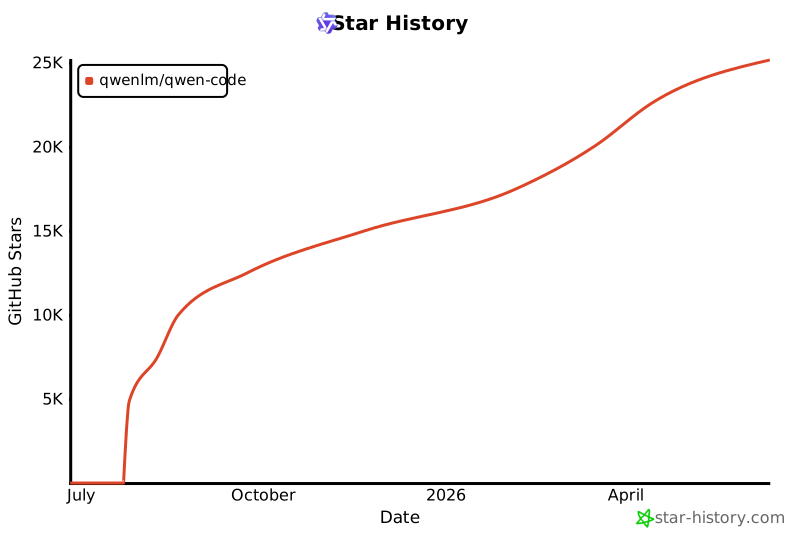](https://www.star-history.com/#QwenLM/qwen-code&Date)
|
||||
|
||||
14
package-lock.json
generated
14
package-lock.json
generated
@@ -1,12 +1,12 @@
|
||||
{
|
||||
"name": "@qwen-code/qwen-code",
|
||||
"version": "0.6.0",
|
||||
"version": "0.5.2",
|
||||
"lockfileVersion": 3,
|
||||
"requires": true,
|
||||
"packages": {
|
||||
"": {
|
||||
"name": "@qwen-code/qwen-code",
|
||||
"version": "0.6.0",
|
||||
"version": "0.5.2",
|
||||
"workspaces": [
|
||||
"packages/*"
|
||||
],
|
||||
@@ -17494,7 +17494,7 @@
|
||||
},
|
||||
"packages/cli": {
|
||||
"name": "@qwen-code/qwen-code",
|
||||
"version": "0.6.0",
|
||||
"version": "0.5.2",
|
||||
"dependencies": {
|
||||
"@google/genai": "1.16.0",
|
||||
"@iarna/toml": "^2.2.5",
|
||||
@@ -17618,7 +17618,7 @@
|
||||
},
|
||||
"packages/core": {
|
||||
"name": "@qwen-code/qwen-code-core",
|
||||
"version": "0.6.0",
|
||||
"version": "0.5.2",
|
||||
"hasInstallScript": true,
|
||||
"dependencies": {
|
||||
"@google/genai": "1.16.0",
|
||||
@@ -17767,7 +17767,7 @@
|
||||
},
|
||||
"packages/sdk-typescript": {
|
||||
"name": "@qwen-code/sdk",
|
||||
"version": "0.6.0",
|
||||
"version": "0.5.2",
|
||||
"license": "Apache-2.0",
|
||||
"dependencies": {
|
||||
"@modelcontextprotocol/sdk": "^1.0.4",
|
||||
@@ -20197,7 +20197,7 @@
|
||||
},
|
||||
"packages/test-utils": {
|
||||
"name": "@qwen-code/qwen-code-test-utils",
|
||||
"version": "0.6.0",
|
||||
"version": "0.5.2",
|
||||
"dev": true,
|
||||
"license": "Apache-2.0",
|
||||
"devDependencies": {
|
||||
@@ -20209,7 +20209,7 @@
|
||||
},
|
||||
"packages/vscode-ide-companion": {
|
||||
"name": "qwen-code-vscode-ide-companion",
|
||||
"version": "0.6.0",
|
||||
"version": "0.5.2",
|
||||
"license": "LICENSE",
|
||||
"dependencies": {
|
||||
"@modelcontextprotocol/sdk": "^1.15.1",
|
||||
|
||||
@@ -1,6 +1,6 @@
|
||||
{
|
||||
"name": "@qwen-code/qwen-code",
|
||||
"version": "0.6.0",
|
||||
"version": "0.5.2",
|
||||
"engines": {
|
||||
"node": ">=20.0.0"
|
||||
},
|
||||
@@ -13,7 +13,7 @@
|
||||
"url": "git+https://github.com/QwenLM/qwen-code.git"
|
||||
},
|
||||
"config": {
|
||||
"sandboxImageUri": "ghcr.io/qwenlm/qwen-code:0.6.0"
|
||||
"sandboxImageUri": "ghcr.io/qwenlm/qwen-code:0.5.2"
|
||||
},
|
||||
"scripts": {
|
||||
"start": "cross-env node scripts/start.js",
|
||||
|
||||
@@ -1,6 +1,6 @@
|
||||
{
|
||||
"name": "@qwen-code/qwen-code",
|
||||
"version": "0.6.0",
|
||||
"version": "0.5.2",
|
||||
"description": "Qwen Code",
|
||||
"repository": {
|
||||
"type": "git",
|
||||
@@ -33,7 +33,7 @@
|
||||
"dist"
|
||||
],
|
||||
"config": {
|
||||
"sandboxImageUri": "ghcr.io/qwenlm/qwen-code:0.6.0"
|
||||
"sandboxImageUri": "ghcr.io/qwenlm/qwen-code:0.5.2"
|
||||
},
|
||||
"dependencies": {
|
||||
"@google/genai": "1.16.0",
|
||||
|
||||
@@ -1,6 +1,6 @@
|
||||
{
|
||||
"name": "@qwen-code/qwen-code-core",
|
||||
"version": "0.6.0",
|
||||
"version": "0.5.2",
|
||||
"description": "Qwen Code Core",
|
||||
"repository": {
|
||||
"type": "git",
|
||||
|
||||
@@ -1,6 +1,6 @@
|
||||
{
|
||||
"name": "@qwen-code/sdk",
|
||||
"version": "0.6.0",
|
||||
"version": "0.5.2",
|
||||
"description": "TypeScript SDK for programmatic access to qwen-code CLI",
|
||||
"main": "./dist/index.cjs",
|
||||
"module": "./dist/index.mjs",
|
||||
|
||||
@@ -150,49 +150,48 @@ export function parseExecutableSpec(executableSpec?: string): {
|
||||
}
|
||||
|
||||
// Check for runtime prefix (e.g., 'bun:/path/to/cli.js')
|
||||
// Use whitelist mechanism: only treat as runtime spec if prefix matches supported runtimes
|
||||
const supportedRuntimes = ['node', 'bun', 'tsx', 'deno'];
|
||||
const runtimeMatch = executableSpec.match(/^([^:]+):(.+)$/);
|
||||
|
||||
if (runtimeMatch) {
|
||||
const [, runtime, filePath] = runtimeMatch;
|
||||
|
||||
// Only process as runtime specification if it matches a supported runtime
|
||||
if (runtime && supportedRuntimes.includes(runtime)) {
|
||||
if (!filePath) {
|
||||
throw new Error(`Invalid runtime specification: '${executableSpec}'`);
|
||||
}
|
||||
|
||||
if (!validateRuntimeAvailability(runtime)) {
|
||||
throw new Error(
|
||||
`Runtime '${runtime}' is not available on this system. Please install it first.`,
|
||||
);
|
||||
}
|
||||
|
||||
const resolvedPath = path.resolve(filePath);
|
||||
|
||||
if (!fs.existsSync(resolvedPath)) {
|
||||
throw new Error(
|
||||
`Executable file not found at '${resolvedPath}' for runtime '${runtime}'. ` +
|
||||
'Please check the file path and ensure the file exists.',
|
||||
);
|
||||
}
|
||||
|
||||
if (!validateFileExtensionForRuntime(resolvedPath, runtime)) {
|
||||
const ext = path.extname(resolvedPath);
|
||||
throw new Error(
|
||||
`File extension '${ext}' is not compatible with runtime '${runtime}'. ` +
|
||||
`Expected extensions for ${runtime}: ${getExpectedExtensions(runtime).join(', ')}`,
|
||||
);
|
||||
}
|
||||
|
||||
return {
|
||||
runtime,
|
||||
executablePath: resolvedPath,
|
||||
isExplicitRuntime: true,
|
||||
};
|
||||
if (!runtime || !filePath) {
|
||||
throw new Error(`Invalid runtime specification: '${executableSpec}'`);
|
||||
}
|
||||
// If not a supported runtime, fall through to treat as file path (e.g., Windows paths like 'D:\path\to\cli.js')
|
||||
|
||||
const supportedRuntimes = ['node', 'bun', 'tsx', 'deno'];
|
||||
if (!supportedRuntimes.includes(runtime)) {
|
||||
throw new Error(
|
||||
`Unsupported runtime '${runtime}'. Supported runtimes: ${supportedRuntimes.join(', ')}`,
|
||||
);
|
||||
}
|
||||
|
||||
if (!validateRuntimeAvailability(runtime)) {
|
||||
throw new Error(
|
||||
`Runtime '${runtime}' is not available on this system. Please install it first.`,
|
||||
);
|
||||
}
|
||||
|
||||
const resolvedPath = path.resolve(filePath);
|
||||
|
||||
if (!fs.existsSync(resolvedPath)) {
|
||||
throw new Error(
|
||||
`Executable file not found at '${resolvedPath}' for runtime '${runtime}'. ` +
|
||||
'Please check the file path and ensure the file exists.',
|
||||
);
|
||||
}
|
||||
|
||||
if (!validateFileExtensionForRuntime(resolvedPath, runtime)) {
|
||||
const ext = path.extname(resolvedPath);
|
||||
throw new Error(
|
||||
`File extension '${ext}' is not compatible with runtime '${runtime}'. ` +
|
||||
`Expected extensions for ${runtime}: ${getExpectedExtensions(runtime).join(', ')}`,
|
||||
);
|
||||
}
|
||||
|
||||
return {
|
||||
runtime,
|
||||
executablePath: resolvedPath,
|
||||
isExplicitRuntime: true,
|
||||
};
|
||||
}
|
||||
|
||||
// Check if it's a command name (no path separators) or a file path
|
||||
|
||||
@@ -125,43 +125,12 @@ describe('CLI Path Utilities', () => {
|
||||
});
|
||||
});
|
||||
|
||||
it('should treat non-whitelisted runtime prefixes as command names', () => {
|
||||
// With whitelist approach, 'invalid:format' is not recognized as a runtime spec
|
||||
// so it's treated as a command name, which fails validation due to the colon
|
||||
it('should throw for invalid runtime prefix format', () => {
|
||||
expect(() => parseExecutableSpec('invalid:format')).toThrow(
|
||||
'Invalid command name',
|
||||
'Unsupported runtime',
|
||||
);
|
||||
});
|
||||
|
||||
it('should treat Windows drive letters as file paths, not runtime specs', () => {
|
||||
mockFs.existsSync.mockReturnValue(true);
|
||||
|
||||
// Test various Windows drive letters
|
||||
const windowsPaths = [
|
||||
'C:\\path\\to\\cli.js',
|
||||
'D:\\path\\to\\cli.js',
|
||||
'E:\\Users\\dev\\qwen\\cli.js',
|
||||
];
|
||||
|
||||
for (const winPath of windowsPaths) {
|
||||
const result = parseExecutableSpec(winPath);
|
||||
|
||||
expect(result.isExplicitRuntime).toBe(false);
|
||||
expect(result.runtime).toBeUndefined();
|
||||
expect(result.executablePath).toBe(path.resolve(winPath));
|
||||
}
|
||||
});
|
||||
|
||||
it('should handle Windows paths with forward slashes', () => {
|
||||
mockFs.existsSync.mockReturnValue(true);
|
||||
|
||||
const result = parseExecutableSpec('C:/path/to/cli.js');
|
||||
|
||||
expect(result.isExplicitRuntime).toBe(false);
|
||||
expect(result.runtime).toBeUndefined();
|
||||
expect(result.executablePath).toBe(path.resolve('C:/path/to/cli.js'));
|
||||
});
|
||||
|
||||
it('should throw when runtime-prefixed file does not exist', () => {
|
||||
mockFs.existsSync.mockReturnValue(false);
|
||||
|
||||
@@ -484,41 +453,6 @@ describe('CLI Path Utilities', () => {
|
||||
originalInput: `bun:${bundlePath}`,
|
||||
});
|
||||
});
|
||||
|
||||
it('should handle Windows paths with drive letters', () => {
|
||||
const windowsPath = 'D:\\path\\to\\cli.js';
|
||||
const result = prepareSpawnInfo(windowsPath);
|
||||
|
||||
expect(result).toEqual({
|
||||
command: process.execPath,
|
||||
args: [path.resolve(windowsPath)],
|
||||
type: 'node',
|
||||
originalInput: windowsPath,
|
||||
});
|
||||
});
|
||||
|
||||
it('should handle Windows paths with TypeScript files', () => {
|
||||
const windowsPath = 'C:\\Users\\dev\\qwen\\index.ts';
|
||||
const result = prepareSpawnInfo(windowsPath);
|
||||
|
||||
expect(result).toEqual({
|
||||
command: 'tsx',
|
||||
args: [path.resolve(windowsPath)],
|
||||
type: 'tsx',
|
||||
originalInput: windowsPath,
|
||||
});
|
||||
});
|
||||
|
||||
it('should not confuse Windows drive letters with runtime prefixes', () => {
|
||||
// Ensure 'D:' is not treated as a runtime specification
|
||||
const windowsPath = 'D:\\workspace\\project\\cli.js';
|
||||
const result = prepareSpawnInfo(windowsPath);
|
||||
|
||||
// Should use node runtime based on .js extension, not treat 'D' as runtime
|
||||
expect(result.type).toBe('node');
|
||||
expect(result.command).toBe(process.execPath);
|
||||
expect(result.args).toEqual([path.resolve(windowsPath)]);
|
||||
});
|
||||
});
|
||||
|
||||
describe('error cases', () => {
|
||||
@@ -538,39 +472,21 @@ describe('CLI Path Utilities', () => {
|
||||
);
|
||||
});
|
||||
|
||||
it('should treat non-whitelisted runtime prefixes as command names', () => {
|
||||
// With whitelist approach, 'invalid:spec' is not recognized as a runtime spec
|
||||
// so it's treated as a command name, which fails validation due to the colon
|
||||
it('should provide helpful error for invalid runtime specification', () => {
|
||||
expect(() => prepareSpawnInfo('invalid:spec')).toThrow(
|
||||
'Invalid command name',
|
||||
);
|
||||
});
|
||||
|
||||
it('should handle Windows paths correctly even when file is missing', () => {
|
||||
mockFs.existsSync.mockReturnValue(false);
|
||||
|
||||
expect(() => prepareSpawnInfo('D:\\missing\\cli.js')).toThrow(
|
||||
'Executable file not found at',
|
||||
);
|
||||
// Should not throw 'Invalid command name' error (which would happen if 'D:' was treated as invalid command)
|
||||
expect(() => prepareSpawnInfo('D:\\missing\\cli.js')).not.toThrow(
|
||||
'Invalid command name',
|
||||
'Unsupported runtime',
|
||||
);
|
||||
});
|
||||
});
|
||||
|
||||
describe('comprehensive validation', () => {
|
||||
describe('runtime validation', () => {
|
||||
it('should treat unsupported runtime prefixes as file paths', () => {
|
||||
mockFs.existsSync.mockReturnValue(true);
|
||||
|
||||
// With whitelist approach, 'unsupported:' is not recognized as a runtime spec
|
||||
// so 'unsupported:/path/to/file.js' is treated as a file path
|
||||
const result = parseExecutableSpec('unsupported:/path/to/file.js');
|
||||
|
||||
// Should be treated as a file path, not a runtime specification
|
||||
expect(result.isExplicitRuntime).toBe(false);
|
||||
expect(result.runtime).toBeUndefined();
|
||||
it('should reject unsupported runtimes', () => {
|
||||
expect(() =>
|
||||
parseExecutableSpec('unsupported:/path/to/file.js'),
|
||||
).toThrow(
|
||||
"Unsupported runtime 'unsupported'. Supported runtimes: node, bun, tsx, deno",
|
||||
);
|
||||
});
|
||||
|
||||
it('should validate runtime availability for explicit runtime specs', () => {
|
||||
|
||||
@@ -1,6 +1,6 @@
|
||||
{
|
||||
"name": "@qwen-code/qwen-code-test-utils",
|
||||
"version": "0.6.0",
|
||||
"version": "0.5.2",
|
||||
"private": true,
|
||||
"main": "src/index.ts",
|
||||
"license": "Apache-2.0",
|
||||
|
||||
@@ -2,7 +2,7 @@
|
||||
"name": "qwen-code-vscode-ide-companion",
|
||||
"displayName": "Qwen Code Companion",
|
||||
"description": "Enable Qwen Code with direct access to your VS Code workspace.",
|
||||
"version": "0.6.0",
|
||||
"version": "0.5.2",
|
||||
"publisher": "qwenlm",
|
||||
"icon": "assets/icon.png",
|
||||
"repository": {
|
||||
|
||||
Reference in New Issue
Block a user