mirror of
https://github.com/QwenLM/qwen-code.git
synced 2025-12-24 10:39:17 +00:00
Compare commits
27 Commits
test/chrom
...
feat/javas
| Author | SHA1 | Date | |
|---|---|---|---|

|
24d11179d8 | ||
|
|
2ef8b6f350 | ||
|
|
5779f7ab1d | ||

|
642dda0315 | ||
|
|
bbbdeb280d | ||
|
|
0d43ddee2a | ||
|
|
50e03f2dd6 | ||
|
|
f440ff2f7f | ||
|
|
9a6b0abc37 | ||

|
00547ba439 | ||
|
|
fc1dac9dc7 | ||
|
|
338eb9038d | ||
|
|
e0b9044833 | ||

|
f33f43e2f7 | ||
|
|
4e7929850c | ||
|
|
9cc5c3ed8f | ||

|
80bb2890df | ||
|
|
abd9ee2a7b | ||
|
|
b8df689e31 | ||
|
|
e610578ecc | ||
|
|
235159216e | ||
|
|
93b30cca29 | ||

|
2f0fa267c8 | ||
|
|
fa6ae0a324 | ||
|
|
387be44866 | ||
|
|
51b82771da | ||
|
|
629cd14fad |
9
.github/workflows/e2e.yml
vendored
9
.github/workflows/e2e.yml
vendored
@@ -18,8 +18,6 @@ jobs:
|
||||
- 'sandbox:docker'
|
||||
node-version:
|
||||
- '20.x'
|
||||
- '22.x'
|
||||
- '24.x'
|
||||
steps:
|
||||
- name: 'Checkout'
|
||||
uses: 'actions/checkout@08c6903cd8c0fde910a37f88322edcfb5dd907a8' # ratchet:actions/checkout@v5
|
||||
@@ -67,10 +65,13 @@ jobs:
|
||||
OPENAI_BASE_URL: '${{ secrets.OPENAI_BASE_URL }}'
|
||||
OPENAI_MODEL: '${{ secrets.OPENAI_MODEL }}'
|
||||
KEEP_OUTPUT: 'true'
|
||||
SANDBOX: '${{ matrix.sandbox }}'
|
||||
VERBOSE: 'true'
|
||||
run: |-
|
||||
npm run "test:integration:${SANDBOX}"
|
||||
if [[ "${{ matrix.sandbox }}" == "sandbox:docker" ]]; then
|
||||
npm run test:integration:sandbox:docker
|
||||
else
|
||||
npm run test:integration:sandbox:none
|
||||
fi
|
||||
|
||||
e2e-test-macos:
|
||||
name: 'E2E Test - macOS'
|
||||
|
||||
110
CONTRIBUTING.md
110
CONTRIBUTING.md
@@ -2,27 +2,6 @@
|
||||
|
||||
We would love to accept your patches and contributions to this project.
|
||||
|
||||
## Before you begin
|
||||
|
||||
### Sign our Contributor License Agreement
|
||||
|
||||
Contributions to this project must be accompanied by a
|
||||
[Contributor License Agreement](https://cla.developers.google.com/about) (CLA).
|
||||
You (or your employer) retain the copyright to your contribution; this simply
|
||||
gives us permission to use and redistribute your contributions as part of the
|
||||
project.
|
||||
|
||||
If you or your current employer have already signed the Google CLA (even if it
|
||||
was for a different project), you probably don't need to do it again.
|
||||
|
||||
Visit <https://cla.developers.google.com/> to see your current agreements or to
|
||||
sign a new one.
|
||||
|
||||
### Review our Community Guidelines
|
||||
|
||||
This project follows [Google's Open Source Community
|
||||
Guidelines](https://opensource.google/conduct/).
|
||||
|
||||
## Contribution Process
|
||||
|
||||
### Code Reviews
|
||||
@@ -74,12 +53,6 @@ Your PR should have a clear, descriptive title and a detailed description of the
|
||||
|
||||
In the PR description, explain the "why" behind your changes and link to the relevant issue (e.g., `Fixes #123`).
|
||||
|
||||
## Forking
|
||||
|
||||
If you are forking the repository you will be able to run the Build, Test and Integration test workflows. However in order to make the integration tests run you'll need to add a [GitHub Repository Secret](https://docs.github.com/en/actions/security-for-github-actions/security-guides/using-secrets-in-github-actions#creating-secrets-for-a-repository) with a value of `GEMINI_API_KEY` and set that to a valid API key that you have available. Your key and secret are private to your repo; no one without access can see your key and you cannot see any secrets related to this repo.
|
||||
|
||||
Additionally you will need to click on the `Actions` tab and enable workflows for your repository, you'll find it's the large blue button in the center of the screen.
|
||||
|
||||
## Development Setup and Workflow
|
||||
|
||||
This section guides contributors on how to build, modify, and understand the development setup of this project.
|
||||
@@ -98,8 +71,8 @@ This section guides contributors on how to build, modify, and understand the dev
|
||||
To clone the repository:
|
||||
|
||||
```bash
|
||||
git clone https://github.com/google-gemini/gemini-cli.git # Or your fork's URL
|
||||
cd gemini-cli
|
||||
git clone https://github.com/QwenLM/qwen-code.git # Or your fork's URL
|
||||
cd qwen-code
|
||||
```
|
||||
|
||||
To install dependencies defined in `package.json` as well as root dependencies:
|
||||
@@ -118,9 +91,9 @@ This command typically compiles TypeScript to JavaScript, bundles assets, and pr
|
||||
|
||||
### Enabling Sandboxing
|
||||
|
||||
[Sandboxing](#sandboxing) is highly recommended and requires, at a minimum, setting `GEMINI_SANDBOX=true` in your `~/.env` and ensuring a sandboxing provider (e.g. `macOS Seatbelt`, `docker`, or `podman`) is available. See [Sandboxing](#sandboxing) for details.
|
||||
[Sandboxing](#sandboxing) is highly recommended and requires, at a minimum, setting `QWEN_SANDBOX=true` in your `~/.env` and ensuring a sandboxing provider (e.g. `macOS Seatbelt`, `docker`, or `podman`) is available. See [Sandboxing](#sandboxing) for details.
|
||||
|
||||
To build both the `gemini` CLI utility and the sandbox container, run `build:all` from the root directory:
|
||||
To build both the `qwen-code` CLI utility and the sandbox container, run `build:all` from the root directory:
|
||||
|
||||
```bash
|
||||
npm run build:all
|
||||
@@ -130,13 +103,13 @@ To skip building the sandbox container, you can use `npm run build` instead.
|
||||
|
||||
### Running
|
||||
|
||||
To start the Gemini CLI from the source code (after building), run the following command from the root directory:
|
||||
To start the Qwen Code application from the source code (after building), run the following command from the root directory:
|
||||
|
||||
```bash
|
||||
npm start
|
||||
```
|
||||
|
||||
If you'd like to run the source build outside of the gemini-cli folder, you can utilize `npm link path/to/gemini-cli/packages/cli` (see: [docs](https://docs.npmjs.com/cli/v9/commands/npm-link)) or `alias gemini="node path/to/gemini-cli/packages/cli"` to run with `gemini`
|
||||
If you'd like to run the source build outside of the qwen-code folder, you can utilize `npm link path/to/qwen-code/packages/cli` (see: [docs](https://docs.npmjs.com/cli/v9/commands/npm-link)) to run with `qwen-code`
|
||||
|
||||
### Running Tests
|
||||
|
||||
@@ -154,7 +127,7 @@ This will run tests located in the `packages/core` and `packages/cli` directorie
|
||||
|
||||
#### Integration Tests
|
||||
|
||||
The integration tests are designed to validate the end-to-end functionality of the Gemini CLI. They are not run as part of the default `npm run test` command.
|
||||
The integration tests are designed to validate the end-to-end functionality of Qwen Code. They are not run as part of the default `npm run test` command.
|
||||
|
||||
To run the integration tests, use the following command:
|
||||
|
||||
@@ -209,19 +182,61 @@ npm run lint
|
||||
### Coding Conventions
|
||||
|
||||
- Please adhere to the coding style, patterns, and conventions used throughout the existing codebase.
|
||||
- Consult [QWEN.md](https://github.com/QwenLM/qwen-code/blob/main/QWEN.md) (typically found in the project root) for specific instructions related to AI-assisted development, including conventions for React, comments, and Git usage.
|
||||
- **Imports:** Pay special attention to import paths. The project uses ESLint to enforce restrictions on relative imports between packages.
|
||||
|
||||
### Project Structure
|
||||
|
||||
- `packages/`: Contains the individual sub-packages of the project.
|
||||
- `cli/`: The command-line interface.
|
||||
- `core/`: The core backend logic for the Gemini CLI.
|
||||
- `core/`: The core backend logic for Qwen Code.
|
||||
- `docs/`: Contains all project documentation.
|
||||
- `scripts/`: Utility scripts for building, testing, and development tasks.
|
||||
|
||||
For more detailed architecture, see `docs/architecture.md`.
|
||||
|
||||
## Documentation Development
|
||||
|
||||
This section describes how to develop and preview the documentation locally.
|
||||
|
||||
### Prerequisites
|
||||
|
||||
1. Ensure you have Node.js (version 18+) installed
|
||||
2. Have npm or yarn available
|
||||
|
||||
### Setup Documentation Site Locally
|
||||
|
||||
To work on the documentation and preview changes locally:
|
||||
|
||||
1. Navigate to the `docs-site` directory:
|
||||
|
||||
```bash
|
||||
cd docs-site
|
||||
```
|
||||
|
||||
2. Install dependencies:
|
||||
|
||||
```bash
|
||||
npm install
|
||||
```
|
||||
|
||||
3. Link the documentation content from the main `docs` directory:
|
||||
|
||||
```bash
|
||||
npm run link
|
||||
```
|
||||
|
||||
This creates a symbolic link from `../docs` to `content` in the docs-site project, allowing the documentation content to be served by the Next.js site.
|
||||
|
||||
4. Start the development server:
|
||||
|
||||
```bash
|
||||
npm run dev
|
||||
```
|
||||
|
||||
5. Open [http://localhost:3000](http://localhost:3000) in your browser to see the documentation site with live updates as you make changes.
|
||||
|
||||
Any changes made to the documentation files in the main `docs` directory will be reflected immediately in the documentation site.
|
||||
|
||||
## Debugging
|
||||
|
||||
### VS Code:
|
||||
@@ -231,7 +246,7 @@ For more detailed architecture, see `docs/architecture.md`.
|
||||
```bash
|
||||
npm run debug
|
||||
```
|
||||
This command runs `node --inspect-brk dist/gemini.js` within the `packages/cli` directory, pausing execution until a debugger attaches. You can then open `chrome://inspect` in your Chrome browser to connect to the debugger.
|
||||
This command runs `node --inspect-brk dist/index.js` within the `packages/cli` directory, pausing execution until a debugger attaches. You can then open `chrome://inspect` in your Chrome browser to connect to the debugger.
|
||||
2. In VS Code, use the "Attach" launch configuration (found in `.vscode/launch.json`).
|
||||
|
||||
Alternatively, you can use the "Launch Program" configuration in VS Code if you prefer to launch the currently open file directly, but 'F5' is generally recommended.
|
||||
@@ -239,16 +254,16 @@ Alternatively, you can use the "Launch Program" configuration in VS Code if you
|
||||
To hit a breakpoint inside the sandbox container run:
|
||||
|
||||
```bash
|
||||
DEBUG=1 gemini
|
||||
DEBUG=1 qwen-code
|
||||
```
|
||||
|
||||
**Note:** If you have `DEBUG=true` in a project's `.env` file, it won't affect gemini-cli due to automatic exclusion. Use `.gemini/.env` files for gemini-cli specific debug settings.
|
||||
**Note:** If you have `DEBUG=true` in a project's `.env` file, it won't affect qwen-code due to automatic exclusion. Use `.qwen-code/.env` files for qwen-code specific debug settings.
|
||||
|
||||
### React DevTools
|
||||
|
||||
To debug the CLI's React-based UI, you can use React DevTools. Ink, the library used for the CLI's interface, is compatible with React DevTools version 4.x.
|
||||
|
||||
1. **Start the Gemini CLI in development mode:**
|
||||
1. **Start the Qwen Code application in development mode:**
|
||||
|
||||
```bash
|
||||
DEV=true npm start
|
||||
@@ -270,23 +285,10 @@ To debug the CLI's React-based UI, you can use React DevTools. Ink, the library
|
||||
```
|
||||
|
||||
Your running CLI application should then connect to React DevTools.
|
||||

|
||||
|
||||
## Sandboxing
|
||||
|
||||
### macOS Seatbelt
|
||||
|
||||
On macOS, `qwen` uses Seatbelt (`sandbox-exec`) under a `permissive-open` profile (see `packages/cli/src/utils/sandbox-macos-permissive-open.sb`) that restricts writes to the project folder but otherwise allows all other operations and outbound network traffic ("open") by default. You can switch to a `restrictive-closed` profile (see `packages/cli/src/utils/sandbox-macos-restrictive-closed.sb`) that declines all operations and outbound network traffic ("closed") by default by setting `SEATBELT_PROFILE=restrictive-closed` in your environment or `.env` file. Available built-in profiles are `{permissive,restrictive}-{open,closed,proxied}` (see below for proxied networking). You can also switch to a custom profile `SEATBELT_PROFILE=<profile>` if you also create a file `.qwen/sandbox-macos-<profile>.sb` under your project settings directory `.qwen`.
|
||||
|
||||
### Container-based Sandboxing (All Platforms)
|
||||
|
||||
For stronger container-based sandboxing on macOS or other platforms, you can set `GEMINI_SANDBOX=true|docker|podman|<command>` in your environment or `.env` file. The specified command (or if `true` then either `docker` or `podman`) must be installed on the host machine. Once enabled, `npm run build:all` will build a minimal container ("sandbox") image and `npm start` will launch inside a fresh instance of that container. The first build can take 20-30s (mostly due to downloading of the base image) but after that both build and start overhead should be minimal. Default builds (`npm run build`) will not rebuild the sandbox.
|
||||
|
||||
Container-based sandboxing mounts the project directory (and system temp directory) with read-write access and is started/stopped/removed automatically as you start/stop Gemini CLI. Files created within the sandbox should be automatically mapped to your user/group on host machine. You can easily specify additional mounts, ports, or environment variables by setting `SANDBOX_{MOUNTS,PORTS,ENV}` as needed. You can also fully customize the sandbox for your projects by creating the files `.qwen/sandbox.Dockerfile` and/or `.qwen/sandbox.bashrc` under your project settings directory (`.qwen`) and running `qwen` with `BUILD_SANDBOX=1` to trigger building of your custom sandbox.
|
||||
|
||||
#### Proxied Networking
|
||||
|
||||
All sandboxing methods, including macOS Seatbelt using `*-proxied` profiles, support restricting outbound network traffic through a custom proxy server that can be specified as `GEMINI_SANDBOX_PROXY_COMMAND=<command>`, where `<command>` must start a proxy server that listens on `:::8877` for relevant requests. See `docs/examples/proxy-script.md` for a minimal proxy that only allows `HTTPS` connections to `example.com:443` (e.g. `curl https://example.com`) and declines all other requests. The proxy is started and stopped automatically alongside the sandbox.
|
||||
> TBD
|
||||
|
||||
## Manual Publish
|
||||
|
||||
|
||||
10
Makefile
10
Makefile
@@ -1,9 +1,9 @@
|
||||
# Makefile for gemini-cli
|
||||
# Makefile for qwen-code
|
||||
|
||||
.PHONY: help install build build-sandbox build-all test lint format preflight clean start debug release run-npx create-alias
|
||||
|
||||
help:
|
||||
@echo "Makefile for gemini-cli"
|
||||
@echo "Makefile for qwen-code"
|
||||
@echo ""
|
||||
@echo "Usage:"
|
||||
@echo " make install - Install npm dependencies"
|
||||
@@ -14,11 +14,11 @@ help:
|
||||
@echo " make format - Format the code"
|
||||
@echo " make preflight - Run formatting, linting, and tests"
|
||||
@echo " make clean - Remove generated files"
|
||||
@echo " make start - Start the Gemini CLI"
|
||||
@echo " make debug - Start the Gemini CLI in debug mode"
|
||||
@echo " make start - Start the Qwen Code CLI"
|
||||
@echo " make debug - Start the Qwen Code CLI in debug mode"
|
||||
@echo ""
|
||||
@echo " make run-npx - Run the CLI using npx (for testing the published package)"
|
||||
@echo " make create-alias - Create a 'gemini' alias for your shell"
|
||||
@echo " make create-alias - Create a 'qwen' alias for your shell"
|
||||
|
||||
install:
|
||||
npm install
|
||||
|
||||
410
README.md
410
README.md
@@ -1,382 +1,152 @@
|
||||
# Qwen Code
|
||||
|
||||
<div align="center">
|
||||
|
||||

|
||||
|
||||
[](https://www.npmjs.com/package/@qwen-code/qwen-code)
|
||||
[](./LICENSE)
|
||||
[](https://nodejs.org/)
|
||||
[](https://www.npmjs.com/package/@qwen-code/qwen-code)
|
||||
|
||||
**AI-powered command-line workflow tool for developers**
|
||||
**An open-source AI agent that lives in your terminal.**
|
||||
|
||||
[Installation](#installation) • [Quick Start](#quick-start) • [Features](#key-features) • [Documentation](./docs/) • [Contributing](./CONTRIBUTING.md)
|
||||
<a href="https://qwenlm.github.io/qwen-code-docs/zh/users/overview">中文</a> |
|
||||
<a href="https://qwenlm.github.io/qwen-code-docs/de/users/overview">Deutsch</a> |
|
||||
<a href="https://qwenlm.github.io/qwen-code-docs/fr/users/overview">français</a> |
|
||||
<a href="https://qwenlm.github.io/qwen-code-docs/ja/users/overview">日本語</a> |
|
||||
<a href="https://qwenlm.github.io/qwen-code-docs/ru/users/overview">Русский</a> |
|
||||
<a href="https://qwenlm.github.io/qwen-code-docs/pt-BR/users/overview">Português (Brasil)</a>
|
||||
|
||||
</div>
|
||||
|
||||
<div align="center">
|
||||
|
||||
<a href="https://qwenlm.github.io/qwen-code-docs/de/">Deutsch</a> |
|
||||
<a href="https://qwenlm.github.io/qwen-code-docs/fr">français</a> |
|
||||
<a href="https://qwenlm.github.io/qwen-code-docs/ja/">日本語</a> |
|
||||
<a href="https://qwenlm.github.io/qwen-code-docs/ru">Русский</a> |
|
||||
<a href="https://qwenlm.github.io/qwen-code-docs/zh/">中文</a>
|
||||
|
||||
</div>
|
||||
Qwen Code is an open-source AI agent for the terminal, optimized for [Qwen3-Coder](https://github.com/QwenLM/Qwen3-Coder). It helps you understand large codebases, automate tedious work, and ship faster.
|
||||
|
||||
Qwen Code is a powerful command-line AI workflow tool adapted from [**Gemini CLI**](https://github.com/google-gemini/gemini-cli), specifically optimized for [Qwen3-Coder](https://github.com/QwenLM/Qwen3-Coder) models. It enhances your development workflow with advanced code understanding, automated tasks, and intelligent assistance.
|
||||

|
||||
|
||||
## 💡 Free Options Available
|
||||
## Why Qwen Code?
|
||||
|
||||
Get started with Qwen Code at no cost using any of these free options:
|
||||
|
||||
### 🔥 Qwen OAuth (Recommended)
|
||||
|
||||
- **2,000 requests per day** with no token limits
|
||||
- **60 requests per minute** rate limit
|
||||
- Simply run `qwen` and authenticate with your qwen.ai account
|
||||
- Automatic credential management and refresh
|
||||
- Use `/auth` command to switch to Qwen OAuth if you have initialized with OpenAI compatible mode
|
||||
|
||||
### 🌏 Regional Free Tiers
|
||||
|
||||
- **Mainland China**: ModelScope offers **2,000 free API calls per day**
|
||||
- **International**: OpenRouter provides **up to 1,000 free API calls per day** worldwide
|
||||
|
||||
For detailed setup instructions, see [Authorization](#authorization).
|
||||
|
||||
> [!WARNING]
|
||||
> **Token Usage Notice**: Qwen Code may issue multiple API calls per cycle, resulting in higher token usage (similar to Claude Code). We're actively optimizing API efficiency.
|
||||
|
||||
## Key Features
|
||||
|
||||
- **Code Understanding & Editing** - Query and edit large codebases beyond traditional context window limits
|
||||
- **Workflow Automation** - Automate operational tasks like handling pull requests and complex rebases
|
||||
- **Enhanced Parser** - Adapted parser specifically optimized for Qwen-Coder models
|
||||
- **Vision Model Support** - Automatically detect images in your input and seamlessly switch to vision-capable models for multimodal analysis
|
||||
- **OpenAI-compatible, OAuth free tier**: use an OpenAI-compatible API, or sign in with Qwen OAuth to get 2,000 free requests/day.
|
||||
- **Open-source, co-evolving**: both the framework and the Qwen3-Coder model are open-source—and they ship and evolve together.
|
||||
- **Agentic workflow, feature-rich**: rich built-in tools (Skills, SubAgents, Plan Mode) for a full agentic workflow and a Claude Code-like experience.
|
||||
- **Terminal-first, IDE-friendly**: built for developers who live in the command line, with optional integration for VS Code and Zed.
|
||||
|
||||
## Installation
|
||||
|
||||
### Prerequisites
|
||||
|
||||
Ensure you have [Node.js version 20](https://nodejs.org/en/download) or higher installed.
|
||||
#### Prerequisites
|
||||
|
||||
```bash
|
||||
# Node.js 20+
|
||||
curl -qL https://www.npmjs.com/install.sh | sh
|
||||
```
|
||||
|
||||
### Install from npm
|
||||
#### NPM (recommended)
|
||||
|
||||
```bash
|
||||
npm install -g @qwen-code/qwen-code@latest
|
||||
qwen --version
|
||||
```
|
||||
|
||||
### Install from source
|
||||
|
||||
```bash
|
||||
git clone https://github.com/QwenLM/qwen-code.git
|
||||
cd qwen-code
|
||||
npm install
|
||||
npm install -g .
|
||||
```
|
||||
|
||||
### Install globally with Homebrew (macOS/Linux)
|
||||
#### Homebrew (macOS, Linux)
|
||||
|
||||
```bash
|
||||
brew install qwen-code
|
||||
```
|
||||
|
||||
## VS Code Extension
|
||||
|
||||
In addition to the CLI tool, Qwen Code also provides a **VS Code extension** that brings AI-powered coding assistance directly into your editor with features like file system operations, native diffing, interactive chat, and more.
|
||||
|
||||
> 📦 The extension is currently in development. For installation, features, and development guide, see the [VS Code Extension README](./packages/vscode-ide-companion/README.md).
|
||||
|
||||
## Quick Start
|
||||
|
||||
```bash
|
||||
# Start Qwen Code
|
||||
# Start Qwen Code (interactive)
|
||||
qwen
|
||||
|
||||
# Example commands
|
||||
> Explain this codebase structure
|
||||
> Help me refactor this function
|
||||
> Generate unit tests for this module
|
||||
# Then, in the session:
|
||||
/help
|
||||
/auth
|
||||
```
|
||||
|
||||
### Session Management
|
||||
On first use, you'll be prompted to sign in. You can run `/auth` anytime to switch authentication methods.
|
||||
|
||||
Control your token usage with configurable session limits to optimize costs and performance.
|
||||
Example prompts:
|
||||
|
||||
#### Configure Session Token Limit
|
||||
|
||||
Create or edit `.qwen/settings.json` in your home directory:
|
||||
|
||||
```json
|
||||
{
|
||||
"sessionTokenLimit": 32000
|
||||
}
|
||||
```text
|
||||
What does this project do?
|
||||
Explain the codebase structure.
|
||||
Help me refactor this function.
|
||||
Generate unit tests for this module.
|
||||
```
|
||||
|
||||
#### Session Commands
|
||||
|
||||
- **`/compress`** - Compress conversation history to continue within token limits
|
||||
- **`/clear`** - Clear all conversation history and start fresh
|
||||
- **`/stats`** - Check current token usage and limits
|
||||
|
||||
> 📝 **Note**: Session token limit applies to a single conversation, not cumulative API calls.
|
||||
|
||||
### Vision Model Configuration
|
||||
|
||||
Qwen Code includes intelligent vision model auto-switching that detects images in your input and can automatically switch to vision-capable models for multimodal analysis. **This feature is enabled by default** - when you include images in your queries, you'll see a dialog asking how you'd like to handle the vision model switch.
|
||||
|
||||
#### Skip the Switch Dialog (Optional)
|
||||
|
||||
If you don't want to see the interactive dialog each time, configure the default behavior in your `.qwen/settings.json`:
|
||||
|
||||
```json
|
||||
{
|
||||
"experimental": {
|
||||
"vlmSwitchMode": "once"
|
||||
}
|
||||
}
|
||||
```
|
||||
|
||||
**Available modes:**
|
||||
|
||||
- **`"once"`** - Switch to vision model for this query only, then revert
|
||||
- **`"session"`** - Switch to vision model for the entire session
|
||||
- **`"persist"`** - Continue with current model (no switching)
|
||||
- **Not set** - Show interactive dialog each time (default)
|
||||
|
||||
#### Command Line Override
|
||||
|
||||
You can also set the behavior via command line:
|
||||
|
||||
```bash
|
||||
# Switch once per query
|
||||
qwen --vlm-switch-mode once
|
||||
|
||||
# Switch for entire session
|
||||
qwen --vlm-switch-mode session
|
||||
|
||||
# Never switch automatically
|
||||
qwen --vlm-switch-mode persist
|
||||
```
|
||||
|
||||
#### Disable Vision Models (Optional)
|
||||
|
||||
To completely disable vision model support, add to your `.qwen/settings.json`:
|
||||
|
||||
```json
|
||||
{
|
||||
"experimental": {
|
||||
"visionModelPreview": false
|
||||
}
|
||||
}
|
||||
```
|
||||
|
||||
> 💡 **Tip**: In YOLO mode (`--yolo`), vision switching happens automatically without prompts when images are detected.
|
||||
|
||||
### Authorization
|
||||
|
||||
Choose your preferred authentication method based on your needs:
|
||||
|
||||
#### 1. Qwen OAuth (🚀 Recommended - Start in 30 seconds)
|
||||
|
||||
The easiest way to get started - completely free with generous quotas:
|
||||
|
||||
```bash
|
||||
# Just run this command and follow the browser authentication
|
||||
qwen
|
||||
```
|
||||
|
||||
**What happens:**
|
||||
|
||||
1. **Instant Setup**: CLI opens your browser automatically
|
||||
2. **One-Click Login**: Authenticate with your qwen.ai account
|
||||
3. **Automatic Management**: Credentials cached locally for future use
|
||||
4. **No Configuration**: Zero setup required - just start coding!
|
||||
|
||||
**Free Tier Benefits:**
|
||||
|
||||
- ✅ **2,000 requests/day** (no token counting needed)
|
||||
- ✅ **60 requests/minute** rate limit
|
||||
- ✅ **Automatic credential refresh**
|
||||
- ✅ **Zero cost** for individual users
|
||||
- ℹ️ **Note**: Model fallback may occur to maintain service quality
|
||||
|
||||
#### 2. OpenAI-Compatible API
|
||||
|
||||
Use API keys for OpenAI or other compatible providers:
|
||||
|
||||
**Configuration Methods:**
|
||||
|
||||
1. **Environment Variables**
|
||||
|
||||
```bash
|
||||
export OPENAI_API_KEY="your_api_key_here"
|
||||
export OPENAI_BASE_URL="your_api_endpoint"
|
||||
export OPENAI_MODEL="your_model_choice"
|
||||
```
|
||||
|
||||
2. **Project `.env` File**
|
||||
Create a `.env` file in your project root:
|
||||
```env
|
||||
OPENAI_API_KEY=your_api_key_here
|
||||
OPENAI_BASE_URL=your_api_endpoint
|
||||
OPENAI_MODEL=your_model_choice
|
||||
```
|
||||
|
||||
**API Provider Options**
|
||||
|
||||
> ⚠️ **Regional Notice:**
|
||||
>
|
||||
> - **Mainland China**: Use Alibaba Cloud Bailian or ModelScope
|
||||
> - **International**: Use Alibaba Cloud ModelStudio or OpenRouter
|
||||
|
||||
<details>
|
||||
<summary><b>🇨🇳 For Users in Mainland China</b></summary>
|
||||
<summary>Click to watch a demo video</summary>
|
||||
|
||||
**Option 1: Alibaba Cloud Bailian** ([Apply for API Key](https://bailian.console.aliyun.com/))
|
||||
|
||||
```bash
|
||||
export OPENAI_API_KEY="your_api_key_here"
|
||||
export OPENAI_BASE_URL="https://dashscope.aliyuncs.com/compatible-mode/v1"
|
||||
export OPENAI_MODEL="qwen3-coder-plus"
|
||||
```
|
||||
|
||||
**Option 2: ModelScope (Free Tier)** ([Apply for API Key](https://modelscope.cn/docs/model-service/API-Inference/intro))
|
||||
|
||||
- ✅ **2,000 free API calls per day**
|
||||
- ⚠️ Connect your Aliyun account to avoid authentication errors
|
||||
|
||||
```bash
|
||||
export OPENAI_API_KEY="your_api_key_here"
|
||||
export OPENAI_BASE_URL="https://api-inference.modelscope.cn/v1"
|
||||
export OPENAI_MODEL="Qwen/Qwen3-Coder-480B-A35B-Instruct"
|
||||
```
|
||||
<video src="https://cloud.video.taobao.com/vod/HLfyppnCHplRV9Qhz2xSqeazHeRzYtG-EYJnHAqtzkQ.mp4" controls>
|
||||
Your browser does not support the video tag.
|
||||
</video>
|
||||
|
||||
</details>
|
||||
|
||||
<details>
|
||||
<summary><b>🌍 For International Users</b></summary>
|
||||
## Authentication
|
||||
|
||||
**Option 1: Alibaba Cloud ModelStudio** ([Apply for API Key](https://modelstudio.console.alibabacloud.com/))
|
||||
Qwen Code supports two authentication methods:
|
||||
|
||||
- **Qwen OAuth (recommended & free)**: sign in with your `qwen.ai` account in a browser.
|
||||
- **OpenAI-compatible API**: use `OPENAI_API_KEY` (and optionally a custom base URL / model).
|
||||
|
||||
#### Qwen OAuth (recommended)
|
||||
|
||||
Start `qwen`, then run:
|
||||
|
||||
```bash
|
||||
export OPENAI_API_KEY="your_api_key_here"
|
||||
export OPENAI_BASE_URL="https://dashscope-intl.aliyuncs.com/compatible-mode/v1"
|
||||
export OPENAI_MODEL="qwen3-coder-plus"
|
||||
/auth
|
||||
```
|
||||
|
||||
**Option 2: OpenRouter (Free Tier Available)** ([Apply for API Key](https://openrouter.ai/))
|
||||
Choose **Qwen OAuth** and complete the browser flow. Your credentials are cached locally so you usually won't need to log in again.
|
||||
|
||||
#### OpenAI-compatible API (API key)
|
||||
|
||||
Environment variables (recommended for CI / headless environments):
|
||||
|
||||
```bash
|
||||
export OPENAI_API_KEY="your_api_key_here"
|
||||
export OPENAI_BASE_URL="https://openrouter.ai/api/v1"
|
||||
export OPENAI_MODEL="qwen/qwen3-coder:free"
|
||||
export OPENAI_API_KEY="your-api-key-here"
|
||||
export OPENAI_BASE_URL="https://api.openai.com/v1" # optional
|
||||
export OPENAI_MODEL="gpt-4o" # optional
|
||||
```
|
||||
|
||||
</details>
|
||||
For details (including `.qwen/.env` loading and security notes), see the [authentication guide](https://qwenlm.github.io/qwen-code-docs/en/users/configuration/auth/).
|
||||
|
||||
## Usage Examples
|
||||
## Usage
|
||||
|
||||
### 🔍 Explore Codebases
|
||||
As an open-source terminal agent, you can use Qwen Code in four primary ways:
|
||||
|
||||
1. Interactive mode (terminal UI)
|
||||
2. Headless mode (scripts, CI)
|
||||
3. IDE integration (VS Code, Zed)
|
||||
4. TypeScript SDK
|
||||
|
||||
#### Interactive mode
|
||||
|
||||
```bash
|
||||
cd your-project/
|
||||
qwen
|
||||
|
||||
# Architecture analysis
|
||||
> Describe the main pieces of this system's architecture
|
||||
> What are the key dependencies and how do they interact?
|
||||
> Find all API endpoints and their authentication methods
|
||||
```
|
||||
|
||||
### 💻 Code Development
|
||||
Run `qwen` in your project folder to launch the interactive terminal UI. Use `@` to reference local files (for example `@src/main.ts`).
|
||||
|
||||
#### Headless mode
|
||||
|
||||
```bash
|
||||
# Refactoring
|
||||
> Refactor this function to improve readability and performance
|
||||
> Convert this class to use dependency injection
|
||||
> Split this large module into smaller, focused components
|
||||
|
||||
# Code generation
|
||||
> Create a REST API endpoint for user management
|
||||
> Generate unit tests for the authentication module
|
||||
> Add error handling to all database operations
|
||||
cd your-project/
|
||||
qwen -p "your question"
|
||||
```
|
||||
|
||||
### 🔄 Automate Workflows
|
||||
Use `-p` to run Qwen Code without the interactive UI—ideal for scripts, automation, and CI/CD. Learn more: [Headless mode](https://qwenlm.github.io/qwen-code-docs/en/users/features/headless).
|
||||
|
||||
```bash
|
||||
# Git automation
|
||||
> Analyze git commits from the last 7 days, grouped by feature
|
||||
> Create a changelog from recent commits
|
||||
> Find all TODO comments and create GitHub issues
|
||||
#### IDE integration
|
||||
|
||||
# File operations
|
||||
> Convert all images in this directory to PNG format
|
||||
> Rename all test files to follow the *.test.ts pattern
|
||||
> Find and remove all console.log statements
|
||||
```
|
||||
Use Qwen Code inside your editor (VS Code and Zed):
|
||||
|
||||
### 🐛 Debugging & Analysis
|
||||
- [Use in VS Code](https://qwenlm.github.io/qwen-code-docs/en/users/integration-vscode/)
|
||||
- [Use in Zed](https://qwenlm.github.io/qwen-code-docs/en/users/integration-zed/)
|
||||
|
||||
```bash
|
||||
# Performance analysis
|
||||
> Identify performance bottlenecks in this React component
|
||||
> Find all N+1 query problems in the codebase
|
||||
#### TypeScript SDK
|
||||
|
||||
# Security audit
|
||||
> Check for potential SQL injection vulnerabilities
|
||||
> Find all hardcoded credentials or API keys
|
||||
```
|
||||
Build on top of Qwen Code with the TypeScript SDK:
|
||||
|
||||
## Popular Tasks
|
||||
|
||||
### 📚 Understand New Codebases
|
||||
|
||||
```text
|
||||
> What are the core business logic components?
|
||||
> What security mechanisms are in place?
|
||||
> How does the data flow through the system?
|
||||
> What are the main design patterns used?
|
||||
> Generate a dependency graph for this module
|
||||
```
|
||||
|
||||
### 🔨 Code Refactoring & Optimization
|
||||
|
||||
```text
|
||||
> What parts of this module can be optimized?
|
||||
> Help me refactor this class to follow SOLID principles
|
||||
> Add proper error handling and logging
|
||||
> Convert callbacks to async/await pattern
|
||||
> Implement caching for expensive operations
|
||||
```
|
||||
|
||||
### 📝 Documentation & Testing
|
||||
|
||||
```text
|
||||
> Generate comprehensive JSDoc comments for all public APIs
|
||||
> Write unit tests with edge cases for this component
|
||||
> Create API documentation in OpenAPI format
|
||||
> Add inline comments explaining complex algorithms
|
||||
> Generate a README for this module
|
||||
```
|
||||
|
||||
### 🚀 Development Acceleration
|
||||
|
||||
```text
|
||||
> Set up a new Express server with authentication
|
||||
> Create a React component with TypeScript and tests
|
||||
> Implement a rate limiter middleware
|
||||
> Add database migrations for new schema
|
||||
> Configure CI/CD pipeline for this project
|
||||
```
|
||||
- [Use the Qwen Code SDK](./packages/sdk-typescript/README.md)
|
||||
|
||||
## Commands & Shortcuts
|
||||
|
||||
@@ -386,6 +156,7 @@ qwen
|
||||
- `/clear` - Clear conversation history
|
||||
- `/compress` - Compress history to save tokens
|
||||
- `/stats` - Show current session information
|
||||
- `/bug` - Submit a bug report
|
||||
- `/exit` or `/quit` - Exit Qwen Code
|
||||
|
||||
### Keyboard Shortcuts
|
||||
@@ -394,6 +165,19 @@ qwen
|
||||
- `Ctrl+D` - Exit (on empty line)
|
||||
- `Up/Down` - Navigate command history
|
||||
|
||||
> Learn more about [Commands](https://qwenlm.github.io/qwen-code-docs/en/users/features/commands/)
|
||||
>
|
||||
> **Tip**: In YOLO mode (`--yolo`), vision switching happens automatically without prompts when images are detected. Learn more about [Approval Mode](https://qwenlm.github.io/qwen-code-docs/en/users/features/approval-mode/)
|
||||
|
||||
## Configuration
|
||||
|
||||
Qwen Code can be configured via `settings.json`, environment variables, and CLI flags.
|
||||
|
||||
- **User settings**: `~/.qwen/settings.json`
|
||||
- **Project settings**: `.qwen/settings.json`
|
||||
|
||||
See [settings](https://qwenlm.github.io/qwen-code-docs/en/users/configuration/settings/) for available options and precedence.
|
||||
|
||||
## Benchmark Results
|
||||
|
||||
### Terminal-Bench Performance
|
||||
@@ -403,24 +187,18 @@ qwen
|
||||
| Qwen Code | Qwen3-Coder-480A35 | 37.5% |
|
||||
| Qwen Code | Qwen3-Coder-30BA3B | 31.3% |
|
||||
|
||||
## Development & Contributing
|
||||
## Ecosystem
|
||||
|
||||
See [CONTRIBUTING.md](./CONTRIBUTING.md) to learn how to contribute to the project.
|
||||
Looking for a graphical interface?
|
||||
|
||||
For detailed authentication setup, see the [authentication guide](./docs/cli/authentication.md).
|
||||
- [**Gemini CLI Desktop**](https://github.com/Piebald-AI/gemini-cli-desktop) A cross-platform desktop/web/mobile UI for Qwen Code
|
||||
|
||||
## Troubleshooting
|
||||
|
||||
If you encounter issues, check the [troubleshooting guide](docs/troubleshooting.md).
|
||||
If you encounter issues, check the [troubleshooting guide](https://qwenlm.github.io/qwen-code-docs/en/users/support/troubleshooting/).
|
||||
|
||||
To report a bug from within the CLI, run `/bug` and include a short title and repro steps.
|
||||
|
||||
## Acknowledgments
|
||||
|
||||
This project is based on [Google Gemini CLI](https://github.com/google-gemini/gemini-cli). We acknowledge and appreciate the excellent work of the Gemini CLI team. Our main contribution focuses on parser-level adaptations to better support Qwen-Coder models.
|
||||
|
||||
## License
|
||||
|
||||
[LICENSE](./LICENSE)
|
||||
|
||||
## Star History
|
||||
|
||||
[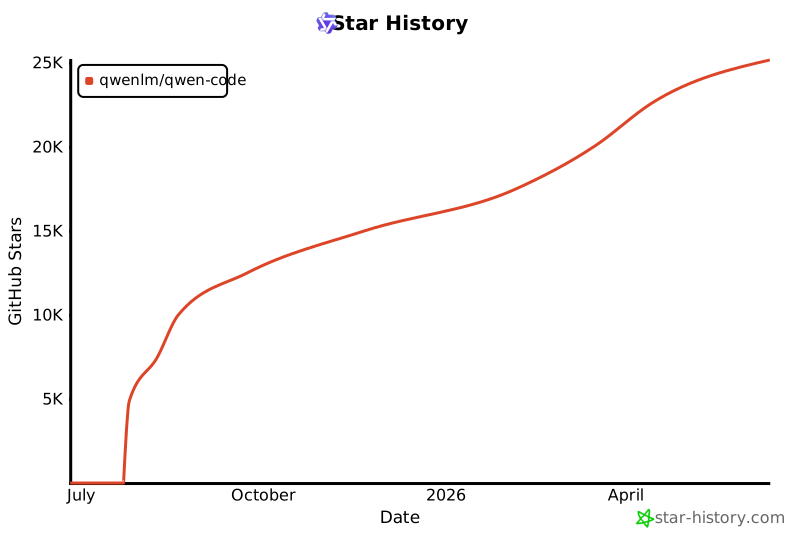](https://www.star-history.com/#QwenLM/qwen-code&Date)
|
||||
|
||||
42
package-lock.json
generated
42
package-lock.json
generated
@@ -1,12 +1,12 @@
|
||||
{
|
||||
"name": "@qwen-code/qwen-code",
|
||||
"version": "0.5.1",
|
||||
"version": "0.6.0",
|
||||
"lockfileVersion": 3,
|
||||
"requires": true,
|
||||
"packages": {
|
||||
"": {
|
||||
"name": "@qwen-code/qwen-code",
|
||||
"version": "0.5.1",
|
||||
"version": "0.6.0",
|
||||
"workspaces": [
|
||||
"packages/*"
|
||||
],
|
||||
@@ -3142,10 +3142,6 @@
|
||||
"integrity": "sha512-Vvn3zZrhQZkkBE8LSuW3em98c0FwgO4nxzv6OdSxPKJIEKY2bGbHn+mhGIPerzI4twdxaP8/0+06HBpwf345Lw==",
|
||||
"license": "BSD-3-Clause"
|
||||
},
|
||||
"node_modules/@qwen-code/chrome-bridge": {
|
||||
"resolved": "packages/chrome-qwen-bridge",
|
||||
"link": true
|
||||
},
|
||||
"node_modules/@qwen-code/qwen-code": {
|
||||
"resolved": "packages/cli",
|
||||
"link": true
|
||||
@@ -13868,6 +13864,7 @@
|
||||
"version": "19.1.0",
|
||||
"resolved": "https://registry.npmjs.org/react-dom/-/react-dom-19.1.0.tgz",
|
||||
"integrity": "sha512-Xs1hdnE+DyKgeHJeJznQmYMIBG3TKIHJJT95Q58nHLSrElKlGQqDTR2HQ9fx5CN/Gk6Vh/kupBTDLU11/nDk/g==",
|
||||
"dev": true,
|
||||
"license": "MIT",
|
||||
"dependencies": {
|
||||
"scheduler": "^0.26.0"
|
||||
@@ -17495,32 +17492,9 @@
|
||||
"zod": "^3.24.1"
|
||||
}
|
||||
},
|
||||
"packages/chrome-qwen-bridge": {
|
||||
"name": "@qwen-code/chrome-bridge",
|
||||
"version": "1.0.0",
|
||||
"license": "Apache-2.0",
|
||||
"dependencies": {
|
||||
"markdown-it": "^14.1.0",
|
||||
"react": "^19.1.0",
|
||||
"react-dom": "^19.1.0"
|
||||
},
|
||||
"devDependencies": {
|
||||
"@types/markdown-it": "^14.1.2",
|
||||
"@types/react": "^19.1.8",
|
||||
"@types/react-dom": "^19.1.6",
|
||||
"autoprefixer": "^10.4.22",
|
||||
"esbuild": "^0.25.3",
|
||||
"postcss": "^8.5.6",
|
||||
"tailwindcss": "^3.4.18",
|
||||
"typescript": "^5.8.3"
|
||||
},
|
||||
"engines": {
|
||||
"node": ">=18.0.0"
|
||||
}
|
||||
},
|
||||
"packages/cli": {
|
||||
"name": "@qwen-code/qwen-code",
|
||||
"version": "0.5.1",
|
||||
"version": "0.6.0",
|
||||
"dependencies": {
|
||||
"@google/genai": "1.16.0",
|
||||
"@iarna/toml": "^2.2.5",
|
||||
@@ -17644,7 +17618,7 @@
|
||||
},
|
||||
"packages/core": {
|
||||
"name": "@qwen-code/qwen-code-core",
|
||||
"version": "0.5.1",
|
||||
"version": "0.6.0",
|
||||
"hasInstallScript": true,
|
||||
"dependencies": {
|
||||
"@google/genai": "1.16.0",
|
||||
@@ -17793,7 +17767,7 @@
|
||||
},
|
||||
"packages/sdk-typescript": {
|
||||
"name": "@qwen-code/sdk",
|
||||
"version": "0.1.1",
|
||||
"version": "0.6.0",
|
||||
"license": "Apache-2.0",
|
||||
"dependencies": {
|
||||
"@modelcontextprotocol/sdk": "^1.0.4",
|
||||
@@ -20223,7 +20197,7 @@
|
||||
},
|
||||
"packages/test-utils": {
|
||||
"name": "@qwen-code/qwen-code-test-utils",
|
||||
"version": "0.5.1",
|
||||
"version": "0.6.0",
|
||||
"dev": true,
|
||||
"license": "Apache-2.0",
|
||||
"devDependencies": {
|
||||
@@ -20235,7 +20209,7 @@
|
||||
},
|
||||
"packages/vscode-ide-companion": {
|
||||
"name": "qwen-code-vscode-ide-companion",
|
||||
"version": "0.5.1",
|
||||
"version": "0.6.0",
|
||||
"license": "LICENSE",
|
||||
"dependencies": {
|
||||
"@modelcontextprotocol/sdk": "^1.15.1",
|
||||
|
||||
@@ -1,6 +1,6 @@
|
||||
{
|
||||
"name": "@qwen-code/qwen-code",
|
||||
"version": "0.5.1",
|
||||
"version": "0.6.0",
|
||||
"engines": {
|
||||
"node": ">=20.0.0"
|
||||
},
|
||||
@@ -13,7 +13,7 @@
|
||||
"url": "git+https://github.com/QwenLM/qwen-code.git"
|
||||
},
|
||||
"config": {
|
||||
"sandboxImageUri": "ghcr.io/qwenlm/qwen-code:0.5.1"
|
||||
"sandboxImageUri": "ghcr.io/qwenlm/qwen-code:0.6.0"
|
||||
},
|
||||
"scripts": {
|
||||
"start": "cross-env node scripts/start.js",
|
||||
|
||||
@@ -1 +0,0 @@
|
||||
cimaabkejokbhjkdnajgfniiolfjgbhd
|
||||
23
packages/chrome-qwen-bridge/.gitignore
vendored
23
packages/chrome-qwen-bridge/.gitignore
vendored
@@ -1,23 +0,0 @@
|
||||
# Dependencies
|
||||
node_modules/
|
||||
|
||||
# Build outputs
|
||||
dist/
|
||||
*.zip
|
||||
|
||||
# Logs
|
||||
*.log
|
||||
|
||||
# OS files
|
||||
.DS_Store
|
||||
Thumbs.db
|
||||
|
||||
# IDE files
|
||||
.idea/
|
||||
.vscode/
|
||||
*.swp
|
||||
*.swo
|
||||
|
||||
# Temporary files
|
||||
*.tmp
|
||||
.temp/
|
||||
@@ -1,62 +0,0 @@
|
||||
#!/bin/bash
|
||||
|
||||
echo "🎯 Chrome Extension 连接状态总结"
|
||||
echo "================================"
|
||||
echo ""
|
||||
|
||||
GREEN='\033[0;32m'
|
||||
YELLOW='\033[1;33m'
|
||||
NC='\033[0m'
|
||||
|
||||
echo -e "${GREEN}✅ Native Host 已正确配置${NC}"
|
||||
echo " - 配置文件位置正确"
|
||||
echo " - 使用 shell 包装脚本确保 Node.js 环境"
|
||||
echo " - 扩展 ID 已配置: cimaabkejokbhjkdnajgfniiolfjgbhd"
|
||||
echo ""
|
||||
|
||||
echo -e "${GREEN}✅ Native Host 测试响应正常${NC}"
|
||||
echo " - 握手协议工作正常"
|
||||
echo " - 消息传递机制正确"
|
||||
echo ""
|
||||
|
||||
echo -e "${GREEN}✅ Service Worker 已增强${NC}"
|
||||
echo " - 添加了详细的错误日志"
|
||||
echo " - 实现了握手超时机制"
|
||||
echo " - 改进了断开连接处理"
|
||||
echo ""
|
||||
|
||||
echo -e "${YELLOW}📝 现在请进行以下操作:${NC}"
|
||||
echo ""
|
||||
echo "1. 重新加载 Chrome 扩展:"
|
||||
echo " open 'chrome://extensions/'"
|
||||
echo " 找到 'Qwen CLI Bridge' 并点击 🔄"
|
||||
echo ""
|
||||
echo "2. 点击扩展图标测试:"
|
||||
echo " - 点击 'Connect to Qwen CLI'"
|
||||
echo " - 连接应该会成功"
|
||||
echo ""
|
||||
echo "3. 如果仍有问题:"
|
||||
echo " a) 查看 Service Worker 控制台:"
|
||||
echo " open 'chrome://extensions/?id=cimaabkejokbhjkdnajgfniiolfjgbhd'"
|
||||
echo " 点击 'Service Worker' 查看日志"
|
||||
echo ""
|
||||
echo " b) 查看 Native Host 日志:"
|
||||
echo " tail -f /tmp/qwen-bridge-host.log"
|
||||
echo ""
|
||||
echo " c) 运行调试控制台:"
|
||||
echo " open file://$PWD/debug-console.html"
|
||||
echo ""
|
||||
|
||||
echo "================================"
|
||||
echo ""
|
||||
echo "🔍 常见问题排查:"
|
||||
echo ""
|
||||
echo "如果看到 'Native host has exited' 错误:"
|
||||
echo "- 确保 Node.js 已安装: node --version"
|
||||
echo "- 检查路径是否正确: ls -la native-host/run.sh"
|
||||
echo ""
|
||||
echo "如果看到 'Specified native messaging host not found':"
|
||||
echo "- 重新运行: ./set-extension-id.sh"
|
||||
echo "- 确认扩展 ID 正确"
|
||||
echo ""
|
||||
echo "连接现在应该能正常工作了!🎉"
|
||||
@@ -1,121 +0,0 @@
|
||||
# 📦 Chrome Qwen Bridge - 安装指南
|
||||
|
||||
## 🚀 快速安装(推荐)
|
||||
|
||||
### 一键安装(首次用户)
|
||||
|
||||
```bash
|
||||
# 进入项目目录
|
||||
cd packages/chrome-qwen-bridge
|
||||
|
||||
# 运行安装向导
|
||||
npm run install:all
|
||||
```
|
||||
|
||||
这个命令会:
|
||||
1. ✅ 引导你安装 Chrome 扩展
|
||||
2. ✅ 自动配置 Native Host
|
||||
3. ✅ 保存扩展 ID 供后续使用
|
||||
4. ✅ 启动调试环境
|
||||
|
||||
## 📝 安装方式说明
|
||||
|
||||
### 场景 1:从 Chrome Web Store 安装(未来)
|
||||
|
||||
当扩展发布到 Chrome Web Store 后:
|
||||
1. 从商店安装扩展
|
||||
2. 运行 `npm run install:host`(会自动检测已安装的扩展)
|
||||
3. 完成!
|
||||
|
||||
### 场景 2:开发者模式安装(当前)
|
||||
|
||||
```bash
|
||||
# 步骤 1:安装扩展和 Native Host
|
||||
npm run install:all
|
||||
|
||||
# 步骤 2:启动调试
|
||||
npm run dev
|
||||
```
|
||||
|
||||
### 场景 3:分步安装
|
||||
|
||||
```bash
|
||||
# 1. 仅安装 Chrome 扩展
|
||||
npm run install:extension
|
||||
|
||||
# 2. 仅配置 Native Host
|
||||
npm run install:host
|
||||
|
||||
# 3. 启动开发环境
|
||||
npm run dev
|
||||
```
|
||||
|
||||
## 🔧 Native Host 说明
|
||||
|
||||
### 什么是 Native Host?
|
||||
|
||||
Native Host 是一个本地程序,允许 Chrome 扩展与本地应用(如 Qwen CLI)通信。出于安全考虑,Chrome 要求必须手动安装。
|
||||
|
||||
### 智能安装器特性
|
||||
|
||||
我们的 `smart-install.sh` 脚本会:
|
||||
|
||||
1. **自动检测** - 尝试自动找到已安装的扩展
|
||||
2. **保存配置** - 记住扩展 ID,下次无需输入
|
||||
3. **通用模式** - 即使没有扩展 ID 也能配置
|
||||
4. **连接测试** - 可选的连接验证
|
||||
|
||||
### 安装位置
|
||||
|
||||
Native Host 配置文件位置:
|
||||
- **macOS**: `~/Library/Application Support/Google/Chrome/NativeMessagingHosts/`
|
||||
- **Linux**: `~/.config/google-chrome/NativeMessagingHosts/`
|
||||
|
||||
## ❓ 常见问题
|
||||
|
||||
### Q: 必须手动安装 Native Host 吗?
|
||||
|
||||
A: 是的,这是 Chrome 的安全要求。但我们的智能安装器让这个过程非常简单。
|
||||
|
||||
### Q: 如何找到扩展 ID?
|
||||
|
||||
A:
|
||||
1. 打开 `chrome://extensions/`
|
||||
2. 找到 "Qwen CLI Bridge"
|
||||
3. ID 显示在扩展卡片上(类似 `abcdefghijklmnop...`)
|
||||
|
||||
### Q: 重装扩展后需要重新配置吗?
|
||||
|
||||
A: 如果扩展 ID 改变了,需要重新运行 `npm run install:host`。脚本会自动检测新的 ID。
|
||||
|
||||
### Q: 如何验证安装成功?
|
||||
|
||||
A: 运行 `npm run dev`,如果能看到插件图标并能点击连接,说明安装成功。
|
||||
|
||||
## 📋 命令参考
|
||||
|
||||
| 命令 | 说明 |
|
||||
|------|------|
|
||||
| `npm run install:all` | 完整安装向导 |
|
||||
| `npm run install:extension` | 仅安装扩展 |
|
||||
| `npm run install:host` | 仅配置 Native Host |
|
||||
| `npm run dev` | 启动调试环境 |
|
||||
| `npm run clean` | 清理所有配置和日志 |
|
||||
|
||||
## 🔄 更新和重装
|
||||
|
||||
如果需要重新安装:
|
||||
|
||||
```bash
|
||||
# 清理旧配置
|
||||
npm run clean
|
||||
|
||||
# 重新安装
|
||||
npm run install:all
|
||||
```
|
||||
|
||||
## 📚 更多信息
|
||||
|
||||
- [调试指南](./docs/debugging.md)
|
||||
- [API 文档](./docs/api-reference.md)
|
||||
- [架构设计](./docs/architecture.md)
|
||||
@@ -1,64 +0,0 @@
|
||||
# 🚀 快速开始
|
||||
|
||||
## 首次使用
|
||||
|
||||
如果是第一次使用,请运行:
|
||||
|
||||
```bash
|
||||
npm run dev
|
||||
```
|
||||
|
||||
系统会自动检测并引导你完成:
|
||||
1. 📦 手动安装 Chrome 插件
|
||||
2. 🔧 配置 Native Host
|
||||
3. 🎯 启动调试环境
|
||||
|
||||
## 安装步骤说明
|
||||
|
||||
### 第一次运行时需要:
|
||||
|
||||
1. **手动加载插件到 Chrome**
|
||||
- 打开 `chrome://extensions/`
|
||||
- 开启「开发者模式」(右上角)
|
||||
- 点击「加载已解压的扩展程序」
|
||||
- 选择 `extension` 目录
|
||||
- **记下扩展 ID**(很重要!)
|
||||
|
||||
2. **输入扩展 ID**
|
||||
- 脚本会提示你输入
|
||||
- 这样 Native Host 才能识别插件
|
||||
|
||||
3. **完成后**
|
||||
- 以后运行 `npm run dev` 就会自动加载所有内容
|
||||
|
||||
## 常见问题
|
||||
|
||||
### Q: 为什么需要手动加载插件?
|
||||
A: Chrome 安全机制要求开发者模式的插件必须手动加载一次。
|
||||
|
||||
### Q: 插件图标在哪里?
|
||||
A: 点击 Chrome 工具栏的拼图图标,找到 "Qwen CLI Bridge" 并点击固定。
|
||||
|
||||
### Q: 如何知道插件是否加载成功?
|
||||
A:
|
||||
- 在 `chrome://extensions/` 能看到插件
|
||||
- 工具栏有插件图标
|
||||
- 点击图标能看到弹出窗口
|
||||
|
||||
## 调试命令
|
||||
|
||||
```bash
|
||||
npm run dev # 启动调试环境(首次会引导安装)
|
||||
npm run logs # 查看 Native Host 日志
|
||||
npm run logs:qwen # 查看 Qwen 服务器日志
|
||||
npm run clean # 清理所有临时文件
|
||||
```
|
||||
|
||||
## 文件说明
|
||||
|
||||
```
|
||||
├── first-install.sh # 首次安装向导
|
||||
├── debug.sh # 调试启动脚本
|
||||
├── .extension-id # 保存的扩展 ID(自动生成)
|
||||
└── extension/ # Chrome 插件源码
|
||||
```
|
||||
@@ -1,204 +0,0 @@
|
||||
# Qwen CLI Bridge - Chrome Extension
|
||||
|
||||
A Chrome extension that bridges your browser with Qwen CLI, enabling AI-powered analysis and interaction with web content.
|
||||
|
||||
> This package is part of the [Qwen Code](https://github.com/QwenLM/qwen-code) mono repository.
|
||||
|
||||
## Features
|
||||
|
||||
- **Page Data Extraction**: Extract structured data from any webpage including text, links, images, and metadata
|
||||
- **Screenshot Capture**: Capture and analyze screenshots with AI
|
||||
- **Console & Network Monitoring**: Monitor console logs and network requests
|
||||
- **Selected Text Processing**: Send selected text to Qwen CLI for processing
|
||||
- **AI Analysis**: Leverage Qwen's AI capabilities to analyze web content
|
||||
- **MCP Server Integration**: Support for multiple MCP (Model Context Protocol) servers
|
||||
|
||||
## Architecture
|
||||
|
||||
```
|
||||
┌─────────────────────┐
|
||||
│ Chrome Extension │
|
||||
│ - Content Script │
|
||||
│ - Background Worker│
|
||||
│ - Popup UI │
|
||||
└──────────┬──────────┘
|
||||
│
|
||||
Native Messaging
|
||||
│
|
||||
┌──────▼──────────┐
|
||||
│ Native Host │
|
||||
│ (Node.js) │
|
||||
└──────┬──────────┘
|
||||
│
|
||||
┌──────▼──────────┐
|
||||
│ Qwen CLI │
|
||||
│ + MCP Servers │
|
||||
└─────────────────┘
|
||||
```
|
||||
|
||||
## Installation
|
||||
|
||||
### Prerequisites
|
||||
|
||||
1. **Node.js**: Install from [nodejs.org](https://nodejs.org/)
|
||||
2. **Qwen CLI**: Install the Qwen CLI tool (required for full functionality)
|
||||
3. **Chrome Browser**: Version 88 or higher
|
||||
|
||||
### Step 1: Install the Chrome Extension
|
||||
|
||||
1. Open Chrome and navigate to `chrome://extensions/`
|
||||
2. Enable "Developer mode" (toggle in top right)
|
||||
3. Click "Load unpacked"
|
||||
4. Select the `chrome-qwen-bridge/extension` folder
|
||||
5. Note the Extension ID that appears (you'll need this for the next step)
|
||||
|
||||
### Step 2: Install the Native Messaging Host
|
||||
|
||||
The Native Messaging Host allows the Chrome extension to communicate with Qwen CLI.
|
||||
|
||||
#### macOS/Linux
|
||||
|
||||
```bash
|
||||
cd chrome-qwen-bridge/native-host
|
||||
./install.sh
|
||||
```
|
||||
|
||||
When prompted, enter your Chrome Extension ID.
|
||||
|
||||
#### Windows
|
||||
|
||||
1. Run Command Prompt as Administrator
|
||||
2. Navigate to the `native-host` directory:
|
||||
```cmd
|
||||
cd chrome-qwen-bridge\native-host
|
||||
```
|
||||
3. Run the installation script:
|
||||
```cmd
|
||||
install.bat
|
||||
```
|
||||
4. Enter your Chrome Extension ID when prompted
|
||||
|
||||
### Step 3: Configure Qwen CLI (Optional)
|
||||
|
||||
If you want to use MCP servers with the extension:
|
||||
|
||||
```bash
|
||||
# Add chrome-devtools MCP server
|
||||
qwen mcp add chrome-devtools
|
||||
|
||||
# Add other MCP servers as needed
|
||||
qwen mcp add playwright-mcp
|
||||
```
|
||||
|
||||
## Usage
|
||||
|
||||
### Basic Usage
|
||||
|
||||
1. Click the Qwen CLI Bridge extension icon in Chrome
|
||||
2. Click "Connect to Qwen CLI" to establish connection
|
||||
3. Click "Start Qwen CLI" to launch the CLI process
|
||||
4. Use the action buttons to:
|
||||
- Extract and analyze page data
|
||||
- Capture screenshots
|
||||
- Send selected text to Qwen
|
||||
- Monitor console and network logs
|
||||
|
||||
### Advanced Settings
|
||||
|
||||
In the popup's "Advanced Settings" section, you can configure:
|
||||
|
||||
- **MCP Servers**: Comma-separated list of MCP servers to load
|
||||
- **HTTP Port**: Port for Qwen CLI HTTP server (default: 8080)
|
||||
- **Auto-connect**: Automatically connect when opening the popup
|
||||
|
||||
### API Actions
|
||||
|
||||
The extension supports the following actions that can be sent to Qwen CLI:
|
||||
|
||||
- `analyze_page`: Analyze extracted page data
|
||||
- `analyze_screenshot`: Analyze captured screenshot
|
||||
- `ai_analyze`: Perform AI analysis on content
|
||||
- `process_text`: Process selected text
|
||||
- Custom actions based on your MCP server configurations
|
||||
|
||||
## Development
|
||||
|
||||
### Project Structure
|
||||
|
||||
```
|
||||
chrome-qwen-bridge/
|
||||
├── extension/ # Chrome extension source
|
||||
│ ├── manifest.json # Extension manifest
|
||||
│ ├── background/ # Service worker
|
||||
│ ├── content/ # Content scripts
|
||||
│ ├── popup/ # Popup UI
|
||||
│ └── icons/ # Extension icons
|
||||
├── native-host/ # Native messaging host
|
||||
│ ├── host.js # Node.js host script
|
||||
│ ├── manifest.json # Native host manifest
|
||||
│ └── install scripts # Platform-specific installers
|
||||
└── docs/ # Documentation
|
||||
```
|
||||
|
||||
### Building from Source
|
||||
|
||||
1. Clone the repository
|
||||
2. No build step required - the extension uses vanilla JavaScript
|
||||
3. Load the extension as unpacked in Chrome for development
|
||||
|
||||
### Testing
|
||||
|
||||
1. Enable Chrome Developer Tools
|
||||
2. Check the extension's background page console for logs
|
||||
3. Native host logs are written to:
|
||||
- macOS/Linux: `/tmp/qwen-bridge-host.log`
|
||||
- Windows: `%TEMP%\qwen-bridge-host.log`
|
||||
|
||||
## Troubleshooting
|
||||
|
||||
### Extension not connecting to Native Host
|
||||
|
||||
1. Verify Node.js is installed: `node --version`
|
||||
2. Check that the Native Host is properly installed
|
||||
3. Ensure the Extension ID in the manifest matches your actual extension
|
||||
4. Check logs for errors
|
||||
|
||||
### Qwen CLI not starting
|
||||
|
||||
1. Verify Qwen CLI is installed: `qwen --version`
|
||||
2. Check that Qwen CLI can run normally from terminal
|
||||
3. Review Native Host logs for error messages
|
||||
|
||||
### No response from Qwen CLI
|
||||
|
||||
1. Ensure Qwen CLI server is running
|
||||
2. Check the configured HTTP port is not in use
|
||||
3. Verify MCP servers are properly configured
|
||||
|
||||
## Security Considerations
|
||||
|
||||
- The extension requires broad permissions to function properly
|
||||
- Native Messaging Host runs with user privileges
|
||||
- All communication between components uses structured JSON messages
|
||||
- No sensitive data is stored; all processing is ephemeral
|
||||
|
||||
## Contributing
|
||||
|
||||
Contributions are welcome! Please:
|
||||
|
||||
1. Fork the repository
|
||||
2. Create a feature branch
|
||||
3. Make your changes
|
||||
4. Test thoroughly
|
||||
5. Submit a pull request
|
||||
|
||||
## License
|
||||
|
||||
MIT License - See LICENSE file for details
|
||||
|
||||
## Support
|
||||
|
||||
For issues, questions, or feature requests:
|
||||
- Open an issue on GitHub
|
||||
- Check the logs for debugging information
|
||||
- Ensure all prerequisites are properly installed
|
||||
@@ -1,26 +0,0 @@
|
||||
#!/bin/bash
|
||||
|
||||
# Build script for Chrome extension package
|
||||
|
||||
echo "Building Chrome Qwen Bridge..."
|
||||
|
||||
# Ensure we're in the right directory
|
||||
SCRIPT_DIR="$( cd "$( dirname "${BASH_SOURCE[0]}" )" && pwd )"
|
||||
cd "$SCRIPT_DIR"
|
||||
|
||||
# Create dist directory
|
||||
mkdir -p dist
|
||||
|
||||
# Copy extension files to dist
|
||||
echo "Copying extension files..."
|
||||
cp -r extension dist/
|
||||
|
||||
# Create a zip file for Chrome Web Store
|
||||
echo "Creating extension package..."
|
||||
cd dist
|
||||
zip -r ../chrome-qwen-bridge.zip extension/
|
||||
cd ..
|
||||
|
||||
echo "✅ Build complete!"
|
||||
echo " Extension package: chrome-qwen-bridge.zip"
|
||||
echo " Extension files: dist/extension/"
|
||||
@@ -1,52 +0,0 @@
|
||||
#!/bin/bash
|
||||
|
||||
echo "🔍 Chrome Extension 调试启动器"
|
||||
echo "================================"
|
||||
echo ""
|
||||
|
||||
# 检查 Chrome 是否已经运行
|
||||
if pgrep -x "Google Chrome" > /dev/null; then
|
||||
echo "⚠️ Chrome 已在运行,请先关闭 Chrome 再运行此脚本"
|
||||
echo " 或者在新的 Chrome 窗口中手动操作"
|
||||
echo ""
|
||||
fi
|
||||
|
||||
# 获取扩展路径
|
||||
EXTENSION_PATH="$PWD/extension"
|
||||
echo "📂 扩展路径: $EXTENSION_PATH"
|
||||
|
||||
# 读取保存的扩展 ID
|
||||
if [ -f ".extension-id" ]; then
|
||||
EXTENSION_ID=$(cat .extension-id)
|
||||
echo "🆔 扩展 ID: $EXTENSION_ID"
|
||||
else
|
||||
echo "⚠️ 未找到扩展 ID,首次加载后会自动保存"
|
||||
fi
|
||||
|
||||
echo ""
|
||||
echo "正在启动 Chrome 调试模式..."
|
||||
echo ""
|
||||
|
||||
# 启动 Chrome with debugging
|
||||
open -na "Google Chrome" --args \
|
||||
--load-extension="$EXTENSION_PATH" \
|
||||
--auto-open-devtools-for-tabs \
|
||||
--enable-logging \
|
||||
--v=1 \
|
||||
"file://$PWD/debug-console.html"
|
||||
|
||||
echo "✅ Chrome 已启动"
|
||||
echo ""
|
||||
echo "📝 调试步骤:"
|
||||
echo "1. Chrome 会自动加载扩展并打开调试控制台"
|
||||
echo "2. 点击 'Test Connection' 测试连接"
|
||||
echo "3. 如果连接失败,点击 'View Background Logs' 查看详细日志"
|
||||
echo ""
|
||||
echo "💡 提示:"
|
||||
echo "- 按 F12 打开开发者工具查看控制台输出"
|
||||
echo "- 在 chrome://extensions/ 页面点击 'Service Worker' 查看后台日志"
|
||||
echo "- 日志文件: /tmp/qwen-bridge-host.log"
|
||||
echo ""
|
||||
echo "📋 监控日志 (Ctrl+C 退出):"
|
||||
echo "----------------------------"
|
||||
tail -f /tmp/qwen-bridge-host.log 2>/dev/null || echo "等待日志生成..."
|
||||
@@ -1,178 +0,0 @@
|
||||
<!DOCTYPE html>
|
||||
<html>
|
||||
<head>
|
||||
<title>Chrome Extension Debug Console</title>
|
||||
<style>
|
||||
body {
|
||||
font-family: monospace;
|
||||
padding: 20px;
|
||||
background: #1e1e1e;
|
||||
color: #d4d4d4;
|
||||
}
|
||||
h1 {
|
||||
color: #569cd6;
|
||||
}
|
||||
button {
|
||||
background: #569cd6;
|
||||
color: white;
|
||||
border: none;
|
||||
padding: 8px 16px;
|
||||
margin: 5px;
|
||||
cursor: pointer;
|
||||
border-radius: 4px;
|
||||
}
|
||||
button:hover {
|
||||
background: #4080c0;
|
||||
}
|
||||
#console {
|
||||
background: #2d2d30;
|
||||
padding: 15px;
|
||||
margin-top: 20px;
|
||||
border-radius: 4px;
|
||||
min-height: 300px;
|
||||
max-height: 500px;
|
||||
overflow-y: auto;
|
||||
white-space: pre-wrap;
|
||||
}
|
||||
.log {
|
||||
margin: 5px 0;
|
||||
padding: 5px;
|
||||
border-left: 3px solid #569cd6;
|
||||
padding-left: 10px;
|
||||
}
|
||||
.error {
|
||||
border-left-color: #f44747;
|
||||
color: #f44747;
|
||||
}
|
||||
.success {
|
||||
border-left-color: #4ec9b0;
|
||||
color: #4ec9b0;
|
||||
}
|
||||
.info {
|
||||
color: #9cdcfe;
|
||||
}
|
||||
.warning {
|
||||
border-left-color: #ce9178;
|
||||
color: #ce9178;
|
||||
}
|
||||
</style>
|
||||
</head>
|
||||
<body>
|
||||
<h1>🔧 Chrome Extension Debug Console</h1>
|
||||
|
||||
<div>
|
||||
<button onclick="testConnection()">Test Connection</button>
|
||||
<button onclick="getStatus()">Get Status</button>
|
||||
<button onclick="clearConsole()">Clear Console</button>
|
||||
<button onclick="viewBackgroundLogs()">View Background Logs</button>
|
||||
<button onclick="reloadExtension()">Reload Extension</button>
|
||||
</div>
|
||||
|
||||
<div id="console"></div>
|
||||
|
||||
<script>
|
||||
const consoleDiv = document.getElementById('console');
|
||||
let extensionId = 'cimaabkejokbhjkdnajgfniiolfjgbhd';
|
||||
|
||||
function log(message, type = 'log') {
|
||||
const logDiv = document.createElement('div');
|
||||
logDiv.className = `log ${type}`;
|
||||
const timestamp = new Date().toLocaleTimeString();
|
||||
logDiv.textContent = `[${timestamp}] ${message}`;
|
||||
consoleDiv.appendChild(logDiv);
|
||||
consoleDiv.scrollTop = consoleDiv.scrollHeight;
|
||||
}
|
||||
|
||||
function clearConsole() {
|
||||
consoleDiv.innerHTML = '';
|
||||
log('Console cleared', 'info');
|
||||
}
|
||||
|
||||
async function testConnection() {
|
||||
log('Testing connection to extension...', 'info');
|
||||
|
||||
try {
|
||||
// Try to send a message to the extension
|
||||
const response = await chrome.runtime.sendMessage(extensionId, {
|
||||
type: 'CONNECT'
|
||||
});
|
||||
|
||||
if (response) {
|
||||
if (response.success) {
|
||||
log('✅ Connected successfully!', 'success');
|
||||
log(`Status: ${response.status}`, 'info');
|
||||
} else {
|
||||
log(`❌ Connection failed: ${response.error}`, 'error');
|
||||
}
|
||||
} else {
|
||||
log('❌ No response from extension', 'error');
|
||||
log('Possible issues:', 'warning');
|
||||
log('1. Extension not loaded/enabled', 'warning');
|
||||
log('2. Extension ID incorrect', 'warning');
|
||||
log('3. Service worker crashed', 'warning');
|
||||
}
|
||||
} catch (error) {
|
||||
log(`❌ Error: ${error.message}`, 'error');
|
||||
|
||||
if (error.message.includes('Could not establish connection')) {
|
||||
log('Extension is not responding. Checking extension ID...', 'warning');
|
||||
|
||||
// Try to find the extension
|
||||
if (chrome.management) {
|
||||
chrome.management.getAll((extensions) => {
|
||||
const qwenExt = extensions.find(ext =>
|
||||
ext.name.includes('Qwen') || ext.name.includes('CLI Bridge')
|
||||
);
|
||||
if (qwenExt) {
|
||||
log(`Found extension: ${qwenExt.name} (${qwenExt.id})`, 'info');
|
||||
extensionId = qwenExt.id;
|
||||
} else {
|
||||
log('Extension not found in installed extensions', 'error');
|
||||
}
|
||||
});
|
||||
}
|
||||
}
|
||||
}
|
||||
}
|
||||
|
||||
async function getStatus() {
|
||||
log('Getting extension status...', 'info');
|
||||
|
||||
try {
|
||||
const response = await chrome.runtime.sendMessage(extensionId, {
|
||||
type: 'GET_STATUS'
|
||||
});
|
||||
|
||||
if (response) {
|
||||
log(`Status received: ${JSON.stringify(response, null, 2)}`, 'success');
|
||||
} else {
|
||||
log('No status response', 'error');
|
||||
}
|
||||
} catch (error) {
|
||||
log(`Error getting status: ${error.message}`, 'error');
|
||||
}
|
||||
}
|
||||
|
||||
function viewBackgroundLogs() {
|
||||
log('Opening service worker console...', 'info');
|
||||
window.open(`chrome://extensions/?id=${extensionId}`, '_blank');
|
||||
log('Click "Inspect views: service worker" to see logs', 'info');
|
||||
}
|
||||
|
||||
function reloadExtension() {
|
||||
log('Reloading extension...', 'info');
|
||||
if (chrome.runtime && chrome.runtime.reload) {
|
||||
chrome.runtime.reload();
|
||||
log('Extension reloaded', 'success');
|
||||
} else {
|
||||
log('Cannot reload from here. Please reload manually in chrome://extensions/', 'warning');
|
||||
}
|
||||
}
|
||||
|
||||
// Initial log
|
||||
log('Debug console ready', 'success');
|
||||
log(`Extension ID: ${extensionId}`, 'info');
|
||||
log('Click "Test Connection" to start debugging', 'info');
|
||||
</script>
|
||||
</body>
|
||||
</html>
|
||||
@@ -1,357 +0,0 @@
|
||||
#!/bin/bash
|
||||
|
||||
# Qwen CLI Bridge - macOS 一键调试脚本
|
||||
|
||||
# 颜色定义
|
||||
RED='\033[0;31m'
|
||||
GREEN='\033[0;32m'
|
||||
YELLOW='\033[1;33m'
|
||||
BLUE='\033[0;34m'
|
||||
CYAN='\033[0;36m'
|
||||
NC='\033[0m' # No Color
|
||||
|
||||
# 获取脚本目录
|
||||
SCRIPT_DIR="$( cd "$( dirname "${BASH_SOURCE[0]}" )" && pwd )"
|
||||
|
||||
# 检查是否首次安装
|
||||
if [[ ! -f "$SCRIPT_DIR/.extension-id" ]]; then
|
||||
echo -e "${YELLOW}╔════════════════════════════════════════════════════════════════╗${NC}"
|
||||
echo -e "${YELLOW}║ ║${NC}"
|
||||
echo -e "${YELLOW}║ ⚠️ 检测到首次运行,需要先安装插件 ║${NC}"
|
||||
echo -e "${YELLOW}║ ║${NC}"
|
||||
echo -e "${YELLOW}╚════════════════════════════════════════════════════════════════╝${NC}"
|
||||
echo ""
|
||||
echo -e "${CYAN}即将启动首次安装向导...${NC}"
|
||||
sleep 2
|
||||
exec "$SCRIPT_DIR/first-install.sh"
|
||||
exit 0
|
||||
fi
|
||||
|
||||
# 清屏显示标题
|
||||
clear
|
||||
echo -e "${CYAN}╔════════════════════════════════════════════════════════════════╗${NC}"
|
||||
echo -e "${CYAN}║ ║${NC}"
|
||||
echo -e "${CYAN}║ 🚀 Qwen CLI Bridge - macOS 调试环境 ║${NC}"
|
||||
echo -e "${CYAN}║ ║${NC}"
|
||||
echo -e "${CYAN}╚════════════════════════════════════════════════════════════════╝${NC}"
|
||||
echo ""
|
||||
|
||||
# 第一步:检查环境
|
||||
echo -e "${BLUE}[1/5]${NC} 检查开发环境..."
|
||||
|
||||
# 检查 Node.js
|
||||
if ! command -v node &> /dev/null; then
|
||||
echo -e "${RED}✗${NC} Node.js 未安装,请先安装 Node.js"
|
||||
echo " 访问 https://nodejs.org 下载安装"
|
||||
exit 1
|
||||
fi
|
||||
echo -e "${GREEN}✓${NC} Node.js $(node --version)"
|
||||
|
||||
# 检查 Chrome
|
||||
CHROME_PATH="/Applications/Google Chrome.app/Contents/MacOS/Google Chrome"
|
||||
if [[ ! -f "$CHROME_PATH" ]]; then
|
||||
echo -e "${RED}✗${NC} Chrome 未找到"
|
||||
exit 1
|
||||
fi
|
||||
echo -e "${GREEN}✓${NC} Chrome 已安装"
|
||||
|
||||
# 第二步:配置 Native Host
|
||||
echo -e "\n${BLUE}[2/5]${NC} 配置 Native Host..."
|
||||
|
||||
MANIFEST_DIR="$HOME/Library/Application Support/Google/Chrome/NativeMessagingHosts"
|
||||
mkdir -p "$MANIFEST_DIR"
|
||||
|
||||
cat > "$MANIFEST_DIR/com.qwen.cli.bridge.json" << EOF
|
||||
{
|
||||
"name": "com.qwen.cli.bridge",
|
||||
"description": "Native messaging host for Qwen CLI Bridge",
|
||||
"path": "$SCRIPT_DIR/native-host/host.js",
|
||||
"type": "stdio",
|
||||
"allowed_origins": ["chrome-extension://*/"]
|
||||
}
|
||||
EOF
|
||||
|
||||
echo -e "${GREEN}✓${NC} Native Host 已配置"
|
||||
|
||||
# 第三步:检查 Qwen CLI
|
||||
echo -e "\n${BLUE}[3/5]${NC} 检查 Qwen CLI..."
|
||||
|
||||
QWEN_AVAILABLE=false
|
||||
if command -v qwen &> /dev/null; then
|
||||
QWEN_AVAILABLE=true
|
||||
QWEN_VERSION=$(qwen --version 2>/dev/null || echo "已安装")
|
||||
echo -e "${GREEN}✓${NC} Qwen CLI ${QWEN_VERSION}"
|
||||
echo -e "${CYAN}→${NC} 使用 ACP 模式与 Chrome 插件通信"
|
||||
else
|
||||
echo -e "${YELLOW}!${NC} Qwen CLI 未安装(插件基础功能仍可使用)"
|
||||
echo -e " 安装方法: npm install -g @anthropic-ai/qwen-code"
|
||||
fi
|
||||
|
||||
# 第四步:启动测试页面
|
||||
echo -e "\n${BLUE}[4/5]${NC} 启动测试服务器..."
|
||||
|
||||
# 创建测试页面
|
||||
cat > /tmp/qwen-test.html << 'HTML'
|
||||
<!DOCTYPE html>
|
||||
<html>
|
||||
<head>
|
||||
<meta charset="UTF-8">
|
||||
<title>Qwen CLI Bridge 测试页面</title>
|
||||
<style>
|
||||
* { margin: 0; padding: 0; box-sizing: border-box; }
|
||||
body {
|
||||
font-family: -apple-system, BlinkMacSystemFont, 'Segoe UI', Roboto, sans-serif;
|
||||
background: linear-gradient(135deg, #667eea 0%, #764ba2 100%);
|
||||
min-height: 100vh;
|
||||
padding: 40px 20px;
|
||||
}
|
||||
.container {
|
||||
max-width: 900px;
|
||||
margin: 0 auto;
|
||||
background: white;
|
||||
border-radius: 20px;
|
||||
box-shadow: 0 20px 60px rgba(0,0,0,0.3);
|
||||
overflow: hidden;
|
||||
}
|
||||
.header {
|
||||
background: linear-gradient(135deg, #667eea 0%, #764ba2 100%);
|
||||
color: white;
|
||||
padding: 40px;
|
||||
text-align: center;
|
||||
}
|
||||
.content {
|
||||
padding: 40px;
|
||||
}
|
||||
h1 {
|
||||
font-size: 2.5em;
|
||||
margin-bottom: 10px;
|
||||
}
|
||||
.status {
|
||||
display: inline-block;
|
||||
padding: 5px 15px;
|
||||
background: rgba(255,255,255,0.2);
|
||||
border-radius: 20px;
|
||||
margin-top: 10px;
|
||||
}
|
||||
.test-section {
|
||||
margin: 30px 0;
|
||||
padding: 25px;
|
||||
background: #f8f9fa;
|
||||
border-radius: 10px;
|
||||
}
|
||||
.test-section h2 {
|
||||
color: #667eea;
|
||||
margin-bottom: 15px;
|
||||
}
|
||||
button {
|
||||
background: linear-gradient(135deg, #667eea 0%, #764ba2 100%);
|
||||
color: white;
|
||||
border: none;
|
||||
padding: 12px 24px;
|
||||
border-radius: 8px;
|
||||
font-size: 16px;
|
||||
cursor: pointer;
|
||||
margin: 5px;
|
||||
transition: transform 0.2s;
|
||||
}
|
||||
button:hover {
|
||||
transform: translateY(-2px);
|
||||
box-shadow: 0 5px 15px rgba(102, 126, 234, 0.4);
|
||||
}
|
||||
#console {
|
||||
background: #1e1e1e;
|
||||
color: #d4d4d4;
|
||||
padding: 15px;
|
||||
border-radius: 8px;
|
||||
font-family: 'SF Mono', Monaco, 'Courier New', monospace;
|
||||
font-size: 14px;
|
||||
min-height: 150px;
|
||||
max-height: 300px;
|
||||
overflow-y: auto;
|
||||
margin-top: 15px;
|
||||
}
|
||||
.log-entry {
|
||||
margin: 5px 0;
|
||||
padding: 5px;
|
||||
border-left: 3px solid transparent;
|
||||
}
|
||||
.log-entry.info { border-left-color: #3b82f6; }
|
||||
.log-entry.warn { border-left-color: #f59e0b; color: #fbbf24; }
|
||||
.log-entry.error { border-left-color: #ef4444; color: #f87171; }
|
||||
.instructions {
|
||||
background: #e0e7ff;
|
||||
padding: 20px;
|
||||
border-radius: 10px;
|
||||
margin-top: 20px;
|
||||
}
|
||||
.instructions h3 {
|
||||
color: #4c1d95;
|
||||
margin-bottom: 10px;
|
||||
}
|
||||
.instructions ol {
|
||||
margin-left: 20px;
|
||||
color: #4c1d95;
|
||||
}
|
||||
.instructions li {
|
||||
margin: 8px 0;
|
||||
}
|
||||
</style>
|
||||
</head>
|
||||
<body>
|
||||
<div class="container">
|
||||
<div class="header">
|
||||
<h1>🚀 Qwen CLI Bridge</h1>
|
||||
<div class="status">调试环境已就绪</div>
|
||||
</div>
|
||||
|
||||
<div class="content">
|
||||
<div class="test-section">
|
||||
<h2>📝 测试功能</h2>
|
||||
<button onclick="testLog()">测试 Console Log</button>
|
||||
<button onclick="testError()">测试 Console Error</button>
|
||||
<button onclick="testNetwork()">测试网络请求</button>
|
||||
<button onclick="testSelection()">测试文本选择</button>
|
||||
<div id="console"></div>
|
||||
</div>
|
||||
|
||||
<div class="test-section">
|
||||
<h2>📄 示例内容</h2>
|
||||
<p>这是一段可以被插件提取的示例文本。你可以选择这段文字,然后使用插件的"Send Selected Text"功能。</p>
|
||||
<ul style="margin: 15px 0;">
|
||||
<li>列表项 1:Lorem ipsum dolor sit amet</li>
|
||||
<li>列表项 2:Consectetur adipiscing elit</li>
|
||||
<li>列表项 3:Sed do eiusmod tempor incididunt</li>
|
||||
</ul>
|
||||
<blockquote style="border-left: 4px solid #667eea; padding-left: 15px; margin: 15px 0; color: #666;">
|
||||
"这是一个引用块,可以测试 Markdown 转换功能。"
|
||||
</blockquote>
|
||||
</div>
|
||||
|
||||
<div class="instructions">
|
||||
<h3>🎯 使用说明</h3>
|
||||
<ol>
|
||||
<li>点击 Chrome 工具栏中的插件图标</li>
|
||||
<li>点击 "Connect to Qwen CLI" 建立连接</li>
|
||||
<li>如果安装了 Qwen CLI,点击 "Start Qwen CLI"</li>
|
||||
<li>使用各种功能按钮测试插件功能</li>
|
||||
<li>按 F12 打开 DevTools 查看详细日志</li>
|
||||
</ol>
|
||||
</div>
|
||||
</div>
|
||||
</div>
|
||||
|
||||
<script>
|
||||
const consoleDiv = document.getElementById('console');
|
||||
|
||||
function addLog(message, type = 'info') {
|
||||
const entry = document.createElement('div');
|
||||
entry.className = 'log-entry ' + type;
|
||||
const time = new Date().toLocaleTimeString();
|
||||
entry.textContent = `[${time}] ${message}`;
|
||||
consoleDiv.appendChild(entry);
|
||||
consoleDiv.scrollTop = consoleDiv.scrollHeight;
|
||||
|
||||
// 同时输出到真实 console
|
||||
console[type](message);
|
||||
}
|
||||
|
||||
function testLog() {
|
||||
addLog('这是一条测试日志消息', 'info');
|
||||
}
|
||||
|
||||
function testError() {
|
||||
addLog('这是一条测试错误消息', 'error');
|
||||
}
|
||||
|
||||
function testNetwork() {
|
||||
addLog('发起网络请求...', 'info');
|
||||
fetch('https://api.github.com/zen')
|
||||
.then(res => res.text())
|
||||
.then(data => addLog('请求成功: ' + data, 'info'))
|
||||
.catch(err => addLog('请求失败: ' + err.message, 'error'));
|
||||
}
|
||||
|
||||
function testSelection() {
|
||||
const selection = window.getSelection().toString();
|
||||
if (selection) {
|
||||
addLog('选中的文本: ' + selection, 'info');
|
||||
} else {
|
||||
addLog('请先选择一些文本', 'warn');
|
||||
}
|
||||
}
|
||||
|
||||
// 初始化
|
||||
addLog('测试页面已加载', 'info');
|
||||
addLog('插件调试环境已就绪', 'info');
|
||||
</script>
|
||||
</body>
|
||||
</html>
|
||||
HTML
|
||||
|
||||
# 启动 Python HTTP 服务器
|
||||
cd /tmp
|
||||
python3 -m http.server 3000 > /tmp/test-server.log 2>&1 &
|
||||
TEST_PID=$!
|
||||
sleep 1
|
||||
|
||||
echo -e "${GREEN}✓${NC} 测试服务器已启动 (http://localhost:3000)"
|
||||
|
||||
# 第五步:启动 Chrome
|
||||
echo -e "\n${BLUE}[5/5]${NC} 启动 Chrome 并加载插件..."
|
||||
|
||||
"$CHROME_PATH" \
|
||||
--load-extension="$SCRIPT_DIR/extension" \
|
||||
--auto-open-devtools-for-tabs \
|
||||
--no-first-run \
|
||||
--no-default-browser-check \
|
||||
"http://localhost:3000/qwen-test.html" &
|
||||
|
||||
CHROME_PID=$!
|
||||
|
||||
echo -e "${GREEN}✓${NC} Chrome 已启动"
|
||||
|
||||
# 显示最终状态
|
||||
echo ""
|
||||
echo -e "${GREEN}╔════════════════════════════════════════════════════════════════╗${NC}"
|
||||
echo -e "${GREEN}║ ║${NC}"
|
||||
echo -e "${GREEN}║ ✅ 调试环境启动成功! ║${NC}"
|
||||
echo -e "${GREEN}║ ║${NC}"
|
||||
echo -e "${GREEN}╚════════════════════════════════════════════════════════════════╝${NC}"
|
||||
echo ""
|
||||
echo -e "${CYAN}📍 服务状态:${NC}"
|
||||
echo -e " • Chrome: 运行中"
|
||||
echo -e " • 测试页面: ${BLUE}http://localhost:3000/qwen-test.html${NC}"
|
||||
echo -e " • 插件: 已加载到工具栏"
|
||||
|
||||
if [ "$QWEN_AVAILABLE" = true ]; then
|
||||
echo -e " • Qwen CLI: 可用 (ACP 模式)"
|
||||
fi
|
||||
|
||||
echo ""
|
||||
echo -e "${CYAN}🔍 调试位置:${NC}"
|
||||
echo -e " • 插件日志: Chrome DevTools Console"
|
||||
echo -e " • 后台脚本: chrome://extensions → Service Worker"
|
||||
echo -e " • Native Host: /tmp/qwen-bridge-host.log"
|
||||
|
||||
echo ""
|
||||
echo -e "${YELLOW}按 Ctrl+C 停止所有服务${NC}"
|
||||
echo ""
|
||||
|
||||
# 清理函数
|
||||
cleanup() {
|
||||
echo -e "\n${YELLOW}正在停止服务...${NC}"
|
||||
|
||||
# 停止进程
|
||||
[ ! -z "$TEST_PID" ] && kill $TEST_PID 2>/dev/null
|
||||
|
||||
echo -e "${GREEN}✓${NC} 已停止所有服务"
|
||||
exit 0
|
||||
}
|
||||
|
||||
# 捕获中断信号
|
||||
trap cleanup INT TERM
|
||||
|
||||
# 保持运行
|
||||
while true; do
|
||||
sleep 1
|
||||
done
|
||||
@@ -1,511 +0,0 @@
|
||||
#!/usr/bin/env node
|
||||
|
||||
/**
|
||||
* 开发环境一键启动脚本
|
||||
* 自动完成所有配置和启动步骤
|
||||
*/
|
||||
|
||||
const { spawn, exec } = require('child_process');
|
||||
const fs = require('fs');
|
||||
const path = require('path');
|
||||
const os = require('os');
|
||||
const readline = require('readline');
|
||||
|
||||
// 颜色输出
|
||||
const colors = {
|
||||
reset: '\x1b[0m',
|
||||
bright: '\x1b[1m',
|
||||
green: '\x1b[32m',
|
||||
yellow: '\x1b[33m',
|
||||
blue: '\x1b[34m',
|
||||
red: '\x1b[31m',
|
||||
cyan: '\x1b[36m'
|
||||
};
|
||||
|
||||
function log(message, color = '') {
|
||||
console.log(`${color}${message}${colors.reset}`);
|
||||
}
|
||||
|
||||
function logStep(step, message) {
|
||||
log(`\n[${step}] ${message}`, colors.bright + colors.blue);
|
||||
}
|
||||
|
||||
function logSuccess(message) {
|
||||
log(`✅ ${message}`, colors.green);
|
||||
}
|
||||
|
||||
function logWarning(message) {
|
||||
log(`⚠️ ${message}`, colors.yellow);
|
||||
}
|
||||
|
||||
function logError(message) {
|
||||
log(`❌ ${message}`, colors.red);
|
||||
}
|
||||
|
||||
function logInfo(message) {
|
||||
log(`ℹ️ ${message}`, colors.cyan);
|
||||
}
|
||||
|
||||
// 检查命令是否存在
|
||||
function commandExists(command) {
|
||||
return new Promise((resolve) => {
|
||||
exec(`command -v ${command}`, (error) => {
|
||||
resolve(!error);
|
||||
});
|
||||
});
|
||||
}
|
||||
|
||||
// 获取 Chrome 路径
|
||||
function getChromePath() {
|
||||
const platform = process.platform;
|
||||
|
||||
const chromePaths = {
|
||||
darwin: [
|
||||
'/Applications/Google Chrome.app/Contents/MacOS/Google Chrome',
|
||||
'/Applications/Chromium.app/Contents/MacOS/Chromium'
|
||||
],
|
||||
win32: [
|
||||
'C:\\Program Files\\Google\\Chrome\\Application\\chrome.exe',
|
||||
'C:\\Program Files (x86)\\Google\\Chrome\\Application\\chrome.exe',
|
||||
process.env.LOCALAPPDATA + '\\Google\\Chrome\\Application\\chrome.exe'
|
||||
],
|
||||
linux: [
|
||||
'/usr/bin/google-chrome',
|
||||
'/usr/bin/chromium-browser',
|
||||
'/usr/bin/chromium'
|
||||
]
|
||||
};
|
||||
|
||||
const paths = chromePaths[platform] || [];
|
||||
|
||||
for (const chromePath of paths) {
|
||||
if (fs.existsSync(chromePath)) {
|
||||
return chromePath;
|
||||
}
|
||||
}
|
||||
|
||||
return null;
|
||||
}
|
||||
|
||||
// 获取扩展 ID
|
||||
function getExtensionId(extensionPath) {
|
||||
// 这是一个简化的方法,实际的 Extension ID 是通过 Chrome 生成的
|
||||
// 开发时可以固定使用一个 ID
|
||||
return 'development-extension-id';
|
||||
}
|
||||
|
||||
// 安装 Native Host
|
||||
async function installNativeHost(extensionPath) {
|
||||
logStep(2, 'Installing Native Host...');
|
||||
|
||||
const hostPath = path.join(extensionPath, 'native-host');
|
||||
const scriptPath = path.join(hostPath, 'host.js');
|
||||
|
||||
if (!fs.existsSync(scriptPath)) {
|
||||
logError('Native host script not found!');
|
||||
return false;
|
||||
}
|
||||
|
||||
const platform = process.platform;
|
||||
const hostName = 'com.qwen.cli.bridge';
|
||||
|
||||
let manifestDir;
|
||||
if (platform === 'darwin') {
|
||||
manifestDir = path.join(os.homedir(), 'Library/Application Support/Google/Chrome/NativeMessagingHosts');
|
||||
} else if (platform === 'linux') {
|
||||
manifestDir = path.join(os.homedir(), '.config/google-chrome/NativeMessagingHosts');
|
||||
} else if (platform === 'win32') {
|
||||
// Windows 需要写注册表
|
||||
logWarning('Windows requires registry modification. Please run install.bat manually.');
|
||||
return true;
|
||||
} else {
|
||||
logError('Unsupported platform');
|
||||
return false;
|
||||
}
|
||||
|
||||
// 创建目录
|
||||
if (!fs.existsSync(manifestDir)) {
|
||||
fs.mkdirSync(manifestDir, { recursive: true });
|
||||
}
|
||||
|
||||
// 创建 manifest 文件
|
||||
const manifest = {
|
||||
name: hostName,
|
||||
description: 'Native messaging host for Qwen CLI Bridge',
|
||||
path: scriptPath,
|
||||
type: 'stdio',
|
||||
allowed_origins: [
|
||||
'chrome-extension://jniepomhbdkeifkadbfolbcihcmfpfjo/', // 开发用 ID
|
||||
'chrome-extension://*/' // 允许任何扩展(仅开发环境)
|
||||
]
|
||||
};
|
||||
|
||||
const manifestPath = path.join(manifestDir, `${hostName}.json`);
|
||||
fs.writeFileSync(manifestPath, JSON.stringify(manifest, null, 2));
|
||||
|
||||
logSuccess(`Native Host installed at: ${manifestPath}`);
|
||||
return true;
|
||||
}
|
||||
|
||||
// 检查 Qwen CLI
|
||||
async function checkQwenCli() {
|
||||
logStep(3, 'Checking Qwen CLI...');
|
||||
|
||||
const qwenExists = await commandExists('qwen');
|
||||
|
||||
if (qwenExists) {
|
||||
logSuccess('Qwen CLI is installed');
|
||||
|
||||
// 获取版本
|
||||
return new Promise((resolve) => {
|
||||
exec('qwen --version', (error, stdout) => {
|
||||
if (!error && stdout) {
|
||||
logInfo(`Version: ${stdout.trim()}`);
|
||||
}
|
||||
resolve(true);
|
||||
});
|
||||
});
|
||||
} else {
|
||||
logWarning('Qwen CLI is not installed');
|
||||
logInfo('You can still use the extension, but some features will be limited');
|
||||
return false;
|
||||
}
|
||||
}
|
||||
|
||||
// 启动 Qwen CLI 服务器
|
||||
function startQwenServer(port = 8080) {
|
||||
logStep(4, 'Starting Qwen CLI Server...');
|
||||
|
||||
return new Promise((resolve) => {
|
||||
// 检查端口是否被占用
|
||||
exec(`lsof -i:${port} || netstat -an | grep ${port}`, (error, stdout) => {
|
||||
if (stdout && stdout.length > 0) {
|
||||
logWarning(`Port ${port} is already in use`);
|
||||
logInfo('Qwen server might already be running');
|
||||
resolve(null);
|
||||
return;
|
||||
}
|
||||
|
||||
// 启动服务器
|
||||
const qwenProcess = spawn('qwen', ['server', '--port', String(port)], {
|
||||
detached: false,
|
||||
stdio: ['ignore', 'pipe', 'pipe']
|
||||
});
|
||||
|
||||
qwenProcess.stdout.on('data', (data) => {
|
||||
const output = data.toString();
|
||||
if (output.includes('Server started') || output.includes('listening')) {
|
||||
logSuccess(`Qwen server started on port ${port}`);
|
||||
resolve(qwenProcess);
|
||||
}
|
||||
});
|
||||
|
||||
qwenProcess.stderr.on('data', (data) => {
|
||||
logError(`Qwen server error: ${data}`);
|
||||
});
|
||||
|
||||
qwenProcess.on('error', (error) => {
|
||||
logError(`Failed to start Qwen server: ${error.message}`);
|
||||
resolve(null);
|
||||
});
|
||||
|
||||
// 超时处理
|
||||
setTimeout(() => {
|
||||
logWarning('Qwen server start timeout, continuing anyway...');
|
||||
resolve(qwenProcess);
|
||||
}, 5000);
|
||||
});
|
||||
});
|
||||
}
|
||||
|
||||
// 启动 Chrome 开发模式
|
||||
function startChrome(extensionPath, chromePath) {
|
||||
logStep(5, 'Starting Chrome with extension...');
|
||||
|
||||
const args = [
|
||||
`--load-extension=${extensionPath}`,
|
||||
'--auto-open-devtools-for-tabs', // 自动打开 DevTools
|
||||
'--disable-extensions-except=' + extensionPath,
|
||||
'--no-first-run',
|
||||
'--no-default-browser-check',
|
||||
'--disable-default-apps',
|
||||
'--disable-popup-blocking',
|
||||
'--disable-translate',
|
||||
'--disable-sync',
|
||||
'--no-pings',
|
||||
'--disable-background-timer-throttling',
|
||||
'--disable-renderer-backgrounding',
|
||||
'--disable-device-discovery-notifications'
|
||||
];
|
||||
|
||||
// 开发模式特定参数
|
||||
if (process.env.DEBUG === 'true') {
|
||||
args.push('--enable-logging=stderr');
|
||||
args.push('--v=1');
|
||||
}
|
||||
|
||||
// 添加测试页面
|
||||
args.push('http://localhost:3000'); // 或其他测试页面
|
||||
|
||||
const chromeProcess = spawn(chromePath, args, {
|
||||
detached: false,
|
||||
stdio: 'inherit'
|
||||
});
|
||||
|
||||
chromeProcess.on('error', (error) => {
|
||||
logError(`Failed to start Chrome: ${error.message}`);
|
||||
});
|
||||
|
||||
logSuccess('Chrome started with extension loaded');
|
||||
logInfo('Extension should be visible in the toolbar');
|
||||
|
||||
return chromeProcess;
|
||||
}
|
||||
|
||||
// 创建测试服务器
|
||||
function createTestServer(port = 3000) {
|
||||
logStep(6, 'Starting test server...');
|
||||
|
||||
const http = require('http');
|
||||
const testHtml = `
|
||||
<!DOCTYPE html>
|
||||
<html>
|
||||
<head>
|
||||
<title>Qwen CLI Bridge Test Page</title>
|
||||
<style>
|
||||
body {
|
||||
font-family: Arial, sans-serif;
|
||||
max-width: 800px;
|
||||
margin: 0 auto;
|
||||
padding: 40px 20px;
|
||||
background: linear-gradient(135deg, #667eea 0%, #764ba2 100%);
|
||||
min-height: 100vh;
|
||||
}
|
||||
.container {
|
||||
background: white;
|
||||
padding: 40px;
|
||||
border-radius: 10px;
|
||||
box-shadow: 0 10px 30px rgba(0,0,0,0.1);
|
||||
}
|
||||
h1 {
|
||||
color: #333;
|
||||
border-bottom: 3px solid #667eea;
|
||||
padding-bottom: 10px;
|
||||
}
|
||||
.test-content {
|
||||
margin: 20px 0;
|
||||
}
|
||||
.test-button {
|
||||
background: linear-gradient(135deg, #667eea 0%, #764ba2 100%);
|
||||
color: white;
|
||||
border: none;
|
||||
padding: 10px 20px;
|
||||
border-radius: 5px;
|
||||
cursor: pointer;
|
||||
margin: 5px;
|
||||
}
|
||||
.test-button:hover {
|
||||
opacity: 0.9;
|
||||
}
|
||||
#console-output {
|
||||
background: #f5f5f5;
|
||||
padding: 10px;
|
||||
border-radius: 5px;
|
||||
font-family: monospace;
|
||||
min-height: 100px;
|
||||
margin-top: 20px;
|
||||
}
|
||||
</style>
|
||||
</head>
|
||||
<body>
|
||||
<div class="container">
|
||||
<h1>🚀 Qwen CLI Bridge Test Page</h1>
|
||||
|
||||
<div class="test-content">
|
||||
<h2>Test Content</h2>
|
||||
<p>This is a test page for the Qwen CLI Bridge Chrome Extension.</p>
|
||||
<p>Click the extension icon in your toolbar to start testing!</p>
|
||||
|
||||
<h3>Sample Data</h3>
|
||||
<ul>
|
||||
<li>Item 1: Lorem ipsum dolor sit amet</li>
|
||||
<li>Item 2: Consectetur adipiscing elit</li>
|
||||
<li>Item 3: Sed do eiusmod tempor incididunt</li>
|
||||
</ul>
|
||||
|
||||
<h3>Test Actions</h3>
|
||||
<button class="test-button" onclick="testLog()">Test Console Log</button>
|
||||
<button class="test-button" onclick="testError()">Test Console Error</button>
|
||||
<button class="test-button" onclick="testNetwork()">Test Network Request</button>
|
||||
|
||||
<h3>Console Output</h3>
|
||||
<div id="console-output"></div>
|
||||
</div>
|
||||
|
||||
<div class="test-content">
|
||||
<h2>Test Form</h2>
|
||||
<form>
|
||||
<input type="text" placeholder="Test input" style="padding: 5px; margin: 5px;">
|
||||
<textarea placeholder="Test textarea" style="padding: 5px; margin: 5px;"></textarea>
|
||||
<select style="padding: 5px; margin: 5px;">
|
||||
<option>Option 1</option>
|
||||
<option>Option 2</option>
|
||||
</select>
|
||||
</form>
|
||||
</div>
|
||||
|
||||
<div class="test-content">
|
||||
<h2>Images</h2>
|
||||
<img src="data:image/svg+xml;base64,PHN2ZyB3aWR0aD0iMjAwIiBoZWlnaHQ9IjEwMCIgeG1sbnM9Imh0dHA6Ly93d3cudzMub3JnLzIwMDAvc3ZnIj48cmVjdCB3aWR0aD0iMjAwIiBoZWlnaHQ9IjEwMCIgZmlsbD0iIzY2N2VlYSIvPjx0ZXh0IHg9IjUwJSIgeT0iNTAlIiBmaWxsPSJ3aGl0ZSIgdGV4dC1hbmNob3I9Im1pZGRsZSIgZHk9Ii4zZW0iPjIwMHgxMDA8L3RleHQ+PC9zdmc+" alt="Test Image">
|
||||
</div>
|
||||
</div>
|
||||
|
||||
<script>
|
||||
function addOutput(message, type = 'log') {
|
||||
const output = document.getElementById('console-output');
|
||||
const time = new Date().toLocaleTimeString();
|
||||
const color = type === 'error' ? 'red' : type === 'warn' ? 'orange' : 'black';
|
||||
output.innerHTML += \`<div style="color: \${color}">[\${time}] \${message}</div>\`;
|
||||
console[type](message);
|
||||
}
|
||||
|
||||
function testLog() {
|
||||
addOutput('This is a test log message', 'log');
|
||||
}
|
||||
|
||||
function testError() {
|
||||
addOutput('This is a test error message', 'error');
|
||||
}
|
||||
|
||||
async function testNetwork() {
|
||||
addOutput('Making network request...', 'log');
|
||||
try {
|
||||
const response = await fetch('https://api.github.com/users/github');
|
||||
const data = await response.json();
|
||||
addOutput('Network request successful: ' + JSON.stringify(data).substring(0, 100) + '...', 'log');
|
||||
} catch (error) {
|
||||
addOutput('Network request failed: ' + error.message, 'error');
|
||||
}
|
||||
}
|
||||
|
||||
// 自动记录一些日志
|
||||
console.log('Test page loaded');
|
||||
console.info('Extension test environment ready');
|
||||
</script>
|
||||
</body>
|
||||
</html>
|
||||
`;
|
||||
|
||||
const server = http.createServer((req, res) => {
|
||||
res.writeHead(200, { 'Content-Type': 'text/html' });
|
||||
res.end(testHtml);
|
||||
});
|
||||
|
||||
server.listen(port, () => {
|
||||
logSuccess(`Test server running at http://localhost:${port}`);
|
||||
});
|
||||
|
||||
return server;
|
||||
}
|
||||
|
||||
// 主函数
|
||||
async function main() {
|
||||
console.clear();
|
||||
log(`
|
||||
╔════════════════════════════════════════════════════════════════╗
|
||||
║ ║
|
||||
║ 🚀 Qwen CLI Bridge - Development Environment Setup ║
|
||||
║ ║
|
||||
╚════════════════════════════════════════════════════════════════╝
|
||||
`, colors.bright + colors.cyan);
|
||||
|
||||
const extensionPath = path.join(__dirname, 'extension');
|
||||
|
||||
// Step 1: 检查 Chrome
|
||||
logStep(1, 'Checking Chrome installation...');
|
||||
const chromePath = getChromePath();
|
||||
|
||||
if (!chromePath) {
|
||||
logError('Chrome not found! Please install Google Chrome.');
|
||||
process.exit(1);
|
||||
}
|
||||
|
||||
logSuccess(`Chrome found at: ${chromePath}`);
|
||||
|
||||
// Step 2: 安装 Native Host
|
||||
const nativeHostInstalled = await installNativeHost(__dirname);
|
||||
if (!nativeHostInstalled && process.platform === 'win32') {
|
||||
logWarning('Please run install.bat as Administrator to complete Native Host setup');
|
||||
}
|
||||
|
||||
// Step 3: 检查 Qwen CLI
|
||||
const qwenInstalled = await checkQwenCli();
|
||||
|
||||
// Step 4: 启动 Qwen 服务器(如果已安装)
|
||||
let qwenProcess = null;
|
||||
if (qwenInstalled) {
|
||||
qwenProcess = await startQwenServer(8080);
|
||||
}
|
||||
|
||||
// Step 5: 启动测试服务器
|
||||
const testServer = createTestServer(3000);
|
||||
|
||||
// Step 6: 启动 Chrome
|
||||
await new Promise(resolve => setTimeout(resolve, 1000)); // 等待服务器启动
|
||||
const chromeProcess = startChrome(extensionPath, chromePath);
|
||||
|
||||
// 设置清理处理
|
||||
const cleanup = () => {
|
||||
log('\n\nShutting down...', colors.yellow);
|
||||
|
||||
if (qwenProcess) {
|
||||
qwenProcess.kill();
|
||||
logInfo('Qwen server stopped');
|
||||
}
|
||||
|
||||
if (testServer) {
|
||||
testServer.close();
|
||||
logInfo('Test server stopped');
|
||||
}
|
||||
|
||||
if (chromeProcess) {
|
||||
chromeProcess.kill();
|
||||
logInfo('Chrome stopped');
|
||||
}
|
||||
|
||||
process.exit(0);
|
||||
};
|
||||
|
||||
process.on('SIGINT', cleanup);
|
||||
process.on('SIGTERM', cleanup);
|
||||
|
||||
// 显示使用说明
|
||||
log(`
|
||||
╔════════════════════════════════════════════════════════════════╗
|
||||
║ ✅ Setup Complete! ║
|
||||
╠════════════════════════════════════════════════════════════════╣
|
||||
║ ║
|
||||
║ 📍 Chrome is running with the extension loaded ║
|
||||
║ 📍 Test page: http://localhost:3000 ║
|
||||
║ ${qwenInstalled ? '📍 Qwen server: http://localhost:8080 ' : '📍 Qwen CLI not installed (limited functionality) '}║
|
||||
║ ║
|
||||
║ 📝 How to debug: ║
|
||||
║ 1. Click the extension icon in Chrome toolbar ║
|
||||
║ 2. Open Chrome DevTools (F12) to see console logs ║
|
||||
║ 3. Check background page: chrome://extensions → Details ║
|
||||
║ 4. Native Host logs: /tmp/qwen-bridge-host.log ║
|
||||
║ ║
|
||||
║ 🛑 Press Ctrl+C to stop all services ║
|
||||
║ ║
|
||||
╚════════════════════════════════════════════════════════════════╝
|
||||
`, colors.bright + colors.green);
|
||||
|
||||
// 保持进程运行
|
||||
await new Promise(() => {});
|
||||
}
|
||||
|
||||
// 运行
|
||||
main().catch((error) => {
|
||||
logError(`Fatal error: ${error.message}`);
|
||||
process.exit(1);
|
||||
});
|
||||
@@ -1,139 +0,0 @@
|
||||
#!/bin/bash
|
||||
|
||||
echo "🔍 Chrome Qwen Bridge 连接诊断"
|
||||
echo "==============================="
|
||||
echo ""
|
||||
|
||||
# 颜色定义
|
||||
RED='\033[0;31m'
|
||||
GREEN='\033[0;32m'
|
||||
YELLOW='\033[1;33m'
|
||||
BLUE='\033[0;34m'
|
||||
NC='\033[0m'
|
||||
|
||||
# 1. 检查 Native Host 配置
|
||||
echo -e "${BLUE}1. 检查 Native Host 配置${NC}"
|
||||
NATIVE_HOST_CONFIG="$HOME/Library/Application Support/Google/Chrome/NativeMessagingHosts/com.qwen.cli.bridge.json"
|
||||
|
||||
if [ -f "$NATIVE_HOST_CONFIG" ]; then
|
||||
echo -e "${GREEN}✓${NC} Native Host 配置存在"
|
||||
echo " 内容:"
|
||||
cat "$NATIVE_HOST_CONFIG" | sed 's/^/ /'
|
||||
|
||||
# 检查路径是否正确
|
||||
HOST_PATH=$(cat "$NATIVE_HOST_CONFIG" | grep '"path"' | sed 's/.*"path".*:.*"\(.*\)".*/\1/')
|
||||
if [ -f "$HOST_PATH" ]; then
|
||||
echo -e "${GREEN}✓${NC} Host 文件存在: $HOST_PATH"
|
||||
# 检查是否可执行
|
||||
if [ -x "$HOST_PATH" ]; then
|
||||
echo -e "${GREEN}✓${NC} Host 文件可执行"
|
||||
else
|
||||
echo -e "${RED}✗${NC} Host 文件不可执行"
|
||||
echo " 修复: chmod +x '$HOST_PATH'"
|
||||
fi
|
||||
else
|
||||
echo -e "${RED}✗${NC} Host 文件不存在: $HOST_PATH"
|
||||
fi
|
||||
else
|
||||
echo -e "${RED}✗${NC} Native Host 配置不存在"
|
||||
echo " 请运行: npm run install:host"
|
||||
fi
|
||||
echo ""
|
||||
|
||||
# 2. 检查扩展 ID
|
||||
echo -e "${BLUE}2. 检查扩展 ID${NC}"
|
||||
if [ -f ".extension-id" ]; then
|
||||
SAVED_ID=$(cat .extension-id)
|
||||
echo -e "${GREEN}✓${NC} 保存的扩展 ID: $SAVED_ID"
|
||||
|
||||
# 检查配置中的 ID
|
||||
if grep -q "$SAVED_ID" "$NATIVE_HOST_CONFIG" 2>/dev/null; then
|
||||
echo -e "${GREEN}✓${NC} Native Host 配置包含此 ID"
|
||||
else
|
||||
if grep -q 'chrome-extension://\*/' "$NATIVE_HOST_CONFIG" 2>/dev/null; then
|
||||
echo -e "${YELLOW}⚠${NC} Native Host 使用通配符 (接受所有扩展)"
|
||||
else
|
||||
echo -e "${RED}✗${NC} Native Host 配置不包含此 ID"
|
||||
fi
|
||||
fi
|
||||
else
|
||||
echo -e "${YELLOW}⚠${NC} 未保存扩展 ID"
|
||||
fi
|
||||
echo ""
|
||||
|
||||
# 3. 测试 Native Host
|
||||
echo -e "${BLUE}3. 测试 Native Host 直接连接${NC}"
|
||||
if [ -f "$HOST_PATH" ]; then
|
||||
# 发送测试消息
|
||||
TEST_RESPONSE=$(echo '{"type":"handshake","version":"1.0.0"}' | \
|
||||
python3 -c "
|
||||
import sys, json, struct
|
||||
msg = sys.stdin.read().strip()
|
||||
encoded = msg.encode('utf-8')
|
||||
sys.stdout.buffer.write(struct.pack('<I', len(encoded)))
|
||||
sys.stdout.buffer.write(encoded)
|
||||
sys.stdout.flush()
|
||||
" | "$HOST_PATH" 2>/dev/null | \
|
||||
python3 -c "
|
||||
import sys, struct, json
|
||||
try:
|
||||
length_bytes = sys.stdin.buffer.read(4)
|
||||
if length_bytes:
|
||||
length = struct.unpack('<I', length_bytes)[0]
|
||||
message = sys.stdin.buffer.read(length)
|
||||
print(json.loads(message.decode('utf-8')))
|
||||
except: pass
|
||||
" 2>/dev/null)
|
||||
|
||||
if [ -n "$TEST_RESPONSE" ]; then
|
||||
echo -e "${GREEN}✓${NC} Native Host 响应: $TEST_RESPONSE"
|
||||
else
|
||||
echo -e "${RED}✗${NC} Native Host 无响应"
|
||||
fi
|
||||
else
|
||||
echo -e "${YELLOW}⚠${NC} 跳过测试 (Host 文件不存在)"
|
||||
fi
|
||||
echo ""
|
||||
|
||||
# 4. 检查日志
|
||||
echo -e "${BLUE}4. 检查最近的错误日志${NC}"
|
||||
LOG_FILE="/tmp/qwen-bridge-host.log"
|
||||
if [ -f "$LOG_FILE" ]; then
|
||||
RECENT_ERRORS=$(tail -20 "$LOG_FILE" | grep -i error | tail -3)
|
||||
if [ -n "$RECENT_ERRORS" ]; then
|
||||
echo -e "${YELLOW}⚠${NC} 最近的错误:"
|
||||
echo "$RECENT_ERRORS" | sed 's/^/ /'
|
||||
else
|
||||
echo -e "${GREEN}✓${NC} 日志中无最近错误"
|
||||
fi
|
||||
else
|
||||
echo " 日志文件不存在"
|
||||
fi
|
||||
echo ""
|
||||
|
||||
# 5. 建议
|
||||
echo -e "${BLUE}5. 下一步操作建议${NC}"
|
||||
echo ""
|
||||
echo "请按以下步骤操作:"
|
||||
echo ""
|
||||
echo "1. 重新加载扩展:"
|
||||
echo " - 打开 chrome://extensions/"
|
||||
echo " - 找到 'Qwen CLI Bridge' 扩展"
|
||||
echo " - 点击重新加载按钮 (🔄)"
|
||||
echo ""
|
||||
echo "2. 查看 Service Worker 日志:"
|
||||
echo " - 在扩展卡片上点击 'Service Worker'"
|
||||
echo " - 在打开的控制台中查看错误信息"
|
||||
echo ""
|
||||
echo "3. 测试连接:"
|
||||
echo " - 点击扩展图标"
|
||||
echo " - 点击 'Connect to Qwen CLI'"
|
||||
echo " - 观察控制台输出"
|
||||
echo ""
|
||||
echo "4. 如果仍有问题:"
|
||||
echo " - 运行: ./debug-chrome.sh"
|
||||
echo " - 这会打开调试控制台帮助诊断"
|
||||
echo ""
|
||||
|
||||
echo "==============================="
|
||||
echo "诊断完成"
|
||||
@@ -1,119 +0,0 @@
|
||||
# Chrome Qwen Bridge 文档
|
||||
|
||||
欢迎查阅 Chrome Qwen Bridge 的技术文档。本项目是一个 Chrome 扩展,用于连接浏览器与 Qwen CLI,实现 AI 增强的网页交互。
|
||||
|
||||
## 📚 文档目录
|
||||
|
||||
### 核心文档
|
||||
|
||||
1. **[架构设计文档](./architecture.md)**
|
||||
- 系统架构概览
|
||||
- 组件职责划分
|
||||
- 数据流设计
|
||||
- 安全设计
|
||||
- 性能优化策略
|
||||
|
||||
2. **[实施计划文档](./implementation-plan.md)**
|
||||
- 项目背景与需求
|
||||
- 分阶段实施计划
|
||||
- 技术栈选择
|
||||
- 测试与部署计划
|
||||
- 风险评估
|
||||
|
||||
3. **[技术细节文档](./technical-details.md)**
|
||||
- Native Messaging 协议详解
|
||||
- Chrome Extension API 使用
|
||||
- 数据提取算法
|
||||
- 进程管理
|
||||
- 调试技巧
|
||||
|
||||
4. **[API 参考文档](./api-reference.md)**
|
||||
- Chrome Extension APIs
|
||||
- Native Host APIs
|
||||
- Qwen CLI 集成
|
||||
- 错误代码
|
||||
- 使用示例
|
||||
|
||||
### 快速链接
|
||||
|
||||
- [主 README](../README.md) - 安装和使用指南
|
||||
- [GitHub 仓库](https://github.com/QwenLM/qwen-code) - 源代码
|
||||
- [问题反馈](https://github.com/QwenLM/qwen-code/issues) - 提交 Issue
|
||||
|
||||
## 🎯 项目特性
|
||||
|
||||
- ✅ **Native Messaging** - Chrome 官方推荐的安全通信方式
|
||||
- ✅ **MCP 服务器支持** - 集成多个 Model Context Protocol 服务器
|
||||
- ✅ **丰富的数据提取** - DOM、Console、网络请求等全方位数据
|
||||
- ✅ **AI 分析能力** - 利用 Qwen 的 AI 能力分析网页内容
|
||||
- ✅ **跨平台支持** - Windows、macOS、Linux 全平台
|
||||
|
||||
## 🚀 快速开始
|
||||
|
||||
1. **安装扩展**
|
||||
```bash
|
||||
# 在 Chrome 中加载未打包的扩展
|
||||
chrome://extensions/ → 开发者模式 → 加载已解压的扩展程序
|
||||
选择: packages/chrome-qwen-bridge/extension
|
||||
```
|
||||
|
||||
2. **安装 Native Host**
|
||||
```bash
|
||||
cd packages/chrome-qwen-bridge/native-host
|
||||
./install.sh # macOS/Linux
|
||||
# 或
|
||||
install.bat # Windows
|
||||
```
|
||||
|
||||
3. **连接使用**
|
||||
- 点击扩展图标
|
||||
- 连接到 Qwen CLI
|
||||
- 开始分析网页!
|
||||
|
||||
## 📖 文档说明
|
||||
|
||||
### 架构设计文档
|
||||
详细描述了系统的整体架构,包括 Chrome Extension、Native Host 和 Qwen CLI 三层架构的设计理念、组件职责、数据流向等核心概念。
|
||||
|
||||
### 实施计划文档
|
||||
记录了项目从概念到实现的完整过程,包括各个开发阶段的任务分解、技术选型依据、测试计划和未来优化方向。
|
||||
|
||||
### 技术细节文档
|
||||
深入探讨了关键技术的实现细节,如 Native Messaging 协议的具体实现、数据提取算法、进程管理策略等。
|
||||
|
||||
### API 参考文档
|
||||
提供了所有 API 的完整参考,包括消息格式、参数说明、返回值、错误代码等,是开发和调试的重要参考。
|
||||
|
||||
## 🛠 技术架构
|
||||
|
||||
```
|
||||
Chrome Browser
|
||||
↓
|
||||
Chrome Extension (Content Script + Service Worker + Popup)
|
||||
↓
|
||||
Native Messaging API
|
||||
↓
|
||||
Native Host (Node.js)
|
||||
↓
|
||||
Qwen CLI + MCP Servers
|
||||
```
|
||||
|
||||
## 📝 版本历史
|
||||
|
||||
- **v1.0.0** (2024-12) - 初始版本
|
||||
- 实现基础架构
|
||||
- Native Messaging 通信
|
||||
- 页面数据提取
|
||||
- Qwen CLI 集成
|
||||
|
||||
## 🤝 贡献指南
|
||||
|
||||
欢迎贡献代码和文档!请查看主仓库的贡献指南。
|
||||
|
||||
## 📄 许可证
|
||||
|
||||
Apache-2.0 License
|
||||
|
||||
---
|
||||
|
||||
*本文档集是 Chrome Qwen Bridge 项目的技术参考,持续更新中。*
|
||||
@@ -1,646 +0,0 @@
|
||||
# Chrome Qwen Bridge API 参考文档
|
||||
|
||||
## Chrome Extension APIs
|
||||
|
||||
### Background Service Worker
|
||||
|
||||
#### 消息类型
|
||||
|
||||
##### 连接管理
|
||||
|
||||
**CONNECT**
|
||||
```javascript
|
||||
// 请求
|
||||
{
|
||||
type: 'CONNECT'
|
||||
}
|
||||
|
||||
// 响应
|
||||
{
|
||||
success: boolean,
|
||||
status?: string, // 'connected' | 'running' | 'stopped'
|
||||
error?: string
|
||||
}
|
||||
```
|
||||
|
||||
**GET_STATUS**
|
||||
```javascript
|
||||
// 请求
|
||||
{
|
||||
type: 'GET_STATUS'
|
||||
}
|
||||
|
||||
// 响应
|
||||
{
|
||||
connected: boolean,
|
||||
status: string // 'disconnected' | 'connecting' | 'connected' | 'running'
|
||||
}
|
||||
```
|
||||
|
||||
##### Qwen CLI 控制
|
||||
|
||||
**START_QWEN_CLI**
|
||||
```javascript
|
||||
// 请求
|
||||
{
|
||||
type: 'START_QWEN_CLI',
|
||||
config?: {
|
||||
mcpServers?: string[], // MCP 服务器列表
|
||||
httpPort?: number // HTTP 端口,默认 8080
|
||||
}
|
||||
}
|
||||
|
||||
// 响应
|
||||
{
|
||||
success: boolean,
|
||||
data?: {
|
||||
status: string,
|
||||
pid: number,
|
||||
port: number
|
||||
},
|
||||
error?: string
|
||||
}
|
||||
```
|
||||
|
||||
**STOP_QWEN_CLI**
|
||||
```javascript
|
||||
// 请求
|
||||
{
|
||||
type: 'STOP_QWEN_CLI'
|
||||
}
|
||||
|
||||
// 响应
|
||||
{
|
||||
success: boolean,
|
||||
data?: string,
|
||||
error?: string
|
||||
}
|
||||
```
|
||||
|
||||
##### 数据操作
|
||||
|
||||
**EXTRACT_PAGE_DATA**
|
||||
```javascript
|
||||
// 请求
|
||||
{
|
||||
type: 'EXTRACT_PAGE_DATA'
|
||||
}
|
||||
|
||||
// 响应
|
||||
{
|
||||
success: boolean,
|
||||
data?: {
|
||||
url: string,
|
||||
title: string,
|
||||
domain: string,
|
||||
path: string,
|
||||
timestamp: string,
|
||||
meta: object,
|
||||
content: {
|
||||
text: string,
|
||||
html: string,
|
||||
markdown: string
|
||||
},
|
||||
links: Array<{
|
||||
text: string,
|
||||
href: string,
|
||||
target: string,
|
||||
isExternal: boolean
|
||||
}>,
|
||||
images: Array<{
|
||||
src: string,
|
||||
alt: string,
|
||||
title: string,
|
||||
width: number,
|
||||
height: number
|
||||
}>,
|
||||
forms: Array<{
|
||||
action: string,
|
||||
method: string,
|
||||
fields: Array<object>
|
||||
}>,
|
||||
consoleLogs: Array<{
|
||||
type: string,
|
||||
message: string,
|
||||
timestamp: string,
|
||||
stack: string
|
||||
}>,
|
||||
performance: {
|
||||
loadTime: number,
|
||||
domReady: number,
|
||||
firstPaint: number
|
||||
}
|
||||
},
|
||||
error?: string
|
||||
}
|
||||
```
|
||||
|
||||
**CAPTURE_SCREENSHOT**
|
||||
```javascript
|
||||
// 请求
|
||||
{
|
||||
type: 'CAPTURE_SCREENSHOT'
|
||||
}
|
||||
|
||||
// 响应
|
||||
{
|
||||
success: boolean,
|
||||
data?: string, // Base64 编码的图片
|
||||
error?: string
|
||||
}
|
||||
```
|
||||
|
||||
**GET_NETWORK_LOGS**
|
||||
```javascript
|
||||
// 请求
|
||||
{
|
||||
type: 'GET_NETWORK_LOGS'
|
||||
}
|
||||
|
||||
// 响应
|
||||
{
|
||||
success: boolean,
|
||||
data?: Array<{
|
||||
method: string,
|
||||
params: object,
|
||||
timestamp: number
|
||||
}>,
|
||||
error?: string
|
||||
}
|
||||
```
|
||||
|
||||
**SEND_TO_QWEN**
|
||||
```javascript
|
||||
// 请求
|
||||
{
|
||||
type: 'SEND_TO_QWEN',
|
||||
action: string, // 'analyze_page' | 'analyze_screenshot' | 'ai_analyze' | 'process_text'
|
||||
data: any
|
||||
}
|
||||
|
||||
// 响应
|
||||
{
|
||||
success: boolean,
|
||||
data?: any, // Qwen CLI 返回的数据
|
||||
error?: string
|
||||
}
|
||||
```
|
||||
|
||||
### Content Script APIs
|
||||
|
||||
#### 消息类型
|
||||
|
||||
**EXTRACT_DATA**
|
||||
```javascript
|
||||
// 请求
|
||||
{
|
||||
type: 'EXTRACT_DATA'
|
||||
}
|
||||
|
||||
// 响应
|
||||
{
|
||||
success: boolean,
|
||||
data: {
|
||||
// 同 EXTRACT_PAGE_DATA 的 data 字段
|
||||
}
|
||||
}
|
||||
```
|
||||
|
||||
**GET_SELECTED_TEXT**
|
||||
```javascript
|
||||
// 请求
|
||||
{
|
||||
type: 'GET_SELECTED_TEXT'
|
||||
}
|
||||
|
||||
// 响应
|
||||
{
|
||||
success: boolean,
|
||||
data: string // 选中的文本
|
||||
}
|
||||
```
|
||||
|
||||
**HIGHLIGHT_ELEMENT**
|
||||
```javascript
|
||||
// 请求
|
||||
{
|
||||
type: 'HIGHLIGHT_ELEMENT',
|
||||
selector: string // CSS 选择器
|
||||
}
|
||||
|
||||
// 响应
|
||||
{
|
||||
success: boolean
|
||||
}
|
||||
```
|
||||
|
||||
**EXECUTE_CODE**
|
||||
```javascript
|
||||
// 请求
|
||||
{
|
||||
type: 'EXECUTE_CODE',
|
||||
code: string // JavaScript 代码
|
||||
}
|
||||
|
||||
// 响应
|
||||
{
|
||||
success: boolean,
|
||||
data?: any, // 执行结果
|
||||
error?: string
|
||||
}
|
||||
```
|
||||
|
||||
**SCROLL_TO**
|
||||
```javascript
|
||||
// 请求
|
||||
{
|
||||
type: 'SCROLL_TO',
|
||||
x?: number,
|
||||
y?: number,
|
||||
smooth?: boolean
|
||||
}
|
||||
|
||||
// 响应
|
||||
{
|
||||
success: boolean
|
||||
}
|
||||
```
|
||||
|
||||
#### 工具函数
|
||||
|
||||
**extractPageData()**
|
||||
```javascript
|
||||
function extractPageData(): PageData
|
||||
|
||||
interface PageData {
|
||||
url: string;
|
||||
title: string;
|
||||
domain: string;
|
||||
path: string;
|
||||
timestamp: string;
|
||||
meta: Record<string, string>;
|
||||
content: {
|
||||
text: string;
|
||||
html: string;
|
||||
markdown: string;
|
||||
};
|
||||
links: Link[];
|
||||
images: Image[];
|
||||
forms: Form[];
|
||||
consoleLogs: ConsoleLog[];
|
||||
performance: PerformanceMetrics;
|
||||
}
|
||||
```
|
||||
|
||||
**extractTextContent(element)**
|
||||
```javascript
|
||||
function extractTextContent(element: HTMLElement): string
|
||||
// 提取元素的纯文本内容,移除脚本和样式
|
||||
```
|
||||
|
||||
**htmlToMarkdown(element)**
|
||||
```javascript
|
||||
function htmlToMarkdown(element: HTMLElement): string
|
||||
// 将 HTML 转换为 Markdown 格式
|
||||
```
|
||||
|
||||
**getSelectedText()**
|
||||
```javascript
|
||||
function getSelectedText(): string
|
||||
// 获取用户选中的文本
|
||||
```
|
||||
|
||||
**highlightElement(selector)**
|
||||
```javascript
|
||||
function highlightElement(selector: string): boolean
|
||||
// 高亮指定的元素,3秒后自动移除
|
||||
```
|
||||
|
||||
**executeInPageContext(code)**
|
||||
```javascript
|
||||
async function executeInPageContext(code: string): Promise<any>
|
||||
// 在页面上下文中执行 JavaScript 代码
|
||||
```
|
||||
|
||||
## Native Host APIs
|
||||
|
||||
### 消息协议
|
||||
|
||||
#### 请求消息格式
|
||||
|
||||
```typescript
|
||||
interface RequestMessage {
|
||||
id?: number; // 请求 ID,用于匹配响应
|
||||
type: string; // 消息类型
|
||||
action?: string; // 具体动作
|
||||
data?: any; // 携带的数据
|
||||
config?: object; // 配置选项
|
||||
}
|
||||
```
|
||||
|
||||
#### 响应消息格式
|
||||
|
||||
```typescript
|
||||
interface ResponseMessage {
|
||||
id?: number; // 对应的请求 ID
|
||||
type: 'response' | 'event' | 'handshake_response';
|
||||
data?: any; // 响应数据
|
||||
error?: string; // 错误信息
|
||||
success?: boolean; // 操作是否成功
|
||||
}
|
||||
```
|
||||
|
||||
### 消息类型
|
||||
|
||||
**handshake**
|
||||
```javascript
|
||||
// 请求
|
||||
{
|
||||
type: 'handshake',
|
||||
version: string // 扩展版本
|
||||
}
|
||||
|
||||
// 响应
|
||||
{
|
||||
type: 'handshake_response',
|
||||
version: string,
|
||||
qwenInstalled: boolean,
|
||||
qwenStatus: string,
|
||||
capabilities: string[]
|
||||
}
|
||||
```
|
||||
|
||||
**start_qwen**
|
||||
```javascript
|
||||
// 请求
|
||||
{
|
||||
type: 'start_qwen',
|
||||
config?: {
|
||||
mcpServers?: string[],
|
||||
httpPort?: number
|
||||
}
|
||||
}
|
||||
|
||||
// 响应
|
||||
{
|
||||
type: 'response',
|
||||
id: number,
|
||||
success: boolean,
|
||||
data?: {
|
||||
status: string,
|
||||
pid: number,
|
||||
capabilities: string[]
|
||||
},
|
||||
error?: string
|
||||
}
|
||||
```
|
||||
|
||||
**stop_qwen**
|
||||
```javascript
|
||||
// 请求
|
||||
{
|
||||
type: 'stop_qwen'
|
||||
}
|
||||
|
||||
// 响应
|
||||
{
|
||||
type: 'response',
|
||||
id: number,
|
||||
success: boolean,
|
||||
data?: string,
|
||||
error?: string
|
||||
}
|
||||
```
|
||||
|
||||
**qwen_request**
|
||||
```javascript
|
||||
// 请求
|
||||
{
|
||||
type: 'qwen_request',
|
||||
action: string,
|
||||
data: any,
|
||||
config?: object
|
||||
}
|
||||
|
||||
// 响应
|
||||
{
|
||||
type: 'response',
|
||||
id: number,
|
||||
data?: any,
|
||||
error?: string
|
||||
}
|
||||
```
|
||||
|
||||
**get_status**
|
||||
```javascript
|
||||
// 请求
|
||||
{
|
||||
type: 'get_status'
|
||||
}
|
||||
|
||||
// 响应
|
||||
{
|
||||
type: 'response',
|
||||
id: number,
|
||||
data: {
|
||||
qwenInstalled: boolean,
|
||||
qwenStatus: string,
|
||||
qwenPid: number | null,
|
||||
capabilities: string[]
|
||||
}
|
||||
}
|
||||
```
|
||||
|
||||
### 事件消息
|
||||
|
||||
**qwen_output**
|
||||
```javascript
|
||||
{
|
||||
type: 'event',
|
||||
data: {
|
||||
type: 'qwen_output',
|
||||
content: string // stdout 输出
|
||||
}
|
||||
}
|
||||
```
|
||||
|
||||
**qwen_error**
|
||||
```javascript
|
||||
{
|
||||
type: 'event',
|
||||
data: {
|
||||
type: 'qwen_error',
|
||||
content: string // stderr 输出
|
||||
}
|
||||
}
|
||||
```
|
||||
|
||||
**qwen_stopped**
|
||||
```javascript
|
||||
{
|
||||
type: 'event',
|
||||
data: {
|
||||
type: 'qwen_stopped',
|
||||
code: number // 退出码
|
||||
}
|
||||
}
|
||||
```
|
||||
|
||||
## Qwen CLI 集成
|
||||
|
||||
### HTTP API 端点
|
||||
|
||||
**POST /api/process**
|
||||
```javascript
|
||||
// 请求
|
||||
{
|
||||
action: string,
|
||||
data: any
|
||||
}
|
||||
|
||||
// 响应
|
||||
{
|
||||
success: boolean,
|
||||
result?: any,
|
||||
error?: string
|
||||
}
|
||||
```
|
||||
|
||||
### 支持的动作
|
||||
|
||||
| 动作 | 描述 | 输入数据 | 返回数据 |
|
||||
|------|------|---------|---------|
|
||||
| `analyze_page` | 分析网页内容 | PageData | 分析结果 |
|
||||
| `analyze_screenshot` | 分析截图 | { screenshot: string, url: string } | 图片分析结果 |
|
||||
| `ai_analyze` | AI 深度分析 | { pageData: PageData, prompt: string } | AI 分析结果 |
|
||||
| `process_text` | 处理文本 | { text: string, context: string } | 处理后的文本 |
|
||||
|
||||
## Chrome Storage API
|
||||
|
||||
### 配置存储
|
||||
|
||||
```javascript
|
||||
// 保存配置
|
||||
await chrome.storage.local.set({
|
||||
mcpServers: 'chrome-devtools,playwright',
|
||||
httpPort: 8080,
|
||||
autoConnect: true
|
||||
});
|
||||
|
||||
// 读取配置
|
||||
const settings = await chrome.storage.local.get([
|
||||
'mcpServers',
|
||||
'httpPort',
|
||||
'autoConnect'
|
||||
]);
|
||||
```
|
||||
|
||||
### 存储结构
|
||||
|
||||
```typescript
|
||||
interface StorageSchema {
|
||||
mcpServers?: string; // 逗号分隔的服务器列表
|
||||
httpPort?: number; // HTTP 端口
|
||||
autoConnect?: boolean; // 是否自动连接
|
||||
lastConnected?: string; // 最后连接时间
|
||||
extensionVersion?: string; // 扩展版本
|
||||
}
|
||||
```
|
||||
|
||||
## 错误代码
|
||||
|
||||
| 错误代码 | 描述 | 处理建议 |
|
||||
|----------|------|----------|
|
||||
| `NATIVE_HOST_NOT_FOUND` | Native Host 未安装 | 运行安装脚本 |
|
||||
| `QWEN_NOT_INSTALLED` | Qwen CLI 未安装 | 安装 Qwen CLI |
|
||||
| `CONNECTION_FAILED` | 连接失败 | 检查 Native Host |
|
||||
| `PROCESS_START_FAILED` | 进程启动失败 | 检查 Qwen CLI 配置 |
|
||||
| `REQUEST_TIMEOUT` | 请求超时 | 重试请求 |
|
||||
| `INVALID_MESSAGE` | 消息格式错误 | 检查消息格式 |
|
||||
| `PERMISSION_DENIED` | 权限不足 | 检查扩展权限 |
|
||||
| `PORT_IN_USE` | 端口被占用 | 更换端口 |
|
||||
|
||||
## 使用示例
|
||||
|
||||
### 基本使用流程
|
||||
|
||||
```javascript
|
||||
// 1. 连接到 Native Host
|
||||
const connectResponse = await chrome.runtime.sendMessage({
|
||||
type: 'CONNECT'
|
||||
});
|
||||
|
||||
if (!connectResponse.success) {
|
||||
console.error('连接失败:', connectResponse.error);
|
||||
return;
|
||||
}
|
||||
|
||||
// 2. 启动 Qwen CLI
|
||||
const startResponse = await chrome.runtime.sendMessage({
|
||||
type: 'START_QWEN_CLI',
|
||||
config: {
|
||||
mcpServers: ['chrome-devtools-mcp'],
|
||||
httpPort: 8080
|
||||
}
|
||||
});
|
||||
|
||||
// 3. 提取页面数据
|
||||
const pageDataResponse = await chrome.runtime.sendMessage({
|
||||
type: 'EXTRACT_PAGE_DATA'
|
||||
});
|
||||
|
||||
// 4. 发送给 Qwen 分析
|
||||
const analysisResponse = await chrome.runtime.sendMessage({
|
||||
type: 'SEND_TO_QWEN',
|
||||
action: 'analyze_page',
|
||||
data: pageDataResponse.data
|
||||
});
|
||||
|
||||
console.log('分析结果:', analysisResponse.data);
|
||||
```
|
||||
|
||||
### 高级功能示例
|
||||
|
||||
```javascript
|
||||
// 监听 Qwen 事件
|
||||
chrome.runtime.onMessage.addListener((message, sender, sendResponse) => {
|
||||
if (message.type === 'QWEN_EVENT') {
|
||||
console.log('Qwen 事件:', message.event);
|
||||
|
||||
switch (message.event.type) {
|
||||
case 'qwen_output':
|
||||
// 处理输出
|
||||
updateUI(message.event.content);
|
||||
break;
|
||||
case 'qwen_error':
|
||||
// 处理错误
|
||||
showError(message.event.content);
|
||||
break;
|
||||
case 'qwen_stopped':
|
||||
// 处理停止
|
||||
handleStop(message.event.code);
|
||||
break;
|
||||
}
|
||||
}
|
||||
});
|
||||
```
|
||||
|
||||
## 版本兼容性
|
||||
|
||||
| 组件 | 最低版本 | 推荐版本 |
|
||||
|------|---------|---------|
|
||||
| Chrome | 88 | 最新稳定版 |
|
||||
| Node.js | 14.0.0 | 18+ |
|
||||
| Qwen CLI | 1.0.0 | 最新版 |
|
||||
| Manifest | V3 | V3 |
|
||||
|
||||
## 性能指标
|
||||
|
||||
| 操作 | 预期延迟 | 超时时间 |
|
||||
|------|---------|---------|
|
||||
| Native Host 连接 | <100ms | 5s |
|
||||
| Qwen CLI 启动 | <2s | 10s |
|
||||
| 页面数据提取 | <500ms | 5s |
|
||||
| 截图捕获 | <1s | 5s |
|
||||
| AI 分析请求 | <5s | 30s |
|
||||
| 消息往返 | <50ms | 1s |
|
||||
@@ -1,361 +0,0 @@
|
||||
# Chrome Qwen Bridge 架构设计文档
|
||||
|
||||
## 1. 项目概述
|
||||
|
||||
### 1.1 背景与需求
|
||||
|
||||
基于与 Kimi 的技术讨论,我们需要实现一个 Chrome 插件,能够:
|
||||
- 将浏览器中的数据(DOM、网络请求、Console日志等)透传给 Qwen CLI
|
||||
- 让 Qwen CLI 能够利用 AI 能力分析网页内容
|
||||
- 支持 MCP(Model Context Protocol)服务器集成
|
||||
- 实现浏览器与本地 CLI 的双向通信
|
||||
|
||||
### 1.2 技术约束
|
||||
|
||||
根据浏览器安全模型的限制:
|
||||
- **浏览器无法直接启动本地进程**:Chrome 插件运行在沙箱环境中
|
||||
- **无法直接调用 Node.js API**:插件无法访问文件系统或执行系统命令
|
||||
- **跨域限制**:需要遵守 CORS 策略
|
||||
|
||||
### 1.3 解决方案选择
|
||||
|
||||
经过评估,我们选择了 **Native Messaging** 方案:
|
||||
|
||||
| 方案 | 优点 | 缺点 | 选择理由 |
|
||||
|------|------|------|----------|
|
||||
| Native Messaging | - Chrome 官方推荐<br>- 无需开放端口<br>- 安全性高<br>- 可自动启动进程 | - 需要首次手动安装<br>- 平台相关配置 | ✅ 官方标准,安全可靠 |
|
||||
| HTTP Server | - 安装简单<br>- 跨平台统一 | - 需要占用端口<br>- 无法自动启动<br>- CORS 问题 | ❌ 用户体验较差 |
|
||||
| 文件轮询 | - 实现简单 | - 性能差<br>- 实时性差<br>- 不适合生产 | ❌ 仅适合调试 |
|
||||
|
||||
## 2. 系统架构
|
||||
|
||||
### 2.1 整体架构图
|
||||
|
||||
```
|
||||
┌─────────────────────────────────────────────────────────────┐
|
||||
│ Chrome Browser │
|
||||
│ │
|
||||
│ ┌────────────────────────────────────────────────────────┐ │
|
||||
│ │ Chrome Extension │ │
|
||||
│ │ │ │
|
||||
│ │ ┌─────────────┐ ┌──────────────┐ ┌──────────────┐ │ │
|
||||
│ │ │Content Script│ │Service Worker│ │ Popup UI │ │ │
|
||||
│ │ │ │◄─►│ │◄─►│ │ │ │
|
||||
│ │ │ - DOM提取 │ │ - 消息路由 │ │ - 用户交互 │ │ │
|
||||
│ │ │ - 事件监听 │ │ - 连接管理 │ │ - 状态显示 │ │ │
|
||||
│ │ │ - JS执行 │ │ - 请求处理 │ │ - 配置管理 │ │ │
|
||||
│ │ └─────────────┘ └──────┬───────┘ └──────────────┘ │ │
|
||||
│ │ │ │ │
|
||||
│ └───────────────────────────┼────────────────────────────┘ │
|
||||
│ │ │
|
||||
└──────────────────────────────┼───────────────────────────────┘
|
||||
│
|
||||
Native Messaging API
|
||||
│
|
||||
▼
|
||||
┌───────────────────────────────────────────────────────────────┐
|
||||
│ Native Host (Node.js) │
|
||||
│ │
|
||||
│ ┌──────────────────┐ ┌──────────────┐ ┌────────────────┐ │
|
||||
│ │ Message Handler │ │Process Manager│ │ HTTP Client │ │
|
||||
│ │ │◄─►│ │◄─►│ │ │
|
||||
│ │ - JSON-RPC │ │ - spawn() │ │ - REST API │ │
|
||||
│ │ - 协议转换 │ │ - 生命周期 │ │ - WebSocket │ │
|
||||
│ │ - 错误处理 │ │ - 日志管理 │ │ - 状态同步 │ │
|
||||
│ └──────────────────┘ └──────┬───────┘ └────────┬───────┘ │
|
||||
│ │ │ │
|
||||
└────────────────────────────────┼────────────────────┼─────────┘
|
||||
│ │
|
||||
▼ ▼
|
||||
┌───────────────────────────────────────────────────────────────┐
|
||||
│ Qwen CLI │
|
||||
│ │
|
||||
│ ┌──────────────────┐ ┌──────────────┐ ┌────────────────┐ │
|
||||
│ │ CLI Process │ │ MCP Manager │ │ AI Engine │ │
|
||||
│ │ │◄─►│ │◄─►│ │ │
|
||||
│ │ - 命令解析 │ │ - 服务注册 │ │ - 内容分析 │ │
|
||||
│ │ - HTTP Server │ │ - 协议适配 │ │ - 智能处理 │ │
|
||||
│ │ - WebSocket │ │ - 工具调用 │ │ - 结果返回 │ │
|
||||
│ └──────────────────┘ └──────────────┘ └────────────────┘ │
|
||||
│ │
|
||||
│ MCP Servers │
|
||||
│ ┌─────────────────────────────────────────────────────────┐ │
|
||||
│ │ chrome-devtools-mcp │ playwright-mcp │ custom-mcp ... │ │
|
||||
│ └─────────────────────────────────────────────────────────┘ │
|
||||
└───────────────────────────────────────────────────────────────┘
|
||||
```
|
||||
|
||||
### 2.2 组件职责
|
||||
|
||||
#### 2.2.1 Chrome Extension 层
|
||||
|
||||
**Content Script (`content-script.js`)**
|
||||
- 注入到每个网页中运行
|
||||
- 提取 DOM 结构、文本内容
|
||||
- 监听 Console 日志
|
||||
- 执行页面内 JavaScript
|
||||
- 捕获用户选择的文本
|
||||
|
||||
**Service Worker (`service-worker.js`)**
|
||||
- 管理 Native Messaging 连接
|
||||
- 路由消息between组件
|
||||
- 管理扩展生命周期
|
||||
- 处理网络请求监控(通过 Debugger API)
|
||||
|
||||
**Popup UI (`popup.html/js/css`)**
|
||||
- 提供用户界面
|
||||
- 显示连接状态
|
||||
- 触发各种操作
|
||||
- 管理配置选项
|
||||
|
||||
#### 2.2.2 Native Host 层
|
||||
|
||||
**Message Handler**
|
||||
- 实现 Native Messaging 协议
|
||||
- 4字节长度前缀 + JSON 消息
|
||||
- 双向消息队列管理
|
||||
- 错误处理与重试机制
|
||||
|
||||
**Process Manager**
|
||||
- 使用 `child_process.spawn()` 启动 Qwen CLI
|
||||
- 管理进程生命周期
|
||||
- 监控进程输出
|
||||
- 优雅关闭处理
|
||||
|
||||
**HTTP Client**
|
||||
- 与 Qwen CLI HTTP 服务通信
|
||||
- 支持 REST API 调用
|
||||
- WebSocket 连接管理(预留)
|
||||
|
||||
#### 2.2.3 Qwen CLI 层
|
||||
|
||||
- 接收并处理来自插件的请求
|
||||
- 管理 MCP 服务器
|
||||
- 调用 AI 模型分析内容
|
||||
- 返回处理结果
|
||||
|
||||
## 3. 数据流设计
|
||||
|
||||
### 3.1 消息流向
|
||||
|
||||
```
|
||||
用户操作 → Popup UI → Service Worker → Native Host → Qwen CLI → AI/MCP
|
||||
↓
|
||||
用户界面 ← Popup UI ← Service Worker ← Native Host ← 响应结果
|
||||
```
|
||||
|
||||
### 3.2 消息格式
|
||||
|
||||
#### Chrome Extension ↔ Native Host
|
||||
|
||||
```typescript
|
||||
interface Message {
|
||||
id: number; // 请求ID,用于匹配响应
|
||||
type: string; // 消息类型
|
||||
action?: string; // 具体动作
|
||||
data?: any; // 携带数据
|
||||
error?: string; // 错误信息
|
||||
}
|
||||
```
|
||||
|
||||
示例消息:
|
||||
```json
|
||||
{
|
||||
"id": 1,
|
||||
"type": "qwen_request",
|
||||
"action": "analyze_page",
|
||||
"data": {
|
||||
"url": "https://example.com",
|
||||
"content": "...",
|
||||
"metadata": {}
|
||||
}
|
||||
}
|
||||
```
|
||||
|
||||
#### Native Host ↔ Qwen CLI
|
||||
|
||||
使用 HTTP POST 请求:
|
||||
```json
|
||||
{
|
||||
"action": "analyze",
|
||||
"data": {
|
||||
"type": "webpage",
|
||||
"content": "...",
|
||||
"prompt": "分析这个网页的主要内容"
|
||||
}
|
||||
}
|
||||
```
|
||||
|
||||
### 3.3 状态管理
|
||||
|
||||
```typescript
|
||||
enum ConnectionState {
|
||||
DISCONNECTED = 'disconnected',
|
||||
CONNECTING = 'connecting',
|
||||
CONNECTED = 'connected',
|
||||
RUNNING = 'running',
|
||||
ERROR = 'error'
|
||||
}
|
||||
```
|
||||
|
||||
## 4. 安全设计
|
||||
|
||||
### 4.1 权限控制
|
||||
|
||||
**Chrome Extension 权限**:
|
||||
```json
|
||||
{
|
||||
"permissions": [
|
||||
"nativeMessaging", // Native Host 通信
|
||||
"activeTab", // 当前标签页访问
|
||||
"storage", // 配置存储
|
||||
"debugger" // 网络请求监控
|
||||
],
|
||||
"host_permissions": [
|
||||
"<all_urls>" // 所有网站(可根据需要限制)
|
||||
]
|
||||
}
|
||||
```
|
||||
|
||||
### 4.2 安全措施
|
||||
|
||||
1. **Native Messaging 安全**
|
||||
- 只允许特定扩展 ID 访问
|
||||
- Manifest 文件明确指定路径
|
||||
- 系统级权限保护
|
||||
|
||||
2. **数据安全**
|
||||
- 所有通信都在本地进行
|
||||
- 不存储敏感信息
|
||||
- 内容大小限制(防止内存溢出)
|
||||
|
||||
3. **进程安全**
|
||||
- 子进程权限继承用户权限
|
||||
- 无法执行系统级操作
|
||||
- 自动清理僵尸进程
|
||||
|
||||
## 5. 性能优化
|
||||
|
||||
### 5.1 数据传输优化
|
||||
|
||||
- **内容截断**:限制提取内容大小(50KB文本,30KB Markdown)
|
||||
- **懒加载**:只在需要时提取数据
|
||||
- **缓存机制**:缓存 Console 日志(最多100条)
|
||||
|
||||
### 5.2 进程管理优化
|
||||
|
||||
- **连接池**:复用 Native Messaging 连接
|
||||
- **超时控制**:30秒请求超时
|
||||
- **批量处理**:合并多个小请求
|
||||
|
||||
## 6. 错误处理
|
||||
|
||||
### 6.1 错误类型
|
||||
|
||||
| 错误类型 | 处理策略 | 用户提示 |
|
||||
|---------|---------|---------|
|
||||
| Native Host 未安装 | 引导安装 | "请先安装 Native Host" |
|
||||
| Qwen CLI 未安装 | 继续运行,功能受限 | "Qwen CLI 未安装,部分功能不可用" |
|
||||
| 连接断开 | 自动重连(3次) | "连接断开,正在重连..." |
|
||||
| 请求超时 | 返回超时错误 | "请求超时,请重试" |
|
||||
| 进程崩溃 | 清理并重启 | "Qwen CLI 异常退出" |
|
||||
|
||||
### 6.2 日志记录
|
||||
|
||||
- **Chrome Extension**:使用 `console.log`,可在扩展背景页查看
|
||||
- **Native Host**:写入文件
|
||||
- macOS/Linux: `/tmp/qwen-bridge-host.log`
|
||||
- Windows: `%TEMP%\qwen-bridge-host.log`
|
||||
|
||||
## 7. 扩展性设计
|
||||
|
||||
### 7.1 MCP 服务器扩展
|
||||
|
||||
支持动态添加 MCP 服务器:
|
||||
```javascript
|
||||
// 配置新的 MCP 服务器
|
||||
const mcpServers = [
|
||||
'chrome-devtools-mcp',
|
||||
'playwright-mcp',
|
||||
'custom-mcp' // 自定义服务器
|
||||
];
|
||||
```
|
||||
|
||||
### 7.2 动作扩展
|
||||
|
||||
易于添加新的处理动作:
|
||||
```javascript
|
||||
const actions = {
|
||||
'analyze_page': analyzePageHandler,
|
||||
'process_text': processTextHandler,
|
||||
'custom_action': customHandler // 自定义动作
|
||||
};
|
||||
```
|
||||
|
||||
### 7.3 通信协议扩展
|
||||
|
||||
预留 WebSocket 支持:
|
||||
```javascript
|
||||
// 未来可以升级为 WebSocket
|
||||
if (config.useWebSocket) {
|
||||
return new WebSocketConnection(url);
|
||||
} else {
|
||||
return new HTTPConnection(url);
|
||||
}
|
||||
```
|
||||
|
||||
## 8. 部署架构
|
||||
|
||||
### 8.1 开发环境
|
||||
|
||||
```
|
||||
开发者机器
|
||||
├── Chrome (Developer Mode)
|
||||
├── Node.js 环境
|
||||
├── Qwen CLI (本地安装)
|
||||
└── MCP 服务器(可选)
|
||||
```
|
||||
|
||||
### 8.2 用户环境
|
||||
|
||||
```
|
||||
用户机器
|
||||
├── Chrome 浏览器
|
||||
├── Chrome Extension (从商店或本地加载)
|
||||
├── Native Host (一次性安装)
|
||||
├── Node.js 运行时
|
||||
└── Qwen CLI (用户安装)
|
||||
```
|
||||
|
||||
## 9. 技术栈
|
||||
|
||||
- **前端**:原生 JavaScript (ES6+)
|
||||
- **UI**:HTML5 + CSS3 (渐变设计)
|
||||
- **后端**:Node.js (Native Host)
|
||||
- **通信**:Native Messaging + HTTP
|
||||
- **进程管理**:child_process
|
||||
- **协议**:JSON-RPC 风格
|
||||
|
||||
## 10. 未来展望
|
||||
|
||||
### 10.1 短期优化
|
||||
- 添加 TypeScript 支持
|
||||
- 实现 WebSocket 实时通信
|
||||
- 优化 UI/UX 设计
|
||||
- 添加单元测试
|
||||
|
||||
### 10.2 长期规划
|
||||
- 支持更多浏览器(Firefox、Edge)
|
||||
- 开发配套的 VS Code 插件
|
||||
- 实现云端同步功能
|
||||
- 支持批量网页处理
|
||||
|
||||
## 附录:关键决策记录
|
||||
|
||||
| 决策点 | 选择 | 理由 |
|
||||
|--------|------|------|
|
||||
| 通信方式 | Native Messaging | Chrome 官方推荐,安全可靠 |
|
||||
| 进程管理 | child_process.spawn | 灵活控制,支持流式输出 |
|
||||
| UI 框架 | 原生 JavaScript | 减少依赖,快速加载 |
|
||||
| 消息格式 | JSON | 通用性好,易于调试 |
|
||||
| MCP 集成 | HTTP Transport | 简单可靠,易于实现 |
|
||||
@@ -1,295 +0,0 @@
|
||||
# Chrome Qwen Bridge 调试指南
|
||||
|
||||
## 🚀 快速开始调试
|
||||
|
||||
### 一键启动(推荐)
|
||||
|
||||
最简单的方式是使用我们提供的一键启动脚本:
|
||||
|
||||
```bash
|
||||
# 进入项目目录
|
||||
cd packages/chrome-qwen-bridge
|
||||
|
||||
# 方式一:使用 npm 脚本(跨平台)
|
||||
npm run dev
|
||||
|
||||
# 方式二:使用 shell 脚本(macOS/Linux)
|
||||
npm run dev:quick
|
||||
# 或直接运行
|
||||
./start.sh
|
||||
```
|
||||
|
||||
**脚本会自动完成以下操作:**
|
||||
1. ✅ 检查并配置 Chrome
|
||||
2. ✅ 安装 Native Host
|
||||
3. ✅ 检查 Qwen CLI
|
||||
4. ✅ 启动 Qwen 服务器(端口 8080)
|
||||
5. ✅ 启动测试页面服务器(端口 3000)
|
||||
6. ✅ 启动 Chrome 并加载插件
|
||||
7. ✅ 自动打开 DevTools
|
||||
|
||||
## 📝 可用的 npm 命令
|
||||
|
||||
```bash
|
||||
# 开发调试
|
||||
npm run dev # 完整的开发环境启动(Node.js 脚本)
|
||||
npm run dev:quick # 快速启动(Shell 脚本)
|
||||
npm run dev:stop # 停止所有服务
|
||||
npm run dev:chrome # 仅启动 Chrome 加载插件
|
||||
npm run dev:server # 仅启动 Qwen 服务器
|
||||
|
||||
# 安装配置
|
||||
npm run install:host # 安装 Native Host 依赖
|
||||
npm run install:host:macos # macOS 安装 Native Host
|
||||
npm run install:host:windows # Windows 安装 Native Host
|
||||
|
||||
# 构建打包
|
||||
npm run build # 构建项目
|
||||
npm run package # 打包扩展为 zip
|
||||
npm run package:source # 打包源代码
|
||||
|
||||
# 日志查看
|
||||
npm run logs # 查看 Native Host 日志
|
||||
npm run logs:qwen # 查看 Qwen 服务器日志
|
||||
|
||||
# 清理
|
||||
npm run clean # 清理构建文件和日志
|
||||
```
|
||||
|
||||
## 🔧 手动调试步骤
|
||||
|
||||
如果自动脚本有问题,可以手动进行调试:
|
||||
|
||||
### 步骤 1:安装 Native Host
|
||||
|
||||
```bash
|
||||
# macOS/Linux
|
||||
cd native-host
|
||||
./install.sh
|
||||
|
||||
# Windows(管理员权限)
|
||||
cd native-host
|
||||
install.bat
|
||||
```
|
||||
|
||||
### 步骤 2:启动 Qwen 服务器(可选)
|
||||
|
||||
```bash
|
||||
# 如果安装了 Qwen CLI
|
||||
qwen server --port 8080
|
||||
```
|
||||
|
||||
### 步骤 3:加载插件到 Chrome
|
||||
|
||||
1. 打开 Chrome
|
||||
2. 访问 `chrome://extensions/`
|
||||
3. 开启「开发者模式」
|
||||
4. 点击「加载已解压的扩展程序」
|
||||
5. 选择 `packages/chrome-qwen-bridge/extension` 目录
|
||||
|
||||
### 步骤 4:测试插件
|
||||
|
||||
1. 打开任意网页(或访问 http://localhost:3000)
|
||||
2. 点击工具栏中的插件图标
|
||||
3. 点击「Connect to Qwen CLI」
|
||||
4. 测试各项功能
|
||||
|
||||
## 🐛 调试技巧
|
||||
|
||||
### 1. Chrome DevTools
|
||||
|
||||
#### Service Worker (Background Script)
|
||||
- 打开 `chrome://extensions/`
|
||||
- 找到 Qwen CLI Bridge
|
||||
- 点击「Service Worker」链接
|
||||
- 在打开的 DevTools 中查看日志
|
||||
|
||||
#### Content Script
|
||||
- 在任意网页上右键 → 检查
|
||||
- 在 Console 中查看 content script 的日志
|
||||
- 使用 Sources 面板设置断点
|
||||
|
||||
#### Popup
|
||||
- 右键点击插件图标
|
||||
- 选择「检查弹出内容」
|
||||
- 在 DevTools 中调试 popup 代码
|
||||
|
||||
### 2. Native Host 调试
|
||||
|
||||
查看 Native Host 日志:
|
||||
```bash
|
||||
# macOS/Linux
|
||||
tail -f /tmp/qwen-bridge-host.log
|
||||
|
||||
# 或使用 npm 命令
|
||||
npm run logs
|
||||
```
|
||||
|
||||
测试 Native Host 连接:
|
||||
```javascript
|
||||
// 在 Service Worker console 中执行
|
||||
chrome.runtime.sendNativeMessage('com.qwen.cli.bridge',
|
||||
{type: 'handshake', version: '1.0.0'},
|
||||
response => console.log('Native Host response:', response)
|
||||
);
|
||||
```
|
||||
|
||||
### 3. 消息调试
|
||||
|
||||
在 Service Worker 中添加日志:
|
||||
```javascript
|
||||
// background/service-worker.js
|
||||
chrome.runtime.onMessage.addListener((request, sender, sendResponse) => {
|
||||
console.log('Message received:', request, 'from:', sender);
|
||||
// ...
|
||||
});
|
||||
```
|
||||
|
||||
### 4. 网络请求调试
|
||||
|
||||
使用 Chrome DevTools Network 面板:
|
||||
- 查看与 Qwen 服务器的 HTTP 通信
|
||||
- 检查请求/响应头和内容
|
||||
- 查看请求时间
|
||||
|
||||
## 🔍 常见问题排查
|
||||
|
||||
### 问题:Native Host 连接失败
|
||||
|
||||
**症状**:点击「Connect」后显示连接错误
|
||||
|
||||
**解决方案**:
|
||||
1. 检查 Native Host 是否正确安装:
|
||||
```bash
|
||||
# macOS
|
||||
ls ~/Library/Application\ Support/Google/Chrome/NativeMessagingHosts/
|
||||
|
||||
# Linux
|
||||
ls ~/.config/google-chrome/NativeMessagingHosts/
|
||||
```
|
||||
|
||||
2. 验证 manifest.json 中的路径是否正确
|
||||
3. 确保 host.js 有执行权限:
|
||||
```bash
|
||||
chmod +x native-host/host.js
|
||||
```
|
||||
|
||||
### 问题:Qwen CLI 未响应
|
||||
|
||||
**症状**:显示 Qwen CLI 未安装或无响应
|
||||
|
||||
**解决方案**:
|
||||
1. 确认 Qwen CLI 已安装:
|
||||
```bash
|
||||
qwen --version
|
||||
```
|
||||
|
||||
2. 手动启动 Qwen 服务器:
|
||||
```bash
|
||||
qwen server --port 8080
|
||||
```
|
||||
|
||||
3. 检查端口是否被占用:
|
||||
```bash
|
||||
lsof -i:8080
|
||||
```
|
||||
|
||||
### 问题:插件图标不显示
|
||||
|
||||
**症状**:加载插件后工具栏没有图标
|
||||
|
||||
**解决方案**:
|
||||
1. 点击 Chrome 扩展图标(拼图图标)
|
||||
2. 找到「Qwen CLI Bridge」
|
||||
3. 点击固定图标
|
||||
|
||||
### 问题:Content Script 未注入
|
||||
|
||||
**症状**:提取页面数据失败
|
||||
|
||||
**解决方案**:
|
||||
1. 刷新目标网页
|
||||
2. 检查 manifest.json 的 content_scripts 配置
|
||||
3. 确认网页不是 Chrome 内部页面(chrome://)
|
||||
|
||||
## 📊 性能分析
|
||||
|
||||
### Memory 分析
|
||||
1. 打开 Chrome Task Manager(Shift + Esc)
|
||||
2. 查看扩展的内存使用
|
||||
3. 使用 DevTools Memory Profiler
|
||||
|
||||
### Performance 分析
|
||||
1. 在 DevTools 中打开 Performance 面板
|
||||
2. 记录操作过程
|
||||
3. 分析瓶颈
|
||||
|
||||
## 🔄 热重载开发
|
||||
|
||||
虽然 Chrome Extension 不支持真正的热重载,但可以:
|
||||
|
||||
1. **快速重载扩展**:
|
||||
- 在 `chrome://extensions/` 点击重载按钮
|
||||
- 或使用快捷键:Cmd+R (macOS) / Ctrl+R (Windows/Linux)
|
||||
|
||||
2. **自动重载 Content Script**:
|
||||
修改代码后刷新网页即可
|
||||
|
||||
3. **保持 Qwen 服务器运行**:
|
||||
Qwen 服务器不需要重启,只需重载扩展
|
||||
|
||||
## 📱 远程调试
|
||||
|
||||
如果需要在其他设备上调试:
|
||||
|
||||
1. **启用远程调试**:
|
||||
```bash
|
||||
google-chrome --remote-debugging-port=9222
|
||||
```
|
||||
|
||||
2. **访问调试界面**:
|
||||
```
|
||||
http://localhost:9222
|
||||
```
|
||||
|
||||
3. **使用 Chrome DevTools Protocol**:
|
||||
可以编程控制和调试
|
||||
|
||||
## 💡 开发建议
|
||||
|
||||
1. **使用 console.log 大量输出日志**
|
||||
- 在开发阶段多打日志
|
||||
- 生产环境再移除
|
||||
|
||||
2. **利用 Chrome Storage API 存储调试信息**
|
||||
```javascript
|
||||
chrome.storage.local.set({debug: data});
|
||||
```
|
||||
|
||||
3. **创建测试页面**
|
||||
- 包含各种测试场景
|
||||
- 方便重复测试
|
||||
|
||||
4. **使用 Postman 测试 API**
|
||||
- 测试与 Qwen 服务器的通信
|
||||
- 验证数据格式
|
||||
|
||||
## 📚 相关资源
|
||||
|
||||
- [Chrome Extension 开发文档](https://developer.chrome.com/docs/extensions/mv3/)
|
||||
- [Native Messaging 文档](https://developer.chrome.com/docs/apps/nativeMessaging/)
|
||||
- [Chrome DevTools 文档](https://developer.chrome.com/docs/devtools/)
|
||||
- [项目 API 参考](./api-reference.md)
|
||||
|
||||
## 🆘 获取帮助
|
||||
|
||||
如果遇到问题:
|
||||
|
||||
1. 查看 [技术细节文档](./technical-details.md)
|
||||
2. 检查 [API 参考文档](./api-reference.md)
|
||||
3. 提交 Issue 到 GitHub
|
||||
4. 查看日志文件寻找错误信息
|
||||
|
||||
---
|
||||
|
||||
祝调试愉快!🎉
|
||||
@@ -1,280 +0,0 @@
|
||||
# Chrome Qwen Bridge 实施计划
|
||||
|
||||
## 项目背景
|
||||
|
||||
基于用户需求和技术调研,需要开发一个 Chrome 插件,实现浏览器与 Qwen CLI 之间的数据桥接,让 AI 能够分析和处理网页内容。
|
||||
|
||||
## 实施阶段
|
||||
|
||||
### 第一阶段:基础架构搭建(已完成 ✅)
|
||||
|
||||
#### 1.1 Chrome 插件基础结构
|
||||
- ✅ 创建项目目录结构
|
||||
- ✅ 配置 manifest.json (Manifest V3)
|
||||
- ✅ 设置必要的权限和配置
|
||||
|
||||
#### 1.2 核心组件开发
|
||||
- ✅ **Background Service Worker**
|
||||
- 实现消息路由
|
||||
- 管理 Native Messaging 连接
|
||||
- 处理扩展生命周期
|
||||
|
||||
- ✅ **Content Script**
|
||||
- DOM 内容提取
|
||||
- Console 日志拦截
|
||||
- 页面事件监听
|
||||
- HTML 转 Markdown 转换器
|
||||
|
||||
- ✅ **Popup UI**
|
||||
- 用户界面设计(渐变主题)
|
||||
- 状态指示器
|
||||
- 操作按钮组
|
||||
- 响应结果展示
|
||||
- 设置管理
|
||||
|
||||
#### 1.3 功能实现清单
|
||||
|
||||
| 功能模块 | 具体功能 | 状态 |
|
||||
|---------|---------|------|
|
||||
| **数据提取** | | |
|
||||
| | 提取页面文本内容 | ✅ |
|
||||
| | 提取页面 HTML | ✅ |
|
||||
| | 转换为 Markdown | ✅ |
|
||||
| | 提取链接列表 | ✅ |
|
||||
| | 提取图片信息 | ✅ |
|
||||
| | 提取表单结构 | ✅ |
|
||||
| | 提取元数据 | ✅ |
|
||||
| **监控功能** | | |
|
||||
| | Console 日志捕获 | ✅ |
|
||||
| | 网络请求监控 | ✅ |
|
||||
| | 性能指标收集 | ✅ |
|
||||
| **交互功能** | | |
|
||||
| | 截图捕获 | ✅ |
|
||||
| | 选中文本获取 | ✅ |
|
||||
| | 元素高亮 | ✅ |
|
||||
| | 执行 JavaScript | ✅ |
|
||||
| | 页面滚动控制 | ✅ |
|
||||
|
||||
### 第二阶段:Native Messaging 实现(已完成 ✅)
|
||||
|
||||
#### 2.1 Native Host 开发
|
||||
- ✅ **host.js 核心脚本**
|
||||
- Native Messaging 协议实现
|
||||
- 4字节长度前缀处理
|
||||
- JSON 消息解析
|
||||
- 双向通信管道
|
||||
|
||||
#### 2.2 进程管理
|
||||
- ✅ Qwen CLI 进程启动/停止
|
||||
- ✅ 进程状态监控
|
||||
- ✅ 输出流捕获
|
||||
- ✅ 错误处理
|
||||
- ✅ 优雅退出机制
|
||||
|
||||
#### 2.3 安装脚本
|
||||
- ✅ macOS/Linux 安装脚本 (`install.sh`)
|
||||
- ✅ Windows 安装脚本 (`install.bat`)
|
||||
- ✅ Manifest 文件生成
|
||||
- ✅ 权限配置
|
||||
|
||||
### 第三阶段:Qwen CLI 集成(已完成 ✅)
|
||||
|
||||
#### 3.1 通信实现
|
||||
- ✅ HTTP 请求封装
|
||||
- ✅ MCP 服务器配置
|
||||
- ✅ 动态端口管理
|
||||
- ✅ 错误重试机制
|
||||
|
||||
#### 3.2 MCP 服务器支持
|
||||
```javascript
|
||||
// 支持的 MCP 服务器配置
|
||||
const mcpServers = [
|
||||
'chrome-devtools-mcp', // Chrome 开发工具
|
||||
'playwright-mcp', // 浏览器自动化
|
||||
'custom-mcp' // 自定义服务器
|
||||
];
|
||||
```
|
||||
|
||||
### 第四阶段:项目集成(已完成 ✅)
|
||||
|
||||
#### 4.1 Mono Repo 集成
|
||||
- ✅ 移动到 packages 目录
|
||||
- ✅ 配置 package.json
|
||||
- ✅ 添加 TypeScript 配置
|
||||
- ✅ 创建构建脚本
|
||||
- ✅ 配置 .gitignore
|
||||
|
||||
#### 4.2 文档编写
|
||||
- ✅ README 主文档
|
||||
- ✅ 架构设计文档
|
||||
- ✅ 实施计划文档(本文档)
|
||||
- 🔄 技术细节文档
|
||||
- 🔄 API 参考文档
|
||||
|
||||
## 技术栈选择
|
||||
|
||||
| 层次 | 技术选择 | 选择理由 |
|
||||
|------|---------|----------|
|
||||
| **Chrome Extension** | | |
|
||||
| 开发语言 | JavaScript (ES6+) | 原生支持,无需构建 |
|
||||
| UI 框架 | 原生 HTML/CSS | 轻量快速,无依赖 |
|
||||
| 消息传递 | Chrome Extension API | 官方标准 |
|
||||
| **Native Host** | | |
|
||||
| 运行时 | Node.js | 跨平台,生态丰富 |
|
||||
| 进程管理 | child_process | Node.js 内置 |
|
||||
| **通信协议** | | |
|
||||
| Extension ↔ Host | Native Messaging | Chrome 官方推荐 |
|
||||
| Host ↔ Qwen | HTTP/REST | 简单可靠 |
|
||||
| 数据格式 | JSON | 通用性好 |
|
||||
|
||||
## 实现细节
|
||||
|
||||
### Native Messaging 协议实现
|
||||
|
||||
```javascript
|
||||
// 发送消息(4字节长度前缀 + JSON)
|
||||
function sendMessage(message) {
|
||||
const buffer = Buffer.from(JSON.stringify(message));
|
||||
const length = Buffer.allocUnsafe(4);
|
||||
length.writeUInt32LE(buffer.length, 0);
|
||||
|
||||
process.stdout.write(length);
|
||||
process.stdout.write(buffer);
|
||||
}
|
||||
|
||||
// 接收消息
|
||||
function readMessages() {
|
||||
let messageLength = null;
|
||||
let chunks = [];
|
||||
|
||||
process.stdin.on('readable', () => {
|
||||
// 读取长度前缀
|
||||
// 读取消息内容
|
||||
// 处理消息
|
||||
});
|
||||
}
|
||||
```
|
||||
|
||||
### 进程启动命令
|
||||
|
||||
```javascript
|
||||
// 启动 Qwen CLI 的完整命令
|
||||
const command = [
|
||||
// 添加 MCP 服务器
|
||||
'qwen mcp add --transport http chrome-devtools http://localhost:8080/mcp',
|
||||
'&&',
|
||||
// 启动 CLI 服务器
|
||||
'qwen server --port 8080'
|
||||
].join(' ');
|
||||
|
||||
spawn(command, { shell: true });
|
||||
```
|
||||
|
||||
## 测试计划
|
||||
|
||||
### 单元测试
|
||||
- [ ] Message Handler 测试
|
||||
- [ ] 数据提取功能测试
|
||||
- [ ] 进程管理测试
|
||||
|
||||
### 集成测试
|
||||
- [ ] Extension ↔ Native Host 通信
|
||||
- [ ] Native Host ↔ Qwen CLI 通信
|
||||
- [ ] 端到端数据流测试
|
||||
|
||||
### 用户测试
|
||||
- [ ] 安装流程测试
|
||||
- [ ] 功能完整性测试
|
||||
- [ ] 错误恢复测试
|
||||
- [ ] 性能测试
|
||||
|
||||
## 部署计划
|
||||
|
||||
### 开发环境部署
|
||||
1. Clone 代码库
|
||||
2. 加载未打包的扩展
|
||||
3. 运行安装脚本
|
||||
4. 测试功能
|
||||
|
||||
### 生产环境部署
|
||||
1. 构建扩展包
|
||||
2. 提交到 Chrome Web Store(可选)
|
||||
3. 提供安装指南
|
||||
4. 用户支持文档
|
||||
|
||||
## 时间线(已完成)
|
||||
|
||||
| 阶段 | 任务 | 预计时间 | 实际状态 |
|
||||
|------|------|---------|----------|
|
||||
| 第一阶段 | 基础架构 | 2小时 | ✅ 完成 |
|
||||
| 第二阶段 | Native Host | 2小时 | ✅ 完成 |
|
||||
| 第三阶段 | Qwen 集成 | 1小时 | ✅ 完成 |
|
||||
| 第四阶段 | 项目集成 | 1小时 | ✅ 完成 |
|
||||
| 第五阶段 | 测试优化 | 2小时 | 🔄 进行中 |
|
||||
|
||||
## 风险评估
|
||||
|
||||
| 风险项 | 可能性 | 影响 | 缓解措施 |
|
||||
|--------|-------|------|----------|
|
||||
| Native Host 安装失败 | 中 | 高 | 提供详细文档和脚本 |
|
||||
| Qwen CLI 未安装 | 高 | 中 | 优雅降级,提示用户 |
|
||||
| 权限不足 | 低 | 高 | 明确权限要求 |
|
||||
| 性能问题 | 中 | 中 | 数据大小限制 |
|
||||
| 兼容性问题 | 低 | 中 | 多平台测试 |
|
||||
|
||||
## 优化计划
|
||||
|
||||
### 短期优化(1-2周)
|
||||
- 添加 TypeScript 类型定义
|
||||
- 实现 WebSocket 通信
|
||||
- 优化错误提示
|
||||
- 添加更多 MCP 服务器
|
||||
|
||||
### 中期优化(1-2月)
|
||||
- 开发选项页面
|
||||
- 实现配置同步
|
||||
- 添加快捷键支持
|
||||
- 国际化支持
|
||||
|
||||
### 长期优化(3-6月)
|
||||
- 支持 Firefox/Edge
|
||||
- 云端配置同步
|
||||
- 批量处理模式
|
||||
- AI 模型选择
|
||||
|
||||
## 维护计划
|
||||
|
||||
### 日常维护
|
||||
- Bug 修复
|
||||
- 安全更新
|
||||
- 依赖升级
|
||||
|
||||
### 版本发布
|
||||
- 遵循语义化版本
|
||||
- 维护 CHANGELOG
|
||||
- 发布说明
|
||||
|
||||
### 用户支持
|
||||
- GitHub Issues
|
||||
- 文档更新
|
||||
- FAQ 维护
|
||||
|
||||
## 成功指标
|
||||
|
||||
- ✅ 成功实现浏览器与 Qwen CLI 通信
|
||||
- ✅ 支持主要数据提取功能
|
||||
- ✅ 稳定的进程管理
|
||||
- ✅ 良好的用户体验
|
||||
- 🔄 完善的文档
|
||||
- 🔄 社区反馈收集
|
||||
|
||||
## 总结
|
||||
|
||||
项目已成功完成核心功能开发,实现了:
|
||||
1. Chrome 插件与本地 Qwen CLI 的桥接
|
||||
2. 丰富的数据提取和监控功能
|
||||
3. 安全可靠的 Native Messaging 通信
|
||||
4. 灵活的 MCP 服务器集成
|
||||
5. 跨平台支持
|
||||
|
||||
下一步将重点优化用户体验和完善文档。
|
||||
@@ -1,534 +0,0 @@
|
||||
# Chrome Qwen Bridge 技术细节文档
|
||||
|
||||
## Native Messaging 协议详解
|
||||
|
||||
### 协议规范
|
||||
|
||||
Chrome 的 Native Messaging 使用简单的基于消息长度的协议:
|
||||
|
||||
```
|
||||
[4字节长度][JSON消息内容]
|
||||
```
|
||||
|
||||
- **长度前缀**:32位无符号整数,小端字节序
|
||||
- **消息内容**:UTF-8 编码的 JSON 字符串
|
||||
- **最大消息大小**:1MB (Chrome 限制)
|
||||
|
||||
### 实现细节
|
||||
|
||||
#### 消息发送实现
|
||||
|
||||
```javascript
|
||||
function sendMessage(message) {
|
||||
// 1. 将消息对象转换为 JSON 字符串
|
||||
const jsonString = JSON.stringify(message);
|
||||
|
||||
// 2. 转换为 Buffer
|
||||
const buffer = Buffer.from(jsonString, 'utf8');
|
||||
|
||||
// 3. 创建 4 字节的长度前缀
|
||||
const lengthBuffer = Buffer.allocUnsafe(4);
|
||||
lengthBuffer.writeUInt32LE(buffer.length, 0);
|
||||
|
||||
// 4. 写入 stdout
|
||||
process.stdout.write(lengthBuffer);
|
||||
process.stdout.write(buffer);
|
||||
}
|
||||
```
|
||||
|
||||
#### 消息接收实现
|
||||
|
||||
```javascript
|
||||
function readMessages() {
|
||||
let messageLength = null;
|
||||
let chunks = [];
|
||||
|
||||
process.stdin.on('readable', () => {
|
||||
let chunk;
|
||||
|
||||
while ((chunk = process.stdin.read()) !== null) {
|
||||
chunks.push(chunk);
|
||||
const buffer = Buffer.concat(chunks);
|
||||
|
||||
// 第一步:读取消息长度
|
||||
if (messageLength === null) {
|
||||
if (buffer.length >= 4) {
|
||||
messageLength = buffer.readUInt32LE(0);
|
||||
chunks = [buffer.slice(4)];
|
||||
}
|
||||
}
|
||||
|
||||
// 第二步:读取消息内容
|
||||
if (messageLength !== null) {
|
||||
const fullBuffer = Buffer.concat(chunks);
|
||||
|
||||
if (fullBuffer.length >= messageLength) {
|
||||
const messageBuffer = fullBuffer.slice(0, messageLength);
|
||||
const message = JSON.parse(messageBuffer.toString('utf8'));
|
||||
|
||||
// 重置状态,准备读取下一条消息
|
||||
chunks = [fullBuffer.slice(messageLength)];
|
||||
messageLength = null;
|
||||
|
||||
// 处理消息
|
||||
handleMessage(message);
|
||||
}
|
||||
}
|
||||
}
|
||||
});
|
||||
}
|
||||
```
|
||||
|
||||
### 错误处理
|
||||
|
||||
1. **JSON 解析错误**:发送错误响应
|
||||
2. **长度溢出**:拒绝超过 1MB 的消息
|
||||
3. **流关闭**:优雅退出进程
|
||||
|
||||
## Chrome Extension API 使用
|
||||
|
||||
### 权限说明
|
||||
|
||||
| 权限 | 用途 | 风险级别 |
|
||||
|------|------|---------|
|
||||
| `nativeMessaging` | 与 Native Host 通信 | 高 |
|
||||
| `activeTab` | 访问当前标签页 | 中 |
|
||||
| `tabs` | 管理标签页 | 中 |
|
||||
| `storage` | 存储配置 | 低 |
|
||||
| `debugger` | 网络监控 | 高 |
|
||||
| `scripting` | 注入脚本 | 高 |
|
||||
| `webNavigation` | 页面导航事件 | 中 |
|
||||
| `cookies` | Cookie 访问 | 中 |
|
||||
|
||||
### Content Script 注入
|
||||
|
||||
```javascript
|
||||
// manifest.json 配置
|
||||
{
|
||||
"content_scripts": [
|
||||
{
|
||||
"matches": ["<all_urls>"], // 所有网页
|
||||
"js": ["content/content-script.js"],
|
||||
"run_at": "document_idle" // DOM 加载完成后
|
||||
}
|
||||
]
|
||||
}
|
||||
```
|
||||
|
||||
### Service Worker 生命周期
|
||||
|
||||
Service Worker 在 Manifest V3 中替代了 Background Page:
|
||||
|
||||
```javascript
|
||||
// 扩展安装/更新时
|
||||
chrome.runtime.onInstalled.addListener((details) => {
|
||||
if (details.reason === 'install') {
|
||||
// 首次安装
|
||||
} else if (details.reason === 'update') {
|
||||
// 更新
|
||||
}
|
||||
});
|
||||
|
||||
// Service Worker 可能会被系统终止
|
||||
// 使用 chrome.storage 持久化状态
|
||||
```
|
||||
|
||||
## 数据提取算法
|
||||
|
||||
### DOM 内容提取策略
|
||||
|
||||
```javascript
|
||||
function extractPageData() {
|
||||
// 1. 优先查找语义化标签
|
||||
const mainContent = document.querySelector(
|
||||
'article, main, [role="main"], #content, .content'
|
||||
) || document.body;
|
||||
|
||||
// 2. 克隆节点避免修改原始 DOM
|
||||
const clone = mainContent.cloneNode(true);
|
||||
|
||||
// 3. 移除干扰元素
|
||||
const removeSelectors = [
|
||||
'script', 'style', 'noscript', 'iframe',
|
||||
'nav', 'header', 'footer', '.ad', '#ads'
|
||||
];
|
||||
|
||||
removeSelectors.forEach(selector => {
|
||||
clone.querySelectorAll(selector).forEach(el => el.remove());
|
||||
});
|
||||
|
||||
// 4. 提取文本内容
|
||||
return clone.textContent.trim();
|
||||
}
|
||||
```
|
||||
|
||||
### HTML 转 Markdown 算法
|
||||
|
||||
```javascript
|
||||
function htmlToMarkdown(element) {
|
||||
const rules = {
|
||||
'h1': (node) => `# ${node.textContent}\n`,
|
||||
'h2': (node) => `## ${node.textContent}\n`,
|
||||
'h3': (node) => `### ${node.textContent}\n`,
|
||||
'p': (node) => `${node.textContent}\n\n`,
|
||||
'a': (node) => `[${node.textContent}](${node.href})`,
|
||||
'img': (node) => ``,
|
||||
'ul,ol': (node) => processLi",
|
||||
'code': (node) => `\`${node.textContent}\``,
|
||||
'pre': (node) => `\`\`\`\n${node.textContent}\n\`\`\``,
|
||||
'blockquote': (node) => `> ${node.textContent}`,
|
||||
'strong,b': (node) => `**${node.textContent}**`,
|
||||
'em,i': (node) => `*${node.textContent}*`
|
||||
};
|
||||
|
||||
// 递归遍历 DOM 树
|
||||
// 应用转换规则
|
||||
// 返回 Markdown 字符串
|
||||
}
|
||||
```
|
||||
|
||||
### Console 日志拦截
|
||||
|
||||
```javascript
|
||||
// 保存原始 console 方法
|
||||
const originalConsole = {
|
||||
log: console.log,
|
||||
error: console.error,
|
||||
warn: console.warn,
|
||||
info: console.info
|
||||
};
|
||||
|
||||
// 拦截并记录
|
||||
['log', 'error', 'warn', 'info'].forEach(method => {
|
||||
console[method] = function(...args) {
|
||||
// 记录日志
|
||||
consoleLogs.push({
|
||||
type: method,
|
||||
message: args.map(formatArg).join(' '),
|
||||
timestamp: Date.now(),
|
||||
stack: new Error().stack
|
||||
});
|
||||
|
||||
// 调用原始方法
|
||||
originalConsole[method].apply(console, args);
|
||||
};
|
||||
});
|
||||
```
|
||||
|
||||
## 进程管理详解
|
||||
|
||||
### Qwen CLI 启动流程
|
||||
|
||||
```javascript
|
||||
async function startQwenCli(config) {
|
||||
// 1. 构建命令参数
|
||||
const commands = [];
|
||||
|
||||
// 2. 添加 MCP 服务器
|
||||
for (const server of config.mcpServers) {
|
||||
commands.push(
|
||||
`qwen mcp add --transport http ${server} ` +
|
||||
`http://localhost:${config.port}/mcp/${server}`
|
||||
);
|
||||
}
|
||||
|
||||
// 3. 启动服务器
|
||||
commands.push(`qwen server --port ${config.port}`);
|
||||
|
||||
// 4. 使用 shell 执行复合命令
|
||||
const process = spawn(commands.join(' && '), {
|
||||
shell: true, // 使用 shell 执行
|
||||
detached: false, // 不分离进程
|
||||
windowsHide: true, // Windows 下隐藏窗口
|
||||
stdio: ['pipe', 'pipe', 'pipe']
|
||||
});
|
||||
|
||||
// 5. 监控输出
|
||||
process.stdout.on('data', handleOutput);
|
||||
process.stderr.on('data', handleError);
|
||||
process.on('exit', handleExit);
|
||||
|
||||
return process;
|
||||
}
|
||||
```
|
||||
|
||||
### 进程清理
|
||||
|
||||
```javascript
|
||||
// 优雅关闭
|
||||
function gracefulShutdown() {
|
||||
if (qwenProcess) {
|
||||
// 发送 SIGTERM
|
||||
qwenProcess.kill('SIGTERM');
|
||||
|
||||
// 等待进程退出
|
||||
setTimeout(() => {
|
||||
if (!qwenProcess.killed) {
|
||||
// 强制结束
|
||||
qwenProcess.kill('SIGKILL');
|
||||
}
|
||||
}, 5000);
|
||||
}
|
||||
}
|
||||
|
||||
// 注册清理处理器
|
||||
process.on('SIGINT', gracefulShutdown);
|
||||
process.on('SIGTERM', gracefulShutdown);
|
||||
process.on('exit', gracefulShutdown);
|
||||
```
|
||||
|
||||
## 性能优化技巧
|
||||
|
||||
### 内存管理
|
||||
|
||||
1. **内容大小限制**
|
||||
```javascript
|
||||
const MAX_TEXT_LENGTH = 50000; // 50KB
|
||||
const MAX_HTML_LENGTH = 100000; // 100KB
|
||||
const MAX_LOGS = 100; // 最多 100 条日志
|
||||
```
|
||||
|
||||
2. **防止内存泄漏**
|
||||
```javascript
|
||||
// 使用 WeakMap 存储 DOM 引用
|
||||
const elementCache = new WeakMap();
|
||||
|
||||
// 定期清理
|
||||
setInterval(() => {
|
||||
consoleLogs.splice(0, consoleLogs.length - MAX_LOGS);
|
||||
}, 60000);
|
||||
```
|
||||
|
||||
### 响应时间优化
|
||||
|
||||
1. **懒加载**
|
||||
```javascript
|
||||
// 只在需要时提取数据
|
||||
async function getPageData() {
|
||||
if (!pageDataCache) {
|
||||
pageDataCache = await extractPageData();
|
||||
}
|
||||
return pageDataCache;
|
||||
}
|
||||
```
|
||||
|
||||
2. **批处理**
|
||||
```javascript
|
||||
// 合并多个请求
|
||||
const requestQueue = [];
|
||||
const flushQueue = debounce(() => {
|
||||
sendBatchRequest(requestQueue);
|
||||
requestQueue.length = 0;
|
||||
}, 100);
|
||||
```
|
||||
|
||||
## 安全最佳实践
|
||||
|
||||
### 输入验证
|
||||
|
||||
```javascript
|
||||
function validateMessage(message) {
|
||||
// 类型检查
|
||||
if (typeof message !== 'object') {
|
||||
throw new Error('Invalid message type');
|
||||
}
|
||||
|
||||
// 必填字段
|
||||
if (!message.type) {
|
||||
throw new Error('Missing message type');
|
||||
}
|
||||
|
||||
// 大小限制
|
||||
const size = JSON.stringify(message).length;
|
||||
if (size > 1024 * 1024) { // 1MB
|
||||
throw new Error('Message too large');
|
||||
}
|
||||
|
||||
return true;
|
||||
}
|
||||
```
|
||||
|
||||
### XSS 防护
|
||||
|
||||
```javascript
|
||||
// 避免直接插入 HTML
|
||||
function escapeHtml(text) {
|
||||
const map = {
|
||||
'&': '&',
|
||||
'<': '<',
|
||||
'>': '>',
|
||||
'"': '"',
|
||||
"'": '''
|
||||
};
|
||||
return text.replace(/[&<>"']/g, m => map[m]);
|
||||
}
|
||||
|
||||
// 使用 textContent 而非 innerHTML
|
||||
element.textContent = userInput; // 安全
|
||||
// element.innerHTML = userInput; // 危险!
|
||||
```
|
||||
|
||||
### CSP (Content Security Policy)
|
||||
|
||||
```javascript
|
||||
// manifest.json
|
||||
{
|
||||
"content_security_policy": {
|
||||
"extension_pages": "script-src 'self'; object-src 'none'"
|
||||
}
|
||||
}
|
||||
```
|
||||
|
||||
## 调试技巧
|
||||
|
||||
### Chrome Extension 调试
|
||||
|
||||
1. **Background Service Worker**
|
||||
- 打开 `chrome://extensions/`
|
||||
- 点击 "Service Worker" 链接
|
||||
- 使用 Chrome DevTools
|
||||
|
||||
2. **Content Script**
|
||||
- 在网页中打开 DevTools
|
||||
- 在 Console 中查看日志
|
||||
|
||||
3. **Popup**
|
||||
- 右键点击插件图标
|
||||
- 选择 "检查弹出内容"
|
||||
|
||||
### Native Host 调试
|
||||
|
||||
```javascript
|
||||
// 日志文件
|
||||
const logFile = path.join(os.tmpdir(), 'qwen-bridge-host.log');
|
||||
|
||||
function log(message) {
|
||||
const timestamp = new Date().toISOString();
|
||||
fs.appendFileSync(logFile, `[${timestamp}] ${message}\n`);
|
||||
}
|
||||
|
||||
// 使用日志调试
|
||||
log(`Received message: ${JSON.stringify(message)}`);
|
||||
```
|
||||
|
||||
### 常见问题排查
|
||||
|
||||
| 问题 | 可能原因 | 解决方法 |
|
||||
|------|---------|---------|
|
||||
| Native Host 不响应 | 路径配置错误 | 检查 manifest.json 中的路径 |
|
||||
| 消息解析失败 | JSON 格式错误 | 验证消息格式 |
|
||||
| 权限错误 | 权限不足 | 检查 manifest 权限配置 |
|
||||
| 进程启动失败 | Qwen CLI 未安装 | 安装 Qwen CLI |
|
||||
| 内存溢出 | 数据量过大 | 添加大小限制 |
|
||||
|
||||
## 跨平台兼容性
|
||||
|
||||
### 平台差异处理
|
||||
|
||||
```javascript
|
||||
// 检测操作系统
|
||||
const platform = process.platform;
|
||||
|
||||
// 平台特定路径
|
||||
const paths = {
|
||||
darwin: { // macOS
|
||||
manifest: '~/Library/Application Support/Google/Chrome/NativeMessagingHosts/',
|
||||
log: '/tmp/'
|
||||
},
|
||||
win32: { // Windows
|
||||
manifest: 'HKCU\\Software\\Google\\Chrome\\NativeMessagingHosts\\',
|
||||
log: process.env.TEMP
|
||||
},
|
||||
linux: {
|
||||
manifest: '~/.config/google-chrome/NativeMessagingHosts/',
|
||||
log: '/tmp/'
|
||||
}
|
||||
};
|
||||
|
||||
// 使用平台特定配置
|
||||
const config = paths[platform];
|
||||
```
|
||||
|
||||
### Shell 命令兼容性
|
||||
|
||||
```javascript
|
||||
// Windows 使用 .bat 文件
|
||||
if (platform === 'win32') {
|
||||
// host.bat 包装器
|
||||
spawn('cmd.exe', ['/c', 'host.bat']);
|
||||
} else {
|
||||
// 直接执行
|
||||
spawn('node', ['host.js']);
|
||||
}
|
||||
```
|
||||
|
||||
## 性能基准
|
||||
|
||||
### 数据提取性能
|
||||
|
||||
| 操作 | 平均耗时 | 内存占用 |
|
||||
|------|---------|----------|
|
||||
| DOM 提取 | ~50ms | ~2MB |
|
||||
| Markdown 转换 | ~30ms | ~1MB |
|
||||
| 截图捕获 | ~100ms | ~5MB |
|
||||
| Console 日志 | <1ms | ~100KB |
|
||||
|
||||
### 通信延迟
|
||||
|
||||
| 通道 | 延迟 |
|
||||
|------|------|
|
||||
| Content ↔ Background | <1ms |
|
||||
| Extension ↔ Native Host | ~5ms |
|
||||
| Native Host ↔ Qwen CLI | ~10ms |
|
||||
| 端到端 | ~20ms |
|
||||
|
||||
## 未来技术方向
|
||||
|
||||
### WebSocket 支持
|
||||
|
||||
```javascript
|
||||
// 升级为 WebSocket 连接
|
||||
class WebSocketBridge {
|
||||
constructor(url) {
|
||||
this.ws = new WebSocket(url);
|
||||
this.setupEventHandlers();
|
||||
}
|
||||
|
||||
send(message) {
|
||||
this.ws.send(JSON.stringify(message));
|
||||
}
|
||||
|
||||
onMessage(callback) {
|
||||
this.ws.on('message', (data) => {
|
||||
callback(JSON.parse(data));
|
||||
});
|
||||
}
|
||||
}
|
||||
```
|
||||
|
||||
### Service Worker 后台任务
|
||||
|
||||
```javascript
|
||||
// 使用 Alarm API 定期任务
|
||||
chrome.alarms.create('sync', { periodInMinutes: 5 });
|
||||
|
||||
chrome.alarms.onAlarm.addListener((alarm) => {
|
||||
if (alarm.name === 'sync') {
|
||||
syncData();
|
||||
}
|
||||
});
|
||||
```
|
||||
|
||||
### Web Workers 并行处理
|
||||
|
||||
```javascript
|
||||
// 在 Web Worker 中处理大量数据
|
||||
const worker = new Worker('processor.js');
|
||||
|
||||
worker.postMessage({ cmd: 'process', data: largeData });
|
||||
|
||||
worker.onmessage = (e) => {
|
||||
const result = e.data;
|
||||
// 处理结果
|
||||
};
|
||||
```
|
||||
@@ -1,102 +0,0 @@
|
||||
/**
|
||||
* esbuild configuration for Chrome Extension Side Panel React App
|
||||
* Bundles React components with Tailwind CSS
|
||||
*/
|
||||
|
||||
import * as esbuild from 'esbuild';
|
||||
import * as fs from 'fs';
|
||||
import * as path from 'path';
|
||||
import postcss from 'postcss';
|
||||
import tailwindcss from 'tailwindcss';
|
||||
import autoprefixer from 'autoprefixer';
|
||||
|
||||
const isWatch = process.argv.includes('--watch');
|
||||
const isProduction = process.argv.includes('--production');
|
||||
|
||||
/**
|
||||
* Custom CSS plugin that processes CSS through PostCSS/Tailwind
|
||||
* and injects it as inline JavaScript
|
||||
*/
|
||||
const cssInjectPlugin = {
|
||||
name: 'css-inject',
|
||||
setup(build) {
|
||||
build.onLoad({ filter: /\.css$/ }, async (args) => {
|
||||
const cssPath = args.path;
|
||||
let cssContent = await fs.promises.readFile(cssPath, 'utf8');
|
||||
|
||||
// Handle @import statements
|
||||
const importRegex = /@import\s+['"]([^'"]+)['"]\s*;/g;
|
||||
let match;
|
||||
while ((match = importRegex.exec(cssContent)) !== null) {
|
||||
const importPath = path.resolve(path.dirname(cssPath), match[1]);
|
||||
if (fs.existsSync(importPath)) {
|
||||
const importedContent = await fs.promises.readFile(importPath, 'utf8');
|
||||
cssContent = cssContent.replace(match[0], importedContent);
|
||||
}
|
||||
}
|
||||
|
||||
// Process with PostCSS and Tailwind
|
||||
const result = await postcss([
|
||||
tailwindcss({
|
||||
config: path.resolve(process.cwd(), 'tailwind.config.js'),
|
||||
}),
|
||||
autoprefixer,
|
||||
]).process(cssContent, {
|
||||
from: cssPath,
|
||||
});
|
||||
|
||||
// Convert to JavaScript that injects CSS
|
||||
const minifiedCss = isProduction
|
||||
? result.css.replace(/\s+/g, ' ').trim()
|
||||
: result.css;
|
||||
|
||||
const jsContent = `
|
||||
(function() {
|
||||
const style = document.createElement('style');
|
||||
style.textContent = ${JSON.stringify(minifiedCss)};
|
||||
document.head.appendChild(style);
|
||||
})();
|
||||
`;
|
||||
|
||||
return {
|
||||
contents: jsContent,
|
||||
loader: 'js',
|
||||
};
|
||||
});
|
||||
},
|
||||
};
|
||||
|
||||
async function build() {
|
||||
const ctx = await esbuild.context({
|
||||
entryPoints: ['src/sidepanel/index.tsx'],
|
||||
bundle: true,
|
||||
format: 'iife',
|
||||
minify: isProduction,
|
||||
sourcemap: !isProduction,
|
||||
platform: 'browser',
|
||||
outfile: 'extension/sidepanel/sidepanel-app.js',
|
||||
jsx: 'automatic',
|
||||
define: {
|
||||
'process.env.NODE_ENV': isProduction ? '"production"' : '"development"',
|
||||
},
|
||||
plugins: [cssInjectPlugin],
|
||||
loader: {
|
||||
'.tsx': 'tsx',
|
||||
'.ts': 'ts',
|
||||
},
|
||||
});
|
||||
|
||||
if (isWatch) {
|
||||
console.log('Watching for changes...');
|
||||
await ctx.watch();
|
||||
} else {
|
||||
await ctx.rebuild();
|
||||
await ctx.dispose();
|
||||
console.log('Build complete!');
|
||||
}
|
||||
}
|
||||
|
||||
build().catch((err) => {
|
||||
console.error(err);
|
||||
process.exit(1);
|
||||
});
|
||||
File diff suppressed because it is too large
Load Diff
@@ -1,474 +0,0 @@
|
||||
/**
|
||||
* Content Script for Qwen CLI Bridge
|
||||
* Extracts data from web pages and communicates with background script
|
||||
*/
|
||||
|
||||
// Data extraction functions
|
||||
function extractPageData() {
|
||||
const data = {
|
||||
// Basic page info
|
||||
url: window.location.href,
|
||||
title: document.title,
|
||||
domain: window.location.hostname,
|
||||
path: window.location.pathname,
|
||||
timestamp: new Date().toISOString(),
|
||||
|
||||
// Meta information
|
||||
meta: {},
|
||||
|
||||
// Page content
|
||||
content: {
|
||||
text: '',
|
||||
html: '',
|
||||
markdown: ''
|
||||
},
|
||||
|
||||
// Structured data
|
||||
links: [],
|
||||
images: [],
|
||||
forms: [],
|
||||
|
||||
// Console logs
|
||||
consoleLogs: [],
|
||||
|
||||
// Performance metrics
|
||||
performance: {}
|
||||
};
|
||||
|
||||
// Extract meta tags
|
||||
document.querySelectorAll('meta').forEach(meta => {
|
||||
const name = meta.getAttribute('name') || meta.getAttribute('property');
|
||||
const content = meta.getAttribute('content');
|
||||
if (name && content) {
|
||||
data.meta[name] = content;
|
||||
}
|
||||
});
|
||||
|
||||
// Extract main content (try to find article or main element first)
|
||||
const mainContent = document.querySelector('article, main, [role="main"]') || document.body;
|
||||
data.content.text = extractTextContent(mainContent);
|
||||
data.content.html = mainContent.innerHTML;
|
||||
data.content.markdown = htmlToMarkdown(mainContent);
|
||||
|
||||
// Extract all links
|
||||
document.querySelectorAll('a[href]').forEach(link => {
|
||||
data.links.push({
|
||||
text: link.textContent.trim(),
|
||||
href: link.href,
|
||||
target: link.target,
|
||||
isExternal: isExternalLink(link.href)
|
||||
});
|
||||
});
|
||||
|
||||
// Extract all images
|
||||
document.querySelectorAll('img').forEach(img => {
|
||||
data.images.push({
|
||||
src: img.src,
|
||||
alt: img.alt,
|
||||
title: img.title,
|
||||
width: img.naturalWidth,
|
||||
height: img.naturalHeight
|
||||
});
|
||||
});
|
||||
|
||||
// Extract form data (structure only, no sensitive data)
|
||||
document.querySelectorAll('form').forEach(form => {
|
||||
const formData = {
|
||||
action: form.action,
|
||||
method: form.method,
|
||||
fields: []
|
||||
};
|
||||
|
||||
form.querySelectorAll('input, textarea, select').forEach(field => {
|
||||
formData.fields.push({
|
||||
type: field.type || field.tagName.toLowerCase(),
|
||||
name: field.name,
|
||||
id: field.id,
|
||||
placeholder: field.placeholder,
|
||||
required: field.required
|
||||
});
|
||||
});
|
||||
|
||||
data.forms.push(formData);
|
||||
});
|
||||
|
||||
// Get performance metrics
|
||||
if (window.performance && window.performance.timing) {
|
||||
const perf = window.performance.timing;
|
||||
data.performance = {
|
||||
loadTime: perf.loadEventEnd - perf.navigationStart,
|
||||
domReady: perf.domContentLoadedEventEnd - perf.navigationStart,
|
||||
firstPaint: getFirstPaintTime()
|
||||
};
|
||||
}
|
||||
|
||||
return data;
|
||||
}
|
||||
|
||||
// Extract clean text content
|
||||
function extractTextContent(element) {
|
||||
// Clone the element to avoid modifying the original
|
||||
const clone = element.cloneNode(true);
|
||||
|
||||
// Remove script and style elements
|
||||
clone.querySelectorAll('script, style, noscript').forEach(el => el.remove());
|
||||
|
||||
// Get text content and clean it up
|
||||
let text = clone.textContent || '';
|
||||
|
||||
// Remove excessive whitespace
|
||||
text = text.replace(/\s+/g, ' ').trim();
|
||||
|
||||
// Limit length to prevent excessive data
|
||||
const maxLength = 50000; // 50KB limit
|
||||
if (text.length > maxLength) {
|
||||
text = text.substring(0, maxLength) + '...';
|
||||
}
|
||||
|
||||
return text;
|
||||
}
|
||||
|
||||
// Simple HTML to Markdown converter
|
||||
function htmlToMarkdown(element) {
|
||||
const clone = element.cloneNode(true);
|
||||
|
||||
// Remove script and style elements
|
||||
clone.querySelectorAll('script, style, noscript').forEach(el => el.remove());
|
||||
|
||||
let markdown = '';
|
||||
const walker = document.createTreeWalker(
|
||||
clone,
|
||||
NodeFilter.SHOW_ELEMENT | NodeFilter.SHOW_TEXT,
|
||||
null,
|
||||
false
|
||||
);
|
||||
|
||||
let node;
|
||||
let listStack = [];
|
||||
|
||||
while (node = walker.nextNode()) {
|
||||
if (node.nodeType === Node.TEXT_NODE) {
|
||||
const text = node.textContent.trim();
|
||||
if (text) {
|
||||
markdown += text + ' ';
|
||||
}
|
||||
} else if (node.nodeType === Node.ELEMENT_NODE) {
|
||||
switch (node.tagName.toLowerCase()) {
|
||||
case 'h1':
|
||||
markdown += '\n# ' + node.textContent.trim() + '\n';
|
||||
break;
|
||||
case 'h2':
|
||||
markdown += '\n## ' + node.textContent.trim() + '\n';
|
||||
break;
|
||||
case 'h3':
|
||||
markdown += '\n### ' + node.textContent.trim() + '\n';
|
||||
break;
|
||||
case 'h4':
|
||||
markdown += '\n#### ' + node.textContent.trim() + '\n';
|
||||
break;
|
||||
case 'h5':
|
||||
markdown += '\n##### ' + node.textContent.trim() + '\n';
|
||||
break;
|
||||
case 'h6':
|
||||
markdown += '\n###### ' + node.textContent.trim() + '\n';
|
||||
break;
|
||||
case 'p':
|
||||
markdown += '\n' + node.textContent.trim() + '\n';
|
||||
break;
|
||||
case 'br':
|
||||
markdown += '\n';
|
||||
break;
|
||||
case 'a':
|
||||
const href = node.getAttribute('href');
|
||||
const text = node.textContent.trim();
|
||||
if (href) {
|
||||
markdown += `[${text}](${href}) `;
|
||||
}
|
||||
break;
|
||||
case 'img':
|
||||
const src = node.getAttribute('src');
|
||||
const alt = node.getAttribute('alt') || '';
|
||||
if (src) {
|
||||
markdown += ` `;
|
||||
}
|
||||
break;
|
||||
case 'ul':
|
||||
case 'ol':
|
||||
markdown += '\n';
|
||||
listStack.push(node.tagName.toLowerCase());
|
||||
break;
|
||||
case 'li':
|
||||
const listType = listStack[listStack.length - 1];
|
||||
const prefix = listType === 'ol' ? '1. ' : '- ';
|
||||
markdown += prefix + node.textContent.trim() + '\n';
|
||||
break;
|
||||
case 'code':
|
||||
markdown += '`' + node.textContent + '`';
|
||||
break;
|
||||
case 'pre':
|
||||
markdown += '\n```\n' + node.textContent + '\n```\n';
|
||||
break;
|
||||
case 'blockquote':
|
||||
markdown += '\n> ' + node.textContent.trim() + '\n';
|
||||
break;
|
||||
case 'strong':
|
||||
case 'b':
|
||||
markdown += '**' + node.textContent + '**';
|
||||
break;
|
||||
case 'em':
|
||||
case 'i':
|
||||
markdown += '*' + node.textContent + '*';
|
||||
break;
|
||||
}
|
||||
}
|
||||
}
|
||||
|
||||
// Limit markdown length
|
||||
const maxLength = 30000;
|
||||
if (markdown.length > maxLength) {
|
||||
markdown = markdown.substring(0, maxLength) + '...';
|
||||
}
|
||||
|
||||
return markdown.trim();
|
||||
}
|
||||
|
||||
// Check if link is external
|
||||
function isExternalLink(url) {
|
||||
try {
|
||||
const link = new URL(url);
|
||||
return link.hostname !== window.location.hostname;
|
||||
} catch {
|
||||
return false;
|
||||
}
|
||||
}
|
||||
|
||||
// Get first paint time
|
||||
function getFirstPaintTime() {
|
||||
if (window.performance && window.performance.getEntriesByType) {
|
||||
const paintEntries = window.performance.getEntriesByType('paint');
|
||||
const firstPaint = paintEntries.find(entry => entry.name === 'first-paint');
|
||||
return firstPaint ? firstPaint.startTime : null;
|
||||
}
|
||||
return null;
|
||||
}
|
||||
|
||||
// Console log interceptor
|
||||
const consoleLogs = [];
|
||||
const originalConsole = {
|
||||
log: console.log,
|
||||
error: console.error,
|
||||
warn: console.warn,
|
||||
info: console.info
|
||||
};
|
||||
|
||||
// Intercept console methods
|
||||
['log', 'error', 'warn', 'info'].forEach(method => {
|
||||
console[method] = function(...args) {
|
||||
// Store the log
|
||||
consoleLogs.push({
|
||||
type: method,
|
||||
message: args.map(arg => {
|
||||
try {
|
||||
if (typeof arg === 'object') {
|
||||
return JSON.stringify(arg);
|
||||
}
|
||||
return String(arg);
|
||||
} catch {
|
||||
return String(arg);
|
||||
}
|
||||
}).join(' '),
|
||||
timestamp: new Date().toISOString(),
|
||||
stack: new Error().stack
|
||||
});
|
||||
|
||||
// Keep only last 100 logs to prevent memory issues
|
||||
if (consoleLogs.length > 100) {
|
||||
consoleLogs.shift();
|
||||
}
|
||||
|
||||
// Call original console method
|
||||
originalConsole[method].apply(console, args);
|
||||
};
|
||||
});
|
||||
|
||||
// Get selected text
|
||||
function getSelectedText() {
|
||||
return window.getSelection().toString();
|
||||
}
|
||||
|
||||
// Highlight element on page
|
||||
function highlightElement(selector) {
|
||||
try {
|
||||
const element = document.querySelector(selector);
|
||||
if (element) {
|
||||
// Store original style
|
||||
const originalStyle = element.style.cssText;
|
||||
|
||||
// Apply highlight
|
||||
element.style.cssText += `
|
||||
outline: 3px solid #FF6B6B !important;
|
||||
background-color: rgba(255, 107, 107, 0.1) !important;
|
||||
transition: all 0.3s ease !important;
|
||||
`;
|
||||
|
||||
// Remove highlight after 3 seconds
|
||||
setTimeout(() => {
|
||||
element.style.cssText = originalStyle;
|
||||
}, 3000);
|
||||
|
||||
return true;
|
||||
}
|
||||
return false;
|
||||
} catch (error) {
|
||||
console.error('Failed to highlight element:', error);
|
||||
return false;
|
||||
}
|
||||
}
|
||||
|
||||
// Execute custom JavaScript in page context
|
||||
function executeInPageContext(code) {
|
||||
try {
|
||||
const script = document.createElement('script');
|
||||
script.textContent = `
|
||||
(function() {
|
||||
try {
|
||||
const result = ${code};
|
||||
window.postMessage({
|
||||
type: 'QWEN_BRIDGE_RESULT',
|
||||
success: true,
|
||||
result: result
|
||||
}, '*');
|
||||
} catch (error) {
|
||||
window.postMessage({
|
||||
type: 'QWEN_BRIDGE_RESULT',
|
||||
success: false,
|
||||
error: error.message
|
||||
}, '*');
|
||||
}
|
||||
})();
|
||||
`;
|
||||
document.documentElement.appendChild(script);
|
||||
script.remove();
|
||||
|
||||
return new Promise((resolve, reject) => {
|
||||
const listener = (event) => {
|
||||
if (event.data && event.data.type === 'QWEN_BRIDGE_RESULT') {
|
||||
window.removeEventListener('message', listener);
|
||||
if (event.data.success) {
|
||||
resolve(event.data.result);
|
||||
} else {
|
||||
reject(new Error(event.data.error));
|
||||
}
|
||||
}
|
||||
};
|
||||
window.addEventListener('message', listener);
|
||||
|
||||
// Timeout after 5 seconds
|
||||
setTimeout(() => {
|
||||
window.removeEventListener('message', listener);
|
||||
reject(new Error('Execution timeout'));
|
||||
}, 5000);
|
||||
});
|
||||
} catch (error) {
|
||||
return Promise.reject(error);
|
||||
}
|
||||
}
|
||||
|
||||
// Message listener for communication with background script
|
||||
chrome.runtime.onMessage.addListener((request, sender, sendResponse) => {
|
||||
console.log('Content script received message:', request);
|
||||
|
||||
switch (request.type) {
|
||||
case 'EXTRACT_DATA':
|
||||
// Extract and send page data
|
||||
const pageData = extractPageData();
|
||||
pageData.consoleLogs = consoleLogs;
|
||||
sendResponse({
|
||||
success: true,
|
||||
data: pageData
|
||||
});
|
||||
break;
|
||||
|
||||
case 'GET_CONSOLE_LOGS':
|
||||
// Get captured console logs
|
||||
sendResponse({
|
||||
success: true,
|
||||
data: consoleLogs.slice() // Return a copy
|
||||
});
|
||||
break;
|
||||
|
||||
case 'GET_SELECTED_TEXT':
|
||||
// Get currently selected text
|
||||
sendResponse({
|
||||
success: true,
|
||||
data: getSelectedText()
|
||||
});
|
||||
break;
|
||||
|
||||
case 'HIGHLIGHT_ELEMENT':
|
||||
// Highlight an element on the page
|
||||
const highlighted = highlightElement(request.selector);
|
||||
sendResponse({
|
||||
success: highlighted
|
||||
});
|
||||
break;
|
||||
|
||||
case 'EXECUTE_CODE':
|
||||
// Execute JavaScript in page context
|
||||
executeInPageContext(request.code)
|
||||
.then(result => {
|
||||
sendResponse({
|
||||
success: true,
|
||||
data: result
|
||||
});
|
||||
})
|
||||
.catch(error => {
|
||||
sendResponse({
|
||||
success: false,
|
||||
error: error.message
|
||||
});
|
||||
});
|
||||
return true; // Will respond asynchronously
|
||||
|
||||
case 'SCROLL_TO':
|
||||
// Scroll to specific position
|
||||
window.scrollTo({
|
||||
top: request.y || 0,
|
||||
left: request.x || 0,
|
||||
behavior: request.smooth ? 'smooth' : 'auto'
|
||||
});
|
||||
sendResponse({ success: true });
|
||||
break;
|
||||
|
||||
case 'QWEN_EVENT':
|
||||
// Handle events from Qwen CLI
|
||||
console.log('Qwen event received:', request.event);
|
||||
// Could trigger UI updates or other actions based on event
|
||||
break;
|
||||
|
||||
default:
|
||||
sendResponse({
|
||||
success: false,
|
||||
error: 'Unknown request type'
|
||||
});
|
||||
}
|
||||
});
|
||||
|
||||
// Notify background script that content script is loaded
|
||||
chrome.runtime.sendMessage({
|
||||
type: 'CONTENT_SCRIPT_LOADED',
|
||||
url: window.location.href
|
||||
}).catch(() => {
|
||||
// Ignore errors if background script is not ready
|
||||
});
|
||||
|
||||
// Export for testing
|
||||
if (typeof module !== 'undefined' && module.exports) {
|
||||
module.exports = {
|
||||
extractPageData,
|
||||
extractTextContent,
|
||||
htmlToMarkdown,
|
||||
getSelectedText,
|
||||
highlightElement
|
||||
};
|
||||
}
|
||||

@@ -1,10 +0,0 @@
|
||||
<svg xmlns="http://www.w3.org/2000/svg" viewBox="0 0 128 128" width="128" height="128">
|
||||
<rect width="128" height="128" rx="20" fill="url(#grad)"/>
|
||||
<path d="M32 64 L64 32 L64 48 L96 48 L64 80 L64 64 Z" fill="white" stroke="white" stroke-width="2" stroke-linejoin="round"/>
|
||||
<defs>
|
||||
<linearGradient id="grad" x1="0%" y1="0%" x2="100%" y2="100%">
|
||||
<stop offset="0%" style="stop-color:#667eea;stop-opacity:1" />
|
||||
<stop offset="100%" style="stop-color:#764ba2;stop-opacity:1" />
|
||||
</linearGradient>
|
||||
</defs>
|
||||
</svg>
|
||||
|
Before Width: | Height: | Size: 530 B |

@@ -1,10 +0,0 @@
|
||||
<svg xmlns="http://www.w3.org/2000/svg" viewBox="0 0 128 128" width="128" height="128">
|
||||
<rect width="128" height="128" rx="20" fill="url(#grad)"/>
|
||||
<path d="M32 64 L64 32 L64 48 L96 48 L64 80 L64 64 Z" fill="white" stroke="white" stroke-width="2" stroke-linejoin="round"/>
|
||||
<defs>
|
||||
<linearGradient id="grad" x1="0%" y1="0%" x2="100%" y2="100%">
|
||||
<stop offset="0%" style="stop-color:#667eea;stop-opacity:1" />
|
||||
<stop offset="100%" style="stop-color:#764ba2;stop-opacity:1" />
|
||||
</linearGradient>
|
||||
</defs>
|
||||
</svg>
|
||||
|
Before Width: | Height: | Size: 530 B |

@@ -1,10 +0,0 @@
|
||||
<svg xmlns="http://www.w3.org/2000/svg" viewBox="0 0 128 128" width="128" height="128">
|
||||
<rect width="128" height="128" rx="20" fill="url(#grad)"/>
|
||||
<path d="M32 64 L64 32 L64 48 L96 48 L64 80 L64 64 Z" fill="white" stroke="white" stroke-width="2" stroke-linejoin="round"/>
|
||||
<defs>
|
||||
<linearGradient id="grad" x1="0%" y1="0%" x2="100%" y2="100%">
|
||||
<stop offset="0%" style="stop-color:#667eea;stop-opacity:1" />
|
||||
<stop offset="100%" style="stop-color:#764ba2;stop-opacity:1" />
|
||||
</linearGradient>
|
||||
</defs>
|
||||
</svg>
|
||||
|
Before Width: | Height: | Size: 530 B |

@@ -1,10 +0,0 @@
|
||||
<svg xmlns="http://www.w3.org/2000/svg" viewBox="0 0 128 128" width="128" height="128">
|
||||
<rect width="128" height="128" rx="20" fill="url(#grad)"/>
|
||||
<path d="M32 64 L64 32 L64 48 L96 48 L64 80 L64 64 Z" fill="white" stroke="white" stroke-width="2" stroke-linejoin="round"/>
|
||||
<defs>
|
||||
<linearGradient id="grad" x1="0%" y1="0%" x2="100%" y2="100%">
|
||||
<stop offset="0%" style="stop-color:#667eea;stop-opacity:1" />
|
||||
<stop offset="100%" style="stop-color:#764ba2;stop-opacity:1" />
|
||||
</linearGradient>
|
||||
</defs>
|
||||
</svg>
|
||||
|
Before Width: | Height: | Size: 530 B |
@@ -1,58 +0,0 @@
|
||||
{
|
||||
"manifest_version": 3,
|
||||
"name": "Qwen CLI Bridge",
|
||||
"version": "1.0.0",
|
||||
"description": "Bridge between Chrome browser and Qwen CLI for enhanced AI interactions",
|
||||
|
||||
"permissions": [
|
||||
"activeTab",
|
||||
"tabs",
|
||||
"storage",
|
||||
"nativeMessaging",
|
||||
"debugger",
|
||||
"webNavigation",
|
||||
"scripting",
|
||||
"cookies",
|
||||
"webRequest",
|
||||
"sidePanel"
|
||||
],
|
||||
|
||||
"host_permissions": [
|
||||
"<all_urls>"
|
||||
],
|
||||
|
||||
"background": {
|
||||
"service_worker": "background/service-worker.js"
|
||||
},
|
||||
|
||||
"content_scripts": [
|
||||
{
|
||||
"matches": ["<all_urls>"],
|
||||
"js": ["content/content-script.js"],
|
||||
"run_at": "document_idle"
|
||||
}
|
||||
],
|
||||
|
||||
"action": {
|
||||
"default_icon": {
|
||||
"16": "icons/icon-16.png",
|
||||
"48": "icons/icon-48.png",
|
||||
"128": "icons/icon-128.png"
|
||||
}
|
||||
},
|
||||
|
||||
"side_panel": {
|
||||
"default_path": "sidepanel/sidepanel.html"
|
||||
},
|
||||
|
||||
"options_ui": {
|
||||
"page": "options/options.html",
|
||||
"open_in_tab": true
|
||||
},
|
||||
|
||||
"icons": {
|
||||
"16": "icons/icon-16.png",
|
||||
"48": "icons/icon-48.png",
|
||||
"128": "icons/icon-128.png"
|
||||
}
|
||||
}
|
||||
@@ -1,217 +0,0 @@
|
||||
<!DOCTYPE html>
|
||||
<html lang="en">
|
||||
<head>
|
||||
<meta charset="UTF-8">
|
||||
<meta name="viewport" content="width=device-width, initial-scale=1.0">
|
||||
<title>Qwen CLI Bridge - Options</title>
|
||||
<style>
|
||||
* {
|
||||
margin: 0;
|
||||
padding: 0;
|
||||
box-sizing: border-box;
|
||||
}
|
||||
|
||||
body {
|
||||
font-family: -apple-system, BlinkMacSystemFont, 'Segoe UI', Roboto, sans-serif;
|
||||
background: linear-gradient(135deg, #667eea 0%, #764ba2 100%);
|
||||
min-height: 100vh;
|
||||
padding: 40px 20px;
|
||||
}
|
||||
|
||||
.container {
|
||||
max-width: 800px;
|
||||
margin: 0 auto;
|
||||
background: white;
|
||||
border-radius: 20px;
|
||||
box-shadow: 0 20px 60px rgba(0,0,0,0.2);
|
||||
padding: 40px;
|
||||
}
|
||||
|
||||
h1 {
|
||||
color: #333;
|
||||
font-size: 2em;
|
||||
margin-bottom: 10px;
|
||||
}
|
||||
|
||||
.subtitle {
|
||||
color: #666;
|
||||
margin-bottom: 30px;
|
||||
}
|
||||
|
||||
.section {
|
||||
margin: 30px 0;
|
||||
padding: 25px;
|
||||
background: #f8f9fa;
|
||||
border-radius: 10px;
|
||||
}
|
||||
|
||||
.section h2 {
|
||||
color: #667eea;
|
||||
margin-bottom: 15px;
|
||||
font-size: 1.3em;
|
||||
}
|
||||
|
||||
.option-group {
|
||||
margin: 20px 0;
|
||||
}
|
||||
|
||||
label {
|
||||
display: block;
|
||||
margin-bottom: 8px;
|
||||
color: #444;
|
||||
font-weight: 500;
|
||||
}
|
||||
|
||||
input[type="text"],
|
||||
input[type="number"],
|
||||
textarea {
|
||||
width: 100%;
|
||||
padding: 10px 15px;
|
||||
border: 2px solid #e0e0e0;
|
||||
border-radius: 8px;
|
||||
font-size: 14px;
|
||||
transition: border-color 0.3s;
|
||||
}
|
||||
|
||||
input:focus,
|
||||
textarea:focus {
|
||||
outline: none;
|
||||
border-color: #667eea;
|
||||
}
|
||||
|
||||
input[type="checkbox"] {
|
||||
margin-right: 8px;
|
||||
}
|
||||
|
||||
.checkbox-label {
|
||||
display: flex;
|
||||
align-items: center;
|
||||
cursor: pointer;
|
||||
}
|
||||
|
||||
button {
|
||||
background: linear-gradient(135deg, #667eea 0%, #764ba2 100%);
|
||||
color: white;
|
||||
border: none;
|
||||
padding: 12px 24px;
|
||||
border-radius: 8px;
|
||||
font-size: 16px;
|
||||
cursor: pointer;
|
||||
transition: transform 0.2s;
|
||||
}
|
||||
|
||||
button:hover {
|
||||
transform: translateY(-2px);
|
||||
box-shadow: 0 5px 15px rgba(102, 126, 234, 0.4);
|
||||
}
|
||||
|
||||
.save-status {
|
||||
display: inline-block;
|
||||
margin-left: 15px;
|
||||
color: #4caf50;
|
||||
opacity: 0;
|
||||
transition: opacity 0.3s;
|
||||
}
|
||||
|
||||
.save-status.show {
|
||||
opacity: 1;
|
||||
}
|
||||
|
||||
.help-text {
|
||||
font-size: 12px;
|
||||
color: #999;
|
||||
margin-top: 5px;
|
||||
}
|
||||
|
||||
.info-box {
|
||||
background: #e3f2fd;
|
||||
border-left: 4px solid #2196f3;
|
||||
padding: 15px;
|
||||
margin: 20px 0;
|
||||
border-radius: 4px;
|
||||
}
|
||||
|
||||
.info-box h3 {
|
||||
color: #1976d2;
|
||||
margin-bottom: 8px;
|
||||
}
|
||||
|
||||
.info-box p {
|
||||
color: #555;
|
||||
}
|
||||
</style>
|
||||
</head>
|
||||
<body>
|
||||
<div class="container">
|
||||
<h1>⚙️ Qwen CLI Bridge Settings</h1>
|
||||
<p class="subtitle">Configure your Chrome extension and Qwen CLI integration</p>
|
||||
|
||||
<div class="section">
|
||||
<h2>🔌 Connection Settings</h2>
|
||||
|
||||
<div class="option-group">
|
||||
<label for="httpPort">HTTP Server Port</label>
|
||||
<input type="number" id="httpPort" min="1024" max="65535" value="8080">
|
||||
<p class="help-text">Port for Qwen CLI HTTP server (default: 8080)</p>
|
||||
</div>
|
||||
|
||||
<div class="option-group">
|
||||
<label for="mcpServers">MCP Servers</label>
|
||||
<input type="text" id="mcpServers" placeholder="chrome-devtools,playwright">
|
||||
<p class="help-text">Comma-separated list of MCP servers to load</p>
|
||||
</div>
|
||||
|
||||
<div class="option-group">
|
||||
<label class="checkbox-label">
|
||||
<input type="checkbox" id="autoConnect">
|
||||
<span>Auto-connect on startup</span>
|
||||
</label>
|
||||
<p class="help-text">Automatically connect to Qwen CLI when opening the popup</p>
|
||||
</div>
|
||||
</div>
|
||||
|
||||
<div class="section">
|
||||
<h2>🎨 Display Settings</h2>
|
||||
|
||||
<div class="option-group">
|
||||
<label class="checkbox-label">
|
||||
<input type="checkbox" id="showNotifications">
|
||||
<span>Show notifications</span>
|
||||
</label>
|
||||
<p class="help-text">Display desktop notifications for important events</p>
|
||||
</div>
|
||||
|
||||
<div class="option-group">
|
||||
<label class="checkbox-label">
|
||||
<input type="checkbox" id="debugMode">
|
||||
<span>Debug mode</span>
|
||||
</label>
|
||||
<p class="help-text">Show detailed debug information in console</p>
|
||||
</div>
|
||||
</div>
|
||||
|
||||
<div class="info-box">
|
||||
<h3>ℹ️ Native Host Status</h3>
|
||||
<p id="nativeHostStatus">Checking...</p>
|
||||
</div>
|
||||
|
||||
<div class="info-box">
|
||||
<h3>📍 Extension ID</h3>
|
||||
<p id="extensionId">Loading...</p>
|
||||
</div>
|
||||
|
||||
<button id="saveBtn">Save Settings</button>
|
||||
<span class="save-status" id="saveStatus">✓ Settings saved</span>
|
||||
|
||||
<div style="margin-top: 40px; padding-top: 20px; border-top: 1px solid #e0e0e0;">
|
||||
<p style="text-align: center; color: #999; font-size: 14px;">
|
||||
Qwen CLI Bridge v1.0.0 |
|
||||
<a href="https://github.com/QwenLM/qwen-code" style="color: #667eea;">GitHub</a> |
|
||||
<a href="#" id="helpLink" style="color: #667eea;">Help</a>
|
||||
</p>
|
||||
</div>
|
||||
</div>
|
||||
|
||||
<script src="options.js"></script>
|
||||
</body>
|
||||
</html>
|
||||
@@ -1,80 +0,0 @@
|
||||
/**
|
||||
* Options page script for Qwen CLI Bridge
|
||||
*/
|
||||
|
||||
// Load saved settings
|
||||
async function loadSettings() {
|
||||
const settings = await chrome.storage.local.get([
|
||||
'httpPort',
|
||||
'mcpServers',
|
||||
'autoConnect',
|
||||
'showNotifications',
|
||||
'debugMode'
|
||||
]);
|
||||
|
||||
// Set values in form
|
||||
document.getElementById('httpPort').value = settings.httpPort || 8080;
|
||||
document.getElementById('mcpServers').value = settings.mcpServers || '';
|
||||
document.getElementById('autoConnect').checked = settings.autoConnect || false;
|
||||
document.getElementById('showNotifications').checked = settings.showNotifications || false;
|
||||
document.getElementById('debugMode').checked = settings.debugMode || false;
|
||||
}
|
||||
|
||||
// Save settings
|
||||
document.getElementById('saveBtn').addEventListener('click', async () => {
|
||||
const settings = {
|
||||
httpPort: parseInt(document.getElementById('httpPort').value) || 8080,
|
||||
mcpServers: document.getElementById('mcpServers').value,
|
||||
autoConnect: document.getElementById('autoConnect').checked,
|
||||
showNotifications: document.getElementById('showNotifications').checked,
|
||||
debugMode: document.getElementById('debugMode').checked
|
||||
};
|
||||
|
||||
await chrome.storage.local.set(settings);
|
||||
|
||||
// Show saved status
|
||||
const saveStatus = document.getElementById('saveStatus');
|
||||
saveStatus.classList.add('show');
|
||||
setTimeout(() => {
|
||||
saveStatus.classList.remove('show');
|
||||
}, 2000);
|
||||
});
|
||||
|
||||
// Check Native Host status
|
||||
async function checkNativeHostStatus() {
|
||||
try {
|
||||
// Try to send a message to check if Native Host is installed
|
||||
chrome.runtime.sendMessage({ type: 'GET_STATUS' }, (response) => {
|
||||
if (chrome.runtime.lastError) {
|
||||
document.getElementById('nativeHostStatus').textContent =
|
||||
'❌ Not installed - Please run install script';
|
||||
} else if (response && response.connected) {
|
||||
document.getElementById('nativeHostStatus').textContent =
|
||||
'✅ Connected and running';
|
||||
} else {
|
||||
document.getElementById('nativeHostStatus').textContent =
|
||||
'⚠️ Installed but not connected';
|
||||
}
|
||||
});
|
||||
} catch (error) {
|
||||
document.getElementById('nativeHostStatus').textContent =
|
||||
'❌ Error checking status';
|
||||
}
|
||||
}
|
||||
|
||||
// Show extension ID
|
||||
document.getElementById('extensionId').textContent = chrome.runtime.id;
|
||||
|
||||
// Help link
|
||||
document.getElementById('helpLink').addEventListener('click', (e) => {
|
||||
e.preventDefault();
|
||||
chrome.tabs.create({
|
||||
url: 'https://github.com/QwenLM/qwen-code/tree/main/packages/chrome-qwen-bridge'
|
||||
});
|
||||
});
|
||||
|
||||
// Initialize
|
||||
document.addEventListener('DOMContentLoaded', () => {
|
||||
loadSettings();
|
||||
checkNativeHostStatus();
|
||||
});
|
||||
@@ -1,385 +0,0 @@
|
||||
/* Popup Styles for Qwen CLI Bridge */
|
||||
|
||||
* {
|
||||
margin: 0;
|
||||
padding: 0;
|
||||
box-sizing: border-box;
|
||||
}
|
||||
|
||||
body {
|
||||
width: 400px;
|
||||
min-height: 500px;
|
||||
font-family: -apple-system, BlinkMacSystemFont, 'Segoe UI', Roboto, 'Helvetica Neue', Arial, sans-serif;
|
||||
font-size: 14px;
|
||||
line-height: 1.5;
|
||||
color: #333;
|
||||
background: linear-gradient(135deg, #667eea 0%, #764ba2 100%);
|
||||
}
|
||||
|
||||
.container {
|
||||
background: white;
|
||||
min-height: 500px;
|
||||
display: flex;
|
||||
flex-direction: column;
|
||||
}
|
||||
|
||||
/* Header */
|
||||
.header {
|
||||
padding: 16px;
|
||||
background: linear-gradient(135deg, #667eea 0%, #764ba2 100%);
|
||||
color: white;
|
||||
display: flex;
|
||||
justify-content: space-between;
|
||||
align-items: center;
|
||||
}
|
||||
|
||||
.logo {
|
||||
display: flex;
|
||||
align-items: center;
|
||||
gap: 8px;
|
||||
}
|
||||
|
||||
.logo .icon {
|
||||
width: 24px;
|
||||
height: 24px;
|
||||
}
|
||||
|
||||
.logo h1 {
|
||||
font-size: 18px;
|
||||
font-weight: 600;
|
||||
}
|
||||
|
||||
/* Status Indicator */
|
||||
.status-indicator {
|
||||
display: flex;
|
||||
align-items: center;
|
||||
gap: 6px;
|
||||
padding: 4px 12px;
|
||||
background: rgba(255, 255, 255, 0.2);
|
||||
border-radius: 12px;
|
||||
font-size: 12px;
|
||||
}
|
||||
|
||||
.status-dot {
|
||||
width: 8px;
|
||||
height: 8px;
|
||||
border-radius: 50%;
|
||||
background: #ff4444;
|
||||
animation: pulse 2s infinite;
|
||||
}
|
||||
|
||||
.status-indicator.connected .status-dot {
|
||||
background: #44ff44;
|
||||
}
|
||||
|
||||
.status-indicator.connecting .status-dot {
|
||||
background: #ffaa44;
|
||||
}
|
||||
|
||||
@keyframes pulse {
|
||||
0%, 100% {
|
||||
opacity: 1;
|
||||
}
|
||||
50% {
|
||||
opacity: 0.5;
|
||||
}
|
||||
}
|
||||
|
||||
/* Sections */
|
||||
.section {
|
||||
padding: 16px;
|
||||
border-bottom: 1px solid #e5e5e5;
|
||||
}
|
||||
|
||||
.section:last-of-type {
|
||||
border-bottom: none;
|
||||
}
|
||||
|
||||
.section h2 {
|
||||
font-size: 14px;
|
||||
font-weight: 600;
|
||||
color: #666;
|
||||
text-transform: uppercase;
|
||||
letter-spacing: 0.5px;
|
||||
margin-bottom: 12px;
|
||||
}
|
||||
|
||||
/* Buttons */
|
||||
.btn {
|
||||
padding: 8px 16px;
|
||||
border: none;
|
||||
border-radius: 6px;
|
||||
font-size: 14px;
|
||||
font-weight: 500;
|
||||
cursor: pointer;
|
||||
transition: all 0.2s;
|
||||
}
|
||||
|
||||
.btn:disabled {
|
||||
opacity: 0.5;
|
||||
cursor: not-allowed;
|
||||
}
|
||||
|
||||
.btn-primary {
|
||||
background: linear-gradient(135deg, #667eea 0%, #764ba2 100%);
|
||||
color: white;
|
||||
}
|
||||
|
||||
.btn-primary:hover:not(:disabled) {
|
||||
transform: translateY(-1px);
|
||||
box-shadow: 0 4px 12px rgba(102, 126, 234, 0.4);
|
||||
}
|
||||
|
||||
.btn-secondary {
|
||||
background: #f5f5f5;
|
||||
color: #333;
|
||||
}
|
||||
|
||||
.btn-secondary:hover:not(:disabled) {
|
||||
background: #e5e5e5;
|
||||
}
|
||||
|
||||
.btn-small {
|
||||
padding: 4px 12px;
|
||||
font-size: 12px;
|
||||
}
|
||||
|
||||
.btn-icon {
|
||||
width: 32px;
|
||||
height: 32px;
|
||||
padding: 4px;
|
||||
border: none;
|
||||
background: transparent;
|
||||
cursor: pointer;
|
||||
border-radius: 4px;
|
||||
transition: background 0.2s;
|
||||
}
|
||||
|
||||
.btn-icon:hover {
|
||||
background: #f5f5f5;
|
||||
}
|
||||
|
||||
.btn-icon svg {
|
||||
width: 100%;
|
||||
height: 100%;
|
||||
stroke: #666;
|
||||
}
|
||||
|
||||
/* Connection Section */
|
||||
.connection-controls {
|
||||
display: flex;
|
||||
gap: 8px;
|
||||
}
|
||||
|
||||
.error-message {
|
||||
margin-top: 8px;
|
||||
padding: 8px;
|
||||
background: #fee;
|
||||
color: #c00;
|
||||
border-radius: 4px;
|
||||
font-size: 12px;
|
||||
}
|
||||
|
||||
/* Action Buttons */
|
||||
.action-buttons {
|
||||
display: grid;
|
||||
grid-template-columns: repeat(2, 1fr);
|
||||
gap: 8px;
|
||||
}
|
||||
|
||||
.action-btn {
|
||||
padding: 12px;
|
||||
border: 1px solid #e5e5e5;
|
||||
border-radius: 8px;
|
||||
background: white;
|
||||
cursor: pointer;
|
||||
transition: all 0.2s;
|
||||
display: flex;
|
||||
flex-direction: column;
|
||||
align-items: center;
|
||||
gap: 8px;
|
||||
font-size: 12px;
|
||||
color: #666;
|
||||
}
|
||||
|
||||
.action-btn:hover:not(:disabled) {
|
||||
border-color: #667eea;
|
||||
background: #f8f9ff;
|
||||
color: #667eea;
|
||||
}
|
||||
|
||||
.action-btn:hover:not(:disabled) .action-icon {
|
||||
stroke: #667eea;
|
||||
}
|
||||
|
||||
.action-btn:disabled {
|
||||
opacity: 0.4;
|
||||
cursor: not-allowed;
|
||||
}
|
||||
|
||||
.action-icon {
|
||||
width: 24px;
|
||||
height: 24px;
|
||||
stroke: #999;
|
||||
}
|
||||
|
||||
/* Response Section */
|
||||
.response-container {
|
||||
background: #f9f9f9;
|
||||
border-radius: 8px;
|
||||
overflow: hidden;
|
||||
}
|
||||
|
||||
.response-header {
|
||||
padding: 8px 12px;
|
||||
background: #f0f0f0;
|
||||
border-bottom: 1px solid #e0e0e0;
|
||||
display: flex;
|
||||
justify-content: space-between;
|
||||
align-items: center;
|
||||
}
|
||||
|
||||
.response-type {
|
||||
font-size: 12px;
|
||||
font-weight: 600;
|
||||
color: #666;
|
||||
}
|
||||
|
||||
.response-content {
|
||||
padding: 12px;
|
||||
font-family: 'Consolas', 'Monaco', 'Courier New', monospace;
|
||||
font-size: 12px;
|
||||
color: #333;
|
||||
max-height: 200px;
|
||||
overflow-y: auto;
|
||||
white-space: pre-wrap;
|
||||
word-break: break-all;
|
||||
}
|
||||
|
||||
/* Settings Section */
|
||||
.settings-section details {
|
||||
cursor: pointer;
|
||||
}
|
||||
|
||||
.settings-section summary {
|
||||
font-size: 14px;
|
||||
font-weight: 600;
|
||||
color: #666;
|
||||
text-transform: uppercase;
|
||||
letter-spacing: 0.5px;
|
||||
padding: 4px 0;
|
||||
user-select: none;
|
||||
}
|
||||
|
||||
.settings-section summary:hover {
|
||||
color: #667eea;
|
||||
}
|
||||
|
||||
.settings-content {
|
||||
margin-top: 12px;
|
||||
}
|
||||
|
||||
.setting-item {
|
||||
margin-bottom: 12px;
|
||||
}
|
||||
|
||||
.setting-item label {
|
||||
display: block;
|
||||
margin-bottom: 4px;
|
||||
font-size: 12px;
|
||||
color: #666;
|
||||
}
|
||||
|
||||
.setting-item input[type="text"],
|
||||
.setting-item input[type="number"] {
|
||||
width: 100%;
|
||||
padding: 6px 8px;
|
||||
border: 1px solid #ddd;
|
||||
border-radius: 4px;
|
||||
font-size: 14px;
|
||||
}
|
||||
|
||||
.setting-item input[type="checkbox"] {
|
||||
margin-right: 8px;
|
||||
}
|
||||
|
||||
/* Footer */
|
||||
.footer {
|
||||
padding: 12px 16px;
|
||||
background: #f9f9f9;
|
||||
border-top: 1px solid #e5e5e5;
|
||||
display: flex;
|
||||
align-items: center;
|
||||
justify-content: center;
|
||||
gap: 8px;
|
||||
font-size: 12px;
|
||||
color: #999;
|
||||
margin-top: auto;
|
||||
}
|
||||
|
||||
.footer a {
|
||||
color: #667eea;
|
||||
text-decoration: none;
|
||||
}
|
||||
|
||||
.footer a:hover {
|
||||
text-decoration: underline;
|
||||
}
|
||||
|
||||
.version {
|
||||
color: #bbb;
|
||||
}
|
||||
|
||||
/* Scrollbar */
|
||||
::-webkit-scrollbar {
|
||||
width: 6px;
|
||||
height: 6px;
|
||||
}
|
||||
|
||||
::-webkit-scrollbar-track {
|
||||
background: #f1f1f1;
|
||||
}
|
||||
|
||||
::-webkit-scrollbar-thumb {
|
||||
background: #888;
|
||||
border-radius: 3px;
|
||||
}
|
||||
|
||||
::-webkit-scrollbar-thumb:hover {
|
||||
background: #555;
|
||||
}
|
||||
|
||||
/* Loading state */
|
||||
.loading {
|
||||
position: relative;
|
||||
pointer-events: none;
|
||||
}
|
||||
|
||||
.loading::after {
|
||||
content: '';
|
||||
position: absolute;
|
||||
top: 0;
|
||||
left: 0;
|
||||
right: 0;
|
||||
bottom: 0;
|
||||
background: rgba(255, 255, 255, 0.8);
|
||||
display: flex;
|
||||
align-items: center;
|
||||
justify-content: center;
|
||||
}
|
||||
|
||||
/* Animations */
|
||||
@keyframes fadeIn {
|
||||
from {
|
||||
opacity: 0;
|
||||
transform: translateY(10px);
|
||||
}
|
||||
to {
|
||||
opacity: 1;
|
||||
transform: translateY(0);
|
||||
}
|
||||
}
|
||||
|
||||
.fade-in {
|
||||
animation: fadeIn 0.3s ease;
|
||||
}
|
||||
@@ -1,140 +0,0 @@
|
||||
<!DOCTYPE html>
|
||||
<html lang="en">
|
||||
<head>
|
||||
<meta charset="UTF-8">
|
||||
<meta name="viewport" content="width=device-width, initial-scale=1.0">
|
||||
<title>Qwen CLI Bridge</title>
|
||||
<link rel="stylesheet" href="popup.css">
|
||||
</head>
|
||||
<body>
|
||||
<div class="container">
|
||||
<!-- Header -->
|
||||
<header class="header">
|
||||
<div class="logo">
|
||||
<svg class="icon" viewBox="0 0 24 24" fill="none" stroke="currentColor">
|
||||
<path stroke-linecap="round" stroke-linejoin="round" stroke-width="2" d="M13 10V3L4 14h7v7l9-11h-7z" />
|
||||
</svg>
|
||||
<h1>Qwen CLI Bridge</h1>
|
||||
</div>
|
||||
<div class="status-indicator" id="statusIndicator">
|
||||
<span class="status-dot"></span>
|
||||
<span class="status-text">Disconnected</span>
|
||||
</div>
|
||||
</header>
|
||||
|
||||
<!-- Connection Section -->
|
||||
<section class="section connection-section">
|
||||
<h2>Connection</h2>
|
||||
<div class="connection-controls">
|
||||
<button id="connectBtn" class="btn btn-primary">
|
||||
Connect to Qwen CLI
|
||||
</button>
|
||||
<button id="startQwenBtn" class="btn btn-secondary" disabled>
|
||||
Start Qwen CLI
|
||||
</button>
|
||||
</div>
|
||||
<div id="connectionError" class="error-message" style="display: none;"></div>
|
||||
</section>
|
||||
|
||||
<!-- Actions Section -->
|
||||
<section class="section actions-section">
|
||||
<h2>Quick Actions</h2>
|
||||
<div class="action-buttons">
|
||||
<button id="extractDataBtn" class="action-btn" disabled>
|
||||
<svg class="action-icon" viewBox="0 0 24 24" fill="none" stroke="currentColor">
|
||||
<path stroke-linecap="round" stroke-linejoin="round" stroke-width="2" d="M9 12h6m-6 4h6m2 5H7a2 2 0 01-2-2V5a2 2 0 012-2h5.586a1 1 0 01.707.293l5.414 5.414a1 1 0 01.293.707V19a2 2 0 01-2 2z" />
|
||||
</svg>
|
||||
Extract Page Data
|
||||
</button>
|
||||
|
||||
<button id="captureScreenBtn" class="action-btn" disabled>
|
||||
<svg class="action-icon" viewBox="0 0 24 24" fill="none" stroke="currentColor">
|
||||
<path stroke-linecap="round" stroke-linejoin="round" stroke-width="2" d="M3 9a2 2 0 012-2h.93a2 2 0 001.664-.89l.812-1.22A2 2 0 0110.07 4h3.86a2 2 0 011.664.89l.812 1.22A2 2 0 0018.07 7H19a2 2 0 012 2v9a2 2 0 01-2 2H5a2 2 0 01-2-2V9z" />
|
||||
<path stroke-linecap="round" stroke-linejoin="round" stroke-width="2" d="M15 13a3 3 0 11-6 0 3 3 0 016 0z" />
|
||||
</svg>
|
||||
Capture Screenshot
|
||||
</button>
|
||||
|
||||
<button id="analyzePageBtn" class="action-btn" disabled>
|
||||
<svg class="action-icon" viewBox="0 0 24 24" fill="none" stroke="currentColor">
|
||||
<path stroke-linecap="round" stroke-linejoin="round" stroke-width="2" d="M9.663 17h4.673M12 3v1m6.364 1.636l-.707.707M21 12h-1M4 12H3m3.343-5.657l-.707-.707m2.828 9.9a5 5 0 117.072 0l-.548.547A3.374 3.374 0 0014 18.469V19a2 2 0 11-4 0v-.531c0-.895-.356-1.754-.988-2.386l-.548-.547z" />
|
||||
</svg>
|
||||
Analyze with AI
|
||||
</button>
|
||||
|
||||
<button id="getSelectedBtn" class="action-btn" disabled>
|
||||
<svg class="action-icon" viewBox="0 0 24 24" fill="none" stroke="currentColor">
|
||||
<path stroke-linecap="round" stroke-linejoin="round" stroke-width="2" d="M8 16H6a2 2 0 01-2-2V6a2 2 0 012-2h8a2 2 0 012 2v2m-6 12h8a2 2 0 002-2v-8a2 2 0 00-2-2h-8a2 2 0 00-2 2v8a2 2 0 002 2z" />
|
||||
</svg>
|
||||
Send Selected Text
|
||||
</button>
|
||||
|
||||
<button id="networkLogsBtn" class="action-btn" disabled>
|
||||
<svg class="action-icon" viewBox="0 0 24 24" fill="none" stroke="currentColor">
|
||||
<path stroke-linecap="round" stroke-linejoin="round" stroke-width="2" d="M8.111 16.404a5.5 5.5 0 017.778 0M12 20h.01m-7.08-7.071c3.904-3.905 10.236-3.905 14.141 0M1.394 9.393c5.857-5.857 15.355-5.857 21.213 0" />
|
||||
</svg>
|
||||
Network Logs
|
||||
</button>
|
||||
|
||||
<button id="consoleLogsBtn" class="action-btn" disabled>
|
||||
<svg class="action-icon" viewBox="0 0 24 24" fill="none" stroke="currentColor">
|
||||
<path stroke-linecap="round" stroke-linejoin="round" stroke-width="2" d="M8 9l3 3-3 3m5 0h3M5 20h14a2 2 0 002-2V6a2 2 0 00-2-2H5a2 2 0 00-2 2v12a2 2 0 002 2z" />
|
||||
</svg>
|
||||
Console Logs
|
||||
</button>
|
||||
</div>
|
||||
</section>
|
||||
|
||||
<!-- Response Section -->
|
||||
<section class="section response-section" id="responseSection" style="display: none;">
|
||||
<h2>Response</h2>
|
||||
<div class="response-container">
|
||||
<div class="response-header">
|
||||
<span id="responseType" class="response-type"></span>
|
||||
<button id="copyResponseBtn" class="btn-icon" title="Copy to clipboard">
|
||||
<svg viewBox="0 0 24 24" fill="none" stroke="currentColor">
|
||||
<path stroke-linecap="round" stroke-linejoin="round" stroke-width="2" d="M8 16H6a2 2 0 01-2-2V6a2 2 0 012-2h8a2 2 0 012 2v2m-6 12h8a2 2 0 002-2v-8a2 2 0 00-2-2h-8a2 2 0 00-2 2v8a2 2 0 002 2z" />
|
||||
</svg>
|
||||
</button>
|
||||
</div>
|
||||
<pre id="responseContent" class="response-content"></pre>
|
||||
</div>
|
||||
</section>
|
||||
|
||||
<!-- Settings Section -->
|
||||
<section class="section settings-section">
|
||||
<details>
|
||||
<summary>Advanced Settings</summary>
|
||||
<div class="settings-content">
|
||||
<div class="setting-item">
|
||||
<label for="mcpServers">MCP Servers:</label>
|
||||
<input type="text" id="mcpServers" placeholder="chrome-devtools,playwright" />
|
||||
</div>
|
||||
<div class="setting-item">
|
||||
<label for="httpPort">HTTP Port:</label>
|
||||
<input type="number" id="httpPort" placeholder="8080" value="8080" />
|
||||
</div>
|
||||
<div class="setting-item">
|
||||
<label for="autoConnect">
|
||||
<input type="checkbox" id="autoConnect" />
|
||||
Auto-connect on startup
|
||||
</label>
|
||||
</div>
|
||||
<button id="saveSettingsBtn" class="btn btn-small">Save Settings</button>
|
||||
</div>
|
||||
</details>
|
||||
</section>
|
||||
|
||||
<!-- Footer -->
|
||||
<footer class="footer">
|
||||
<a href="#" id="openOptionsBtn">Options</a>
|
||||
<span>•</span>
|
||||
<a href="#" id="helpBtn">Help</a>
|
||||
<span>•</span>
|
||||
<span class="version">v1.0.0</span>
|
||||
</footer>
|
||||
</div>
|
||||
|
||||
<script src="popup.js"></script>
|
||||
</body>
|
||||
</html>
|
||||
@@ -1,523 +0,0 @@
|
||||
/**
|
||||
* Popup Script for Qwen CLI Bridge
|
||||
* Handles UI interactions and communication with background script
|
||||
*/
|
||||
|
||||
// UI Elements
|
||||
const statusIndicator = document.getElementById('statusIndicator');
|
||||
const statusText = statusIndicator.querySelector('.status-text');
|
||||
const connectBtn = document.getElementById('connectBtn');
|
||||
const startQwenBtn = document.getElementById('startQwenBtn');
|
||||
const connectionError = document.getElementById('connectionError');
|
||||
const responseSection = document.getElementById('responseSection');
|
||||
const responseType = document.getElementById('responseType');
|
||||
const responseContent = document.getElementById('responseContent');
|
||||
const copyResponseBtn = document.getElementById('copyResponseBtn');
|
||||
|
||||
// Action buttons
|
||||
const extractDataBtn = document.getElementById('extractDataBtn');
|
||||
const captureScreenBtn = document.getElementById('captureScreenBtn');
|
||||
const analyzePageBtn = document.getElementById('analyzePageBtn');
|
||||
const getSelectedBtn = document.getElementById('getSelectedBtn');
|
||||
const networkLogsBtn = document.getElementById('networkLogsBtn');
|
||||
const consoleLogsBtn = document.getElementById('consoleLogsBtn');
|
||||
|
||||
// Settings
|
||||
const mcpServersInput = document.getElementById('mcpServers');
|
||||
const httpPortInput = document.getElementById('httpPort');
|
||||
const autoConnectCheckbox = document.getElementById('autoConnect');
|
||||
const saveSettingsBtn = document.getElementById('saveSettingsBtn');
|
||||
|
||||
// Footer links
|
||||
const openOptionsBtn = document.getElementById('openOptionsBtn');
|
||||
const helpBtn = document.getElementById('helpBtn');
|
||||
|
||||
// State
|
||||
let isConnected = false;
|
||||
let qwenStatus = 'disconnected';
|
||||
|
||||
// Initialize popup
|
||||
document.addEventListener('DOMContentLoaded', async () => {
|
||||
await loadSettings();
|
||||
await checkConnectionStatus();
|
||||
|
||||
// Auto-connect if enabled
|
||||
const settings = await chrome.storage.local.get(['autoConnect']);
|
||||
if (settings.autoConnect && !isConnected) {
|
||||
connectToQwen();
|
||||
}
|
||||
});
|
||||
|
||||
// Load saved settings
|
||||
async function loadSettings() {
|
||||
const settings = await chrome.storage.local.get([
|
||||
'mcpServers',
|
||||
'httpPort',
|
||||
'autoConnect'
|
||||
]);
|
||||
|
||||
if (settings.mcpServers) {
|
||||
mcpServersInput.value = settings.mcpServers;
|
||||
}
|
||||
if (settings.httpPort) {
|
||||
httpPortInput.value = settings.httpPort;
|
||||
}
|
||||
if (settings.autoConnect !== undefined) {
|
||||
autoConnectCheckbox.checked = settings.autoConnect;
|
||||
}
|
||||
}
|
||||
|
||||
// Save settings
|
||||
saveSettingsBtn.addEventListener('click', async () => {
|
||||
await chrome.storage.local.set({
|
||||
mcpServers: mcpServersInput.value,
|
||||
httpPort: parseInt(httpPortInput.value) || 8080,
|
||||
autoConnect: autoConnectCheckbox.checked
|
||||
});
|
||||
|
||||
saveSettingsBtn.textContent = 'Saved!';
|
||||
setTimeout(() => {
|
||||
saveSettingsBtn.textContent = 'Save Settings';
|
||||
}, 2000);
|
||||
});
|
||||
|
||||
// Check connection status
|
||||
async function checkConnectionStatus() {
|
||||
try {
|
||||
const response = await chrome.runtime.sendMessage({ type: 'GET_STATUS' });
|
||||
updateConnectionStatus(response.connected, response.status);
|
||||
} catch (error) {
|
||||
updateConnectionStatus(false, 'disconnected');
|
||||
}
|
||||
}
|
||||
|
||||
// Update UI based on connection status
|
||||
function updateConnectionStatus(connected, status) {
|
||||
isConnected = connected;
|
||||
qwenStatus = status;
|
||||
|
||||
// Update status indicator
|
||||
statusIndicator.classList.toggle('connected', connected);
|
||||
statusIndicator.classList.toggle('connecting', status === 'connecting');
|
||||
statusText.textContent = getStatusText(status);
|
||||
|
||||
// Update button states
|
||||
connectBtn.textContent = connected ? 'Disconnect' : 'Connect to Qwen CLI';
|
||||
connectBtn.classList.toggle('btn-danger', connected);
|
||||
|
||||
startQwenBtn.disabled = !connected || status === 'running';
|
||||
|
||||
// Enable/disable action buttons
|
||||
const actionButtons = [
|
||||
extractDataBtn,
|
||||
captureScreenBtn,
|
||||
analyzePageBtn,
|
||||
getSelectedBtn,
|
||||
networkLogsBtn,
|
||||
consoleLogsBtn
|
||||
];
|
||||
|
||||
actionButtons.forEach(btn => {
|
||||
btn.disabled = !connected || status !== 'running';
|
||||
});
|
||||
}
|
||||
|
||||
// Get human-readable status text
|
||||
function getStatusText(status) {
|
||||
switch (status) {
|
||||
case 'connected':
|
||||
return 'Connected';
|
||||
case 'running':
|
||||
return 'Qwen CLI Running';
|
||||
case 'connecting':
|
||||
return 'Connecting...';
|
||||
case 'disconnected':
|
||||
return 'Disconnected';
|
||||
case 'stopped':
|
||||
return 'Qwen CLI Stopped';
|
||||
default:
|
||||
return 'Unknown';
|
||||
}
|
||||
}
|
||||
|
||||
// Connect button handler
|
||||
connectBtn.addEventListener('click', () => {
|
||||
if (isConnected) {
|
||||
disconnectFromQwen();
|
||||
} else {
|
||||
connectToQwen();
|
||||
}
|
||||
});
|
||||
|
||||
// Connect to Qwen CLI
|
||||
async function connectToQwen() {
|
||||
updateConnectionStatus(false, 'connecting');
|
||||
connectionError.style.display = 'none';
|
||||
|
||||
try {
|
||||
const response = await chrome.runtime.sendMessage({ type: 'CONNECT' });
|
||||
|
||||
if (response.success) {
|
||||
updateConnectionStatus(true, response.status);
|
||||
} else {
|
||||
throw new Error(response.error || 'Connection failed');
|
||||
}
|
||||
} catch (error) {
|
||||
console.error('Connection error:', error);
|
||||
connectionError.textContent = `Error: ${error.message}`;
|
||||
connectionError.style.display = 'block';
|
||||
updateConnectionStatus(false, 'disconnected');
|
||||
}
|
||||
}
|
||||
|
||||
// Disconnect from Qwen CLI
|
||||
function disconnectFromQwen() {
|
||||
// Simply close the popup to disconnect
|
||||
// The native port will be closed when the extension unloads
|
||||
updateConnectionStatus(false, 'disconnected');
|
||||
window.close();
|
||||
}
|
||||
|
||||
// Start Qwen CLI button handler
|
||||
startQwenBtn.addEventListener('click', async () => {
|
||||
startQwenBtn.disabled = true;
|
||||
startQwenBtn.textContent = 'Starting...';
|
||||
|
||||
try {
|
||||
const settings = await chrome.storage.local.get(['mcpServers', 'httpPort']);
|
||||
const response = await chrome.runtime.sendMessage({
|
||||
type: 'START_QWEN_CLI',
|
||||
config: {
|
||||
mcpServers: settings.mcpServers ? settings.mcpServers.split(',').map(s => s.trim()) : [],
|
||||
httpPort: settings.httpPort || 8080
|
||||
}
|
||||
});
|
||||
|
||||
if (response.success) {
|
||||
updateConnectionStatus(true, 'running');
|
||||
showResponse('Qwen CLI Started', response.data || 'Successfully started');
|
||||
} else {
|
||||
throw new Error(response.error || 'Failed to start Qwen CLI');
|
||||
}
|
||||
} catch (error) {
|
||||
console.error('Start error:', error);
|
||||
connectionError.textContent = `Error: ${error.message}`;
|
||||
connectionError.style.display = 'block';
|
||||
} finally {
|
||||
startQwenBtn.textContent = 'Start Qwen CLI';
|
||||
}
|
||||
});
|
||||
|
||||
// Extract page data button handler
|
||||
extractDataBtn.addEventListener('click', async () => {
|
||||
try {
|
||||
showLoading('Extracting page data...');
|
||||
|
||||
const response = await chrome.runtime.sendMessage({
|
||||
type: 'EXTRACT_PAGE_DATA'
|
||||
});
|
||||
|
||||
if (response.success) {
|
||||
// Send to Qwen CLI
|
||||
const qwenResponse = await chrome.runtime.sendMessage({
|
||||
type: 'SEND_TO_QWEN',
|
||||
action: 'analyze_page',
|
||||
data: response.data
|
||||
});
|
||||
|
||||
if (qwenResponse.success) {
|
||||
showResponse('Page Analysis', qwenResponse.data);
|
||||
} else {
|
||||
throw new Error(qwenResponse.error);
|
||||
}
|
||||
} else {
|
||||
throw new Error(response.error);
|
||||
}
|
||||
} catch (error) {
|
||||
showError(`Failed to extract data: ${error.message}`);
|
||||
}
|
||||
});
|
||||
|
||||
// Capture screenshot button handler
|
||||
captureScreenBtn.addEventListener('click', async () => {
|
||||
try {
|
||||
showLoading('Capturing screenshot...');
|
||||
|
||||
const response = await chrome.runtime.sendMessage({
|
||||
type: 'CAPTURE_SCREENSHOT'
|
||||
});
|
||||
|
||||
if (response.success) {
|
||||
// Send to Qwen CLI
|
||||
const qwenResponse = await chrome.runtime.sendMessage({
|
||||
type: 'SEND_TO_QWEN',
|
||||
action: 'analyze_screenshot',
|
||||
data: {
|
||||
screenshot: response.data,
|
||||
url: (await chrome.tabs.query({ active: true, currentWindow: true }))[0].url
|
||||
}
|
||||
});
|
||||
|
||||
if (qwenResponse.success) {
|
||||
showResponse('Screenshot Analysis', qwenResponse.data);
|
||||
} else {
|
||||
throw new Error(qwenResponse.error);
|
||||
}
|
||||
} else {
|
||||
throw new Error(response.error);
|
||||
}
|
||||
} catch (error) {
|
||||
showError(`Failed to capture screenshot: ${error.message}`);
|
||||
}
|
||||
});
|
||||
|
||||
// Analyze page with AI button handler
|
||||
analyzePageBtn.addEventListener('click', async () => {
|
||||
try {
|
||||
showLoading('Analyzing page with AI...');
|
||||
|
||||
// First extract page data
|
||||
const extractResponse = await chrome.runtime.sendMessage({
|
||||
type: 'EXTRACT_PAGE_DATA'
|
||||
});
|
||||
|
||||
if (!extractResponse.success) {
|
||||
throw new Error(extractResponse.error);
|
||||
}
|
||||
|
||||
// Send to Qwen for AI analysis
|
||||
const qwenResponse = await chrome.runtime.sendMessage({
|
||||
type: 'SEND_TO_QWEN',
|
||||
action: 'ai_analyze',
|
||||
data: {
|
||||
pageData: extractResponse.data,
|
||||
prompt: 'Please analyze this webpage and provide insights about its content, purpose, and any notable features.'
|
||||
}
|
||||
});
|
||||
|
||||
if (qwenResponse.success) {
|
||||
showResponse('AI Analysis', qwenResponse.data);
|
||||
} else {
|
||||
throw new Error(qwenResponse.error);
|
||||
}
|
||||
} catch (error) {
|
||||
showError(`Analysis failed: ${error.message}`);
|
||||
}
|
||||
});
|
||||
|
||||
// Get selected text button handler
|
||||
getSelectedBtn.addEventListener('click', async () => {
|
||||
try {
|
||||
showLoading('Getting selected text...');
|
||||
|
||||
// Get active tab
|
||||
const tabs = await chrome.tabs.query({ active: true, currentWindow: true });
|
||||
const tab = tabs[0];
|
||||
|
||||
if (!tab) {
|
||||
throw new Error('No active tab found');
|
||||
}
|
||||
|
||||
// Check if we can access this page
|
||||
if (tab.url && (tab.url.startsWith('chrome://') ||
|
||||
tab.url.startsWith('chrome-extension://') ||
|
||||
tab.url.startsWith('edge://') ||
|
||||
tab.url.startsWith('about:'))) {
|
||||
throw new Error('Cannot access this page (browser internal page)');
|
||||
}
|
||||
|
||||
// Try to inject content script first
|
||||
try {
|
||||
await chrome.scripting.executeScript({
|
||||
target: { tabId: tab.id },
|
||||
files: ['content/content-script.js']
|
||||
});
|
||||
} catch (injectError) {
|
||||
console.log('Script injection skipped:', injectError.message);
|
||||
}
|
||||
|
||||
// Get selected text from content script
|
||||
let response;
|
||||
try {
|
||||
response = await chrome.tabs.sendMessage(tab.id, {
|
||||
type: 'GET_SELECTED_TEXT'
|
||||
});
|
||||
} catch (msgError) {
|
||||
throw new Error('Cannot connect to page. Please refresh the page and try again.');
|
||||
}
|
||||
|
||||
if (response.success && response.data) {
|
||||
// Send to Qwen CLI
|
||||
const qwenResponse = await chrome.runtime.sendMessage({
|
||||
type: 'SEND_TO_QWEN',
|
||||
action: 'process_text',
|
||||
data: {
|
||||
text: response.data,
|
||||
context: 'selected_text'
|
||||
}
|
||||
});
|
||||
|
||||
if (qwenResponse.success) {
|
||||
showResponse('Selected Text Processed', qwenResponse.data);
|
||||
} else {
|
||||
throw new Error(qwenResponse.error);
|
||||
}
|
||||
} else {
|
||||
showError('No text selected. Please select some text on the page first.');
|
||||
}
|
||||
} catch (error) {
|
||||
showError(`Failed to process selected text: ${error.message}`);
|
||||
}
|
||||
});
|
||||
|
||||
// Network logs button handler
|
||||
networkLogsBtn.addEventListener('click', async () => {
|
||||
try {
|
||||
showLoading('Getting network logs...');
|
||||
|
||||
const response = await chrome.runtime.sendMessage({
|
||||
type: 'GET_NETWORK_LOGS'
|
||||
});
|
||||
|
||||
if (response.success) {
|
||||
showResponse('Network Logs', JSON.stringify(response.data, null, 2));
|
||||
} else {
|
||||
throw new Error(response.error);
|
||||
}
|
||||
} catch (error) {
|
||||
showError(`Failed to get network logs: ${error.message}`);
|
||||
}
|
||||
});
|
||||
|
||||
// Console logs button handler
|
||||
consoleLogsBtn.addEventListener('click', async () => {
|
||||
try {
|
||||
showLoading('Getting console logs...');
|
||||
|
||||
// Get active tab
|
||||
const tabs = await chrome.tabs.query({ active: true, currentWindow: true });
|
||||
const tab = tabs[0];
|
||||
|
||||
if (!tab) {
|
||||
throw new Error('No active tab found');
|
||||
}
|
||||
|
||||
// Check if we can access this page
|
||||
if (tab.url && (tab.url.startsWith('chrome://') ||
|
||||
tab.url.startsWith('chrome-extension://') ||
|
||||
tab.url.startsWith('edge://') ||
|
||||
tab.url.startsWith('about:'))) {
|
||||
throw new Error('Cannot access this page (browser internal page)');
|
||||
}
|
||||
|
||||
// Try to inject content script first
|
||||
try {
|
||||
await chrome.scripting.executeScript({
|
||||
target: { tabId: tab.id },
|
||||
files: ['content/content-script.js']
|
||||
});
|
||||
} catch (injectError) {
|
||||
console.log('Script injection skipped:', injectError.message);
|
||||
}
|
||||
|
||||
// Get console logs from content script
|
||||
let response;
|
||||
try {
|
||||
response = await chrome.tabs.sendMessage(tab.id, {
|
||||
type: 'EXTRACT_DATA'
|
||||
});
|
||||
} catch (msgError) {
|
||||
throw new Error('Cannot connect to page. Please refresh the page and try again.');
|
||||
}
|
||||
|
||||
if (response.success) {
|
||||
const consoleLogs = response.data.consoleLogs || [];
|
||||
if (consoleLogs.length > 0) {
|
||||
showResponse('Console Logs', JSON.stringify(consoleLogs, null, 2));
|
||||
} else {
|
||||
showResponse('Console Logs', 'No console logs captured');
|
||||
}
|
||||
} else {
|
||||
throw new Error(response.error);
|
||||
}
|
||||
} catch (error) {
|
||||
showError(`Failed to get console logs: ${error.message}`);
|
||||
}
|
||||
});
|
||||
|
||||
// Copy response button handler
|
||||
copyResponseBtn.addEventListener('click', () => {
|
||||
const text = responseContent.textContent;
|
||||
navigator.clipboard.writeText(text).then(() => {
|
||||
const originalTitle = copyResponseBtn.title;
|
||||
copyResponseBtn.title = 'Copied!';
|
||||
setTimeout(() => {
|
||||
copyResponseBtn.title = originalTitle;
|
||||
}, 2000);
|
||||
});
|
||||
});
|
||||
|
||||
// Footer link handlers
|
||||
openOptionsBtn.addEventListener('click', (e) => {
|
||||
e.preventDefault();
|
||||
// Use try-catch to handle potential errors
|
||||
try {
|
||||
chrome.runtime.openOptionsPage(() => {
|
||||
if (chrome.runtime.lastError) {
|
||||
// If opening options page fails, open it in a new tab as fallback
|
||||
console.error('Error opening options page:', chrome.runtime.lastError);
|
||||
chrome.tabs.create({
|
||||
url: chrome.runtime.getURL('options/options.html')
|
||||
});
|
||||
}
|
||||
});
|
||||
} catch (error) {
|
||||
console.error('Failed to open options page:', error);
|
||||
// Fallback: open in new tab
|
||||
chrome.tabs.create({
|
||||
url: chrome.runtime.getURL('options/options.html')
|
||||
});
|
||||
}
|
||||
});
|
||||
|
||||
helpBtn.addEventListener('click', (e) => {
|
||||
e.preventDefault();
|
||||
chrome.tabs.create({
|
||||
url: 'https://github.com/QwenLM/qwen-code/tree/main/packages/chrome-qwen-bridge'
|
||||
});
|
||||
});
|
||||
|
||||
// Helper functions
|
||||
function showLoading(message) {
|
||||
responseSection.style.display = 'block';
|
||||
responseType.textContent = 'Loading';
|
||||
responseContent.textContent = message;
|
||||
responseSection.classList.add('loading');
|
||||
}
|
||||
|
||||
function showResponse(type, content) {
|
||||
responseSection.style.display = 'block';
|
||||
responseType.textContent = type;
|
||||
responseContent.textContent = typeof content === 'string' ? content : JSON.stringify(content, null, 2);
|
||||
responseSection.classList.remove('loading');
|
||||
responseSection.classList.add('fade-in');
|
||||
}
|
||||
|
||||
function showError(message) {
|
||||
responseSection.style.display = 'block';
|
||||
responseType.textContent = 'Error';
|
||||
responseType.style.color = '#c00';
|
||||
responseContent.textContent = message;
|
||||
responseSection.classList.remove('loading');
|
||||
}
|
||||
|
||||
// Listen for status updates from background
|
||||
chrome.runtime.onMessage.addListener((message, sender, sendResponse) => {
|
||||
if (message.type === 'STATUS_UPDATE') {
|
||||
updateConnectionStatus(message.status !== 'disconnected', message.status);
|
||||
} else if (message.type === 'QWEN_EVENT') {
|
||||
// Handle events from Qwen CLI
|
||||
console.log('Qwen event received:', message.event);
|
||||
// Could update UI based on event
|
||||
}
|
||||
});
|
||||
File diff suppressed because one or more lines are too long
File diff suppressed because one or more lines are too long
@@ -1,402 +0,0 @@
|
||||
/* Side Panel Styles for Qwen CLI Bridge */
|
||||
|
||||
* {
|
||||
margin: 0;
|
||||
padding: 0;
|
||||
box-sizing: border-box;
|
||||
}
|
||||
|
||||
html, body {
|
||||
height: 100%;
|
||||
width: 100%;
|
||||
}
|
||||
|
||||
body {
|
||||
font-family: -apple-system, BlinkMacSystemFont, 'Segoe UI', Roboto, 'Helvetica Neue', Arial, sans-serif;
|
||||
font-size: 14px;
|
||||
line-height: 1.5;
|
||||
color: #333;
|
||||
background: linear-gradient(135deg, #667eea 0%, #764ba2 100%);
|
||||
}
|
||||
|
||||
.container {
|
||||
background: white;
|
||||
min-height: 100%;
|
||||
display: flex;
|
||||
flex-direction: column;
|
||||
}
|
||||
|
||||
/* Header */
|
||||
.header {
|
||||
padding: 16px;
|
||||
background: linear-gradient(135deg, #667eea 0%, #764ba2 100%);
|
||||
color: white;
|
||||
display: flex;
|
||||
justify-content: space-between;
|
||||
align-items: center;
|
||||
position: sticky;
|
||||
top: 0;
|
||||
z-index: 100;
|
||||
}
|
||||
|
||||
.logo {
|
||||
display: flex;
|
||||
align-items: center;
|
||||
gap: 8px;
|
||||
}
|
||||
|
||||
.logo .icon {
|
||||
width: 24px;
|
||||
height: 24px;
|
||||
}
|
||||
|
||||
.logo h1 {
|
||||
font-size: 18px;
|
||||
font-weight: 600;
|
||||
}
|
||||
|
||||
/* Status Indicator */
|
||||
.status-indicator {
|
||||
display: flex;
|
||||
align-items: center;
|
||||
gap: 6px;
|
||||
padding: 4px 12px;
|
||||
background: rgba(255, 255, 255, 0.2);
|
||||
border-radius: 12px;
|
||||
font-size: 12px;
|
||||
}
|
||||
|
||||
.status-dot {
|
||||
width: 8px;
|
||||
height: 8px;
|
||||
border-radius: 50%;
|
||||
background: #ff4444;
|
||||
animation: pulse 2s infinite;
|
||||
}
|
||||
|
||||
.status-indicator.connected .status-dot {
|
||||
background: #44ff44;
|
||||
}
|
||||
|
||||
.status-indicator.connecting .status-dot {
|
||||
background: #ffaa44;
|
||||
}
|
||||
|
||||
@keyframes pulse {
|
||||
0%, 100% {
|
||||
opacity: 1;
|
||||
}
|
||||
50% {
|
||||
opacity: 0.5;
|
||||
}
|
||||
}
|
||||
|
||||
/* Sections */
|
||||
.section {
|
||||
padding: 16px;
|
||||
border-bottom: 1px solid #e5e5e5;
|
||||
}
|
||||
|
||||
.section:last-of-type {
|
||||
border-bottom: none;
|
||||
}
|
||||
|
||||
.section h2 {
|
||||
font-size: 14px;
|
||||
font-weight: 600;
|
||||
color: #666;
|
||||
text-transform: uppercase;
|
||||
letter-spacing: 0.5px;
|
||||
margin-bottom: 12px;
|
||||
}
|
||||
|
||||
/* Buttons */
|
||||
.btn {
|
||||
padding: 8px 16px;
|
||||
border: none;
|
||||
border-radius: 6px;
|
||||
font-size: 14px;
|
||||
font-weight: 500;
|
||||
cursor: pointer;
|
||||
transition: all 0.2s;
|
||||
}
|
||||
|
||||
.btn:disabled {
|
||||
opacity: 0.5;
|
||||
cursor: not-allowed;
|
||||
}
|
||||
|
||||
.btn-primary {
|
||||
background: linear-gradient(135deg, #667eea 0%, #764ba2 100%);
|
||||
color: white;
|
||||
}
|
||||
|
||||
.btn-primary:hover:not(:disabled) {
|
||||
transform: translateY(-1px);
|
||||
box-shadow: 0 4px 12px rgba(102, 126, 234, 0.4);
|
||||
}
|
||||
|
||||
.btn-secondary {
|
||||
background: #f5f5f5;
|
||||
color: #333;
|
||||
}
|
||||
|
||||
.btn-secondary:hover:not(:disabled) {
|
||||
background: #e5e5e5;
|
||||
}
|
||||
|
||||
.btn-small {
|
||||
padding: 4px 12px;
|
||||
font-size: 12px;
|
||||
}
|
||||
|
||||
.btn-icon {
|
||||
width: 32px;
|
||||
height: 32px;
|
||||
padding: 4px;
|
||||
border: none;
|
||||
background: transparent;
|
||||
cursor: pointer;
|
||||
border-radius: 4px;
|
||||
transition: background 0.2s;
|
||||
}
|
||||
|
||||
.btn-icon:hover {
|
||||
background: #f5f5f5;
|
||||
}
|
||||
|
||||
.btn-icon svg {
|
||||
width: 100%;
|
||||
height: 100%;
|
||||
stroke: #666;
|
||||
}
|
||||
|
||||
/* Connection Section */
|
||||
.connection-controls {
|
||||
display: flex;
|
||||
gap: 8px;
|
||||
flex-wrap: wrap;
|
||||
}
|
||||
|
||||
.error-message {
|
||||
margin-top: 8px;
|
||||
padding: 8px;
|
||||
background: #fee;
|
||||
color: #c00;
|
||||
border-radius: 4px;
|
||||
font-size: 12px;
|
||||
}
|
||||
|
||||
/* Action Buttons */
|
||||
.action-buttons {
|
||||
display: grid;
|
||||
grid-template-columns: repeat(2, 1fr);
|
||||
gap: 8px;
|
||||
}
|
||||
|
||||
.action-btn {
|
||||
padding: 12px;
|
||||
border: 1px solid #e5e5e5;
|
||||
border-radius: 8px;
|
||||
background: white;
|
||||
cursor: pointer;
|
||||
transition: all 0.2s;
|
||||
display: flex;
|
||||
flex-direction: column;
|
||||
align-items: center;
|
||||
gap: 8px;
|
||||
font-size: 12px;
|
||||
color: #666;
|
||||
}
|
||||
|
||||
.action-btn:hover:not(:disabled) {
|
||||
border-color: #667eea;
|
||||
background: #f8f9ff;
|
||||
color: #667eea;
|
||||
}
|
||||
|
||||
.action-btn:hover:not(:disabled) .action-icon {
|
||||
stroke: #667eea;
|
||||
}
|
||||
|
||||
.action-btn:disabled {
|
||||
opacity: 0.4;
|
||||
cursor: not-allowed;
|
||||
}
|
||||
|
||||
.action-icon {
|
||||
width: 24px;
|
||||
height: 24px;
|
||||
stroke: #999;
|
||||
}
|
||||
|
||||
/* Response Section */
|
||||
.response-section {
|
||||
flex: 1;
|
||||
display: flex;
|
||||
flex-direction: column;
|
||||
}
|
||||
|
||||
.response-container {
|
||||
background: #f9f9f9;
|
||||
border-radius: 8px;
|
||||
overflow: hidden;
|
||||
flex: 1;
|
||||
display: flex;
|
||||
flex-direction: column;
|
||||
}
|
||||
|
||||
.response-header {
|
||||
padding: 8px 12px;
|
||||
background: #f0f0f0;
|
||||
border-bottom: 1px solid #e0e0e0;
|
||||
display: flex;
|
||||
justify-content: space-between;
|
||||
align-items: center;
|
||||
}
|
||||
|
||||
.response-type {
|
||||
font-size: 12px;
|
||||
font-weight: 600;
|
||||
color: #666;
|
||||
}
|
||||
|
||||
.response-content {
|
||||
padding: 12px;
|
||||
font-family: 'Consolas', 'Monaco', 'Courier New', monospace;
|
||||
font-size: 12px;
|
||||
color: #333;
|
||||
flex: 1;
|
||||
overflow-y: auto;
|
||||
white-space: pre-wrap;
|
||||
word-break: break-all;
|
||||
max-height: 400px;
|
||||
}
|
||||
|
||||
/* Settings Section */
|
||||
.settings-section details {
|
||||
cursor: pointer;
|
||||
}
|
||||
|
||||
.settings-section summary {
|
||||
font-size: 14px;
|
||||
font-weight: 600;
|
||||
color: #666;
|
||||
text-transform: uppercase;
|
||||
letter-spacing: 0.5px;
|
||||
padding: 4px 0;
|
||||
user-select: none;
|
||||
}
|
||||
|
||||
.settings-section summary:hover {
|
||||
color: #667eea;
|
||||
}
|
||||
|
||||
.settings-content {
|
||||
margin-top: 12px;
|
||||
}
|
||||
|
||||
.setting-item {
|
||||
margin-bottom: 12px;
|
||||
}
|
||||
|
||||
.setting-item label {
|
||||
display: block;
|
||||
margin-bottom: 4px;
|
||||
font-size: 12px;
|
||||
color: #666;
|
||||
}
|
||||
|
||||
.setting-item input[type="text"],
|
||||
.setting-item input[type="number"] {
|
||||
width: 100%;
|
||||
padding: 6px 8px;
|
||||
border: 1px solid #ddd;
|
||||
border-radius: 4px;
|
||||
font-size: 14px;
|
||||
}
|
||||
|
||||
.setting-item input[type="checkbox"] {
|
||||
margin-right: 8px;
|
||||
}
|
||||
|
||||
/* Footer */
|
||||
.footer {
|
||||
padding: 12px 16px;
|
||||
background: #f9f9f9;
|
||||
border-top: 1px solid #e5e5e5;
|
||||
display: flex;
|
||||
align-items: center;
|
||||
justify-content: center;
|
||||
gap: 8px;
|
||||
font-size: 12px;
|
||||
color: #999;
|
||||
margin-top: auto;
|
||||
}
|
||||
|
||||
.footer a {
|
||||
color: #667eea;
|
||||
text-decoration: none;
|
||||
}
|
||||
|
||||
.footer a:hover {
|
||||
text-decoration: underline;
|
||||
}
|
||||
|
||||
.version {
|
||||
color: #bbb;
|
||||
}
|
||||
|
||||
/* Scrollbar */
|
||||
::-webkit-scrollbar {
|
||||
width: 6px;
|
||||
height: 6px;
|
||||
}
|
||||
|
||||
::-webkit-scrollbar-track {
|
||||
background: #f1f1f1;
|
||||
}
|
||||
|
||||
::-webkit-scrollbar-thumb {
|
||||
background: #888;
|
||||
border-radius: 3px;
|
||||
}
|
||||
|
||||
::-webkit-scrollbar-thumb:hover {
|
||||
background: #555;
|
||||
}
|
||||
|
||||
/* Loading state */
|
||||
.loading {
|
||||
position: relative;
|
||||
pointer-events: none;
|
||||
}
|
||||
|
||||
.loading::after {
|
||||
content: '';
|
||||
position: absolute;
|
||||
top: 0;
|
||||
left: 0;
|
||||
right: 0;
|
||||
bottom: 0;
|
||||
background: rgba(255, 255, 255, 0.8);
|
||||
display: flex;
|
||||
align-items: center;
|
||||
justify-content: center;
|
||||
}
|
||||
|
||||
/* Animations */
|
||||
@keyframes fadeIn {
|
||||
from {
|
||||
opacity: 0;
|
||||
transform: translateY(10px);
|
||||
}
|
||||
to {
|
||||
opacity: 1;
|
||||
transform: translateY(0);
|
||||
}
|
||||
}
|
||||
|
||||
.fade-in {
|
||||
animation: fadeIn 0.3s ease;
|
||||
}
|
||||
@@ -1,59 +0,0 @@
|
||||
<!DOCTYPE html>
|
||||
<html lang="en">
|
||||
<head>
|
||||
<meta charset="UTF-8">
|
||||
<meta name="viewport" content="width=device-width, initial-scale=1.0">
|
||||
<title>Qwen Code</title>
|
||||
<style>
|
||||
/* Base reset and full-height container */
|
||||
* {
|
||||
margin: 0;
|
||||
padding: 0;
|
||||
box-sizing: border-box;
|
||||
}
|
||||
html, body, #root {
|
||||
width: 100%;
|
||||
height: 100%;
|
||||
overflow: hidden;
|
||||
}
|
||||
body {
|
||||
font-family: -apple-system, BlinkMacSystemFont, 'Segoe UI', Roboto, Oxygen, Ubuntu, Cantarell, sans-serif;
|
||||
background-color: #1e1e1e;
|
||||
color: #e0e0e0;
|
||||
}
|
||||
/* Loading state */
|
||||
.loading-container {
|
||||
display: flex;
|
||||
flex-direction: column;
|
||||
align-items: center;
|
||||
justify-content: center;
|
||||
height: 100%;
|
||||
gap: 16px;
|
||||
}
|
||||
.loading-spinner {
|
||||
width: 32px;
|
||||
height: 32px;
|
||||
border: 3px solid #333;
|
||||
border-top-color: #615fff;
|
||||
border-radius: 50%;
|
||||
animation: spin 1s linear infinite;
|
||||
}
|
||||
@keyframes spin {
|
||||
to { transform: rotate(360deg); }
|
||||
}
|
||||
.loading-text {
|
||||
color: #888;
|
||||
font-size: 14px;
|
||||
}
|
||||
</style>
|
||||
</head>
|
||||
<body>
|
||||
<div id="root">
|
||||
<div class="loading-container">
|
||||
<div class="loading-spinner"></div>
|
||||
<div class="loading-text">Loading Qwen Code...</div>
|
||||
</div>
|
||||
</div>
|
||||
<script src="sidepanel-app.js"></script>
|
||||
</body>
|
||||
</html>
|
||||
@@ -1,480 +0,0 @@
|
||||
/**
|
||||
* Side Panel Script for Qwen CLI Bridge
|
||||
* Handles UI interactions and communication with background script
|
||||
*/
|
||||
|
||||
// UI Elements
|
||||
const statusIndicator = document.getElementById('statusIndicator');
|
||||
const statusText = statusIndicator.querySelector('.status-text');
|
||||
const connectBtn = document.getElementById('connectBtn');
|
||||
const startQwenBtn = document.getElementById('startQwenBtn');
|
||||
const connectionError = document.getElementById('connectionError');
|
||||
const responseSection = document.getElementById('responseSection');
|
||||
const responseType = document.getElementById('responseType');
|
||||
const responseContent = document.getElementById('responseContent');
|
||||
const copyResponseBtn = document.getElementById('copyResponseBtn');
|
||||
|
||||
// Action buttons
|
||||
const extractDataBtn = document.getElementById('extractDataBtn');
|
||||
const captureScreenBtn = document.getElementById('captureScreenBtn');
|
||||
const analyzePageBtn = document.getElementById('analyzePageBtn');
|
||||
const getSelectedBtn = document.getElementById('getSelectedBtn');
|
||||
const networkLogsBtn = document.getElementById('networkLogsBtn');
|
||||
const consoleLogsBtn = document.getElementById('consoleLogsBtn');
|
||||
|
||||
// Settings
|
||||
const mcpServersInput = document.getElementById('mcpServers');
|
||||
const httpPortInput = document.getElementById('httpPort');
|
||||
const autoConnectCheckbox = document.getElementById('autoConnect');
|
||||
const saveSettingsBtn = document.getElementById('saveSettingsBtn');
|
||||
|
||||
// Footer links
|
||||
const openOptionsBtn = document.getElementById('openOptionsBtn');
|
||||
const helpBtn = document.getElementById('helpBtn');
|
||||
|
||||
// State
|
||||
let isConnected = false;
|
||||
let qwenStatus = 'disconnected';
|
||||
|
||||
// Initialize side panel
|
||||
document.addEventListener('DOMContentLoaded', async () => {
|
||||
await loadSettings();
|
||||
await checkConnectionStatus();
|
||||
|
||||
// Auto-connect if enabled
|
||||
const settings = await chrome.storage.local.get(['autoConnect']);
|
||||
if (settings.autoConnect && !isConnected) {
|
||||
connectToQwen();
|
||||
}
|
||||
});
|
||||
|
||||
// Load saved settings
|
||||
async function loadSettings() {
|
||||
const settings = await chrome.storage.local.get([
|
||||
'mcpServers',
|
||||
'httpPort',
|
||||
'autoConnect'
|
||||
]);
|
||||
|
||||
if (settings.mcpServers) {
|
||||
mcpServersInput.value = settings.mcpServers;
|
||||
}
|
||||
if (settings.httpPort) {
|
||||
httpPortInput.value = settings.httpPort;
|
||||
}
|
||||
if (settings.autoConnect !== undefined) {
|
||||
autoConnectCheckbox.checked = settings.autoConnect;
|
||||
}
|
||||
}
|
||||
|
||||
// Save settings
|
||||
saveSettingsBtn.addEventListener('click', async () => {
|
||||
await chrome.storage.local.set({
|
||||
mcpServers: mcpServersInput.value,
|
||||
httpPort: parseInt(httpPortInput.value) || 8080,
|
||||
autoConnect: autoConnectCheckbox.checked
|
||||
});
|
||||
|
||||
saveSettingsBtn.textContent = 'Saved!';
|
||||
setTimeout(() => {
|
||||
saveSettingsBtn.textContent = 'Save Settings';
|
||||
}, 2000);
|
||||
});
|
||||
|
||||
// Check connection status
|
||||
async function checkConnectionStatus() {
|
||||
try {
|
||||
const response = await chrome.runtime.sendMessage({ type: 'GET_STATUS' });
|
||||
updateConnectionStatus(response.connected, response.status);
|
||||
} catch (error) {
|
||||
updateConnectionStatus(false, 'disconnected');
|
||||
}
|
||||
}
|
||||
|
||||
// Update UI based on connection status
|
||||
function updateConnectionStatus(connected, status) {
|
||||
isConnected = connected;
|
||||
qwenStatus = status;
|
||||
|
||||
// Update status indicator
|
||||
statusIndicator.classList.toggle('connected', connected);
|
||||
statusIndicator.classList.toggle('connecting', status === 'connecting');
|
||||
statusText.textContent = getStatusText(status);
|
||||
|
||||
// Update button states
|
||||
connectBtn.textContent = connected ? 'Disconnect' : 'Connect to Qwen CLI';
|
||||
connectBtn.classList.toggle('btn-danger', connected);
|
||||
|
||||
startQwenBtn.disabled = !connected || status === 'running';
|
||||
|
||||
// Enable/disable action buttons
|
||||
const actionButtons = [
|
||||
extractDataBtn,
|
||||
captureScreenBtn,
|
||||
analyzePageBtn,
|
||||
getSelectedBtn,
|
||||
networkLogsBtn,
|
||||
consoleLogsBtn
|
||||
];
|
||||
|
||||
actionButtons.forEach(btn => {
|
||||
btn.disabled = !connected || status !== 'running';
|
||||
});
|
||||
}
|
||||
|
||||
// Get human-readable status text
|
||||
function getStatusText(status) {
|
||||
switch (status) {
|
||||
case 'connected':
|
||||
return 'Connected';
|
||||
case 'running':
|
||||
return 'Qwen CLI Running';
|
||||
case 'connecting':
|
||||
return 'Connecting...';
|
||||
case 'disconnected':
|
||||
return 'Disconnected';
|
||||
case 'stopped':
|
||||
return 'Qwen CLI Stopped';
|
||||
default:
|
||||
return 'Unknown';
|
||||
}
|
||||
}
|
||||
|
||||
// Connect button handler
|
||||
connectBtn.addEventListener('click', () => {
|
||||
if (isConnected) {
|
||||
disconnectFromQwen();
|
||||
} else {
|
||||
connectToQwen();
|
||||
}
|
||||
});
|
||||
|
||||
// Connect to Qwen CLI
|
||||
async function connectToQwen() {
|
||||
updateConnectionStatus(false, 'connecting');
|
||||
connectionError.style.display = 'none';
|
||||
|
||||
try {
|
||||
const response = await chrome.runtime.sendMessage({ type: 'CONNECT' });
|
||||
|
||||
if (response.success) {
|
||||
updateConnectionStatus(true, response.status);
|
||||
} else {
|
||||
throw new Error(response.error || 'Connection failed');
|
||||
}
|
||||
} catch (error) {
|
||||
console.error('Connection error:', error);
|
||||
connectionError.textContent = `Error: ${error.message}`;
|
||||
connectionError.style.display = 'block';
|
||||
updateConnectionStatus(false, 'disconnected');
|
||||
}
|
||||
}
|
||||
|
||||
// Disconnect from Qwen CLI
|
||||
async function disconnectFromQwen() {
|
||||
try {
|
||||
await chrome.runtime.sendMessage({ type: 'DISCONNECT' });
|
||||
} catch (error) {
|
||||
console.error('Disconnect error:', error);
|
||||
}
|
||||
updateConnectionStatus(false, 'disconnected');
|
||||
}
|
||||
|
||||
// Start Qwen CLI button handler
|
||||
startQwenBtn.addEventListener('click', async () => {
|
||||
startQwenBtn.disabled = true;
|
||||
startQwenBtn.textContent = 'Starting...';
|
||||
|
||||
try {
|
||||
const settings = await chrome.storage.local.get(['mcpServers', 'httpPort']);
|
||||
const response = await chrome.runtime.sendMessage({
|
||||
type: 'START_QWEN_CLI',
|
||||
config: {
|
||||
mcpServers: settings.mcpServers ? settings.mcpServers.split(',').map(s => s.trim()) : [],
|
||||
httpPort: settings.httpPort || 8080
|
||||
}
|
||||
});
|
||||
|
||||
if (response.success) {
|
||||
updateConnectionStatus(true, 'running');
|
||||
showResponse('Qwen CLI Started', response.data || 'Successfully started');
|
||||
} else {
|
||||
throw new Error(response.error || 'Failed to start Qwen CLI');
|
||||
}
|
||||
} catch (error) {
|
||||
console.error('Start error:', error);
|
||||
connectionError.textContent = `Error: ${error.message}`;
|
||||
connectionError.style.display = 'block';
|
||||
} finally {
|
||||
startQwenBtn.textContent = 'Start Qwen CLI';
|
||||
}
|
||||
});
|
||||
|
||||
// Extract page data button handler
|
||||
extractDataBtn.addEventListener('click', async () => {
|
||||
try {
|
||||
showLoading('Extracting page data...');
|
||||
|
||||
const response = await chrome.runtime.sendMessage({
|
||||
type: 'EXTRACT_PAGE_DATA'
|
||||
});
|
||||
|
||||
if (response.success) {
|
||||
// Send to Qwen CLI
|
||||
const qwenResponse = await chrome.runtime.sendMessage({
|
||||
type: 'SEND_TO_QWEN',
|
||||
action: 'analyze_page',
|
||||
data: response.data
|
||||
});
|
||||
|
||||
if (qwenResponse.success) {
|
||||
showResponse('Page Analysis', qwenResponse.data);
|
||||
} else {
|
||||
throw new Error(qwenResponse.error);
|
||||
}
|
||||
} else {
|
||||
throw new Error(response.error);
|
||||
}
|
||||
} catch (error) {
|
||||
showError(`Failed to extract data: ${error.message}`);
|
||||
}
|
||||
});
|
||||
|
||||
// Capture screenshot button handler
|
||||
captureScreenBtn.addEventListener('click', async () => {
|
||||
try {
|
||||
showLoading('Capturing screenshot...');
|
||||
|
||||
const response = await chrome.runtime.sendMessage({
|
||||
type: 'CAPTURE_SCREENSHOT'
|
||||
});
|
||||
|
||||
if (response.success) {
|
||||
// Send to Qwen CLI
|
||||
const qwenResponse = await chrome.runtime.sendMessage({
|
||||
type: 'SEND_TO_QWEN',
|
||||
action: 'analyze_screenshot',
|
||||
data: {
|
||||
screenshot: response.data,
|
||||
url: (await chrome.tabs.query({ active: true, currentWindow: true }))[0].url
|
||||
}
|
||||
});
|
||||
|
||||
if (qwenResponse.success) {
|
||||
showResponse('Screenshot Analysis', qwenResponse.data);
|
||||
} else {
|
||||
throw new Error(qwenResponse.error);
|
||||
}
|
||||
} else {
|
||||
throw new Error(response.error);
|
||||
}
|
||||
} catch (error) {
|
||||
showError(`Failed to capture screenshot: ${error.message}`);
|
||||
}
|
||||
});
|
||||
|
||||
// Analyze page with AI button handler
|
||||
analyzePageBtn.addEventListener('click', async () => {
|
||||
try {
|
||||
showLoading('Analyzing page with AI...');
|
||||
|
||||
// First extract page data
|
||||
const extractResponse = await chrome.runtime.sendMessage({
|
||||
type: 'EXTRACT_PAGE_DATA'
|
||||
});
|
||||
|
||||
if (!extractResponse.success) {
|
||||
throw new Error(extractResponse.error);
|
||||
}
|
||||
|
||||
// Send to Qwen for AI analysis
|
||||
const qwenResponse = await chrome.runtime.sendMessage({
|
||||
type: 'SEND_TO_QWEN',
|
||||
action: 'ai_analyze',
|
||||
data: {
|
||||
pageData: extractResponse.data,
|
||||
prompt: 'Please analyze this webpage and provide insights about its content, purpose, and any notable features.'
|
||||
}
|
||||
});
|
||||
|
||||
if (qwenResponse.success) {
|
||||
showResponse('AI Analysis', qwenResponse.data);
|
||||
} else {
|
||||
throw new Error(qwenResponse.error);
|
||||
}
|
||||
} catch (error) {
|
||||
showError(`Analysis failed: ${error.message}`);
|
||||
}
|
||||
});
|
||||
|
||||
// Get selected text button handler
|
||||
getSelectedBtn.addEventListener('click', async () => {
|
||||
try {
|
||||
showLoading('Getting selected text...');
|
||||
|
||||
// Get active tab
|
||||
const tabs = await chrome.tabs.query({ active: true, currentWindow: true });
|
||||
const tab = tabs[0];
|
||||
|
||||
if (!tab) {
|
||||
throw new Error('No active tab found');
|
||||
}
|
||||
|
||||
// Get selected text from content script
|
||||
const response = await chrome.tabs.sendMessage(tab.id, {
|
||||
type: 'GET_SELECTED_TEXT'
|
||||
});
|
||||
|
||||
if (response.success && response.data) {
|
||||
// Send to Qwen CLI
|
||||
const qwenResponse = await chrome.runtime.sendMessage({
|
||||
type: 'SEND_TO_QWEN',
|
||||
action: 'process_text',
|
||||
data: {
|
||||
text: response.data,
|
||||
context: 'selected_text'
|
||||
}
|
||||
});
|
||||
|
||||
if (qwenResponse.success) {
|
||||
showResponse('Selected Text Processed', qwenResponse.data);
|
||||
} else {
|
||||
throw new Error(qwenResponse.error);
|
||||
}
|
||||
} else {
|
||||
showError('No text selected. Please select some text on the page first.');
|
||||
}
|
||||
} catch (error) {
|
||||
showError(`Failed to process selected text: ${error.message}`);
|
||||
}
|
||||
});
|
||||
|
||||
// Network logs button handler
|
||||
networkLogsBtn.addEventListener('click', async () => {
|
||||
try {
|
||||
showLoading('Getting network logs...');
|
||||
|
||||
const response = await chrome.runtime.sendMessage({
|
||||
type: 'GET_NETWORK_LOGS'
|
||||
});
|
||||
|
||||
if (response.success) {
|
||||
showResponse('Network Logs', JSON.stringify(response.data, null, 2));
|
||||
} else {
|
||||
throw new Error(response.error);
|
||||
}
|
||||
} catch (error) {
|
||||
showError(`Failed to get network logs: ${error.message}`);
|
||||
}
|
||||
});
|
||||
|
||||
// Console logs button handler
|
||||
consoleLogsBtn.addEventListener('click', async () => {
|
||||
try {
|
||||
showLoading('Getting console logs...');
|
||||
|
||||
// Get active tab
|
||||
const tabs = await chrome.tabs.query({ active: true, currentWindow: true });
|
||||
const tab = tabs[0];
|
||||
|
||||
if (!tab) {
|
||||
throw new Error('No active tab found');
|
||||
}
|
||||
|
||||
// Get console logs from content script
|
||||
const response = await chrome.tabs.sendMessage(tab.id, {
|
||||
type: 'EXTRACT_DATA'
|
||||
});
|
||||
|
||||
if (response.success) {
|
||||
const consoleLogs = response.data.consoleLogs || [];
|
||||
if (consoleLogs.length > 0) {
|
||||
showResponse('Console Logs', JSON.stringify(consoleLogs, null, 2));
|
||||
} else {
|
||||
showResponse('Console Logs', 'No console logs captured');
|
||||
}
|
||||
} else {
|
||||
throw new Error(response.error);
|
||||
}
|
||||
} catch (error) {
|
||||
showError(`Failed to get console logs: ${error.message}`);
|
||||
}
|
||||
});
|
||||
|
||||
// Copy response button handler
|
||||
copyResponseBtn.addEventListener('click', () => {
|
||||
const text = responseContent.textContent;
|
||||
navigator.clipboard.writeText(text).then(() => {
|
||||
const originalTitle = copyResponseBtn.title;
|
||||
copyResponseBtn.title = 'Copied!';
|
||||
setTimeout(() => {
|
||||
copyResponseBtn.title = originalTitle;
|
||||
}, 2000);
|
||||
});
|
||||
});
|
||||
|
||||
// Footer link handlers
|
||||
openOptionsBtn.addEventListener('click', (e) => {
|
||||
e.preventDefault();
|
||||
// Use try-catch to handle potential errors
|
||||
try {
|
||||
chrome.runtime.openOptionsPage(() => {
|
||||
if (chrome.runtime.lastError) {
|
||||
// If opening options page fails, open it in a new tab as fallback
|
||||
console.error('Error opening options page:', chrome.runtime.lastError);
|
||||
chrome.tabs.create({
|
||||
url: chrome.runtime.getURL('options/options.html')
|
||||
});
|
||||
}
|
||||
});
|
||||
} catch (error) {
|
||||
console.error('Failed to open options page:', error);
|
||||
// Fallback: open in new tab
|
||||
chrome.tabs.create({
|
||||
url: chrome.runtime.getURL('options/options.html')
|
||||
});
|
||||
}
|
||||
});
|
||||
|
||||
helpBtn.addEventListener('click', (e) => {
|
||||
e.preventDefault();
|
||||
chrome.tabs.create({
|
||||
url: 'https://github.com/QwenLM/qwen-code/tree/main/packages/chrome-qwen-bridge'
|
||||
});
|
||||
});
|
||||
|
||||
// Helper functions
|
||||
function showLoading(message) {
|
||||
responseSection.style.display = 'block';
|
||||
responseType.textContent = 'Loading';
|
||||
responseContent.textContent = message;
|
||||
responseSection.classList.add('loading');
|
||||
}
|
||||
|
||||
function showResponse(type, content) {
|
||||
responseSection.style.display = 'block';
|
||||
responseType.textContent = type;
|
||||
responseType.style.color = '#666';
|
||||
responseContent.textContent = typeof content === 'string' ? content : JSON.stringify(content, null, 2);
|
||||
responseSection.classList.remove('loading');
|
||||
responseSection.classList.add('fade-in');
|
||||
}
|
||||
|
||||
function showError(message) {
|
||||
responseSection.style.display = 'block';
|
||||
responseType.textContent = 'Error';
|
||||
responseType.style.color = '#c00';
|
||||
responseContent.textContent = message;
|
||||
responseSection.classList.remove('loading');
|
||||
}
|
||||
|
||||
// Listen for status updates from background
|
||||
chrome.runtime.onMessage.addListener((message, sender, sendResponse) => {
|
||||
if (message.type === 'STATUS_UPDATE') {
|
||||
updateConnectionStatus(message.status !== 'disconnected', message.status);
|
||||
} else if (message.type === 'QWEN_EVENT') {
|
||||
// Handle events from Qwen CLI
|
||||
console.log('Qwen event received:', message.event);
|
||||
// Could update UI based on event
|
||||
}
|
||||
});
|
||||
@@ -1,120 +0,0 @@
|
||||
#!/bin/bash
|
||||
|
||||
# Qwen CLI Bridge - 首次安装脚本
|
||||
|
||||
# 颜色定义
|
||||
RED='\033[0;31m'
|
||||
GREEN='\033[0;32m'
|
||||
YELLOW='\033[1;33m'
|
||||
BLUE='\033[0;34m'
|
||||
CYAN='\033[0;36m'
|
||||
NC='\033[0m'
|
||||
|
||||
SCRIPT_DIR="$( cd "$( dirname "${BASH_SOURCE[0]}" )" && pwd )"
|
||||
|
||||
clear
|
||||
echo -e "${CYAN}╔════════════════════════════════════════════════════════════════╗${NC}"
|
||||
echo -e "${CYAN}║ ║${NC}"
|
||||
echo -e "${CYAN}║ 🎯 Qwen CLI Bridge - 首次安装向导 ║${NC}"
|
||||
echo -e "${CYAN}║ ║${NC}"
|
||||
echo -e "${CYAN}╚════════════════════════════════════════════════════════════════╝${NC}"
|
||||
echo ""
|
||||
|
||||
echo -e "${YELLOW}这是首次安装,需要手动加载插件到 Chrome。${NC}"
|
||||
echo ""
|
||||
|
||||
# 步骤 1: 配置 Native Host
|
||||
echo -e "${BLUE}步骤 1:${NC} 配置 Native Host..."
|
||||
|
||||
MANIFEST_DIR="$HOME/Library/Application Support/Google/Chrome/NativeMessagingHosts"
|
||||
mkdir -p "$MANIFEST_DIR"
|
||||
|
||||
# 先创建一个临时的 manifest,允许所有扩展
|
||||
cat > "$MANIFEST_DIR/com.qwen.cli.bridge.json" << EOF
|
||||
{
|
||||
"name": "com.qwen.cli.bridge",
|
||||
"description": "Native messaging host for Qwen CLI Bridge",
|
||||
"path": "$SCRIPT_DIR/native-host/host.js",
|
||||
"type": "stdio",
|
||||
"allowed_origins": ["chrome-extension://*/"]
|
||||
}
|
||||
EOF
|
||||
|
||||
echo -e "${GREEN}✓${NC} Native Host 已配置"
|
||||
|
||||
# 步骤 2: 打开 Chrome 扩展页面
|
||||
echo -e "\n${BLUE}步骤 2:${NC} 打开 Chrome 扩展管理页面..."
|
||||
|
||||
open -a "Google Chrome" "chrome://extensions"
|
||||
sleep 2
|
||||
|
||||
echo -e "${GREEN}✓${NC} 已打开扩展管理页面"
|
||||
|
||||
# 步骤 3: 指导用户安装
|
||||
echo ""
|
||||
echo -e "${CYAN}════════════════════════════════════════════════════════════════${NC}"
|
||||
echo -e "${YELLOW}请按照以下步骤手动安装插件:${NC}"
|
||||
echo ""
|
||||
echo -e " 1️⃣ 在 Chrome 扩展页面,${GREEN}开启「开发者模式」${NC}(右上角开关)"
|
||||
echo ""
|
||||
echo -e " 2️⃣ 点击 ${GREEN}「加载已解压的扩展程序」${NC} 按钮"
|
||||
echo ""
|
||||
echo -e " 3️⃣ 选择以下目录:"
|
||||
echo -e " ${BLUE}$SCRIPT_DIR/extension${NC}"
|
||||
echo ""
|
||||
echo -e " 4️⃣ ${YELLOW}重要:${NC} 记下显示的扩展 ID(类似 ${CYAN}abcdefghijklmnopqrstuvwx${NC})"
|
||||
echo ""
|
||||
echo -e "${CYAN}════════════════════════════════════════════════════════════════${NC}"
|
||||
echo ""
|
||||
|
||||
# 等待用户输入扩展 ID
|
||||
echo -e "${YELLOW}请输入扩展 ID(安装后显示的 ID):${NC}"
|
||||
read -p "> " EXTENSION_ID
|
||||
|
||||
if [[ -z "$EXTENSION_ID" ]]; then
|
||||
echo -e "${RED}✗ 未输入扩展 ID${NC}"
|
||||
echo -e "${YELLOW}你可以稍后手动更新 Native Host 配置${NC}"
|
||||
else
|
||||
# 更新 manifest 文件,添加具体的扩展 ID
|
||||
cat > "$MANIFEST_DIR/com.qwen.cli.bridge.json" << EOF
|
||||
{
|
||||
"name": "com.qwen.cli.bridge",
|
||||
"description": "Native messaging host for Qwen CLI Bridge",
|
||||
"path": "$SCRIPT_DIR/native-host/host.js",
|
||||
"type": "stdio",
|
||||
"allowed_origins": [
|
||||
"chrome-extension://$EXTENSION_ID/",
|
||||
"chrome-extension://*/"
|
||||
]
|
||||
}
|
||||
EOF
|
||||
|
||||
# 保存扩展 ID 供后续使用
|
||||
echo "$EXTENSION_ID" > "$SCRIPT_DIR/.extension-id"
|
||||
|
||||
echo -e "${GREEN}✓${NC} Native Host 已更新,支持扩展 ID: $EXTENSION_ID"
|
||||
fi
|
||||
|
||||
echo ""
|
||||
echo -e "${GREEN}════════════════════════════════════════════════════════════════${NC}"
|
||||
echo -e "${GREEN} ✅ 首次安装完成! ${NC}"
|
||||
echo -e "${GREEN}════════════════════════════════════════════════════════════════${NC}"
|
||||
echo ""
|
||||
echo -e "现在你可以:"
|
||||
echo ""
|
||||
echo -e " 1. 运行 ${CYAN}npm run dev${NC} 启动调试环境"
|
||||
echo -e " 2. 点击 Chrome 工具栏的插件图标开始使用"
|
||||
echo ""
|
||||
echo -e "${YELLOW}提示:${NC}"
|
||||
echo -e " • 如果看不到插件图标,点击拼图图标并固定插件"
|
||||
echo -e " • 首次连接可能需要刷新页面"
|
||||
echo ""
|
||||
|
||||
# 询问是否立即启动
|
||||
echo -e "${CYAN}是否立即启动调试环境?(y/n)${NC}"
|
||||
read -p "> " START_NOW
|
||||
|
||||
if [[ "$START_NOW" == "y" ]] || [[ "$START_NOW" == "Y" ]]; then
|
||||
echo -e "\n${GREEN}正在启动调试环境...${NC}\n"
|
||||
exec "$SCRIPT_DIR/debug.sh"
|
||||
fi
|
||||
@@ -1,312 +0,0 @@
|
||||
#!/usr/bin/env node
|
||||
|
||||
/**
|
||||
* Browser MCP Server
|
||||
* Provides browser tools (read_page, capture_screenshot, etc.) to Qwen CLI
|
||||
* Communicates with Native Host via HTTP to get browser data
|
||||
*/
|
||||
|
||||
const http = require('http');
|
||||
|
||||
const BRIDGE_URL = 'http://127.0.0.1:18765';
|
||||
|
||||
// MCP Protocol version
|
||||
const PROTOCOL_VERSION = '2024-11-05';
|
||||
|
||||
// Available tools
|
||||
const TOOLS = [
|
||||
{
|
||||
name: 'browser_read_page',
|
||||
description:
|
||||
'Read the content of the current browser page. Returns URL, title, text content, links, and images.',
|
||||
inputSchema: {
|
||||
type: 'object',
|
||||
properties: {},
|
||||
required: [],
|
||||
},
|
||||
},
|
||||
{
|
||||
name: 'browser_capture_screenshot',
|
||||
description:
|
||||
'Capture a screenshot of the current browser tab. Returns a base64-encoded PNG image.',
|
||||
inputSchema: {
|
||||
type: 'object',
|
||||
properties: {},
|
||||
required: [],
|
||||
},
|
||||
},
|
||||
{
|
||||
name: 'browser_get_network_logs',
|
||||
description:
|
||||
'Get network request logs from the current browser tab. Useful for debugging API calls.',
|
||||
inputSchema: {
|
||||
type: 'object',
|
||||
properties: {},
|
||||
required: [],
|
||||
},
|
||||
},
|
||||
{
|
||||
name: 'browser_get_console_logs',
|
||||
description:
|
||||
'Get console logs (log, error, warn, info) from the current browser tab.',
|
||||
inputSchema: {
|
||||
type: 'object',
|
||||
properties: {},
|
||||
required: [],
|
||||
},
|
||||
},
|
||||
];
|
||||
|
||||
// Send request to Native Host HTTP bridge
|
||||
async function callBridge(method, params = {}) {
|
||||
return new Promise((resolve, reject) => {
|
||||
const data = JSON.stringify({ method, params });
|
||||
|
||||
const req = http.request(
|
||||
BRIDGE_URL,
|
||||
{
|
||||
method: 'POST',
|
||||
headers: {
|
||||
'Content-Type': 'application/json',
|
||||
'Content-Length': Buffer.byteLength(data),
|
||||
},
|
||||
},
|
||||
(res) => {
|
||||
let body = '';
|
||||
res.on('data', (chunk) => (body += chunk));
|
||||
res.on('end', () => {
|
||||
try {
|
||||
const result = JSON.parse(body);
|
||||
if (result.success) {
|
||||
resolve(result.data);
|
||||
} else {
|
||||
reject(new Error(result.error || 'Unknown error'));
|
||||
}
|
||||
} catch (err) {
|
||||
reject(new Error(`Failed to parse response: ${err.message}`));
|
||||
}
|
||||
});
|
||||
},
|
||||
);
|
||||
|
||||
req.on('error', (err) => {
|
||||
reject(
|
||||
new Error(
|
||||
`Bridge connection failed: ${err.message}. Make sure Chrome extension is running.`,
|
||||
),
|
||||
);
|
||||
});
|
||||
|
||||
req.write(data);
|
||||
req.end();
|
||||
});
|
||||
}
|
||||
|
||||
// Handle MCP tool calls
|
||||
async function handleToolCall(name, args) {
|
||||
switch (name) {
|
||||
case 'browser_read_page': {
|
||||
const data = await callBridge('read_page');
|
||||
return {
|
||||
content: [
|
||||
{
|
||||
type: 'text',
|
||||
text: JSON.stringify(
|
||||
{
|
||||
url: data.url,
|
||||
title: data.title,
|
||||
content: data.content?.text || data.content?.markdown || '',
|
||||
linksCount: data.links?.length || 0,
|
||||
imagesCount: data.images?.length || 0,
|
||||
},
|
||||
null,
|
||||
2,
|
||||
),
|
||||
},
|
||||
],
|
||||
};
|
||||
}
|
||||
|
||||
case 'browser_capture_screenshot': {
|
||||
const data = await callBridge('capture_screenshot');
|
||||
return {
|
||||
content: [
|
||||
{
|
||||
type: 'image',
|
||||
data: data.dataUrl?.replace(/^data:image\/png;base64,/, '') || '',
|
||||
mimeType: 'image/png',
|
||||
},
|
||||
],
|
||||
};
|
||||
}
|
||||
|
||||
case 'browser_get_network_logs': {
|
||||
const data = await callBridge('get_network_logs');
|
||||
const logs = data.logs || [];
|
||||
const summary = logs.slice(-50).map((log) => ({
|
||||
method: log.method,
|
||||
url: log.params?.request?.url || log.params?.documentURL,
|
||||
status: log.params?.response?.status,
|
||||
timestamp: log.timestamp,
|
||||
}));
|
||||
return {
|
||||
content: [
|
||||
{
|
||||
type: 'text',
|
||||
text: `Network logs (last ${summary.length} entries):\n${JSON.stringify(summary, null, 2)}`,
|
||||
},
|
||||
],
|
||||
};
|
||||
}
|
||||
|
||||
case 'browser_get_console_logs': {
|
||||
const data = await callBridge('get_console_logs');
|
||||
const logs = data.logs || [];
|
||||
const formatted = logs
|
||||
.slice(-50)
|
||||
.map((log) => `[${log.type}] ${log.message}`)
|
||||
.join('\n');
|
||||
return {
|
||||
content: [
|
||||
{
|
||||
type: 'text',
|
||||
text: `Console logs (last ${Math.min(logs.length, 50)} entries):\n${formatted || '(no logs captured)'}`,
|
||||
},
|
||||
],
|
||||
};
|
||||
}
|
||||
|
||||
default:
|
||||
throw new Error(`Unknown tool: ${name}`);
|
||||
}
|
||||
}
|
||||
|
||||
// JSON-RPC framing over stdio (Content-Length)
|
||||
let inputBuffer = Buffer.alloc(0);
|
||||
function writeMessage(obj) {
|
||||
const json = Buffer.from(JSON.stringify(obj), 'utf8');
|
||||
const header = Buffer.from(`Content-Length: ${json.length}\r\n\r\n`, 'utf8');
|
||||
process.stdout.write(header);
|
||||
process.stdout.write(json);
|
||||
}
|
||||
function sendResponse(id, result) {
|
||||
writeMessage({ jsonrpc: '2.0', id, result });
|
||||
}
|
||||
function sendError(id, code, message) {
|
||||
writeMessage({ jsonrpc: '2.0', id, error: { code, message } });
|
||||
}
|
||||
|
||||
// Handle incoming JSON-RPC messages
|
||||
async function handleMessage(message) {
|
||||
const { id, method, params } = message;
|
||||
|
||||
try {
|
||||
switch (method) {
|
||||
case 'initialize':
|
||||
sendResponse(id, {
|
||||
protocolVersion: PROTOCOL_VERSION,
|
||||
capabilities: {
|
||||
tools: {},
|
||||
},
|
||||
serverInfo: {
|
||||
name: 'chrome-browser',
|
||||
version: '1.0.0',
|
||||
},
|
||||
});
|
||||
break;
|
||||
|
||||
case 'tool': {
|
||||
// Return functionDeclarations compatible with Qwen's mcpToTool expectation
|
||||
const functionDeclarations = TOOLS.map(t => ({
|
||||
name: t.name,
|
||||
description: t.description,
|
||||
parametersJsonSchema: t.inputSchema || { type: 'object', properties: {} },
|
||||
}));
|
||||
sendResponse(id, { functionDeclarations });
|
||||
break;
|
||||
}
|
||||
|
||||
case 'notifications/initialized':
|
||||
// No response needed for notifications
|
||||
break;
|
||||
|
||||
case 'tools/list':
|
||||
sendResponse(id, { tools: TOOLS });
|
||||
break;
|
||||
|
||||
case 'tools/call':
|
||||
try {
|
||||
const result = await handleToolCall(
|
||||
params.name,
|
||||
params.arguments || {},
|
||||
);
|
||||
sendResponse(id, result);
|
||||
} catch (err) {
|
||||
sendResponse(id, {
|
||||
content: [
|
||||
{
|
||||
type: 'text',
|
||||
text: `Error: ${err.message}`,
|
||||
},
|
||||
],
|
||||
isError: true,
|
||||
});
|
||||
}
|
||||
break;
|
||||
|
||||
case 'ping':
|
||||
sendResponse(id, {});
|
||||
break;
|
||||
|
||||
default:
|
||||
if (id !== undefined) {
|
||||
sendError(id, -32601, `Method not found: ${method}`);
|
||||
}
|
||||
}
|
||||
} catch (err) {
|
||||
if (id !== undefined) {
|
||||
sendError(id, -32603, err.message);
|
||||
}
|
||||
}
|
||||
}
|
||||
|
||||
// Main: Read JSON-RPC messages from stdin (Content-Length framed)
|
||||
process.stdin.on('data', (chunk) => {
|
||||
inputBuffer = Buffer.concat([inputBuffer, chunk]);
|
||||
while (true) {
|
||||
let headerEnd = inputBuffer.indexOf('\r\n\r\n');
|
||||
let sepLen = 4;
|
||||
if (headerEnd === -1) {
|
||||
headerEnd = inputBuffer.indexOf('\n\n');
|
||||
sepLen = 2;
|
||||
}
|
||||
if (headerEnd === -1) return; // wait for full header
|
||||
|
||||
const headerStr = inputBuffer.slice(0, headerEnd).toString('utf8');
|
||||
const match = headerStr.match(/Content-Length:\s*(\d+)/i);
|
||||
if (!match) {
|
||||
// drop until next header
|
||||
inputBuffer = inputBuffer.slice(headerEnd + sepLen);
|
||||
continue;
|
||||
}
|
||||
const length = parseInt(match[1], 10);
|
||||
const totalLen = headerEnd + sepLen + length;
|
||||
if (inputBuffer.length < totalLen) return; // wait for full body
|
||||
const body = inputBuffer.slice(headerEnd + sepLen, totalLen);
|
||||
inputBuffer = inputBuffer.slice(totalLen);
|
||||
try {
|
||||
const message = JSON.parse(body.toString('utf8'));
|
||||
// Debug to stderr (not stdout): show basic method flow
|
||||
try { console.error('[MCP <-]', message.method || 'response', message.id ?? ''); } catch (_) {}
|
||||
handleMessage(message);
|
||||
} catch (e) {
|
||||
try { console.error('[MCP] JSON parse error:', e.message); } catch (_) {}
|
||||
// ignore parse errors
|
||||
}
|
||||
}
|
||||
});
|
||||
|
||||
// Handle errors
|
||||
process.on('uncaughtException', (err) => {
|
||||
console.error('Uncaught exception:', err);
|
||||
});
|
||||
@@ -1,9 +0,0 @@
|
||||
{
|
||||
"name": "com.qwen.bridge",
|
||||
"description": "Native messaging host for Qwen CLI Bridge",
|
||||
"path": "__PATH__",
|
||||
"type": "stdio",
|
||||
"allowed_origins": [
|
||||
"__EXTENSION_ID__"
|
||||
]
|
||||
}
|
||||
@@ -1,11 +0,0 @@
|
||||
#!/bin/bash
|
||||
|
||||
# 添加必要的 PATH
|
||||
export PATH="/usr/local/bin:/Users/yiliang/.npm-global/bin:$PATH"
|
||||
|
||||
LOG="/var/folders/sy/9mwf8c3n2b57__q35fyxwdhh0000gp/T/qwen-wrapper.log"
|
||||
echo "$(date): Wrapper started" >> "$LOG"
|
||||
echo "$(date): PATH=$PATH" >> "$LOG"
|
||||
|
||||
# 使用完整路径运行 node
|
||||
exec /usr/local/bin/node "$(dirname "$0")/host.js" 2>> "$LOG"
|
||||
@@ -1,2 +0,0 @@
|
||||
@echo off
|
||||
node "%~dp0host.js" %*
|
||||
File diff suppressed because it is too large
Load Diff
@@ -1,98 +0,0 @@
|
||||
@echo off
|
||||
setlocal enabledelayedexpansion
|
||||
|
||||
REM Qwen CLI Bridge - Native Host Installation Script for Windows
|
||||
REM This script installs the Native Messaging host for the Chrome extension
|
||||
|
||||
echo ========================================
|
||||
echo Qwen CLI Bridge - Native Host Installer
|
||||
echo ========================================
|
||||
echo.
|
||||
|
||||
REM Set variables
|
||||
set HOST_NAME=com.qwen.cli.bridge
|
||||
set SCRIPT_DIR=%~dp0
|
||||
set HOST_SCRIPT=%SCRIPT_DIR%host.bat
|
||||
|
||||
REM Check if Node.js is installed
|
||||
where node >nul 2>nul
|
||||
if %ERRORLEVEL% NEQ 0 (
|
||||
echo Error: Node.js is not installed
|
||||
echo Please install Node.js from https://nodejs.org/
|
||||
pause
|
||||
exit /b 1
|
||||
)
|
||||
|
||||
REM Check if qwen CLI is installed
|
||||
where qwen >nul 2>nul
|
||||
if %ERRORLEVEL% NEQ 0 (
|
||||
echo Warning: qwen CLI is not installed
|
||||
echo Please install qwen CLI to use all features
|
||||
echo Installation will continue...
|
||||
echo.
|
||||
)
|
||||
|
||||
REM Check if host files exist
|
||||
if not exist "%HOST_SCRIPT%" (
|
||||
echo Error: host.bat not found in %SCRIPT_DIR%
|
||||
pause
|
||||
exit /b 1
|
||||
)
|
||||
|
||||
if not exist "%SCRIPT_DIR%host.js" (
|
||||
echo Error: host.js not found in %SCRIPT_DIR%
|
||||
pause
|
||||
exit /b 1
|
||||
)
|
||||
|
||||
REM Get extension ID
|
||||
set /p EXTENSION_ID="Enter your Chrome extension ID (found in chrome://extensions): "
|
||||
|
||||
if "%EXTENSION_ID%"=="" (
|
||||
echo Error: Extension ID is required
|
||||
pause
|
||||
exit /b 1
|
||||
)
|
||||
|
||||
REM Create manifest
|
||||
set MANIFEST_FILE=%SCRIPT_DIR%manifest-windows.json
|
||||
echo Creating manifest: %MANIFEST_FILE%
|
||||
|
||||
(
|
||||
echo {
|
||||
echo "name": "%HOST_NAME%",
|
||||
echo "description": "Native messaging host for Qwen CLI Bridge Chrome extension",
|
||||
echo "path": "%HOST_SCRIPT:\=\\%",
|
||||
echo "type": "stdio",
|
||||
echo "allowed_origins": [
|
||||
echo "chrome-extension://%EXTENSION_ID%/"
|
||||
echo ]
|
||||
echo }
|
||||
) > "%MANIFEST_FILE%"
|
||||
|
||||
REM Add registry entry for Chrome
|
||||
echo.
|
||||
echo Adding registry entry for Chrome...
|
||||
reg add "HKCU\Software\Google\Chrome\NativeMessagingHosts\%HOST_NAME%" /ve /t REG_SZ /d "%MANIFEST_FILE%" /f
|
||||
|
||||
if %ERRORLEVEL% EQU 0 (
|
||||
echo.
|
||||
echo ✅ Installation complete!
|
||||
echo.
|
||||
echo Next steps:
|
||||
echo 1. Load the Chrome extension in chrome://extensions
|
||||
echo 2. Enable 'Developer mode'
|
||||
echo 3. Click 'Load unpacked' and select: %SCRIPT_DIR%..\extension
|
||||
echo 4. Copy the extension ID and re-run this script if needed
|
||||
echo 5. Click the extension icon and connect to Qwen CLI
|
||||
echo.
|
||||
echo Host manifest: %MANIFEST_FILE%
|
||||
echo Log file location: %%TEMP%%\qwen-bridge-host.log
|
||||
) else (
|
||||
echo.
|
||||
echo ❌ Failed to add registry entry
|
||||
echo Please run this script as Administrator
|
||||
)
|
||||
|
||||
echo.
|
||||
pause
|
||||
@@ -1,96 +0,0 @@
|
||||
#!/bin/bash
|
||||
|
||||
# Qwen CLI Bridge - Native Host Installation Script for macOS/Linux
|
||||
# This script installs the Native Messaging host for the Chrome extension
|
||||
|
||||
set -e
|
||||
|
||||
SCRIPT_DIR="$( cd "$( dirname "${BASH_SOURCE[0]}" )" && pwd )"
|
||||
HOST_NAME="com.qwen.cli.bridge"
|
||||
|
||||
echo "========================================"
|
||||
echo "Qwen CLI Bridge - Native Host Installer"
|
||||
echo "========================================"
|
||||
echo ""
|
||||
|
||||
# Detect OS
|
||||
if [[ "$OSTYPE" == "darwin"* ]]; then
|
||||
# macOS
|
||||
TARGET_DIR="$HOME/Library/Application Support/Google/Chrome/NativeMessagingHosts"
|
||||
BROWSER="Chrome"
|
||||
elif [[ "$OSTYPE" == "linux-gnu"* ]]; then
|
||||
# Linux
|
||||
TARGET_DIR="$HOME/.config/google-chrome/NativeMessagingHosts"
|
||||
BROWSER="Chrome"
|
||||
else
|
||||
echo "Error: Unsupported operating system"
|
||||
exit 1
|
||||
fi
|
||||
|
||||
# Check if Node.js is installed
|
||||
if ! command -v node &> /dev/null; then
|
||||
echo "Error: Node.js is not installed"
|
||||
echo "Please install Node.js from https://nodejs.org/"
|
||||
exit 1
|
||||
fi
|
||||
|
||||
# Check if qwen CLI is installed
|
||||
if ! command -v qwen &> /dev/null; then
|
||||
echo "Warning: qwen CLI is not installed"
|
||||
echo "Please install qwen CLI to use all features"
|
||||
echo "Installation will continue..."
|
||||
echo ""
|
||||
fi
|
||||
|
||||
# Create target directory if it doesn't exist
|
||||
echo "Creating directory: $TARGET_DIR"
|
||||
mkdir -p "$TARGET_DIR"
|
||||
|
||||
# Copy the host script
|
||||
HOST_SCRIPT="$SCRIPT_DIR/host.js"
|
||||
if [ ! -f "$HOST_SCRIPT" ]; then
|
||||
echo "Error: host.js not found in $SCRIPT_DIR"
|
||||
exit 1
|
||||
fi
|
||||
|
||||
# Make the host script executable
|
||||
chmod +x "$HOST_SCRIPT"
|
||||
|
||||
# Create the manifest file with the correct path
|
||||
MANIFEST_FILE="$TARGET_DIR/$HOST_NAME.json"
|
||||
echo "Creating manifest: $MANIFEST_FILE"
|
||||
|
||||
# Get the extension ID (you need to update this after installing the extension)
|
||||
read -p "Enter your Chrome extension ID (found in chrome://extensions): " EXTENSION_ID
|
||||
|
||||
if [ -z "$EXTENSION_ID" ]; then
|
||||
echo "Error: Extension ID is required"
|
||||
exit 1
|
||||
fi
|
||||
|
||||
# Create the manifest
|
||||
cat > "$MANIFEST_FILE" << EOF
|
||||
{
|
||||
"name": "$HOST_NAME",
|
||||
"description": "Native messaging host for Qwen CLI Bridge Chrome extension",
|
||||
"path": "$HOST_SCRIPT",
|
||||
"type": "stdio",
|
||||
"allowed_origins": [
|
||||
"chrome-extension://$EXTENSION_ID/"
|
||||
]
|
||||
}
|
||||
EOF
|
||||
|
||||
echo ""
|
||||
echo "✅ Installation complete!"
|
||||
echo ""
|
||||
echo "Next steps:"
|
||||
echo "1. Load the Chrome extension in chrome://extensions"
|
||||
echo "2. Enable 'Developer mode'"
|
||||
echo "3. Click 'Load unpacked' and select: $SCRIPT_DIR/../extension"
|
||||
echo "4. Copy the extension ID and re-run this script if needed"
|
||||
echo "5. Click the extension icon and connect to Qwen CLI"
|
||||
echo ""
|
||||
echo "Host installed at: $MANIFEST_FILE"
|
||||
echo "Log file location: /tmp/qwen-bridge-host.log"
|
||||
echo ""
|
||||
@@ -1,9 +0,0 @@
|
||||
{
|
||||
"name": "com.qwen.cli.bridge",
|
||||
"description": "Native messaging host for Qwen CLI Bridge Chrome extension",
|
||||
"path": "HOST_PATH",
|
||||
"type": "stdio",
|
||||
"allowed_origins": [
|
||||
"chrome-extension://YOUR_EXTENSION_ID/"
|
||||
]
|
||||
}
|
||||
@@ -1,23 +0,0 @@
|
||||
{
|
||||
"name": "qwen-cli-bridge-host",
|
||||
"version": "1.0.0",
|
||||
"description": "Native messaging host for Qwen CLI Bridge Chrome extension",
|
||||
"main": "host.js",
|
||||
"scripts": {
|
||||
"test": "node host.js --test"
|
||||
},
|
||||
"keywords": [
|
||||
"chrome-extension",
|
||||
"native-messaging",
|
||||
"qwen",
|
||||
"cli",
|
||||
"bridge"
|
||||
],
|
||||
"author": "",
|
||||
"license": "MIT",
|
||||
"engines": {
|
||||
"node": ">=14.0.0"
|
||||
},
|
||||
"dependencies": {},
|
||||
"devDependencies": {}
|
||||
}
|
||||
@@ -1,26 +0,0 @@
|
||||
#!/bin/bash
|
||||
|
||||
# Native Host 包装脚本 - 确保 Node.js 环境正确设置
|
||||
|
||||
# 获取脚本所在目录
|
||||
DIR="$( cd "$( dirname "${BASH_SOURCE[0]}" )" && pwd )"
|
||||
|
||||
# 设置 Node.js 路径 (使用系统中的 node)
|
||||
NODE_PATH="/usr/local/bin/node"
|
||||
|
||||
# 如果 /usr/local/bin/node 不存在,尝试其他位置
|
||||
if [ ! -f "$NODE_PATH" ]; then
|
||||
NODE_PATH=$(which node)
|
||||
fi
|
||||
|
||||
# 执行 Native Host
|
||||
|
||||
# Prefer local CLI build if available and QWEN_CLI_PATH is not set
|
||||
if [ -z "$QWEN_CLI_PATH" ]; then
|
||||
LOCAL_CLI="$DIR/../../cli/dist/index.js"
|
||||
if [ -f "$LOCAL_CLI" ]; then
|
||||
export QWEN_CLI_PATH="$LOCAL_CLI"
|
||||
fi
|
||||
fi
|
||||
|
||||
exec "$NODE_PATH" "$DIR/host.js"
|
||||
@@ -1,306 +0,0 @@
|
||||
#!/bin/bash
|
||||
|
||||
# Qwen CLI Bridge - 智能 Native Host 安装器
|
||||
# 自动检测 Chrome 插件并配置 Native Host
|
||||
|
||||
set -e
|
||||
|
||||
# 颜色定义
|
||||
RED='\033[0;31m'
|
||||
GREEN='\033[0;32m'
|
||||
YELLOW='\033[1;33m'
|
||||
BLUE='\033[0;34m'
|
||||
CYAN='\033[0;36m'
|
||||
NC='\033[0m'
|
||||
|
||||
SCRIPT_DIR="$( cd "$( dirname "${BASH_SOURCE[0]}" )" && pwd )"
|
||||
HOST_NAME="com.qwen.cli.bridge"
|
||||
|
||||
echo -e "${CYAN}╔════════════════════════════════════════════════════════════════╗${NC}"
|
||||
echo -e "${CYAN}║ ║${NC}"
|
||||
echo -e "${CYAN}║ 🔧 Qwen CLI Bridge - Native Host 安装器 ║${NC}"
|
||||
echo -e "${CYAN}║ ║${NC}"
|
||||
echo -e "${CYAN}╚════════════════════════════════════════════════════════════════╝${NC}"
|
||||
echo ""
|
||||
|
||||
# 检测操作系统
|
||||
if [[ "$OSTYPE" == "darwin"* ]]; then
|
||||
OS="macOS"
|
||||
MANIFEST_DIR="$HOME/Library/Application Support/Google/Chrome/NativeMessagingHosts"
|
||||
EXTENSIONS_DIR="$HOME/Library/Application Support/Google/Chrome/Default/Extensions"
|
||||
elif [[ "$OSTYPE" == "linux-gnu"* ]]; then
|
||||
OS="Linux"
|
||||
MANIFEST_DIR="$HOME/.config/google-chrome/NativeMessagingHosts"
|
||||
EXTENSIONS_DIR="$HOME/.config/google-chrome/Default/Extensions"
|
||||
else
|
||||
echo -e "${RED}✗ 不支持的操作系统${NC}"
|
||||
exit 1
|
||||
fi
|
||||
|
||||
echo -e "${BLUE}检测到系统:${NC} $OS"
|
||||
echo ""
|
||||
|
||||
# 检查 Node.js
|
||||
echo -e "${BLUE}检查依赖...${NC}"
|
||||
if ! command -v node &> /dev/null; then
|
||||
echo -e "${RED}✗ Node.js 未安装${NC}"
|
||||
echo -e " 请访问 https://nodejs.org 安装 Node.js"
|
||||
exit 1
|
||||
fi
|
||||
echo -e "${GREEN}✓${NC} Node.js $(node --version)"
|
||||
|
||||
# 尝试自动检测扩展 ID
|
||||
echo -e "\n${BLUE}查找已安装的 Qwen CLI Bridge 扩展...${NC}"
|
||||
|
||||
EXTENSION_ID=""
|
||||
AUTO_DETECTED=false
|
||||
|
||||
# 方法1: 从 Chrome 扩展目录查找
|
||||
if [[ -d "$EXTENSIONS_DIR" ]]; then
|
||||
for ext_id in "$EXTENSIONS_DIR"/*; do
|
||||
if [[ -d "$ext_id" ]]; then
|
||||
ext_id_name=$(basename "$ext_id")
|
||||
# 检查最新版本目录
|
||||
for version_dir in "$ext_id"/*; do
|
||||
if [[ -f "$version_dir/manifest.json" ]]; then
|
||||
# 检查是否是我们的扩展
|
||||
if grep -q "Qwen CLI Bridge" "$version_dir/manifest.json" 2>/dev/null; then
|
||||
EXTENSION_ID="$ext_id_name"
|
||||
AUTO_DETECTED=true
|
||||
echo -e "${GREEN}✓${NC} 自动检测到扩展 ID: ${CYAN}$EXTENSION_ID${NC}"
|
||||
break 2
|
||||
fi
|
||||
fi
|
||||
done
|
||||
fi
|
||||
done
|
||||
fi
|
||||
|
||||
# 方法2: 检查之前保存的 ID
|
||||
if [[ -z "$EXTENSION_ID" && -f "$SCRIPT_DIR/../.extension-id" ]]; then
|
||||
EXTENSION_ID=$(cat "$SCRIPT_DIR/../.extension-id")
|
||||
echo -e "${GREEN}✓${NC} 使用保存的扩展 ID: ${CYAN}$EXTENSION_ID${NC}"
|
||||
AUTO_DETECTED=true
|
||||
fi
|
||||
|
||||
# 如果自动检测失败,提供选项
|
||||
if [[ -z "$EXTENSION_ID" ]]; then
|
||||
echo -e "${YELLOW}⚠️ 未能自动检测到扩展${NC}"
|
||||
echo ""
|
||||
echo -e "请选择:"
|
||||
echo -e " ${CYAN}1)${NC} 我已经安装了扩展(输入扩展 ID)"
|
||||
echo -e " ${CYAN}2)${NC} 我还没有安装扩展(通用配置)"
|
||||
echo -e " ${CYAN}3)${NC} 打开 Chrome 扩展页面查看"
|
||||
echo ""
|
||||
read -p "选择 (1/2/3): " CHOICE
|
||||
|
||||
case $CHOICE in
|
||||
1)
|
||||
echo ""
|
||||
echo -e "${YELLOW}请输入扩展 ID:${NC}"
|
||||
echo -e "${CYAN}提示: 在 chrome://extensions 页面找到 Qwen CLI Bridge,ID 在扩展卡片上${NC}"
|
||||
read -p "> " EXTENSION_ID
|
||||
if [[ -n "$EXTENSION_ID" ]]; then
|
||||
# 保存 ID 供以后使用
|
||||
echo "$EXTENSION_ID" > "$SCRIPT_DIR/../.extension-id"
|
||||
echo -e "${GREEN}✓${NC} 扩展 ID 已保存"
|
||||
fi
|
||||
;;
|
||||
2)
|
||||
echo -e "\n${CYAN}将使用通用配置(允许所有开发扩展)${NC}"
|
||||
EXTENSION_ID="*"
|
||||
;;
|
||||
3)
|
||||
echo -e "\n${CYAN}正在打开 Chrome 扩展页面...${NC}"
|
||||
open "chrome://extensions" 2>/dev/null || xdg-open "chrome://extensions" 2>/dev/null || echo "请手动打开 chrome://extensions"
|
||||
echo ""
|
||||
echo -e "${YELLOW}找到 Qwen CLI Bridge 扩展后,输入其 ID:${NC}"
|
||||
read -p "> " EXTENSION_ID
|
||||
if [[ -n "$EXTENSION_ID" && "$EXTENSION_ID" != "*" ]]; then
|
||||
echo "$EXTENSION_ID" > "$SCRIPT_DIR/../.extension-id"
|
||||
fi
|
||||
;;
|
||||
*)
|
||||
echo -e "${RED}无效的选择${NC}"
|
||||
exit 1
|
||||
;;
|
||||
esac
|
||||
fi
|
||||
|
||||
# 创建 Native Host 目录
|
||||
echo -e "\n${BLUE}配置 Native Host...${NC}"
|
||||
mkdir -p "$MANIFEST_DIR"
|
||||
|
||||
# 创建 manifest 文件
|
||||
MANIFEST_FILE="$MANIFEST_DIR/$HOST_NAME.json"
|
||||
|
||||
if [[ "$EXTENSION_ID" == "*" ]]; then
|
||||
# 通用配置
|
||||
cat > "$MANIFEST_FILE" << EOF
|
||||
{
|
||||
"name": "$HOST_NAME",
|
||||
"description": "Native messaging host for Qwen CLI Bridge",
|
||||
"path": "$SCRIPT_DIR/host.js",
|
||||
"type": "stdio",
|
||||
"allowed_origins": [
|
||||
"chrome-extension://*/"
|
||||
]
|
||||
}
|
||||
EOF
|
||||
echo -e "${GREEN}✓${NC} Native Host 已配置(通用模式)"
|
||||
else
|
||||
# 特定扩展 ID 配置
|
||||
cat > "$MANIFEST_FILE" << EOF
|
||||
{
|
||||
"name": "$HOST_NAME",
|
||||
"description": "Native messaging host for Qwen CLI Bridge",
|
||||
"path": "$SCRIPT_DIR/host.js",
|
||||
"type": "stdio",
|
||||
"allowed_origins": [
|
||||
"chrome-extension://$EXTENSION_ID/",
|
||||
"chrome-extension://*/"
|
||||
]
|
||||
}
|
||||
EOF
|
||||
echo -e "${GREEN}✓${NC} Native Host 已配置(扩展 ID: $EXTENSION_ID)"
|
||||
fi
|
||||
|
||||
# 验证配置
|
||||
echo -e "\n${BLUE}验证配置...${NC}"
|
||||
|
||||
# 检查 host.js 是否存在
|
||||
if [[ ! -f "$SCRIPT_DIR/host.js" ]]; then
|
||||
echo -e "${RED}✗ host.js 文件不存在${NC}"
|
||||
exit 1
|
||||
fi
|
||||
|
||||
# 确保 host.js 可执行
|
||||
chmod +x "$SCRIPT_DIR/host.js"
|
||||
echo -e "${GREEN}✓${NC} host.js 已设置为可执行"
|
||||
|
||||
# 检查 manifest 文件
|
||||
if [[ -f "$MANIFEST_FILE" ]]; then
|
||||
echo -e "${GREEN}✓${NC} Manifest 文件已创建: $MANIFEST_FILE"
|
||||
else
|
||||
echo -e "${RED}✗ Manifest 文件创建失败${NC}"
|
||||
exit 1
|
||||
fi
|
||||
|
||||
echo ""
|
||||
echo -e "${GREEN}╔════════════════════════════════════════════════════════════════╗${NC}"
|
||||
echo -e "${GREEN}║ ║${NC}"
|
||||
echo -e "${GREEN}║ ✅ Native Host 安装成功! ║${NC}"
|
||||
echo -e "${GREEN}║ ║${NC}"
|
||||
echo -e "${GREEN}╚════════════════════════════════════════════════════════════════╝${NC}"
|
||||
echo ""
|
||||
|
||||
# 显示下一步
|
||||
if [[ "$AUTO_DETECTED" == true ]]; then
|
||||
echo -e "${CYAN}检测到扩展已安装,你可以直接使用了!${NC}"
|
||||
echo ""
|
||||
echo -e "使用方法:"
|
||||
echo -e " 1. 点击 Chrome 工具栏的扩展图标"
|
||||
echo -e " 2. 点击 'Connect to Qwen CLI'"
|
||||
echo -e " 3. 开始使用各项功能"
|
||||
else
|
||||
echo -e "${YELLOW}下一步:${NC}"
|
||||
echo -e " 1. 在 Chrome 中打开 ${CYAN}chrome://extensions/${NC}"
|
||||
echo -e " 2. 开启${CYAN}「开发者模式」${NC}(右上角)"
|
||||
echo -e " 3. 点击${CYAN}「加载已解压的扩展程序」${NC}"
|
||||
echo -e " 4. 选择目录: ${CYAN}$SCRIPT_DIR/../extension${NC}"
|
||||
echo -e " 5. 安装完成后,重新运行此脚本以更新配置"
|
||||
fi
|
||||
|
||||
echo ""
|
||||
echo -e "${CYAN}提示:${NC}"
|
||||
echo -e " • 如需重新配置,随时可以重新运行此脚本"
|
||||
echo -e " • 日志文件位置: /tmp/qwen-bridge-host.log"
|
||||
echo -e " • 如遇问题,请查看: $SCRIPT_DIR/../docs/debugging.md"
|
||||
echo ""
|
||||
|
||||
# 询问是否测试连接
|
||||
if [[ "$AUTO_DETECTED" == true ]]; then
|
||||
echo -e "${CYAN}是否测试 Native Host 连接?(y/n)${NC}"
|
||||
read -p "> " TEST_CONNECTION
|
||||
|
||||
if [[ "$TEST_CONNECTION" == "y" ]] || [[ "$TEST_CONNECTION" == "Y" ]]; then
|
||||
echo -e "\n${BLUE}测试连接...${NC}"
|
||||
|
||||
# 创建测试脚本
|
||||
cat > /tmp/test-native-host.js << 'EOF'
|
||||
const chrome = {
|
||||
runtime: {
|
||||
connectNative: () => {
|
||||
console.log("Chrome API not available in Node.js environment");
|
||||
console.log("请在 Chrome 扩展中测试连接");
|
||||
}
|
||||
}
|
||||
};
|
||||
|
||||
// 直接测试 host.js
|
||||
const { spawn } = require('child_process');
|
||||
const path = require('path');
|
||||
|
||||
const hostPath = process.argv[2];
|
||||
if (!hostPath) {
|
||||
console.error("Missing host path");
|
||||
process.exit(1);
|
||||
}
|
||||
|
||||
console.log("Testing host at:", hostPath);
|
||||
|
||||
const host = spawn('node', [hostPath], {
|
||||
stdio: ['pipe', 'pipe', 'pipe']
|
||||
});
|
||||
|
||||
// 发送测试消息
|
||||
const testMessage = JSON.stringify({ type: 'handshake', version: '1.0.0' });
|
||||
const length = Buffer.allocUnsafe(4);
|
||||
length.writeUInt32LE(Buffer.byteLength(testMessage), 0);
|
||||
|
||||
host.stdin.write(length);
|
||||
host.stdin.write(testMessage);
|
||||
|
||||
// 读取响应
|
||||
let responseBuffer = Buffer.alloc(0);
|
||||
let messageLength = null;
|
||||
|
||||
host.stdout.on('data', (data) => {
|
||||
responseBuffer = Buffer.concat([responseBuffer, data]);
|
||||
|
||||
if (messageLength === null && responseBuffer.length >= 4) {
|
||||
messageLength = responseBuffer.readUInt32LE(0);
|
||||
responseBuffer = responseBuffer.slice(4);
|
||||
}
|
||||
|
||||
if (messageLength !== null && responseBuffer.length >= messageLength) {
|
||||
const message = JSON.parse(responseBuffer.slice(0, messageLength).toString());
|
||||
console.log("Response received:", message);
|
||||
|
||||
if (message.type === 'handshake_response') {
|
||||
console.log("✅ Native Host 响应正常");
|
||||
}
|
||||
|
||||
host.kill();
|
||||
process.exit(0);
|
||||
}
|
||||
});
|
||||
|
||||
host.on('error', (error) => {
|
||||
console.error("❌ Host error:", error.message);
|
||||
process.exit(1);
|
||||
});
|
||||
|
||||
setTimeout(() => {
|
||||
console.error("❌ 测试超时");
|
||||
host.kill();
|
||||
process.exit(1);
|
||||
}, 5000);
|
||||
EOF
|
||||
|
||||
node /tmp/test-native-host.js "$SCRIPT_DIR/host.js"
|
||||
rm /tmp/test-native-host.js
|
||||
fi
|
||||
fi
|
||||
|
||||
echo -e "${GREEN}安装完成!${NC}"
|
||||
@@ -1,18 +0,0 @@
|
||||
#!/bin/bash
|
||||
|
||||
# Native Host 启动脚本
|
||||
# Chrome 在 macOS 上需要这个包装脚本来正确启动 Node.js
|
||||
|
||||
# 获取脚本所在目录
|
||||
DIR="$( cd "$( dirname "${BASH_SOURCE[0]}" )" && pwd )"
|
||||
|
||||
# 日志文件
|
||||
LOG_FILE="/tmp/qwen-bridge-host.log"
|
||||
|
||||
# 记录启动信息
|
||||
echo "[$(date)] Native Host 启动..." >> "$LOG_FILE"
|
||||
echo "[$(date)] 工作目录: $DIR" >> "$LOG_FILE"
|
||||
echo "[$(date)] Node 路径: $(which node)" >> "$LOG_FILE"
|
||||
|
||||
# 启动 Node.js Native Host
|
||||
exec /usr/bin/env node "$DIR/host.js" 2>> "$LOG_FILE"
|
||||
@@ -1,8 +0,0 @@
|
||||
#!/bin/bash
|
||||
exec 2>> /tmp/qwen-wrapper-error.log
|
||||
echo "$(date): Wrapper started" >> /tmp/qwen-wrapper-error.log
|
||||
echo "$(date): PWD=$PWD" >> /tmp/qwen-wrapper-error.log
|
||||
echo "$(date): Node=$(which node)" >> /tmp/qwen-wrapper-error.log
|
||||
|
||||
# 运行实际的 host.js
|
||||
exec /usr/local/bin/node /Users/yiliang/projects/temp/qwen-code/packages/chrome-qwen-bridge/native-host/host.js
|
||||
@@ -1,59 +0,0 @@
|
||||
{
|
||||
"name": "@qwen-code/chrome-bridge",
|
||||
"version": "1.0.0",
|
||||
"description": "Chrome extension bridge for Qwen CLI - enables AI-powered browser interactions",
|
||||
"private": true,
|
||||
"repository": {
|
||||
"type": "git",
|
||||
"url": "https://github.com/QwenLM/qwen-code.git",
|
||||
"directory": "packages/chrome-qwen-bridge"
|
||||
},
|
||||
"keywords": [
|
||||
"chrome-extension",
|
||||
"qwen",
|
||||
"cli",
|
||||
"bridge",
|
||||
"native-messaging",
|
||||
"mcp",
|
||||
"ai"
|
||||
],
|
||||
"author": "Qwen Team",
|
||||
"license": "Apache-2.0",
|
||||
"type": "module",
|
||||
"files": [
|
||||
"extension/",
|
||||
"native-host/",
|
||||
"README.md"
|
||||
],
|
||||
"scripts": {
|
||||
"dev": "./debug.sh",
|
||||
"build:ui": "node esbuild.config.js",
|
||||
"build:ui:watch": "node esbuild.config.js --watch",
|
||||
"build": "npm run build:ui",
|
||||
"install:extension": "./first-install.sh",
|
||||
"install:host": "cd native-host && ./smart-install.sh",
|
||||
"install:all": "./first-install.sh",
|
||||
"dev:chrome": "open -a 'Google Chrome' --args --load-extension=$PWD/extension --auto-open-devtools-for-tabs",
|
||||
"package": "zip -r chrome-qwen-bridge.zip extension/",
|
||||
"clean": "rm -rf dist *.zip /tmp/qwen-bridge-host.log /tmp/qwen-server.log .extension-id",
|
||||
"logs": "tail -f /tmp/qwen-bridge-host.log"
|
||||
},
|
||||
"engines": {
|
||||
"node": ">=18.0.0"
|
||||
},
|
||||
"dependencies": {
|
||||
"markdown-it": "^14.1.0",
|
||||
"react": "^19.1.0",
|
||||
"react-dom": "^19.1.0"
|
||||
},
|
||||
"devDependencies": {
|
||||
"@types/markdown-it": "^14.1.2",
|
||||
"@types/react": "^19.1.8",
|
||||
"@types/react-dom": "^19.1.6",
|
||||
"autoprefixer": "^10.4.22",
|
||||
"esbuild": "^0.25.3",
|
||||
"postcss": "^8.5.6",
|
||||
"tailwindcss": "^3.4.18",
|
||||
"typescript": "^5.8.3"
|
||||
}
|
||||
}
|
||||
@@ -1,6 +0,0 @@
|
||||
export default {
|
||||
plugins: {
|
||||
tailwindcss: {},
|
||||
autoprefixer: {},
|
||||
},
|
||||
};
|
||||
@@ -1,61 +0,0 @@
|
||||
#!/bin/bash
|
||||
|
||||
# 快速重新加载 Chrome 扩展的脚本
|
||||
|
||||
echo "🔄 重新加载 Chrome 扩展..."
|
||||
echo ""
|
||||
|
||||
# 获取扩展路径
|
||||
EXTENSION_PATH="$PWD/extension"
|
||||
|
||||
# 检查扩展目录
|
||||
if [ ! -d "$EXTENSION_PATH" ]; then
|
||||
echo "❌ 错误: 扩展目录不存在: $EXTENSION_PATH"
|
||||
exit 1
|
||||
fi
|
||||
|
||||
echo "📂 扩展路径: $EXTENSION_PATH"
|
||||
echo ""
|
||||
|
||||
# 提示用户操作步骤
|
||||
echo "请按照以下步骤操作:"
|
||||
echo ""
|
||||
echo "1️⃣ 打开 Chrome 浏览器"
|
||||
echo "2️⃣ 访问 chrome://extensions/"
|
||||
echo "3️⃣ 点击右上角的 '开发者模式' 开关(如果尚未开启)"
|
||||
echo "4️⃣ 如果扩展已加载:"
|
||||
echo " - 找到 'Qwen CLI Bridge' 扩展"
|
||||
echo " - 点击 '重新加载' 按钮 (🔄 图标)"
|
||||
echo "5️⃣ 如果扩展未加载:"
|
||||
echo " - 点击 '加载已解压的扩展程序'"
|
||||
echo " - 选择以下目录:"
|
||||
echo " $EXTENSION_PATH"
|
||||
echo ""
|
||||
echo "6️⃣ 点击扩展图标测试功能"
|
||||
echo "7️⃣ 如有错误,按 F12 打开 DevTools 查看控制台"
|
||||
echo ""
|
||||
|
||||
# 如果存在扩展 ID 文件,显示它
|
||||
if [ -f ".extension-id" ]; then
|
||||
EXTENSION_ID=$(cat .extension-id)
|
||||
echo "📝 已保存的扩展 ID: $EXTENSION_ID"
|
||||
echo ""
|
||||
fi
|
||||
|
||||
# 提供快速打开 Chrome 的命令
|
||||
echo "💡 快速命令:"
|
||||
echo " 打开扩展页面: open 'chrome://extensions/'"
|
||||
echo " 查看后台日志: open 'chrome://extensions/?id=<扩展ID>'"
|
||||
echo ""
|
||||
|
||||
# 询问是否要打开 Chrome 扩展页面
|
||||
read -p "是否要自动打开 Chrome 扩展页面? (y/n) " -n 1 -r
|
||||
echo
|
||||
if [[ $REPLY =~ ^[Yy]$ ]]; then
|
||||
open "chrome://extensions/"
|
||||
echo ""
|
||||
echo "✅ 已打开 Chrome 扩展页面"
|
||||
fi
|
||||
|
||||
echo ""
|
||||
echo "🎉 准备完成!请在 Chrome 中重新加载扩展。"
|
||||
@@ -1,24 +0,0 @@
|
||||
#!/bin/bash
|
||||
|
||||
echo "🔧 配置 Native Host 使用特定扩展 ID..."
|
||||
|
||||
EXTENSION_ID="cimaabkejokbhjkdnajgfniiolfjgbhd"
|
||||
CONFIG_FILE="$HOME/Library/Application Support/Google/Chrome/NativeMessagingHosts/com.qwen.cli.bridge.json"
|
||||
RUN_SCRIPT="$PWD/native-host/run.sh"
|
||||
|
||||
# 创建配置(使用特定扩展 ID)
|
||||
cat > "$CONFIG_FILE" <<EOF
|
||||
{
|
||||
"name": "com.qwen.cli.bridge",
|
||||
"description": "Native messaging host for Qwen CLI Bridge",
|
||||
"path": "$RUN_SCRIPT",
|
||||
"type": "stdio",
|
||||
"allowed_origins": [
|
||||
"chrome-extension://$EXTENSION_ID/"
|
||||
]
|
||||
}
|
||||
EOF
|
||||
|
||||
echo "✅ 配置已更新(仅允许扩展 ID: $EXTENSION_ID)"
|
||||
echo ""
|
||||
cat "$CONFIG_FILE"
|
||||
@@ -1,554 +0,0 @@
|
||||
/**
|
||||
* Chrome Extension Side Panel App
|
||||
* Simplified version adapted from vscode-ide-companion
|
||||
*/
|
||||
|
||||
import React, { useState, useEffect, useRef, useCallback } from 'react';
|
||||
import { useVSCode } from './hooks/useVSCode.js';
|
||||
import { InputForm } from './components/layout/InputForm.js';
|
||||
import { EmptyState } from './components/layout/EmptyState.js';
|
||||
import {
|
||||
UserMessage,
|
||||
AssistantMessage,
|
||||
WaitingMessage,
|
||||
} from './components/messages/index.js';
|
||||
import { PermissionDrawer } from './components/PermissionDrawer/PermissionDrawer.js';
|
||||
import type { PermissionOption, ToolCall } from './components/PermissionDrawer/PermissionRequest.js';
|
||||
|
||||
interface Message {
|
||||
role: 'user' | 'assistant';
|
||||
content: string;
|
||||
timestamp: number;
|
||||
}
|
||||
|
||||
export const App: React.FC = () => {
|
||||
const vscode = useVSCode();
|
||||
|
||||
// State
|
||||
const [messages, setMessages] = useState<Message[]>([]);
|
||||
const [inputText, setInputText] = useState('');
|
||||
const [isConnected, setIsConnected] = useState(false);
|
||||
const [isStreaming, setIsStreaming] = useState(false);
|
||||
const [isWaitingForResponse, setIsWaitingForResponse] = useState(false);
|
||||
const [loadingMessage, setLoadingMessage] = useState<string | null>(null);
|
||||
const [streamingContent, setStreamingContent] = useState('');
|
||||
// Debug: cache slash-commands (available_commands_update) & MCP tools list
|
||||
const [availableCommands, setAvailableCommands] = useState<any[]>([]);
|
||||
const [mcpTools, setMcpTools] = useState<any[]>([]);
|
||||
const [internalTools, setInternalTools] = useState<any[]>([]);
|
||||
const [showToolsPanel, setShowToolsPanel] = useState(false);
|
||||
const [authUri, setAuthUri] = useState<string | null>(null);
|
||||
const [isComposing, setIsComposing] = useState(false);
|
||||
const [permissionRequest, setPermissionRequest] = useState<{
|
||||
requestId: number;
|
||||
options: PermissionOption[];
|
||||
toolCall: ToolCall;
|
||||
} | null>(null);
|
||||
|
||||
const messagesEndRef = useRef<HTMLDivElement>(null);
|
||||
const messagesContainerRef = useRef<HTMLDivElement>(null);
|
||||
const inputFieldRef = useRef<HTMLDivElement>(null);
|
||||
|
||||
// Auto-scroll to bottom
|
||||
useEffect(() => {
|
||||
messagesEndRef.current?.scrollIntoView({ behavior: 'smooth' });
|
||||
}, [messages, streamingContent]);
|
||||
|
||||
// Listen for messages from background script
|
||||
useEffect(() => {
|
||||
const handleMessage = (message: { type: string; data?: unknown }) => {
|
||||
console.log('[App] Received message:', message);
|
||||
|
||||
switch (message.type) {
|
||||
case 'STATUS_UPDATE':
|
||||
setIsConnected((message as { status: string }).status !== 'disconnected');
|
||||
break;
|
||||
case 'hostInfo': {
|
||||
console.log('[HostInfo]', (message as any).data);
|
||||
break;
|
||||
}
|
||||
case 'hostLog': {
|
||||
const line = (message as { data?: { line?: string } }).data?.line;
|
||||
if (line) console.log('[HostLog]', line);
|
||||
break;
|
||||
}
|
||||
case 'authUpdate': {
|
||||
const uri = (message as { data?: { authUri?: string } }).data?.authUri;
|
||||
if (uri) setAuthUri(uri);
|
||||
break;
|
||||
}
|
||||
case 'availableCommands': {
|
||||
const cmds = (message as { data?: { availableCommands?: any[] } }).data?.availableCommands || [];
|
||||
setAvailableCommands(cmds);
|
||||
console.log('[App] Available commands:', cmds);
|
||||
break;
|
||||
}
|
||||
case 'mcpTools': {
|
||||
const tools = (message as { data?: { tools?: any[] } }).data?.tools || [];
|
||||
setMcpTools(tools);
|
||||
console.log('[App] MCP tools:', tools);
|
||||
break;
|
||||
}
|
||||
case 'internalMcpTools': {
|
||||
const tools = (message as { data?: { tools?: any[] } }).data?.tools || [];
|
||||
setInternalTools(tools);
|
||||
console.log('[App] Internal MCP tools:', tools);
|
||||
break;
|
||||
}
|
||||
|
||||
case 'toolProgress': {
|
||||
const payload = (message as { data?: { name?: string; stage?: string; ok?: boolean; error?: string } }).data || ({} as any);
|
||||
const name = payload.name || '';
|
||||
const stage = payload.stage || '';
|
||||
const ok = payload.ok;
|
||||
const pretty = (n: string) => {
|
||||
switch (n) {
|
||||
case 'read_page': return 'Read Page';
|
||||
case 'capture_screenshot': return 'Capture Screenshot';
|
||||
case 'get_network_logs': return 'Get Network Logs';
|
||||
case 'get_console_logs': return 'Get Console Logs';
|
||||
default: return n;
|
||||
}
|
||||
};
|
||||
if (stage === 'start') {
|
||||
setMessages(prev => [...prev, { role: 'assistant', content: `Running tool: ${pretty(name)}…`, timestamp: Date.now() }]);
|
||||
} else if (stage === 'end') {
|
||||
const endText = ok === false ? `Tool failed: ${pretty(name)}${payload.error ? ` — ${payload.error}` : ''}` : `Tool finished: ${pretty(name)}`;
|
||||
setMessages(prev => [...prev, { role: 'assistant', content: endText, timestamp: Date.now() }]);
|
||||
}
|
||||
break;
|
||||
}
|
||||
|
||||
case 'streamStart':
|
||||
setIsStreaming(true);
|
||||
setIsWaitingForResponse(false);
|
||||
setStreamingContent('');
|
||||
break;
|
||||
|
||||
case 'streamChunk':
|
||||
setStreamingContent(prev => prev + ((message as { data: { chunk: string } }).data?.chunk || ''));
|
||||
break;
|
||||
|
||||
case 'streamEnd':
|
||||
if (streamingContent) {
|
||||
setMessages(prev => [...prev, {
|
||||
role: 'assistant',
|
||||
content: streamingContent,
|
||||
timestamp: Date.now(),
|
||||
}]);
|
||||
}
|
||||
setIsStreaming(false);
|
||||
setStreamingContent('');
|
||||
break;
|
||||
|
||||
case 'message':
|
||||
const msgData = (message as { data: Message }).data;
|
||||
if (msgData) {
|
||||
setMessages(prev => [...prev, {
|
||||
role: msgData.role,
|
||||
content: msgData.content,
|
||||
timestamp: msgData.timestamp || Date.now(),
|
||||
}]);
|
||||
}
|
||||
break;
|
||||
|
||||
case 'error':
|
||||
setIsStreaming(false);
|
||||
setIsWaitingForResponse(false);
|
||||
setLoadingMessage(null);
|
||||
break;
|
||||
|
||||
case 'permissionRequest':
|
||||
// Handle permission request from Qwen CLI
|
||||
console.log('[App] Permission request:', message);
|
||||
const permData = (message as { data: { requestId: number; options: PermissionOption[]; toolCall: ToolCall } }).data;
|
||||
if (permData) {
|
||||
setPermissionRequest({
|
||||
requestId: permData.requestId,
|
||||
options: permData.options,
|
||||
toolCall: permData.toolCall,
|
||||
});
|
||||
}
|
||||
break;
|
||||
}
|
||||
};
|
||||
|
||||
// Add Chrome message listener
|
||||
if (typeof chrome !== 'undefined' && chrome.runtime) {
|
||||
chrome.runtime.onMessage.addListener(handleMessage);
|
||||
return () => {
|
||||
chrome.runtime.onMessage.removeListener(handleMessage);
|
||||
};
|
||||
}
|
||||
}, [streamingContent]);
|
||||
|
||||
// Check connection status on mount
|
||||
useEffect(() => {
|
||||
const checkStatus = async () => {
|
||||
const response = await vscode.postMessage({ type: 'GET_STATUS' }) as { connected?: boolean; status?: string; availableCommands?: any[]; mcpTools?: any[]; internalTools?: any[] } | null;
|
||||
if (response) {
|
||||
setIsConnected(response.connected || false);
|
||||
if (Array.isArray(response.availableCommands)) {
|
||||
setAvailableCommands(response.availableCommands);
|
||||
}
|
||||
if (Array.isArray(response.mcpTools)) {
|
||||
setMcpTools(response.mcpTools);
|
||||
}
|
||||
if (Array.isArray(response.internalTools)) {
|
||||
setInternalTools(response.internalTools);
|
||||
}
|
||||
}
|
||||
};
|
||||
checkStatus();
|
||||
}, [vscode]);
|
||||
|
||||
// Handle submit
|
||||
const handleSubmit = useCallback(async (e: React.FormEvent) => {
|
||||
e.preventDefault();
|
||||
|
||||
const text = inputText.trim();
|
||||
if (!text || isStreaming || isWaitingForResponse) return;
|
||||
|
||||
// Add user message
|
||||
setMessages(prev => [...prev, {
|
||||
role: 'user',
|
||||
content: text,
|
||||
timestamp: Date.now(),
|
||||
}]);
|
||||
|
||||
// Clear input
|
||||
setInputText('');
|
||||
if (inputFieldRef.current) {
|
||||
inputFieldRef.current.textContent = '';
|
||||
}
|
||||
|
||||
// Send to background
|
||||
setIsWaitingForResponse(true);
|
||||
setLoadingMessage('Thinking...');
|
||||
|
||||
await vscode.postMessage({
|
||||
type: 'sendMessage',
|
||||
data: { text },
|
||||
});
|
||||
}, [inputText, isStreaming, isWaitingForResponse, vscode]);
|
||||
|
||||
// Handle cancel
|
||||
const handleCancel = useCallback(async () => {
|
||||
await vscode.postMessage({ type: 'cancelStreaming', data: {} });
|
||||
setIsStreaming(false);
|
||||
setIsWaitingForResponse(false);
|
||||
setLoadingMessage(null);
|
||||
}, [vscode]);
|
||||
|
||||
// Handle connect
|
||||
const handleConnect = useCallback(async () => {
|
||||
setLoadingMessage('Connecting...');
|
||||
const response = await vscode.postMessage({ type: 'CONNECT' }) as { success?: boolean; status?: string } | null;
|
||||
if (response?.success) {
|
||||
setIsConnected(true);
|
||||
setLoadingMessage(null);
|
||||
} else {
|
||||
setLoadingMessage('Connection failed');
|
||||
setTimeout(() => setLoadingMessage(null), 3000);
|
||||
}
|
||||
}, [vscode]);
|
||||
|
||||
// Read current page and ask Qwen to analyze (bypasses MCP; uses content-script extractor)
|
||||
const handleReadPage = useCallback(async () => {
|
||||
try {
|
||||
setIsWaitingForResponse(true);
|
||||
setLoadingMessage('Reading page...');
|
||||
const extract = (await vscode.postMessage({ type: 'EXTRACT_PAGE_DATA' })) as any;
|
||||
if (!extract || !extract.success) {
|
||||
setIsWaitingForResponse(false);
|
||||
setLoadingMessage(null);
|
||||
setMessages(prev => [...prev, { role: 'assistant', content: `Read Page failed: ${extract?.error || 'unknown error'}`, timestamp: Date.now() }]);
|
||||
return;
|
||||
}
|
||||
await vscode.postMessage({ type: 'SEND_TO_QWEN', action: 'analyze_page', data: extract.data });
|
||||
// streamStart will arrive from service worker; keep waiting state until it starts streaming
|
||||
} catch (err: any) {
|
||||
setIsWaitingForResponse(false);
|
||||
setLoadingMessage(null);
|
||||
setMessages(prev => [...prev, { role: 'assistant', content: `Read Page error: ${err?.message || String(err)}`, timestamp: Date.now() }]);
|
||||
}
|
||||
}, [vscode]);
|
||||
|
||||
// Get network logs and send to Qwen to analyze (bypasses MCP; uses debugger API)
|
||||
const handleGetNetworkLogs = useCallback(async () => {
|
||||
try {
|
||||
setIsWaitingForResponse(true);
|
||||
setLoadingMessage('Collecting network logs...');
|
||||
const resp = (await vscode.postMessage({ type: 'GET_NETWORK_LOGS' })) as any;
|
||||
if (!resp || !resp.success) {
|
||||
setIsWaitingForResponse(false);
|
||||
setLoadingMessage(null);
|
||||
setMessages(prev => [...prev, { role: 'assistant', content: `Get Network Logs failed: ${resp?.error || 'unknown error'}`, timestamp: Date.now() }]);
|
||||
return;
|
||||
}
|
||||
const logs = resp.data || resp.logs || [];
|
||||
const summary = Array.isArray(logs) ? logs.slice(-50) : [];
|
||||
const text = `Network logs (last ${summary.length} entries):\n` + JSON.stringify(summary.map((l:any)=>({method:l.method,url:l.params?.request?.url||l.params?.documentURL,status:l.params?.response?.status,timestamp:l.timestamp})), null, 2);
|
||||
// Show a short message to user
|
||||
setMessages(prev => [...prev, { role: 'assistant', content: 'Running tool: Get Network Logs…', timestamp: Date.now() }]);
|
||||
// Ask Qwen to analyze
|
||||
await vscode.postMessage({ type: 'SEND_TO_QWEN', action: 'ai_analyze', data: { pageData: { content: { text } }, prompt: 'Please analyze these network logs, list failed or slow requests and possible causes.' } });
|
||||
} catch (err:any) {
|
||||
setIsWaitingForResponse(false);
|
||||
setLoadingMessage(null);
|
||||
setMessages(prev => [...prev, { role: 'assistant', content: `Get Network Logs error: ${err?.message || String(err)}`, timestamp: Date.now() }]);
|
||||
}
|
||||
}, [vscode]);
|
||||
|
||||
// Handle permission response
|
||||
const handlePermissionResponse = useCallback((optionId: string) => {
|
||||
if (!permissionRequest) return;
|
||||
|
||||
console.log('[App] Sending permission response:', optionId, 'for requestId:', permissionRequest.requestId);
|
||||
vscode.postMessage({
|
||||
type: 'permissionResponse',
|
||||
data: {
|
||||
requestId: permissionRequest.requestId,
|
||||
optionId,
|
||||
},
|
||||
});
|
||||
setPermissionRequest(null);
|
||||
}, [vscode, permissionRequest]);
|
||||
|
||||
const hasContent = messages.length > 0 || isStreaming || streamingContent;
|
||||
|
||||
return (
|
||||
<div className="chat-container relative flex flex-col h-screen bg-[#1e1e1e] text-white">
|
||||
{/* Header */}
|
||||
<div className="flex items-center justify-between p-3 border-b border-gray-700">
|
||||
<h1 className="text-sm font-medium">Qwen Code</h1>
|
||||
<div className="flex items-center gap-2">
|
||||
<span className={`w-2 h-2 rounded-full ${isConnected ? 'bg-green-500' : 'bg-gray-500'}`} />
|
||||
<span className="text-xs text-gray-400">
|
||||
{isConnected ? `Connected (${mcpTools.length + internalTools.length} tools)` : 'Disconnected'}
|
||||
</span>
|
||||
{isConnected && (
|
||||
<button
|
||||
className="text-xs px-2 py-0.5 rounded bg-gray-700 hover:bg-gray-600"
|
||||
onClick={handleReadPage}
|
||||
title="Read current page"
|
||||
>
|
||||
Read Page
|
||||
</button>
|
||||
)}
|
||||
{isConnected && (
|
||||
<button
|
||||
className="text-xs px-2 py-0.5 rounded bg-gray-700 hover:bg-gray-600"
|
||||
onClick={handleGetNetworkLogs}
|
||||
title="Get network logs"
|
||||
>
|
||||
Network Logs
|
||||
</button>
|
||||
)}
|
||||
{isConnected && (
|
||||
<button
|
||||
className="text-xs px-2 py-0.5 rounded bg-gray-700 hover:bg-gray-600"
|
||||
onClick={handleGetConsoleLogs}
|
||||
title="Get console logs"
|
||||
>
|
||||
Console Logs
|
||||
</button>
|
||||
)}
|
||||
{isConnected && (mcpTools.length + internalTools.length) > 0 && (
|
||||
<button
|
||||
className="text-xs px-2 py-0.5 rounded bg-gray-700 hover:bg-gray-600"
|
||||
onClick={() => setShowToolsPanel(v => !v)}
|
||||
title="Show available tools"
|
||||
>
|
||||
Tools
|
||||
</button>
|
||||
)}
|
||||
</div>
|
||||
</div>
|
||||
|
||||
{/* Messages */}
|
||||
<div
|
||||
ref={messagesContainerRef}
|
||||
className="flex-1 overflow-y-auto p-4 space-y-4"
|
||||
>
|
||||
{!hasContent ? (
|
||||
<EmptyState
|
||||
isAuthenticated={isConnected}
|
||||
loadingMessage={!isConnected ? 'Click Connect to start' : undefined}
|
||||
/>
|
||||
) : (
|
||||
<>
|
||||
{messages.map((msg, index) => (
|
||||
msg.role === 'user' ? (
|
||||
<UserMessage
|
||||
key={index}
|
||||
content={msg.content}
|
||||
timestamp={msg.timestamp}
|
||||
onFileClick={() => {}}
|
||||
/>
|
||||
) : (
|
||||
<AssistantMessage
|
||||
key={index}
|
||||
content={msg.content}
|
||||
timestamp={msg.timestamp}
|
||||
onFileClick={() => {}}
|
||||
/>
|
||||
)
|
||||
))}
|
||||
|
||||
{/* Streaming message */}
|
||||
{isStreaming && streamingContent && (
|
||||
<AssistantMessage
|
||||
content={streamingContent}
|
||||
timestamp={Date.now()}
|
||||
onFileClick={() => {}}
|
||||
/>
|
||||
)}
|
||||
|
||||
{/* Waiting indicator */}
|
||||
{(isWaitingForResponse && loadingMessage) && (
|
||||
<WaitingMessage loadingMessage={loadingMessage} />
|
||||
)}
|
||||
{/* If streaming started but no chunks yet, show thinking indicator */}
|
||||
{(isStreaming && !streamingContent) && (
|
||||
<WaitingMessage loadingMessage={loadingMessage || 'Thinking...'} />
|
||||
)}
|
||||
|
||||
<div ref={messagesEndRef} />
|
||||
</>
|
||||
)}
|
||||
</div>
|
||||
|
||||
{/* Input */}
|
||||
{isConnected ? (
|
||||
<InputForm
|
||||
inputText={inputText}
|
||||
inputFieldRef={inputFieldRef}
|
||||
isStreaming={isStreaming}
|
||||
isWaitingForResponse={isWaitingForResponse}
|
||||
isComposing={isComposing}
|
||||
editMode="default"
|
||||
thinkingEnabled={false}
|
||||
activeFileName={null}
|
||||
activeSelection={null}
|
||||
skipAutoActiveContext={true}
|
||||
onInputChange={setInputText}
|
||||
onCompositionStart={() => setIsComposing(true)}
|
||||
onCompositionEnd={() => setIsComposing(false)}
|
||||
onKeyDown={() => {}}
|
||||
onSubmit={handleSubmit}
|
||||
onCancel={handleCancel}
|
||||
onToggleEditMode={() => {}}
|
||||
onToggleThinking={() => {}}
|
||||
onFocusActiveEditor={() => {}}
|
||||
onToggleSkipAutoActiveContext={() => {}}
|
||||
onShowCommandMenu={() => {}}
|
||||
onAttachContext={() => {}}
|
||||
completionIsOpen={false}
|
||||
completionItems={[]}
|
||||
onCompletionSelect={() => {}}
|
||||
onCompletionClose={() => {}}
|
||||
/>
|
||||
) : (
|
||||
<div className="p-4 border-t border-gray-700">
|
||||
<button
|
||||
onClick={handleConnect}
|
||||
className="w-full py-2 px-4 bg-indigo-600 hover:bg-indigo-700 rounded text-white text-sm font-medium transition-colors"
|
||||
>
|
||||
Connect to Qwen CLI
|
||||
</button>
|
||||
</div>
|
||||
)}
|
||||
|
||||
{/* Permission Request Drawer */}
|
||||
{permissionRequest && (
|
||||
<PermissionDrawer
|
||||
isOpen={!!permissionRequest}
|
||||
options={permissionRequest.options}
|
||||
toolCall={permissionRequest.toolCall}
|
||||
onResponse={handlePermissionResponse}
|
||||
onClose={() => setPermissionRequest(null)}
|
||||
/>
|
||||
)}
|
||||
|
||||
{/* Auth Required banner */}
|
||||
{authUri && (
|
||||
<div className="absolute left-3 right-3 top-10 z-50 bg-[#2a2d2e] border border-yellow-600 text-yellow-200 rounded p-2 text-[12px] flex items-center justify-between gap-2">
|
||||
<div>Authentication required. Click to sign in.</div>
|
||||
<div className="flex items-center gap-2">
|
||||
<button
|
||||
className="px-2 py-0.5 rounded bg-yellow-700 hover:bg-yellow-600 text-white"
|
||||
onClick={() => {
|
||||
try { chrome.tabs.create({ url: authUri }); } catch (_) {}
|
||||
}}
|
||||
>Open Link</button>
|
||||
<button className="px-2 py-0.5 rounded bg-gray-700 hover:bg-gray-600" onClick={() => setAuthUri(null)}>Dismiss</button>
|
||||
</div>
|
||||
</div>
|
||||
)}
|
||||
|
||||
{/* Debug: Tools panel */}
|
||||
{showToolsPanel && (mcpTools.length + internalTools.length) > 0 && (
|
||||
<div className="absolute right-3 top-10 z-50 max-w-[80%] w-[360px] max-h-[50vh] overflow-auto bg-[#2a2d2e] text-[13px] text-gray-200 border border-gray-700 rounded shadow-lg p-2">
|
||||
<div className="flex items-center justify-between mb-2">
|
||||
<div className="font-semibold">Available Tools ({mcpTools.length + internalTools.length})</div>
|
||||
<button className="text-gray-400 hover:text-gray-200" onClick={() => setShowToolsPanel(false)}>×</button>
|
||||
</div>
|
||||
<div className="text-[11px] text-gray-400 mb-1">Internal (chrome-browser)</div>
|
||||
<ul className="space-y-1 mb-2">
|
||||
{internalTools.map((t: any, i: number) => {
|
||||
const name = (t && (t.name || t.tool?.name)) || String(t);
|
||||
const desc = (t && (t.description || t.tool?.description)) || '';
|
||||
return (
|
||||
<li key={`internal-${i}`} className="px-2 py-1 rounded hover:bg-[#3a3d3e]">
|
||||
<div className="font-mono text-xs text-[#a6e22e] break-all">{name}</div>
|
||||
{desc && <div className="text-[11px] text-gray-400 break-words">{desc}</div>}
|
||||
</li>
|
||||
);
|
||||
})}
|
||||
</ul>
|
||||
<div className="text-[11px] text-gray-400 mb-1">Discovered (MCP)</div>
|
||||
<ul className="space-y-1">
|
||||
{mcpTools.map((t: any, i: number) => {
|
||||
const name = (t && (t.name || t.tool?.name)) || String(t);
|
||||
const desc = (t && (t.description || t.tool?.description)) || '';
|
||||
return (
|
||||
<li key={`discovered-${i}`} className="px-2 py-1 rounded hover:bg-[#3a3d3e]">
|
||||
<div className="font-mono text-xs text-[#a6e22e] break-all">{name}</div>
|
||||
{desc && <div className="text-[11px] text-gray-400 break-words">{desc}</div>}
|
||||
</li>
|
||||
);
|
||||
})}
|
||||
</ul>
|
||||
</div>
|
||||
)}
|
||||
</div>
|
||||
);
|
||||
};
|
||||
|
||||
|
||||
// Get console logs and send to Qwen to analyze (bypasses MCP; uses content-script capture)
|
||||
const handleGetConsoleLogs = useCallback(async () => {
|
||||
try {
|
||||
setIsWaitingForResponse(true);
|
||||
setLoadingMessage('Collecting console logs...');
|
||||
const resp = (await vscode.postMessage({ type: 'GET_CONSOLE_LOGS' })) as any;
|
||||
if (!resp || !resp.success) {
|
||||
setIsWaitingForResponse(false);
|
||||
setLoadingMessage(null);
|
||||
setMessages(prev => [...prev, { role: 'assistant', content: `Get Console Logs failed: ${resp?.error || 'unknown error'}`, timestamp: Date.now() }]);
|
||||
return;
|
||||
}
|
||||
const logs = resp.data || [];
|
||||
const formatted = logs.slice(-50).map((l:any)=>`[${l.type}] ${l.message}`).join('
|
||||
');
|
||||
const text = `Console logs (last ${Math.min(logs.length,50)} entries):
|
||||
${formatted || '(no logs captured)'}`;
|
||||
setMessages(prev => [...prev, { role: 'assistant', content: 'Running tool: Get Console Logs…', timestamp: Date.now() }]);
|
||||
await vscode.postMessage({ type: 'SEND_TO_QWEN', action: 'ai_analyze', data: { pageData: { content: { text } }, prompt: 'Please analyze these console logs and summarize errors/warnings.' } });
|
||||
} catch (err:any) {
|
||||
setIsWaitingForResponse(false);
|
||||
setLoadingMessage(null);
|
||||
setMessages(prev => [...prev, { role: 'assistant', content: `Get Console Logs error: ${err?.message || String(err)}`, timestamp: Date.now() }]);
|
||||
}
|
||||
}, [vscode]);
|
||||
@@ -1,312 +0,0 @@
|
||||
/**
|
||||
* @license
|
||||
* Copyright 2025 Qwen Team
|
||||
* SPDX-License-Identifier: Apache-2.0
|
||||
*/
|
||||
|
||||
import type React from 'react';
|
||||
import { useEffect, useState, useRef } from 'react';
|
||||
import type { PermissionOption, ToolCall } from './PermissionRequest.js';
|
||||
|
||||
interface PermissionDrawerProps {
|
||||
isOpen: boolean;
|
||||
options: PermissionOption[];
|
||||
toolCall: ToolCall;
|
||||
onResponse: (optionId: string) => void;
|
||||
onClose?: () => void;
|
||||
}
|
||||
|
||||
export const PermissionDrawer: React.FC<PermissionDrawerProps> = ({
|
||||
isOpen,
|
||||
options,
|
||||
toolCall,
|
||||
onResponse,
|
||||
onClose,
|
||||
}) => {
|
||||
const [focusedIndex, setFocusedIndex] = useState(0);
|
||||
const [customMessage, setCustomMessage] = useState('');
|
||||
const containerRef = useRef<HTMLDivElement>(null);
|
||||
// Correct the ref type for custom input to HTMLInputElement to avoid subsequent forced casting
|
||||
const customInputRef = useRef<HTMLInputElement>(null);
|
||||
|
||||
console.log('PermissionDrawer rendered with isOpen:', isOpen, toolCall);
|
||||
// Prefer file name from locations, fall back to content[].path if present
|
||||
const getAffectedFileName = (): string => {
|
||||
const fromLocations = toolCall.locations?.[0]?.path;
|
||||
if (fromLocations) {
|
||||
return fromLocations.split('/').pop() || fromLocations;
|
||||
}
|
||||
// Some tool calls (e.g. write/edit with diff content) only include path in content
|
||||
const fromContent = Array.isArray(toolCall.content)
|
||||
? (
|
||||
toolCall.content.find(
|
||||
(c: unknown) =>
|
||||
typeof c === 'object' &&
|
||||
c !== null &&
|
||||
'path' in (c as Record<string, unknown>),
|
||||
) as { path?: unknown } | undefined
|
||||
)?.path
|
||||
: undefined;
|
||||
if (typeof fromContent === 'string' && fromContent.length > 0) {
|
||||
return fromContent.split('/').pop() || fromContent;
|
||||
}
|
||||
return 'file';
|
||||
};
|
||||
|
||||
// Get the title for the permission request
|
||||
const getTitle = () => {
|
||||
if (toolCall.kind === 'edit' || toolCall.kind === 'write') {
|
||||
const fileName = getAffectedFileName();
|
||||
return (
|
||||
<>
|
||||
Make this edit to{' '}
|
||||
<span className="font-mono text-[var(--app-primary-foreground)]">
|
||||
{fileName}
|
||||
</span>
|
||||
?
|
||||
</>
|
||||
);
|
||||
}
|
||||
if (toolCall.kind === 'execute' || toolCall.kind === 'bash') {
|
||||
return 'Allow this bash command?';
|
||||
}
|
||||
if (toolCall.kind === 'read') {
|
||||
const fileName = getAffectedFileName();
|
||||
return (
|
||||
<>
|
||||
Allow read from{' '}
|
||||
<span className="font-mono text-[var(--app-primary-foreground)]">
|
||||
{fileName}
|
||||
</span>
|
||||
?
|
||||
</>
|
||||
);
|
||||
}
|
||||
return toolCall.title || 'Permission Required';
|
||||
};
|
||||
|
||||
// Handle keyboard navigation
|
||||
useEffect(() => {
|
||||
const handleKeyDown = (e: KeyboardEvent) => {
|
||||
if (!isOpen) {
|
||||
return;
|
||||
}
|
||||
|
||||
// Number keys 1-9 for quick select
|
||||
const numMatch = e.key.match(/^[1-9]$/);
|
||||
if (
|
||||
numMatch &&
|
||||
!customInputRef.current?.contains(document.activeElement)
|
||||
) {
|
||||
const index = parseInt(e.key, 10) - 1;
|
||||
if (index < options.length) {
|
||||
e.preventDefault();
|
||||
onResponse(options[index].optionId);
|
||||
}
|
||||
return;
|
||||
}
|
||||
|
||||
// Arrow keys for navigation
|
||||
if (e.key === 'ArrowDown' || e.key === 'ArrowUp') {
|
||||
e.preventDefault();
|
||||
const totalItems = options.length + 1; // +1 for custom input
|
||||
if (e.key === 'ArrowDown') {
|
||||
setFocusedIndex((prev) => (prev + 1) % totalItems);
|
||||
} else {
|
||||
setFocusedIndex((prev) => (prev - 1 + totalItems) % totalItems);
|
||||
}
|
||||
}
|
||||
|
||||
// Enter to select
|
||||
if (
|
||||
e.key === 'Enter' &&
|
||||
!customInputRef.current?.contains(document.activeElement)
|
||||
) {
|
||||
e.preventDefault();
|
||||
if (focusedIndex < options.length) {
|
||||
onResponse(options[focusedIndex].optionId);
|
||||
}
|
||||
}
|
||||
|
||||
// Escape to cancel permission and close (align with CLI behavior)
|
||||
if (e.key === 'Escape') {
|
||||
e.preventDefault();
|
||||
const rejectOptionId =
|
||||
options.find((o) => o.kind.includes('reject'))?.optionId ||
|
||||
options.find((o) => o.optionId === 'cancel')?.optionId ||
|
||||
'cancel';
|
||||
onResponse(rejectOptionId);
|
||||
if (onClose) {
|
||||
onClose();
|
||||
}
|
||||
}
|
||||
};
|
||||
|
||||
window.addEventListener('keydown', handleKeyDown);
|
||||
return () => window.removeEventListener('keydown', handleKeyDown);
|
||||
}, [isOpen, options, onResponse, onClose, focusedIndex]);
|
||||
|
||||
// Focus container when opened
|
||||
useEffect(() => {
|
||||
if (isOpen && containerRef.current) {
|
||||
containerRef.current.focus();
|
||||
}
|
||||
}, [isOpen]);
|
||||
|
||||
// Reset focus to the first option when the drawer opens or the options change
|
||||
useEffect(() => {
|
||||
if (isOpen) {
|
||||
setFocusedIndex(0);
|
||||
}
|
||||
}, [isOpen, options.length]);
|
||||
|
||||
if (!isOpen) {
|
||||
return null;
|
||||
}
|
||||
|
||||
return (
|
||||
<div className="fixed inset-x-0 bottom-0 z-[1000] p-2">
|
||||
{/* Main container */}
|
||||
<div
|
||||
ref={containerRef}
|
||||
className="relative flex flex-col rounded-large border p-2 outline-none animate-slide-up"
|
||||
style={{
|
||||
backgroundColor: 'var(--app-input-secondary-background)',
|
||||
borderColor: 'var(--app-input-border)',
|
||||
}}
|
||||
tabIndex={0}
|
||||
data-focused-index={focusedIndex}
|
||||
>
|
||||
{/* Background layer */}
|
||||
<div
|
||||
className="p-2 absolute inset-0 rounded-large"
|
||||
style={{ backgroundColor: 'var(--app-input-background)' }}
|
||||
/>
|
||||
|
||||
{/* Title + Description (from toolCall.title) */}
|
||||
<div className="relative z-[1] text-[1.1em] text-[var(--app-primary-foreground)] flex flex-col min-h-0">
|
||||
<div className="font-bold text-[var(--app-primary-foreground)] mb-0.5">
|
||||
{getTitle()}
|
||||
</div>
|
||||
{(toolCall.kind === 'edit' ||
|
||||
toolCall.kind === 'write' ||
|
||||
toolCall.kind === 'read' ||
|
||||
toolCall.kind === 'execute' ||
|
||||
toolCall.kind === 'bash') &&
|
||||
toolCall.title && (
|
||||
<div
|
||||
/* 13px, normal font weight; normal whitespace wrapping + long word breaking; maximum 3 lines with overflow ellipsis */
|
||||
className="text-[13px] font-normal text-[var(--app-secondary-foreground)] opacity-90 font-mono whitespace-normal break-words q-line-clamp-3 mb-2"
|
||||
style={{
|
||||
fontSize: '.9em',
|
||||
color: 'var(--app-secondary-foreground)',
|
||||
marginBottom: '6px',
|
||||
}}
|
||||
title={toolCall.title}
|
||||
>
|
||||
{toolCall.title}
|
||||
</div>
|
||||
)}
|
||||
</div>
|
||||
|
||||
{/* Options */}
|
||||
<div className="relative z-[1] flex flex-col gap-1 pb-1">
|
||||
{options.map((option, index) => {
|
||||
const isFocused = focusedIndex === index;
|
||||
|
||||
return (
|
||||
<button
|
||||
key={option.optionId}
|
||||
className={`flex items-center gap-2 px-2 py-1.5 text-left w-full box-border rounded-[4px] border-0 shadow-[inset_0_0_0_1px_var(--app-transparent-inner-border)] transition-colors duration-150 text-[var(--app-primary-foreground)] hover:bg-[var(--app-button-background)] ${
|
||||
isFocused
|
||||
? 'text-[var(--app-list-active-foreground)] bg-[var(--app-list-active-background)] hover:text-[var(--app-button-foreground)] hover:font-bold hover:relative hover:border-0'
|
||||
: 'hover:bg-[var(--app-button-background)] hover:text-[var(--app-button-foreground)] hover:font-bold hover:relative hover:border-0'
|
||||
}`}
|
||||
onClick={() => onResponse(option.optionId)}
|
||||
onMouseEnter={() => setFocusedIndex(index)}
|
||||
>
|
||||
{/* Number badge */}
|
||||
<span className="inline-flex items-center justify-center min-w-[10px] h-5 font-semibold opacity-60">
|
||||
{index + 1}
|
||||
</span>
|
||||
{/* Option text */}
|
||||
<span className="font-semibold">{option.name}</span>
|
||||
</button>
|
||||
);
|
||||
})}
|
||||
|
||||
{/* Custom message input (extracted component) */}
|
||||
{(() => {
|
||||
const isFocused = focusedIndex === options.length;
|
||||
const rejectOptionId = options.find((o) =>
|
||||
o.kind.includes('reject'),
|
||||
)?.optionId;
|
||||
return (
|
||||
<CustomMessageInputRow
|
||||
isFocused={isFocused}
|
||||
customMessage={customMessage}
|
||||
setCustomMessage={setCustomMessage}
|
||||
onFocusRow={() => setFocusedIndex(options.length)}
|
||||
onSubmitReject={() => {
|
||||
if (rejectOptionId) {
|
||||
onResponse(rejectOptionId);
|
||||
}
|
||||
}}
|
||||
inputRef={customInputRef}
|
||||
/>
|
||||
);
|
||||
})()}
|
||||
</div>
|
||||
</div>
|
||||
|
||||
{/* Moved slide-up keyframes to Tailwind theme (tailwind.config.js) */}
|
||||
</div>
|
||||
);
|
||||
};
|
||||
|
||||
/**
|
||||
* CustomMessageInputRow: Reusable custom input row component (without hooks)
|
||||
*/
|
||||
interface CustomMessageInputRowProps {
|
||||
isFocused: boolean;
|
||||
customMessage: string;
|
||||
setCustomMessage: (val: string) => void;
|
||||
onFocusRow: () => void; // Set focus when mouse enters or input box is focused
|
||||
onSubmitReject: () => void; // Triggered when Enter is pressed (selecting reject option)
|
||||
inputRef: React.RefObject<HTMLInputElement | null>;
|
||||
}
|
||||
|
||||
const CustomMessageInputRow: React.FC<CustomMessageInputRowProps> = ({
|
||||
isFocused,
|
||||
customMessage,
|
||||
setCustomMessage,
|
||||
onFocusRow,
|
||||
onSubmitReject,
|
||||
inputRef,
|
||||
}) => (
|
||||
<div
|
||||
className={`flex items-center gap-2 px-2 py-1.5 text-left w-full box-border rounded-[4px] border-0 shadow-[inset_0_0_0_1px_var(--app-transparent-inner-border)] cursor-text text-[var(--app-primary-foreground)] ${
|
||||
isFocused ? 'text-[var(--app-list-active-foreground)]' : ''
|
||||
}`}
|
||||
onMouseEnter={onFocusRow}
|
||||
onClick={() => inputRef.current?.focus()}
|
||||
>
|
||||
<input
|
||||
ref={inputRef as React.LegacyRef<HTMLInputElement> | undefined}
|
||||
type="text"
|
||||
placeholder="Tell Qwen what to do instead"
|
||||
spellCheck={false}
|
||||
className="flex-1 bg-transparent border-0 outline-none text-sm placeholder:opacity-70"
|
||||
style={{ color: 'var(--app-input-foreground)' }}
|
||||
value={customMessage}
|
||||
onChange={(e) => setCustomMessage(e.target.value)}
|
||||
onFocus={onFocusRow}
|
||||
onKeyDown={(e) => {
|
||||
if (e.key === 'Enter' && !e.shiftKey && customMessage.trim()) {
|
||||
e.preventDefault();
|
||||
onSubmitReject();
|
||||
}
|
||||
}}
|
||||
/>
|
||||
</div>
|
||||
);
|
||||
@@ -1,37 +0,0 @@
|
||||
/**
|
||||
* @license
|
||||
* Copyright 2025 Qwen Team
|
||||
* SPDX-License-Identifier: Apache-2.0
|
||||
*/
|
||||
|
||||
export interface PermissionOption {
|
||||
name: string;
|
||||
kind: string;
|
||||
optionId: string;
|
||||
}
|
||||
|
||||
export interface ToolCall {
|
||||
title?: string;
|
||||
kind?: string;
|
||||
toolCallId?: string;
|
||||
rawInput?: {
|
||||
command?: string;
|
||||
description?: string;
|
||||
[key: string]: unknown;
|
||||
};
|
||||
content?: Array<{
|
||||
type: string;
|
||||
[key: string]: unknown;
|
||||
}>;
|
||||
locations?: Array<{
|
||||
path: string;
|
||||
line?: number | null;
|
||||
}>;
|
||||
status?: string;
|
||||
}
|
||||
|
||||
export interface PermissionRequestProps {
|
||||
options: PermissionOption[];
|
||||
toolCall: ToolCall;
|
||||
onResponse: (optionId: string) => void;
|
||||
}
|
||||
@@ -1,215 +0,0 @@
|
||||
/**
|
||||
* @license
|
||||
* Copyright 2025 Qwen Team
|
||||
* SPDX-License-Identifier: Apache-2.0
|
||||
*
|
||||
* Edit mode related icons
|
||||
*/
|
||||
|
||||
import type React from 'react';
|
||||
import type { IconProps } from './types.js';
|
||||
|
||||
/**
|
||||
* Edit pencil icon (16x16)
|
||||
* Used for "Ask before edits" mode
|
||||
*/
|
||||
export const EditPencilIcon: React.FC<IconProps> = ({
|
||||
size = 16,
|
||||
className,
|
||||
...props
|
||||
}) => (
|
||||
<svg
|
||||
xmlns="http://www.w3.org/2000/svg"
|
||||
viewBox="0 0 16 16"
|
||||
fill="currentColor"
|
||||
width={size}
|
||||
height={size}
|
||||
className={className}
|
||||
aria-hidden="true"
|
||||
{...props}
|
||||
>
|
||||
<path
|
||||
fillRule="evenodd"
|
||||
d="M11.013 2.513a1.75 1.75 0 0 1 2.475 2.474L6.226 12.25a2.751 2.751 0 0 1-.892.596l-2.047.848a.75.75 0 0 1-.98-.98l.848-2.047a2.75 2.75 0 0 1 .596-.892l7.262-7.261Z"
|
||||
clipRule="evenodd"
|
||||
/>
|
||||
</svg>
|
||||
);
|
||||
|
||||
/**
|
||||
* Auto/fast-forward icon (16x16)
|
||||
* Used for "Edit automatically" mode
|
||||
*/
|
||||
export const AutoEditIcon: React.FC<IconProps> = ({
|
||||
size = 16,
|
||||
className,
|
||||
...props
|
||||
}) => (
|
||||
<svg
|
||||
xmlns="http://www.w3.org/2000/svg"
|
||||
viewBox="0 0 16 16"
|
||||
fill="currentColor"
|
||||
width={size}
|
||||
height={size}
|
||||
className={className}
|
||||
aria-hidden="true"
|
||||
{...props}
|
||||
>
|
||||
<path d="M2.53 3.956A1 1 0 0 0 1 4.804v6.392a1 1 0 0 0 1.53.848l5.113-3.196c.16-.1.279-.233.357-.383v2.73a1 1 0 0 0 1.53.849l5.113-3.196a1 1 0 0 0 0-1.696L9.53 3.956A1 1 0 0 0 8 4.804v2.731a.992.992 0 0 0-.357-.383L2.53 3.956Z" />
|
||||
</svg>
|
||||
);
|
||||
|
||||
/**
|
||||
* Plan mode/bars icon (16x16)
|
||||
* Used for "Plan mode"
|
||||
*/
|
||||
export const PlanModeIcon: React.FC<IconProps> = ({
|
||||
size = 16,
|
||||
className,
|
||||
...props
|
||||
}) => (
|
||||
<svg
|
||||
xmlns="http://www.w3.org/2000/svg"
|
||||
viewBox="0 0 16 16"
|
||||
fill="currentColor"
|
||||
width={size}
|
||||
height={size}
|
||||
className={className}
|
||||
aria-hidden="true"
|
||||
{...props}
|
||||
>
|
||||
<path d="M4.5 2a.5.5 0 0 0-.5.5v11a.5.5 0 0 0 .5.5h1a.5.5 0 0 0 .5-.5v-11a.5.5 0 0 0-.5-.5h-1ZM10.5 2a.5.5 0 0 0-.5.5v11a.5.5 0 0 0 .5.5h1a.5.5 0 0 0 .5-.5v-11a.5.5 0 0 0-.5-.5h-1Z" />
|
||||
</svg>
|
||||
);
|
||||
|
||||
/**
|
||||
* Code brackets icon (20x20)
|
||||
* Used for active file indicator
|
||||
*/
|
||||
export const CodeBracketsIcon: React.FC<IconProps> = ({
|
||||
size = 20,
|
||||
className,
|
||||
...props
|
||||
}) => (
|
||||
<svg
|
||||
xmlns="http://www.w3.org/2000/svg"
|
||||
viewBox="0 0 20 20"
|
||||
fill="currentColor"
|
||||
width={size}
|
||||
height={size}
|
||||
className={className}
|
||||
aria-hidden="true"
|
||||
{...props}
|
||||
>
|
||||
<path
|
||||
fillRule="evenodd"
|
||||
d="M6.28 5.22a.75.75 0 0 1 0 1.06L2.56 10l3.72 3.72a.75.75 0 0 1-1.06 1.06L.97 10.53a.75.75 0 0 1 0-1.06l4.25-4.25a.75.75 0 0 1 1.06 0Zm7.44 0a.75.75 0 0 1 1.06 0l4.25 4.25a.75.75 0 0 1 0 1.06l-4.25 4.25a.75.75 0 0 1-1.06-1.06L17.44 10l-3.72-3.72a.75.75 0 0 1 0-1.06ZM11.377 2.011a.75.75 0 0 1 .612.867l-2.5 14.5a.75.75 0 0 1-1.478-.255l2.5-14.5a.75.75 0 0 1 .866-.612Z"
|
||||
clipRule="evenodd"
|
||||
/>
|
||||
</svg>
|
||||
);
|
||||
|
||||
/**
|
||||
* Hide context (eye slash) icon (20x20)
|
||||
* Used to indicate the active selection will NOT be auto-loaded into context
|
||||
*/
|
||||
export const HideContextIcon: React.FC<IconProps> = ({
|
||||
size = 20,
|
||||
className,
|
||||
...props
|
||||
}) => (
|
||||
<svg
|
||||
xmlns="http://www.w3.org/2000/svg"
|
||||
viewBox="0 0 20 20"
|
||||
fill="currentColor"
|
||||
width={size}
|
||||
height={size}
|
||||
className={className}
|
||||
aria-hidden="true"
|
||||
{...props}
|
||||
>
|
||||
<path
|
||||
fillRule="evenodd"
|
||||
d="M3.28 2.22a.75.75 0 0 0-1.06 1.06l14.5 14.5a.75.75 0 1 0 1.06-1.06l-1.745-1.745a10.029 10.029 0 0 0 3.3-4.38 1.651 1.651 0 0 0 0-1.185A10.004 10.004 0 0 0 9.999 3a9.956 9.956 0 0 0-4.744 1.194L3.28 2.22ZM7.752 6.69l1.092 1.092a2.5 2.5 0 0 1 3.374 3.373l1.091 1.092a4 4 0 0 0-5.557-5.557Z"
|
||||
clipRule="evenodd"
|
||||
/>
|
||||
<path d="m10.748 13.93 2.523 2.523a9.987 9.987 0 0 1-3.27.547c-4.258 0-7.894-2.66-9.337-6.41a1.651 1.651 0 0 1 0-1.186A10.007 10.007 0 0 1 2.839 6.02L6.07 9.252a4 4 0 0 0 4.678 4.678Z" />
|
||||
</svg>
|
||||
);
|
||||
|
||||
/**
|
||||
* Slash command icon (20x20)
|
||||
* Used for command menu button
|
||||
*/
|
||||
export const SlashCommandIcon: React.FC<IconProps> = ({
|
||||
size = 20,
|
||||
className,
|
||||
...props
|
||||
}) => (
|
||||
<svg
|
||||
xmlns="http://www.w3.org/2000/svg"
|
||||
viewBox="0 0 20 20"
|
||||
fill="currentColor"
|
||||
width={size}
|
||||
height={size}
|
||||
className={className}
|
||||
aria-hidden="true"
|
||||
{...props}
|
||||
>
|
||||
<path
|
||||
fillRule="evenodd"
|
||||
d="M12.528 3.047a.75.75 0 0 1 .449.961L8.433 16.504a.75.75 0 1 1-1.41-.512l4.544-12.496a.75.75 0 0 1 .961-.449Z"
|
||||
clipRule="evenodd"
|
||||
/>
|
||||
</svg>
|
||||
);
|
||||
|
||||
/**
|
||||
* Link/attachment icon (20x20)
|
||||
* Used for attach context button
|
||||
*/
|
||||
export const LinkIcon: React.FC<IconProps> = ({
|
||||
size = 20,
|
||||
className,
|
||||
...props
|
||||
}) => (
|
||||
<svg
|
||||
xmlns="http://www.w3.org/2000/svg"
|
||||
viewBox="0 0 20 20"
|
||||
fill="currentColor"
|
||||
width={size}
|
||||
height={size}
|
||||
className={className}
|
||||
aria-hidden="true"
|
||||
{...props}
|
||||
>
|
||||
<path
|
||||
fillRule="evenodd"
|
||||
d="M15.621 4.379a3 3 0 0 0-4.242 0l-7 7a3 3 0 0 0 4.241 4.243h.001l.497-.5a.75.75 0 0 1 1.064 1.057l-.498.501-.002.002a4.5 4.5 0 0 1-6.364-6.364l7-7a4.5 4.5 0 0 1 6.368 6.36l-3.455 3.553A2.625 2.625 0 1 1 9.52 9.52l3.45-3.451a.75.75 0 1 1 1.061 1.06l-3.45 3.451a1.125 1.125 0 0 0 1.587 1.595l3.454-3.553a3 3 0 0 0 0-4.242Z"
|
||||
clipRule="evenodd"
|
||||
/>
|
||||
</svg>
|
||||
);
|
||||
|
||||
/**
|
||||
* Open diff icon (16x16)
|
||||
* Used for opening diff in VS Code
|
||||
*/
|
||||
export const OpenDiffIcon: React.FC<IconProps> = ({
|
||||
size = 16,
|
||||
className,
|
||||
...props
|
||||
}) => (
|
||||
<svg
|
||||
xmlns="http://www.w3.org/2000/svg"
|
||||
viewBox="0 0 16 16"
|
||||
fill="currentColor"
|
||||
width={size}
|
||||
height={size}
|
||||
className={className}
|
||||
aria-hidden="true"
|
||||
{...props}
|
||||
>
|
||||
<path d="M13.5 7l-4-4v3h-6v2h6v3l4-4z" />
|
||||
</svg>
|
||||
);
|
||||
@@ -1,103 +0,0 @@
|
||||
/**
|
||||
* @license
|
||||
* Copyright 2025 Qwen Team
|
||||
* SPDX-License-Identifier: Apache-2.0
|
||||
*
|
||||
* File and document related icons
|
||||
*/
|
||||
|
||||
import type React from 'react';
|
||||
import type { IconProps } from './types.js';
|
||||
|
||||
/**
|
||||
* File document icon (16x16)
|
||||
* Used for file completion menu
|
||||
*/
|
||||
export const FileIcon: React.FC<IconProps> = ({
|
||||
size = 16,
|
||||
className,
|
||||
...props
|
||||
}) => (
|
||||
<svg
|
||||
xmlns="http://www.w3.org/2000/svg"
|
||||
viewBox="0 0 16 16"
|
||||
fill="currentColor"
|
||||
width={size}
|
||||
height={size}
|
||||
className={className}
|
||||
aria-hidden="true"
|
||||
{...props}
|
||||
>
|
||||
<path d="M9 2H4a2 2 0 0 0-2 2v8a2 2 0 0 0 2 2h8a2 2 0 0 0 2-2V7l-5-5zm3 7V3.5L10.5 2H10v3a1 1 0 0 1-1 1H6a1 1 0 0 1-1-1V2H4a1 1 0 0 0-1 1v8a1 1 0 0 0 1 1h8a1 1 0 0 0 1-1zM6 3h3v2H6V3z" />
|
||||
</svg>
|
||||
);
|
||||
|
||||
export const FileListIcon: React.FC<IconProps> = ({
|
||||
size = 16,
|
||||
className,
|
||||
...props
|
||||
}) => (
|
||||
<svg
|
||||
xmlns="http://www.w3.org/2000/svg"
|
||||
viewBox="0 0 16 16"
|
||||
fill="currentColor"
|
||||
width={size}
|
||||
height={size}
|
||||
className={className}
|
||||
aria-hidden="true"
|
||||
{...props}
|
||||
>
|
||||
<path d="M5 3.5a.5.5 0 0 1 .5-.5h4a.5.5 0 0 1 0 1h-4a.5.5 0 0 1-.5-.5Zm0 2a.5.5 0 0 1 .5-.5h7a.5.5 0 0 1 0 1h-7a.5.5 0 0 1-.5-.5Zm0 2a.5.5 0 0 1 .5-.5h7a.5.5 0 0 1 0 1h-7a.5.5 0 0 1-.5-.5Zm0 2a.5.5 0 0 1 .5-.5h7a.5.5 0 0 1 0 1h-7a.5.5 0 0 1-.5-.5Z" />
|
||||
</svg>
|
||||
);
|
||||
|
||||
/**
|
||||
* Save document icon (16x16)
|
||||
* Used for save session button
|
||||
*/
|
||||
export const SaveDocumentIcon: React.FC<IconProps> = ({
|
||||
size = 16,
|
||||
className,
|
||||
...props
|
||||
}) => (
|
||||
<svg
|
||||
xmlns="http://www.w3.org/2000/svg"
|
||||
viewBox="0 0 16 16"
|
||||
fill="none"
|
||||
stroke="currentColor"
|
||||
strokeWidth="1.5"
|
||||
strokeLinecap="round"
|
||||
strokeLinejoin="round"
|
||||
width={size}
|
||||
height={size}
|
||||
className={className}
|
||||
aria-hidden="true"
|
||||
{...props}
|
||||
>
|
||||
<path d="M2.66663 2.66663H10.6666L13.3333 5.33329V13.3333H2.66663V2.66663Z" />
|
||||
<path d="M8 10.6666V8M8 8V5.33329M8 8H10.6666M8 8H5.33329" />
|
||||
</svg>
|
||||
);
|
||||
|
||||
/**
|
||||
* Folder icon (16x16)
|
||||
* Useful for directory entries in completion lists
|
||||
*/
|
||||
export const FolderIcon: React.FC<IconProps> = ({
|
||||
size = 16,
|
||||
className,
|
||||
...props
|
||||
}) => (
|
||||
<svg
|
||||
xmlns="http://www.w3.org/2000/svg"
|
||||
viewBox="0 0 16 16"
|
||||
fill="currentColor"
|
||||
width={size}
|
||||
height={size}
|
||||
className={className}
|
||||
aria-hidden="true"
|
||||
{...props}
|
||||
>
|
||||
<path d="M1.5 3A1.5 1.5 0 0 1 3 1.5h3.086a1.5 1.5 0 0 1 1.06.44L8.5 3H13A1.5 1.5 0 0 1 14.5 4.5v7A1.5 1.5 0 0 1 13 13H3A1.5 1.5 0 0 1 1.5 11.5v-8Z" />
|
||||
</svg>
|
||||
);
|
||||
@@ -1,212 +0,0 @@
|
||||
/**
|
||||
* @license
|
||||
* Copyright 2025 Qwen Team
|
||||
* SPDX-License-Identifier: Apache-2.0
|
||||
*
|
||||
* Navigation and action icons
|
||||
*/
|
||||
|
||||
import type React from 'react';
|
||||
import type { IconProps } from './types.js';
|
||||
|
||||
/**
|
||||
* Chevron down icon (20x20)
|
||||
* Used for dropdown arrows
|
||||
*/
|
||||
export const ChevronDownIcon: React.FC<IconProps> = ({
|
||||
size = 20,
|
||||
className,
|
||||
...props
|
||||
}) => (
|
||||
<svg
|
||||
xmlns="http://www.w3.org/2000/svg"
|
||||
viewBox="0 0 20 20"
|
||||
fill="currentColor"
|
||||
width={size}
|
||||
height={size}
|
||||
className={className}
|
||||
aria-hidden="true"
|
||||
{...props}
|
||||
>
|
||||
<path
|
||||
fillRule="evenodd"
|
||||
d="M5.22 8.22a.75.75 0 0 1 1.06 0L10 11.94l3.72-3.72a.75.75 0 1 1 1.06 1.06l-4.25 4.25a.75.75 0 0 1-1.06 0L5.22 9.28a.75.75 0 0 1 0-1.06Z"
|
||||
clipRule="evenodd"
|
||||
/>
|
||||
</svg>
|
||||
);
|
||||
|
||||
/**
|
||||
* Plus icon (20x20)
|
||||
* Used for new session button
|
||||
*/
|
||||
export const PlusIcon: React.FC<IconProps> = ({
|
||||
size = 20,
|
||||
className,
|
||||
...props
|
||||
}) => (
|
||||
<svg
|
||||
xmlns="http://www.w3.org/2000/svg"
|
||||
viewBox="0 0 20 20"
|
||||
fill="currentColor"
|
||||
width={size}
|
||||
height={size}
|
||||
className={className}
|
||||
aria-hidden="true"
|
||||
{...props}
|
||||
>
|
||||
<path d="M10.75 4.75a.75.75 0 0 0-1.5 0v4.5h-4.5a.75.75 0 0 0 0 1.5h4.5v4.5a.75.75 0 0 0 1.5 0v-4.5h4.5a.75.75 0 0 0 0-1.5h-4.5v-4.5Z" />
|
||||
</svg>
|
||||
);
|
||||
|
||||
/**
|
||||
* Small plus icon (16x16)
|
||||
* Used for default attachment type
|
||||
*/
|
||||
export const PlusSmallIcon: React.FC<IconProps> = ({
|
||||
size = 16,
|
||||
className,
|
||||
...props
|
||||
}) => (
|
||||
<svg
|
||||
xmlns="http://www.w3.org/2000/svg"
|
||||
viewBox="0 0 16 16"
|
||||
fill="currentColor"
|
||||
width={size}
|
||||
height={size}
|
||||
className={className}
|
||||
aria-hidden="true"
|
||||
{...props}
|
||||
>
|
||||
<path d="M8 2a.5.5 0 0 1 .5.5V5h2.5a.5.5 0 0 1 0 1H8.5v2.5a.5.5 0 0 1-1 0V6H5a.5.5 0 0 1 0-1h2.5V2.5A.5.5 0 0 1 8 2Z" />
|
||||
</svg>
|
||||
);
|
||||
|
||||
/**
|
||||
* Arrow up icon (20x20)
|
||||
* Used for send message button
|
||||
*/
|
||||
export const ArrowUpIcon: React.FC<IconProps> = ({
|
||||
size = 20,
|
||||
className,
|
||||
...props
|
||||
}) => (
|
||||
<svg
|
||||
xmlns="http://www.w3.org/2000/svg"
|
||||
viewBox="0 0 20 20"
|
||||
fill="currentColor"
|
||||
width={size}
|
||||
height={size}
|
||||
className={className}
|
||||
aria-hidden="true"
|
||||
{...props}
|
||||
>
|
||||
<path
|
||||
fillRule="evenodd"
|
||||
d="M10 17a.75.75 0 0 1-.75-.75V5.612L5.29 9.77a.75.75 0 0 1-1.08-1.04l5.25-5.5a.75.75 0 0 1 1.08 0l5.25 5.5a.75.75 0 1 1-1.08 1.04l-3.96-4.158V16.25A.75.75 0 0 1 10 17Z"
|
||||
clipRule="evenodd"
|
||||
/>
|
||||
</svg>
|
||||
);
|
||||
|
||||
/**
|
||||
* Close X icon (14x14)
|
||||
* Used for close buttons in banners and dialogs
|
||||
*/
|
||||
export const CloseIcon: React.FC<IconProps> = ({
|
||||
size = 14,
|
||||
className,
|
||||
...props
|
||||
}) => (
|
||||
<svg
|
||||
xmlns="http://www.w3.org/2000/svg"
|
||||
viewBox="0 0 14 14"
|
||||
fill="none"
|
||||
width={size}
|
||||
height={size}
|
||||
className={className}
|
||||
aria-hidden="true"
|
||||
{...props}
|
||||
>
|
||||
<path
|
||||
d="M1 1L13 13M1 13L13 1"
|
||||
stroke="currentColor"
|
||||
strokeWidth="1.5"
|
||||
strokeLinecap="round"
|
||||
/>
|
||||
</svg>
|
||||
);
|
||||
|
||||
export const CloseSmallIcon: React.FC<IconProps> = ({
|
||||
size = 16,
|
||||
className,
|
||||
...props
|
||||
}) => (
|
||||
<svg
|
||||
xmlns="http://www.w3.org/2000/svg"
|
||||
viewBox="0 0 16 16"
|
||||
fill="currentColor"
|
||||
width={size}
|
||||
height={size}
|
||||
className={className}
|
||||
aria-hidden="true"
|
||||
{...props}
|
||||
>
|
||||
<path d="M4.646 4.646a.5.5 0 0 1 .708 0L8 7.293l2.646-2.647a.5.5 0 0 1 .708.708L8.707 8l2.647 2.646a.5.5 0 0 1-.708.708L8 8.707l-2.646 2.647a.5.5 0 0 1-.708-.708L7.293 8 4.646 5.354a.5.5 0 0 1 0-.708Z" />
|
||||
</svg>
|
||||
);
|
||||
|
||||
/**
|
||||
* Search/magnifying glass icon (20x20)
|
||||
* Used for search input
|
||||
*/
|
||||
export const SearchIcon: React.FC<IconProps> = ({
|
||||
size = 20,
|
||||
className,
|
||||
...props
|
||||
}) => (
|
||||
<svg
|
||||
xmlns="http://www.w3.org/2000/svg"
|
||||
viewBox="0 0 20 20"
|
||||
fill="currentColor"
|
||||
width={size}
|
||||
height={size}
|
||||
className={className}
|
||||
aria-hidden="true"
|
||||
{...props}
|
||||
>
|
||||
<path
|
||||
fillRule="evenodd"
|
||||
d="M9 3.5a5.5 5.5 0 1 0 0 11 5.5 5.5 0 0 0 0-11ZM2 9a7 7 0 1 1 12.452 4.391l3.328 3.329a.75.75 0 1 1-1.06 1.06l-3.329-3.328A7 7 0 0 1 2 9Z"
|
||||
clipRule="evenodd"
|
||||
/>
|
||||
</svg>
|
||||
);
|
||||
|
||||
/**
|
||||
* Refresh/reload icon (16x16)
|
||||
* Used for refresh session list
|
||||
*/
|
||||
export const RefreshIcon: React.FC<IconProps> = ({
|
||||
size = 16,
|
||||
className,
|
||||
...props
|
||||
}) => (
|
||||
<svg
|
||||
xmlns="http://www.w3.org/2000/svg"
|
||||
viewBox="0 0 16 16"
|
||||
fill="none"
|
||||
stroke="currentColor"
|
||||
strokeWidth="1.5"
|
||||
strokeLinecap="round"
|
||||
strokeLinejoin="round"
|
||||
width={size}
|
||||
height={size}
|
||||
className={className}
|
||||
aria-hidden="true"
|
||||
{...props}
|
||||
>
|
||||
<path d="M13.3333 8C13.3333 10.9455 10.9455 13.3333 8 13.3333C5.05451 13.3333 2.66663 10.9455 2.66663 8C2.66663 5.05451 5.05451 2.66663 8 2.66663" />
|
||||
<path d="M10.6666 8L13.3333 8M13.3333 8L13.3333 5.33333M13.3333 8L10.6666 10.6667" />
|
||||
</svg>
|
||||
);
|
||||
@@ -1,79 +0,0 @@
|
||||
/**
|
||||
* @license
|
||||
* Copyright 2025 Qwen Team
|
||||
* SPDX-License-Identifier: Apache-2.0
|
||||
*
|
||||
* Special UI icons
|
||||
*/
|
||||
|
||||
import type React from 'react';
|
||||
import type { IconProps } from './types.js';
|
||||
|
||||
interface ThinkingIconProps extends IconProps {
|
||||
/**
|
||||
* Whether thinking is enabled (affects styling)
|
||||
*/
|
||||
enabled?: boolean;
|
||||
}
|
||||
|
||||
export const ThinkingIcon: React.FC<ThinkingIconProps> = ({
|
||||
size = 16,
|
||||
className,
|
||||
enabled = false,
|
||||
style,
|
||||
...props
|
||||
}) => (
|
||||
<svg
|
||||
width={size}
|
||||
height={size}
|
||||
viewBox="0 0 16 16"
|
||||
fill="none"
|
||||
xmlns="http://www.w3.org/2000/svg"
|
||||
className={className}
|
||||
aria-hidden="true"
|
||||
{...props}
|
||||
>
|
||||
<path
|
||||
d="M8.00293 1.11523L8.35059 1.12402H8.35352C11.9915 1.30834 14.8848 4.31624 14.8848 8C14.8848 11.8025 11.8025 14.8848 8 14.8848C4.19752 14.8848 1.11523 11.8025 1.11523 8C1.11523 7.67691 1.37711 7.41504 1.7002 7.41504C2.02319 7.41514 2.28516 7.67698 2.28516 8C2.28516 11.1563 4.84369 13.7148 8 13.7148C11.1563 13.7148 13.7148 11.1563 13.7148 8C13.7148 4.94263 11.3141 2.4464 8.29492 2.29297V2.29199L7.99609 2.28516H7.9873V2.28418L7.89648 2.27539L7.88281 2.27441V2.27344C7.61596 2.21897 7.41513 1.98293 7.41504 1.7002C7.41504 1.37711 7.67691 1.11523 8 1.11523H8.00293ZM8 3.81543C8.32309 3.81543 8.58496 4.0773 8.58496 4.40039V7.6377L10.9619 8.82715C11.2505 8.97169 11.3678 9.32256 11.2236 9.61133C11.0972 9.86425 10.8117 9.98544 10.5488 9.91504L10.5352 9.91211V9.91016L10.4502 9.87891L10.4385 9.87402V9.87305L7.73828 8.52344C7.54007 8.42433 7.41504 8.22155 7.41504 8V4.40039C7.41504 4.0773 7.67691 3.81543 8 3.81543ZM2.44336 5.12695C2.77573 5.19517 3.02597 5.48929 3.02637 5.8418C3.02637 6.19456 2.7761 6.49022 2.44336 6.55859L2.2959 6.57324C1.89241 6.57324 1.56543 6.24529 1.56543 5.8418C1.56588 5.43853 1.89284 5.1123 2.2959 5.1123L2.44336 5.12695ZM3.46094 2.72949C3.86418 2.72984 4.19017 3.05712 4.19043 3.45996V3.46094C4.19009 3.86393 3.86392 4.19008 3.46094 4.19043H3.45996C3.05712 4.19017 2.72983 3.86419 2.72949 3.46094V3.45996C2.72976 3.05686 3.05686 2.72976 3.45996 2.72949H3.46094ZM5.98926 1.58008C6.32235 1.64818 6.57324 1.94276 6.57324 2.2959L6.55859 2.44336C6.49022 2.7761 6.19456 3.02637 5.8418 3.02637C5.43884 3.02591 5.11251 2.69895 5.1123 2.2959L5.12695 2.14844C5.19504 1.81591 5.48906 1.56583 5.8418 1.56543L5.98926 1.58008Z"
|
||||
strokeWidth="0.27"
|
||||
style={{
|
||||
stroke: enabled
|
||||
? 'var(--app-qwen-ivory)'
|
||||
: 'var(--app-secondary-foreground)',
|
||||
fill: enabled
|
||||
? 'var(--app-qwen-ivory)'
|
||||
: 'var(--app-secondary-foreground)',
|
||||
...style,
|
||||
}}
|
||||
/>
|
||||
</svg>
|
||||
);
|
||||
|
||||
export const TerminalIcon: React.FC<IconProps> = ({
|
||||
size = 20,
|
||||
className,
|
||||
...props
|
||||
}) => (
|
||||
<svg
|
||||
xmlns="http://www.w3.org/2000/svg"
|
||||
viewBox="0 0 20 20"
|
||||
fill="currentColor"
|
||||
width={size}
|
||||
height={size}
|
||||
className={className}
|
||||
aria-hidden="true"
|
||||
{...props}
|
||||
>
|
||||
<path
|
||||
fillRule="evenodd"
|
||||
d="M5.14648 7.14648C5.34175 6.95122 5.65825 6.95122 5.85352 7.14648L8.35352 9.64648C8.44728 9.74025 8.5 9.86739 8.5 10C8.5 10.0994 8.47037 10.1958 8.41602 10.2773L8.35352 10.3535L5.85352 12.8535C5.65825 13.0488 5.34175 13.0488 5.14648 12.8535C4.95122 12.6583 4.95122 12.3417 5.14648 12.1465L7.29297 10L5.14648 7.85352C4.95122 7.65825 4.95122 7.34175 5.14648 7.14648Z"
|
||||
clipRule="evenodd"
|
||||
/>
|
||||
<path d="M14.5 12C14.7761 12 15 12.2239 15 12.5C15 12.7761 14.7761 13 14.5 13H9.5C9.22386 13 9 12.7761 9 12.5C9 12.2239 9.22386 12 9.5 12H14.5Z" />
|
||||
<path
|
||||
fillRule="evenodd"
|
||||
d="M16.5 4C17.3284 4 18 4.67157 18 5.5V14.5C18 15.3284 17.3284 16 16.5 16H3.5C2.67157 16 2 15.3284 2 14.5V5.5C2 4.67157 2.67157 4 3.5 4H16.5ZM3.5 5C3.22386 5 3 5.22386 3 5.5V14.5C3 14.7761 3.22386 15 3.5 15H16.5C16.7761 15 17 14.7761 17 14.5V5.5C17 5.22386 16.7761 5 16.5 5H3.5Z"
|
||||
clipRule="evenodd"
|
||||
/>
|
||||
</svg>
|
||||
);
|
||||
@@ -1,188 +0,0 @@
|
||||
/**
|
||||
* @license
|
||||
* Copyright 2025 Qwen Team
|
||||
* SPDX-License-Identifier: Apache-2.0
|
||||
*
|
||||
* Status and state related icons
|
||||
*/
|
||||
|
||||
import type React from 'react';
|
||||
import type { IconProps } from './types.js';
|
||||
|
||||
/**
|
||||
* Plan completed icon (14x14)
|
||||
* Used for completed plan items
|
||||
*/
|
||||
export const PlanCompletedIcon: React.FC<IconProps> = ({
|
||||
size = 14,
|
||||
className,
|
||||
...props
|
||||
}) => (
|
||||
<svg
|
||||
xmlns="http://www.w3.org/2000/svg"
|
||||
viewBox="0 0 14 14"
|
||||
fill="none"
|
||||
width={size}
|
||||
height={size}
|
||||
className={className}
|
||||
aria-hidden="true"
|
||||
{...props}
|
||||
>
|
||||
<circle cx="7" cy="7" r="6" fill="currentColor" opacity="0.2" />
|
||||
<path
|
||||
d="M4 7.5L6 9.5L10 4.5"
|
||||
stroke="currentColor"
|
||||
strokeWidth="1.5"
|
||||
strokeLinecap="round"
|
||||
strokeLinejoin="round"
|
||||
/>
|
||||
</svg>
|
||||
);
|
||||
|
||||
/**
|
||||
* Plan in progress icon (14x14)
|
||||
* Used for in-progress plan items
|
||||
*/
|
||||
export const PlanInProgressIcon: React.FC<IconProps> = ({
|
||||
size = 14,
|
||||
className,
|
||||
...props
|
||||
}) => (
|
||||
<svg
|
||||
xmlns="http://www.w3.org/2000/svg"
|
||||
viewBox="0 0 14 14"
|
||||
fill="none"
|
||||
width={size}
|
||||
height={size}
|
||||
className={className}
|
||||
aria-hidden="true"
|
||||
{...props}
|
||||
>
|
||||
<circle
|
||||
cx="7"
|
||||
cy="7"
|
||||
r="5"
|
||||
fill="none"
|
||||
stroke="currentColor"
|
||||
strokeWidth="2.5"
|
||||
/>
|
||||
</svg>
|
||||
);
|
||||
|
||||
/**
|
||||
* Plan pending icon (14x14)
|
||||
* Used for pending plan items
|
||||
*/
|
||||
export const PlanPendingIcon: React.FC<IconProps> = ({
|
||||
size = 14,
|
||||
className,
|
||||
...props
|
||||
}) => (
|
||||
<svg
|
||||
xmlns="http://www.w3.org/2000/svg"
|
||||
viewBox="0 0 14 14"
|
||||
fill="none"
|
||||
width={size}
|
||||
height={size}
|
||||
className={className}
|
||||
aria-hidden="true"
|
||||
{...props}
|
||||
>
|
||||
<circle
|
||||
cx="7"
|
||||
cy="7"
|
||||
r="5.5"
|
||||
fill="none"
|
||||
stroke="currentColor"
|
||||
strokeWidth="1"
|
||||
/>
|
||||
</svg>
|
||||
);
|
||||
|
||||
/**
|
||||
* Warning triangle icon (20x20)
|
||||
* Used for warning messages
|
||||
*/
|
||||
export const WarningTriangleIcon: React.FC<IconProps> = ({
|
||||
size = 20,
|
||||
className,
|
||||
...props
|
||||
}) => (
|
||||
<svg
|
||||
xmlns="http://www.w3.org/2000/svg"
|
||||
viewBox="0 0 20 20"
|
||||
fill="currentColor"
|
||||
width={size}
|
||||
height={size}
|
||||
className={className}
|
||||
aria-hidden="true"
|
||||
{...props}
|
||||
>
|
||||
<path
|
||||
fillRule="evenodd"
|
||||
d="M8.485 2.495c.673-1.167 2.357-1.167 3.03 0l6.28 10.875c.673 1.167-.17 2.625-1.516 2.625H3.72c-1.347 0-2.189-1.458-1.515-2.625L8.485 2.495ZM10 5a.75.75 0 0 1 .75.75v3.5a.75.75 0 0 1-1.5 0v-3.5A.75.75 0 0 1 10 5Zm0 9a1 1 0 1 0 0-2 1 1 0 0 0 0 2Z"
|
||||
clipRule="evenodd"
|
||||
/>
|
||||
</svg>
|
||||
);
|
||||
|
||||
/**
|
||||
* User profile icon (16x16)
|
||||
* Used for login command
|
||||
*/
|
||||
export const UserIcon: React.FC<IconProps> = ({
|
||||
size = 16,
|
||||
className,
|
||||
...props
|
||||
}) => (
|
||||
<svg
|
||||
xmlns="http://www.w3.org/2000/svg"
|
||||
viewBox="0 0 16 16"
|
||||
fill="currentColor"
|
||||
width={size}
|
||||
height={size}
|
||||
className={className}
|
||||
aria-hidden="true"
|
||||
{...props}
|
||||
>
|
||||
<path d="M8 8a3 3 0 1 0 0-6 3 3 0 0 0 0 6ZM12.735 14c.618 0 1.093-.561.872-1.139a6.002 6.002 0 0 0-11.215 0c-.22.578.254 1.139.872 1.139h9.47Z" />
|
||||
</svg>
|
||||
);
|
||||
|
||||
export const SymbolIcon: React.FC<IconProps> = ({
|
||||
size = 16,
|
||||
className,
|
||||
...props
|
||||
}) => (
|
||||
<svg
|
||||
xmlns="http://www.w3.org/2000/svg"
|
||||
viewBox="0 0 16 16"
|
||||
fill="currentColor"
|
||||
width={size}
|
||||
height={size}
|
||||
className={className}
|
||||
aria-hidden="true"
|
||||
{...props}
|
||||
>
|
||||
<path d="M8 1a.5.5 0 0 1 .5.5v5.793l2.146-2.147a.5.5 0 0 1 .708.708l-3 3a.5.5 0 0 1-.708 0l-3-3a.5.5 0 1 1 .708-.708L7.5 7.293V1.5A.5.5 0 0 1 8 1Z" />
|
||||
</svg>
|
||||
);
|
||||
|
||||
export const SelectionIcon: React.FC<IconProps> = ({
|
||||
size = 16,
|
||||
className,
|
||||
...props
|
||||
}) => (
|
||||
<svg
|
||||
xmlns="http://www.w3.org/2000/svg"
|
||||
viewBox="0 0 16 16"
|
||||
fill="currentColor"
|
||||
width={size}
|
||||
height={size}
|
||||
className={className}
|
||||
aria-hidden="true"
|
||||
{...props}
|
||||
>
|
||||
<path d="M2 3.5a.5.5 0 0 1 .5-.5h11a.5.5 0 0 1 0 1h-11a.5.5 0 0 1-.5-.5Zm0 4a.5.5 0 0 1 .5-.5h7a.5.5 0 0 1 0 1h-7a.5.5 0 0 1-.5-.5Zm0 4a.5.5 0 0 1 .5-.5h9a.5.5 0 0 1 0 1h-9a.5.5 0 0 1-.5-.5Z" />
|
||||
</svg>
|
||||
);
|
||||
@@ -1,33 +0,0 @@
|
||||
/**
|
||||
* @license
|
||||
* Copyright 2025 Qwen Team
|
||||
* SPDX-License-Identifier: Apache-2.0
|
||||
*
|
||||
* Stop icon for canceling operations
|
||||
*/
|
||||
|
||||
import type React from 'react';
|
||||
import type { IconProps } from './types.js';
|
||||
|
||||
/**
|
||||
* Stop/square icon (16x16)
|
||||
* Used for stop/cancel operations
|
||||
*/
|
||||
export const StopIcon: React.FC<IconProps> = ({
|
||||
size = 16,
|
||||
className,
|
||||
...props
|
||||
}) => (
|
||||
<svg
|
||||
xmlns="http://www.w3.org/2000/svg"
|
||||
viewBox="0 0 16 16"
|
||||
fill="currentColor"
|
||||
width={size}
|
||||
height={size}
|
||||
className={className}
|
||||
aria-hidden="true"
|
||||
{...props}
|
||||
>
|
||||
<rect x="4" y="4" width="8" height="8" rx="1" />
|
||||
</svg>
|
||||
);
|
||||
@@ -1,49 +0,0 @@
|
||||
/**
|
||||
* @license
|
||||
* Copyright 2025 Qwen Team
|
||||
* SPDX-License-Identifier: Apache-2.0
|
||||
*/
|
||||
|
||||
export type { IconProps } from './types.js';
|
||||
export { FileIcon, FileListIcon, FolderIcon } from './FileIcons.js';
|
||||
|
||||
// Navigation icons
|
||||
export {
|
||||
ChevronDownIcon,
|
||||
PlusIcon,
|
||||
PlusSmallIcon,
|
||||
ArrowUpIcon,
|
||||
CloseIcon,
|
||||
CloseSmallIcon,
|
||||
SearchIcon,
|
||||
RefreshIcon,
|
||||
} from './NavigationIcons.js';
|
||||
|
||||
// Edit mode icons
|
||||
export {
|
||||
EditPencilIcon,
|
||||
AutoEditIcon,
|
||||
PlanModeIcon,
|
||||
CodeBracketsIcon,
|
||||
HideContextIcon,
|
||||
SlashCommandIcon,
|
||||
LinkIcon,
|
||||
OpenDiffIcon,
|
||||
} from './EditIcons.js';
|
||||
|
||||
// Status icons
|
||||
export {
|
||||
PlanCompletedIcon,
|
||||
PlanInProgressIcon,
|
||||
PlanPendingIcon,
|
||||
WarningTriangleIcon,
|
||||
UserIcon,
|
||||
SymbolIcon,
|
||||
SelectionIcon,
|
||||
} from './StatusIcons.js';
|
||||
|
||||
// Special icons
|
||||
export { ThinkingIcon, TerminalIcon } from './SpecialIcons.js';
|
||||
|
||||
// Stop icon
|
||||
export { StopIcon } from './StopIcon.js';
|
||||
@@ -1,22 +0,0 @@
|
||||
/**
|
||||
* @license
|
||||
* Copyright 2025 Qwen Team
|
||||
* SPDX-License-Identifier: Apache-2.0
|
||||
*
|
||||
* Common icon props interface
|
||||
*/
|
||||
|
||||
import type React from 'react';
|
||||
|
||||
export interface IconProps extends React.SVGProps<SVGSVGElement> {
|
||||
/**
|
||||
* Icon size (width and height)
|
||||
* @default 16
|
||||
*/
|
||||
size?: number;
|
||||
|
||||
/**
|
||||
* Additional CSS classes
|
||||
*/
|
||||
className?: string;
|
||||
}
|
||||
@@ -1,47 +0,0 @@
|
||||
/**
|
||||
* @license
|
||||
* Copyright 2025 Qwen Team
|
||||
* SPDX-License-Identifier: Apache-2.0
|
||||
*/
|
||||
|
||||
import type React from 'react';
|
||||
import { ChevronDownIcon, PlusIcon } from '../icons/index.js';
|
||||
|
||||
interface ChatHeaderProps {
|
||||
currentSessionTitle: string;
|
||||
onLoadSessions: () => void;
|
||||
onNewSession: () => void;
|
||||
}
|
||||
|
||||
export const ChatHeader: React.FC<ChatHeaderProps> = ({
|
||||
currentSessionTitle,
|
||||
onLoadSessions,
|
||||
onNewSession,
|
||||
}) => (
|
||||
<div
|
||||
className="chat-header flex items-center select-none w-full border-b border-[var(--app-primary-border-color)] bg-[var(--app-header-background)] py-1.5 px-2.5"
|
||||
style={{ borderBottom: '1px solid var(--app-primary-border-color)' }}
|
||||
>
|
||||
<button
|
||||
className="flex items-center gap-1.5 py-0.5 px-2 bg-transparent border-none rounded cursor-pointer outline-none min-w-0 max-w-[300px] overflow-hidden text-[var(--vscode-chat-font-size,13px)] font-[var(--vscode-chat-font-family)] hover:bg-[var(--app-ghost-button-hover-background)] focus:bg-[var(--app-ghost-button-hover-background)]"
|
||||
onClick={onLoadSessions}
|
||||
title="Past conversations"
|
||||
>
|
||||
<span className="whitespace-nowrap overflow-hidden text-ellipsis min-w-0 font-medium">
|
||||
{currentSessionTitle}
|
||||
</span>
|
||||
<ChevronDownIcon className="w-4 h-4 flex-shrink-0" />
|
||||
</button>
|
||||
|
||||
<div className="flex-1 min-w-1"></div>
|
||||
|
||||
<button
|
||||
className="flex items-center justify-center p-1 bg-transparent border-none rounded cursor-pointer outline-none hover:bg-[var(--app-ghost-button-hover-background)]"
|
||||
onClick={onNewSession}
|
||||
title="New Session"
|
||||
style={{ padding: '4px' }}
|
||||
>
|
||||
<PlusIcon className="w-4 h-4" />
|
||||
</button>
|
||||
</div>
|
||||
);
|
||||
@@ -1,171 +0,0 @@
|
||||
/**
|
||||
* @license
|
||||
* Copyright 2025 Qwen Team
|
||||
* SPDX-License-Identifier: Apache-2.0
|
||||
*/
|
||||
|
||||
import type React from 'react';
|
||||
import { useEffect, useRef, useState } from 'react';
|
||||
import type { CompletionItem } from '../../../types/completionItemTypes.js';
|
||||
|
||||
interface CompletionMenuProps {
|
||||
items: CompletionItem[];
|
||||
onSelect: (item: CompletionItem) => void;
|
||||
onClose: () => void;
|
||||
title?: string;
|
||||
selectedIndex?: number;
|
||||
}
|
||||
|
||||
export const CompletionMenu: React.FC<CompletionMenuProps> = ({
|
||||
items,
|
||||
onSelect,
|
||||
onClose,
|
||||
title,
|
||||
selectedIndex = 0,
|
||||
}) => {
|
||||
const containerRef = useRef<HTMLDivElement>(null);
|
||||
const [selected, setSelected] = useState(selectedIndex);
|
||||
// Mount state to drive a simple Tailwind transition (replaces CSS keyframes)
|
||||
const [mounted, setMounted] = useState(false);
|
||||
|
||||
useEffect(() => setSelected(selectedIndex), [selectedIndex]);
|
||||
useEffect(() => setMounted(true), []);
|
||||
|
||||
useEffect(() => {
|
||||
const handleClickOutside = (event: MouseEvent) => {
|
||||
if (
|
||||
containerRef.current &&
|
||||
!containerRef.current.contains(event.target as Node)
|
||||
) {
|
||||
onClose();
|
||||
}
|
||||
};
|
||||
|
||||
const handleKeyDown = (event: KeyboardEvent) => {
|
||||
switch (event.key) {
|
||||
case 'ArrowDown':
|
||||
event.preventDefault();
|
||||
setSelected((prev) => Math.min(prev + 1, items.length - 1));
|
||||
break;
|
||||
case 'ArrowUp':
|
||||
event.preventDefault();
|
||||
setSelected((prev) => Math.max(prev - 1, 0));
|
||||
break;
|
||||
case 'Enter':
|
||||
event.preventDefault();
|
||||
if (items[selected]) {
|
||||
onSelect(items[selected]);
|
||||
}
|
||||
break;
|
||||
case 'Escape':
|
||||
event.preventDefault();
|
||||
onClose();
|
||||
break;
|
||||
default:
|
||||
break;
|
||||
}
|
||||
};
|
||||
|
||||
document.addEventListener('mousedown', handleClickOutside);
|
||||
document.addEventListener('keydown', handleKeyDown);
|
||||
return () => {
|
||||
document.removeEventListener('mousedown', handleClickOutside);
|
||||
document.removeEventListener('keydown', handleKeyDown);
|
||||
};
|
||||
}, [items, selected, onSelect, onClose]);
|
||||
|
||||
useEffect(() => {
|
||||
const selectedEl = containerRef.current?.querySelector(
|
||||
`[data-index="${selected}"]`,
|
||||
);
|
||||
if (selectedEl) {
|
||||
selectedEl.scrollIntoView({ block: 'nearest' });
|
||||
}
|
||||
}, [selected]);
|
||||
|
||||
if (!items.length) {
|
||||
return null;
|
||||
}
|
||||
|
||||
return (
|
||||
<div
|
||||
ref={containerRef}
|
||||
role="menu"
|
||||
className={[
|
||||
'completion-menu',
|
||||
// Positioning and container styling
|
||||
'absolute bottom-full left-0 right-0 mb-2 flex flex-col overflow-hidden',
|
||||
'rounded-large border bg-[var(--app-menu-background)]',
|
||||
'border-[var(--app-input-border)] max-h-[50vh] z-[1000]',
|
||||
// Mount animation (fade + slight slide up) via keyframes
|
||||
mounted ? 'animate-completion-menu-enter' : '',
|
||||
].join(' ')}
|
||||
>
|
||||
{/* Optional top spacer for visual separation from the input */}
|
||||
<div className="h-1" />
|
||||
<div
|
||||
className={[
|
||||
// Semantic
|
||||
'completion-menu-list',
|
||||
// Scroll area
|
||||
'flex max-h-[300px] flex-col overflow-y-auto',
|
||||
// Spacing driven by theme vars
|
||||
'p-[var(--app-list-padding)] pb-2 gap-[var(--app-list-gap)]',
|
||||
].join(' ')}
|
||||
>
|
||||
{title && (
|
||||
<div className="completion-menu-section-label px-3 py-1 text-[var(--app-primary-foreground)] opacity-50 text-[0.9em]">
|
||||
{title}
|
||||
</div>
|
||||
)}
|
||||
{items.map((item, index) => {
|
||||
const isActive = index === selected;
|
||||
return (
|
||||
<div
|
||||
key={item.id}
|
||||
data-index={index}
|
||||
role="menuitem"
|
||||
onClick={() => onSelect(item)}
|
||||
onMouseEnter={() => setSelected(index)}
|
||||
className={[
|
||||
// Semantic
|
||||
'completion-menu-item',
|
||||
// Hit area
|
||||
'mx-1 cursor-pointer rounded-[var(--app-list-border-radius)]',
|
||||
'p-[var(--app-list-item-padding)]',
|
||||
// Active background
|
||||
isActive ? 'bg-[var(--app-list-active-background)]' : '',
|
||||
].join(' ')}
|
||||
>
|
||||
<div className="completion-menu-item-row flex items-center justify-between gap-2">
|
||||
{item.icon && (
|
||||
<span className="completion-menu-item-icon inline-flex h-4 w-4 items-center justify-center text-[var(--vscode-symbolIcon-fileForeground,#cccccc)]">
|
||||
{item.icon}
|
||||
</span>
|
||||
)}
|
||||
<span
|
||||
className={[
|
||||
'completion-menu-item-label flex-1 truncate',
|
||||
isActive
|
||||
? 'text-[var(--app-list-active-foreground)]'
|
||||
: 'text-[var(--app-primary-foreground)]',
|
||||
].join(' ')}
|
||||
>
|
||||
{item.label}
|
||||
</span>
|
||||
{item.description && (
|
||||
<span
|
||||
className="completion-menu-item-desc max-w-[50%] truncate text-[0.9em] text-[var(--app-secondary-foreground)] opacity-70"
|
||||
title={item.description}
|
||||
>
|
||||
{item.description}
|
||||
</span>
|
||||
)}
|
||||
</div>
|
||||
</div>
|
||||
);
|
||||
})}
|
||||
</div>
|
||||
</div>
|
||||
);
|
||||
};
|
||||
@@ -1,66 +0,0 @@
|
||||
/**
|
||||
* @license
|
||||
* Copyright 2025 Qwen Team
|
||||
* SPDX-License-Identifier: Apache-2.0
|
||||
*/
|
||||
|
||||
import type React from 'react';
|
||||
import { generateIconUrl } from '../../utils/resourceUrl.js';
|
||||
|
||||
interface EmptyStateProps {
|
||||
isAuthenticated?: boolean;
|
||||
loadingMessage?: string;
|
||||
}
|
||||
|
||||
export const EmptyState: React.FC<EmptyStateProps> = ({
|
||||
isAuthenticated = false,
|
||||
loadingMessage,
|
||||
}) => {
|
||||
// Generate icon URL using the utility function
|
||||
const iconUri = generateIconUrl('icon.png');
|
||||
|
||||
const description = loadingMessage
|
||||
? 'Preparing Qwen Code…'
|
||||
: isAuthenticated
|
||||
? 'What would you like to do? Ask about this codebase or we can start writing code.'
|
||||
: 'Welcome! Please log in to start using Qwen Code.';
|
||||
|
||||
return (
|
||||
<div className="flex flex-col items-center justify-center h-full p-5 md:p-10">
|
||||
<div className="flex flex-col items-center gap-8 w-full">
|
||||
{/* Qwen Logo */}
|
||||
<div className="flex flex-col items-center gap-6">
|
||||
{iconUri ? (
|
||||
<img
|
||||
src={iconUri}
|
||||
alt="Qwen Logo"
|
||||
className="w-[60px] h-[60px] object-contain"
|
||||
onError={(e) => {
|
||||
// Fallback to a div with text if image fails to load
|
||||
const target = e.target as HTMLImageElement;
|
||||
target.style.display = 'none';
|
||||
const parent = target.parentElement;
|
||||
if (parent) {
|
||||
const fallback = document.createElement('div');
|
||||
fallback.className =
|
||||
'w-[60px] h-[60px] flex items-center justify-center text-2xl font-bold';
|
||||
fallback.textContent = 'Q';
|
||||
parent.appendChild(fallback);
|
||||
}
|
||||
}}
|
||||
/>
|
||||
) : (
|
||||
<div className="w-[60px] h-[60px] flex items-center justify-center text-2xl font-bold bg-gray-200 rounded">
|
||||
Q
|
||||
</div>
|
||||
)}
|
||||
<div className="text-center">
|
||||
<div className="text-[15px] text-app-primary-foreground leading-normal font-normal max-w-[400px]">
|
||||
{description}
|
||||
</div>
|
||||
</div>
|
||||
</div>
|
||||
</div>
|
||||
</div>
|
||||
);
|
||||
};
|
||||
@@ -1,148 +0,0 @@
|
||||
/**
|
||||
* @license
|
||||
* Copyright 2025 Qwen Team
|
||||
* SPDX-License-Identifier: Apache-2.0
|
||||
*
|
||||
* FileLink component - Clickable file path links
|
||||
* Supports clicking to open files and jump to specified line and column numbers
|
||||
*/
|
||||
|
||||
import type React from 'react';
|
||||
import { useVSCode } from '../../hooks/useVSCode.js';
|
||||
// Tailwind rewrite: styles from FileLink.css are now expressed as utility classes
|
||||
|
||||
/**
|
||||
* Props for FileLink
|
||||
*/
|
||||
interface FileLinkProps {
|
||||
/** File path */
|
||||
path: string;
|
||||
/** Optional line number (starting from 1) */
|
||||
line?: number | null;
|
||||
/** Optional column number (starting from 1) */
|
||||
column?: number | null;
|
||||
/** Whether to show full path, default false (show filename only) */
|
||||
showFullPath?: boolean;
|
||||
/** Optional custom class name */
|
||||
className?: string;
|
||||
/** Whether to disable click behavior (use when parent element handles clicks) */
|
||||
disableClick?: boolean;
|
||||
}
|
||||
|
||||
/**
|
||||
* Extract filename from full path
|
||||
* @param path File path
|
||||
* @returns Filename
|
||||
*/
|
||||
function getFileName(path: string): string {
|
||||
const segments = path.split(/[/\\]/);
|
||||
return segments[segments.length - 1] || path;
|
||||
}
|
||||
|
||||
/**
|
||||
* FileLink component - Clickable file link
|
||||
*
|
||||
* Features:
|
||||
* - Click to open file
|
||||
* - Support line and column number navigation
|
||||
* - Hover to show full path
|
||||
* - Optional display mode (full path vs filename only)
|
||||
*
|
||||
* @example
|
||||
* ```tsx
|
||||
* <FileLink path="/src/App.tsx" line={42} />
|
||||
* <FileLink path="/src/components/Button.tsx" line={10} column={5} showFullPath={true} />
|
||||
* ```
|
||||
*/
|
||||
export const FileLink: React.FC<FileLinkProps> = ({
|
||||
path,
|
||||
line,
|
||||
column,
|
||||
showFullPath = false,
|
||||
className = '',
|
||||
disableClick = false,
|
||||
}) => {
|
||||
const vscode = useVSCode();
|
||||
|
||||
/**
|
||||
* Handle click event - Send message to VSCode to open file
|
||||
*/
|
||||
const handleClick = (e: React.MouseEvent) => {
|
||||
// Always prevent default behavior (prevent <a> tag # navigation)
|
||||
e.preventDefault();
|
||||
|
||||
if (disableClick) {
|
||||
// If click is disabled, return directly without stopping propagation
|
||||
// This allows parent elements to handle click events
|
||||
return;
|
||||
}
|
||||
|
||||
// If click is enabled, stop event propagation
|
||||
e.stopPropagation();
|
||||
|
||||
// Build full path including line and column numbers
|
||||
let fullPath = path;
|
||||
if (line !== null && line !== undefined) {
|
||||
fullPath += `:${line}`;
|
||||
if (column !== null && column !== undefined) {
|
||||
fullPath += `:${column}`;
|
||||
}
|
||||
}
|
||||
|
||||
console.log('[FileLink] Opening file:', fullPath);
|
||||
|
||||
vscode.postMessage({
|
||||
type: 'openFile',
|
||||
data: { path: fullPath },
|
||||
});
|
||||
};
|
||||
|
||||
// Build display text
|
||||
const displayPath = showFullPath ? path : getFileName(path);
|
||||
|
||||
// Build hover tooltip (always show full path)
|
||||
const fullDisplayText =
|
||||
line !== null && line !== undefined
|
||||
? column !== null && column !== undefined
|
||||
? `${path}:${line}:${column}`
|
||||
: `${path}:${line}`
|
||||
: path;
|
||||
|
||||
return (
|
||||
<a
|
||||
href="#"
|
||||
className={[
|
||||
'file-link',
|
||||
// Layout + interaction
|
||||
// Use items-center + leading-none to vertically center within surrounding rows
|
||||
'inline-flex items-center leading-none',
|
||||
disableClick
|
||||
? 'pointer-events-none cursor-[inherit] hover:no-underline'
|
||||
: 'cursor-pointer',
|
||||
// Typography + color: match theme body text and fixed size
|
||||
'text-[11px] no-underline hover:underline',
|
||||
'text-[var(--app-primary-foreground)]',
|
||||
// Transitions
|
||||
'transition-colors duration-100 ease-in-out',
|
||||
// Focus ring (keyboard nav)
|
||||
'focus:outline focus:outline-1 focus:outline-[var(--vscode-focusBorder)] focus:outline-offset-2 focus:rounded-[2px]',
|
||||
// Active state
|
||||
'active:opacity-80',
|
||||
className,
|
||||
].join(' ')}
|
||||
onClick={handleClick}
|
||||
title={fullDisplayText}
|
||||
role="button"
|
||||
aria-label={`Open file: ${fullDisplayText}`}
|
||||
// Inherit font family from context so it matches theme body text.
|
||||
>
|
||||
<span className="file-link-path">{displayPath}</span>
|
||||
{line !== null && line !== undefined && (
|
||||
<span className="file-link-location opacity-70 text-[0.9em] font-normal dark:opacity-60">
|
||||
:{line}
|
||||
{column !== null && column !== undefined && <>:{column}</>}
|
||||
</span>
|
||||
)}
|
||||
</a>
|
||||
);
|
||||
};
|
||||
@@ -1,298 +0,0 @@
|
||||
/**
|
||||
* @license
|
||||
* Copyright 2025 Qwen Team
|
||||
* SPDX-License-Identifier: Apache-2.0
|
||||
*/
|
||||
|
||||
import type React from 'react';
|
||||
import {
|
||||
EditPencilIcon,
|
||||
AutoEditIcon,
|
||||
PlanModeIcon,
|
||||
CodeBracketsIcon,
|
||||
HideContextIcon,
|
||||
// ThinkingIcon, // Temporarily disabled
|
||||
SlashCommandIcon,
|
||||
LinkIcon,
|
||||
ArrowUpIcon,
|
||||
StopIcon,
|
||||
} from '../icons/index.js';
|
||||
import { CompletionMenu } from '../layout/CompletionMenu.js';
|
||||
import type { CompletionItem } from '../../../types/completionItemTypes.js';
|
||||
import { getApprovalModeInfoFromString } from '../../types/acpTypes.js';
|
||||
import type { ApprovalModeValue } from '../../../types/approvalModeValueTypes.js';
|
||||
|
||||
interface InputFormProps {
|
||||
inputText: string;
|
||||
// Note: RefObject<T> carries nullability in its `current` property, so the
|
||||
// generic should be `HTMLDivElement` (not `HTMLDivElement | null`).
|
||||
inputFieldRef: React.RefObject<HTMLDivElement>;
|
||||
isStreaming: boolean;
|
||||
isWaitingForResponse: boolean;
|
||||
isComposing: boolean;
|
||||
editMode: ApprovalModeValue;
|
||||
thinkingEnabled: boolean;
|
||||
activeFileName: string | null;
|
||||
activeSelection: { startLine: number; endLine: number } | null;
|
||||
// Whether to auto-load the active editor selection/path into context
|
||||
skipAutoActiveContext: boolean;
|
||||
onInputChange: (text: string) => void;
|
||||
onCompositionStart: () => void;
|
||||
onCompositionEnd: () => void;
|
||||
onKeyDown: (e: React.KeyboardEvent) => void;
|
||||
onSubmit: (e: React.FormEvent) => void;
|
||||
onCancel: () => void;
|
||||
onToggleEditMode: () => void;
|
||||
onToggleThinking: () => void;
|
||||
onFocusActiveEditor: () => void;
|
||||
onToggleSkipAutoActiveContext: () => void;
|
||||
onShowCommandMenu: () => void;
|
||||
onAttachContext: () => void;
|
||||
completionIsOpen: boolean;
|
||||
completionItems?: CompletionItem[];
|
||||
onCompletionSelect?: (item: CompletionItem) => void;
|
||||
onCompletionClose?: () => void;
|
||||
}
|
||||
|
||||
// Get edit mode display info using helper function
|
||||
const getEditModeInfo = (editMode: ApprovalModeValue) => {
|
||||
const info = getApprovalModeInfoFromString(editMode);
|
||||
|
||||
// Map icon types to actual icons
|
||||
let icon = null;
|
||||
switch (info.iconType) {
|
||||
case 'edit':
|
||||
icon = <EditPencilIcon />;
|
||||
break;
|
||||
case 'auto':
|
||||
icon = <AutoEditIcon />;
|
||||
break;
|
||||
case 'plan':
|
||||
icon = <PlanModeIcon />;
|
||||
break;
|
||||
case 'yolo':
|
||||
icon = <AutoEditIcon />;
|
||||
break;
|
||||
default:
|
||||
icon = null;
|
||||
break;
|
||||
}
|
||||
|
||||
return {
|
||||
text: info.label,
|
||||
title: info.title,
|
||||
icon,
|
||||
};
|
||||
};
|
||||
|
||||
export const InputForm: React.FC<InputFormProps> = ({
|
||||
inputText,
|
||||
inputFieldRef,
|
||||
isStreaming,
|
||||
isWaitingForResponse,
|
||||
isComposing,
|
||||
editMode,
|
||||
// thinkingEnabled, // Temporarily disabled
|
||||
activeFileName,
|
||||
activeSelection,
|
||||
skipAutoActiveContext,
|
||||
onInputChange,
|
||||
onCompositionStart,
|
||||
onCompositionEnd,
|
||||
onKeyDown,
|
||||
onSubmit,
|
||||
onCancel,
|
||||
onToggleEditMode,
|
||||
// onToggleThinking, // Temporarily disabled
|
||||
onToggleSkipAutoActiveContext,
|
||||
onShowCommandMenu,
|
||||
onAttachContext,
|
||||
completionIsOpen,
|
||||
completionItems,
|
||||
onCompletionSelect,
|
||||
onCompletionClose,
|
||||
}) => {
|
||||
const editModeInfo = getEditModeInfo(editMode);
|
||||
const composerDisabled = isStreaming || isWaitingForResponse;
|
||||
|
||||
const handleKeyDown = (e: React.KeyboardEvent) => {
|
||||
// ESC should cancel the current interaction (stop generation)
|
||||
if (e.key === 'Escape') {
|
||||
e.preventDefault();
|
||||
onCancel();
|
||||
return;
|
||||
}
|
||||
// If composing (Chinese IME input), don't process Enter key
|
||||
if (e.key === 'Enter' && !e.shiftKey && !isComposing) {
|
||||
// If CompletionMenu is open, let it handle Enter key
|
||||
if (completionIsOpen) {
|
||||
return;
|
||||
}
|
||||
e.preventDefault();
|
||||
onSubmit(e);
|
||||
}
|
||||
onKeyDown(e);
|
||||
};
|
||||
|
||||
// Selection label like "6 lines selected"; no line numbers
|
||||
const selectedLinesCount = activeSelection
|
||||
? Math.max(1, activeSelection.endLine - activeSelection.startLine + 1)
|
||||
: 0;
|
||||
const selectedLinesText =
|
||||
selectedLinesCount > 0
|
||||
? `${selectedLinesCount} ${selectedLinesCount === 1 ? 'line' : 'lines'} selected`
|
||||
: '';
|
||||
|
||||
return (
|
||||
<div className="p-1 px-4 pb-4 absolute bottom-0 left-0 right-0 bg-gradient-to-b from-transparent to-[var(--app-primary-background)]">
|
||||
<div className="block">
|
||||
<form className="composer-form" onSubmit={onSubmit}>
|
||||
{/* Inner background layer */}
|
||||
<div className="composer-overlay" />
|
||||
|
||||
{/* Banner area */}
|
||||
<div className="input-banner" />
|
||||
|
||||
<div className="relative flex z-[1]">
|
||||
{completionIsOpen &&
|
||||
completionItems &&
|
||||
completionItems.length > 0 &&
|
||||
onCompletionSelect &&
|
||||
onCompletionClose && (
|
||||
<CompletionMenu
|
||||
items={completionItems}
|
||||
onSelect={onCompletionSelect}
|
||||
onClose={onCompletionClose}
|
||||
title={undefined}
|
||||
/>
|
||||
)}
|
||||
|
||||
<div
|
||||
ref={inputFieldRef}
|
||||
contentEditable="plaintext-only"
|
||||
className="composer-input"
|
||||
role="textbox"
|
||||
aria-label="Message input"
|
||||
aria-multiline="true"
|
||||
data-placeholder="Ask Qwen Code …"
|
||||
// Use a data flag so CSS can show placeholder even if the browser
|
||||
// inserts an invisible <br> into contentEditable (so :empty no longer matches)
|
||||
data-empty={
|
||||
inputText.replace(/\u200B/g, '').trim().length === 0
|
||||
? 'true'
|
||||
: 'false'
|
||||
}
|
||||
onInput={(e) => {
|
||||
const target = e.target as HTMLDivElement;
|
||||
// Filter out zero-width space that we use to maintain height
|
||||
const text = target.textContent?.replace(/\u200B/g, '') || '';
|
||||
onInputChange(text);
|
||||
}}
|
||||
onCompositionStart={onCompositionStart}
|
||||
onCompositionEnd={onCompositionEnd}
|
||||
onKeyDown={handleKeyDown}
|
||||
suppressContentEditableWarning
|
||||
/>
|
||||
</div>
|
||||
|
||||
<div className="composer-actions">
|
||||
{/* Edit mode button */}
|
||||
<button
|
||||
type="button"
|
||||
className="btn-text-compact btn-text-compact--primary"
|
||||
title={editModeInfo.title}
|
||||
onClick={onToggleEditMode}
|
||||
>
|
||||
{editModeInfo.icon}
|
||||
{/* Let the label truncate with ellipsis; hide on very small screens */}
|
||||
<span className="hidden sm:inline">{editModeInfo.text}</span>
|
||||
</button>
|
||||
|
||||
{/* Active file indicator */}
|
||||
{activeFileName && (
|
||||
<button
|
||||
type="button"
|
||||
className="btn-text-compact btn-text-compact--primary"
|
||||
title={(() => {
|
||||
if (skipAutoActiveContext) {
|
||||
return selectedLinesText
|
||||
? `Active selection will NOT be auto-loaded into context: ${selectedLinesText}`
|
||||
: `Active file will NOT be auto-loaded into context: ${activeFileName}`;
|
||||
}
|
||||
return selectedLinesText
|
||||
? `Showing Qwen Code your current selection: ${selectedLinesText}`
|
||||
: `Showing Qwen Code your current file: ${activeFileName}`;
|
||||
})()}
|
||||
onClick={onToggleSkipAutoActiveContext}
|
||||
>
|
||||
{skipAutoActiveContext ? (
|
||||
<HideContextIcon />
|
||||
) : (
|
||||
<CodeBracketsIcon />
|
||||
)}
|
||||
{/* Truncate file path/selection; hide label on very small screens */}
|
||||
<span className="hidden sm:inline">
|
||||
{selectedLinesText || activeFileName}
|
||||
</span>
|
||||
</button>
|
||||
)}
|
||||
|
||||
{/* Spacer */}
|
||||
<div className="flex-1 min-w-0" />
|
||||
|
||||
{/* @yiliang114. closed temporarily */}
|
||||
{/* Thinking button */}
|
||||
{/* <button
|
||||
type="button"
|
||||
className={`btn-icon-compact ${thinkingEnabled ? 'btn-icon-compact--active' : ''}`}
|
||||
title={thinkingEnabled ? 'Thinking on' : 'Thinking off'}
|
||||
onClick={onToggleThinking}
|
||||
>
|
||||
<ThinkingIcon enabled={thinkingEnabled} />
|
||||
</button> */}
|
||||
|
||||
{/* Command button */}
|
||||
<button
|
||||
type="button"
|
||||
className="btn-icon-compact hover:text-[var(--app-primary-foreground)]"
|
||||
title="Show command menu (/)"
|
||||
onClick={onShowCommandMenu}
|
||||
>
|
||||
<SlashCommandIcon />
|
||||
</button>
|
||||
|
||||
{/* Attach button */}
|
||||
<button
|
||||
type="button"
|
||||
className="btn-icon-compact hover:text-[var(--app-primary-foreground)]"
|
||||
title="Attach context (Cmd/Ctrl + /)"
|
||||
onClick={onAttachContext}
|
||||
>
|
||||
<LinkIcon />
|
||||
</button>
|
||||
|
||||
{/* Send/Stop button */}
|
||||
{isStreaming || isWaitingForResponse ? (
|
||||
<button
|
||||
type="button"
|
||||
className="btn-send-compact [&>svg]:w-5 [&>svg]:h-5"
|
||||
onClick={onCancel}
|
||||
title="Stop generation"
|
||||
>
|
||||
<StopIcon />
|
||||
</button>
|
||||
) : (
|
||||
<button
|
||||
type="submit"
|
||||
className="btn-send-compact [&>svg]:w-5 [&>svg]:h-5"
|
||||
disabled={composerDisabled || !inputText.trim()}
|
||||
>
|
||||
<ArrowUpIcon />
|
||||
</button>
|
||||
)}
|
||||
</div>
|
||||
</form>
|
||||
</div>
|
||||
</div>
|
||||
);
|
||||
};
|
||||
@@ -1,49 +0,0 @@
|
||||
/**
|
||||
* @license
|
||||
* Copyright 2025 Qwen Team
|
||||
* SPDX-License-Identifier: Apache-2.0
|
||||
*/
|
||||
|
||||
import { generateIconUrl } from '../../utils/resourceUrl.js';
|
||||
|
||||
interface OnboardingPageProps {
|
||||
onLogin: () => void;
|
||||
}
|
||||
|
||||
export const Onboarding: React.FC<OnboardingPageProps> = ({ onLogin }) => {
|
||||
const iconUri = generateIconUrl('icon.png');
|
||||
|
||||
return (
|
||||
<div className="flex flex-col items-center justify-center h-full p-5 md:p-10">
|
||||
<div className="flex flex-col items-center gap-8 w-full max-w-md mx-auto">
|
||||
<div className="flex flex-col items-center gap-6">
|
||||
{/* Application icon container */}
|
||||
<div className="relative">
|
||||
<img
|
||||
src={iconUri}
|
||||
alt="Qwen Code Logo"
|
||||
className="w-[80px] h-[80px] object-contain"
|
||||
/>
|
||||
</div>
|
||||
|
||||
<div className="text-center">
|
||||
<h1 className="text-2xl font-bold text-app-primary-foreground mb-2">
|
||||
Welcome to Qwen Code
|
||||
</h1>
|
||||
<p className="text-app-secondary-foreground max-w-sm">
|
||||
Unlock the power of AI to understand, navigate, and transform your
|
||||
codebase faster than ever before.
|
||||
</p>
|
||||
</div>
|
||||
|
||||
<button
|
||||
onClick={onLogin}
|
||||
className="w-full px-4 py-3 bg-[#4f46e5] text-white font-medium rounded-lg shadow-sm hover:bg-[#4338ca] transition-colors duration-200"
|
||||
>
|
||||
Get Started with Qwen Code
|
||||
</button>
|
||||
</div>
|
||||
</div>
|
||||
</div>
|
||||
);
|
||||
};
|
||||
@@ -1,156 +0,0 @@
|
||||
/**
|
||||
* @license
|
||||
* Copyright 2025 Qwen Team
|
||||
* SPDX-License-Identifier: Apache-2.0
|
||||
*/
|
||||
|
||||
import React from 'react';
|
||||
import {
|
||||
getTimeAgo,
|
||||
groupSessionsByDate,
|
||||
} from '../../utils/sessionGrouping.js';
|
||||
import { SearchIcon } from '../icons/index.js';
|
||||
|
||||
interface SessionSelectorProps {
|
||||
visible: boolean;
|
||||
sessions: Array<Record<string, unknown>>;
|
||||
currentSessionId: string | null;
|
||||
searchQuery: string;
|
||||
onSearchChange: (query: string) => void;
|
||||
onSelectSession: (sessionId: string) => void;
|
||||
onClose: () => void;
|
||||
hasMore?: boolean;
|
||||
isLoading?: boolean;
|
||||
onLoadMore?: () => void;
|
||||
}
|
||||
|
||||
/**
|
||||
* Session selector component
|
||||
* Display session list and support search and selection
|
||||
*/
|
||||
export const SessionSelector: React.FC<SessionSelectorProps> = ({
|
||||
visible,
|
||||
sessions,
|
||||
currentSessionId,
|
||||
searchQuery,
|
||||
onSearchChange,
|
||||
onSelectSession,
|
||||
onClose,
|
||||
hasMore = false,
|
||||
isLoading = false,
|
||||
onLoadMore,
|
||||
}) => {
|
||||
if (!visible) {
|
||||
return null;
|
||||
}
|
||||
|
||||
const hasNoSessions = sessions.length === 0;
|
||||
|
||||
return (
|
||||
<>
|
||||
<div
|
||||
className="session-selector-backdrop fixed top-0 left-0 right-0 bottom-0 z-[999] bg-transparent"
|
||||
onClick={onClose}
|
||||
/>
|
||||
<div
|
||||
className="session-dropdown fixed bg-[var(--app-menu-background)] rounded-[var(--corner-radius-small)] w-[min(400px,calc(100vw-32px))] max-h-[min(500px,50vh)] flex flex-col shadow-[0_4px_16px_rgba(0,0,0,0.1)] z-[1000] outline-none text-[var(--vscode-chat-font-size,13px)] font-[var(--vscode-chat-font-family)]"
|
||||
tabIndex={-1}
|
||||
style={{
|
||||
top: '30px',
|
||||
left: '10px',
|
||||
}}
|
||||
onClick={(e) => e.stopPropagation()}
|
||||
>
|
||||
{/* Search Box */}
|
||||
<div className="session-search p-2 flex items-center gap-2">
|
||||
<SearchIcon className="session-search-icon w-4 h-4 opacity-50 flex-shrink-0 text-[var(--app-primary-foreground)]" />
|
||||
<input
|
||||
type="text"
|
||||
className="session-search-input flex-1 bg-transparent border-none outline-none text-[var(--app-menu-foreground)] text-[var(--vscode-chat-font-size,13px)] font-[var(--vscode-chat-font-family)] p-0 placeholder:text-[var(--app-input-placeholder-foreground)] placeholder:opacity-60"
|
||||
placeholder="Search sessions…"
|
||||
value={searchQuery}
|
||||
onChange={(e) => onSearchChange(e.target.value)}
|
||||
/>
|
||||
</div>
|
||||
|
||||
{/* Session List with Grouping */}
|
||||
<div
|
||||
className="session-list-content overflow-y-auto flex-1 select-none p-2"
|
||||
onScroll={(e) => {
|
||||
const el = e.currentTarget;
|
||||
const distanceToBottom =
|
||||
el.scrollHeight - (el.scrollTop + el.clientHeight);
|
||||
if (distanceToBottom < 48 && hasMore && !isLoading) {
|
||||
onLoadMore?.();
|
||||
}
|
||||
}}
|
||||
>
|
||||
{hasNoSessions ? (
|
||||
<div
|
||||
className="p-5 text-center text-[var(--app-secondary-foreground)]"
|
||||
style={{
|
||||
padding: '20px',
|
||||
textAlign: 'center',
|
||||
color: 'var(--app-secondary-foreground)',
|
||||
}}
|
||||
>
|
||||
{searchQuery ? 'No matching sessions' : 'No sessions available'}
|
||||
</div>
|
||||
) : (
|
||||
groupSessionsByDate(sessions).map((group) => (
|
||||
<React.Fragment key={group.label}>
|
||||
<div className="session-group-label p-1 px-2 text-[var(--app-primary-foreground)] opacity-50 text-[0.9em] font-medium [&:not(:first-child)]:mt-2">
|
||||
{group.label}
|
||||
</div>
|
||||
<div className="session-group flex flex-col gap-[2px]">
|
||||
{group.sessions.map((session) => {
|
||||
const sessionId =
|
||||
(session.id as string) ||
|
||||
(session.sessionId as string) ||
|
||||
'';
|
||||
const title =
|
||||
(session.title as string) ||
|
||||
(session.name as string) ||
|
||||
'Untitled';
|
||||
const lastUpdated =
|
||||
(session.lastUpdated as string) ||
|
||||
(session.startTime as string) ||
|
||||
'';
|
||||
const isActive = sessionId === currentSessionId;
|
||||
|
||||
return (
|
||||
<button
|
||||
key={sessionId}
|
||||
className={`session-item flex items-center justify-between py-1.5 px-2 bg-transparent border-none rounded-md cursor-pointer text-left w-full text-[var(--vscode-chat-font-size,13px)] font-[var(--vscode-chat-font-family)] text-[var(--app-primary-foreground)] transition-colors duration-100 hover:bg-[var(--app-list-hover-background)] ${
|
||||
isActive
|
||||
? 'active bg-[var(--app-list-active-background)] text-[var(--app-list-active-foreground)] font-[600]'
|
||||
: ''
|
||||
}`}
|
||||
onClick={() => {
|
||||
onSelectSession(sessionId);
|
||||
onClose();
|
||||
}}
|
||||
>
|
||||
<span className="session-item-title flex-1 overflow-hidden text-ellipsis whitespace-nowrap min-w-0">
|
||||
{title}
|
||||
</span>
|
||||
<span className="session-item-time opacity-60 text-[0.9em] flex-shrink-0 ml-3">
|
||||
{getTimeAgo(lastUpdated)}
|
||||
</span>
|
||||
</button>
|
||||
);
|
||||
})}
|
||||
</div>
|
||||
</React.Fragment>
|
||||
))
|
||||
)}
|
||||
{hasMore && (
|
||||
<div className="p-2 text-center opacity-60 text-[0.9em]">
|
||||
{isLoading ? 'Loading…' : ''}
|
||||
</div>
|
||||
)}
|
||||
</div>
|
||||
</div>
|
||||
</>
|
||||
);
|
||||
};
|
||||
@@ -1,52 +0,0 @@
|
||||
/**
|
||||
* @license
|
||||
* Copyright 2025 Qwen Team
|
||||
* SPDX-License-Identifier: Apache-2.0
|
||||
*
|
||||
* AssistantMessage Component Styles
|
||||
* Pseudo-elements (::before) for bullet points and (::after) for timeline connectors
|
||||
*/
|
||||
|
||||
/* Bullet point indicator using ::before pseudo-element */
|
||||
.assistant-message-container.assistant-message-default::before,
|
||||
.assistant-message-container.assistant-message-success::before,
|
||||
.assistant-message-container.assistant-message-error::before,
|
||||
.assistant-message-container.assistant-message-warning::before,
|
||||
.assistant-message-container.assistant-message-loading::before {
|
||||
content: '\25cf';
|
||||
position: absolute;
|
||||
left: 8px;
|
||||
padding-top: 2px;
|
||||
font-size: 10px;
|
||||
z-index: 1;
|
||||
}
|
||||
|
||||
/* Default state - secondary foreground color */
|
||||
.assistant-message-container.assistant-message-default::before {
|
||||
color: var(--app-secondary-foreground);
|
||||
}
|
||||
|
||||
/* Success state - green bullet (maps to .ge) */
|
||||
.assistant-message-container.assistant-message-success::before {
|
||||
color: #74c991;
|
||||
}
|
||||
|
||||
/* Error state - red bullet (maps to .be) */
|
||||
.assistant-message-container.assistant-message-error::before {
|
||||
color: #c74e39;
|
||||
}
|
||||
|
||||
/* Warning state - yellow/orange bullet (maps to .ue) */
|
||||
.assistant-message-container.assistant-message-warning::before {
|
||||
color: #e1c08d;
|
||||
}
|
||||
|
||||
/* Loading state - static bullet (maps to .he) */
|
||||
.assistant-message-container.assistant-message-loading::before {
|
||||
color: var(--app-secondary-foreground);
|
||||
background-color: var(--app-secondary-background);
|
||||
}
|
||||
|
||||
.assistant-message-container.assistant-message-loading::after {
|
||||
display: none;
|
||||
}
|
||||
@@ -1,87 +0,0 @@
|
||||
/**
|
||||
* @license
|
||||
* Copyright 2025 Qwen Team
|
||||
* SPDX-License-Identifier: Apache-2.0
|
||||
*/
|
||||
|
||||
import type React from 'react';
|
||||
import { MessageContent } from '../MessageContent.js';
|
||||
import './AssistantMessage.css';
|
||||
|
||||
interface AssistantMessageProps {
|
||||
content: string;
|
||||
timestamp: number;
|
||||
onFileClick?: (path: string) => void;
|
||||
status?: 'default' | 'success' | 'error' | 'warning' | 'loading';
|
||||
// When true, render without the left status bullet (no ::before dot)
|
||||
hideStatusIcon?: boolean;
|
||||
}
|
||||
|
||||
/**
|
||||
* AssistantMessage component - renders AI responses with Qwen Code styling
|
||||
* Supports different states: default, success, error, warning, loading
|
||||
*/
|
||||
export const AssistantMessage: React.FC<AssistantMessageProps> = ({
|
||||
content,
|
||||
timestamp: _timestamp,
|
||||
onFileClick,
|
||||
status = 'default',
|
||||
hideStatusIcon = false,
|
||||
}) => {
|
||||
// Empty content not rendered directly, avoid poor visual experience from only showing ::before dot
|
||||
if (!content || content.trim().length === 0) {
|
||||
return null;
|
||||
}
|
||||
|
||||
// Map status to CSS class (only for ::before pseudo-element)
|
||||
const getStatusClass = () => {
|
||||
if (hideStatusIcon) {
|
||||
return '';
|
||||
}
|
||||
switch (status) {
|
||||
case 'success':
|
||||
return 'assistant-message-success';
|
||||
case 'error':
|
||||
return 'assistant-message-error';
|
||||
case 'warning':
|
||||
return 'assistant-message-warning';
|
||||
case 'loading':
|
||||
return 'assistant-message-loading';
|
||||
default:
|
||||
return 'assistant-message-default';
|
||||
}
|
||||
};
|
||||
|
||||
return (
|
||||
<div
|
||||
className={`qwen-message message-item assistant-message-container ${getStatusClass()}`}
|
||||
style={{
|
||||
width: '100%',
|
||||
alignItems: 'flex-start',
|
||||
paddingLeft: '30px',
|
||||
userSelect: 'text',
|
||||
position: 'relative',
|
||||
// paddingTop: '8px',
|
||||
// paddingBottom: '8px',
|
||||
}}
|
||||
>
|
||||
<span style={{ width: '100%' }}>
|
||||
<div
|
||||
style={{
|
||||
margin: 0,
|
||||
width: '100%',
|
||||
wordWrap: 'break-word',
|
||||
overflowWrap: 'break-word',
|
||||
whiteSpace: 'normal',
|
||||
}}
|
||||
>
|
||||
<MessageContent
|
||||
content={content}
|
||||
onFileClick={onFileClick}
|
||||
enableFileLinks={false}
|
||||
/>
|
||||
</div>
|
||||
</span>
|
||||
</div>
|
||||
);
|
||||
};
|
||||
@@ -1,223 +0,0 @@
|
||||
/**
|
||||
* @license
|
||||
* Copyright 2025 Qwen Team
|
||||
* SPDX-License-Identifier: Apache-2.0
|
||||
*
|
||||
* Styles for MarkdownRenderer component
|
||||
*/
|
||||
|
||||
.markdown-content {
|
||||
/* Base styles for markdown content */
|
||||
line-height: 1.6;
|
||||
color: var(--app-primary-foreground);
|
||||
}
|
||||
|
||||
.markdown-content h1,
|
||||
.markdown-content h2,
|
||||
.markdown-content h3,
|
||||
.markdown-content h4,
|
||||
.markdown-content h5,
|
||||
.markdown-content h6 {
|
||||
margin-top: 1.5em;
|
||||
margin-bottom: 0.5em;
|
||||
font-weight: 600;
|
||||
}
|
||||
|
||||
.markdown-content h1 {
|
||||
font-size: 1.75em;
|
||||
border-bottom: 1px solid var(--app-primary-border-color);
|
||||
padding-bottom: 0.3em;
|
||||
}
|
||||
|
||||
.markdown-content h2 {
|
||||
font-size: 1.5em;
|
||||
border-bottom: 1px solid var(--app-primary-border-color);
|
||||
padding-bottom: 0.3em;
|
||||
}
|
||||
|
||||
.markdown-content h3 {
|
||||
font-size: 1.25em;
|
||||
}
|
||||
|
||||
.markdown-content h4 {
|
||||
font-size: 1.1em;
|
||||
}
|
||||
|
||||
.markdown-content h5,
|
||||
.markdown-content h6 {
|
||||
font-size: 1em;
|
||||
}
|
||||
|
||||
.markdown-content p {
|
||||
margin-top: 0;
|
||||
/* margin-bottom: 1em; */
|
||||
}
|
||||
|
||||
.markdown-content ul,
|
||||
.markdown-content ol {
|
||||
margin-top: 1em;
|
||||
margin-bottom: 1em;
|
||||
padding-left: 2em;
|
||||
}
|
||||
|
||||
/* Ensure list markers are visible even with global CSS resets */
|
||||
.markdown-content ul {
|
||||
list-style-type: disc;
|
||||
list-style-position: outside;
|
||||
}
|
||||
|
||||
.markdown-content ol {
|
||||
list-style-type: decimal;
|
||||
list-style-position: outside;
|
||||
}
|
||||
|
||||
/* Nested list styles */
|
||||
.markdown-content ul ul {
|
||||
list-style-type: circle;
|
||||
}
|
||||
|
||||
.markdown-content ul ul ul {
|
||||
list-style-type: square;
|
||||
}
|
||||
|
||||
.markdown-content ol ol {
|
||||
list-style-type: lower-alpha;
|
||||
}
|
||||
|
||||
.markdown-content ol ol ol {
|
||||
list-style-type: lower-roman;
|
||||
}
|
||||
|
||||
/* Style the marker explicitly so themes don't hide it */
|
||||
.markdown-content li::marker {
|
||||
color: var(--app-secondary-foreground);
|
||||
}
|
||||
|
||||
.markdown-content li {
|
||||
margin-bottom: 0.25em;
|
||||
}
|
||||
|
||||
.markdown-content li > p {
|
||||
margin-top: 0.5em;
|
||||
margin-bottom: 0.5em;
|
||||
}
|
||||
|
||||
.markdown-content blockquote {
|
||||
margin: 0 0 1em;
|
||||
padding: 0 1em;
|
||||
border-left: 0.25em solid var(--app-primary-border-color);
|
||||
color: var(--app-secondary-foreground);
|
||||
}
|
||||
|
||||
.markdown-content a {
|
||||
color: var(--app-link-foreground, #007acc);
|
||||
text-decoration: none;
|
||||
}
|
||||
|
||||
.markdown-content a:hover {
|
||||
color: var(--app-link-active-foreground, #005a9e);
|
||||
text-decoration: underline;
|
||||
}
|
||||
|
||||
.markdown-content code {
|
||||
font-family: var(
|
||||
--app-monospace-font-family,
|
||||
'SF Mono',
|
||||
Monaco,
|
||||
'Cascadia Code',
|
||||
'Roboto Mono',
|
||||
Consolas,
|
||||
'Courier New',
|
||||
monospace
|
||||
);
|
||||
font-size: 0.9em;
|
||||
background-color: var(--app-code-background, rgba(0, 0, 0, 0.05));
|
||||
border: 1px solid var(--app-primary-border-color);
|
||||
border-radius: var(--corner-radius-small, 4px);
|
||||
padding: 0.2em 0.4em;
|
||||
white-space: pre-wrap; /* Support automatic line wrapping */
|
||||
word-break: break-word; /* Break words when necessary */
|
||||
}
|
||||
|
||||
.markdown-content pre {
|
||||
margin: 1em 0;
|
||||
padding: 1em;
|
||||
overflow-x: auto;
|
||||
background-color: var(--app-code-background, rgba(0, 0, 0, 0.05));
|
||||
border: 1px solid var(--app-primary-border-color);
|
||||
border-radius: var(--corner-radius-small, 4px);
|
||||
font-family: var(
|
||||
--app-monospace-font-family,
|
||||
'SF Mono',
|
||||
Monaco,
|
||||
'Cascadia Code',
|
||||
'Roboto Mono',
|
||||
Consolas,
|
||||
'Courier New',
|
||||
monospace
|
||||
);
|
||||
font-size: 0.9em;
|
||||
line-height: 1.5;
|
||||
}
|
||||
|
||||
.markdown-content pre code {
|
||||
background: none;
|
||||
border: none;
|
||||
padding: 0;
|
||||
white-space: pre-wrap; /* Support automatic line wrapping */
|
||||
word-break: break-word; /* Break words when necessary */
|
||||
}
|
||||
|
||||
.markdown-content .file-path-link {
|
||||
background: transparent;
|
||||
border: none;
|
||||
padding: 0;
|
||||
font-family: var(
|
||||
--app-monospace-font-family,
|
||||
'SF Mono',
|
||||
Monaco,
|
||||
'Cascadia Code',
|
||||
'Roboto Mono',
|
||||
Consolas,
|
||||
'Courier New',
|
||||
monospace
|
||||
);
|
||||
font-size: 0.95em;
|
||||
color: var(--app-link-foreground, #007acc);
|
||||
text-decoration: underline;
|
||||
cursor: pointer;
|
||||
transition: color 0.1s ease;
|
||||
}
|
||||
|
||||
.markdown-content .file-path-link:hover {
|
||||
color: var(--app-link-active-foreground, #005a9e);
|
||||
}
|
||||
|
||||
.markdown-content hr {
|
||||
border: none;
|
||||
border-top: 1px solid var(--app-primary-border-color);
|
||||
margin: 1.5em 0;
|
||||
}
|
||||
|
||||
.markdown-content img {
|
||||
max-width: 100%;
|
||||
height: auto;
|
||||
}
|
||||
|
||||
.markdown-content table {
|
||||
width: 100%;
|
||||
border-collapse: collapse;
|
||||
margin: 1em 0;
|
||||
}
|
||||
|
||||
.markdown-content th,
|
||||
.markdown-content td {
|
||||
padding: 0.5em 1em;
|
||||
border: 1px solid var(--app-primary-border-color);
|
||||
text-align: left;
|
||||
}
|
||||
|
||||
.markdown-content th {
|
||||
background-color: var(--app-secondary-background);
|
||||
font-weight: 600;
|
||||
}
|
||||
@@ -1,392 +0,0 @@
|
||||
/**
|
||||
* @license
|
||||
* Copyright 2025 Qwen Team
|
||||
* SPDX-License-Identifier: Apache-2.0
|
||||
*
|
||||
* MarkdownRenderer component - renders markdown content with syntax highlighting and clickable file paths
|
||||
*/
|
||||
|
||||
import type React from 'react';
|
||||
import MarkdownIt from 'markdown-it';
|
||||
import type { Options as MarkdownItOptions } from 'markdown-it';
|
||||
import './MarkdownRenderer.css';
|
||||
|
||||
interface MarkdownRendererProps {
|
||||
content: string;
|
||||
onFileClick?: (filePath: string) => void;
|
||||
/** When false, do not convert file paths into clickable links. Default: true */
|
||||
enableFileLinks?: boolean;
|
||||
}
|
||||
|
||||
/**
|
||||
* Regular expressions for parsing content
|
||||
*/
|
||||
// Match absolute file paths like: /path/to/file.ts or C:\path\to\file.ts
|
||||
const FILE_PATH_REGEX =
|
||||
/(?:[a-zA-Z]:)?[/\\](?:[\w\-. ]+[/\\])+[\w\-. ]+\.(tsx?|jsx?|css|scss|json|md|py|java|go|rs|c|cpp|h|hpp|sh|yaml|yml|toml|xml|html|vue|svelte)/gi;
|
||||
// Match file paths with optional line numbers like: /path/to/file.ts#7-14 or C:\path\to\file.ts#7
|
||||
const FILE_PATH_WITH_LINES_REGEX =
|
||||
/(?:[a-zA-Z]:)?[/\\](?:[\w\-. ]+[/\\])+[\w\-. ]+\.(tsx?|jsx?|css|scss|json|md|py|java|go|rs|c|cpp|h|hpp|sh|yaml|yml|toml|xml|html|vue|svelte)#(\d+)(?:-(\d+))?/gi;
|
||||
|
||||
/**
|
||||
* MarkdownRenderer component - renders markdown content with enhanced features
|
||||
*/
|
||||
export const MarkdownRenderer: React.FC<MarkdownRendererProps> = ({
|
||||
content,
|
||||
onFileClick,
|
||||
enableFileLinks = true,
|
||||
}) => {
|
||||
/**
|
||||
* Initialize markdown-it with plugins
|
||||
*/
|
||||
const getMarkdownInstance = (): MarkdownIt => {
|
||||
// Create markdown-it instance with options
|
||||
const md = new MarkdownIt({
|
||||
html: false, // Disable HTML for security
|
||||
xhtmlOut: false,
|
||||
breaks: true,
|
||||
linkify: true,
|
||||
typographer: true,
|
||||
} as MarkdownItOptions);
|
||||
|
||||
return md;
|
||||
};
|
||||
|
||||
/**
|
||||
* Render markdown content to HTML
|
||||
*/
|
||||
const renderMarkdown = (): string => {
|
||||
try {
|
||||
const md = getMarkdownInstance();
|
||||
|
||||
// Process the markdown content
|
||||
let html = md.render(content);
|
||||
|
||||
// Post-process to add file path click handlers unless disabled
|
||||
if (enableFileLinks) {
|
||||
html = processFilePaths(html);
|
||||
}
|
||||
|
||||
return html;
|
||||
} catch (error) {
|
||||
console.error('Error rendering markdown:', error);
|
||||
// Fallback to plain text if markdown rendering fails
|
||||
return escapeHtml(content);
|
||||
}
|
||||
};
|
||||
|
||||
/**
|
||||
* Escape HTML characters for security
|
||||
*/
|
||||
const escapeHtml = (unsafe: string): string =>
|
||||
unsafe
|
||||
.replace(/&/g, '&')
|
||||
.replace(/</g, '<')
|
||||
.replace(/>/g, '>')
|
||||
.replace(/"/g, '"')
|
||||
.replace(/'/g, ''');
|
||||
|
||||
/**
|
||||
* Process file paths in HTML to make them clickable
|
||||
*/
|
||||
const processFilePaths = (html: string): string => {
|
||||
// If DOM is not available, bail out to avoid breaking SSR
|
||||
if (typeof document === 'undefined') {
|
||||
return html;
|
||||
}
|
||||
|
||||
// Build non-global variants to avoid .test() statefulness
|
||||
const FILE_PATH_NO_G = new RegExp(
|
||||
FILE_PATH_REGEX.source,
|
||||
FILE_PATH_REGEX.flags.replace('g', ''),
|
||||
);
|
||||
const FILE_PATH_WITH_LINES_NO_G = new RegExp(
|
||||
FILE_PATH_WITH_LINES_REGEX.source,
|
||||
FILE_PATH_WITH_LINES_REGEX.flags.replace('g', ''),
|
||||
);
|
||||
// Match a bare file name like README.md (no leading slash)
|
||||
const BARE_FILE_REGEX =
|
||||
/[\w\-. ]+\.(tsx?|jsx?|css|scss|json|md|py|java|go|rs|c|cpp|h|hpp|sh|ya?ml|toml|xml|html|vue|svelte)/i;
|
||||
|
||||
// Parse HTML into a DOM tree so we don't replace inside attributes
|
||||
const container = document.createElement('div');
|
||||
container.innerHTML = html;
|
||||
|
||||
const union = new RegExp(
|
||||
`${FILE_PATH_WITH_LINES_REGEX.source}|${FILE_PATH_REGEX.source}|${BARE_FILE_REGEX.source}`,
|
||||
'gi',
|
||||
);
|
||||
|
||||
// Convert a "path#fragment" into VS Code friendly "path:line" (we only keep the start line)
|
||||
const normalizePathAndLine = (
|
||||
raw: string,
|
||||
): { displayText: string; dataPath: string } => {
|
||||
const displayText = raw;
|
||||
let base = raw;
|
||||
// Extract hash fragment like #12, #L12 or #12-34 and keep only the first number
|
||||
const hashIndex = raw.indexOf('#');
|
||||
if (hashIndex >= 0) {
|
||||
const frag = raw.slice(hashIndex + 1);
|
||||
// Accept L12, 12 or 12-34
|
||||
const m = frag.match(/^L?(\d+)(?:-\d+)?$/i);
|
||||
if (m) {
|
||||
const line = parseInt(m[1], 10);
|
||||
base = raw.slice(0, hashIndex);
|
||||
return { displayText, dataPath: `${base}:${line}` };
|
||||
}
|
||||
}
|
||||
return { displayText, dataPath: base };
|
||||
};
|
||||
|
||||
const makeLink = (text: string) => {
|
||||
const link = document.createElement('a');
|
||||
// Pass base path (with optional :line) to the handler; keep the full text as label
|
||||
const { dataPath } = normalizePathAndLine(text);
|
||||
link.className = 'file-path-link';
|
||||
link.textContent = text;
|
||||
link.setAttribute('href', '#');
|
||||
link.setAttribute('title', `Open ${text}`);
|
||||
// Carry file path via data attribute; click handled by event delegation
|
||||
link.setAttribute('data-file-path', dataPath);
|
||||
return link;
|
||||
};
|
||||
|
||||
const upgradeAnchorIfFilePath = (a: HTMLAnchorElement) => {
|
||||
const href = a.getAttribute('href') || '';
|
||||
const text = (a.textContent || '').trim();
|
||||
|
||||
// Helper: identify dot-chained code refs (e.g. vscode.commands.register)
|
||||
// but DO NOT treat filenames/paths as code refs.
|
||||
const isCodeReference = (str: string): boolean => {
|
||||
if (BARE_FILE_REGEX.test(str)) {
|
||||
return false; // looks like a filename
|
||||
}
|
||||
if (/[/\\]/.test(str)) {
|
||||
return false; // contains a path separator
|
||||
}
|
||||
const codeRefPattern = /^[a-zA-Z_$][\w$]*(\.[a-zA-Z_$][\w$]*)+$/;
|
||||
return codeRefPattern.test(str);
|
||||
};
|
||||
|
||||
// If linkify turned a bare filename (e.g. README.md) into http://<filename>, convert it back
|
||||
const httpMatch = href.match(/^https?:\/\/(.+)$/i);
|
||||
if (httpMatch) {
|
||||
try {
|
||||
const url = new URL(href);
|
||||
const host = url.hostname || '';
|
||||
const pathname = url.pathname || '';
|
||||
const noPath = pathname === '' || pathname === '/';
|
||||
|
||||
// Case 1: anchor text itself is a bare filename and equals the host (e.g. README.md)
|
||||
if (
|
||||
noPath &&
|
||||
BARE_FILE_REGEX.test(text) &&
|
||||
host.toLowerCase() === text.toLowerCase()
|
||||
) {
|
||||
const { dataPath } = normalizePathAndLine(text);
|
||||
a.classList.add('file-path-link');
|
||||
a.setAttribute('href', '#');
|
||||
a.setAttribute('title', `Open ${text}`);
|
||||
a.setAttribute('data-file-path', dataPath);
|
||||
return;
|
||||
}
|
||||
|
||||
// Case 2: host itself looks like a filename (rare but happens), use it
|
||||
if (noPath && BARE_FILE_REGEX.test(host)) {
|
||||
const { dataPath } = normalizePathAndLine(host);
|
||||
a.classList.add('file-path-link');
|
||||
a.setAttribute('href', '#');
|
||||
a.setAttribute('title', `Open ${text || host}`);
|
||||
a.setAttribute('data-file-path', dataPath);
|
||||
return;
|
||||
}
|
||||
} catch {
|
||||
// fall through; unparseable URL
|
||||
}
|
||||
}
|
||||
|
||||
// Ignore other external protocols
|
||||
if (/^(https?|mailto|ftp|data):/i.test(href)) {
|
||||
return;
|
||||
}
|
||||
|
||||
const candidate = href || text;
|
||||
|
||||
// Skip if it looks like a code reference
|
||||
if (isCodeReference(candidate)) {
|
||||
return;
|
||||
}
|
||||
|
||||
if (
|
||||
FILE_PATH_WITH_LINES_NO_G.test(candidate) ||
|
||||
FILE_PATH_NO_G.test(candidate)
|
||||
) {
|
||||
const { dataPath } = normalizePathAndLine(candidate);
|
||||
a.classList.add('file-path-link');
|
||||
a.setAttribute('href', '#');
|
||||
a.setAttribute('title', `Open ${text || href}`);
|
||||
a.setAttribute('data-file-path', dataPath);
|
||||
return;
|
||||
}
|
||||
|
||||
// Bare file name or relative path (e.g. README.md or docs/README.md)
|
||||
if (BARE_FILE_REGEX.test(candidate)) {
|
||||
const { dataPath } = normalizePathAndLine(candidate);
|
||||
a.classList.add('file-path-link');
|
||||
a.setAttribute('href', '#');
|
||||
a.setAttribute('title', `Open ${text || href}`);
|
||||
a.setAttribute('data-file-path', dataPath);
|
||||
}
|
||||
};
|
||||
|
||||
// Helper: identify dot-chained code refs (e.g. vscode.commands.register)
|
||||
// but DO NOT treat filenames/paths as code refs.
|
||||
const isCodeReference = (str: string): boolean => {
|
||||
if (BARE_FILE_REGEX.test(str)) {
|
||||
return false; // looks like a filename
|
||||
}
|
||||
if (/[/\\]/.test(str)) {
|
||||
return false; // contains a path separator
|
||||
}
|
||||
const codeRefPattern = /^[a-zA-Z_$][\w$]*(\.[a-zA-Z_$][\w$]*)+$/;
|
||||
return codeRefPattern.test(str);
|
||||
};
|
||||
|
||||
const walk = (node: Node) => {
|
||||
// Do not transform inside existing anchors
|
||||
if (node.nodeType === Node.ELEMENT_NODE) {
|
||||
const el = node as HTMLElement;
|
||||
if (el.tagName.toLowerCase() === 'a') {
|
||||
upgradeAnchorIfFilePath(el as HTMLAnchorElement);
|
||||
return; // Don't descend into <a>
|
||||
}
|
||||
// Avoid transforming inside code/pre blocks
|
||||
const tag = el.tagName.toLowerCase();
|
||||
if (tag === 'code' || tag === 'pre') {
|
||||
return;
|
||||
}
|
||||
}
|
||||
|
||||
for (let child = node.firstChild; child; ) {
|
||||
const next = child.nextSibling; // child may be replaced
|
||||
if (child.nodeType === Node.TEXT_NODE) {
|
||||
const text = child.nodeValue || '';
|
||||
union.lastIndex = 0;
|
||||
const hasMatch = union.test(text);
|
||||
union.lastIndex = 0;
|
||||
if (hasMatch) {
|
||||
const frag = document.createDocumentFragment();
|
||||
let lastIndex = 0;
|
||||
let m: RegExpExecArray | null;
|
||||
while ((m = union.exec(text))) {
|
||||
const matchText = m[0];
|
||||
const idx = m.index;
|
||||
|
||||
// Skip if it looks like a code reference
|
||||
if (isCodeReference(matchText)) {
|
||||
// Just add the text as-is without creating a link
|
||||
if (idx > lastIndex) {
|
||||
frag.appendChild(
|
||||
document.createTextNode(text.slice(lastIndex, idx)),
|
||||
);
|
||||
}
|
||||
frag.appendChild(document.createTextNode(matchText));
|
||||
lastIndex = idx + matchText.length;
|
||||
continue;
|
||||
}
|
||||
|
||||
if (idx > lastIndex) {
|
||||
frag.appendChild(
|
||||
document.createTextNode(text.slice(lastIndex, idx)),
|
||||
);
|
||||
}
|
||||
frag.appendChild(makeLink(matchText));
|
||||
lastIndex = idx + matchText.length;
|
||||
}
|
||||
if (lastIndex < text.length) {
|
||||
frag.appendChild(document.createTextNode(text.slice(lastIndex)));
|
||||
}
|
||||
node.replaceChild(frag, child);
|
||||
}
|
||||
} else if (child.nodeType === Node.ELEMENT_NODE) {
|
||||
walk(child);
|
||||
}
|
||||
child = next;
|
||||
}
|
||||
};
|
||||
|
||||
walk(container);
|
||||
return container.innerHTML;
|
||||
};
|
||||
|
||||
// Event delegation: intercept clicks on generated file-path links
|
||||
const handleContainerClick = (
|
||||
e: React.MouseEvent<HTMLDivElement, MouseEvent>,
|
||||
) => {
|
||||
// If file links disabled, do nothing
|
||||
if (!enableFileLinks) {
|
||||
return;
|
||||
}
|
||||
const target = e.target as HTMLElement | null;
|
||||
if (!target) {
|
||||
return;
|
||||
}
|
||||
|
||||
// Find nearest anchor with our marker class
|
||||
const anchor = (target.closest &&
|
||||
target.closest('a.file-path-link')) as HTMLAnchorElement | null;
|
||||
if (anchor) {
|
||||
const filePath = anchor.getAttribute('data-file-path');
|
||||
if (!filePath) {
|
||||
return;
|
||||
}
|
||||
e.preventDefault();
|
||||
e.stopPropagation();
|
||||
onFileClick?.(filePath);
|
||||
return;
|
||||
}
|
||||
|
||||
// Fallback: intercept "http://README.md" style links that slipped through
|
||||
const anyAnchor = (target.closest &&
|
||||
target.closest('a')) as HTMLAnchorElement | null;
|
||||
if (!anyAnchor) {
|
||||
return;
|
||||
}
|
||||
|
||||
const href = anyAnchor.getAttribute('href') || '';
|
||||
if (!/^https?:\/\//i.test(href)) {
|
||||
return;
|
||||
}
|
||||
try {
|
||||
const url = new URL(href);
|
||||
const host = url.hostname || '';
|
||||
const path = url.pathname || '';
|
||||
const noPath = path === '' || path === '/';
|
||||
|
||||
// Basic bare filename heuristic on the host part (e.g. README.md)
|
||||
if (noPath && /\.[a-z0-9]+$/i.test(host)) {
|
||||
// Prefer the readable text content if it looks like a file
|
||||
const text = (anyAnchor.textContent || '').trim();
|
||||
const candidate = /\.[a-z0-9]+$/i.test(text) ? text : host;
|
||||
e.preventDefault();
|
||||
e.stopPropagation();
|
||||
onFileClick?.(candidate);
|
||||
}
|
||||
} catch {
|
||||
// ignore
|
||||
}
|
||||
};
|
||||
|
||||
return (
|
||||
<div
|
||||
className="markdown-content"
|
||||
onClick={handleContainerClick}
|
||||
dangerouslySetInnerHTML={{ __html: renderMarkdown() }}
|
||||
style={{
|
||||
wordWrap: 'break-word',
|
||||
overflowWrap: 'break-word',
|
||||
whiteSpace: 'normal',
|
||||
}}
|
||||
/>
|
||||
);
|
||||
};
|
||||
@@ -1,26 +0,0 @@
|
||||
/**
|
||||
* @license
|
||||
* Copyright 2025 Qwen Team
|
||||
* SPDX-License-Identifier: Apache-2.0
|
||||
*/
|
||||
|
||||
import type React from 'react';
|
||||
import { MarkdownRenderer } from './MarkdownRenderer/MarkdownRenderer.js';
|
||||
|
||||
interface MessageContentProps {
|
||||
content: string;
|
||||
onFileClick?: (filePath: string) => void;
|
||||
enableFileLinks?: boolean;
|
||||
}
|
||||
|
||||
export const MessageContent: React.FC<MessageContentProps> = ({
|
||||
content,
|
||||
onFileClick,
|
||||
enableFileLinks,
|
||||
}) => (
|
||||
<MarkdownRenderer
|
||||
content={content}
|
||||
onFileClick={onFileClick}
|
||||
enableFileLinks={enableFileLinks}
|
||||
/>
|
||||
);
|
||||
@@ -1,41 +0,0 @@
|
||||
/**
|
||||
* @license
|
||||
* Copyright 2025 Qwen Team
|
||||
* SPDX-License-Identifier: Apache-2.0
|
||||
*/
|
||||
|
||||
import type React from 'react';
|
||||
import { MessageContent } from './MessageContent.js';
|
||||
|
||||
interface ThinkingMessageProps {
|
||||
content: string;
|
||||
timestamp: number;
|
||||
onFileClick?: (path: string) => void;
|
||||
}
|
||||
|
||||
export const ThinkingMessage: React.FC<ThinkingMessageProps> = ({
|
||||
content,
|
||||
timestamp: _timestamp,
|
||||
onFileClick,
|
||||
}) => (
|
||||
<div className="qwen-message thinking-message flex gap-0 items-start text-left py-2 flex-col relative opacity-80 italic pl-6 animate-[fadeIn_0.2s_ease-in]">
|
||||
<div
|
||||
className="inline-block my-1 relative whitespace-pre-wrap rounded-md max-w-full overflow-x-auto overflow-y-hidden select-text leading-[1.5]"
|
||||
style={{
|
||||
backgroundColor:
|
||||
'var(--app-list-hover-background, rgba(100, 100, 255, 0.1))',
|
||||
border: '1px solid rgba(100, 100, 255, 0.3)',
|
||||
borderRadius: 'var(--corner-radius-medium)',
|
||||
padding: 'var(--app-spacing-medium)',
|
||||
color: 'var(--app-primary-foreground)',
|
||||
}}
|
||||
>
|
||||
<span className="inline-flex items-center gap-1 mr-2">
|
||||
<span className="inline-block w-1.5 h-1.5 bg-[var(--app-secondary-foreground)] rounded-full opacity-60 animate-[typingPulse_1.4s_infinite_ease-in-out] [animation-delay:0s]"></span>
|
||||
<span className="inline-block w-1.5 h-1.5 bg-[var(--app-secondary-foreground)] rounded-full opacity-60 animate-[typingPulse_1.4s_infinite_ease-in-out] [animation-delay:0.2s]"></span>
|
||||
<span className="inline-block w-1.5 h-1.5 bg-[var(--app-secondary-foreground)] rounded-full opacity-60 animate-[typingPulse_1.4s_infinite_ease-in-out] [animation-delay:0.4s]"></span>
|
||||
</span>
|
||||
<MessageContent content={content} onFileClick={onFileClick} />
|
||||
</div>
|
||||
</div>
|
||||
);
|
||||
@@ -1,98 +0,0 @@
|
||||
/**
|
||||
* @license
|
||||
* Copyright 2025 Qwen Team
|
||||
* SPDX-License-Identifier: Apache-2.0
|
||||
*/
|
||||
|
||||
import type React from 'react';
|
||||
import { MessageContent } from './MessageContent.js';
|
||||
|
||||
interface FileContext {
|
||||
fileName: string;
|
||||
filePath: string;
|
||||
startLine?: number;
|
||||
endLine?: number;
|
||||
}
|
||||
|
||||
interface UserMessageProps {
|
||||
content: string;
|
||||
timestamp: number;
|
||||
onFileClick?: (path: string) => void;
|
||||
fileContext?: FileContext;
|
||||
}
|
||||
|
||||
export const UserMessage: React.FC<UserMessageProps> = ({
|
||||
content,
|
||||
timestamp: _timestamp,
|
||||
onFileClick,
|
||||
fileContext,
|
||||
}) => {
|
||||
// Generate display text for file context
|
||||
const getFileContextDisplay = () => {
|
||||
if (!fileContext) {
|
||||
return null;
|
||||
}
|
||||
const { fileName, startLine, endLine } = fileContext;
|
||||
if (startLine && endLine) {
|
||||
return startLine === endLine
|
||||
? `${fileName}#${startLine}`
|
||||
: `${fileName}#${startLine}-${endLine}`;
|
||||
}
|
||||
return fileName;
|
||||
};
|
||||
|
||||
const fileContextDisplay = getFileContextDisplay();
|
||||
|
||||
return (
|
||||
<div
|
||||
className="qwen-message user-message-container flex gap-0 my-1 items-start text-left flex-col relative"
|
||||
style={{ position: 'relative' }}
|
||||
>
|
||||
<div
|
||||
className="inline-block relative whitespace-pre-wrap rounded-md max-w-full overflow-x-auto overflow-y-hidden select-text leading-[1.5]"
|
||||
style={{
|
||||
border: '1px solid var(--app-input-border)',
|
||||
borderRadius: 'var(--corner-radius-medium)',
|
||||
backgroundColor: 'var(--app-input-background)',
|
||||
padding: '4px 6px',
|
||||
color: 'var(--app-primary-foreground)',
|
||||
}}
|
||||
>
|
||||
{/* For user messages, do NOT convert filenames to clickable links */}
|
||||
<MessageContent
|
||||
content={content}
|
||||
onFileClick={onFileClick}
|
||||
enableFileLinks={false}
|
||||
/>
|
||||
</div>
|
||||
|
||||
{/* File context indicator */}
|
||||
{fileContextDisplay && (
|
||||
<div className="mt-1">
|
||||
<div
|
||||
role="button"
|
||||
tabIndex={0}
|
||||
className="mr inline-flex items-center py-0 pr-2 gap-1 rounded-sm cursor-pointer relative opacity-50"
|
||||
onClick={() => fileContext && onFileClick?.(fileContext.filePath)}
|
||||
onKeyDown={(e) => {
|
||||
if (e.key === 'Enter' || e.key === ' ') {
|
||||
fileContext && onFileClick?.(fileContext.filePath);
|
||||
}
|
||||
}}
|
||||
>
|
||||
<div
|
||||
className="gr"
|
||||
title={fileContextDisplay}
|
||||
style={{
|
||||
fontSize: '12px',
|
||||
color: 'var(--app-secondary-foreground)',
|
||||
}}
|
||||
>
|
||||
{fileContextDisplay}
|
||||
</div>
|
||||
</div>
|
||||
</div>
|
||||
)}
|
||||
</div>
|
||||
);
|
||||
};
|
||||
@@ -1,22 +0,0 @@
|
||||
/**
|
||||
* @license
|
||||
* Copyright 2025 Qwen Team
|
||||
* SPDX-License-Identifier: Apache-2.0
|
||||
*/
|
||||
|
||||
import type React from 'react';
|
||||
|
||||
interface InterruptedMessageProps {
|
||||
text?: string;
|
||||
}
|
||||
|
||||
// A lightweight status line similar to WaitingMessage but without the left status icon.
|
||||
export const InterruptedMessage: React.FC<InterruptedMessageProps> = ({
|
||||
text = 'Interrupted',
|
||||
}) => (
|
||||
<div className="flex gap-0 items-start text-left py-2 flex-col opacity-85">
|
||||
<div className="interrupted-item w-full relative">
|
||||
<span className="opacity-70 italic">{text}</span>
|
||||
</div>
|
||||
</div>
|
||||
);
|
||||
@@ -1,38 +0,0 @@
|
||||
/**
|
||||
* @license
|
||||
* Copyright 2025 Qwen Team
|
||||
* SPDX-License-Identifier: Apache-2.0
|
||||
*/
|
||||
|
||||
@import url('../Assistant/AssistantMessage.css');
|
||||
|
||||
/* Subtle shimmering highlight across the loading text */
|
||||
@keyframes waitingMessageShimmer {
|
||||
0% {
|
||||
background-position: -200% 0;
|
||||
}
|
||||
100% {
|
||||
background-position: 200% 0;
|
||||
}
|
||||
}
|
||||
|
||||
.loading-text-shimmer {
|
||||
/* Use the theme foreground as the base color, with a moving light band */
|
||||
background-image: linear-gradient(
|
||||
90deg,
|
||||
var(--app-secondary-foreground) 0%,
|
||||
var(--app-secondary-foreground) 40%,
|
||||
rgba(255, 255, 255, 0.95) 50%,
|
||||
var(--app-secondary-foreground) 60%,
|
||||
var(--app-secondary-foreground) 100%
|
||||
);
|
||||
background-size: 200% 100%;
|
||||
-webkit-background-clip: text;
|
||||
background-clip: text;
|
||||
color: transparent; /* text color comes from the gradient */
|
||||
animation: waitingMessageShimmer 1.6s linear infinite;
|
||||
}
|
||||
|
||||
.interrupted-item::after {
|
||||
display: none;
|
||||
}
|
||||
@@ -1,77 +0,0 @@
|
||||
/**
|
||||
* @license
|
||||
* Copyright 2025 Qwen Team
|
||||
* SPDX-License-Identifier: Apache-2.0
|
||||
*/
|
||||
|
||||
import type React from 'react';
|
||||
import { useEffect, useMemo, useState } from 'react';
|
||||
import './WaitingMessage.css';
|
||||
import { WITTY_LOADING_PHRASES } from '../../../constants/loadingMessages.js';
|
||||
|
||||
interface WaitingMessageProps {
|
||||
loadingMessage: string;
|
||||
}
|
||||
|
||||
// Rotate message every few seconds while waiting
|
||||
const ROTATE_INTERVAL_MS = 3000; // rotate every 3s per request
|
||||
|
||||
export const WaitingMessage: React.FC<WaitingMessageProps> = ({
|
||||
loadingMessage,
|
||||
}) => {
|
||||
// Build a phrase list that starts with the provided message (if any), then witty fallbacks
|
||||
const phrases = useMemo(() => {
|
||||
const set = new Set<string>();
|
||||
const list: string[] = [];
|
||||
if (loadingMessage && loadingMessage.trim()) {
|
||||
list.push(loadingMessage);
|
||||
set.add(loadingMessage);
|
||||
}
|
||||
for (const p of WITTY_LOADING_PHRASES) {
|
||||
if (!set.has(p)) {
|
||||
list.push(p);
|
||||
}
|
||||
}
|
||||
return list;
|
||||
}, [loadingMessage]);
|
||||
|
||||
const [index, setIndex] = useState(0);
|
||||
|
||||
// Reset to the first phrase whenever the incoming message changes
|
||||
useEffect(() => {
|
||||
setIndex(0);
|
||||
}, [phrases]);
|
||||
|
||||
// Periodically rotate to a different phrase
|
||||
useEffect(() => {
|
||||
if (phrases.length <= 1) {
|
||||
return;
|
||||
}
|
||||
const id = setInterval(() => {
|
||||
setIndex((prev) => {
|
||||
// pick a different random index to avoid immediate repeats
|
||||
let next = Math.floor(Math.random() * phrases.length);
|
||||
if (phrases.length > 1) {
|
||||
let guard = 0;
|
||||
while (next === prev && guard < 5) {
|
||||
next = Math.floor(Math.random() * phrases.length);
|
||||
guard++;
|
||||
}
|
||||
}
|
||||
return next;
|
||||
});
|
||||
}, ROTATE_INTERVAL_MS);
|
||||
return () => clearInterval(id);
|
||||
}, [phrases]);
|
||||
|
||||
return (
|
||||
<div className="waiting-message-outer flex gap-0 items-start text-left py-2 flex-col opacity-85">
|
||||
{/* Use the same left status icon (pseudo-element) style as assistant-message-container */}
|
||||
<div className="assistant-message-container assistant-message-loading waiting-message-inner w-full items-start pl-[30px] relative">
|
||||
<span className="waiting-message-text opacity-70 italic loading-text-shimmer">
|
||||
{phrases[index]}
|
||||
</span>
|
||||
</div>
|
||||
</div>
|
||||
);
|
||||
};
|
||||
@@ -1,11 +0,0 @@
|
||||
/**
|
||||
* @license
|
||||
* Copyright 2025 Qwen Team
|
||||
* SPDX-License-Identifier: Apache-2.0
|
||||
*/
|
||||
|
||||
export { UserMessage } from './UserMessage.js';
|
||||
export { AssistantMessage } from './Assistant/AssistantMessage.js';
|
||||
export { ThinkingMessage } from './ThinkingMessage.js';
|
||||
export { WaitingMessage } from './Waiting/WaitingMessage.js';
|
||||
export { InterruptedMessage } from './Waiting/InterruptedMessage.js';
|
||||
@@ -1,102 +0,0 @@
|
||||
/**
|
||||
* @license
|
||||
* Copyright 2025 Qwen Team
|
||||
* SPDX-License-Identifier: Apache-2.0
|
||||
*
|
||||
* Execute tool call styles - Enhanced styling with semantic class names
|
||||
*/
|
||||
|
||||
/* Root container for execute tool call output */
|
||||
.bash-toolcall-card {
|
||||
border: 0.5px solid var(--app-input-border);
|
||||
border-radius: 5px;
|
||||
background: var(--app-tool-background);
|
||||
margin: 8px 0;
|
||||
max-width: 100%;
|
||||
font-size: 1em;
|
||||
align-items: start;
|
||||
}
|
||||
|
||||
/* Content wrapper inside the card */
|
||||
.bash-toolcall-content {
|
||||
display: flex;
|
||||
flex-direction: column;
|
||||
gap: 3px;
|
||||
padding: 4px;
|
||||
}
|
||||
|
||||
/* Individual input/output row */
|
||||
.bash-toolcall-row {
|
||||
display: grid;
|
||||
grid-template-columns: max-content 1fr;
|
||||
border-top: 0.5px solid var(--app-input-border);
|
||||
padding: 4px;
|
||||
}
|
||||
|
||||
/* First row has no top border */
|
||||
.bash-toolcall-row:first-child {
|
||||
border-top: none;
|
||||
}
|
||||
|
||||
/* Row label (IN/OUT/ERROR) */
|
||||
.bash-toolcall-label {
|
||||
grid-column: 1;
|
||||
color: var(--app-secondary-foreground);
|
||||
text-align: left;
|
||||
opacity: 50%;
|
||||
padding: 4px 8px 4px 4px;
|
||||
font-family: var(--app-monospace-font-family);
|
||||
font-size: 0.85em;
|
||||
}
|
||||
|
||||
/* Row content area */
|
||||
.bash-toolcall-row-content {
|
||||
grid-column: 2;
|
||||
white-space: pre-wrap;
|
||||
word-break: break-word;
|
||||
margin: 0;
|
||||
padding: 4px;
|
||||
}
|
||||
|
||||
/* Truncated content styling */
|
||||
.bash-toolcall-row-content:not(.bash-toolcall-full) {
|
||||
max-height: 60px;
|
||||
mask-image: linear-gradient(
|
||||
to bottom,
|
||||
var(--app-primary-background) 40px,
|
||||
transparent 60px
|
||||
);
|
||||
overflow: hidden;
|
||||
}
|
||||
|
||||
/* Preformatted content */
|
||||
.bash-toolcall-pre {
|
||||
margin-block: 0;
|
||||
overflow: hidden;
|
||||
font-family: var(--app-monospace-font-family);
|
||||
font-size: 0.85em;
|
||||
}
|
||||
|
||||
/* Code content */
|
||||
.bash-toolcall-code {
|
||||
margin: 0;
|
||||
padding: 0;
|
||||
font-family: var(--app-monospace-font-family);
|
||||
font-size: 0.85em;
|
||||
}
|
||||
|
||||
/* Output content with subtle styling */
|
||||
.bash-toolcall-output-subtle {
|
||||
background-color: var(--app-code-background);
|
||||
white-space: pre;
|
||||
overflow-x: auto;
|
||||
max-width: 100%;
|
||||
min-width: 0;
|
||||
width: 100%;
|
||||
box-sizing: border-box;
|
||||
}
|
||||
|
||||
/* Error content styling */
|
||||
.bash-toolcall-error-content {
|
||||
color: #c74e39;
|
||||
}
|
||||
@@ -1,180 +0,0 @@
|
||||
/**
|
||||
* @license
|
||||
* Copyright 2025 Qwen Team
|
||||
* SPDX-License-Identifier: Apache-2.0
|
||||
*
|
||||
* Execute tool call component - specialized for command execution operations
|
||||
*/
|
||||
|
||||
import type React from 'react';
|
||||
import type { BaseToolCallProps } from '../shared/types.js';
|
||||
import { ToolCallContainer } from '../shared/LayoutComponents.js';
|
||||
import { safeTitle, groupContent } from '../shared/utils.js';
|
||||
import { useVSCode } from '../../../../hooks/useVSCode.js';
|
||||
import { createAndOpenTempFile } from '../../../../utils/tempFileManager.js';
|
||||
import './Bash.css';
|
||||
|
||||
/**
|
||||
* Specialized component for Execute/Bash tool calls
|
||||
* Shows: Bash bullet + description + IN/OUT card
|
||||
*/
|
||||
export const ExecuteToolCall: React.FC<BaseToolCallProps> = ({ toolCall }) => {
|
||||
const { title, content, rawInput, toolCallId } = toolCall;
|
||||
const commandText = safeTitle(title);
|
||||
const vscode = useVSCode();
|
||||
|
||||
// Group content by type
|
||||
const { textOutputs, errors } = groupContent(content);
|
||||
|
||||
// Extract command from rawInput if available
|
||||
let inputCommand = commandText;
|
||||
if (rawInput && typeof rawInput === 'object') {
|
||||
const inputObj = rawInput as { command?: string };
|
||||
inputCommand = inputObj.command || commandText;
|
||||
} else if (typeof rawInput === 'string') {
|
||||
inputCommand = rawInput;
|
||||
}
|
||||
|
||||
// Handle click on IN section
|
||||
const handleInClick = () => {
|
||||
createAndOpenTempFile(
|
||||
vscode.postMessage,
|
||||
inputCommand,
|
||||
'bash-input',
|
||||
'.sh',
|
||||
);
|
||||
};
|
||||
|
||||
// Handle click on OUT section
|
||||
const handleOutClick = () => {
|
||||
if (textOutputs.length > 0) {
|
||||
const output = textOutputs.join('\n');
|
||||
createAndOpenTempFile(vscode.postMessage, output, 'bash-output', '.txt');
|
||||
}
|
||||
};
|
||||
|
||||
// Map tool status to container status for proper bullet coloring
|
||||
const containerStatus:
|
||||
| 'success'
|
||||
| 'error'
|
||||
| 'warning'
|
||||
| 'loading'
|
||||
| 'default' =
|
||||
errors.length > 0
|
||||
? 'error'
|
||||
: toolCall.status === 'in_progress' || toolCall.status === 'pending'
|
||||
? 'loading'
|
||||
: 'success';
|
||||
|
||||
// Error case
|
||||
if (errors.length > 0) {
|
||||
return (
|
||||
<ToolCallContainer
|
||||
label="Bash"
|
||||
status={containerStatus}
|
||||
toolCallId={toolCallId}
|
||||
>
|
||||
{/* Branch connector summary */}
|
||||
<div className="inline-flex text-[var(--app-secondary-foreground)] text-[0.85em] opacity-70 mt-[2px] mb-[2px] flex-row items-start w-full gap-1">
|
||||
<span className="flex-shrink-0 relative top-[-0.1em]">⎿</span>
|
||||
<span className="flex-shrink-0 w-full">{commandText}</span>
|
||||
</div>
|
||||
{/* Error card - semantic DOM + Tailwind styles */}
|
||||
<div className="bash-toolcall-card">
|
||||
<div className="bash-toolcall-content">
|
||||
{/* IN row */}
|
||||
<div
|
||||
className="bash-toolcall-row"
|
||||
onClick={handleInClick}
|
||||
style={{ cursor: 'pointer' }}
|
||||
>
|
||||
<div className="bash-toolcall-label">IN</div>
|
||||
<div className="bash-toolcall-row-content">
|
||||
<pre className="bash-toolcall-pre">{inputCommand}</pre>
|
||||
</div>
|
||||
</div>
|
||||
|
||||
{/* ERROR row */}
|
||||
<div className="bash-toolcall-row">
|
||||
<div className="bash-toolcall-label">Error</div>
|
||||
<div className="bash-toolcall-row-content">
|
||||
<pre className="bash-toolcall-pre bash-toolcall-error-content">
|
||||
{errors.join('\n')}
|
||||
</pre>
|
||||
</div>
|
||||
</div>
|
||||
</div>
|
||||
</div>
|
||||
</ToolCallContainer>
|
||||
);
|
||||
}
|
||||
|
||||
// Success with output
|
||||
if (textOutputs.length > 0) {
|
||||
const output = textOutputs.join('\n');
|
||||
const truncatedOutput =
|
||||
output.length > 500 ? output.substring(0, 500) + '...' : output;
|
||||
|
||||
return (
|
||||
<ToolCallContainer
|
||||
label="Bash"
|
||||
status={containerStatus}
|
||||
toolCallId={toolCallId}
|
||||
>
|
||||
{/* Branch connector summary */}
|
||||
<div className="inline-flex text-[var(--app-secondary-foreground)] text-[0.85em] opacity-70 mt-[2px] mb-[2px] flex-row items-start w-full gap-1">
|
||||
<span className="flex-shrink-0 relative top-[-0.1em]">⎿</span>
|
||||
<span className="flex-shrink-0 w-full">{commandText}</span>
|
||||
</div>
|
||||
{/* Output card - semantic DOM + Tailwind styles */}
|
||||
<div className="bash-toolcall-card">
|
||||
<div className="bash-toolcall-content">
|
||||
{/* IN row */}
|
||||
<div
|
||||
className="bash-toolcall-row"
|
||||
onClick={handleInClick}
|
||||
style={{ cursor: 'pointer' }}
|
||||
>
|
||||
<div className="bash-toolcall-label">IN</div>
|
||||
<div className="bash-toolcall-row-content">
|
||||
<pre className="bash-toolcall-pre">{inputCommand}</pre>
|
||||
</div>
|
||||
</div>
|
||||
|
||||
{/* OUT row */}
|
||||
<div
|
||||
className="bash-toolcall-row"
|
||||
onClick={handleOutClick}
|
||||
style={{ cursor: 'pointer' }}
|
||||
>
|
||||
<div className="bash-toolcall-label">OUT</div>
|
||||
<div className="bash-toolcall-row-content">
|
||||
<div className="bash-toolcall-output-subtle">
|
||||
<pre className="bash-toolcall-pre">{truncatedOutput}</pre>
|
||||
</div>
|
||||
</div>
|
||||
</div>
|
||||
</div>
|
||||
</div>
|
||||
</ToolCallContainer>
|
||||
);
|
||||
}
|
||||
|
||||
// Success without output: show command with branch connector
|
||||
return (
|
||||
<ToolCallContainer
|
||||
label="Bash"
|
||||
status={containerStatus}
|
||||
toolCallId={toolCallId}
|
||||
>
|
||||
<div
|
||||
className="inline-flex text-[var(--app-secondary-foreground)] text-[0.85em] opacity-70 mt-[2px] mb-[2px] flex-row items-start w-full gap-1"
|
||||
onClick={handleInClick}
|
||||
style={{ cursor: 'pointer' }}
|
||||
>
|
||||
<span className="flex-shrink-0 relative top-[-0.1em]">⎿</span>
|
||||
<span className="flex-shrink-0 w-full">{commandText}</span>
|
||||
</div>
|
||||
</ToolCallContainer>
|
||||
);
|
||||
};
|
||||
@@ -1,196 +0,0 @@
|
||||
/**
|
||||
* @license
|
||||
* Copyright 2025 Qwen Team
|
||||
* SPDX-License-Identifier: Apache-2.0
|
||||
*
|
||||
* Edit tool call component - specialized for file editing operations
|
||||
*/
|
||||
|
||||
import { useMemo } from 'react';
|
||||
import type { BaseToolCallProps } from '../shared/types.js';
|
||||
import {
|
||||
groupContent,
|
||||
mapToolStatusToContainerStatus,
|
||||
} from '../shared/utils.js';
|
||||
import { FileLink } from '../../../layout/FileLink.js';
|
||||
import type { ToolCallContainerProps } from '../shared/LayoutComponents.js';
|
||||
|
||||
export const ToolCallContainer: React.FC<ToolCallContainerProps> = ({
|
||||
label,
|
||||
status = 'success',
|
||||
children,
|
||||
toolCallId: _toolCallId,
|
||||
labelSuffix,
|
||||
className: _className,
|
||||
}) => (
|
||||
<div
|
||||
className={`qwen-message message-item ${_className || ''} relative pl-[30px] py-2 select-text toolcall-container toolcall-status-${status}`}
|
||||
>
|
||||
<div className="EditToolCall toolcall-content-wrapper flex flex-col gap-1 min-w-0 max-w-full">
|
||||
<div className="flex items-baseline gap-1.5 relative min-w-0">
|
||||
<span className="text-[14px] leading-none font-bold text-[var(--app-primary-foreground)]">
|
||||
{label}
|
||||
</span>
|
||||
<span className="text-[11px] text-[var(--app-secondary-foreground)]">
|
||||
{labelSuffix}
|
||||
</span>
|
||||
</div>
|
||||
{children && (
|
||||
<div className="text-[var(--app-secondary-foreground)]">{children}</div>
|
||||
)}
|
||||
</div>
|
||||
</div>
|
||||
);
|
||||
|
||||
/**
|
||||
* Calculate diff summary (added/removed lines)
|
||||
*/
|
||||
const getDiffSummary = (
|
||||
oldText: string | null | undefined,
|
||||
newText: string | undefined,
|
||||
): string => {
|
||||
const oldLines = oldText ? oldText.split('\n').length : 0;
|
||||
const newLines = newText ? newText.split('\n').length : 0;
|
||||
const diff = newLines - oldLines;
|
||||
|
||||
if (diff > 0) {
|
||||
return `+${diff} lines`;
|
||||
} else if (diff < 0) {
|
||||
return `${diff} lines`;
|
||||
} else {
|
||||
return 'Modified';
|
||||
}
|
||||
};
|
||||
|
||||
/**
|
||||
* Specialized component for Edit tool calls
|
||||
* Optimized for displaying file editing operations with diffs
|
||||
*/
|
||||
export const EditToolCall: React.FC<BaseToolCallProps> = ({ toolCall }) => {
|
||||
const { content, locations, toolCallId } = toolCall;
|
||||
|
||||
// Group content by type; memoize to avoid new array identities on every render
|
||||
const { errors, diffs } = useMemo(() => groupContent(content), [content]);
|
||||
|
||||
// Failed case: show explicit failed message and render inline diffs
|
||||
if (toolCall.status === 'failed') {
|
||||
const firstDiff = diffs[0];
|
||||
const path = firstDiff?.path || locations?.[0]?.path || '';
|
||||
const containerStatus = mapToolStatusToContainerStatus(toolCall.status);
|
||||
return (
|
||||
<div
|
||||
className={`qwen-message message-item relative py-2 select-text toolcall-container toolcall-status-${containerStatus}`}
|
||||
>
|
||||
<div className="toolcall-edit-content flex flex-col gap-1 min-w-0 max-w-full">
|
||||
<div className="flex items-center justify-between min-w-0">
|
||||
<div className="flex items-baseline gap-2 min-w-0">
|
||||
<span className="text-[13px] leading-none font-bold text-[var(--app-primary-foreground)]">
|
||||
Edit
|
||||
</span>
|
||||
{path && (
|
||||
<FileLink
|
||||
path={path}
|
||||
showFullPath={false}
|
||||
className="font-mono text-[var(--app-secondary-foreground)] hover:underline"
|
||||
/>
|
||||
)}
|
||||
</div>
|
||||
</div>
|
||||
{/* Failed state text (replace summary) */}
|
||||
<div className="inline-flex text-[var(--app-secondary-foreground)] text-[0.85em] opacity-70 flex-row items-start w-full gap-1 flex items-center">
|
||||
<span className="flex-shrink-0 w-full">edit failed</span>
|
||||
</div>
|
||||
</div>
|
||||
</div>
|
||||
);
|
||||
}
|
||||
|
||||
// Error case: show error
|
||||
if (errors.length > 0) {
|
||||
const path = diffs[0]?.path || locations?.[0]?.path || '';
|
||||
return (
|
||||
<ToolCallContainer
|
||||
label={'Edit'}
|
||||
status="error"
|
||||
toolCallId={toolCallId}
|
||||
labelSuffix={
|
||||
path ? (
|
||||
<FileLink
|
||||
path={path}
|
||||
showFullPath={false}
|
||||
className="text-xs font-mono hover:underline"
|
||||
/>
|
||||
) : undefined
|
||||
}
|
||||
>
|
||||
{errors.join('\n')}
|
||||
</ToolCallContainer>
|
||||
);
|
||||
}
|
||||
|
||||
// Success case with diff: show minimal inline preview; clicking the title opens VS Code diff
|
||||
if (diffs.length > 0) {
|
||||
const firstDiff = diffs[0];
|
||||
const path = firstDiff.path || (locations && locations[0]?.path) || '';
|
||||
const summary = getDiffSummary(firstDiff.oldText, firstDiff.newText);
|
||||
const containerStatus = mapToolStatusToContainerStatus(toolCall.status);
|
||||
return (
|
||||
<div
|
||||
className={`qwen-message message-item relative py-2 select-text toolcall-container toolcall-status-${containerStatus}`}
|
||||
>
|
||||
<div className="toolcall-edit-content flex flex-col gap-1 min-w-0 max-w-full">
|
||||
<div className="flex items-center justify-between min-w-0">
|
||||
<div className="flex items-baseline gap-1.5 min-w-0">
|
||||
{/* Align the inline Edit label styling with shared toolcall label: larger + bold */}
|
||||
<span className="text-[13px] leading-none font-bold text-[var(--app-primary-foreground)]">
|
||||
Edit
|
||||
</span>
|
||||
{path && (
|
||||
<FileLink
|
||||
path={path}
|
||||
showFullPath={false}
|
||||
className="font-mono text-[var(--app-secondary-foreground)] hover:underline"
|
||||
/>
|
||||
)}
|
||||
</div>
|
||||
</div>
|
||||
<div className="inline-flex text-[var(--app-secondary-foreground)] text-[0.85em] opacity-70 flex-row items-start w-full gap-1 flex items-baseline">
|
||||
<span className="flex-shrink-0 relative top-[-0.1em]">⎿</span>
|
||||
<span className="flex-shrink-0 w-full">{summary}</span>
|
||||
</div>
|
||||
</div>
|
||||
</div>
|
||||
);
|
||||
}
|
||||
|
||||
// Success case without diff: show file in compact format
|
||||
if (locations && locations.length > 0) {
|
||||
const containerStatus = mapToolStatusToContainerStatus(toolCall.status);
|
||||
return (
|
||||
<ToolCallContainer
|
||||
label={`Edit`}
|
||||
status={containerStatus}
|
||||
toolCallId={toolCallId}
|
||||
labelSuffix={
|
||||
<FileLink
|
||||
path={locations[0].path}
|
||||
showFullPath={false}
|
||||
className="text-xs font-mono text-[var(--app-secondary-foreground)] hover:underline"
|
||||
/>
|
||||
}
|
||||
>
|
||||
<div className="inline-flex text-[var(--app-secondary-foreground)] text-[0.85em] opacity-70 flex-row items-start w-full gap-1 flex items-center">
|
||||
<span className="flex-shrink-0 relative top-[-0.1em]">⎿</span>
|
||||
<FileLink
|
||||
path={locations[0].path}
|
||||
line={locations[0].line}
|
||||
showFullPath={true}
|
||||
/>
|
||||
</div>
|
||||
</ToolCallContainer>
|
||||
);
|
||||
}
|
||||
|
||||
// No output, don't show anything
|
||||
return null;
|
||||
};
|
||||
@@ -1,102 +0,0 @@
|
||||
/**
|
||||
* @license
|
||||
* Copyright 2025 Qwen Team
|
||||
* SPDX-License-Identifier: Apache-2.0
|
||||
*
|
||||
* Execute tool call styles - Enhanced styling with semantic class names
|
||||
*/
|
||||
|
||||
/* Root container for execute tool call output */
|
||||
.execute-toolcall-card {
|
||||
border: 0.5px solid var(--app-input-border);
|
||||
border-radius: 5px;
|
||||
background: var(--app-tool-background);
|
||||
margin: 8px 0;
|
||||
max-width: 100%;
|
||||
font-size: 1em;
|
||||
align-items: start;
|
||||
}
|
||||
|
||||
/* Content wrapper inside the card */
|
||||
.execute-toolcall-content {
|
||||
display: flex;
|
||||
flex-direction: column;
|
||||
gap: 3px;
|
||||
padding: 4px;
|
||||
}
|
||||
|
||||
/* Individual input/output row */
|
||||
.execute-toolcall-row {
|
||||
display: grid;
|
||||
grid-template-columns: max-content 1fr;
|
||||
border-top: 0.5px solid var(--app-input-border);
|
||||
padding: 4px;
|
||||
}
|
||||
|
||||
/* First row has no top border */
|
||||
.execute-toolcall-row:first-child {
|
||||
border-top: none;
|
||||
}
|
||||
|
||||
/* Row label (IN/OUT/ERROR) */
|
||||
.execute-toolcall-label {
|
||||
grid-column: 1;
|
||||
color: var(--app-secondary-foreground);
|
||||
text-align: left;
|
||||
opacity: 50%;
|
||||
padding: 4px 8px 4px 4px;
|
||||
font-family: var(--app-monospace-font-family);
|
||||
font-size: 0.85em;
|
||||
}
|
||||
|
||||
/* Row content area */
|
||||
.execute-toolcall-row-content {
|
||||
grid-column: 2;
|
||||
white-space: pre-wrap;
|
||||
word-break: break-word;
|
||||
margin: 0;
|
||||
padding: 4px;
|
||||
}
|
||||
|
||||
/* Truncated content styling */
|
||||
.execute-toolcall-row-content:not(.execute-toolcall-full) {
|
||||
max-height: 60px;
|
||||
mask-image: linear-gradient(
|
||||
to bottom,
|
||||
var(--app-primary-background) 40px,
|
||||
transparent 60px
|
||||
);
|
||||
overflow: hidden;
|
||||
}
|
||||
|
||||
/* Preformatted content */
|
||||
.execute-toolcall-pre {
|
||||
margin-block: 0;
|
||||
overflow: hidden;
|
||||
font-family: var(--app-monospace-font-family);
|
||||
font-size: 0.85em;
|
||||
}
|
||||
|
||||
/* Code content */
|
||||
.execute-toolcall-code {
|
||||
margin: 0;
|
||||
padding: 0;
|
||||
font-family: var(--app-monospace-font-family);
|
||||
font-size: 0.85em;
|
||||
}
|
||||
|
||||
/* Output content with subtle styling */
|
||||
.execute-toolcall-output-subtle {
|
||||
background-color: var(--app-code-background);
|
||||
white-space: pre;
|
||||
overflow-x: auto;
|
||||
max-width: 100%;
|
||||
min-width: 0;
|
||||
width: 100%;
|
||||
box-sizing: border-box;
|
||||
}
|
||||
|
||||
/* Error content styling */
|
||||
.execute-toolcall-error-content {
|
||||
color: #c74e39;
|
||||
}
|
||||
@@ -1,173 +0,0 @@
|
||||
/**
|
||||
* @license
|
||||
* Copyright 2025 Qwen Team
|
||||
* SPDX-License-Identifier: Apache-2.0
|
||||
*
|
||||
* Execute tool call component - specialized for command execution operations
|
||||
*/
|
||||
|
||||
import type React from 'react';
|
||||
import type { BaseToolCallProps } from '../shared/types.js';
|
||||
import { safeTitle, groupContent } from '../shared/utils.js';
|
||||
import './Execute.css';
|
||||
import type { ToolCallContainerProps } from '../shared/LayoutComponents.js';
|
||||
|
||||
export const ToolCallContainer: React.FC<ToolCallContainerProps> = ({
|
||||
label,
|
||||
status = 'success',
|
||||
children,
|
||||
toolCallId: _toolCallId,
|
||||
labelSuffix,
|
||||
className: _className,
|
||||
}) => (
|
||||
<div
|
||||
className={`ExecuteToolCall qwen-message message-item ${_className || ''} relative pl-[30px] py-2 select-text toolcall-container toolcall-status-${status}`}
|
||||
>
|
||||
<div className="toolcall-content-wrapper flex flex-col gap-0 min-w-0 max-w-full">
|
||||
<div className="flex items-baseline gap-1.5 relative min-w-0">
|
||||
<span className="text-[14px] leading-none font-bold text-[var(--app-primary-foreground)]">
|
||||
{label}
|
||||
</span>
|
||||
<span className="text-[11px] text-[var(--app-secondary-foreground)]">
|
||||
{labelSuffix}
|
||||
</span>
|
||||
</div>
|
||||
{children && (
|
||||
<div className="text-[var(--app-secondary-foreground)]">{children}</div>
|
||||
)}
|
||||
</div>
|
||||
</div>
|
||||
);
|
||||
|
||||
/**
|
||||
* Specialized component for Execute tool calls
|
||||
* Shows: Execute bullet + description + IN/OUT card
|
||||
*/
|
||||
export const ExecuteToolCall: React.FC<BaseToolCallProps> = ({ toolCall }) => {
|
||||
const { title, content, rawInput, toolCallId } = toolCall;
|
||||
const commandText = safeTitle(
|
||||
(rawInput as Record<string, unknown>)?.description || title,
|
||||
);
|
||||
|
||||
// Group content by type
|
||||
const { textOutputs, errors } = groupContent(content);
|
||||
|
||||
// Extract command from rawInput if available
|
||||
let inputCommand = commandText;
|
||||
if (rawInput && typeof rawInput === 'object') {
|
||||
const inputObj = rawInput as Record<string, unknown>;
|
||||
inputCommand = (inputObj.command as string | undefined) || commandText;
|
||||
} else if (typeof rawInput === 'string') {
|
||||
inputCommand = rawInput;
|
||||
}
|
||||
|
||||
// Map tool status to container status for proper bullet coloring
|
||||
const containerStatus:
|
||||
| 'success'
|
||||
| 'error'
|
||||
| 'warning'
|
||||
| 'loading'
|
||||
| 'default' =
|
||||
errors.length > 0 || toolCall.status === 'failed'
|
||||
? 'error'
|
||||
: toolCall.status === 'in_progress' || toolCall.status === 'pending'
|
||||
? 'loading'
|
||||
: 'success';
|
||||
|
||||
// Error case
|
||||
if (errors.length > 0) {
|
||||
return (
|
||||
<ToolCallContainer
|
||||
label="Execute"
|
||||
status={containerStatus}
|
||||
toolCallId={toolCallId}
|
||||
className="execute-default-toolcall"
|
||||
>
|
||||
{/* Branch connector summary */}
|
||||
<div className="inline-flex text-[var(--app-secondary-foreground)] text-[0.85em] opacity-70 mt-[2px] mb-[2px] flex-row items-start w-full gap-1">
|
||||
<span className="flex-shrink-0 relative top-[-0.1em]">⎿</span>
|
||||
<span className="flex-shrink-0 w-full">{commandText}</span>
|
||||
</div>
|
||||
{/* Error card - semantic DOM + Tailwind styles */}
|
||||
<div className="execute-toolcall-card">
|
||||
<div className="execute-toolcall-content">
|
||||
{/* IN row */}
|
||||
<div className="execute-toolcall-row">
|
||||
<div className="execute-toolcall-label">IN</div>
|
||||
<div className="execute-toolcall-row-content">
|
||||
<pre className="execute-toolcall-pre">{inputCommand}</pre>
|
||||
</div>
|
||||
</div>
|
||||
|
||||
{/* ERROR row */}
|
||||
<div className="execute-toolcall-row">
|
||||
<div className="execute-toolcall-label">Error</div>
|
||||
<div className="execute-toolcall-row-content">
|
||||
<pre className="execute-toolcall-pre execute-toolcall-error-content">
|
||||
{errors.join('\n')}
|
||||
</pre>
|
||||
</div>
|
||||
</div>
|
||||
</div>
|
||||
</div>
|
||||
</ToolCallContainer>
|
||||
);
|
||||
}
|
||||
|
||||
// Success with output
|
||||
if (textOutputs.length > 0) {
|
||||
const output = textOutputs.join('\n');
|
||||
const truncatedOutput =
|
||||
output.length > 500 ? output.substring(0, 500) + '...' : output;
|
||||
|
||||
return (
|
||||
<ToolCallContainer
|
||||
label="Execute"
|
||||
status={containerStatus}
|
||||
toolCallId={toolCallId}
|
||||
>
|
||||
{/* Branch connector summary */}
|
||||
<div className="inline-flex text-[var(--app-secondary-foreground)] text-[0.85em] opacity-70 mt-[2px] mb-[2px] flex-row items-start w-full gap-1">
|
||||
<span className="flex-shrink-0 relative top-[-0.1em]">⎿</span>
|
||||
<span className="flex-shrink-0 w-full">{commandText}</span>
|
||||
</div>
|
||||
{/* Output card - semantic DOM + Tailwind styles */}
|
||||
<div className="execute-toolcall-card">
|
||||
<div className="execute-toolcall-content">
|
||||
{/* IN row */}
|
||||
<div className="execute-toolcall-row">
|
||||
<div className="execute-toolcall-label">IN</div>
|
||||
<div className="execute-toolcall-row-content">
|
||||
<pre className="execute-toolcall-pre">{inputCommand}</pre>
|
||||
</div>
|
||||
</div>
|
||||
|
||||
{/* OUT row */}
|
||||
<div className="execute-toolcall-row">
|
||||
<div className="execute-toolcall-label">OUT</div>
|
||||
<div className="execute-toolcall-row-content">
|
||||
<div className="execute-toolcall-output-subtle">
|
||||
<pre className="execute-toolcall-pre">{truncatedOutput}</pre>
|
||||
</div>
|
||||
</div>
|
||||
</div>
|
||||
</div>
|
||||
</div>
|
||||
</ToolCallContainer>
|
||||
);
|
||||
}
|
||||
|
||||
// Success without output: show command with branch connector
|
||||
return (
|
||||
<ToolCallContainer
|
||||
label="Execute"
|
||||
status={containerStatus}
|
||||
toolCallId={toolCallId}
|
||||
>
|
||||
<div className="inline-flex text-[var(--app-secondary-foreground)] text-[0.85em] opacity-70 mt-[2px] mb-[2px] flex-row items-start w-full gap-1">
|
||||
<span className="flex-shrink-0 relative top-[-0.1em]">⎿</span>
|
||||
<span className="flex-shrink-0 w-full">{commandText}</span>
|
||||
</div>
|
||||
</ToolCallContainer>
|
||||
);
|
||||
};
|
||||
@@ -1,119 +0,0 @@
|
||||
/**
|
||||
* @license
|
||||
* Copyright 2025 Qwen Team
|
||||
* SPDX-License-Identifier: Apache-2.0
|
||||
*
|
||||
* Generic tool call component - handles all tool call types as fallback
|
||||
*/
|
||||
|
||||
import type React from 'react';
|
||||
import type { BaseToolCallProps } from './shared/types.js';
|
||||
import {
|
||||
ToolCallContainer,
|
||||
ToolCallCard,
|
||||
ToolCallRow,
|
||||
LocationsList,
|
||||
} from './shared/LayoutComponents.js';
|
||||
import { safeTitle, groupContent } from './shared/utils.js';
|
||||
|
||||
/**
|
||||
* Generic tool call component that can display any tool call type
|
||||
* Used as fallback for unknown tool call kinds
|
||||
* Minimal display: show description and outcome
|
||||
*/
|
||||
export const GenericToolCall: React.FC<BaseToolCallProps> = ({ toolCall }) => {
|
||||
const { kind, title, content, locations, toolCallId } = toolCall;
|
||||
const operationText = safeTitle(title);
|
||||
|
||||
// Group content by type
|
||||
const { textOutputs, errors } = groupContent(content);
|
||||
|
||||
// Error case: show operation + error in card layout
|
||||
if (errors.length > 0) {
|
||||
return (
|
||||
<ToolCallCard icon="🔧">
|
||||
<ToolCallRow label={kind}>
|
||||
<div>{operationText}</div>
|
||||
</ToolCallRow>
|
||||
<ToolCallRow label="Error">
|
||||
<div className="text-[#c74e39] font-medium">{errors.join('\n')}</div>
|
||||
</ToolCallRow>
|
||||
</ToolCallCard>
|
||||
);
|
||||
}
|
||||
|
||||
// Success with output: use card for long output, compact for short
|
||||
if (textOutputs.length > 0) {
|
||||
const output = textOutputs.join('\n');
|
||||
const isLong = output.length > 150;
|
||||
|
||||
if (isLong) {
|
||||
const truncatedOutput =
|
||||
output.length > 300 ? output.substring(0, 300) + '...' : output;
|
||||
|
||||
return (
|
||||
<ToolCallCard icon="🔧">
|
||||
<ToolCallRow label={kind}>
|
||||
<div>{operationText}</div>
|
||||
</ToolCallRow>
|
||||
<ToolCallRow label="Output">
|
||||
<div className="whitespace-pre-wrap font-mono text-[13px] opacity-90">
|
||||
{truncatedOutput}
|
||||
</div>
|
||||
</ToolCallRow>
|
||||
</ToolCallCard>
|
||||
);
|
||||
}
|
||||
|
||||
// Short output - compact format
|
||||
const statusFlag: 'success' | 'error' | 'warning' | 'loading' | 'default' =
|
||||
toolCall.status === 'in_progress' || toolCall.status === 'pending'
|
||||
? 'loading'
|
||||
: 'success';
|
||||
return (
|
||||
<ToolCallContainer
|
||||
label={kind}
|
||||
status={statusFlag}
|
||||
toolCallId={toolCallId}
|
||||
>
|
||||
{operationText || output}
|
||||
</ToolCallContainer>
|
||||
);
|
||||
}
|
||||
|
||||
// Success with files: show operation + file list in compact format
|
||||
if (locations && locations.length > 0) {
|
||||
const statusFlag: 'success' | 'error' | 'warning' | 'loading' | 'default' =
|
||||
toolCall.status === 'in_progress' || toolCall.status === 'pending'
|
||||
? 'loading'
|
||||
: 'success';
|
||||
return (
|
||||
<ToolCallContainer
|
||||
label={kind}
|
||||
status={statusFlag}
|
||||
toolCallId={toolCallId}
|
||||
>
|
||||
<LocationsList locations={locations} />
|
||||
</ToolCallContainer>
|
||||
);
|
||||
}
|
||||
|
||||
// No output - show just the operation
|
||||
if (operationText) {
|
||||
const statusFlag: 'success' | 'error' | 'warning' | 'loading' | 'default' =
|
||||
toolCall.status === 'in_progress' || toolCall.status === 'pending'
|
||||
? 'loading'
|
||||
: 'success';
|
||||
return (
|
||||
<ToolCallContainer
|
||||
label={kind}
|
||||
status={statusFlag}
|
||||
toolCallId={toolCallId}
|
||||
>
|
||||
{operationText}
|
||||
</ToolCallContainer>
|
||||
);
|
||||
}
|
||||
|
||||
return null;
|
||||
};
|
||||
@@ -1,177 +0,0 @@
|
||||
/**
|
||||
* @license
|
||||
* Copyright 2025 Qwen Team
|
||||
* SPDX-License-Identifier: Apache-2.0
|
||||
*
|
||||
* Read tool call component - specialized for file reading operations
|
||||
*/
|
||||
|
||||
import type React from 'react';
|
||||
import { useCallback, useEffect, useMemo } from 'react';
|
||||
import type { BaseToolCallProps } from '../shared/types.js';
|
||||
import {
|
||||
groupContent,
|
||||
mapToolStatusToContainerStatus,
|
||||
} from '../shared/utils.js';
|
||||
import { FileLink } from '../../../layout/FileLink.js';
|
||||
import { useVSCode } from '../../../../hooks/useVSCode.js';
|
||||
import { handleOpenDiff } from '../../../../utils/diffUtils.js';
|
||||
import type { ToolCallContainerProps } from '../shared/LayoutComponents.js';
|
||||
|
||||
export const ToolCallContainer: React.FC<ToolCallContainerProps> = ({
|
||||
label,
|
||||
status = 'success',
|
||||
children,
|
||||
toolCallId: _toolCallId,
|
||||
labelSuffix,
|
||||
className: _className,
|
||||
}) => (
|
||||
<div
|
||||
className={`ReadToolCall qwen-message message-item ${_className || ''} relative pl-[30px] py-2 select-text toolcall-container toolcall-status-${status}`}
|
||||
>
|
||||
<div className="toolcall-content-wrapper flex flex-col gap-1 min-w-0 max-w-full">
|
||||
<div className="flex items-baseline gap-1.5 relative min-w-0">
|
||||
<span className="text-[14px] leading-none font-bold text-[var(--app-primary-foreground)]">
|
||||
{label}
|
||||
</span>
|
||||
<span className="text-[11px] text-[var(--app-secondary-foreground)]">
|
||||
{labelSuffix}
|
||||
</span>
|
||||
</div>
|
||||
{children && (
|
||||
<div className="text-[var(--app-secondary-foreground)] py-1">
|
||||
{children}
|
||||
</div>
|
||||
)}
|
||||
</div>
|
||||
</div>
|
||||
);
|
||||
|
||||
/**
|
||||
* Specialized component for Read tool calls
|
||||
* Optimized for displaying file reading operations
|
||||
* Shows: Read filename (no content preview)
|
||||
*/
|
||||
export const ReadToolCall: React.FC<BaseToolCallProps> = ({ toolCall }) => {
|
||||
const { content, locations, toolCallId } = toolCall;
|
||||
const vscode = useVSCode();
|
||||
|
||||
// Group content by type; memoize to avoid new array identities on every render
|
||||
const { errors, diffs } = useMemo(() => groupContent(content), [content]);
|
||||
|
||||
// Post a message to the extension host to open a VS Code diff tab
|
||||
const handleOpenDiffInternal = useCallback(
|
||||
(
|
||||
path: string | undefined,
|
||||
oldText: string | null | undefined,
|
||||
newText: string | undefined,
|
||||
) => {
|
||||
handleOpenDiff(vscode, path, oldText, newText);
|
||||
},
|
||||
[vscode],
|
||||
);
|
||||
|
||||
// Auto-open diff when a read call returns diff content.
|
||||
// Only trigger once per toolCallId so we don't spam as in-progress updates stream in.
|
||||
useEffect(() => {
|
||||
if (diffs.length > 0) {
|
||||
const firstDiff = diffs[0];
|
||||
const path = firstDiff.path || (locations && locations[0]?.path) || '';
|
||||
|
||||
if (
|
||||
path &&
|
||||
firstDiff.oldText !== undefined &&
|
||||
firstDiff.newText !== undefined
|
||||
) {
|
||||
const timer = setTimeout(() => {
|
||||
handleOpenDiffInternal(path, firstDiff.oldText, firstDiff.newText);
|
||||
}, 100);
|
||||
return () => timer && clearTimeout(timer);
|
||||
}
|
||||
}
|
||||
// eslint-disable-next-line react-hooks/exhaustive-deps
|
||||
}, [toolCallId]);
|
||||
|
||||
// Compute container status based on toolCall.status (pending/in_progress -> loading)
|
||||
const containerStatus:
|
||||
| 'success'
|
||||
| 'error'
|
||||
| 'warning'
|
||||
| 'loading'
|
||||
| 'default' = mapToolStatusToContainerStatus(toolCall.status);
|
||||
|
||||
// Error case: show error
|
||||
if (errors.length > 0) {
|
||||
const path = locations?.[0]?.path || '';
|
||||
return (
|
||||
<ToolCallContainer
|
||||
label={'Read'}
|
||||
className="read-tool-call-error"
|
||||
status="error"
|
||||
toolCallId={toolCallId}
|
||||
labelSuffix={
|
||||
path ? (
|
||||
<FileLink
|
||||
path={path}
|
||||
showFullPath={false}
|
||||
className="text-xs font-mono text-[var(--app-secondary-foreground)] hover:underline"
|
||||
/>
|
||||
) : undefined
|
||||
}
|
||||
>
|
||||
{errors.join('\n')}
|
||||
</ToolCallContainer>
|
||||
);
|
||||
}
|
||||
|
||||
// Success case with diff: keep UI compact; VS Code diff is auto-opened above
|
||||
if (diffs.length > 0) {
|
||||
const path = diffs[0]?.path || locations?.[0]?.path || '';
|
||||
return (
|
||||
<ToolCallContainer
|
||||
label={'Read'}
|
||||
className="read-tool-call-success"
|
||||
status={containerStatus}
|
||||
toolCallId={toolCallId}
|
||||
labelSuffix={
|
||||
path ? (
|
||||
<FileLink
|
||||
path={path}
|
||||
showFullPath={false}
|
||||
className="text-xs font-mono text-[var(--app-secondary-foreground)] hover:underline"
|
||||
/>
|
||||
) : undefined
|
||||
}
|
||||
>
|
||||
{null}
|
||||
</ToolCallContainer>
|
||||
);
|
||||
}
|
||||
|
||||
// Success case: show which file was read with filename in label
|
||||
if (locations && locations.length > 0) {
|
||||
const path = locations[0].path;
|
||||
return (
|
||||
<ToolCallContainer
|
||||
label={'Read'}
|
||||
className="read-tool-call-success"
|
||||
status={containerStatus}
|
||||
toolCallId={toolCallId}
|
||||
labelSuffix={
|
||||
path ? (
|
||||
<FileLink
|
||||
path={path}
|
||||
showFullPath={false}
|
||||
className="text-xs font-mono text-[var(--app-secondary-foreground)] hover:underline"
|
||||
/>
|
||||
) : undefined
|
||||
}
|
||||
>
|
||||
{null}
|
||||
</ToolCallContainer>
|
||||
);
|
||||
}
|
||||
|
||||
// No file info, don't show
|
||||
return null;
|
||||
};
|
||||
@@ -1,227 +0,0 @@
|
||||
/**
|
||||
* @license
|
||||
* Copyright 2025 Qwen Team
|
||||
* SPDX-License-Identifier: Apache-2.0
|
||||
*
|
||||
* Search tool call component - specialized for search operations
|
||||
*/
|
||||
|
||||
import type React from 'react';
|
||||
import type { BaseToolCallProps } from '../shared/types.js';
|
||||
import { FileLink } from '../../../layout/FileLink.js';
|
||||
import {
|
||||
safeTitle,
|
||||
groupContent,
|
||||
mapToolStatusToContainerStatus,
|
||||
} from '../shared/utils.js';
|
||||
|
||||
/**
|
||||
* Specialized component for Search tool calls
|
||||
* Optimized for displaying search operations and results
|
||||
* Shows query + result count or file list
|
||||
*/
|
||||
const InlineContainer: React.FC<{
|
||||
status: 'success' | 'error' | 'warning' | 'loading' | 'default';
|
||||
labelSuffix?: string;
|
||||
children?: React.ReactNode;
|
||||
isFirst?: boolean;
|
||||
isLast?: boolean;
|
||||
}> = ({ status, labelSuffix, children, isFirst, isLast }) => {
|
||||
const beforeStatusClass = `toolcall-container toolcall-status-${status}`;
|
||||
const lineCropTop = isFirst ? 'top-[24px]' : 'top-0';
|
||||
const lineCropBottom = isLast
|
||||
? 'bottom-auto h-[calc(100%-24px)]'
|
||||
: 'bottom-0';
|
||||
return (
|
||||
<div
|
||||
className={
|
||||
`qwen-message message-item relative pl-[30px] py-2 select-text ` +
|
||||
`before:absolute before:left-[8px] before:top-2 before:content-["\\25cf"] before:text-[10px] before:z-[1] ` +
|
||||
beforeStatusClass
|
||||
}
|
||||
>
|
||||
{/* timeline vertical line */}
|
||||
<div
|
||||
className={`absolute left-[12px] ${lineCropTop} ${lineCropBottom} w-px bg-[var(--app-primary-border-color)]`}
|
||||
aria-hidden
|
||||
/>
|
||||
<div className="flex-1 min-w-0">
|
||||
<div className="flex items-baseline gap-2 min-w-0">
|
||||
<span className="text-[14px] leading-none font-bold text-[var(--app-primary-foreground)]">
|
||||
Search
|
||||
</span>
|
||||
{labelSuffix ? (
|
||||
<span className="text-[11px] text-[var(--app-secondary-foreground)]">
|
||||
{labelSuffix}
|
||||
</span>
|
||||
) : null}
|
||||
</div>
|
||||
{children ? (
|
||||
<div className="mt-1 text-[var(--app-secondary-foreground)]">
|
||||
{children}
|
||||
</div>
|
||||
) : null}
|
||||
</div>
|
||||
</div>
|
||||
);
|
||||
};
|
||||
|
||||
// Local card layout for multi-result or error display
|
||||
const SearchCard: React.FC<{
|
||||
status: 'success' | 'error' | 'warning' | 'loading' | 'default';
|
||||
children: React.ReactNode;
|
||||
isFirst?: boolean;
|
||||
isLast?: boolean;
|
||||
}> = ({ status, children, isFirst, isLast }) => {
|
||||
const beforeStatusClass =
|
||||
status === 'success'
|
||||
? 'before:text-qwen-success'
|
||||
: status === 'error'
|
||||
? 'before:text-qwen-error'
|
||||
: status === 'warning'
|
||||
? 'before:text-qwen-warning'
|
||||
: 'before:text-qwen-loading before:opacity-70 before:animate-pulse-slow';
|
||||
const lineCropTop = isFirst ? 'top-[24px]' : 'top-0';
|
||||
const lineCropBottom = isLast
|
||||
? 'bottom-auto h-[calc(100%-24px)]'
|
||||
: 'bottom-0';
|
||||
return (
|
||||
<div
|
||||
className={
|
||||
`qwen-message message-item relative pl-[30px] py-2 select-text ` +
|
||||
`before:absolute before:left-[8px] before:top-2 before:content-["\\25cf"] before:text-[10px] before:z-[1] ` +
|
||||
beforeStatusClass
|
||||
}
|
||||
>
|
||||
{/* timeline vertical line */}
|
||||
<div
|
||||
className={`absolute left-[12px] ${lineCropTop} ${lineCropBottom} w-px bg-[var(--app-primary-border-color)]`}
|
||||
aria-hidden
|
||||
/>
|
||||
<div className="bg-[var(--app-input-background)] border border-[var(--app-input-border)] rounded-medium p-large my-medium">
|
||||
<div className="flex flex-col gap-3 min-w-0">{children}</div>
|
||||
</div>
|
||||
</div>
|
||||
);
|
||||
};
|
||||
|
||||
const SearchRow: React.FC<{ label: string; children: React.ReactNode }> = ({
|
||||
label,
|
||||
children,
|
||||
}) => (
|
||||
<div className="grid grid-cols-[80px_1fr] gap-medium min-w-0">
|
||||
<div className="text-xs text-[var(--app-secondary-foreground)] font-medium pt-[2px]">
|
||||
{label}
|
||||
</div>
|
||||
<div className="text-[var(--app-primary-foreground)] min-w-0 break-words">
|
||||
{children}
|
||||
</div>
|
||||
</div>
|
||||
);
|
||||
|
||||
const LocationsListLocal: React.FC<{
|
||||
locations: Array<{ path: string; line?: number | null }>;
|
||||
}> = ({ locations }) => (
|
||||
<div className="flex flex-col gap-1 max-w-full">
|
||||
{locations.map((loc, idx) => (
|
||||
<FileLink key={idx} path={loc.path} line={loc.line} showFullPath={true} />
|
||||
))}
|
||||
</div>
|
||||
);
|
||||
|
||||
export const SearchToolCall: React.FC<BaseToolCallProps> = ({
|
||||
toolCall,
|
||||
isFirst,
|
||||
isLast,
|
||||
}) => {
|
||||
const { title, content, locations } = toolCall;
|
||||
const queryText = safeTitle(title);
|
||||
|
||||
// Group content by type
|
||||
const { errors, textOutputs } = groupContent(content);
|
||||
|
||||
// Error case: show search query + error in card layout
|
||||
if (errors.length > 0) {
|
||||
return (
|
||||
<SearchCard status="error" isFirst={isFirst} isLast={isLast}>
|
||||
<SearchRow label="Search">
|
||||
<div className="font-mono">{queryText}</div>
|
||||
</SearchRow>
|
||||
<SearchRow label="Error">
|
||||
<div className="text-qwen-error font-medium">{errors.join('\n')}</div>
|
||||
</SearchRow>
|
||||
</SearchCard>
|
||||
);
|
||||
}
|
||||
|
||||
// Success case with results: show search query + file list
|
||||
if (locations && locations.length > 0) {
|
||||
const containerStatus = mapToolStatusToContainerStatus(toolCall.status);
|
||||
// If multiple results, use card layout; otherwise use compact format
|
||||
if (locations.length > 1) {
|
||||
return (
|
||||
<SearchCard status={containerStatus} isFirst={isFirst} isLast={isLast}>
|
||||
<SearchRow label="Search">
|
||||
<div className="font-mono">{queryText}</div>
|
||||
</SearchRow>
|
||||
<SearchRow label={`Found (${locations.length})`}>
|
||||
<LocationsListLocal locations={locations} />
|
||||
</SearchRow>
|
||||
</SearchCard>
|
||||
);
|
||||
}
|
||||
// Single result - compact format
|
||||
return (
|
||||
<InlineContainer
|
||||
status={containerStatus}
|
||||
labelSuffix={`(${queryText})`}
|
||||
isFirst={isFirst}
|
||||
isLast={isLast}
|
||||
>
|
||||
<span className="mx-2 opacity-50">→</span>
|
||||
<LocationsListLocal locations={locations} />
|
||||
</InlineContainer>
|
||||
);
|
||||
}
|
||||
|
||||
// Show content text if available (e.g., "Listed 4 item(s).")
|
||||
if (textOutputs.length > 0) {
|
||||
const containerStatus = mapToolStatusToContainerStatus(toolCall.status);
|
||||
return (
|
||||
<InlineContainer
|
||||
status={containerStatus}
|
||||
labelSuffix={queryText ? `(${queryText})` : undefined}
|
||||
isFirst={isFirst}
|
||||
isLast={isLast}
|
||||
>
|
||||
<div className="flex flex-col">
|
||||
{textOutputs.map((text, index) => (
|
||||
<div
|
||||
key={index}
|
||||
className="inline-flex text-[var(--app-secondary-foreground)] text-[0.85em] opacity-70 mt-[2px] mb-[2px] flex-row items-start w-full gap-1"
|
||||
>
|
||||
<span className="flex-shrink-0 relative top-[-0.1em]">⎿</span>
|
||||
<span className="flex-shrink-0 w-full">{text}</span>
|
||||
</div>
|
||||
))}
|
||||
</div>
|
||||
</InlineContainer>
|
||||
);
|
||||
}
|
||||
|
||||
// No results - show query only
|
||||
if (queryText) {
|
||||
const containerStatus = mapToolStatusToContainerStatus(toolCall.status);
|
||||
return (
|
||||
<InlineContainer
|
||||
status={containerStatus}
|
||||
isFirst={isFirst}
|
||||
isLast={isLast}
|
||||
>
|
||||
<span className="font-mono">{queryText}</span>
|
||||
</InlineContainer>
|
||||
);
|
||||
}
|
||||
|
||||
return null;
|
||||
};
|
||||
@@ -1,72 +0,0 @@
|
||||
/**
|
||||
* @license
|
||||
* Copyright 2025 Qwen Team
|
||||
* SPDX-License-Identifier: Apache-2.0
|
||||
*
|
||||
* Think tool call component - specialized for thinking/reasoning operations
|
||||
*/
|
||||
|
||||
import type React from 'react';
|
||||
import type { BaseToolCallProps } from '../shared/types.js';
|
||||
import {
|
||||
ToolCallContainer,
|
||||
ToolCallCard,
|
||||
ToolCallRow,
|
||||
} from '../shared/LayoutComponents.js';
|
||||
import { groupContent } from '../shared/utils.js';
|
||||
|
||||
/**
|
||||
* Specialized component for Think tool calls
|
||||
* Optimized for displaying AI reasoning and thought processes
|
||||
* Minimal display: just show the thoughts (no context)
|
||||
*/
|
||||
export const ThinkToolCall: React.FC<BaseToolCallProps> = ({ toolCall }) => {
|
||||
const { content } = toolCall;
|
||||
|
||||
// Group content by type
|
||||
const { textOutputs, errors } = groupContent(content);
|
||||
|
||||
// Error case (rare for thinking)
|
||||
if (errors.length > 0) {
|
||||
return (
|
||||
<ToolCallContainer label="Thinking" status="error">
|
||||
{errors.join('\n')}
|
||||
</ToolCallContainer>
|
||||
);
|
||||
}
|
||||
|
||||
// Show thoughts - use card for long content, compact for short
|
||||
if (textOutputs.length > 0) {
|
||||
const thoughts = textOutputs.join('\n\n');
|
||||
const isLong = thoughts.length > 200;
|
||||
|
||||
if (isLong) {
|
||||
const truncatedThoughts =
|
||||
thoughts.length > 500 ? thoughts.substring(0, 500) + '...' : thoughts;
|
||||
|
||||
return (
|
||||
<ToolCallCard icon="💭">
|
||||
<ToolCallRow label="Thinking">
|
||||
<div className="italic opacity-90 leading-relaxed">
|
||||
{truncatedThoughts}
|
||||
</div>
|
||||
</ToolCallRow>
|
||||
</ToolCallCard>
|
||||
);
|
||||
}
|
||||
|
||||
// Short thoughts - compact format
|
||||
const status =
|
||||
toolCall.status === 'pending' || toolCall.status === 'in_progress'
|
||||
? 'loading'
|
||||
: 'default';
|
||||
return (
|
||||
<ToolCallContainer label="Thinking" status={status}>
|
||||
<span className="italic opacity-90">{thoughts}</span>
|
||||
</ToolCallContainer>
|
||||
);
|
||||
}
|
||||
|
||||
// Empty thoughts
|
||||
return null;
|
||||
};
|
||||
@@ -1,29 +0,0 @@
|
||||
/**
|
||||
* @license
|
||||
* Copyright 2025 Qwen Team
|
||||
* SPDX-License-Identifier: Apache-2.0
|
||||
*
|
||||
* Main ToolCall component - uses factory pattern to route to specialized components
|
||||
*
|
||||
* This file serves as the public API for tool call rendering.
|
||||
* It re-exports the router and types from the toolcalls module.
|
||||
*/
|
||||
|
||||
import type React from 'react';
|
||||
import { ToolCallRouter } from './index.js';
|
||||
|
||||
// Re-export types from the toolcalls module for backward compatibility
|
||||
export type {
|
||||
ToolCallData,
|
||||
BaseToolCallProps as ToolCallProps,
|
||||
} from './shared/types.js';
|
||||
|
||||
// Re-export the content type for external use
|
||||
export type { ToolCallContent } from './shared/types.js';
|
||||
export const ToolCall: React.FC<{
|
||||
toolCall: import('./shared/types.js').ToolCallData;
|
||||
isFirst?: boolean;
|
||||
isLast?: boolean;
|
||||
}> = ({ toolCall, isFirst, isLast }) => (
|
||||
<ToolCallRouter toolCall={toolCall} isFirst={isFirst} isLast={isLast} />
|
||||
);
|
||||
@@ -1,84 +0,0 @@
|
||||
/**
|
||||
* @license
|
||||
* Copyright 2025 Qwen Team
|
||||
* SPDX-License-Identifier: Apache-2.0
|
||||
*/
|
||||
|
||||
import type React from 'react';
|
||||
|
||||
export interface CheckboxDisplayProps {
|
||||
checked?: boolean;
|
||||
indeterminate?: boolean;
|
||||
disabled?: boolean;
|
||||
className?: string;
|
||||
style?: React.CSSProperties;
|
||||
title?: string;
|
||||
}
|
||||
|
||||
/**
|
||||
* Display-only checkbox styled via Tailwind classes.
|
||||
* - Renders a custom-looking checkbox using appearance-none and pseudo-elements.
|
||||
* - Supports indeterminate (middle) state using the DOM property and a data- attribute.
|
||||
* - Intended for read-only display (disabled by default).
|
||||
*/
|
||||
export const CheckboxDisplay: React.FC<CheckboxDisplayProps> = ({
|
||||
checked = false,
|
||||
indeterminate = false,
|
||||
disabled = true,
|
||||
className = '',
|
||||
style,
|
||||
title,
|
||||
}) => {
|
||||
// Render as a span (not <input>) so we can draw a checkmark with CSS.
|
||||
// Pseudo-elements do not reliably render on <input> in Chromium (VS Code webviews),
|
||||
// which caused the missing icon. This version is font-free and uses borders.
|
||||
const showCheck = !!checked && !indeterminate;
|
||||
const showInProgress = !!indeterminate;
|
||||
|
||||
return (
|
||||
<span
|
||||
role="checkbox"
|
||||
aria-checked={indeterminate ? 'mixed' : !!checked}
|
||||
aria-disabled={disabled || undefined}
|
||||
title={title}
|
||||
style={style}
|
||||
className={[
|
||||
'q m-[2px] shrink-0 w-4 h-4 relative rounded-[2px] box-border',
|
||||
'border border-[var(--app-input-border)] bg-[var(--app-input-background)]',
|
||||
'inline-flex items-center justify-center',
|
||||
showCheck ? 'opacity-70' : '',
|
||||
className,
|
||||
].join(' ')}
|
||||
>
|
||||
{showCheck ? (
|
||||
<span
|
||||
aria-hidden
|
||||
className={[
|
||||
'absolute block',
|
||||
// Place the check slightly to the left/top so rotated arms stay inside the 16x16 box
|
||||
'left-[3px] top-[3px]',
|
||||
// 10x6 shape works well for a 16x16 checkbox
|
||||
'w-2.5 h-1.5',
|
||||
// Draw the L-corner and rotate to form a check
|
||||
'border-l-2 border-b-2',
|
||||
'border-[#74c991]',
|
||||
'-rotate-45',
|
||||
].join(' ')}
|
||||
/>
|
||||
) : null}
|
||||
{showInProgress ? (
|
||||
<span
|
||||
aria-hidden
|
||||
className={[
|
||||
'absolute inline-block',
|
||||
'left-1/2 top-[10px] -translate-x-1/2 -translate-y-1/2',
|
||||
// Use a literal star; no icon font needed
|
||||
'text-[16px] leading-none text-[#e1c08d] select-none',
|
||||
].join(' ')}
|
||||
>
|
||||
*
|
||||
</span>
|
||||
) : null}
|
||||
</span>
|
||||
);
|
||||
};
|
||||
Some files were not shown because too many files have changed in this diff Show More
Reference in New Issue
Block a user