mirror of
https://github.com/QwenLM/qwen-code.git
synced 2025-12-19 09:33:53 +00:00

158 lines
6.2 KiB
Markdown
158 lines
6.2 KiB
Markdown
# Qwen Code
|
||
|
||
<div align="center">
|
||
|
||

|
||
|
||
[](https://www.npmjs.com/package/@qwen-code/qwen-code)
|
||
[](./LICENSE)
|
||
[](https://nodejs.org/)
|
||
[](https://www.npmjs.com/package/@qwen-code/qwen-code)
|
||
|
||
**AI-powered command-line workflow tool for developers**
|
||
|
||
<a href="https://qwenlm.github.io/qwen-code-docs/zh/">中文</a> |
|
||
<a href="https://qwenlm.github.io/qwen-code-docs/de/">Deutsch</a> |
|
||
<a href="https://qwenlm.github.io/qwen-code-docs/fr">français</a> |
|
||
<a href="https://qwenlm.github.io/qwen-code-docs/ja/">日本語</a> |
|
||
<a href="https://qwenlm.github.io/qwen-code-docs/ru">Русский</a>
|
||
|
||
[Installation](#install-from-npm) • [Quick Start](#-quick-start) • [Features](#-why-qwen-code) • [Documentation](https://qwenlm.github.io/qwen-code-docs/en/users/overview/) • [Contributing](https://qwenlm.github.io/qwen-code-docs/en/developers/contributing/)
|
||
|
||
|
||
</div>
|
||
|
||
Qwen Code is a powerful command-line AI workflow tool adapted from [**Gemini CLI**](https://github.com/google-gemini/gemini-cli), specifically optimized for [Qwen3-Coder](https://github.com/QwenLM/Qwen3-Coder) models. It enhances your development workflow with advanced code understanding, automated tasks, and intelligent assistance.
|
||
|
||
|
||
|
||
## 📌 Why Qwen Code?
|
||
|
||
- 🎯 Free Access Available: Get started with 2,000 free requests per day via Qwen OAuth.
|
||
- 🧠 Code Understanding & Editing - Query and edit large codebases beyond traditional context window limits
|
||
- 🤖 Workflow Automation - Automate operational tasks like handling pull requests and complex rebases
|
||
- 💻 Terminal-first: Designed for developers who live in the command line.
|
||
- 🧰 VS Code: Install the VS Code extension to seamlessly integrate into your existing workflow.
|
||
- 📦 Simple Setup: Easy installation with npm, Homebrew, or source for quick deployment.
|
||
|
||
>👉 Know more [workflows](https://qwenlm.github.io/qwen-code-docs/en/users/common-workflow/)
|
||
>
|
||
> 📦 The extension is currently in development. For installation, features, and development guide, see the [VS Code Extension README](./packages/vscode-ide-companion/README.md).
|
||
|
||
|
||
## ❓ How to use Qwen Code?
|
||
|
||
### Prerequisites
|
||
|
||
Ensure you have [Node.js version 20](https://nodejs.org/en/download) or higher installed.
|
||
|
||
```bash
|
||
curl -qL https://www.npmjs.com/install.sh | sh
|
||
```
|
||
|
||
### Install from npm
|
||
|
||
```bash
|
||
npm install -g @qwen-code/qwen-code@latest
|
||
```
|
||
|
||
## 🚀 Quick Start
|
||
|
||
```bash
|
||
# Start Qwen Code
|
||
qwen
|
||
|
||
# Example commands
|
||
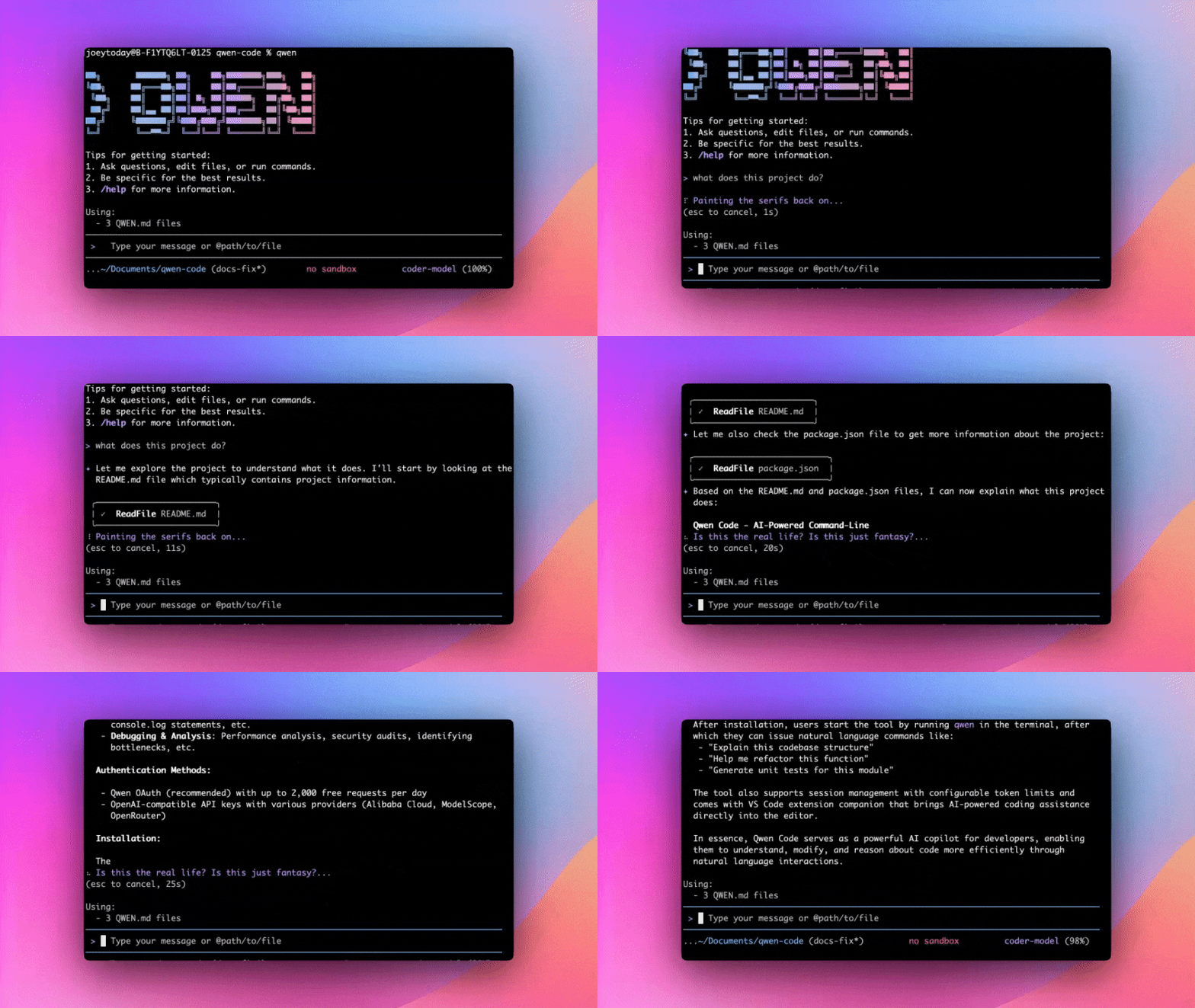
> What does this project do?
|
||
> Explain this codebase structure
|
||
> Help me refactor this function
|
||
> Generate unit tests for this module
|
||
```
|
||
|
||
|
||
|
||
|
||
## Usage Examples
|
||
|
||
### 1️⃣ Interactive Mode
|
||
|
||
```bash
|
||
cd your-project/
|
||
qwen
|
||
```
|
||
|
||
Navigate to your project folder and type `qwen` to launch Qwen Code. Start a conversation and use `@` to reference files within the folder.
|
||
|
||
If you want to learn more about common workflows, click [Common Workflows](https://qwenlm.github.io/qwen-code-docs/en/users/common-workflow/) to view.
|
||
|
||
### 2️⃣ Headless Mode
|
||
|
||
```bash
|
||
cd your-project/
|
||
qwen -p "your question"
|
||
```
|
||
[Headless mode](https://qwenlm.github.io/qwen-code-docs/en/users/features/headless) allows you to run Qwen Code programmatically from command line scripts and automation tools without any interactive UI. This is ideal for scripting, automation, CI/CD pipelines, and building AI-powered tools.
|
||
|
||
### 3️⃣ Use in IDE
|
||
If you prefer to integrate Qwen Code into your current editor, we now support VS Code and Zed. For details, please refer to:
|
||
|
||
- [Use in VS Code](https://qwenlm.github.io/qwen-code-docs/en/users/integration-vscode/)
|
||
- [Use in Zed](https://qwenlm.github.io/qwen-code-docs/en/users/integration-zed/)
|
||
|
||
### 4️⃣ SDK
|
||
Qwen Code now supports an SDK designed to simplify integration with the Qwen Code platform. It provides a set of easy-to-use APIs and tools enabling developers to efficiently build, test, and deploy applications. For details, please refer to:
|
||
|
||
- [Use the Qwen Code SDK](./packages/sdk-typescript/README.md)
|
||
|
||
## Commands & Shortcuts
|
||
|
||
### Session Commands
|
||
|
||
- `/help` - Display available commands
|
||
- `/clear` - Clear conversation history
|
||
- `/compress` - Compress history to save tokens
|
||
- `/stats` - Show current session information
|
||
- `/exit` or `/quit` - Exit Qwen Code
|
||
|
||
### Keyboard Shortcuts
|
||
|
||
- `Ctrl+C` - Cancel current operation
|
||
- `Ctrl+D` - Exit (on empty line)
|
||
- `Up/Down` - Navigate command history
|
||
|
||
|
||
> 👉 Know more about [Commands](https://qwenlm.github.io/qwen-code-docs/en/users/features/commands/)
|
||
>
|
||
> 💡 **Tip**: In YOLO mode (`--yolo`), vision switching happens automatically without prompts when images are detected. Know more about [Approval Mode](https://qwenlm.github.io/qwen-code-docs/en/users/features/approval-mode/)
|
||
|
||
## Benchmark Results
|
||
|
||
### Terminal-Bench Performance
|
||
|
||
| Agent | Model | Accuracy |
|
||
| --------- | ------------------ | -------- |
|
||
| Qwen Code | Qwen3-Coder-480A35 | 37.5% |
|
||
| Qwen Code | Qwen3-Coder-30BA3B | 31.3% |
|
||
|
||
## Development & Contributing
|
||
|
||
See [CONTRIBUTING.md](https://qwenlm.github.io/qwen-code-docs/en/developers/contributing/) to learn how to contribute to the project.
|
||
|
||
For detailed authentication setup, see the [authentication guide](https://qwenlm.github.io/qwen-code-docs/en/users/configuration/auth/).
|
||
|
||
## Troubleshooting
|
||
|
||
If you encounter issues, check the [troubleshooting guide](https://qwenlm.github.io/qwen-code-docs/en/users/support/troubleshooting/).
|
||
|
||
## Acknowledgments
|
||
|
||
This project is based on [Google Gemini CLI](https://github.com/google-gemini/gemini-cli). We acknowledge and appreciate the excellent work of the Gemini CLI team. Our main contribution focuses on parser-level adaptations to better support Qwen-Coder models.
|
||
|
||
## License
|
||
|
||
[LICENSE](./LICENSE)
|
||
|
||
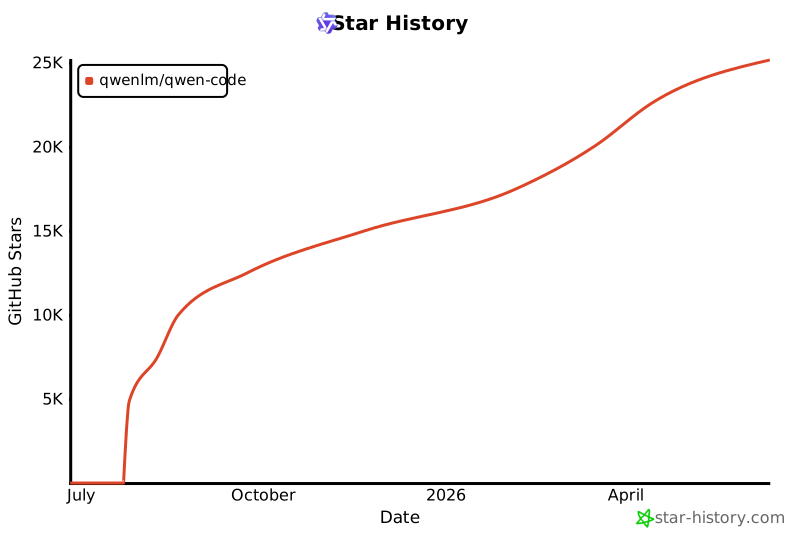
## Star History
|
||
|
||
[](https://www.star-history.com/#QwenLM/qwen-code&Date)
|