mirror of
https://github.com/QwenLM/qwen-code.git
synced 2026-01-16 13:59:14 +00:00
Compare commits
12 Commits
docs/code-
...
feat/unifi
| Author | SHA1 | Date | |
|---|---|---|---|

|
593577864b | ||
|
|
c44a60f9f9 | ||
|
|
e81cdbbcb1 | ||
|
|
ef48ebc118 | ||
|
|
4f0aed4d71 | ||
|
|
2cdfb1ffad | ||
|
|
a78cfc572b | ||
|
|
71570540cc | ||
|
|
af76450dee | ||
|
|
ec0586b135 | ||
|
|
1e2ef871d7 | ||
|
|
223fb1bfab |
3
.gitignore
vendored
3
.gitignore
vendored
@@ -63,3 +63,6 @@ patch_output.log
|
||||
docs-site/.next
|
||||
# content is a symlink to ../docs
|
||||
docs-site/content
|
||||
|
||||
*storybook.log
|
||||
storybook-static
|
||||
|
||||
@@ -5,13 +5,11 @@ Qwen Code supports two authentication methods. Pick the one that matches how you
|
||||
- **Qwen OAuth (recommended)**: sign in with your `qwen.ai` account in a browser.
|
||||
- **OpenAI-compatible API**: use an API key (OpenAI or any OpenAI-compatible provider / endpoint).
|
||||
|
||||
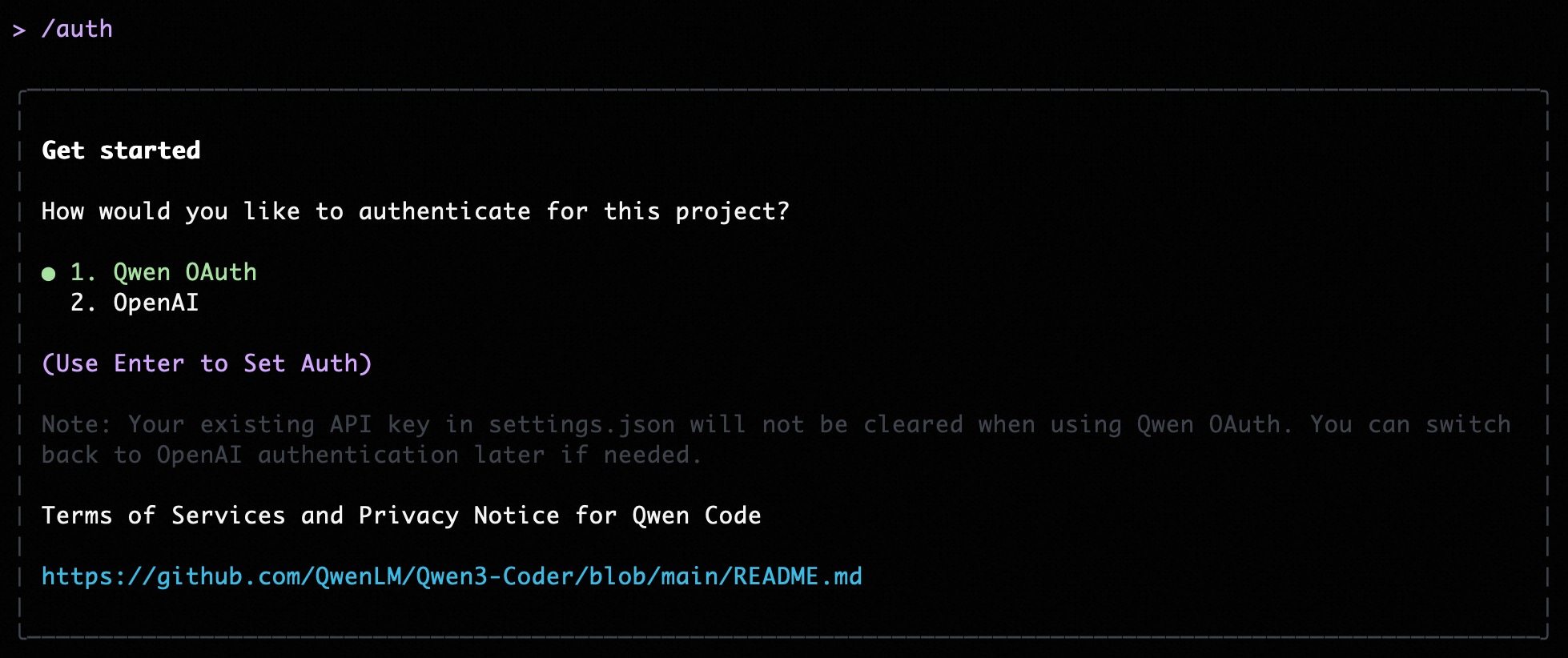
|
||||
|
||||
## Option 1: Qwen OAuth (recommended & free) 👍
|
||||
|
||||
Use this if you want the simplest setup and you're using Qwen models.
|
||||
Use this if you want the simplest setup and you’re using Qwen models.
|
||||
|
||||
- **How it works**: on first start, Qwen Code opens a browser login page. After you finish, credentials are cached locally so you usually won't need to log in again.
|
||||
- **How it works**: on first start, Qwen Code opens a browser login page. After you finish, credentials are cached locally so you usually won’t need to log in again.
|
||||
- **Requirements**: a `qwen.ai` account + internet access (at least for the first login).
|
||||
- **Benefits**: no API key management, automatic credential refresh.
|
||||
- **Cost & quota**: free, with a quota of **60 requests/minute** and **2,000 requests/day**.
|
||||
@@ -26,54 +24,15 @@ qwen
|
||||
|
||||
Use this if you want to use OpenAI models or any provider that exposes an OpenAI-compatible API (e.g. OpenAI, Azure OpenAI, OpenRouter, ModelScope, Alibaba Cloud Bailian, or a self-hosted compatible endpoint).
|
||||
|
||||
### Recommended: Coding Plan (subscription-based) 🚀
|
||||
### Quick start (interactive, recommended for local use)
|
||||
|
||||
Use this if you want predictable costs with higher usage quotas for the qwen3-coder-plus model.
|
||||
When you choose the OpenAI-compatible option in the CLI, it will prompt you for:
|
||||
|
||||
> [!IMPORTANT]
|
||||
>
|
||||
> Coding Plan is only available for users in China mainland (Beijing region).
|
||||
- **API key**
|
||||
- **Base URL** (default: `https://api.openai.com/v1`)
|
||||
- **Model** (default: `gpt-4o`)
|
||||
|
||||
- **How it works**: subscribe to the Coding Plan with a fixed monthly fee, then configure Qwen Code to use the dedicated endpoint and your subscription API key.
|
||||
- **Requirements**: an active Coding Plan subscription from [Alibaba Cloud Bailian](https://bailian.console.aliyun.com/cn-beijing/?tab=globalset#/efm/coding_plan).
|
||||
- **Benefits**: higher usage quotas, predictable monthly costs, access to latest qwen3-coder-plus model.
|
||||
- **Cost & quota**: varies by plan (see table below).
|
||||
|
||||
#### Coding Plan Pricing & Quotas
|
||||
|
||||
| Feature | Lite Basic Plan | Pro Advanced Plan |
|
||||
| :------------------ | :-------------------- | :-------------------- |
|
||||
| **Price** | ¥40/month | ¥200/month |
|
||||
| **5-Hour Limit** | Up to 1,200 requests | Up to 6,000 requests |
|
||||
| **Weekly Limit** | Up to 9,000 requests | Up to 45,000 requests |
|
||||
| **Monthly Limit** | Up to 18,000 requests | Up to 90,000 requests |
|
||||
| **Supported Model** | qwen3-coder-plus | qwen3-coder-plus |
|
||||
|
||||
#### Quick Setup for Coding Plan
|
||||
|
||||
When you select the OpenAI-compatible option in the CLI, enter these values:
|
||||
|
||||
- **API key**: `sk-sp-xxxxx`
|
||||
- **Base URL**: `https://coding.dashscope.aliyuncs.com/v1`
|
||||
- **Model**: `qwen3-coder-plus`
|
||||
|
||||
> **Note**: Coding Plan API keys have the format `sk-sp-xxxxx`, which is different from standard Alibaba Cloud API keys.
|
||||
|
||||
#### Configure via Environment Variables
|
||||
|
||||
Set these environment variables to use Coding Plan:
|
||||
|
||||
```bash
|
||||
export OPENAI_API_KEY="your-coding-plan-api-key" # Format: sk-sp-xxxxx
|
||||
export OPENAI_BASE_URL="https://coding.dashscope.aliyuncs.com/v1"
|
||||
export OPENAI_MODEL="qwen3-coder-plus"
|
||||
```
|
||||
|
||||
For more details about Coding Plan, including subscription options and troubleshooting, see the [full Coding Plan documentation](https://bailian.console.aliyun.com/cn-beijing/?tab=doc#/doc/?type=model&url=3005961).
|
||||
|
||||
### Other OpenAI-compatible Providers
|
||||
|
||||
If you are using other providers (OpenAI, Azure, local LLMs, etc.), use the following configuration methods.
|
||||
> **Note:** the CLI may display the key in plain text for verification. Make sure your terminal is not being recorded or shared.
|
||||
|
||||
### Configure via command-line arguments
|
||||
|
||||
|
||||
522
eslint.config.js
522
eslint.config.js
@@ -1,3 +1,6 @@
|
||||
// For more info, see https://github.com/storybookjs/eslint-plugin-storybook#configuration-flat-config-format
|
||||
import storybook from "eslint-plugin-storybook";
|
||||
|
||||
/**
|
||||
* @license
|
||||
* Copyright 2025 Google LLC
|
||||
@@ -13,277 +16,260 @@ import importPlugin from 'eslint-plugin-import';
|
||||
import vitest from '@vitest/eslint-plugin';
|
||||
import globals from 'globals';
|
||||
|
||||
export default tseslint.config(
|
||||
{
|
||||
// Global ignores
|
||||
ignores: [
|
||||
'node_modules/*',
|
||||
'packages/**/dist/**',
|
||||
'bundle/**',
|
||||
'package/bundle/**',
|
||||
'.integration-tests/**',
|
||||
'packages/**/.integration-test/**',
|
||||
'dist/**',
|
||||
'docs-site/.next/**',
|
||||
'docs-site/out/**',
|
||||
export default tseslint.config({
|
||||
// Global ignores
|
||||
ignores: [
|
||||
'node_modules/*',
|
||||
'packages/**/dist/**',
|
||||
'bundle/**',
|
||||
'package/bundle/**',
|
||||
'.integration-tests/**',
|
||||
'packages/**/.integration-test/**',
|
||||
'dist/**',
|
||||
'docs-site/.next/**',
|
||||
'docs-site/out/**',
|
||||
],
|
||||
}, eslint.configs.recommended, ...tseslint.configs.recommended, reactHooks.configs['recommended-latest'], reactPlugin.configs.flat.recommended, // Add this if you are using React 17+
|
||||
reactPlugin.configs.flat['jsx-runtime'], {
|
||||
// Settings for eslint-plugin-react
|
||||
settings: {
|
||||
react: {
|
||||
version: 'detect',
|
||||
},
|
||||
},
|
||||
}, {
|
||||
// Import specific config
|
||||
files: ['packages/cli/src/**/*.{ts,tsx}'], // Target only TS/TSX in the cli package
|
||||
plugins: {
|
||||
import: importPlugin,
|
||||
},
|
||||
settings: {
|
||||
'import/resolver': {
|
||||
node: true,
|
||||
},
|
||||
},
|
||||
rules: {
|
||||
...importPlugin.configs.recommended.rules,
|
||||
...importPlugin.configs.typescript.rules,
|
||||
'import/no-default-export': 'warn',
|
||||
'import/no-unresolved': 'off', // Disable for now, can be noisy with monorepos/paths
|
||||
},
|
||||
}, {
|
||||
// General overrides and rules for the project (TS/TSX files)
|
||||
files: ['packages/*/src/**/*.{ts,tsx}'], // Target only TS/TSX in the cli package
|
||||
plugins: {
|
||||
import: importPlugin,
|
||||
},
|
||||
settings: {
|
||||
'import/resolver': {
|
||||
node: true,
|
||||
},
|
||||
},
|
||||
languageOptions: {
|
||||
globals: {
|
||||
...globals.node,
|
||||
...globals.es2021,
|
||||
},
|
||||
},
|
||||
rules: {
|
||||
// We use TypeScript for React components; prop-types are unnecessary
|
||||
'react/prop-types': 'off',
|
||||
// General Best Practice Rules (subset adapted for flat config)
|
||||
'@typescript-eslint/array-type': ['error', { default: 'array-simple' }],
|
||||
'arrow-body-style': ['error', 'as-needed'],
|
||||
curly: ['error', 'multi-line'],
|
||||
eqeqeq: ['error', 'always', { null: 'ignore' }],
|
||||
'@typescript-eslint/consistent-type-assertions': [
|
||||
'error',
|
||||
{ assertionStyle: 'as' },
|
||||
],
|
||||
'@typescript-eslint/explicit-member-accessibility': [
|
||||
'error',
|
||||
{ accessibility: 'no-public' },
|
||||
],
|
||||
'@typescript-eslint/no-explicit-any': 'error',
|
||||
'@typescript-eslint/no-inferrable-types': [
|
||||
'error',
|
||||
{ ignoreParameters: true, ignoreProperties: true },
|
||||
],
|
||||
'@typescript-eslint/consistent-type-imports': [
|
||||
'error',
|
||||
{ disallowTypeAnnotations: false },
|
||||
],
|
||||
'@typescript-eslint/no-namespace': ['error', { allowDeclarations: true }],
|
||||
'@typescript-eslint/no-unused-vars': [
|
||||
'error',
|
||||
{
|
||||
argsIgnorePattern: '^_',
|
||||
varsIgnorePattern: '^_',
|
||||
caughtErrorsIgnorePattern: '^_',
|
||||
},
|
||||
],
|
||||
'import/no-internal-modules': [
|
||||
'error',
|
||||
{
|
||||
allow: [
|
||||
'react-dom/test-utils',
|
||||
'react-dom/client',
|
||||
'memfs/lib/volume.js',
|
||||
'yargs/**',
|
||||
'msw/node',
|
||||
'**/generated/**',
|
||||
'./styles/tailwind.css',
|
||||
'./styles/App.css',
|
||||
'./styles/style.css'
|
||||
],
|
||||
},
|
||||
],
|
||||
'import/no-relative-packages': 'error',
|
||||
'no-cond-assign': 'error',
|
||||
'no-debugger': 'error',
|
||||
'no-duplicate-case': 'error',
|
||||
'no-restricted-syntax': [
|
||||
'error',
|
||||
{
|
||||
selector: 'CallExpression[callee.name="require"]',
|
||||
message: 'Avoid using require(). Use ES6 imports instead.',
|
||||
},
|
||||
{
|
||||
selector: 'ThrowStatement > Literal:not([value=/^\\w+Error:/])',
|
||||
message:
|
||||
'Do not throw string literals or non-Error objects. Throw new Error("...") instead.',
|
||||
},
|
||||
],
|
||||
'no-unsafe-finally': 'error',
|
||||
'no-unused-expressions': 'off', // Disable base rule
|
||||
'@typescript-eslint/no-unused-expressions': [
|
||||
// Enable TS version
|
||||
'error',
|
||||
{ allowShortCircuit: true, allowTernary: true },
|
||||
],
|
||||
'no-var': 'error',
|
||||
'object-shorthand': 'error',
|
||||
'one-var': ['error', 'never'],
|
||||
'prefer-arrow-callback': 'error',
|
||||
'prefer-const': ['error', { destructuring: 'all' }],
|
||||
radix: 'error',
|
||||
'default-case': 'error',
|
||||
},
|
||||
}, {
|
||||
files: ['packages/*/src/**/*.test.{ts,tsx}', 'packages/**/test/**/*.test.{ts,tsx}'],
|
||||
plugins: {
|
||||
vitest,
|
||||
},
|
||||
rules: {
|
||||
...vitest.configs.recommended.rules,
|
||||
'vitest/expect-expect': 'off',
|
||||
'vitest/no-commented-out-tests': 'off',
|
||||
'@typescript-eslint/no-unused-vars': [
|
||||
'error',
|
||||
{
|
||||
argsIgnorePattern: '^_',
|
||||
varsIgnorePattern: '^_',
|
||||
caughtErrorsIgnorePattern: '^_',
|
||||
},
|
||||
],
|
||||
},
|
||||
eslint.configs.recommended,
|
||||
...tseslint.configs.recommended,
|
||||
reactHooks.configs['recommended-latest'],
|
||||
reactPlugin.configs.flat.recommended,
|
||||
reactPlugin.configs.flat['jsx-runtime'], // Add this if you are using React 17+
|
||||
{
|
||||
// Settings for eslint-plugin-react
|
||||
settings: {
|
||||
react: {
|
||||
version: 'detect',
|
||||
}, // extra settings for scripts that we run directly with node
|
||||
{
|
||||
files: ['./scripts/**/*.js', 'esbuild.config.js', 'packages/*/scripts/**/*.js'],
|
||||
languageOptions: {
|
||||
globals: {
|
||||
...globals.node,
|
||||
process: 'readonly',
|
||||
console: 'readonly',
|
||||
},
|
||||
},
|
||||
rules: {
|
||||
'@typescript-eslint/no-unused-vars': [
|
||||
'error',
|
||||
{
|
||||
argsIgnorePattern: '^_',
|
||||
varsIgnorePattern: '^_',
|
||||
caughtErrorsIgnorePattern: '^_',
|
||||
},
|
||||
],
|
||||
},
|
||||
}, {
|
||||
files: ['packages/vscode-ide-companion/esbuild.js'],
|
||||
languageOptions: {
|
||||
globals: {
|
||||
...globals.node,
|
||||
process: 'readonly',
|
||||
console: 'readonly',
|
||||
},
|
||||
},
|
||||
rules: {
|
||||
'no-restricted-syntax': 'off',
|
||||
'@typescript-eslint/no-require-imports': 'off',
|
||||
},
|
||||
}, // extra settings for scripts that we run directly with node
|
||||
{
|
||||
files: ['packages/vscode-ide-companion/scripts/**/*.js'],
|
||||
languageOptions: {
|
||||
globals: {
|
||||
...globals.node,
|
||||
process: 'readonly',
|
||||
console: 'readonly',
|
||||
},
|
||||
},
|
||||
rules: {
|
||||
'no-restricted-syntax': 'off',
|
||||
'@typescript-eslint/no-require-imports': 'off',
|
||||
},
|
||||
}, // extra settings for core package scripts
|
||||
{
|
||||
files: ['packages/core/scripts/**/*.js'],
|
||||
languageOptions: {
|
||||
globals: {
|
||||
...globals.node,
|
||||
process: 'readonly',
|
||||
console: 'readonly',
|
||||
},
|
||||
},
|
||||
rules: {
|
||||
'no-restricted-syntax': 'off',
|
||||
'@typescript-eslint/no-require-imports': 'off',
|
||||
},
|
||||
}, // Prettier config must be last
|
||||
prettierConfig, // extra settings for scripts that we run directly with node
|
||||
{
|
||||
files: ['./integration-tests/**/*.{js,ts,tsx}'],
|
||||
languageOptions: {
|
||||
globals: {
|
||||
...globals.node,
|
||||
process: 'readonly',
|
||||
console: 'readonly',
|
||||
},
|
||||
},
|
||||
rules: {
|
||||
'@typescript-eslint/no-unused-vars': [
|
||||
'error',
|
||||
{
|
||||
argsIgnorePattern: '^_',
|
||||
varsIgnorePattern: '^_',
|
||||
caughtErrorsIgnorePattern: '^_',
|
||||
},
|
||||
],
|
||||
},
|
||||
}, // Settings for docs-site directory
|
||||
{
|
||||
files: ['docs-site/**/*.{js,jsx}'],
|
||||
languageOptions: {
|
||||
globals: {
|
||||
...globals.browser,
|
||||
...globals.node,
|
||||
},
|
||||
parserOptions: {
|
||||
ecmaFeatures: {
|
||||
jsx: true,
|
||||
},
|
||||
},
|
||||
},
|
||||
{
|
||||
// Import specific config
|
||||
files: ['packages/cli/src/**/*.{ts,tsx}'], // Target only TS/TSX in the cli package
|
||||
plugins: {
|
||||
import: importPlugin,
|
||||
},
|
||||
settings: {
|
||||
'import/resolver': {
|
||||
node: true,
|
||||
},
|
||||
},
|
||||
rules: {
|
||||
...importPlugin.configs.recommended.rules,
|
||||
...importPlugin.configs.typescript.rules,
|
||||
'import/no-default-export': 'warn',
|
||||
'import/no-unresolved': 'off', // Disable for now, can be noisy with monorepos/paths
|
||||
},
|
||||
rules: {
|
||||
// Allow relaxed rules for documentation site
|
||||
'@typescript-eslint/no-unused-vars': 'off',
|
||||
'react/prop-types': 'off',
|
||||
'react/react-in-jsx-scope': 'off',
|
||||
},
|
||||
{
|
||||
// General overrides and rules for the project (TS/TSX files)
|
||||
files: ['packages/*/src/**/*.{ts,tsx}'], // Target only TS/TSX in the cli package
|
||||
plugins: {
|
||||
import: importPlugin,
|
||||
},
|
||||
settings: {
|
||||
'import/resolver': {
|
||||
node: true,
|
||||
},
|
||||
},
|
||||
languageOptions: {
|
||||
globals: {
|
||||
...globals.node,
|
||||
...globals.es2021,
|
||||
},
|
||||
},
|
||||
rules: {
|
||||
// We use TypeScript for React components; prop-types are unnecessary
|
||||
'react/prop-types': 'off',
|
||||
// General Best Practice Rules (subset adapted for flat config)
|
||||
'@typescript-eslint/array-type': ['error', { default: 'array-simple' }],
|
||||
'arrow-body-style': ['error', 'as-needed'],
|
||||
curly: ['error', 'multi-line'],
|
||||
eqeqeq: ['error', 'always', { null: 'ignore' }],
|
||||
'@typescript-eslint/consistent-type-assertions': [
|
||||
'error',
|
||||
{ assertionStyle: 'as' },
|
||||
],
|
||||
'@typescript-eslint/explicit-member-accessibility': [
|
||||
'error',
|
||||
{ accessibility: 'no-public' },
|
||||
],
|
||||
'@typescript-eslint/no-explicit-any': 'error',
|
||||
'@typescript-eslint/no-inferrable-types': [
|
||||
'error',
|
||||
{ ignoreParameters: true, ignoreProperties: true },
|
||||
],
|
||||
'@typescript-eslint/consistent-type-imports': [
|
||||
'error',
|
||||
{ disallowTypeAnnotations: false },
|
||||
],
|
||||
'@typescript-eslint/no-namespace': ['error', { allowDeclarations: true }],
|
||||
'@typescript-eslint/no-unused-vars': [
|
||||
'error',
|
||||
{
|
||||
argsIgnorePattern: '^_',
|
||||
varsIgnorePattern: '^_',
|
||||
caughtErrorsIgnorePattern: '^_',
|
||||
},
|
||||
],
|
||||
'import/no-internal-modules': [
|
||||
'error',
|
||||
{
|
||||
allow: [
|
||||
'react-dom/test-utils',
|
||||
'react-dom/client',
|
||||
'memfs/lib/volume.js',
|
||||
'yargs/**',
|
||||
'msw/node',
|
||||
'**/generated/**',
|
||||
'./styles/tailwind.css',
|
||||
'./styles/App.css',
|
||||
'./styles/style.css'
|
||||
],
|
||||
},
|
||||
],
|
||||
'import/no-relative-packages': 'error',
|
||||
'no-cond-assign': 'error',
|
||||
'no-debugger': 'error',
|
||||
'no-duplicate-case': 'error',
|
||||
'no-restricted-syntax': [
|
||||
'error',
|
||||
{
|
||||
selector: 'CallExpression[callee.name="require"]',
|
||||
message: 'Avoid using require(). Use ES6 imports instead.',
|
||||
},
|
||||
{
|
||||
selector: 'ThrowStatement > Literal:not([value=/^\\w+Error:/])',
|
||||
message:
|
||||
'Do not throw string literals or non-Error objects. Throw new Error("...") instead.',
|
||||
},
|
||||
],
|
||||
'no-unsafe-finally': 'error',
|
||||
'no-unused-expressions': 'off', // Disable base rule
|
||||
'@typescript-eslint/no-unused-expressions': [
|
||||
// Enable TS version
|
||||
'error',
|
||||
{ allowShortCircuit: true, allowTernary: true },
|
||||
],
|
||||
'no-var': 'error',
|
||||
'object-shorthand': 'error',
|
||||
'one-var': ['error', 'never'],
|
||||
'prefer-arrow-callback': 'error',
|
||||
'prefer-const': ['error', { destructuring: 'all' }],
|
||||
radix: 'error',
|
||||
'default-case': 'error',
|
||||
},
|
||||
},
|
||||
{
|
||||
files: ['packages/*/src/**/*.test.{ts,tsx}', 'packages/**/test/**/*.test.{ts,tsx}'],
|
||||
plugins: {
|
||||
vitest,
|
||||
},
|
||||
rules: {
|
||||
...vitest.configs.recommended.rules,
|
||||
'vitest/expect-expect': 'off',
|
||||
'vitest/no-commented-out-tests': 'off',
|
||||
'@typescript-eslint/no-unused-vars': [
|
||||
'error',
|
||||
{
|
||||
argsIgnorePattern: '^_',
|
||||
varsIgnorePattern: '^_',
|
||||
caughtErrorsIgnorePattern: '^_',
|
||||
},
|
||||
],
|
||||
},
|
||||
},
|
||||
// extra settings for scripts that we run directly with node
|
||||
{
|
||||
files: ['./scripts/**/*.js', 'esbuild.config.js', 'packages/*/scripts/**/*.js'],
|
||||
languageOptions: {
|
||||
globals: {
|
||||
...globals.node,
|
||||
process: 'readonly',
|
||||
console: 'readonly',
|
||||
},
|
||||
},
|
||||
rules: {
|
||||
'@typescript-eslint/no-unused-vars': [
|
||||
'error',
|
||||
{
|
||||
argsIgnorePattern: '^_',
|
||||
varsIgnorePattern: '^_',
|
||||
caughtErrorsIgnorePattern: '^_',
|
||||
},
|
||||
],
|
||||
},
|
||||
},
|
||||
{
|
||||
files: ['packages/vscode-ide-companion/esbuild.js'],
|
||||
languageOptions: {
|
||||
globals: {
|
||||
...globals.node,
|
||||
process: 'readonly',
|
||||
console: 'readonly',
|
||||
},
|
||||
},
|
||||
rules: {
|
||||
'no-restricted-syntax': 'off',
|
||||
'@typescript-eslint/no-require-imports': 'off',
|
||||
},
|
||||
},
|
||||
// extra settings for scripts that we run directly with node
|
||||
{
|
||||
files: ['packages/vscode-ide-companion/scripts/**/*.js'],
|
||||
languageOptions: {
|
||||
globals: {
|
||||
...globals.node,
|
||||
process: 'readonly',
|
||||
console: 'readonly',
|
||||
},
|
||||
},
|
||||
rules: {
|
||||
'no-restricted-syntax': 'off',
|
||||
'@typescript-eslint/no-require-imports': 'off',
|
||||
},
|
||||
},
|
||||
// extra settings for core package scripts
|
||||
{
|
||||
files: ['packages/core/scripts/**/*.js'],
|
||||
languageOptions: {
|
||||
globals: {
|
||||
...globals.node,
|
||||
process: 'readonly',
|
||||
console: 'readonly',
|
||||
},
|
||||
},
|
||||
rules: {
|
||||
'no-restricted-syntax': 'off',
|
||||
'@typescript-eslint/no-require-imports': 'off',
|
||||
},
|
||||
},
|
||||
// Prettier config must be last
|
||||
prettierConfig,
|
||||
// extra settings for scripts that we run directly with node
|
||||
{
|
||||
files: ['./integration-tests/**/*.{js,ts,tsx}'],
|
||||
languageOptions: {
|
||||
globals: {
|
||||
...globals.node,
|
||||
process: 'readonly',
|
||||
console: 'readonly',
|
||||
},
|
||||
},
|
||||
rules: {
|
||||
'@typescript-eslint/no-unused-vars': [
|
||||
'error',
|
||||
{
|
||||
argsIgnorePattern: '^_',
|
||||
varsIgnorePattern: '^_',
|
||||
caughtErrorsIgnorePattern: '^_',
|
||||
},
|
||||
],
|
||||
},
|
||||
},
|
||||
// Settings for docs-site directory
|
||||
{
|
||||
files: ['docs-site/**/*.{js,jsx}'],
|
||||
languageOptions: {
|
||||
globals: {
|
||||
...globals.browser,
|
||||
...globals.node,
|
||||
},
|
||||
parserOptions: {
|
||||
ecmaFeatures: {
|
||||
jsx: true,
|
||||
},
|
||||
},
|
||||
},
|
||||
rules: {
|
||||
// Allow relaxed rules for documentation site
|
||||
'@typescript-eslint/no-unused-vars': 'off',
|
||||
'react/prop-types': 'off',
|
||||
'react/react-in-jsx-scope': 'off',
|
||||
},
|
||||
},
|
||||
);
|
||||
}, storybook.configs["flat/recommended"]);
|
||||
|
||||
2668
package-lock.json
generated
2668
package-lock.json
generated
File diff suppressed because it is too large
Load Diff
@@ -874,10 +874,11 @@ export async function loadCliConfig(
|
||||
}
|
||||
};
|
||||
|
||||
// ACP mode check: must include both --acp (current) and --experimental-acp (deprecated).
|
||||
// Without this check, edit, write_file, run_shell_command would be excluded in ACP mode.
|
||||
const isAcpMode = argv.acp || argv.experimentalAcp;
|
||||
if (!interactive && !isAcpMode && inputFormat !== InputFormat.STREAM_JSON) {
|
||||
if (
|
||||
!interactive &&
|
||||
!argv.experimentalAcp &&
|
||||
inputFormat !== InputFormat.STREAM_JSON
|
||||
) {
|
||||
switch (approvalMode) {
|
||||
case ApprovalMode.PLAN:
|
||||
case ApprovalMode.DEFAULT:
|
||||
|
||||
@@ -1,11 +1,6 @@
|
||||
# Qwen Code Companion
|
||||
|
||||
[](https://marketplace.visualstudio.com/items?itemName=qwenlm.qwen-code-vscode-ide-companion)
|
||||
[](https://marketplace.visualstudio.com/items?itemName=qwenlm.qwen-code-vscode-ide-companion)
|
||||
[](https://open-vsx.org/extension/qwenlm/qwen-code-vscode-ide-companion)
|
||||
[](https://marketplace.visualstudio.com/items?itemName=qwenlm.qwen-code-vscode-ide-companion)
|
||||
|
||||
Seamlessly integrate [Qwen Code](https://github.com/QwenLM/qwen-code) into Visual Studio Code with native IDE features and an intuitive chat interface. This extension bundles everything you need — no additional installation required.
|
||||
Seamlessly integrate [Qwen Code](https://github.com/QwenLM/qwen-code) into Visual Studio Code with native IDE features and an intuitive interface. This extension bundles everything you need to get started immediately.
|
||||
|
||||
## Demo
|
||||
|
||||
@@ -16,7 +11,7 @@ Seamlessly integrate [Qwen Code](https://github.com/QwenLM/qwen-code) into Visua
|
||||
|
||||
## Features
|
||||
|
||||
- **Native IDE experience**: Dedicated Qwen Code Chat panel accessed via the Qwen icon in the editor title bar
|
||||
- **Native IDE experience**: Dedicated Qwen Code sidebar panel accessed via the Qwen icon
|
||||
- **Native diffing**: Review, edit, and accept changes in VS Code's diff view
|
||||
- **Auto-accept edits mode**: Automatically apply Qwen's changes as they're made
|
||||
- **File management**: @-mention files or attach files and images using the system file picker
|
||||
@@ -25,46 +20,73 @@ Seamlessly integrate [Qwen Code](https://github.com/QwenLM/qwen-code) into Visua
|
||||
|
||||
## Requirements
|
||||
|
||||
- Visual Studio Code 1.85.0 or newer (also works with Cursor, Windsurf, and other VS Code-based editors)
|
||||
- Visual Studio Code 1.85.0 or newer
|
||||
|
||||
## Quick Start
|
||||
## Installation
|
||||
|
||||
1. **Install** from the [VS Code Marketplace](https://marketplace.visualstudio.com/items?itemName=qwenlm.qwen-code-vscode-ide-companion) or [Open VSX Registry](https://open-vsx.org/extension/qwenlm/qwen-code-vscode-ide-companion)
|
||||
1. Install from the VS Code Marketplace: https://marketplace.visualstudio.com/items?itemName=qwenlm.qwen-code-vscode-ide-companion
|
||||
|
||||
2. **Open the Chat panel** using one of these methods:
|
||||
- Click the **Qwen icon** in the top-right corner of the editor
|
||||
- Run `Qwen Code: Open` from the Command Palette (`Cmd+Shift+P` / `Ctrl+Shift+P`)
|
||||
2. Two ways to use
|
||||
- Chat panel: Click the Qwen icon in the Activity Bar, or run `Qwen Code: Open` from the Command Palette (`Cmd+Shift+P` / `Ctrl+Shift+P`).
|
||||
- Terminal session (classic): Run `Qwen Code: Run` to launch a session in the integrated terminal (bundled CLI).
|
||||
|
||||
3. **Start chatting** — Ask Qwen to help with coding tasks, explain code, fix bugs, or write new features
|
||||
## Development and Debugging
|
||||
|
||||
## Commands
|
||||
To debug and develop this extension locally:
|
||||
|
||||
| Command | Description |
|
||||
| -------------------------------- | ------------------------------------------------------ |
|
||||
| `Qwen Code: Open` | Open the Qwen Code Chat panel |
|
||||
| `Qwen Code: Run` | Launch a classic terminal session with the bundled CLI |
|
||||
| `Qwen Code: Accept Current Diff` | Accept the currently displayed diff |
|
||||
| `Qwen Code: Close Diff Editor` | Close/reject the current diff |
|
||||
1. **Clone the repository**
|
||||
|
||||
## Feedback & Issues
|
||||
```bash
|
||||
git clone https://github.com/QwenLM/qwen-code.git
|
||||
cd qwen-code
|
||||
```
|
||||
|
||||
- 🐛 [Report bugs](https://github.com/QwenLM/qwen-code/issues/new?template=bug_report.yml&labels=bug,vscode-ide-companion)
|
||||
- 💡 [Request features](https://github.com/QwenLM/qwen-code/issues/new?template=feature_request.yml&labels=enhancement,vscode-ide-companion)
|
||||
- 📖 [Documentation](https://qwenlm.github.io/qwen-code-docs/)
|
||||
- 📋 [Changelog](https://github.com/QwenLM/qwen-code/releases)
|
||||
2. **Install dependencies**
|
||||
|
||||
## Contributing
|
||||
```bash
|
||||
npm install
|
||||
# or if using pnpm
|
||||
pnpm install
|
||||
```
|
||||
|
||||
We welcome contributions! See our [Contributing Guide](https://github.com/QwenLM/qwen-code/blob/main/CONTRIBUTING.md) for details on:
|
||||
3. **Start debugging**
|
||||
|
||||
- Setting up the development environment
|
||||
- Building and debugging the extension locally
|
||||
- Submitting pull requests
|
||||
```bash
|
||||
code . # Open the project root in VS Code
|
||||
```
|
||||
- Open the `packages/vscode-ide-companion/src/extension.ts` file
|
||||
- Open Debug panel (`Ctrl+Shift+D` or `Cmd+Shift+D`)
|
||||
- Select **"Launch Companion VS Code Extension"** from the debug dropdown
|
||||
- Press `F5` to launch Extension Development Host
|
||||
|
||||
4. **Make changes and reload**
|
||||
- Edit the source code in the original VS Code window
|
||||
- To see your changes, reload the Extension Development Host window by:
|
||||
- Pressing `Ctrl+R` (Windows/Linux) or `Cmd+R` (macOS)
|
||||
- Or clicking the "Reload" button in the debug toolbar
|
||||
|
||||
5. **View logs and debug output**
|
||||
- Open the Debug Console in the original VS Code window to see extension logs
|
||||
- In the Extension Development Host window, open Developer Tools with `Help > Toggle Developer Tools` to see webview logs
|
||||
|
||||
## Build for Production
|
||||
|
||||
To build the extension for distribution:
|
||||
|
||||
```bash
|
||||
npm run compile
|
||||
# or
|
||||
pnpm run compile
|
||||
```
|
||||
|
||||
To package the extension as a VSIX file:
|
||||
|
||||
```bash
|
||||
npx vsce package
|
||||
# or
|
||||
pnpm vsce package
|
||||
```
|
||||
|
||||
## Terms of Service and Privacy Notice
|
||||
|
||||
By installing this extension, you agree to the [Terms of Service](https://github.com/QwenLM/qwen-code/blob/main/docs/tos-privacy.md).
|
||||
|
||||
## License
|
||||
|
||||
[Apache-2.0](https://github.com/QwenLM/qwen-code/blob/main/LICENSE)
|
||||
|
||||
@@ -152,6 +152,7 @@
|
||||
"vitest": "^3.2.4"
|
||||
},
|
||||
"dependencies": {
|
||||
"@qwen-code/webui": "*",
|
||||
"semver": "^7.7.2",
|
||||
"@modelcontextprotocol/sdk": "^1.25.1",
|
||||
"cors": "^2.8.5",
|
||||
|
||||
@@ -1,3 +1,9 @@
|
||||
/**
|
||||
* @license
|
||||
* Copyright 2025 Qwen Team
|
||||
* SPDX-License-Identifier: Apache-2.0
|
||||
*/
|
||||
|
||||
import * as vscode from 'vscode';
|
||||
import type { DiffManager } from '../diff-manager.js';
|
||||
import type { WebViewProvider } from '../webview/WebViewProvider.js';
|
||||
|
||||
@@ -314,32 +314,34 @@ export async function activate(context: vscode.ExtensionContext) {
|
||||
'cli.js',
|
||||
).fsPath;
|
||||
const execPath = process.execPath;
|
||||
const lowerExecPath = execPath.toLowerCase();
|
||||
const needsElectronRunAsNode =
|
||||
lowerExecPath.includes('code') ||
|
||||
lowerExecPath.includes('electron');
|
||||
|
||||
let qwenCmd: string;
|
||||
const terminalOptions: vscode.TerminalOptions = {
|
||||
name: `Qwen Code (${selectedFolder.name})`,
|
||||
cwd: selectedFolder.uri.fsPath,
|
||||
location,
|
||||
};
|
||||
|
||||
let qwenCmd: string;
|
||||
|
||||
if (isWindows) {
|
||||
// On Windows, try multiple strategies to find a Node.js runtime:
|
||||
// 1. Check if VSCode ships a standalone node.exe alongside Code.exe
|
||||
// 2. Check VSCode's internal Node.js in resources directory
|
||||
// 3. Fall back to using Code.exe with ELECTRON_RUN_AS_NODE=1
|
||||
// Use system Node via cmd.exe; avoid PowerShell parsing issues
|
||||
const quoteCmd = (s: string) => `"${s.replace(/"/g, '""')}"`;
|
||||
const cliQuoted = quoteCmd(cliEntry);
|
||||
// TODO: @yiliang114, temporarily run through node, and later hope to decouple from the local node
|
||||
qwenCmd = `node ${cliQuoted}`;
|
||||
terminalOptions.shellPath = process.env.ComSpec;
|
||||
} else {
|
||||
// macOS/Linux: All VSCode-like IDEs (VSCode, Cursor, Windsurf, etc.)
|
||||
// are Electron-based, so we always need ELECTRON_RUN_AS_NODE=1
|
||||
// to run Node.js scripts using the IDE's bundled runtime.
|
||||
const quotePosix = (s: string) => `"${s.replace(/"/g, '\\"')}"`;
|
||||
const baseCmd = `${quotePosix(execPath)} ${quotePosix(cliEntry)}`;
|
||||
qwenCmd = `ELECTRON_RUN_AS_NODE=1 ${baseCmd}`;
|
||||
if (needsElectronRunAsNode) {
|
||||
// macOS Electron helper needs ELECTRON_RUN_AS_NODE=1;
|
||||
qwenCmd = `ELECTRON_RUN_AS_NODE=1 ${baseCmd}`;
|
||||
} else {
|
||||
qwenCmd = baseCmd;
|
||||
}
|
||||
}
|
||||
|
||||
const terminal = vscode.window.createTerminal(terminalOptions);
|
||||
|
||||
@@ -2,18 +2,8 @@
|
||||
* @license
|
||||
* Copyright 2025 Qwen Team
|
||||
* SPDX-License-Identifier: Apache-2.0
|
||||
*
|
||||
* Re-export completion item types from webui for backward compatibility
|
||||
*/
|
||||
|
||||
import type React from 'react';
|
||||
|
||||
export interface CompletionItem {
|
||||
id: string;
|
||||
label: string;
|
||||
description?: string;
|
||||
icon?: React.ReactNode;
|
||||
type: 'file' | 'folder' | 'symbol' | 'command' | 'variable' | 'info';
|
||||
// Value inserted into the input when selected (e.g., filename or command)
|
||||
value?: string;
|
||||
// Optional full path for files (used to build @filename -> full path mapping)
|
||||
path?: string;
|
||||
}
|
||||
export type { CompletionItem, CompletionItemType } from '@qwen-code/webui';
|
||||
|
||||
@@ -28,21 +28,23 @@ import type { ToolCallData } from './components/messages/toolcalls/ToolCall.js';
|
||||
import { PermissionDrawer } from './components/PermissionDrawer/PermissionDrawer.js';
|
||||
import { ToolCall } from './components/messages/toolcalls/ToolCall.js';
|
||||
import { hasToolCallOutput } from './utils/utils.js';
|
||||
import { EmptyState } from './components/layout/EmptyState.js';
|
||||
import { Onboarding } from './components/layout/Onboarding.js';
|
||||
import { type CompletionItem } from '../types/completionItemTypes.js';
|
||||
import { useCompletionTrigger } from './hooks/useCompletionTrigger.js';
|
||||
import { ChatHeader } from './components/layout/ChatHeader.js';
|
||||
import {
|
||||
UserMessage,
|
||||
AssistantMessage,
|
||||
UserMessage,
|
||||
ThinkingMessage,
|
||||
WaitingMessage,
|
||||
InterruptedMessage,
|
||||
} from './components/messages/index.js';
|
||||
FileIcon,
|
||||
UserIcon,
|
||||
// Layout components imported directly from webui
|
||||
EmptyState,
|
||||
ChatHeader,
|
||||
SessionSelector,
|
||||
} from '@qwen-code/webui';
|
||||
import { InputForm } from './components/layout/InputForm.js';
|
||||
import { SessionSelector } from './components/layout/SessionSelector.js';
|
||||
import { FileIcon, UserIcon } from './components/icons/index.js';
|
||||
import { ApprovalMode, NEXT_APPROVAL_MODE } from '../types/acpTypes.js';
|
||||
import type { ApprovalModeValue } from '../types/approvalModeValueTypes.js';
|
||||
import type { PlanEntry, UsageStatsPayload } from '../types/chatTypes.js';
|
||||
|
||||
@@ -1,47 +0,0 @@
|
||||
/**
|
||||
* @license
|
||||
* Copyright 2025 Qwen Team
|
||||
* SPDX-License-Identifier: Apache-2.0
|
||||
*/
|
||||
|
||||
import type React from 'react';
|
||||
import { ChevronDownIcon, PlusIcon } from '../icons/index.js';
|
||||
|
||||
interface ChatHeaderProps {
|
||||
currentSessionTitle: string;
|
||||
onLoadSessions: () => void;
|
||||
onNewSession: () => void;
|
||||
}
|
||||
|
||||
export const ChatHeader: React.FC<ChatHeaderProps> = ({
|
||||
currentSessionTitle,
|
||||
onLoadSessions,
|
||||
onNewSession,
|
||||
}) => (
|
||||
<div
|
||||
className="chat-header flex items-center select-none w-full border-b border-[var(--app-primary-border-color)] bg-[var(--app-header-background)] py-1.5 px-2.5"
|
||||
style={{ borderBottom: '1px solid var(--app-primary-border-color)' }}
|
||||
>
|
||||
<button
|
||||
className="flex items-center gap-1.5 py-0.5 px-2 bg-transparent border-none rounded cursor-pointer outline-none min-w-0 max-w-[300px] overflow-hidden text-[var(--vscode-chat-font-size,13px)] font-[var(--vscode-chat-font-family)] hover:bg-[var(--app-ghost-button-hover-background)] focus:bg-[var(--app-ghost-button-hover-background)]"
|
||||
onClick={onLoadSessions}
|
||||
title="Past conversations"
|
||||
>
|
||||
<span className="whitespace-nowrap overflow-hidden text-ellipsis min-w-0 font-medium">
|
||||
{currentSessionTitle}
|
||||
</span>
|
||||
<ChevronDownIcon className="w-4 h-4 flex-shrink-0" />
|
||||
</button>
|
||||
|
||||
<div className="flex-1 min-w-1"></div>
|
||||
|
||||
<button
|
||||
className="flex items-center justify-center p-1 bg-transparent border-none rounded cursor-pointer outline-none hover:bg-[var(--app-ghost-button-hover-background)]"
|
||||
onClick={onNewSession}
|
||||
title="New Session"
|
||||
style={{ padding: '4px' }}
|
||||
>
|
||||
<PlusIcon className="w-4 h-4" />
|
||||
</button>
|
||||
</div>
|
||||
);
|
||||
@@ -4,145 +4,8 @@
|
||||
* SPDX-License-Identifier: Apache-2.0
|
||||
*
|
||||
* FileLink component - Clickable file path links
|
||||
* Supports clicking to open files and jump to specified line and column numbers
|
||||
* Now re-exports from @qwen-code/webui for backward compatibility
|
||||
*/
|
||||
|
||||
import type React from 'react';
|
||||
import { useVSCode } from '../../hooks/useVSCode.js';
|
||||
// Tailwind rewrite: styles from FileLink.css are now expressed as utility classes
|
||||
|
||||
/**
|
||||
* Props for FileLink
|
||||
*/
|
||||
interface FileLinkProps {
|
||||
/** File path */
|
||||
path: string;
|
||||
/** Optional line number (starting from 1) */
|
||||
line?: number | null;
|
||||
/** Optional column number (starting from 1) */
|
||||
column?: number | null;
|
||||
/** Whether to show full path, default false (show filename only) */
|
||||
showFullPath?: boolean;
|
||||
/** Optional custom class name */
|
||||
className?: string;
|
||||
/** Whether to disable click behavior (use when parent element handles clicks) */
|
||||
disableClick?: boolean;
|
||||
}
|
||||
|
||||
/**
|
||||
* Extract filename from full path
|
||||
* @param path File path
|
||||
* @returns Filename
|
||||
*/
|
||||
function getFileName(path: string): string {
|
||||
const segments = path.split(/[/\\]/);
|
||||
return segments[segments.length - 1] || path;
|
||||
}
|
||||
|
||||
/**
|
||||
* FileLink component - Clickable file link
|
||||
*
|
||||
* Features:
|
||||
* - Click to open file
|
||||
* - Support line and column number navigation
|
||||
* - Hover to show full path
|
||||
* - Optional display mode (full path vs filename only)
|
||||
*
|
||||
* @example
|
||||
* ```tsx
|
||||
* <FileLink path="/src/App.tsx" line={42} />
|
||||
* <FileLink path="/src/components/Button.tsx" line={10} column={5} showFullPath={true} />
|
||||
* ```
|
||||
*/
|
||||
export const FileLink: React.FC<FileLinkProps> = ({
|
||||
path,
|
||||
line,
|
||||
column,
|
||||
showFullPath = false,
|
||||
className = '',
|
||||
disableClick = false,
|
||||
}) => {
|
||||
const vscode = useVSCode();
|
||||
|
||||
/**
|
||||
* Handle click event - Send message to VSCode to open file
|
||||
*/
|
||||
const handleClick = (e: React.MouseEvent) => {
|
||||
// Always prevent default behavior (prevent <a> tag # navigation)
|
||||
e.preventDefault();
|
||||
|
||||
if (disableClick) {
|
||||
// If click is disabled, return directly without stopping propagation
|
||||
// This allows parent elements to handle click events
|
||||
return;
|
||||
}
|
||||
|
||||
// If click is enabled, stop event propagation
|
||||
e.stopPropagation();
|
||||
|
||||
// Build full path including line and column numbers
|
||||
let fullPath = path;
|
||||
if (line !== null && line !== undefined) {
|
||||
fullPath += `:${line}`;
|
||||
if (column !== null && column !== undefined) {
|
||||
fullPath += `:${column}`;
|
||||
}
|
||||
}
|
||||
|
||||
console.log('[FileLink] Opening file:', fullPath);
|
||||
|
||||
vscode.postMessage({
|
||||
type: 'openFile',
|
||||
data: { path: fullPath },
|
||||
});
|
||||
};
|
||||
|
||||
// Build display text
|
||||
const displayPath = showFullPath ? path : getFileName(path);
|
||||
|
||||
// Build hover tooltip (always show full path)
|
||||
const fullDisplayText =
|
||||
line !== null && line !== undefined
|
||||
? column !== null && column !== undefined
|
||||
? `${path}:${line}:${column}`
|
||||
: `${path}:${line}`
|
||||
: path;
|
||||
|
||||
return (
|
||||
<a
|
||||
href="#"
|
||||
className={[
|
||||
'file-link',
|
||||
// Layout + interaction
|
||||
// Use items-center + leading-none to vertically center within surrounding rows
|
||||
'inline-flex items-center leading-none',
|
||||
disableClick
|
||||
? 'pointer-events-none cursor-[inherit] hover:no-underline'
|
||||
: 'cursor-pointer',
|
||||
// Typography + color: match theme body text and fixed size
|
||||
'text-[11px] no-underline hover:underline',
|
||||
'text-[var(--app-primary-foreground)]',
|
||||
// Transitions
|
||||
'transition-colors duration-100 ease-in-out',
|
||||
// Focus ring (keyboard nav)
|
||||
'focus:outline focus:outline-1 focus:outline-[var(--vscode-focusBorder)] focus:outline-offset-2 focus:rounded-[2px]',
|
||||
// Active state
|
||||
'active:opacity-80',
|
||||
className,
|
||||
].join(' ')}
|
||||
onClick={handleClick}
|
||||
title={fullDisplayText}
|
||||
role="button"
|
||||
aria-label={`Open file: ${fullDisplayText}`}
|
||||
// Inherit font family from context so it matches theme body text.
|
||||
>
|
||||
<span className="file-link-path">{displayPath}</span>
|
||||
{line !== null && line !== undefined && (
|
||||
<span className="file-link-location opacity-70 text-[0.9em] font-normal dark:opacity-60">
|
||||
:{line}
|
||||
{column !== null && column !== undefined && <>:{column}</>}
|
||||
</span>
|
||||
)}
|
||||
</a>
|
||||
);
|
||||
};
|
||||
export { FileLink } from '@qwen-code/webui';
|
||||
export type { FileLinkProps } from '@qwen-code/webui';
|
||||
|
||||
@@ -2,307 +2,54 @@
|
||||
* @license
|
||||
* Copyright 2025 Qwen Team
|
||||
* SPDX-License-Identifier: Apache-2.0
|
||||
*
|
||||
* InputForm adapter for VSCode - wraps webui InputForm with local type handling
|
||||
* This allows local ApprovalModeValue to work with webui's EditModeInfo
|
||||
*/
|
||||
|
||||
import type React from 'react';
|
||||
import {
|
||||
EditPencilIcon,
|
||||
AutoEditIcon,
|
||||
PlanModeIcon,
|
||||
CodeBracketsIcon,
|
||||
HideContextIcon,
|
||||
// ThinkingIcon, // Temporarily disabled
|
||||
SlashCommandIcon,
|
||||
LinkIcon,
|
||||
ArrowUpIcon,
|
||||
StopIcon,
|
||||
} from '../icons/index.js';
|
||||
import { CompletionMenu } from '../layout/CompletionMenu.js';
|
||||
import type { CompletionItem } from '../../../types/completionItemTypes.js';
|
||||
import { InputForm as BaseInputForm, getEditModeIcon } from '@qwen-code/webui';
|
||||
import type {
|
||||
InputFormProps as BaseInputFormProps,
|
||||
EditModeInfo,
|
||||
} from '@qwen-code/webui';
|
||||
import { getApprovalModeInfoFromString } from '../../../types/acpTypes.js';
|
||||
import type { ApprovalModeValue } from '../../../types/approvalModeValueTypes.js';
|
||||
import { ContextIndicator } from './ContextIndicator.js';
|
||||
|
||||
interface InputFormProps {
|
||||
inputText: string;
|
||||
// Note: RefObject<T> carries nullability in its `current` property, so the
|
||||
// generic should be `HTMLDivElement` (not `HTMLDivElement | null`).
|
||||
inputFieldRef: React.RefObject<HTMLDivElement>;
|
||||
isStreaming: boolean;
|
||||
isWaitingForResponse: boolean;
|
||||
isComposing: boolean;
|
||||
// Re-export base types for convenience
|
||||
export type { EditModeInfo, EditModeIconType } from '@qwen-code/webui';
|
||||
export { getEditModeIcon } from '@qwen-code/webui';
|
||||
|
||||
/**
|
||||
* Extended props that accept ApprovalModeValue
|
||||
*/
|
||||
export interface InputFormProps
|
||||
extends Omit<BaseInputFormProps, 'editModeInfo'> {
|
||||
/** Edit mode value (local type) */
|
||||
editMode: ApprovalModeValue;
|
||||
thinkingEnabled: boolean;
|
||||
activeFileName: string | null;
|
||||
activeSelection: { startLine: number; endLine: number } | null;
|
||||
// Whether to auto-load the active editor selection/path into context
|
||||
skipAutoActiveContext: boolean;
|
||||
contextUsage: {
|
||||
percentLeft: number;
|
||||
usedTokens: number;
|
||||
tokenLimit: number;
|
||||
} | null;
|
||||
onInputChange: (text: string) => void;
|
||||
onCompositionStart: () => void;
|
||||
onCompositionEnd: () => void;
|
||||
onKeyDown: (e: React.KeyboardEvent) => void;
|
||||
onSubmit: (e: React.FormEvent) => void;
|
||||
onCancel: () => void;
|
||||
onToggleEditMode: () => void;
|
||||
onToggleThinking: () => void;
|
||||
onFocusActiveEditor: () => void;
|
||||
onToggleSkipAutoActiveContext: () => void;
|
||||
onShowCommandMenu: () => void;
|
||||
onAttachContext: () => void;
|
||||
completionIsOpen: boolean;
|
||||
completionItems?: CompletionItem[];
|
||||
onCompletionSelect?: (item: CompletionItem) => void;
|
||||
onCompletionClose?: () => void;
|
||||
}
|
||||
|
||||
// Get edit mode display info using helper function
|
||||
const getEditModeInfo = (editMode: ApprovalModeValue) => {
|
||||
/**
|
||||
* Convert ApprovalModeValue to EditModeInfo
|
||||
*/
|
||||
const getEditModeInfo = (editMode: ApprovalModeValue): EditModeInfo => {
|
||||
const info = getApprovalModeInfoFromString(editMode);
|
||||
|
||||
// Map icon types to actual icons
|
||||
let icon = null;
|
||||
switch (info.iconType) {
|
||||
case 'edit':
|
||||
icon = <EditPencilIcon />;
|
||||
break;
|
||||
case 'auto':
|
||||
icon = <AutoEditIcon />;
|
||||
break;
|
||||
case 'plan':
|
||||
icon = <PlanModeIcon />;
|
||||
break;
|
||||
case 'yolo':
|
||||
icon = <AutoEditIcon />;
|
||||
break;
|
||||
default:
|
||||
icon = null;
|
||||
break;
|
||||
}
|
||||
|
||||
return {
|
||||
text: info.label,
|
||||
label: info.label,
|
||||
title: info.title,
|
||||
icon,
|
||||
icon: info.iconType ? getEditModeIcon(info.iconType) : null,
|
||||
};
|
||||
};
|
||||
|
||||
export const InputForm: React.FC<InputFormProps> = ({
|
||||
inputText,
|
||||
inputFieldRef,
|
||||
isStreaming,
|
||||
isWaitingForResponse,
|
||||
isComposing,
|
||||
editMode,
|
||||
// thinkingEnabled, // Temporarily disabled
|
||||
activeFileName,
|
||||
activeSelection,
|
||||
skipAutoActiveContext,
|
||||
contextUsage,
|
||||
onInputChange,
|
||||
onCompositionStart,
|
||||
onCompositionEnd,
|
||||
onKeyDown,
|
||||
onSubmit,
|
||||
onCancel,
|
||||
onToggleEditMode,
|
||||
// onToggleThinking, // Temporarily disabled
|
||||
onToggleSkipAutoActiveContext,
|
||||
onShowCommandMenu,
|
||||
onAttachContext,
|
||||
completionIsOpen,
|
||||
completionItems,
|
||||
onCompletionSelect,
|
||||
onCompletionClose,
|
||||
}) => {
|
||||
/**
|
||||
* InputForm with ApprovalModeValue support
|
||||
*
|
||||
* This is an adapter that accepts the local ApprovalModeValue type
|
||||
* and converts it to webui's EditModeInfo format.
|
||||
*/
|
||||
export const InputForm: React.FC<InputFormProps> = ({ editMode, ...rest }) => {
|
||||
const editModeInfo = getEditModeInfo(editMode);
|
||||
const composerDisabled = isStreaming || isWaitingForResponse;
|
||||
|
||||
const handleKeyDown = (e: React.KeyboardEvent) => {
|
||||
// ESC should cancel the current interaction (stop generation)
|
||||
if (e.key === 'Escape') {
|
||||
e.preventDefault();
|
||||
onCancel();
|
||||
return;
|
||||
}
|
||||
// If composing (Chinese IME input), don't process Enter key
|
||||
if (e.key === 'Enter' && !e.shiftKey && !isComposing) {
|
||||
// If CompletionMenu is open, let it handle Enter key
|
||||
if (completionIsOpen) {
|
||||
return;
|
||||
}
|
||||
e.preventDefault();
|
||||
onSubmit(e);
|
||||
}
|
||||
onKeyDown(e);
|
||||
};
|
||||
|
||||
// Selection label like "6 lines selected"; no line numbers
|
||||
const selectedLinesCount = activeSelection
|
||||
? Math.max(1, activeSelection.endLine - activeSelection.startLine + 1)
|
||||
: 0;
|
||||
const selectedLinesText =
|
||||
selectedLinesCount > 0
|
||||
? `${selectedLinesCount} ${selectedLinesCount === 1 ? 'line' : 'lines'} selected`
|
||||
: '';
|
||||
|
||||
return (
|
||||
<div className="p-1 px-4 pb-4 absolute bottom-0 left-0 right-0 bg-gradient-to-b from-transparent to-[var(--app-primary-background)]">
|
||||
<div className="block">
|
||||
<form className="composer-form" onSubmit={onSubmit}>
|
||||
{/* Inner background layer */}
|
||||
<div className="composer-overlay" />
|
||||
|
||||
{/* Banner area */}
|
||||
<div className="input-banner" />
|
||||
|
||||
<div className="relative flex z-[1]">
|
||||
{completionIsOpen &&
|
||||
completionItems &&
|
||||
completionItems.length > 0 &&
|
||||
onCompletionSelect &&
|
||||
onCompletionClose && (
|
||||
<CompletionMenu
|
||||
items={completionItems}
|
||||
onSelect={onCompletionSelect}
|
||||
onClose={onCompletionClose}
|
||||
title={undefined}
|
||||
/>
|
||||
)}
|
||||
|
||||
<div
|
||||
ref={inputFieldRef}
|
||||
contentEditable="plaintext-only"
|
||||
className="composer-input"
|
||||
role="textbox"
|
||||
aria-label="Message input"
|
||||
aria-multiline="true"
|
||||
data-placeholder="Ask Qwen Code …"
|
||||
// Use a data flag so CSS can show placeholder even if the browser
|
||||
// inserts an invisible <br> into contentEditable (so :empty no longer matches)
|
||||
data-empty={
|
||||
inputText.replace(/\u200B/g, '').trim().length === 0
|
||||
? 'true'
|
||||
: 'false'
|
||||
}
|
||||
onInput={(e) => {
|
||||
const target = e.target as HTMLDivElement;
|
||||
// Filter out zero-width space that we use to maintain height
|
||||
const text = target.textContent?.replace(/\u200B/g, '') || '';
|
||||
onInputChange(text);
|
||||
}}
|
||||
onCompositionStart={onCompositionStart}
|
||||
onCompositionEnd={onCompositionEnd}
|
||||
onKeyDown={handleKeyDown}
|
||||
suppressContentEditableWarning
|
||||
/>
|
||||
</div>
|
||||
|
||||
<div className="composer-actions">
|
||||
{/* Edit mode button */}
|
||||
<button
|
||||
type="button"
|
||||
className="btn-text-compact btn-text-compact--primary"
|
||||
title={editModeInfo.title}
|
||||
onClick={onToggleEditMode}
|
||||
>
|
||||
{editModeInfo.icon}
|
||||
{/* Let the label truncate with ellipsis; hide on very small screens */}
|
||||
<span className="hidden sm:inline">{editModeInfo.text}</span>
|
||||
</button>
|
||||
|
||||
{/* Active file indicator */}
|
||||
{activeFileName && (
|
||||
<button
|
||||
type="button"
|
||||
className="btn-text-compact btn-text-compact--primary"
|
||||
title={(() => {
|
||||
if (skipAutoActiveContext) {
|
||||
return selectedLinesText
|
||||
? `Active selection will NOT be auto-loaded into context: ${selectedLinesText}`
|
||||
: `Active file will NOT be auto-loaded into context: ${activeFileName}`;
|
||||
}
|
||||
return selectedLinesText
|
||||
? `Showing Qwen Code your current selection: ${selectedLinesText}`
|
||||
: `Showing Qwen Code your current file: ${activeFileName}`;
|
||||
})()}
|
||||
onClick={onToggleSkipAutoActiveContext}
|
||||
>
|
||||
{skipAutoActiveContext ? (
|
||||
<HideContextIcon />
|
||||
) : (
|
||||
<CodeBracketsIcon />
|
||||
)}
|
||||
{/* Truncate file path/selection; hide label on very small screens */}
|
||||
<span className="hidden sm:inline">
|
||||
{selectedLinesText || activeFileName}
|
||||
</span>
|
||||
</button>
|
||||
)}
|
||||
|
||||
{/* Spacer */}
|
||||
<div className="flex-1 min-w-0" />
|
||||
|
||||
{/* Context usage indicator */}
|
||||
<ContextIndicator contextUsage={contextUsage} />
|
||||
|
||||
{/* @yiliang114. closed temporarily */}
|
||||
{/* Thinking button */}
|
||||
{/* <button
|
||||
type="button"
|
||||
className={`btn-icon-compact ${thinkingEnabled ? 'btn-icon-compact--active' : ''}`}
|
||||
title={thinkingEnabled ? 'Thinking on' : 'Thinking off'}
|
||||
onClick={onToggleThinking}
|
||||
>
|
||||
<ThinkingIcon enabled={thinkingEnabled} />
|
||||
</button> */}
|
||||
|
||||
{/* Command button */}
|
||||
<button
|
||||
type="button"
|
||||
className="btn-icon-compact hover:text-[var(--app-primary-foreground)]"
|
||||
title="Show command menu (/)"
|
||||
onClick={onShowCommandMenu}
|
||||
>
|
||||
<SlashCommandIcon />
|
||||
</button>
|
||||
|
||||
{/* Attach button */}
|
||||
<button
|
||||
type="button"
|
||||
className="btn-icon-compact hover:text-[var(--app-primary-foreground)]"
|
||||
title="Attach context (Cmd/Ctrl + /)"
|
||||
onClick={onAttachContext}
|
||||
>
|
||||
<LinkIcon />
|
||||
</button>
|
||||
|
||||
{/* Send/Stop button */}
|
||||
{isStreaming || isWaitingForResponse ? (
|
||||
<button
|
||||
type="button"
|
||||
className="btn-send-compact [&>svg]:w-5 [&>svg]:h-5"
|
||||
onClick={onCancel}
|
||||
title="Stop generation"
|
||||
>
|
||||
<StopIcon />
|
||||
</button>
|
||||
) : (
|
||||
<button
|
||||
type="submit"
|
||||
className="btn-send-compact [&>svg]:w-5 [&>svg]:h-5"
|
||||
disabled={composerDisabled || !inputText.trim()}
|
||||
>
|
||||
<ArrowUpIcon />
|
||||
</button>
|
||||
)}
|
||||
</div>
|
||||
</form>
|
||||
</div>
|
||||
</div>
|
||||
);
|
||||
return <BaseInputForm editModeInfo={editModeInfo} {...rest} />;
|
||||
};
|
||||
|
||||
@@ -1,38 +0,0 @@
|
||||
/**
|
||||
* @license
|
||||
* Copyright 2025 Qwen Team
|
||||
* SPDX-License-Identifier: Apache-2.0
|
||||
*/
|
||||
|
||||
@import url('../Assistant/AssistantMessage.css');
|
||||
|
||||
/* Subtle shimmering highlight across the loading text */
|
||||
@keyframes waitingMessageShimmer {
|
||||
0% {
|
||||
background-position: -200% 0;
|
||||
}
|
||||
100% {
|
||||
background-position: 200% 0;
|
||||
}
|
||||
}
|
||||
|
||||
.loading-text-shimmer {
|
||||
/* Use the theme foreground as the base color, with a moving light band */
|
||||
background-image: linear-gradient(
|
||||
90deg,
|
||||
var(--app-secondary-foreground) 0%,
|
||||
var(--app-secondary-foreground) 40%,
|
||||
rgba(255, 255, 255, 0.95) 50%,
|
||||
var(--app-secondary-foreground) 60%,
|
||||
var(--app-secondary-foreground) 100%
|
||||
);
|
||||
background-size: 200% 100%;
|
||||
-webkit-background-clip: text;
|
||||
background-clip: text;
|
||||
color: transparent; /* text color comes from the gradient */
|
||||
animation: waitingMessageShimmer 1.6s linear infinite;
|
||||
}
|
||||
|
||||
.interrupted-item::after {
|
||||
display: none;
|
||||
}
|
||||
@@ -4,8 +4,9 @@
|
||||
* SPDX-License-Identifier: Apache-2.0
|
||||
*/
|
||||
|
||||
export { UserMessage } from './UserMessage.js';
|
||||
export { AssistantMessage } from './Assistant/AssistantMessage.js';
|
||||
export { ThinkingMessage } from './ThinkingMessage.js';
|
||||
export { WaitingMessage } from './Waiting/WaitingMessage.js';
|
||||
export { InterruptedMessage } from './Waiting/InterruptedMessage.js';
|
||||
// All message components are now imported from @qwen-code/webui:
|
||||
// - AssistantMessage
|
||||
// - UserMessage
|
||||
// - ThinkingMessage
|
||||
// - WaitingMessage
|
||||
// - InterruptedMessage
|
||||
|
||||
@@ -1,108 +0,0 @@
|
||||
/**
|
||||
* @license
|
||||
* Copyright 2025 Qwen Team
|
||||
* SPDX-License-Identifier: Apache-2.0
|
||||
*
|
||||
* Bash tool call styles - Enhanced styling with semantic class names
|
||||
*/
|
||||
|
||||
/* Root container for bash tool call output */
|
||||
.bash-toolcall-card {
|
||||
border: 0.5px solid var(--app-input-border);
|
||||
border-radius: 5px;
|
||||
background: var(--app-tool-background);
|
||||
margin: 8px 0;
|
||||
max-width: 100%;
|
||||
font-size: 1em;
|
||||
align-items: start;
|
||||
}
|
||||
|
||||
/* Content wrapper inside the card */
|
||||
.bash-toolcall-content {
|
||||
display: flex;
|
||||
flex-direction: column;
|
||||
gap: 3px;
|
||||
padding: 4px;
|
||||
}
|
||||
|
||||
/* Individual input/output row */
|
||||
.bash-toolcall-row {
|
||||
display: grid;
|
||||
grid-template-columns: max-content 1fr;
|
||||
border-top: 0.5px solid var(--app-input-border);
|
||||
padding: 4px;
|
||||
}
|
||||
|
||||
/* First row has no top border */
|
||||
.bash-toolcall-row:first-child {
|
||||
border-top: none;
|
||||
}
|
||||
|
||||
/* Row label (IN/OUT/ERROR) */
|
||||
.bash-toolcall-label {
|
||||
grid-column: 1;
|
||||
color: var(--app-secondary-foreground);
|
||||
text-align: left;
|
||||
opacity: 50%;
|
||||
padding: 4px 8px 4px 4px;
|
||||
font-family: var(--app-monospace-font-family);
|
||||
font-size: 0.85em;
|
||||
}
|
||||
|
||||
/* Row content area */
|
||||
.bash-toolcall-row-content {
|
||||
grid-column: 2;
|
||||
white-space: pre-wrap;
|
||||
word-break: break-word;
|
||||
margin: 0;
|
||||
padding: 4px;
|
||||
}
|
||||
|
||||
/* Truncated content styling */
|
||||
.bash-toolcall-row-content:not(.bash-toolcall-full) {
|
||||
max-height: 60px;
|
||||
mask-image: linear-gradient(
|
||||
to bottom,
|
||||
var(--app-primary-background) 40px,
|
||||
transparent 60px
|
||||
);
|
||||
overflow: hidden;
|
||||
}
|
||||
|
||||
/* Preformatted content */
|
||||
.bash-toolcall-pre {
|
||||
margin-block: 0;
|
||||
overflow: hidden;
|
||||
font-family: var(--app-monospace-font-family);
|
||||
font-size: 0.85em;
|
||||
}
|
||||
|
||||
/* Code content */
|
||||
.bash-toolcall-code {
|
||||
margin: 0;
|
||||
padding: 0;
|
||||
font-family: var(--app-monospace-font-family);
|
||||
font-size: 0.85em;
|
||||
}
|
||||
|
||||
/* Output content with subtle styling */
|
||||
.bash-toolcall-output-subtle {
|
||||
background-color: var(--app-code-background);
|
||||
white-space: pre;
|
||||
overflow-x: auto;
|
||||
max-width: 100%;
|
||||
min-width: 0;
|
||||
width: 100%;
|
||||
box-sizing: border-box;
|
||||
}
|
||||
|
||||
/* Error content styling */
|
||||
.bash-toolcall-error-content {
|
||||
color: #c74e39;
|
||||
}
|
||||
|
||||
/* Row with copy button */
|
||||
.bash-toolcall-row-with-copy {
|
||||
position: relative;
|
||||
grid-template-columns: max-content 1fr max-content;
|
||||
}
|
||||
@@ -1,178 +0,0 @@
|
||||
/**
|
||||
* @license
|
||||
* Copyright 2025 Qwen Team
|
||||
* SPDX-License-Identifier: Apache-2.0
|
||||
*
|
||||
* Execute tool call component - specialized for command execution operations
|
||||
*/
|
||||
|
||||
import type React from 'react';
|
||||
import type { BaseToolCallProps } from '../shared/types.js';
|
||||
import { ToolCallContainer } from '../shared/LayoutComponents.js';
|
||||
import { safeTitle, groupContent } from '../../../../utils/utils.js';
|
||||
import { useVSCode } from '../../../../hooks/useVSCode.js';
|
||||
import { createAndOpenTempFile } from '../../../../utils/diffUtils.js';
|
||||
import { CopyButton } from '../shared/copyUtils.js';
|
||||
import './Bash.css';
|
||||
|
||||
/**
|
||||
* Specialized component for Execute/Bash tool calls
|
||||
* Shows: Bash bullet + description + IN/OUT card
|
||||
*/
|
||||
export const ExecuteToolCall: React.FC<BaseToolCallProps> = ({ toolCall }) => {
|
||||
const { title, content, rawInput, toolCallId } = toolCall;
|
||||
const commandText = safeTitle(title);
|
||||
const vscode = useVSCode();
|
||||
|
||||
// Group content by type
|
||||
const { textOutputs, errors } = groupContent(content);
|
||||
|
||||
// Extract command from rawInput if available
|
||||
let inputCommand = commandText;
|
||||
if (rawInput && typeof rawInput === 'object') {
|
||||
const inputObj = rawInput as { command?: string };
|
||||
inputCommand = inputObj.command || commandText;
|
||||
} else if (typeof rawInput === 'string') {
|
||||
inputCommand = rawInput;
|
||||
}
|
||||
|
||||
// Handle click on IN section
|
||||
const handleInClick = () => {
|
||||
createAndOpenTempFile(vscode, inputCommand, `bash-input-${toolCallId}`);
|
||||
};
|
||||
|
||||
// Handle click on OUT section
|
||||
const handleOutClick = () => {
|
||||
if (textOutputs.length > 0) {
|
||||
const output = textOutputs.join('\n');
|
||||
createAndOpenTempFile(vscode, output, `bash-output-${toolCallId}`);
|
||||
}
|
||||
};
|
||||
|
||||
// Map tool status to container status for proper bullet coloring
|
||||
const containerStatus:
|
||||
| 'success'
|
||||
| 'error'
|
||||
| 'warning'
|
||||
| 'loading'
|
||||
| 'default' =
|
||||
errors.length > 0
|
||||
? 'error'
|
||||
: toolCall.status === 'in_progress' || toolCall.status === 'pending'
|
||||
? 'loading'
|
||||
: 'success';
|
||||
|
||||
// Error case
|
||||
if (errors.length > 0) {
|
||||
return (
|
||||
<ToolCallContainer
|
||||
label="Bash"
|
||||
status={containerStatus}
|
||||
toolCallId={toolCallId}
|
||||
>
|
||||
{/* Branch connector summary */}
|
||||
<div className="inline-flex text-[var(--app-secondary-foreground)] text-[0.85em] opacity-70 mt-[2px] mb-[2px] flex-row items-start w-full gap-1">
|
||||
<span className="flex-shrink-0 relative top-[-0.1em]">⎿</span>
|
||||
<span className="flex-shrink-0 w-full">{commandText}</span>
|
||||
</div>
|
||||
{/* Error card - semantic DOM + Tailwind styles */}
|
||||
<div className="bash-toolcall-card">
|
||||
<div className="bash-toolcall-content">
|
||||
{/* IN row */}
|
||||
<div
|
||||
className="bash-toolcall-row bash-toolcall-row-with-copy group"
|
||||
onClick={handleInClick}
|
||||
style={{ cursor: 'pointer' }}
|
||||
>
|
||||
<div className="bash-toolcall-label">IN</div>
|
||||
<div className="bash-toolcall-row-content">
|
||||
<pre className="bash-toolcall-pre">{inputCommand}</pre>
|
||||
</div>
|
||||
<CopyButton text={inputCommand} />
|
||||
</div>
|
||||
|
||||
{/* ERROR row */}
|
||||
<div className="bash-toolcall-row">
|
||||
<div className="bash-toolcall-label">Error</div>
|
||||
<div className="bash-toolcall-row-content">
|
||||
<pre className="bash-toolcall-pre bash-toolcall-error-content">
|
||||
{errors.join('\n')}
|
||||
</pre>
|
||||
</div>
|
||||
</div>
|
||||
</div>
|
||||
</div>
|
||||
</ToolCallContainer>
|
||||
);
|
||||
}
|
||||
|
||||
// Success with output
|
||||
if (textOutputs.length > 0) {
|
||||
const output = textOutputs.join('\n');
|
||||
const truncatedOutput =
|
||||
output.length > 500 ? output.substring(0, 500) + '...' : output;
|
||||
|
||||
return (
|
||||
<ToolCallContainer
|
||||
label="Bash"
|
||||
status={containerStatus}
|
||||
toolCallId={toolCallId}
|
||||
>
|
||||
{/* Branch connector summary */}
|
||||
<div className="inline-flex text-[var(--app-secondary-foreground)] text-[0.85em] opacity-70 mt-[2px] mb-[2px] flex-row items-start w-full gap-1">
|
||||
<span className="flex-shrink-0 relative top-[-0.1em]">⎿</span>
|
||||
<span className="flex-shrink-0 w-full">{commandText}</span>
|
||||
</div>
|
||||
{/* Output card - semantic DOM + Tailwind styles */}
|
||||
<div className="bash-toolcall-card">
|
||||
<div className="bash-toolcall-content">
|
||||
{/* IN row */}
|
||||
<div
|
||||
className="bash-toolcall-row bash-toolcall-row-with-copy group"
|
||||
onClick={handleInClick}
|
||||
style={{ cursor: 'pointer' }}
|
||||
>
|
||||
<div className="bash-toolcall-label">IN</div>
|
||||
<div className="bash-toolcall-row-content">
|
||||
<pre className="bash-toolcall-pre">{inputCommand}</pre>
|
||||
</div>
|
||||
<CopyButton text={inputCommand} />
|
||||
</div>
|
||||
|
||||
{/* OUT row */}
|
||||
<div
|
||||
className="bash-toolcall-row"
|
||||
onClick={handleOutClick}
|
||||
style={{ cursor: 'pointer' }}
|
||||
>
|
||||
<div className="bash-toolcall-label">OUT</div>
|
||||
<div className="bash-toolcall-row-content">
|
||||
<div className="bash-toolcall-output-subtle">
|
||||
<pre className="bash-toolcall-pre">{truncatedOutput}</pre>
|
||||
</div>
|
||||
</div>
|
||||
</div>
|
||||
</div>
|
||||
</div>
|
||||
</ToolCallContainer>
|
||||
);
|
||||
}
|
||||
|
||||
// Success without output: show command with branch connector
|
||||
return (
|
||||
<ToolCallContainer
|
||||
label="Bash"
|
||||
status={containerStatus}
|
||||
toolCallId={toolCallId}
|
||||
>
|
||||
<div
|
||||
className="inline-flex text-[var(--app-secondary-foreground)] text-[0.85em] opacity-70 mt-[2px] mb-[2px] flex-row items-start w-full gap-1"
|
||||
onClick={handleInClick}
|
||||
style={{ cursor: 'pointer' }}
|
||||
>
|
||||
<span className="flex-shrink-0 relative top-[-0.1em]">⎿</span>
|
||||
<span className="flex-shrink-0 w-full">{commandText}</span>
|
||||
</div>
|
||||
</ToolCallContainer>
|
||||
);
|
||||
};
|
||||
@@ -1,107 +0,0 @@
|
||||
/**
|
||||
* @license
|
||||
* Copyright 2025 Qwen Team
|
||||
* SPDX-License-Identifier: Apache-2.0
|
||||
*
|
||||
* Execute tool call styles - Enhanced styling with semantic class names
|
||||
*/
|
||||
|
||||
/* Root container for execute tool call output */
|
||||
.execute-toolcall-card {
|
||||
border: 0.5px solid var(--app-input-border);
|
||||
border-radius: 5px;
|
||||
background: var(--app-tool-background);
|
||||
margin: 8px 0;
|
||||
max-width: 100%;
|
||||
font-size: 1em;
|
||||
align-items: start;
|
||||
}
|
||||
|
||||
/* Content wrapper inside the card */
|
||||
.execute-toolcall-content {
|
||||
display: flex;
|
||||
flex-direction: column;
|
||||
gap: 3px;
|
||||
padding: 4px;
|
||||
}
|
||||
|
||||
/* Individual input/output row */
|
||||
.execute-toolcall-row {
|
||||
display: grid;
|
||||
grid-template-columns: max-content 1fr;
|
||||
border-top: 0.5px solid var(--app-input-border);
|
||||
padding: 4px;
|
||||
}
|
||||
|
||||
/* First row has no top border */
|
||||
.execute-toolcall-row:first-child {
|
||||
border-top: none;
|
||||
}
|
||||
|
||||
/* Row label (IN/OUT/ERROR) */
|
||||
.execute-toolcall-label {
|
||||
grid-column: 1;
|
||||
color: var(--app-secondary-foreground);
|
||||
text-align: left;
|
||||
opacity: 50%;
|
||||
padding: 4px 8px 4px 4px;
|
||||
font-family: var(--app-monospace-font-family);
|
||||
font-size: 0.85em;
|
||||
}
|
||||
|
||||
/* Row content area */
|
||||
.execute-toolcall-row-content {
|
||||
grid-column: 2;
|
||||
white-space: pre-wrap;
|
||||
word-break: break-word;
|
||||
margin: 0;
|
||||
padding: 4px;
|
||||
}
|
||||
|
||||
/* Truncated content styling */
|
||||
.execute-toolcall-row-content:not(.execute-toolcall-full) {
|
||||
max-height: 60px;
|
||||
mask-image: linear-gradient(
|
||||
to bottom,
|
||||
var(--app-primary-background) 40px,
|
||||
transparent 60px
|
||||
);
|
||||
overflow: hidden;
|
||||
}
|
||||
|
||||
/* Preformatted content */
|
||||
.execute-toolcall-pre {
|
||||
margin-block: 0;
|
||||
overflow: hidden;
|
||||
font-family: var(--app-monospace-font-family);
|
||||
font-size: 0.85em;
|
||||
}
|
||||
|
||||
/* Code content */
|
||||
.execute-toolcall-code {
|
||||
margin: 0;
|
||||
padding: 0;
|
||||
font-family: var(--app-monospace-font-family);
|
||||
font-size: 0.85em;
|
||||
}
|
||||
|
||||
/* Output content with subtle styling */
|
||||
.execute-toolcall-output-subtle {
|
||||
white-space: pre;
|
||||
overflow-x: auto;
|
||||
max-width: 100%;
|
||||
min-width: 0;
|
||||
width: 100%;
|
||||
box-sizing: border-box;
|
||||
}
|
||||
|
||||
/* Error content styling */
|
||||
.execute-toolcall-error-content {
|
||||
color: #c74e39;
|
||||
}
|
||||
|
||||
/* Row with copy button */
|
||||
.execute-toolcall-row-with-copy {
|
||||
position: relative;
|
||||
grid-template-columns: max-content 1fr max-content;
|
||||
}
|
||||
@@ -8,15 +8,17 @@
|
||||
|
||||
import type React from 'react';
|
||||
import { useCallback, useEffect, useMemo } from 'react';
|
||||
import type { BaseToolCallProps } from '../shared/types.js';
|
||||
import {
|
||||
FileLink,
|
||||
groupContent,
|
||||
mapToolStatusToContainerStatus,
|
||||
} from '../../../../utils/utils.js';
|
||||
import { FileLink } from '../../../layout/FileLink.js';
|
||||
} from '@qwen-code/webui';
|
||||
import type {
|
||||
BaseToolCallProps,
|
||||
ToolCallContainerProps,
|
||||
} from '@qwen-code/webui';
|
||||
import { useVSCode } from '../../../../hooks/useVSCode.js';
|
||||
import { handleOpenDiff } from '../../../../utils/diffUtils.js';
|
||||
import type { ToolCallContainerProps } from '../shared/LayoutComponents.js';
|
||||
|
||||
export const ToolCallContainer: React.FC<ToolCallContainerProps> = ({
|
||||
label,
|
||||
@@ -53,9 +55,23 @@ export const ToolCallContainer: React.FC<ToolCallContainerProps> = ({
|
||||
* Shows: Read filename (no content preview)
|
||||
*/
|
||||
export const ReadToolCall: React.FC<BaseToolCallProps> = ({ toolCall }) => {
|
||||
const { content, locations, toolCallId } = toolCall;
|
||||
const { kind, content, locations, toolCallId } = toolCall;
|
||||
const vscode = useVSCode();
|
||||
|
||||
// Map tool call kind to appropriate display name
|
||||
const getDisplayLabel = (): string => {
|
||||
const normalizedKind = kind.toLowerCase();
|
||||
if (normalizedKind === 'read_many_files') {
|
||||
return 'ReadManyFiles';
|
||||
} else if (normalizedKind === 'list_directory' || normalizedKind === 'ls') {
|
||||
return 'ListFiles';
|
||||
} else if (normalizedKind === 'skill') {
|
||||
return 'Skill';
|
||||
} else {
|
||||
return 'ReadFile'; // default for read_file tools
|
||||
}
|
||||
};
|
||||
|
||||
// Group content by type; memoize to avoid new array identities on every render
|
||||
const { errors, diffs } = useMemo(() => groupContent(content), [content]);
|
||||
|
||||
@@ -105,7 +121,7 @@ export const ReadToolCall: React.FC<BaseToolCallProps> = ({ toolCall }) => {
|
||||
const path = locations?.[0]?.path || '';
|
||||
return (
|
||||
<ToolCallContainer
|
||||
label={'Read'}
|
||||
label={getDisplayLabel()}
|
||||
className="read-tool-call-error"
|
||||
status="error"
|
||||
toolCallId={toolCallId}
|
||||
@@ -129,7 +145,7 @@ export const ReadToolCall: React.FC<BaseToolCallProps> = ({ toolCall }) => {
|
||||
const path = diffs[0]?.path || locations?.[0]?.path || '';
|
||||
return (
|
||||
<ToolCallContainer
|
||||
label={'Read'}
|
||||
label={getDisplayLabel()}
|
||||
className="read-tool-call-success"
|
||||
status={containerStatus}
|
||||
toolCallId={toolCallId}
|
||||
@@ -153,7 +169,7 @@ export const ReadToolCall: React.FC<BaseToolCallProps> = ({ toolCall }) => {
|
||||
const path = locations[0].path;
|
||||
return (
|
||||
<ToolCallContainer
|
||||
label={'Read'}
|
||||
label={getDisplayLabel()}
|
||||
className="read-tool-call-success"
|
||||
status={containerStatus}
|
||||
toolCallId={toolCallId}
|
||||
|
||||
@@ -0,0 +1,191 @@
|
||||
/**
|
||||
* @license
|
||||
* Copyright 2025 Qwen Team
|
||||
* SPDX-License-Identifier: Apache-2.0
|
||||
*
|
||||
* Shell tool call styles - shared styles for bash/execute variants
|
||||
*/
|
||||
|
||||
/**
|
||||
* Bash variant styles (class prefix: bash-*)
|
||||
*/
|
||||
.bash-toolcall-card {
|
||||
border: 0.5px solid var(--app-input-border);
|
||||
border-radius: 5px;
|
||||
background: var(--app-tool-background);
|
||||
margin: 8px 0;
|
||||
max-width: 100%;
|
||||
font-size: 1em;
|
||||
align-items: start;
|
||||
}
|
||||
|
||||
.bash-toolcall-content {
|
||||
display: flex;
|
||||
flex-direction: column;
|
||||
gap: 3px;
|
||||
padding: 4px;
|
||||
}
|
||||
|
||||
.bash-toolcall-row {
|
||||
display: grid;
|
||||
grid-template-columns: max-content 1fr;
|
||||
border-top: 0.5px solid var(--app-input-border);
|
||||
padding: 4px;
|
||||
}
|
||||
|
||||
.bash-toolcall-row:first-child {
|
||||
border-top: none;
|
||||
}
|
||||
|
||||
.bash-toolcall-label {
|
||||
grid-column: 1;
|
||||
color: var(--app-secondary-foreground);
|
||||
text-align: left;
|
||||
opacity: 50%;
|
||||
padding: 4px 8px 4px 4px;
|
||||
font-family: var(--app-monospace-font-family);
|
||||
font-size: 0.85em;
|
||||
}
|
||||
|
||||
.bash-toolcall-row-content {
|
||||
grid-column: 2;
|
||||
white-space: pre-wrap;
|
||||
word-break: break-word;
|
||||
margin: 0;
|
||||
padding: 4px;
|
||||
}
|
||||
|
||||
.bash-toolcall-row-content:not(.bash-toolcall-full) {
|
||||
max-height: 60px;
|
||||
mask-image: linear-gradient(
|
||||
to bottom,
|
||||
var(--app-primary-background) 40px,
|
||||
transparent 60px
|
||||
);
|
||||
overflow: hidden;
|
||||
}
|
||||
|
||||
.bash-toolcall-pre {
|
||||
margin-block: 0;
|
||||
overflow: hidden;
|
||||
font-family: var(--app-monospace-font-family);
|
||||
font-size: 0.85em;
|
||||
}
|
||||
|
||||
.bash-toolcall-code {
|
||||
margin: 0;
|
||||
padding: 0;
|
||||
font-family: var(--app-monospace-font-family);
|
||||
font-size: 0.85em;
|
||||
}
|
||||
|
||||
.bash-toolcall-output-subtle {
|
||||
background-color: var(--app-code-background);
|
||||
white-space: pre;
|
||||
overflow-x: auto;
|
||||
max-width: 100%;
|
||||
min-width: 0;
|
||||
width: 100%;
|
||||
box-sizing: border-box;
|
||||
}
|
||||
|
||||
.bash-toolcall-error-content {
|
||||
color: #c74e39;
|
||||
}
|
||||
|
||||
.bash-toolcall-row-with-copy {
|
||||
position: relative;
|
||||
grid-template-columns: max-content 1fr max-content;
|
||||
}
|
||||
|
||||
/**
|
||||
* Execute variant styles (class prefix: execute-*)
|
||||
*/
|
||||
.execute-toolcall-card {
|
||||
border: 0.5px solid var(--app-input-border);
|
||||
border-radius: 5px;
|
||||
background: var(--app-tool-background);
|
||||
margin: 8px 0;
|
||||
max-width: 100%;
|
||||
font-size: 1em;
|
||||
align-items: start;
|
||||
}
|
||||
|
||||
.execute-toolcall-content {
|
||||
display: flex;
|
||||
flex-direction: column;
|
||||
gap: 3px;
|
||||
padding: 4px;
|
||||
}
|
||||
|
||||
.execute-toolcall-row {
|
||||
display: grid;
|
||||
grid-template-columns: max-content 1fr;
|
||||
border-top: 0.5px solid var(--app-input-border);
|
||||
padding: 4px;
|
||||
}
|
||||
|
||||
.execute-toolcall-row:first-child {
|
||||
border-top: none;
|
||||
}
|
||||
|
||||
.execute-toolcall-label {
|
||||
grid-column: 1;
|
||||
color: var(--app-secondary-foreground);
|
||||
text-align: left;
|
||||
opacity: 50%;
|
||||
padding: 4px 8px 4px 4px;
|
||||
font-family: var(--app-monospace-font-family);
|
||||
font-size: 0.85em;
|
||||
}
|
||||
|
||||
.execute-toolcall-row-content {
|
||||
grid-column: 2;
|
||||
white-space: pre-wrap;
|
||||
word-break: break-word;
|
||||
margin: 0;
|
||||
padding: 4px;
|
||||
}
|
||||
|
||||
.execute-toolcall-row-content:not(.execute-toolcall-full) {
|
||||
max-height: 60px;
|
||||
mask-image: linear-gradient(
|
||||
to bottom,
|
||||
var(--app-primary-background) 40px,
|
||||
transparent 60px
|
||||
);
|
||||
overflow: hidden;
|
||||
}
|
||||
|
||||
.execute-toolcall-pre {
|
||||
margin-block: 0;
|
||||
overflow: hidden;
|
||||
font-family: var(--app-monospace-font-family);
|
||||
font-size: 0.85em;
|
||||
}
|
||||
|
||||
.execute-toolcall-code {
|
||||
margin: 0;
|
||||
padding: 0;
|
||||
font-family: var(--app-monospace-font-family);
|
||||
font-size: 0.85em;
|
||||
}
|
||||
|
||||
.execute-toolcall-output-subtle {
|
||||
white-space: pre;
|
||||
overflow-x: auto;
|
||||
max-width: 100%;
|
||||
min-width: 0;
|
||||
width: 100%;
|
||||
box-sizing: border-box;
|
||||
}
|
||||
|
||||
.execute-toolcall-error-content {
|
||||
color: #c74e39;
|
||||
}
|
||||
|
||||
.execute-toolcall-row-with-copy {
|
||||
position: relative;
|
||||
grid-template-columns: max-content 1fr max-content;
|
||||
}
|
||||
|
||||
@@ -3,19 +3,28 @@
|
||||
* Copyright 2025 Qwen Team
|
||||
* SPDX-License-Identifier: Apache-2.0
|
||||
*
|
||||
* Execute tool call component - specialized for command execution operations
|
||||
* Shared Shell tool call component for Execute/Bash/Command
|
||||
*/
|
||||
|
||||
import type React from 'react';
|
||||
import type { BaseToolCallProps } from '../shared/types.js';
|
||||
import { safeTitle, groupContent } from '../../../../utils/utils.js';
|
||||
import './Execute.css';
|
||||
import type { ToolCallContainerProps } from '../shared/LayoutComponents.js';
|
||||
import {
|
||||
ToolCallContainer as SharedToolCallContainer,
|
||||
CopyButton,
|
||||
safeTitle,
|
||||
groupContent,
|
||||
} from '@qwen-code/webui';
|
||||
import type {
|
||||
BaseToolCallProps,
|
||||
ToolCallContainerProps,
|
||||
} from '@qwen-code/webui';
|
||||
import { useVSCode } from '../../../../hooks/useVSCode.js';
|
||||
import { createAndOpenTempFile } from '../../../../utils/diffUtils.js';
|
||||
import { CopyButton } from '../shared/copyUtils.js';
|
||||
|
||||
export const ToolCallContainer: React.FC<ToolCallContainerProps> = ({
|
||||
import './ShellToolCall.css';
|
||||
|
||||
type ShellVariant = 'execute' | 'bash';
|
||||
|
||||
const ExecuteToolCallContainer: React.FC<ToolCallContainerProps> = ({
|
||||
label,
|
||||
status = 'success',
|
||||
children,
|
||||
@@ -42,39 +51,72 @@ export const ToolCallContainer: React.FC<ToolCallContainerProps> = ({
|
||||
</div>
|
||||
);
|
||||
|
||||
const getCommandText = (
|
||||
variant: ShellVariant,
|
||||
title: unknown,
|
||||
rawInput?: unknown,
|
||||
): string => {
|
||||
if (variant === 'execute' && rawInput && typeof rawInput === 'object') {
|
||||
const description = (rawInput as Record<string, unknown>).description;
|
||||
const describedTitle = safeTitle(description);
|
||||
if (describedTitle) {
|
||||
return describedTitle;
|
||||
}
|
||||
}
|
||||
return safeTitle(title);
|
||||
};
|
||||
|
||||
const getInputCommand = (
|
||||
commandText: string,
|
||||
rawInput?: string | object,
|
||||
): string => {
|
||||
if (rawInput && typeof rawInput === 'object') {
|
||||
const inputObj = rawInput as Record<string, unknown>;
|
||||
return (inputObj.command as string | undefined) || commandText;
|
||||
}
|
||||
if (typeof rawInput === 'string') {
|
||||
return rawInput;
|
||||
}
|
||||
return commandText;
|
||||
};
|
||||
|
||||
/**
|
||||
* Specialized component for Execute tool calls
|
||||
* Shows: Execute bullet + description + IN/OUT card
|
||||
* Shared component for Execute/Bash tool calls
|
||||
* Shows: Shell bullet + description + IN/OUT card
|
||||
*/
|
||||
export const ExecuteToolCall: React.FC<BaseToolCallProps> = ({ toolCall }) => {
|
||||
const ShellToolCallImpl: React.FC<
|
||||
BaseToolCallProps & { variant: ShellVariant }
|
||||
> = ({ toolCall, variant }) => {
|
||||
const { title, content, rawInput, toolCallId } = toolCall;
|
||||
const commandText = safeTitle(
|
||||
(rawInput as Record<string, unknown>)?.description || title,
|
||||
);
|
||||
const classPrefix = variant;
|
||||
const commandText = getCommandText(variant, title, rawInput);
|
||||
const inputCommand = getInputCommand(commandText, rawInput);
|
||||
const vscode = useVSCode();
|
||||
|
||||
const Container =
|
||||
variant === 'execute' ? ExecuteToolCallContainer : SharedToolCallContainer;
|
||||
|
||||
// Group content by type
|
||||
const { textOutputs, errors } = groupContent(content);
|
||||
|
||||
// Extract command from rawInput if available
|
||||
let inputCommand = commandText;
|
||||
if (rawInput && typeof rawInput === 'object') {
|
||||
const inputObj = rawInput as Record<string, unknown>;
|
||||
inputCommand = (inputObj.command as string | undefined) || commandText;
|
||||
} else if (typeof rawInput === 'string') {
|
||||
inputCommand = rawInput;
|
||||
}
|
||||
|
||||
// Handle click on IN section
|
||||
const handleInClick = () => {
|
||||
createAndOpenTempFile(vscode, inputCommand, `execute-input-${toolCallId}`);
|
||||
createAndOpenTempFile(
|
||||
vscode,
|
||||
inputCommand,
|
||||
`${classPrefix}-input-${toolCallId}`,
|
||||
);
|
||||
};
|
||||
|
||||
// Handle click on OUT section
|
||||
const handleOutClick = () => {
|
||||
if (textOutputs.length > 0) {
|
||||
const output = textOutputs.join('\n');
|
||||
createAndOpenTempFile(vscode, output, `execute-output-${toolCallId}`);
|
||||
createAndOpenTempFile(
|
||||
vscode,
|
||||
output,
|
||||
`${classPrefix}-output-${toolCallId}`,
|
||||
);
|
||||
}
|
||||
};
|
||||
|
||||
@@ -85,7 +127,7 @@ export const ExecuteToolCall: React.FC<BaseToolCallProps> = ({ toolCall }) => {
|
||||
| 'warning'
|
||||
| 'loading'
|
||||
| 'default' =
|
||||
errors.length > 0 || toolCall.status === 'failed'
|
||||
errors.length > 0 || (variant === 'execute' && toolCall.status === 'failed')
|
||||
? 'error'
|
||||
: toolCall.status === 'in_progress' || toolCall.status === 'pending'
|
||||
? 'loading'
|
||||
@@ -94,45 +136,42 @@ export const ExecuteToolCall: React.FC<BaseToolCallProps> = ({ toolCall }) => {
|
||||
// Error case
|
||||
if (errors.length > 0) {
|
||||
return (
|
||||
<ToolCallContainer
|
||||
label="Execute"
|
||||
status={containerStatus}
|
||||
toolCallId={toolCallId}
|
||||
className="execute-default-toolcall"
|
||||
>
|
||||
<Container label="Shell" status={containerStatus} toolCallId={toolCallId}>
|
||||
{/* Branch connector summary */}
|
||||
<div className="inline-flex text-[var(--app-secondary-foreground)] text-[0.85em] opacity-70 mt-[2px] mb-[2px] flex-row items-start w-full gap-1">
|
||||
<span className="flex-shrink-0 relative top-[-0.1em]">⎿</span>
|
||||
<span className="flex-shrink-0 w-full">{commandText}</span>
|
||||
</div>
|
||||
{/* Error card - semantic DOM + Tailwind styles */}
|
||||
<div className="execute-toolcall-card">
|
||||
<div className="execute-toolcall-content">
|
||||
{/* IN row */}
|
||||
|
||||
<div className={`${classPrefix}-toolcall-card`}>
|
||||
<div className={`${classPrefix}-toolcall-content`}>
|
||||
<div
|
||||
className="execute-toolcall-row execute-toolcall-row-with-copy group"
|
||||
className={`${classPrefix}-toolcall-row ${classPrefix}-toolcall-row-with-copy group`}
|
||||
onClick={handleInClick}
|
||||
style={{ cursor: 'pointer' }}
|
||||
>
|
||||
<div className="execute-toolcall-label">IN</div>
|
||||
<div className="execute-toolcall-row-content">
|
||||
<pre className="execute-toolcall-pre">{inputCommand}</pre>
|
||||
<div className={`${classPrefix}-toolcall-label`}>IN</div>
|
||||
<div className={`${classPrefix}-toolcall-row-content`}>
|
||||
<pre className={`${classPrefix}-toolcall-pre`}>
|
||||
{inputCommand}
|
||||
</pre>
|
||||
</div>
|
||||
<CopyButton text={inputCommand} />
|
||||
</div>
|
||||
|
||||
{/* ERROR row */}
|
||||
<div className="execute-toolcall-row">
|
||||
<div className="execute-toolcall-label">Error</div>
|
||||
<div className="execute-toolcall-row-content">
|
||||
<pre className="execute-toolcall-pre execute-toolcall-error-content">
|
||||
<div className={`${classPrefix}-toolcall-row`}>
|
||||
<div className={`${classPrefix}-toolcall-label`}>Error</div>
|
||||
<div className={`${classPrefix}-toolcall-row-content`}>
|
||||
<pre
|
||||
className={`${classPrefix}-toolcall-pre ${classPrefix}-toolcall-error-content`}
|
||||
>
|
||||
{errors.join('\n')}
|
||||
</pre>
|
||||
</div>
|
||||
</div>
|
||||
</div>
|
||||
</div>
|
||||
</ToolCallContainer>
|
||||
</Container>
|
||||
);
|
||||
}
|
||||
|
||||
@@ -143,58 +182,52 @@ export const ExecuteToolCall: React.FC<BaseToolCallProps> = ({ toolCall }) => {
|
||||
output.length > 500 ? output.substring(0, 500) + '...' : output;
|
||||
|
||||
return (
|
||||
<ToolCallContainer
|
||||
label="Execute"
|
||||
status={containerStatus}
|
||||
toolCallId={toolCallId}
|
||||
>
|
||||
<Container label="Shell" status={containerStatus} toolCallId={toolCallId}>
|
||||
{/* Branch connector summary */}
|
||||
<div className="inline-flex text-[var(--app-secondary-foreground)] text-[0.85em] opacity-70 mt-[2px] mb-[2px] flex-row items-start w-full gap-1">
|
||||
<span className="flex-shrink-0 relative top-[-0.1em]">⎿</span>
|
||||
<span className="flex-shrink-0 w-full">{commandText}</span>
|
||||
</div>
|
||||
{/* Output card - semantic DOM + Tailwind styles */}
|
||||
<div className="execute-toolcall-card">
|
||||
<div className="execute-toolcall-content">
|
||||
{/* IN row */}
|
||||
|
||||
<div className={`${classPrefix}-toolcall-card`}>
|
||||
<div className={`${classPrefix}-toolcall-content`}>
|
||||
<div
|
||||
className="execute-toolcall-row execute-toolcall-row-with-copy group"
|
||||
className={`${classPrefix}-toolcall-row ${classPrefix}-toolcall-row-with-copy group`}
|
||||
onClick={handleInClick}
|
||||
style={{ cursor: 'pointer' }}
|
||||
>
|
||||
<div className="execute-toolcall-label">IN</div>
|
||||
<div className="execute-toolcall-row-content">
|
||||
<pre className="execute-toolcall-pre">{inputCommand}</pre>
|
||||
<div className={`${classPrefix}-toolcall-label`}>IN</div>
|
||||
<div className={`${classPrefix}-toolcall-row-content`}>
|
||||
<pre className={`${classPrefix}-toolcall-pre`}>
|
||||
{inputCommand}
|
||||
</pre>
|
||||
</div>
|
||||
<CopyButton text={inputCommand} />
|
||||
</div>
|
||||
|
||||
{/* OUT row */}
|
||||
<div
|
||||
className="execute-toolcall-row"
|
||||
className={`${classPrefix}-toolcall-row`}
|
||||
onClick={handleOutClick}
|
||||
style={{ cursor: 'pointer' }}
|
||||
>
|
||||
<div className="execute-toolcall-label">OUT</div>
|
||||
<div className="execute-toolcall-row-content">
|
||||
<div className="execute-toolcall-output-subtle">
|
||||
<pre className="execute-toolcall-pre">{truncatedOutput}</pre>
|
||||
<div className={`${classPrefix}-toolcall-label`}>OUT</div>
|
||||
<div className={`${classPrefix}-toolcall-row-content`}>
|
||||
<div className={`${classPrefix}-toolcall-output-subtle`}>
|
||||
<pre className={`${classPrefix}-toolcall-pre`}>
|
||||
{truncatedOutput}
|
||||
</pre>
|
||||
</div>
|
||||
</div>
|
||||
</div>
|
||||
</div>
|
||||
</div>
|
||||
</ToolCallContainer>
|
||||
</Container>
|
||||
);
|
||||
}
|
||||
|
||||
// Success without output: show command with branch connector
|
||||
return (
|
||||
<ToolCallContainer
|
||||
label="Execute"
|
||||
status={containerStatus}
|
||||
toolCallId={toolCallId}
|
||||
>
|
||||
<Container label="Shell" status={containerStatus} toolCallId={toolCallId}>
|
||||
<div
|
||||
className="inline-flex text-[var(--app-secondary-foreground)] text-[0.85em] opacity-70 mt-[2px] mb-[2px] flex-row items-start w-full gap-1"
|
||||
onClick={handleInClick}
|
||||
@@ -203,6 +236,13 @@ export const ExecuteToolCall: React.FC<BaseToolCallProps> = ({ toolCall }) => {
|
||||
<span className="flex-shrink-0 relative top-[-0.1em]">⎿</span>
|
||||
<span className="flex-shrink-0 w-full">{commandText}</span>
|
||||
</div>
|
||||
</ToolCallContainer>
|
||||
</Container>
|
||||
);
|
||||
};
|
||||
|
||||
export const ShellToolCall: React.FC<BaseToolCallProps> = (props) => {
|
||||
const normalizedKind = props.toolCall.kind.toLowerCase();
|
||||
const variant: ShellVariant =
|
||||
normalizedKind === 'execute' ? 'execute' : 'bash';
|
||||
return <ShellToolCallImpl {...props} variant={variant} />;
|
||||
};
|
||||
@@ -7,17 +7,20 @@
|
||||
*/
|
||||
|
||||
import type React from 'react';
|
||||
import type { BaseToolCallProps } from './shared/types.js';
|
||||
import { shouldShowToolCall } from '../../../utils/utils.js';
|
||||
import { GenericToolCall } from './GenericToolCall.js';
|
||||
import {
|
||||
shouldShowToolCall,
|
||||
// Pure UI ToolCall components from webui
|
||||
GenericToolCall,
|
||||
ThinkToolCall,
|
||||
EditToolCall,
|
||||
WriteToolCall,
|
||||
SearchToolCall,
|
||||
UpdatedPlanToolCall,
|
||||
} from '@qwen-code/webui';
|
||||
import type { BaseToolCallProps } from '@qwen-code/webui';
|
||||
// VSCode-specific components (have platform dependencies)
|
||||
import { ReadToolCall } from './Read/ReadToolCall.js';
|
||||
import { WriteToolCall } from './Write/WriteToolCall.js';
|
||||
import { EditToolCall } from './Edit/EditToolCall.js';
|
||||
import { ExecuteToolCall as BashExecuteToolCall } from './Bash/Bash.js';
|
||||
import { ExecuteToolCall } from './Execute/Execute.js';
|
||||
import { UpdatedPlanToolCall } from './UpdatedPlan/UpdatedPlanToolCall.js';
|
||||
import { SearchToolCall } from './Search/SearchToolCall.js';
|
||||
import { ThinkToolCall } from './Think/ThinkToolCall.js';
|
||||
import { ShellToolCall } from './Shell/ShellToolCall.js';
|
||||
|
||||
/**
|
||||
* Factory function that returns the appropriate tool call component based on kind
|
||||
@@ -39,11 +42,9 @@ export const getToolCallComponent = (
|
||||
return EditToolCall;
|
||||
|
||||
case 'execute':
|
||||
return ExecuteToolCall;
|
||||
|
||||
case 'bash':
|
||||
case 'command':
|
||||
return BashExecuteToolCall;
|
||||
return ShellToolCall;
|
||||
|
||||
case 'updated_plan':
|
||||
case 'updatedplan':
|
||||
@@ -87,4 +88,4 @@ export const ToolCallRouter: React.FC<
|
||||
};
|
||||
|
||||
// Re-export types for convenience
|
||||
export type { BaseToolCallProps, ToolCallData } from './shared/types.js';
|
||||
export type { BaseToolCallProps, ToolCallData } from '@qwen-code/webui';
|
||||
|
||||
@@ -4,171 +4,16 @@
|
||||
* SPDX-License-Identifier: Apache-2.0
|
||||
*
|
||||
* Shared layout components for tool call UI
|
||||
* Now re-exports from @qwen-code/webui for backward compatibility
|
||||
*/
|
||||
|
||||
import type React from 'react';
|
||||
import { FileLink } from '../../../layout/FileLink.js';
|
||||
import './LayoutComponents.css';
|
||||
|
||||
/**
|
||||
* Props for ToolCallContainer
|
||||
*/
|
||||
export interface ToolCallContainerProps {
|
||||
/** Operation label (e.g., "Read", "Write", "Search") */
|
||||
label: string;
|
||||
/** Status for bullet color: 'success' | 'error' | 'warning' | 'loading' | 'default' */
|
||||
status?: 'success' | 'error' | 'warning' | 'loading' | 'default';
|
||||
/** Main content to display */
|
||||
children: React.ReactNode;
|
||||
/** Tool call ID for debugging */
|
||||
toolCallId?: string;
|
||||
/** Optional trailing content rendered next to label (e.g., clickable filename) */
|
||||
labelSuffix?: React.ReactNode;
|
||||
/** Optional custom class name */
|
||||
className?: string;
|
||||
}
|
||||
|
||||
export const ToolCallContainer: React.FC<ToolCallContainerProps> = ({
|
||||
label,
|
||||
status = 'success',
|
||||
children,
|
||||
toolCallId: _toolCallId,
|
||||
labelSuffix,
|
||||
className: _className,
|
||||
}) => (
|
||||
<div
|
||||
className={`qwen-message message-item ${_className || ''} relative pl-[30px] py-2 select-text toolcall-container toolcall-status-${status}`}
|
||||
>
|
||||
<div className="toolcall-content-wrapper flex flex-col gap-2 min-w-0 max-w-full">
|
||||
<div className="flex items-baseline gap-1 relative min-w-0">
|
||||
<span className="text-[14px] leading-none font-bold text-[var(--app-primary-foreground)]">
|
||||
{label}
|
||||
</span>
|
||||
<span className="text-[11px] text-[var(--app-secondary-foreground)]">
|
||||
{labelSuffix}
|
||||
</span>
|
||||
</div>
|
||||
{children && (
|
||||
<div className="text-[var(--app-secondary-foreground)] py-1">
|
||||
{children}
|
||||
</div>
|
||||
)}
|
||||
</div>
|
||||
</div>
|
||||
);
|
||||
|
||||
interface ToolCallCardProps {
|
||||
icon: string;
|
||||
children: React.ReactNode;
|
||||
}
|
||||
|
||||
/**
|
||||
* Legacy card wrapper - kept for backward compatibility with complex layouts like diffs
|
||||
*/
|
||||
export const ToolCallCard: React.FC<ToolCallCardProps> = ({
|
||||
icon: _icon,
|
||||
children,
|
||||
}) => (
|
||||
<div className="grid grid-cols-[auto_1fr] gap-medium bg-[var(--app-input-background)] border border-[var(--app-input-border)] rounded-medium p-large my-medium items-start animate-[fadeIn_0.2s_ease-in] toolcall-card">
|
||||
<div className="flex flex-col gap-medium min-w-0">{children}</div>
|
||||
</div>
|
||||
);
|
||||
|
||||
interface ToolCallRowProps {
|
||||
label: string;
|
||||
children: React.ReactNode;
|
||||
}
|
||||
|
||||
/**
|
||||
* A single row in the tool call grid (legacy - for complex layouts)
|
||||
*/
|
||||
export const ToolCallRow: React.FC<ToolCallRowProps> = ({
|
||||
label,
|
||||
children,
|
||||
}) => (
|
||||
<div className="grid grid-cols-[80px_1fr] gap-medium min-w-0">
|
||||
<div className="text-xs text-[var(--app-secondary-foreground)] font-medium pt-[2px]">
|
||||
{label}
|
||||
</div>
|
||||
<div className="text-[var(--app-primary-foreground)] min-w-0 break-words">
|
||||
{children}
|
||||
</div>
|
||||
</div>
|
||||
);
|
||||
|
||||
/**
|
||||
* Props for StatusIndicator
|
||||
*/
|
||||
interface StatusIndicatorProps {
|
||||
status: 'pending' | 'in_progress' | 'completed' | 'failed';
|
||||
text: string;
|
||||
}
|
||||
|
||||
/**
|
||||
* Get status color class
|
||||
*/
|
||||
const getStatusColorClass = (
|
||||
status: 'pending' | 'in_progress' | 'completed' | 'failed',
|
||||
): string => {
|
||||
switch (status) {
|
||||
case 'pending':
|
||||
return 'bg-[#ffc107]';
|
||||
case 'in_progress':
|
||||
return 'bg-[#2196f3]';
|
||||
case 'completed':
|
||||
return 'bg-[#4caf50]';
|
||||
case 'failed':
|
||||
return 'bg-[#f44336]';
|
||||
default:
|
||||
return 'bg-gray-500';
|
||||
}
|
||||
};
|
||||
|
||||
/**
|
||||
* Status indicator with colored dot
|
||||
*/
|
||||
export const StatusIndicator: React.FC<StatusIndicatorProps> = ({
|
||||
status,
|
||||
text,
|
||||
}) => (
|
||||
<div className="inline-block font-medium relative" title={status}>
|
||||
<span
|
||||
className={`inline-block w-1.5 h-1.5 rounded-full mr-1.5 align-middle ${getStatusColorClass(status)}`}
|
||||
/>
|
||||
{text}
|
||||
</div>
|
||||
);
|
||||
|
||||
interface CodeBlockProps {
|
||||
children: string;
|
||||
}
|
||||
|
||||
/**
|
||||
* Code block for displaying formatted code or output
|
||||
*/
|
||||
export const CodeBlock: React.FC<CodeBlockProps> = ({ children }) => (
|
||||
<pre className="font-mono text-[var(--app-monospace-font-size)] bg-[var(--app-primary-background)] border border-[var(--app-input-border)] rounded-small p-medium overflow-x-auto mt-1 whitespace-pre-wrap break-words max-h-[300px] overflow-y-auto">
|
||||
{children}
|
||||
</pre>
|
||||
);
|
||||
|
||||
/**
|
||||
* Props for LocationsList
|
||||
*/
|
||||
interface LocationsListProps {
|
||||
locations: Array<{
|
||||
path: string;
|
||||
line?: number | null;
|
||||
}>;
|
||||
}
|
||||
|
||||
/**
|
||||
* List of file locations with clickable links
|
||||
*/
|
||||
export const LocationsList: React.FC<LocationsListProps> = ({ locations }) => (
|
||||
<div className="toolcall-locations-list flex flex-col gap-1 max-w-full">
|
||||
{locations.map((loc, idx) => (
|
||||
<FileLink key={idx} path={loc.path} line={loc.line} showFullPath={true} />
|
||||
))}
|
||||
</div>
|
||||
);
|
||||
// Re-export all layout components from webui
|
||||
export {
|
||||
ToolCallContainer,
|
||||
ToolCallCard,
|
||||
ToolCallRow,
|
||||
StatusIndicator,
|
||||
CodeBlock,
|
||||
LocationsList,
|
||||
} from '@qwen-code/webui';
|
||||
export type { ToolCallContainerProps } from '@qwen-code/webui';
|
||||
|
||||
@@ -4,71 +4,7 @@
|
||||
* SPDX-License-Identifier: Apache-2.0
|
||||
*
|
||||
* Shared copy utilities for toolcall components
|
||||
* Now re-exports from @qwen-code/webui for backward compatibility
|
||||
*/
|
||||
|
||||
import type React from 'react';
|
||||
import { useState } from 'react';
|
||||
|
||||
/**
|
||||
* Handle copy to clipboard
|
||||
*/
|
||||
export const handleCopyToClipboard = async (
|
||||
text: string,
|
||||
event: React.MouseEvent,
|
||||
): Promise<void> => {
|
||||
event.stopPropagation(); // Prevent triggering the row click
|
||||
try {
|
||||
await navigator.clipboard.writeText(text);
|
||||
} catch (err) {
|
||||
console.error('Failed to copy text:', err);
|
||||
}
|
||||
};
|
||||
|
||||
/**
|
||||
* Copy button component props
|
||||
*/
|
||||
interface CopyButtonProps {
|
||||
text: string;
|
||||
}
|
||||
|
||||
/**
|
||||
* Shared copy button component with Tailwind styles
|
||||
* Note: Parent element should have 'group' class for hover effect
|
||||
*/
|
||||
export const CopyButton: React.FC<CopyButtonProps> = ({ text }) => {
|
||||
const [showTooltip, setShowTooltip] = useState(false);
|
||||
|
||||
return (
|
||||
<button
|
||||
className="col-start-3 bg-transparent border-none px-2 py-1.5 cursor-pointer text-[var(--app-secondary-foreground)] opacity-0 transition-opacity duration-200 ease-out flex items-center justify-center rounded relative group-hover:opacity-70 hover:!opacity-100 hover:bg-[var(--app-input-border)] active:scale-95"
|
||||
onClick={async (e) => {
|
||||
await handleCopyToClipboard(text, e);
|
||||
setShowTooltip(true);
|
||||
setTimeout(() => setShowTooltip(false), 1000);
|
||||
}}
|
||||
title="Copy"
|
||||
aria-label="Copy to clipboard"
|
||||
>
|
||||
<svg
|
||||
width="14"
|
||||
height="14"
|
||||
viewBox="0 0 16 16"
|
||||
fill="none"
|
||||
xmlns="http://www.w3.org/2000/svg"
|
||||
>
|
||||
<path
|
||||
d="M4 4V3C4 2.44772 4.44772 2 5 2H13C13.5523 2 14 2.44772 14 3V11C14 11.5523 13.5523 12 13 12H12M3 6H11C11.5523 6 12 6.44772 12 7V13C12 13.5523 11.5523 14 11 14H3C2.44772 14 2 13.5523 2 13V7C2 6.44772 2.44772 6 3 6Z"
|
||||
stroke="currentColor"
|
||||
strokeWidth="1.5"
|
||||
strokeLinecap="round"
|
||||
strokeLinejoin="round"
|
||||
/>
|
||||
</svg>
|
||||
{showTooltip && (
|
||||
<span className="absolute -top-7 right-0 bg-[var(--app-tool-background)] text-[var(--app-primary-foreground)] px-2 py-1 rounded text-xs whitespace-nowrap border border-[var(--app-input-border)] pointer-events-none">
|
||||
Copied!
|
||||
</span>
|
||||
)}
|
||||
</button>
|
||||
);
|
||||
};
|
||||
export { handleCopyToClipboard, CopyButton } from '@qwen-code/webui';
|
||||
|
||||
@@ -4,69 +4,15 @@
|
||||
* SPDX-License-Identifier: Apache-2.0
|
||||
*
|
||||
* Shared types for tool call components
|
||||
* Now re-exports from @qwen-code/webui for backward compatibility
|
||||
*/
|
||||
|
||||
/**
|
||||
* Tool call content types
|
||||
*/
|
||||
export interface ToolCallContent {
|
||||
type: 'content' | 'diff';
|
||||
// For content type
|
||||
content?: {
|
||||
type: string;
|
||||
text?: string;
|
||||
error?: unknown;
|
||||
[key: string]: unknown;
|
||||
};
|
||||
// For diff type
|
||||
path?: string;
|
||||
oldText?: string | null;
|
||||
newText?: string;
|
||||
}
|
||||
|
||||
/**
|
||||
* Tool call location type
|
||||
*/
|
||||
export interface ToolCallLocation {
|
||||
path: string;
|
||||
line?: number | null;
|
||||
}
|
||||
|
||||
/**
|
||||
* Tool call status type
|
||||
*/
|
||||
export type ToolCallStatus = 'pending' | 'in_progress' | 'completed' | 'failed';
|
||||
|
||||
/**
|
||||
* Base tool call data interface
|
||||
*/
|
||||
export interface ToolCallData {
|
||||
toolCallId: string;
|
||||
kind: string;
|
||||
title: string | object;
|
||||
status: ToolCallStatus;
|
||||
rawInput?: string | object;
|
||||
content?: ToolCallContent[];
|
||||
locations?: ToolCallLocation[];
|
||||
timestamp?: number; // Add a timestamp field for message sorting
|
||||
}
|
||||
|
||||
/**
|
||||
* Base props for all tool call components
|
||||
*/
|
||||
export interface BaseToolCallProps {
|
||||
toolCall: ToolCallData;
|
||||
// Optional timeline flags for rendering connector line cropping
|
||||
isFirst?: boolean;
|
||||
isLast?: boolean;
|
||||
}
|
||||
|
||||
/**
|
||||
* Grouped content structure for rendering
|
||||
*/
|
||||
export interface GroupedContent {
|
||||
textOutputs: string[];
|
||||
errors: string[];
|
||||
diffs: ToolCallContent[];
|
||||
otherData: unknown[];
|
||||
}
|
||||
export type {
|
||||
ToolCallContent,
|
||||
ToolCallLocation,
|
||||
ToolCallStatus,
|
||||
ToolCallData,
|
||||
BaseToolCallProps,
|
||||
GroupedContent,
|
||||
ContainerStatus,
|
||||
} from '@qwen-code/webui';
|
||||
|
||||
@@ -0,0 +1,125 @@
|
||||
/**
|
||||
* @license
|
||||
* Copyright 2025 Qwen Team
|
||||
* SPDX-License-Identifier: Apache-2.0
|
||||
*
|
||||
* VSCode Platform Provider - Adapts VSCode API to PlatformContext
|
||||
* This allows webui components to work with VSCode's messaging system
|
||||
*/
|
||||
|
||||
import type React from 'react';
|
||||
import { useMemo, useCallback, useEffect, useRef } from 'react';
|
||||
import { PlatformProvider } from '@qwen-code/webui';
|
||||
import type { PlatformContextValue } from '@qwen-code/webui';
|
||||
import { useVSCode } from '../hooks/useVSCode.js';
|
||||
import { generateIconUrl } from '../utils/resourceUrl.js';
|
||||
|
||||
/**
|
||||
* Props for VSCodePlatformProvider
|
||||
*/
|
||||
interface VSCodePlatformProviderProps {
|
||||
children: React.ReactNode;
|
||||
}
|
||||
|
||||
/**
|
||||
* VSCodePlatformProvider - Provides platform context for VSCode extension
|
||||
*
|
||||
* This component bridges the VSCode API with the platform-agnostic webui components.
|
||||
* It wraps children with PlatformProvider and provides VSCode-specific implementations.
|
||||
*/
|
||||
export const VSCodePlatformProvider: React.FC<VSCodePlatformProviderProps> = ({
|
||||
children,
|
||||
}) => {
|
||||
const vscode = useVSCode();
|
||||
const messageHandlersRef = useRef<Set<(message: unknown) => void>>(new Set());
|
||||
|
||||
// Set up message listener
|
||||
useEffect(() => {
|
||||
const handleMessage = (event: MessageEvent) => {
|
||||
messageHandlersRef.current.forEach((handler) => {
|
||||
handler(event.data);
|
||||
});
|
||||
};
|
||||
|
||||
window.addEventListener('message', handleMessage);
|
||||
return () => window.removeEventListener('message', handleMessage);
|
||||
}, []);
|
||||
|
||||
// Open file handler
|
||||
const openFile = useCallback(
|
||||
(path: string) => {
|
||||
vscode.postMessage({
|
||||
type: 'openFile',
|
||||
data: { path },
|
||||
});
|
||||
},
|
||||
[vscode],
|
||||
);
|
||||
|
||||
// Attach file handler
|
||||
const attachFile = useCallback(() => {
|
||||
vscode.postMessage({
|
||||
type: 'attachFile',
|
||||
data: {},
|
||||
});
|
||||
}, [vscode]);
|
||||
|
||||
// Login handler
|
||||
const login = useCallback(() => {
|
||||
vscode.postMessage({
|
||||
type: 'login',
|
||||
data: {},
|
||||
});
|
||||
}, [vscode]);
|
||||
|
||||
// Copy to clipboard handler
|
||||
const copyToClipboard = useCallback(async (text: string) => {
|
||||
try {
|
||||
await navigator.clipboard.writeText(text);
|
||||
} catch (err) {
|
||||
console.error('Failed to copy to clipboard:', err);
|
||||
}
|
||||
}, []);
|
||||
|
||||
// Get resource URL handler (for icons and other assets)
|
||||
const getResourceUrl = useCallback((resourceName: string) => generateIconUrl(resourceName) || undefined, []);
|
||||
|
||||
// Subscribe to messages
|
||||
const onMessage = useCallback((handler: (message: unknown) => void) => {
|
||||
messageHandlersRef.current.add(handler);
|
||||
return () => {
|
||||
messageHandlersRef.current.delete(handler);
|
||||
};
|
||||
}, []);
|
||||
|
||||
// Build platform context value
|
||||
const platformValue = useMemo<PlatformContextValue>(
|
||||
() => ({
|
||||
platform: 'vscode',
|
||||
postMessage: vscode.postMessage,
|
||||
onMessage,
|
||||
openFile,
|
||||
attachFile,
|
||||
login,
|
||||
copyToClipboard,
|
||||
getResourceUrl,
|
||||
features: {
|
||||
canOpenFile: true,
|
||||
canAttachFile: true,
|
||||
canLogin: true,
|
||||
canCopy: true,
|
||||
},
|
||||
}),
|
||||
[
|
||||
vscode.postMessage,
|
||||
onMessage,
|
||||
openFile,
|
||||
attachFile,
|
||||
login,
|
||||
copyToClipboard,
|
||||
getResourceUrl,
|
||||
],
|
||||
);
|
||||
|
||||
return <PlatformProvider value={platformValue}>{children}</PlatformProvider>;
|
||||
};
|
||||
@@ -6,6 +6,10 @@
|
||||
|
||||
import ReactDOM from 'react-dom/client';
|
||||
import { App } from './App.js';
|
||||
import { VSCodePlatformProvider } from './context/VSCodePlatformProvider.js';
|
||||
|
||||
// Import webui shared styles (CSS variables, component-specific styles)
|
||||
import '@qwen-code/webui/styles.css';
|
||||
|
||||
// eslint-disable-next-line import/no-internal-modules
|
||||
import './styles/tailwind.css';
|
||||
@@ -17,5 +21,9 @@ import './styles/styles.css';
|
||||
const container = document.getElementById('root');
|
||||
if (container) {
|
||||
const root = ReactDOM.createRoot(container);
|
||||
root.render(<App />);
|
||||
root.render(
|
||||
<VSCodePlatformProvider>
|
||||
<App />
|
||||
</VSCodePlatformProvider>,
|
||||
);
|
||||
}
|
||||
|
||||
@@ -6,7 +6,7 @@
|
||||
|
||||
/* Import component styles */
|
||||
@import './timeline.css';
|
||||
@import '../components/messages/MarkdownRenderer/MarkdownRenderer.css';
|
||||
/* MarkdownRenderer styles are now bundled with @qwen-code/webui */
|
||||
|
||||
/* ===========================
|
||||
CSS Variables
|
||||
|
||||
@@ -2,98 +2,9 @@
|
||||
* @license
|
||||
* Copyright 2025 Qwen Team
|
||||
* SPDX-License-Identifier: Apache-2.0
|
||||
*/
|
||||
|
||||
export interface SessionGroup {
|
||||
label: string;
|
||||
sessions: Array<Record<string, unknown>>;
|
||||
}
|
||||
|
||||
/**
|
||||
* Group sessions by date
|
||||
*
|
||||
* @param sessions - Array of session objects
|
||||
* @returns Array of grouped sessions
|
||||
* Re-export session grouping utilities from webui for backward compatibility
|
||||
*/
|
||||
export const groupSessionsByDate = (
|
||||
sessions: Array<Record<string, unknown>>,
|
||||
): SessionGroup[] => {
|
||||
const now = new Date();
|
||||
const today = new Date(now.getFullYear(), now.getMonth(), now.getDate());
|
||||
const yesterday = new Date(today);
|
||||
yesterday.setDate(yesterday.getDate() - 1);
|
||||
|
||||
const groups: {
|
||||
[key: string]: Array<Record<string, unknown>>;
|
||||
} = {
|
||||
Today: [],
|
||||
Yesterday: [],
|
||||
'This Week': [],
|
||||
Older: [],
|
||||
};
|
||||
|
||||
sessions.forEach((session) => {
|
||||
const timestamp =
|
||||
(session.lastUpdated as string) || (session.startTime as string) || '';
|
||||
if (!timestamp) {
|
||||
groups['Older'].push(session);
|
||||
return;
|
||||
}
|
||||
|
||||
const sessionDate = new Date(timestamp);
|
||||
const sessionDay = new Date(
|
||||
sessionDate.getFullYear(),
|
||||
sessionDate.getMonth(),
|
||||
sessionDate.getDate(),
|
||||
);
|
||||
|
||||
if (sessionDay.getTime() === today.getTime()) {
|
||||
groups['Today'].push(session);
|
||||
} else if (sessionDay.getTime() === yesterday.getTime()) {
|
||||
groups['Yesterday'].push(session);
|
||||
} else if (sessionDay.getTime() > today.getTime() - 7 * 86400000) {
|
||||
groups['This Week'].push(session);
|
||||
} else {
|
||||
groups['Older'].push(session);
|
||||
}
|
||||
});
|
||||
|
||||
return Object.entries(groups)
|
||||
.filter(([, sessions]) => sessions.length > 0)
|
||||
.map(([label, sessions]) => ({ label, sessions }));
|
||||
};
|
||||
|
||||
/**
|
||||
* Time ago formatter
|
||||
*
|
||||
* @param timestamp - ISO timestamp string
|
||||
* @returns Formatted time string
|
||||
*/
|
||||
export const getTimeAgo = (timestamp: string): string => {
|
||||
if (!timestamp) {
|
||||
return '';
|
||||
}
|
||||
const now = new Date().getTime();
|
||||
const then = new Date(timestamp).getTime();
|
||||
const diffMs = now - then;
|
||||
const diffMins = Math.floor(diffMs / 60000);
|
||||
const diffHours = Math.floor(diffMs / 3600000);
|
||||
const diffDays = Math.floor(diffMs / 86400000);
|
||||
|
||||
if (diffMins < 1) {
|
||||
return 'now';
|
||||
}
|
||||
if (diffMins < 60) {
|
||||
return `${diffMins}m`;
|
||||
}
|
||||
if (diffHours < 24) {
|
||||
return `${diffHours}h`;
|
||||
}
|
||||
if (diffDays === 1) {
|
||||
return 'Yesterday';
|
||||
}
|
||||
if (diffDays < 7) {
|
||||
return `${diffDays}d`;
|
||||
}
|
||||
return new Date(timestamp).toLocaleDateString();
|
||||
};
|
||||
export { groupSessionsByDate, getTimeAgo } from '@qwen-code/webui';
|
||||
export type { SessionGroup } from '@qwen-code/webui';
|
||||
|
||||
@@ -4,294 +4,23 @@
|
||||
* SPDX-License-Identifier: Apache-2.0
|
||||
*
|
||||
* Shared utility functions for tool call components
|
||||
* Now re-exports from @qwen-code/webui for backward compatibility
|
||||
*/
|
||||
|
||||
import type {
|
||||
export {
|
||||
extractCommandOutput,
|
||||
formatValue,
|
||||
safeTitle,
|
||||
shouldShowToolCall,
|
||||
groupContent,
|
||||
hasToolCallOutput,
|
||||
mapToolStatusToContainerStatus,
|
||||
} from '@qwen-code/webui';
|
||||
|
||||
// Re-export types for backward compatibility
|
||||
export type {
|
||||
ToolCallContent,
|
||||
GroupedContent,
|
||||
ToolCallData,
|
||||
ToolCallStatus,
|
||||
} from '../components/messages/toolcalls/shared/types.js';
|
||||
|
||||
/**
|
||||
* Extract output from command execution result text
|
||||
* Handles both JSON format and structured text format
|
||||
*
|
||||
* Example structured text:
|
||||
* ```
|
||||
* Command: lsof -i :5173
|
||||
* Directory: (root)
|
||||
* Output: COMMAND PID USER...
|
||||
* Error: (none)
|
||||
* Exit Code: 0
|
||||
* ```
|
||||
*/
|
||||
export const extractCommandOutput = (text: string): string => {
|
||||
// First try: Parse as JSON and extract output field
|
||||
try {
|
||||
const parsed = JSON.parse(text) as { output?: unknown; Output?: unknown };
|
||||
const output = parsed.output ?? parsed.Output;
|
||||
if (output !== undefined && output !== null) {
|
||||
return typeof output === 'string'
|
||||
? output
|
||||
: JSON.stringify(output, null, 2);
|
||||
}
|
||||
} catch (_error) {
|
||||
// Not JSON, continue with text parsing
|
||||
}
|
||||
|
||||
// Second try: Extract from structured text format
|
||||
// Look for "Output: " followed by content until "Error: " or end of string
|
||||
// Only match if there's actual content after "Output:" (not just whitespace)
|
||||
// Avoid treating the next line (e.g. "Error: ...") as output when the Output line is empty.
|
||||
// Intentionally do not allow `\s*` here since it would consume newlines.
|
||||
const outputMatch = text.match(/Output:[ \t]*(.+?)(?=\nError:|$)/i);
|
||||
if (outputMatch && outputMatch[1]) {
|
||||
const output = outputMatch[1].trim();
|
||||
// Only return if there's meaningful content (not just "(none)" or empty)
|
||||
if (output && output !== '(none)' && output.length > 0) {
|
||||
return output;
|
||||
}
|
||||
}
|
||||
|
||||
// Third try: Check if text starts with structured format (Command:, Directory:, etc.)
|
||||
// If so, try to extract everything between first line and "Error:" or "Exit Code:"
|
||||
if (text.match(/^Command:/)) {
|
||||
const lines = text.split('\n');
|
||||
const outputLines: string[] = [];
|
||||
let inOutput = false;
|
||||
|
||||
for (const line of lines) {
|
||||
// Stop at metadata lines
|
||||
if (
|
||||
line.startsWith('Error:') ||
|
||||
line.startsWith('Exit Code:') ||
|
||||
line.startsWith('Signal:') ||
|
||||
line.startsWith('Background PIDs:') ||
|
||||
line.startsWith('Process Group PGID:')
|
||||
) {
|
||||
break;
|
||||
}
|
||||
// Skip header lines
|
||||
if (line.startsWith('Command:') || line.startsWith('Directory:')) {
|
||||
continue;
|
||||
}
|
||||
// Start collecting after "Output:" label
|
||||
if (line.startsWith('Output:')) {
|
||||
inOutput = true;
|
||||
const content = line.substring('Output:'.length).trim();
|
||||
if (content && content !== '(none)') {
|
||||
outputLines.push(content);
|
||||
}
|
||||
continue;
|
||||
}
|
||||
// Collect output lines
|
||||
if (
|
||||
inOutput ||
|
||||
(!line.startsWith('Command:') && !line.startsWith('Directory:'))
|
||||
) {
|
||||
outputLines.push(line);
|
||||
}
|
||||
}
|
||||
|
||||
if (outputLines.length > 0) {
|
||||
const result = outputLines.join('\n').trim();
|
||||
if (result && result !== '(none)') {
|
||||
return result;
|
||||
}
|
||||
}
|
||||
}
|
||||
|
||||
// Fallback: Return original text
|
||||
return text;
|
||||
};
|
||||
|
||||
/**
|
||||
* Format any value to a string for display
|
||||
*/
|
||||
export const formatValue = (value: unknown): string => {
|
||||
if (value === null || value === undefined) {
|
||||
return '';
|
||||
}
|
||||
if (typeof value === 'string') {
|
||||
// Extract command output from structured text
|
||||
return extractCommandOutput(value);
|
||||
}
|
||||
// Handle Error objects specially
|
||||
if (value instanceof Error) {
|
||||
return value.message || value.toString();
|
||||
}
|
||||
// Handle error-like objects with message property
|
||||
if (typeof value === 'object' && value !== null && 'message' in value) {
|
||||
const errorObj = value as { message?: string; stack?: string };
|
||||
return errorObj.message || String(value);
|
||||
}
|
||||
if (typeof value === 'object') {
|
||||
try {
|
||||
return JSON.stringify(value, null, 2);
|
||||
} catch (_e) {
|
||||
return String(value);
|
||||
}
|
||||
}
|
||||
return String(value);
|
||||
};
|
||||
|
||||
/**
|
||||
* Safely convert title to string, handling object types
|
||||
* Returns empty string if no meaningful title
|
||||
*/
|
||||
export const safeTitle = (title: unknown): string => {
|
||||
if (typeof title === 'string' && title.trim()) {
|
||||
return title;
|
||||
}
|
||||
if (title && typeof title === 'object') {
|
||||
return JSON.stringify(title);
|
||||
}
|
||||
return '';
|
||||
};
|
||||
|
||||
/**
|
||||
* Check if a tool call should be displayed
|
||||
* Hides internal tool calls
|
||||
*/
|
||||
export const shouldShowToolCall = (kind: string): boolean =>
|
||||
!kind.includes('internal');
|
||||
|
||||
/**
|
||||
* Check if a tool call has actual output to display
|
||||
* Returns false for tool calls that completed successfully but have no visible output
|
||||
*/
|
||||
export const hasToolCallOutput = (toolCall: ToolCallData): boolean => {
|
||||
// Always show failed tool calls (even without content)
|
||||
if (toolCall.status === 'failed') {
|
||||
return true;
|
||||
}
|
||||
|
||||
// Always show execute/bash/command tool calls (they show the command in title)
|
||||
const kind = toolCall.kind.toLowerCase();
|
||||
if (kind === 'execute' || kind === 'bash' || kind === 'command') {
|
||||
// But only if they have a title
|
||||
if (
|
||||
toolCall.title &&
|
||||
typeof toolCall.title === 'string' &&
|
||||
toolCall.title.trim()
|
||||
) {
|
||||
return true;
|
||||
}
|
||||
}
|
||||
|
||||
// Show if there are locations (file paths)
|
||||
if (toolCall.locations && toolCall.locations.length > 0) {
|
||||
return true;
|
||||
}
|
||||
|
||||
// Show if there is content
|
||||
if (toolCall.content && toolCall.content.length > 0) {
|
||||
const grouped = groupContent(toolCall.content);
|
||||
// Has any meaningful content?
|
||||
if (
|
||||
grouped.textOutputs.length > 0 ||
|
||||
grouped.errors.length > 0 ||
|
||||
grouped.diffs.length > 0 ||
|
||||
grouped.otherData.length > 0
|
||||
) {
|
||||
return true;
|
||||
}
|
||||
}
|
||||
|
||||
// Show if there's a meaningful title for generic tool calls
|
||||
if (
|
||||
toolCall.title &&
|
||||
typeof toolCall.title === 'string' &&
|
||||
toolCall.title.trim()
|
||||
) {
|
||||
return true;
|
||||
}
|
||||
|
||||
// No output, don't show
|
||||
return false;
|
||||
};
|
||||
|
||||
/**
|
||||
* Group tool call content by type to avoid duplicate labels
|
||||
*/
|
||||
export const groupContent = (content?: ToolCallContent[]): GroupedContent => {
|
||||
const textOutputs: string[] = [];
|
||||
const errors: string[] = [];
|
||||
const diffs: ToolCallContent[] = [];
|
||||
const otherData: unknown[] = [];
|
||||
|
||||
content?.forEach((item) => {
|
||||
if (item.type === 'diff') {
|
||||
diffs.push(item);
|
||||
} else if (item.content) {
|
||||
const contentObj = item.content;
|
||||
|
||||
// Handle error content
|
||||
if (contentObj.type === 'error' || 'error' in contentObj) {
|
||||
// Try to extract meaningful error message
|
||||
let errorMsg = '';
|
||||
|
||||
// Check if error is a string
|
||||
if (typeof contentObj.error === 'string') {
|
||||
errorMsg = contentObj.error;
|
||||
}
|
||||
// Check if error has a message property
|
||||
else if (
|
||||
contentObj.error &&
|
||||
typeof contentObj.error === 'object' &&
|
||||
'message' in contentObj.error
|
||||
) {
|
||||
errorMsg = (contentObj.error as { message: string }).message;
|
||||
}
|
||||
// Try text field
|
||||
else if (contentObj.text) {
|
||||
errorMsg = formatValue(contentObj.text);
|
||||
}
|
||||
// Format the error object itself
|
||||
else if (contentObj.error) {
|
||||
errorMsg = formatValue(contentObj.error);
|
||||
}
|
||||
// Fallback
|
||||
else {
|
||||
errorMsg = 'An error occurred';
|
||||
}
|
||||
|
||||
errors.push(errorMsg);
|
||||
}
|
||||
// Handle text content
|
||||
else if (contentObj.text) {
|
||||
textOutputs.push(formatValue(contentObj.text));
|
||||
}
|
||||
// Handle other content
|
||||
else {
|
||||
otherData.push(contentObj);
|
||||
}
|
||||
}
|
||||
});
|
||||
|
||||
return { textOutputs, errors, diffs, otherData };
|
||||
};
|
||||
|
||||
/**
|
||||
* Map a tool call status to a ToolCallContainer status (bullet color)
|
||||
* - pending/in_progress -> loading
|
||||
* - completed -> success
|
||||
* - failed -> error
|
||||
* - default fallback
|
||||
*/
|
||||
export const mapToolStatusToContainerStatus = (
|
||||
status: ToolCallStatus,
|
||||
): 'success' | 'error' | 'warning' | 'loading' | 'default' => {
|
||||
switch (status) {
|
||||
case 'pending':
|
||||
case 'in_progress':
|
||||
return 'loading';
|
||||
case 'failed':
|
||||
return 'error';
|
||||
case 'completed':
|
||||
return 'success';
|
||||
default:
|
||||
return 'default';
|
||||
}
|
||||
};
|
||||
} from '@qwen-code/webui';
|
||||
|
||||
@@ -5,9 +5,18 @@
|
||||
*/
|
||||
|
||||
/* eslint-env node */
|
||||
import { createRequire } from 'module';
|
||||
const require = createRequire(import.meta.url);
|
||||
|
||||
/** @type {import('tailwindcss').Config} */
|
||||
export default {
|
||||
content: ['./src/webview/**/**/*.{js,jsx,ts,tsx}'],
|
||||
// Use webui preset for shared theme configuration
|
||||
presets: [require('@qwen-code/webui/tailwind.preset')],
|
||||
content: [
|
||||
'./src/webview/**/**/*.{js,jsx,ts,tsx}',
|
||||
// Include webui components to prevent Tailwind JIT from tree-shaking their classes
|
||||
'./node_modules/@qwen-code/webui/dist/**/*.js',
|
||||
],
|
||||
theme: {
|
||||
extend: {
|
||||
keyframes: {
|
||||
|
||||
@@ -7,7 +7,8 @@
|
||||
"jsx": "react-jsx",
|
||||
"jsxImportSource": "react",
|
||||
"sourceMap": true,
|
||||
"strict": true /* enable all strict type-checking options */
|
||||
"strict": true,
|
||||
"skipLibCheck": true
|
||||
/* Additional Checks */
|
||||
// "noImplicitReturns": true, /* Report error when not all code paths in function return a value. */
|
||||
// "noFallthroughCasesInSwitch": true, /* Report errors for fallthrough cases in switch statement. */
|
||||
|
||||
31
packages/webui/.storybook/main.ts
Normal file
31
packages/webui/.storybook/main.ts
Normal file
@@ -0,0 +1,31 @@
|
||||
/**
|
||||
* @license
|
||||
* Copyright 2025 Qwen Team
|
||||
* SPDX-License-Identifier: Apache-2.0
|
||||
*/
|
||||
|
||||
import type { StorybookConfig } from '@storybook/react-vite';
|
||||
|
||||
import { dirname } from 'path';
|
||||
|
||||
import { fileURLToPath } from 'url';
|
||||
|
||||
/**
|
||||
* This function is used to resolve the absolute path of a package.
|
||||
* It is needed in projects that use Yarn PnP or are set up within a monorepo.
|
||||
*/
|
||||
function getAbsolutePath(value: string): string {
|
||||
return dirname(fileURLToPath(import.meta.resolve(`${value}/package.json`)));
|
||||
}
|
||||
const config: StorybookConfig = {
|
||||
stories: ['../src/**/*.mdx', '../src/**/*.stories.@(js|jsx|mjs|ts|tsx)'],
|
||||
addons: [
|
||||
getAbsolutePath('@chromatic-com/storybook'),
|
||||
getAbsolutePath('@storybook/addon-vitest'),
|
||||
getAbsolutePath('@storybook/addon-a11y'),
|
||||
getAbsolutePath('@storybook/addon-docs'),
|
||||
getAbsolutePath('@storybook/addon-onboarding'),
|
||||
],
|
||||
framework: getAbsolutePath('@storybook/react-vite'),
|
||||
};
|
||||
export default config;
|
||||
17
packages/webui/.storybook/preview.css
Normal file
17
packages/webui/.storybook/preview.css
Normal file
@@ -0,0 +1,17 @@
|
||||
/**
|
||||
* @license
|
||||
* Copyright 2025 Qwen Team
|
||||
* SPDX-License-Identifier: Apache-2.0
|
||||
*/
|
||||
|
||||
/* Import CSS variables BEFORE Tailwind so they're available */
|
||||
@import '../src/styles/variables.css';
|
||||
|
||||
@tailwind base;
|
||||
@tailwind components;
|
||||
@tailwind utilities;
|
||||
|
||||
/* Ensure text color is inherited properly in Storybook */
|
||||
body {
|
||||
color: var(--app-primary-foreground);
|
||||
}
|
||||
44
packages/webui/.storybook/preview.ts
Normal file
44
packages/webui/.storybook/preview.ts
Normal file
@@ -0,0 +1,44 @@
|
||||
/**
|
||||
* @license
|
||||
* Copyright 2025 Qwen Team
|
||||
* SPDX-License-Identifier: Apache-2.0
|
||||
*/
|
||||
|
||||
import type { Preview } from '@storybook/react-vite';
|
||||
import React from 'react';
|
||||
import './preview.css';
|
||||
|
||||
const preview: Preview = {
|
||||
parameters: {
|
||||
controls: {
|
||||
matchers: {
|
||||
color: /(background|color)$/i,
|
||||
date: /Date$/i,
|
||||
},
|
||||
},
|
||||
backgrounds: {
|
||||
default: 'dark',
|
||||
values: [
|
||||
{ name: 'dark', value: '#1e1e1e' },
|
||||
{ name: 'light', value: '#ffffff' },
|
||||
],
|
||||
},
|
||||
},
|
||||
decorators: [
|
||||
(Story) =>
|
||||
React.createElement(
|
||||
'div',
|
||||
{
|
||||
style: {
|
||||
backgroundColor: 'var(--app-background)',
|
||||
color: 'var(--app-primary-foreground)',
|
||||
minHeight: '100px',
|
||||
padding: '16px',
|
||||
},
|
||||
},
|
||||
React.createElement(Story),
|
||||
),
|
||||
],
|
||||
};
|
||||
|
||||
export default preview;
|
||||
210
packages/webui/README.md
Normal file
210
packages/webui/README.md
Normal file
@@ -0,0 +1,210 @@
|
||||
# @anthropic/webui
|
||||
|
||||
A shared React component library for Qwen Code applications, providing cross-platform UI components with consistent styling and behavior.
|
||||
|
||||
## Features
|
||||
|
||||
- **Cross-platform support**: Components work seamlessly across VS Code extension, web, and other platforms
|
||||
- **Platform Context**: Abstraction layer for platform-specific capabilities
|
||||
- **Tailwind CSS**: Shared styling preset for consistent design
|
||||
- **TypeScript**: Full type definitions for all components
|
||||
- **Storybook**: Interactive component documentation and development
|
||||
|
||||
## Installation
|
||||
|
||||
```bash
|
||||
npm install @anthropic/webui
|
||||
```
|
||||
|
||||
## Quick Start
|
||||
|
||||
```tsx
|
||||
import { Button, Input, Tooltip } from '@anthropic/webui';
|
||||
import { PlatformProvider } from '@anthropic/webui/context';
|
||||
|
||||
function App() {
|
||||
return (
|
||||
<PlatformProvider value={platformContext}>
|
||||
<Button variant="primary" onClick={handleClick}>
|
||||
Click me
|
||||
</Button>
|
||||
</PlatformProvider>
|
||||
);
|
||||
}
|
||||
```
|
||||
|
||||
## Components
|
||||
|
||||
### UI Components
|
||||
|
||||
#### Button
|
||||
|
||||
```tsx
|
||||
import { Button } from '@anthropic/webui';
|
||||
|
||||
<Button variant="primary" size="md" loading={false}>
|
||||
Submit
|
||||
</Button>;
|
||||
```
|
||||
|
||||
**Props:**
|
||||
|
||||
- `variant`: 'primary' | 'secondary' | 'danger' | 'ghost' | 'outline'
|
||||
- `size`: 'sm' | 'md' | 'lg'
|
||||
- `loading`: boolean
|
||||
- `leftIcon`: ReactNode
|
||||
- `rightIcon`: ReactNode
|
||||
- `fullWidth`: boolean
|
||||
|
||||
#### Input
|
||||
|
||||
```tsx
|
||||
import { Input } from '@anthropic/webui';
|
||||
|
||||
<Input
|
||||
label="Email"
|
||||
placeholder="Enter email"
|
||||
error={hasError}
|
||||
errorMessage="Invalid email"
|
||||
/>;
|
||||
```
|
||||
|
||||
**Props:**
|
||||
|
||||
- `size`: 'sm' | 'md' | 'lg'
|
||||
- `error`: boolean
|
||||
- `errorMessage`: string
|
||||
- `label`: string
|
||||
- `helperText`: string
|
||||
- `leftElement`: ReactNode
|
||||
- `rightElement`: ReactNode
|
||||
|
||||
#### Tooltip
|
||||
|
||||
```tsx
|
||||
import { Tooltip } from '@anthropic/webui';
|
||||
|
||||
<Tooltip content="Helpful tip">
|
||||
<span>Hover me</span>
|
||||
</Tooltip>;
|
||||
```
|
||||
|
||||
### Icons
|
||||
|
||||
```tsx
|
||||
import { FileIcon, FolderIcon, CheckIcon } from '@anthropic/webui/icons';
|
||||
|
||||
<FileIcon size={16} className="text-gray-500" />;
|
||||
```
|
||||
|
||||
Available icon categories:
|
||||
|
||||
- **FileIcons**: FileIcon, FolderIcon, SaveDocumentIcon
|
||||
- **StatusIcons**: CheckIcon, ErrorIcon, WarningIcon, LoadingIcon
|
||||
- **NavigationIcons**: ArrowLeftIcon, ArrowRightIcon, ChevronIcon
|
||||
- **EditIcons**: EditIcon, DeleteIcon, CopyIcon
|
||||
- **SpecialIcons**: SendIcon, StopIcon, CloseIcon
|
||||
|
||||
### Layout Components
|
||||
|
||||
- `Container`: Main layout wrapper
|
||||
- `Header`: Application header
|
||||
- `Footer`: Application footer
|
||||
- `Sidebar`: Side navigation
|
||||
- `Main`: Main content area
|
||||
|
||||
### Message Components
|
||||
|
||||
- `Message`: Chat message display
|
||||
- `MessageList`: List of messages
|
||||
- `MessageInput`: Message input field
|
||||
- `WaitingMessage`: Loading/waiting state
|
||||
- `InterruptedMessage`: Interrupted state display
|
||||
|
||||
## Platform Context
|
||||
|
||||
The Platform Context provides an abstraction layer for platform-specific capabilities:
|
||||
|
||||
```tsx
|
||||
import { PlatformProvider, usePlatform } from '@anthropic/webui/context';
|
||||
|
||||
const platformContext = {
|
||||
postMessage: (message) => vscode.postMessage(message),
|
||||
onMessage: (handler) => {
|
||||
window.addEventListener('message', handler);
|
||||
return () => window.removeEventListener('message', handler);
|
||||
},
|
||||
openFile: (path) => {
|
||||
/* platform-specific */
|
||||
},
|
||||
platform: 'vscode',
|
||||
};
|
||||
|
||||
function App() {
|
||||
return (
|
||||
<PlatformProvider value={platformContext}>
|
||||
<YourApp />
|
||||
</PlatformProvider>
|
||||
);
|
||||
}
|
||||
|
||||
function Component() {
|
||||
const { postMessage, platform } = usePlatform();
|
||||
// Use platform capabilities
|
||||
}
|
||||
```
|
||||
|
||||
## Tailwind Preset
|
||||
|
||||
Use the shared Tailwind preset for consistent styling:
|
||||
|
||||
```js
|
||||
// tailwind.config.js
|
||||
module.exports = {
|
||||
presets: [require('@anthropic/webui/tailwind.preset.cjs')],
|
||||
// your customizations
|
||||
};
|
||||
```
|
||||
|
||||
## Development
|
||||
|
||||
### Running Storybook
|
||||
|
||||
```bash
|
||||
cd packages/webui
|
||||
npm run storybook
|
||||
```
|
||||
|
||||
### Building
|
||||
|
||||
```bash
|
||||
npm run build
|
||||
```
|
||||
|
||||
### Type Checking
|
||||
|
||||
```bash
|
||||
npm run typecheck
|
||||
```
|
||||
|
||||
## Project Structure
|
||||
|
||||
```
|
||||
packages/webui/
|
||||
├── src/
|
||||
│ ├── components/
|
||||
│ │ ├── icons/ # Icon components
|
||||
│ │ ├── layout/ # Layout components
|
||||
│ │ ├── messages/ # Message components
|
||||
│ │ └── ui/ # UI primitives
|
||||
│ ├── context/ # Platform context
|
||||
│ ├── hooks/ # Custom hooks
|
||||
│ └── types/ # Type definitions
|
||||
├── .storybook/ # Storybook config
|
||||
├── tailwind.preset.cjs # Shared Tailwind preset
|
||||
└── vite.config.ts # Build configuration
|
||||
```
|
||||
|
||||
## License
|
||||
|
||||
Apache-2.0
|
||||
428
packages/webui/WEBUI_MIGRATION_PLAN_EN.md
Normal file
428
packages/webui/WEBUI_MIGRATION_PLAN_EN.md
Normal file
@@ -0,0 +1,428 @@
|
||||
# WebUI Component Library Extraction Plan
|
||||
|
||||
## 1. Background and Goals
|
||||
|
||||
### 1.1 Background
|
||||
|
||||
`packages/vscode-ide-companion` is a VSCode extension whose core content is a WebView page with UI components provided by React. As the product line expands, more scenarios require building products with Web UI:
|
||||
|
||||
- **Chrome Browser Extension** - Sidebar chat interface
|
||||
- **Web Chat Page** - Pure web application
|
||||
- **Conversation Share Page** - Render conversations as static HTML
|
||||
|
||||
For excellent software engineering architecture, we need to unify and reuse UI components across products.
|
||||
|
||||
### 1.2 Goals
|
||||
|
||||
1. Extract components from `vscode-ide-companion/src/webview/` into an independent `@qwen-code/webui` package
|
||||
2. Establish a layered architecture: Pure UI components + Business UI components
|
||||
3. Use Vite + Storybook for development and component showcase
|
||||
4. Abstract platform capabilities through Platform Context for cross-platform reuse
|
||||
5. Provide Tailwind CSS preset to ensure UI consistency across products
|
||||
|
||||
---
|
||||
|
||||
## 2. Current State Analysis
|
||||
|
||||
### 2.1 Current Code Structure
|
||||
|
||||
`packages/vscode-ide-companion/src/webview/` contains 77 files:
|
||||
|
||||
```
|
||||
webview/
|
||||
├── App.tsx # Main entry
|
||||
├── components/
|
||||
│ ├── icons/ # 8 icon components
|
||||
│ ├── layout/ # 8 layout components
|
||||
│ │ ├── ChatHeader.tsx
|
||||
│ │ ├── InputForm.tsx
|
||||
│ │ ├── SessionSelector.tsx
|
||||
│ │ ├── EmptyState.tsx
|
||||
│ │ ├── Onboarding.tsx
|
||||
│ │ └── ...
|
||||
│ ├── messages/ # Message display components
|
||||
│ │ ├── UserMessage.tsx
|
||||
│ │ ├── Assistant/
|
||||
│ │ ├── MarkdownRenderer/
|
||||
│ │ ├── ThinkingMessage.tsx
|
||||
│ │ ├── Waiting/
|
||||
│ │ └── toolcalls/ # 16 tool call components
|
||||
│ ├── PermissionDrawer/ # Permission request drawer
|
||||
│ └── Tooltip.tsx
|
||||
├── hooks/ # Custom hooks
|
||||
├── handlers/ # Message handlers
|
||||
├── styles/ # CSS styles
|
||||
└── utils/ # Utility functions
|
||||
```
|
||||
|
||||
### 2.2 Key Dependency Analysis
|
||||
|
||||
**Platform Coupling Points:**
|
||||
|
||||
- `useVSCode` hook - Calls `acquireVsCodeApi()` for message communication
|
||||
- `handlers/` - Handles VSCode message protocol
|
||||
- Some type definitions come from `../types/` directory
|
||||
|
||||
```
|
||||
┌─────────────────────────────────────────────────────────┐
|
||||
│ App.tsx (Entry) │
|
||||
├─────────────────────────────────────────────────────────┤
|
||||
│ hooks/ │ handlers/ │ components/ │
|
||||
│ ├─useVSCode ◄───┼──────────────────┼──────────────────┤
|
||||
│ ├─useSession │ ├─MessageRouter │ ├─icons/ │
|
||||
│ ├─useFileContext│ ├─AuthHandler │ ├─layout/ │
|
||||
│ └─... │ └─... │ ├─messages/ │
|
||||
│ │ │ └─PermDrawer/ │
|
||||
├─────────────────────────────────────────────────────────┤
|
||||
│ VSCode API (acquireVsCodeApi) │
|
||||
└─────────────────────────────────────────────────────────┘
|
||||
```
|
||||
|
||||
---
|
||||
|
||||
## 3. Target Architecture
|
||||
|
||||
### 3.1 Layered Architecture Design
|
||||
|
||||
```
|
||||
┌─────────────────────────────────────────────────────────┐
|
||||
│ Layer 3: Platform Adapters │
|
||||
│ ┌──────────────┐ ┌──────────────┐ ┌──────────────┐ │
|
||||
│ │VSCode Adapter│ │Chrome Adapter│ │ Web Adapter │ │
|
||||
│ └──────┬───────┘ └──────┬───────┘ └──────┬───────┘ │
|
||||
├─────────┼────────────────┼────────────────┼────────────┤
|
||||
│ │ │ │ │
|
||||
│ ▼ ▼ ▼ │
|
||||
│ ┌─────────────────────────────────────────────────┐ │
|
||||
│ │ Platform Context Provider │ │
|
||||
│ └─────────────────────────────────────────────────┘ │
|
||||
├─────────────────────────────────────────────────────────┤
|
||||
│ Layer 2: Chat Components │
|
||||
│ ┌────────────┐ ┌────────────┐ ┌────────────┐ │
|
||||
│ │ MessageList│ │ ChatHeader │ │ InputForm │ │
|
||||
│ └────────────┘ └────────────┘ └────────────┘ │
|
||||
├─────────────────────────────────────────────────────────┤
|
||||
│ Layer 1: Primitives (Pure UI) │
|
||||
│ ┌────────┐ ┌────────┐ ┌────────┐ ┌────────┐ │
|
||||
│ │ Button │ │ Input │ │ Icons │ │Tooltip │ │
|
||||
│ └────────┘ └────────┘ └────────┘ └────────┘ │
|
||||
└─────────────────────────────────────────────────────────┘
|
||||
```
|
||||
|
||||
### 3.2 Platform Context Design
|
||||
|
||||
```typescript
|
||||
// @qwen-code/webui/src/context/PlatformContext.ts
|
||||
interface PlatformContext {
|
||||
// Message communication
|
||||
postMessage: (message: unknown) => void;
|
||||
onMessage: (handler: (message: unknown) => void) => () => void;
|
||||
|
||||
// File operations
|
||||
openFile?: (path: string) => void;
|
||||
attachFile?: () => void;
|
||||
|
||||
// Authentication
|
||||
login?: () => void;
|
||||
|
||||
// Platform info
|
||||
platform: 'vscode' | 'chrome' | 'web' | 'share';
|
||||
}
|
||||
```
|
||||
|
||||
---
|
||||
|
||||
## 4. Technical Solution
|
||||
|
||||
### 4.1 Build Configuration (Vite Library Mode)
|
||||
|
||||
**Output formats:**
|
||||
|
||||
- ESM (`dist/index.js`) - Primary format
|
||||
- CJS (`dist/index.cjs`) - Compatibility
|
||||
- TypeScript declarations (`dist/index.d.ts`)
|
||||
|
||||
```javascript
|
||||
// vite.config.ts
|
||||
export default defineConfig({
|
||||
build: {
|
||||
lib: {
|
||||
entry: resolve(__dirname, 'src/index.ts'),
|
||||
formats: ['es', 'cjs'],
|
||||
fileName: (format) => `index.${format === 'es' ? 'js' : 'cjs'}`,
|
||||
},
|
||||
rollupOptions: {
|
||||
external: ['react', 'react-dom'],
|
||||
},
|
||||
},
|
||||
});
|
||||
```
|
||||
|
||||
### 4.2 Tailwind Preset Solution
|
||||
|
||||
```javascript
|
||||
// @qwen-code/webui/tailwind.preset.js
|
||||
module.exports = {
|
||||
theme: {
|
||||
extend: {
|
||||
colors: {
|
||||
'app-primary': 'var(--app-primary)',
|
||||
'app-background': 'var(--app-primary-background)',
|
||||
'app-foreground': 'var(--app-primary-foreground)',
|
||||
},
|
||||
},
|
||||
},
|
||||
};
|
||||
|
||||
// Consumer's tailwind.config.js
|
||||
module.exports = {
|
||||
presets: [require('@qwen-code/webui/tailwind.preset')],
|
||||
content: [
|
||||
'./src/**/*.{ts,tsx}',
|
||||
'./node_modules/@qwen-code/webui/dist/**/*.js',
|
||||
],
|
||||
};
|
||||
```
|
||||
|
||||
### 4.3 Storybook Configuration
|
||||
|
||||
```
|
||||
packages/webui/
|
||||
├── .storybook/
|
||||
│ ├── main.ts # Storybook config
|
||||
│ ├── preview.ts # Global decorators
|
||||
│ └── manager.ts # UI config
|
||||
└── src/
|
||||
└── stories/ # Story files
|
||||
```
|
||||
|
||||
---
|
||||
|
||||
## 5. Component Migration Classification
|
||||
|
||||
### 5.1 Batch 1: No-dependency Components (Ready to migrate)
|
||||
|
||||
| Component | Source Path | Complexity | Notes |
|
||||
| ------------------ | ------------------------ | ---------- | --------------------------- |
|
||||
| Icons | `components/icons/` | Low | 8 icon components, pure SVG |
|
||||
| Tooltip | `components/Tooltip.tsx` | Low | Pure UI |
|
||||
| WaitingMessage | `messages/Waiting/` | Low | Loading state display |
|
||||
| InterruptedMessage | `messages/Waiting/` | Low | Interrupted state display |
|
||||
|
||||
### 5.2 Batch 2: Light-dependency Components (Need props abstraction)
|
||||
|
||||
| Component | Source Path | Dependency | Refactoring |
|
||||
| ---------------- | ------------------------------ | ----------- | ---------------- |
|
||||
| UserMessage | `messages/UserMessage.tsx` | onFileClick | Props injection |
|
||||
| AssistantMessage | `messages/Assistant/` | onFileClick | Props injection |
|
||||
| ThinkingMessage | `messages/ThinkingMessage.tsx` | onFileClick | Props injection |
|
||||
| MarkdownRenderer | `messages/MarkdownRenderer/` | None | Direct migration |
|
||||
| EmptyState | `layout/EmptyState.tsx` | None | Direct migration |
|
||||
| ChatHeader | `layout/ChatHeader.tsx` | callbacks | Props injection |
|
||||
|
||||
### 5.3 Batch 3: Medium-dependency Components (Need Context)
|
||||
|
||||
| Component | Source Path | Dependency | Refactoring |
|
||||
| ------------------- | ---------------------------- | --------------------- | ----------------- |
|
||||
| InputForm | `layout/InputForm.tsx` | Multiple callbacks | Context + Props |
|
||||
| SessionSelector | `layout/SessionSelector.tsx` | session data | Props injection |
|
||||
| CompletionMenu | `layout/CompletionMenu.tsx` | items data | Props injection |
|
||||
| PermissionDrawer | `PermissionDrawer/` | callbacks | Context + Props |
|
||||
| ToolCall components | `messages/toolcalls/` | Various tool displays | Modular migration |
|
||||
|
||||
### 5.4 Batch 4: Heavy-dependency (Keep in platform package)
|
||||
|
||||
| Component/Module | Notes |
|
||||
| ---------------- | ------------------------------------------------- |
|
||||
| App.tsx | Main entry, contains business orchestration logic |
|
||||
| hooks/ | Most require platform adaptation |
|
||||
| handlers/ | VSCode message handling |
|
||||
| Onboarding | Authentication related, platform-specific |
|
||||
|
||||
---
|
||||
|
||||
## 6. Incremental Migration Strategy
|
||||
|
||||
### 6.1 Migration Principles
|
||||
|
||||
1. **Bidirectional compatibility**: During migration, vscode-ide-companion can import from both webui and local
|
||||
2. **One-by-one replacement**: For each migrated component, replace import path in VSCode extension and verify
|
||||
3. **No breaking changes**: Ensure the extension builds and runs normally after each migration
|
||||
|
||||
### 6.2 Migration Workflow
|
||||
|
||||
```
|
||||
Developer ──► @qwen-code/webui ──► vscode-ide-companion
|
||||
│ │ │
|
||||
│ 1. Copy component to webui │
|
||||
│ 2. Add Story for verification │
|
||||
│ 3. Export from index.ts │
|
||||
│ │ │
|
||||
│ └──────────────────────┤
|
||||
│ │
|
||||
│ 4. Update import path
|
||||
│ 5. Delete original component
|
||||
│ 6. Build and test
|
||||
```
|
||||
|
||||
### 6.3 Example: Migrating Icons
|
||||
|
||||
```typescript
|
||||
// Before: vscode-ide-companion/src/webview/components/icons/index.ts
|
||||
export { FileIcon } from './FileIcons.js';
|
||||
|
||||
// After: Update import
|
||||
import { FileIcon } from '@qwen-code/webui';
|
||||
// or import { FileIcon } from '@qwen-code/webui/icons';
|
||||
```
|
||||
|
||||
---
|
||||
|
||||
## 7. Task Breakdown
|
||||
|
||||
### Phase 0: Infrastructure Setup (Prerequisites)
|
||||
|
||||
- [ ] **T0-1**: Vite build configuration
|
||||
- [ ] **T0-2**: Storybook configuration
|
||||
- [ ] **T0-3**: Tailwind preset creation
|
||||
- [ ] **T0-4**: Platform Context definition
|
||||
- [ ] **T0-5**: Shared types migration
|
||||
|
||||
### Phase 1: Pure UI Components Migration
|
||||
|
||||
- [ ] **T1-1**: Icons components migration (8 files)
|
||||
- [ ] **T1-2**: Tooltip component migration
|
||||
- [ ] **T1-3**: WaitingMessage / InterruptedMessage migration
|
||||
- [ ] **T1-4**: Basic Button/Input components refinement
|
||||
|
||||
### Phase 2: Message Components Migration
|
||||
|
||||
- [ ] **T2-1**: MarkdownRenderer migration
|
||||
- [ ] **T2-2**: UserMessage migration
|
||||
- [ ] **T2-3**: AssistantMessage migration
|
||||
- [ ] **T2-4**: ThinkingMessage migration
|
||||
|
||||
### Phase 3: Layout Components Migration
|
||||
|
||||
- [ ] **T3-1**: ChatHeader migration
|
||||
- [ ] **T3-2**: EmptyState migration
|
||||
- [ ] **T3-3**: InputForm migration (requires Context)
|
||||
- [ ] **T3-4**: SessionSelector migration
|
||||
- [ ] **T3-5**: CompletionMenu migration
|
||||
|
||||
### Phase 4: Complex Components Migration
|
||||
|
||||
- [ ] **T4-1**: PermissionDrawer migration
|
||||
- [ ] **T4-2**: ToolCall series components migration (16 files)
|
||||
|
||||
### Phase 5: Platform Adapters
|
||||
|
||||
- [ ] **T5-1**: VSCode Adapter implementation
|
||||
- [ ] **T5-2**: Chrome Extension Adapter
|
||||
- [ ] **T5-3**: Web/Share Page Adapter
|
||||
|
||||
---
|
||||
|
||||
## 8. Risks and Considerations
|
||||
|
||||
### 8.1 Common Pitfalls
|
||||
|
||||
1. **Tailwind Class Name Tree Shaking**
|
||||
- Problem: Tailwind class names may be removed after library bundling
|
||||
- Solution: Consumer's `content` config needs to include `node_modules/@qwen-code/webui`
|
||||
|
||||
2. **CSS Variable Scope**
|
||||
- Problem: Variables like `var(--app-primary)` need to be defined by consumers
|
||||
- Solution: Provide default CSS variables file, or define fallbacks in Tailwind preset
|
||||
|
||||
3. **React Version Compatibility**
|
||||
- Current vscode-ide-companion uses React 19, webui's peerDependencies is React 18
|
||||
- Need to update peerDependencies to `"react": "^18.0.0 || ^19.0.0"`
|
||||
|
||||
4. **ESM/CJS Compatibility**
|
||||
- VSCode extensions may require CJS format
|
||||
- Vite needs to be configured for dual format output
|
||||
|
||||
### 8.2 Industry References
|
||||
|
||||
- **Radix UI**: Pure Headless components, styles completely controlled by consumers
|
||||
- **shadcn/ui**: Copy components into project, rather than importing as dependency
|
||||
- **Ant Design**: Complete component library, customization through ConfigProvider
|
||||
|
||||
### 8.3 Acceptance Criteria
|
||||
|
||||
Each migration task completion requires:
|
||||
|
||||
1. Component has corresponding Storybook Story
|
||||
2. Import in vscode-ide-companion has been updated
|
||||
3. Extension builds successfully (`npm run build:vscode`)
|
||||
4. Extension functionality works (manual testing or existing tests pass)
|
||||
|
||||
---
|
||||
|
||||
## 9. Time Estimation
|
||||
|
||||
| Phase | Tasks | Estimated Days | Parallelizable |
|
||||
| ------- | ----- | -------------- | -------------- |
|
||||
| Phase 0 | 5 | 2-3 days | Partially |
|
||||
| Phase 1 | 4 | 1-2 days | Fully |
|
||||
| Phase 2 | 4 | 2-3 days | Fully |
|
||||
| Phase 3 | 5 | 3-4 days | Partially |
|
||||
| Phase 4 | 2 | 3-4 days | Yes |
|
||||
| Phase 5 | 3 | 2-3 days | Yes |
|
||||
|
||||
**Total**: Approximately 13-19 person-days (sequential execution), can be reduced to 1-2 weeks with parallel work
|
||||
|
||||
---
|
||||
|
||||
## 10. Development and Debugging Workflow
|
||||
|
||||
### 10.1 Component Development Flow
|
||||
|
||||
```
|
||||
┌─────────────────────────────────────────────────────────────────┐
|
||||
│ Development Workflow │
|
||||
├─────────────────────────────────────────────────────────────────┤
|
||||
│ │
|
||||
│ 1. Develop/Modify Component │
|
||||
│ └── Edit files in @qwen-code/webui/src/ │
|
||||
│ │
|
||||
│ 2. Debug with Storybook │
|
||||
│ └── npm run storybook (port 6006) │
|
||||
│ └── View component in isolation │
|
||||
│ └── Test different props/states │
|
||||
│ │
|
||||
│ 3. Build Library │
|
||||
│ └── npm run build │
|
||||
│ └── Outputs: dist/index.js, dist/index.cjs, dist/index.d.ts │
|
||||
│ │
|
||||
│ 4. Use in VSCode Extension │
|
||||
│ └── import { Component } from '@qwen-code/webui' │
|
||||
│ └── No UI code modifications in vscode-ide-companion │
|
||||
│ │
|
||||
└─────────────────────────────────────────────────────────────────┘
|
||||
```
|
||||
|
||||
### 10.2 Debugging Commands
|
||||
|
||||
```bash
|
||||
# Start Storybook for component development
|
||||
cd packages/webui
|
||||
npm run storybook
|
||||
|
||||
# Watch mode for library development
|
||||
npm run dev
|
||||
|
||||
# Build library for production
|
||||
npm run build
|
||||
|
||||
# Type checking
|
||||
npm run typecheck
|
||||
```
|
||||
|
||||
### 10.3 Key Principles
|
||||
|
||||
1. **Single Source of Truth**: All UI components live in `@qwen-code/webui`
|
||||
2. **Storybook First**: Debug and validate components in Storybook before integration
|
||||
3. **No UI Code in Consumers**: `vscode-ide-companion` only imports and uses components
|
||||
4. **Platform Abstraction**: Use `PlatformContext` for platform-specific behaviors
|
||||
428
packages/webui/WEBUI_MIGRATION_PLAN_ZH.md
Normal file
428
packages/webui/WEBUI_MIGRATION_PLAN_ZH.md
Normal file
@@ -0,0 +1,428 @@
|
||||
# WebUI 组件库抽离计划
|
||||
|
||||
## 一、背景与目标
|
||||
|
||||
### 1.1 背景
|
||||
|
||||
`packages/vscode-ide-companion` 是一个 VSCode 插件,其核心内容是一个 WebView 页面,大量 UI 部分由 React 组件提供。随着产品线扩展,越来越多的场景需要构建包含 Web UI 的产品:
|
||||
|
||||
- **Chrome 浏览器扩展** - 侧边栏聊天界面
|
||||
- **Web 端聊天页面** - 纯 Web 应用
|
||||
- **对话分享页面** - 将对话渲染为静态 HTML
|
||||
|
||||
对于优秀的软件工程架构,我们需要让 UI 做到统一且可复用。
|
||||
|
||||
### 1.2 目标
|
||||
|
||||
1. 将 `vscode-ide-companion/src/webview/` 中的组件抽离到独立的 `@qwen-code/webui` 包
|
||||
2. 建立分层架构:纯 UI 组件 + 业务 UI 组件
|
||||
3. 使用 Vite + Storybook 进行开发和组件展示
|
||||
4. 通过 Platform Context 抽象平台能力,实现跨平台复用
|
||||
5. 提供 Tailwind CSS 预设,保证多产品 UI 一致性
|
||||
|
||||
---
|
||||
|
||||
## 二、现状分析
|
||||
|
||||
### 2.1 当前代码结构
|
||||
|
||||
`packages/vscode-ide-companion/src/webview/` 包含 77 个文件:
|
||||
|
||||
```
|
||||
webview/
|
||||
├── App.tsx # 主入口
|
||||
├── components/
|
||||
│ ├── icons/ # 8 个图标组件
|
||||
│ ├── layout/ # 8 个布局组件
|
||||
│ │ ├── ChatHeader.tsx
|
||||
│ │ ├── InputForm.tsx
|
||||
│ │ ├── SessionSelector.tsx
|
||||
│ │ ├── EmptyState.tsx
|
||||
│ │ ├── Onboarding.tsx
|
||||
│ │ └── ...
|
||||
│ ├── messages/ # 消息展示组件
|
||||
│ │ ├── UserMessage.tsx
|
||||
│ │ ├── Assistant/
|
||||
│ │ ├── MarkdownRenderer/
|
||||
│ │ ├── ThinkingMessage.tsx
|
||||
│ │ ├── Waiting/
|
||||
│ │ └── toolcalls/ # 16 个工具调用组件
|
||||
│ ├── PermissionDrawer/ # 权限请求抽屉
|
||||
│ └── Tooltip.tsx
|
||||
├── hooks/ # 自定义 hooks
|
||||
├── handlers/ # 消息处理器
|
||||
├── styles/ # CSS 样式
|
||||
└── utils/ # 工具函数
|
||||
```
|
||||
|
||||
### 2.2 关键依赖分析
|
||||
|
||||
**平台耦合点:**
|
||||
|
||||
- `useVSCode` hook - 调用 `acquireVsCodeApi()` 进行消息通信
|
||||
- `handlers/` - 处理 VSCode 消息协议
|
||||
- 部分类型定义来自 `../types/` 目录
|
||||
|
||||
```
|
||||
┌─────────────────────────────────────────────────────────┐
|
||||
│ App.tsx (入口) │
|
||||
├─────────────────────────────────────────────────────────┤
|
||||
│ hooks/ │ handlers/ │ components/ │
|
||||
│ ├─useVSCode ◄───┼──────────────────┼──────────────────┤
|
||||
│ ├─useSession │ ├─MessageRouter │ ├─icons/ │
|
||||
│ ├─useFileContext│ ├─AuthHandler │ ├─layout/ │
|
||||
│ └─... │ └─... │ ├─messages/ │
|
||||
│ │ │ └─PermDrawer/ │
|
||||
├─────────────────────────────────────────────────────────┤
|
||||
│ VSCode API (acquireVsCodeApi) │
|
||||
└─────────────────────────────────────────────────────────┘
|
||||
```
|
||||
|
||||
---
|
||||
|
||||
## 三、目标架构
|
||||
|
||||
### 3.1 分层架构设计
|
||||
|
||||
```
|
||||
┌─────────────────────────────────────────────────────────┐
|
||||
│ Layer 3: Platform Adapters │
|
||||
│ ┌──────────────┐ ┌──────────────┐ ┌──────────────┐ │
|
||||
│ │VSCode Adapter│ │Chrome Adapter│ │ Web Adapter │ │
|
||||
│ └──────┬───────┘ └──────┬───────┘ └──────┬───────┘ │
|
||||
├─────────┼────────────────┼────────────────┼────────────┤
|
||||
│ │ │ │ │
|
||||
│ ▼ ▼ ▼ │
|
||||
│ ┌─────────────────────────────────────────────────┐ │
|
||||
│ │ Platform Context Provider │ │
|
||||
│ └─────────────────────────────────────────────────┘ │
|
||||
├─────────────────────────────────────────────────────────┤
|
||||
│ Layer 2: Chat Components │
|
||||
│ ┌────────────┐ ┌────────────┐ ┌────────────┐ │
|
||||
│ │ MessageList│ │ ChatHeader │ │ InputForm │ │
|
||||
│ └────────────┘ └────────────┘ └────────────┘ │
|
||||
├─────────────────────────────────────────────────────────┤
|
||||
│ Layer 1: Primitives (纯 UI) │
|
||||
│ ┌────────┐ ┌────────┐ ┌────────┐ ┌────────┐ │
|
||||
│ │ Button │ │ Input │ │ Icons │ │Tooltip │ │
|
||||
│ └────────┘ └────────┘ └────────┘ └────────┘ │
|
||||
└─────────────────────────────────────────────────────────┘
|
||||
```
|
||||
|
||||
### 3.2 Platform Context 设计
|
||||
|
||||
```typescript
|
||||
// @qwen-code/webui/src/context/PlatformContext.ts
|
||||
interface PlatformContext {
|
||||
// 消息通信
|
||||
postMessage: (message: unknown) => void;
|
||||
onMessage: (handler: (message: unknown) => void) => () => void;
|
||||
|
||||
// 文件操作
|
||||
openFile?: (path: string) => void;
|
||||
attachFile?: () => void;
|
||||
|
||||
// 认证
|
||||
login?: () => void;
|
||||
|
||||
// 平台信息
|
||||
platform: 'vscode' | 'chrome' | 'web' | 'share';
|
||||
}
|
||||
```
|
||||
|
||||
---
|
||||
|
||||
## 四、技术方案
|
||||
|
||||
### 4.1 构建配置(Vite Library Mode)
|
||||
|
||||
**输出格式:**
|
||||
|
||||
- ESM (`dist/index.js`) - 主要格式
|
||||
- CJS (`dist/index.cjs`) - 兼容性
|
||||
- TypeScript 声明 (`dist/index.d.ts`)
|
||||
|
||||
```javascript
|
||||
// vite.config.ts
|
||||
export default defineConfig({
|
||||
build: {
|
||||
lib: {
|
||||
entry: resolve(__dirname, 'src/index.ts'),
|
||||
formats: ['es', 'cjs'],
|
||||
fileName: (format) => `index.${format === 'es' ? 'js' : 'cjs'}`,
|
||||
},
|
||||
rollupOptions: {
|
||||
external: ['react', 'react-dom'],
|
||||
},
|
||||
},
|
||||
});
|
||||
```
|
||||
|
||||
### 4.2 Tailwind 预设方案
|
||||
|
||||
```javascript
|
||||
// @qwen-code/webui/tailwind.preset.js
|
||||
module.exports = {
|
||||
theme: {
|
||||
extend: {
|
||||
colors: {
|
||||
'app-primary': 'var(--app-primary)',
|
||||
'app-background': 'var(--app-primary-background)',
|
||||
'app-foreground': 'var(--app-primary-foreground)',
|
||||
},
|
||||
},
|
||||
},
|
||||
};
|
||||
|
||||
// 消费方 tailwind.config.js
|
||||
module.exports = {
|
||||
presets: [require('@qwen-code/webui/tailwind.preset')],
|
||||
content: [
|
||||
'./src/**/*.{ts,tsx}',
|
||||
'./node_modules/@qwen-code/webui/dist/**/*.js',
|
||||
],
|
||||
};
|
||||
```
|
||||
|
||||
### 4.3 Storybook 配置
|
||||
|
||||
```
|
||||
packages/webui/
|
||||
├── .storybook/
|
||||
│ ├── main.ts # Storybook 配置
|
||||
│ ├── preview.ts # 全局装饰器
|
||||
│ └── manager.ts # UI 配置
|
||||
└── src/
|
||||
└── stories/ # Story 文件
|
||||
```
|
||||
|
||||
---
|
||||
|
||||
## 五、组件迁移分类
|
||||
|
||||
### 5.1 第一批:无依赖组件(可立即迁移)
|
||||
|
||||
| 组件 | 来源路径 | 复杂度 | 说明 |
|
||||
| ------------------ | ------------------------ | ------ | -------------------- |
|
||||
| Icons | `components/icons/` | 低 | 8 个图标组件,纯 SVG |
|
||||
| Tooltip | `components/Tooltip.tsx` | 低 | 纯 UI |
|
||||
| WaitingMessage | `messages/Waiting/` | 低 | 加载状态展示 |
|
||||
| InterruptedMessage | `messages/Waiting/` | 低 | 中断状态展示 |
|
||||
|
||||
### 5.2 第二批:轻度依赖组件(需要抽象 props)
|
||||
|
||||
| 组件 | 来源路径 | 依赖 | 改造方式 |
|
||||
| ---------------- | ------------------------------ | ----------- | --------------- |
|
||||
| UserMessage | `messages/UserMessage.tsx` | onFileClick | 通过 props 注入 |
|
||||
| AssistantMessage | `messages/Assistant/` | onFileClick | 通过 props 注入 |
|
||||
| ThinkingMessage | `messages/ThinkingMessage.tsx` | onFileClick | 通过 props 注入 |
|
||||
| MarkdownRenderer | `messages/MarkdownRenderer/` | 无 | 直接迁移 |
|
||||
| EmptyState | `layout/EmptyState.tsx` | 无 | 直接迁移 |
|
||||
| ChatHeader | `layout/ChatHeader.tsx` | callbacks | 通过 props 注入 |
|
||||
|
||||
### 5.3 第三批:中度依赖组件(需要 Context)
|
||||
|
||||
| 组件 | 来源路径 | 依赖 | 改造方式 |
|
||||
| ---------------- | ---------------------------- | -------------- | --------------- |
|
||||
| InputForm | `layout/InputForm.tsx` | 多个 callbacks | Context + Props |
|
||||
| SessionSelector | `layout/SessionSelector.tsx` | session 数据 | Props 注入 |
|
||||
| CompletionMenu | `layout/CompletionMenu.tsx` | items 数据 | Props 注入 |
|
||||
| PermissionDrawer | `PermissionDrawer/` | 回调函数 | Context + Props |
|
||||
| ToolCall 组件 | `messages/toolcalls/` | 多种工具展示 | 分模块迁移 |
|
||||
|
||||
### 5.4 第四批:重度依赖(保留在平台包)
|
||||
|
||||
| 组件/模块 | 说明 |
|
||||
| ---------- | ------------------------ |
|
||||
| App.tsx | 总入口,包含业务编排逻辑 |
|
||||
| hooks/ | 大部分需要平台适配 |
|
||||
| handlers/ | VSCode 消息处理 |
|
||||
| Onboarding | 认证相关,平台特定 |
|
||||
|
||||
---
|
||||
|
||||
## 六、渐进式迁移策略
|
||||
|
||||
### 6.1 迁移原则
|
||||
|
||||
1. **双向兼容**:迁移期间,vscode-ide-companion 可以同时从 webui 和本地导入
|
||||
2. **逐个替换**:每迁移一个组件,在 VSCode 插件中替换导入路径并验证
|
||||
3. **不破坏现有功能**:确保每次迁移后插件可正常构建和运行
|
||||
|
||||
### 6.2 迁移流程
|
||||
|
||||
```
|
||||
开发者 ──► @qwen-code/webui ──► vscode-ide-companion
|
||||
│ │ │
|
||||
│ 1. 复制组件到 webui │
|
||||
│ 2. 添加 Story 验证 │
|
||||
│ 3. 从 index.ts 导出 │
|
||||
│ │ │
|
||||
│ └──────────────────────┤
|
||||
│ │
|
||||
│ 4. 更新 import 路径
|
||||
│ 5. 删除原组件文件
|
||||
│ 6. 构建测试验证
|
||||
```
|
||||
|
||||
### 6.3 示例:迁移 Icons
|
||||
|
||||
```typescript
|
||||
// Before: vscode-ide-companion/src/webview/components/icons/index.ts
|
||||
export { FileIcon } from './FileIcons.js';
|
||||
|
||||
// After: 修改导入
|
||||
import { FileIcon } from '@qwen-code/webui';
|
||||
// 或 import { FileIcon } from '@qwen-code/webui/icons';
|
||||
```
|
||||
|
||||
---
|
||||
|
||||
## 七、任务拆分
|
||||
|
||||
### Phase 0: 基础设施搭建(前置任务)
|
||||
|
||||
- [ ] **T0-1**: Vite 构建配置
|
||||
- [ ] **T0-2**: Storybook 配置
|
||||
- [ ] **T0-3**: Tailwind 预设创建
|
||||
- [ ] **T0-4**: Platform Context 定义
|
||||
- [ ] **T0-5**: 类型定义迁移(共享 types)
|
||||
|
||||
### Phase 1: 纯 UI 组件迁移
|
||||
|
||||
- [ ] **T1-1**: Icons 组件迁移(8 个文件)
|
||||
- [ ] **T1-2**: Tooltip 组件迁移
|
||||
- [ ] **T1-3**: WaitingMessage / InterruptedMessage 迁移
|
||||
- [ ] **T1-4**: 基础 Button/Input 组件完善
|
||||
|
||||
### Phase 2: 消息组件迁移
|
||||
|
||||
- [ ] **T2-1**: MarkdownRenderer 迁移
|
||||
- [ ] **T2-2**: UserMessage 迁移
|
||||
- [ ] **T2-3**: AssistantMessage 迁移
|
||||
- [ ] **T2-4**: ThinkingMessage 迁移
|
||||
|
||||
### Phase 3: 布局组件迁移
|
||||
|
||||
- [ ] **T3-1**: ChatHeader 迁移
|
||||
- [ ] **T3-2**: EmptyState 迁移
|
||||
- [ ] **T3-3**: InputForm 迁移(需要 Context)
|
||||
- [ ] **T3-4**: SessionSelector 迁移
|
||||
- [ ] **T3-5**: CompletionMenu 迁移
|
||||
|
||||
### Phase 4: 复杂组件迁移
|
||||
|
||||
- [ ] **T4-1**: PermissionDrawer 迁移
|
||||
- [ ] **T4-2**: ToolCall 系列组件迁移(16 个文件)
|
||||
|
||||
### Phase 5: 平台适配器
|
||||
|
||||
- [ ] **T5-1**: VSCode Adapter 实现
|
||||
- [ ] **T5-2**: Chrome Extension Adapter
|
||||
- [ ] **T5-3**: Web/Share Page Adapter
|
||||
|
||||
---
|
||||
|
||||
## 八、风险与注意事项
|
||||
|
||||
### 8.1 常见坑点
|
||||
|
||||
1. **Tailwind 类名 Tree Shaking**
|
||||
- 问题:组件库打包后 Tailwind 类名可能被移除
|
||||
- 解决:消费方的 `content` 配置需要包含 `node_modules/@qwen-code/webui`
|
||||
|
||||
2. **CSS 变量作用域**
|
||||
- 问题:`var(--app-primary)` 等变量需要在消费方定义
|
||||
- 解决:提供默认 CSS 变量文件,或在 Tailwind 预设中定义 fallback
|
||||
|
||||
3. **React 版本兼容**
|
||||
- 当前 vscode-ide-companion 使用 React 19,webui 的 peerDependencies 是 React 18
|
||||
- 需要更新 peerDependencies 为 `"react": "^18.0.0 || ^19.0.0"`
|
||||
|
||||
4. **ESM/CJS 兼容**
|
||||
- VSCode 扩展可能需要 CJS 格式
|
||||
- Vite 需要配置双格式输出
|
||||
|
||||
### 8.2 业界参考
|
||||
|
||||
- **Radix UI**: 纯 Headless 组件,样式完全由消费方控制
|
||||
- **shadcn/ui**: 复制组件到项目中,而非作为依赖引入
|
||||
- **Ant Design**: 完整的组件库,通过 ConfigProvider 进行定制
|
||||
|
||||
### 8.3 验收标准
|
||||
|
||||
每个迁移任务完成后需要:
|
||||
|
||||
1. 组件有对应的 Storybook Story
|
||||
2. vscode-ide-companion 中的导入已更新
|
||||
3. 插件可正常构建 (`npm run build:vscode`)
|
||||
4. 插件功能正常(手动测试或已有测试通过)
|
||||
|
||||
---
|
||||
|
||||
## 九、预估时间
|
||||
|
||||
| 阶段 | 任务数 | 预估人天 | 可并行 |
|
||||
| ------- | ------ | -------- | ---------- |
|
||||
| Phase 0 | 5 | 2-3 天 | 部分可并行 |
|
||||
| Phase 1 | 4 | 1-2 天 | 全部可并行 |
|
||||
| Phase 2 | 4 | 2-3 天 | 全部可并行 |
|
||||
| Phase 3 | 5 | 3-4 天 | 部分可并行 |
|
||||
| Phase 4 | 2 | 3-4 天 | 可并行 |
|
||||
| Phase 5 | 3 | 2-3 天 | 可并行 |
|
||||
|
||||
**总计**:约 13-19 人天(单人顺序执行),如果多人并行可缩短至 1-2 周
|
||||
|
||||
---
|
||||
|
||||
## 十、开发与调试流程
|
||||
|
||||
### 10.1 组件开发流程
|
||||
|
||||
```
|
||||
┌─────────────────────────────────────────────────────────────────┐
|
||||
│ 开发工作流程 │
|
||||
├─────────────────────────────────────────────────────────────────┤
|
||||
│ │
|
||||
│ 1. 开发/修改组件 │
|
||||
│ └── 在 @qwen-code/webui/src/ 中编辑文件 │
|
||||
│ │
|
||||
│ 2. 使用 Storybook 调试 │
|
||||
│ └── npm run storybook (端口 6006) │
|
||||
│ └── 独立查看组件 │
|
||||
│ └── 测试不同的 props/状态 │
|
||||
│ │
|
||||
│ 3. 构建组件库 │
|
||||
│ └── npm run build │
|
||||
│ └── 输出: dist/index.js, dist/index.cjs, dist/index.d.ts │
|
||||
│ │
|
||||
│ 4. 在 VSCode 插件中使用 │
|
||||
│ └── import { Component } from '@qwen-code/webui' │
|
||||
│ └── vscode-ide-companion 中不再修改 UI 代码 │
|
||||
│ │
|
||||
└─────────────────────────────────────────────────────────────────┘
|
||||
```
|
||||
|
||||
### 10.2 调试命令
|
||||
|
||||
```bash
|
||||
# 启动 Storybook 进行组件开发
|
||||
cd packages/webui
|
||||
npm run storybook
|
||||
|
||||
# 监听模式进行库开发
|
||||
npm run dev
|
||||
|
||||
# 构建生产版本
|
||||
npm run build
|
||||
|
||||
# 类型检查
|
||||
npm run typecheck
|
||||
```
|
||||
|
||||
### 10.3 核心原则
|
||||
|
||||
1. **单一数据源**: 所有 UI 组件都在 `@qwen-code/webui` 中
|
||||
2. **Storybook 优先**: 在集成前先在 Storybook 中调试和验证组件
|
||||
3. **消费方不修改 UI 代码**: `vscode-ide-companion` 只导入和使用组件
|
||||
4. **平台抽象**: 使用 `PlatformContext` 处理平台特定行为
|
||||
84
packages/webui/example/ExampleComponent.tsx
Normal file
84
packages/webui/example/ExampleComponent.tsx
Normal file
@@ -0,0 +1,84 @@
|
||||
/**
|
||||
* @license
|
||||
* Copyright 2025 Qwen Team
|
||||
* SPDX-License-Identifier: Apache-2.0
|
||||
*/
|
||||
|
||||
// Example of how to use shared UI components
|
||||
// This would typically be integrated into existing components
|
||||
|
||||
import React, { useState } from 'react';
|
||||
import {
|
||||
Button,
|
||||
Input,
|
||||
Message,
|
||||
PermissionDrawer,
|
||||
Tooltip,
|
||||
} from '@qwen-code/webui';
|
||||
|
||||
const ExampleComponent: React.FC = () => {
|
||||
const [inputValue, setInputValue] = useState('');
|
||||
const [showPermissionDrawer, setShowPermissionDrawer] = useState(false);
|
||||
|
||||
const handleConfirmPermission = () => {
|
||||
console.log('Permissions confirmed');
|
||||
setShowPermissionDrawer(false);
|
||||
};
|
||||
|
||||
return (
|
||||
<div className="p-4">
|
||||
<h2 className="text-lg font-bold mb-4">Shared Components Demo</h2>
|
||||
|
||||
{/* Example of using shared Button component */}
|
||||
<div className="mb-4">
|
||||
<Button
|
||||
variant="primary"
|
||||
size="md"
|
||||
onClick={() => setShowPermissionDrawer(true)}
|
||||
>
|
||||
Show Permission Drawer
|
||||
</Button>
|
||||
</div>
|
||||
|
||||
{/* Example of using shared Input component */}
|
||||
<div className="mb-4">
|
||||
<Input
|
||||
value={inputValue}
|
||||
onChange={setInputValue}
|
||||
placeholder="Type something..."
|
||||
/>
|
||||
</div>
|
||||
|
||||
{/* Example of using shared Message component */}
|
||||
<div className="mb-4">
|
||||
<Message
|
||||
id="demo-message"
|
||||
content="This is a shared message component"
|
||||
sender="system"
|
||||
timestamp={new Date()}
|
||||
/>
|
||||
</div>
|
||||
|
||||
{/* Example of using shared Tooltip component */}
|
||||
<div className="mb-4">
|
||||
<Tooltip content="This is a helpful tooltip" position="top">
|
||||
<Button variant="secondary">Hover for tooltip</Button>
|
||||
</Tooltip>
|
||||
</div>
|
||||
|
||||
{/* Example of using shared PermissionDrawer component */}
|
||||
<PermissionDrawer
|
||||
isOpen={showPermissionDrawer}
|
||||
onClose={() => setShowPermissionDrawer(false)}
|
||||
onConfirm={handleConfirmPermission}
|
||||
permissions={[
|
||||
'Access browser history',
|
||||
'Read current page',
|
||||
'Capture screenshots',
|
||||
]}
|
||||
/>
|
||||
</div>
|
||||
);
|
||||
};
|
||||
|
||||
export default ExampleComponent;
|
||||
77
packages/webui/package.json
Normal file
77
packages/webui/package.json
Normal file
@@ -0,0 +1,77 @@
|
||||
{
|
||||
"name": "@qwen-code/webui",
|
||||
"version": "0.1.0",
|
||||
"description": "Shared UI components for Qwen Code packages",
|
||||
"type": "module",
|
||||
"main": "./dist/index.cjs",
|
||||
"module": "./dist/index.js",
|
||||
"types": "./dist/index.d.ts",
|
||||
"exports": {
|
||||
".": {
|
||||
"types": "./dist/index.d.ts",
|
||||
"import": "./dist/index.js",
|
||||
"require": "./dist/index.cjs"
|
||||
},
|
||||
"./icons": {
|
||||
"types": "./dist/components/icons/index.d.ts",
|
||||
"import": "./dist/components/icons/index.js",
|
||||
"require": "./dist/components/icons/index.cjs"
|
||||
},
|
||||
"./tailwind.preset": "./tailwind.preset.cjs",
|
||||
"./styles.css": "./dist/styles.css"
|
||||
},
|
||||
"files": [
|
||||
"dist",
|
||||
"tailwind.preset.cjs"
|
||||
],
|
||||
"sideEffects": [
|
||||
"**/*.css"
|
||||
],
|
||||
"scripts": {
|
||||
"dev": "vite build --watch",
|
||||
"build": "vite build",
|
||||
"typecheck": "tsc --noEmit",
|
||||
"lint": "eslint src --ext .ts,.tsx",
|
||||
"lint:fix": "eslint src --ext .ts,.tsx --fix",
|
||||
"storybook": "storybook dev -p 6006",
|
||||
"build-storybook": "storybook build"
|
||||
},
|
||||
"peerDependencies": {
|
||||
"react": "^18.0.0 || ^19.0.0",
|
||||
"react-dom": "^18.0.0 || ^19.0.0"
|
||||
},
|
||||
"dependencies": {
|
||||
"markdown-it": "^14.1.0"
|
||||
},
|
||||
"devDependencies": {
|
||||
"@types/markdown-it": "^14.1.2",
|
||||
"@types/react": "^18.0.0",
|
||||
"@types/react-dom": "^18.0.0",
|
||||
"@vitejs/plugin-react": "^4.2.0",
|
||||
"autoprefixer": "^10.4.0",
|
||||
"postcss": "^8.4.0",
|
||||
"tailwindcss": "^3.4.0",
|
||||
"typescript": "^5.0.0",
|
||||
"vite": "^5.0.0",
|
||||
"vite-plugin-dts": "^3.7.0",
|
||||
"storybook": "^10.1.11",
|
||||
"@storybook/react-vite": "^10.1.11",
|
||||
"@chromatic-com/storybook": "^5.0.0",
|
||||
"@storybook/addon-vitest": "^10.1.11",
|
||||
"@storybook/addon-a11y": "^10.1.11",
|
||||
"@storybook/addon-docs": "^10.1.11",
|
||||
"@storybook/addon-onboarding": "^10.1.11",
|
||||
"eslint-plugin-storybook": "^10.1.11",
|
||||
"playwright": "^1.57.0",
|
||||
"@vitest/browser": "^3.2.4",
|
||||
"@vitest/coverage-v8": "^3.2.4"
|
||||
},
|
||||
"keywords": [
|
||||
"qwen",
|
||||
"ui",
|
||||
"components",
|
||||
"shared"
|
||||
],
|
||||
"author": "Qwen Team",
|
||||
"license": "MIT"
|
||||
}
|
||||
13
packages/webui/postcss.config.cjs
Normal file
13
packages/webui/postcss.config.cjs
Normal file
@@ -0,0 +1,13 @@
|
||||
/**
|
||||
* @license
|
||||
* Copyright 2025 Qwen Team
|
||||
* SPDX-License-Identifier: Apache-2.0
|
||||
*/
|
||||
|
||||
/* eslint-env node */
|
||||
module.exports = {
|
||||
plugins: {
|
||||
tailwindcss: {},
|
||||
autoprefixer: {},
|
||||
},
|
||||
};
|
||||
48
packages/webui/scripts/add-license-header.sh
Executable file
48
packages/webui/scripts/add-license-header.sh
Executable file
@@ -0,0 +1,48 @@
|
||||
#!/bin/bash
|
||||
|
||||
# Script to check and add license header to files in the packages/webui directory
|
||||
# If a file doesn't have the required license header, it will be added at the top
|
||||
# Excludes Markdown files and common build/dependency directories
|
||||
|
||||
LICENSE_HEADER="/**
|
||||
* @license
|
||||
* Copyright 2025 Qwen Team
|
||||
* SPDX-License-Identifier: Apache-2.0
|
||||
*/"
|
||||
|
||||
# Directory to scan (relative to script location)
|
||||
TARGET_DIR="$(dirname "$0")/../"
|
||||
|
||||
# Find all JavaScript, TypeScript, CSS, HTML, and JSX/TSX files in the target directory, excluding Markdown files
|
||||
# Also exclude common build/dependency directories
|
||||
find "$TARGET_DIR" -type f \( -name "*.js" -o -name "*.jsx" -o -name "*.ts" -o -name "*.tsx" -o -name "*.cjs" -o -name "*.mjs" -o -name "*.css" -o -name "*.html" \) -not -name "*.md" \
|
||||
-not -path "*/node_modules/*" \
|
||||
-not -path "*/dist/*" \
|
||||
-not -path "*/build/*" \
|
||||
-not -path "*/coverage/*" \
|
||||
-not -path "*/.next/*" \
|
||||
-not -path "*/out/*" \
|
||||
-not -path "*/target/*" \
|
||||
-not -path "*/vendor/*" \
|
||||
-print0 | while IFS= read -r -d '' file; do
|
||||
# Skip the script file itself
|
||||
if [[ "$(basename "$file")" != "add-license-header.sh" ]]; then
|
||||
# Check if the file starts with the license header
|
||||
if ! head -n 5 "$file" | grep -Fq "@license"; then
|
||||
echo "Adding license header to: $file"
|
||||
|
||||
# Create a temporary file with the license header followed by the original content
|
||||
temp_file=$(mktemp)
|
||||
echo "$LICENSE_HEADER" > "$temp_file"
|
||||
echo "" >> "$temp_file" # Add an empty line after the license header
|
||||
cat "$file" >> "$temp_file"
|
||||
|
||||
# Move the temporary file to replace the original file
|
||||
mv "$temp_file" "$file"
|
||||
else
|
||||
echo "License header already present in: $file"
|
||||
fi
|
||||
fi
|
||||
done
|
||||
|
||||
echo "License header check and update completed."
|
||||
99
packages/webui/src/components/PermissionDrawer.tsx
Normal file
99
packages/webui/src/components/PermissionDrawer.tsx
Normal file
@@ -0,0 +1,99 @@
|
||||
/**
|
||||
* @license
|
||||
* Copyright 2025 Qwen Team
|
||||
* SPDX-License-Identifier: Apache-2.0
|
||||
*/
|
||||
|
||||
import type React from 'react';
|
||||
import { useState, useEffect } from 'react';
|
||||
|
||||
interface PermissionDrawerProps {
|
||||
isOpen: boolean;
|
||||
onClose: () => void;
|
||||
onConfirm: () => void;
|
||||
permissions: string[];
|
||||
}
|
||||
|
||||
const PermissionDrawer: React.FC<PermissionDrawerProps> = ({
|
||||
isOpen,
|
||||
onClose,
|
||||
onConfirm,
|
||||
permissions,
|
||||
}) => {
|
||||
const [checkedPermissions, setCheckedPermissions] = useState<boolean[]>(
|
||||
Array(permissions.length).fill(false),
|
||||
);
|
||||
|
||||
useEffect(() => {
|
||||
if (!isOpen) {
|
||||
setCheckedPermissions(Array(permissions.length).fill(false));
|
||||
}
|
||||
}, [isOpen, permissions]);
|
||||
|
||||
const handleTogglePermission = (index: number) => {
|
||||
const newChecked = [...checkedPermissions];
|
||||
newChecked[index] = !newChecked[index];
|
||||
setCheckedPermissions(newChecked);
|
||||
};
|
||||
|
||||
const handleConfirm = () => {
|
||||
onConfirm();
|
||||
onClose();
|
||||
};
|
||||
|
||||
if (!isOpen) return null;
|
||||
|
||||
return (
|
||||
<div className="fixed inset-0 bg-black bg-opacity-50 flex items-center justify-center z-50">
|
||||
<div className="bg-white rounded-lg shadow-xl w-96 max-h-96 overflow-y-auto">
|
||||
<div className="p-4 border-b">
|
||||
<h2 className="text-lg font-semibold">Permissions Required</h2>
|
||||
<button
|
||||
onClick={onClose}
|
||||
className="absolute top-4 right-4 text-gray-500 hover:text-gray-700"
|
||||
>
|
||||
✕
|
||||
</button>
|
||||
</div>
|
||||
|
||||
<div className="p-4">
|
||||
<ul className="space-y-2">
|
||||
{permissions.map((permission, index) => (
|
||||
<li key={index} className="flex items-center">
|
||||
<input
|
||||
type="checkbox"
|
||||
checked={checkedPermissions[index]}
|
||||
onChange={() => handleTogglePermission(index)}
|
||||
className="mr-2 h-4 w-4"
|
||||
/>
|
||||
<span>{permission}</span>
|
||||
</li>
|
||||
))}
|
||||
</ul>
|
||||
</div>
|
||||
|
||||
<div className="p-4 border-t flex justify-end space-x-2">
|
||||
<button
|
||||
onClick={onClose}
|
||||
className="px-4 py-2 border border-gray-300 rounded hover:bg-gray-100"
|
||||
>
|
||||
Cancel
|
||||
</button>
|
||||
<button
|
||||
onClick={handleConfirm}
|
||||
disabled={!checkedPermissions.every((p) => p)}
|
||||
className={`px-4 py-2 rounded ${
|
||||
checkedPermissions.every((p) => p)
|
||||
? 'bg-blue-500 text-white hover:bg-blue-600'
|
||||
: 'bg-gray-300 text-gray-500 cursor-not-allowed'
|
||||
}`}
|
||||
>
|
||||
Confirm
|
||||
</button>
|
||||
</div>
|
||||
</div>
|
||||
</div>
|
||||
);
|
||||
};
|
||||
|
||||
export default PermissionDrawer;
|
||||
36
packages/webui/src/components/icons/CloseIcon.tsx
Normal file
36
packages/webui/src/components/icons/CloseIcon.tsx
Normal file
@@ -0,0 +1,36 @@
|
||||
/**
|
||||
* @license
|
||||
* Copyright 2025 Qwen Team
|
||||
* SPDX-License-Identifier: Apache-2.0
|
||||
*/
|
||||
|
||||
import type React from 'react';
|
||||
|
||||
interface CloseIconProps {
|
||||
size?: number;
|
||||
color?: string;
|
||||
className?: string;
|
||||
}
|
||||
|
||||
const CloseIcon: React.FC<CloseIconProps> = ({
|
||||
size = 24,
|
||||
color = 'currentColor',
|
||||
className = '',
|
||||
}) => (
|
||||
<svg
|
||||
width={size}
|
||||
height={size}
|
||||
viewBox="0 0 24 24"
|
||||
fill="none"
|
||||
stroke={color}
|
||||
strokeWidth="2"
|
||||
strokeLinecap="round"
|
||||
strokeLinejoin="round"
|
||||
className={className}
|
||||
>
|
||||
<line x1="18" y1="6" x2="6" y2="18"></line>
|
||||
<line x1="6" y1="6" x2="18" y2="18"></line>
|
||||
</svg>
|
||||
);
|
||||
|
||||
export default CloseIcon;
|
||||
@@ -213,3 +213,193 @@ export const OpenDiffIcon: React.FC<IconProps> = ({
|
||||
<path d="M13.5 7l-4-4v3h-6v2h6v3l4-4z" />
|
||||
</svg>
|
||||
);
|
||||
|
||||
/**
|
||||
* Undo edit icon (16x16)
|
||||
* Used for undoing edits in diff views
|
||||
*/
|
||||
export const UndoIcon: React.FC<IconProps> = ({
|
||||
size = 16,
|
||||
className,
|
||||
...props
|
||||
}) => (
|
||||
<svg
|
||||
xmlns="http://www.w3.org/2000/svg"
|
||||
viewBox="0 0 16 16"
|
||||
fill="none"
|
||||
width={size}
|
||||
height={size}
|
||||
className={className}
|
||||
aria-hidden="true"
|
||||
{...props}
|
||||
>
|
||||
<path
|
||||
d="M9 10.6667L12.3333 14L9 17.3333M12.3333 14H4.66667C3.56112 14 2.66667 13.1056 2.66667 12V4.66667C2.66667 3.56112 3.56112 2.66667 4.66667 2.66667H13.3333C14.4389 2.66667 15.3333 3.56112 15.3333 4.66667V8.66667"
|
||||
stroke="currentColor"
|
||||
strokeWidth="1.33333"
|
||||
strokeLinecap="round"
|
||||
strokeLinejoin="round"
|
||||
/>
|
||||
</svg>
|
||||
);
|
||||
|
||||
/**
|
||||
* Redo edit icon (16x16)
|
||||
* Used for redoing edits in diff views
|
||||
*/
|
||||
export const RedoIcon: React.FC<IconProps> = ({
|
||||
size = 16,
|
||||
className,
|
||||
...props
|
||||
}) => (
|
||||
<svg
|
||||
xmlns="http://www.w3.org/2000/svg"
|
||||
viewBox="0 0 16 16"
|
||||
fill="none"
|
||||
width={size}
|
||||
height={size}
|
||||
className={className}
|
||||
aria-hidden="true"
|
||||
{...props}
|
||||
>
|
||||
<path
|
||||
d="M7 10.6667L3.66667 14L7 17.3333M3.66667 14H11.3333C12.4389 14 13.3333 13.1056 13.3333 12V4.66667C13.3333 3.56112 12.4389 2.66667 11.3333 2.66667H2.66667C1.56112 2.66667 0.666667 3.56112 0.666667 4.66667V8.66667"
|
||||
stroke="currentColor"
|
||||
strokeWidth="1.33333"
|
||||
strokeLinecap="round"
|
||||
strokeLinejoin="round"
|
||||
/>
|
||||
</svg>
|
||||
);
|
||||
|
||||
/**
|
||||
* Replace all icon (16x16)
|
||||
* Used for replacing all occurrences in search/replace
|
||||
*/
|
||||
export const ReplaceAllIcon: React.FC<IconProps> = ({
|
||||
size = 16,
|
||||
className,
|
||||
...props
|
||||
}) => (
|
||||
<svg
|
||||
xmlns="http://www.w3.org/2000/svg"
|
||||
viewBox="0 0 16 16"
|
||||
fill="none"
|
||||
width={size}
|
||||
height={size}
|
||||
className={className}
|
||||
aria-hidden="true"
|
||||
{...props}
|
||||
>
|
||||
<path
|
||||
d="M11.3333 5.33333L14 8L11.3333 10.6667M14 8H6C3.79086 8 2 9.79086 2 12M2.66667 10.6667L0 8L2.66667 5.33333M2.66667 8H10C12.2091 8 14 6.20914 14 4V4"
|
||||
stroke="currentColor"
|
||||
strokeWidth="1.33333"
|
||||
strokeLinecap="round"
|
||||
strokeLinejoin="round"
|
||||
/>
|
||||
</svg>
|
||||
);
|
||||
|
||||
/**
|
||||
* Copy icon (16x16)
|
||||
* Used for copying content
|
||||
*/
|
||||
export const CopyIcon: React.FC<IconProps> = ({
|
||||
size = 16,
|
||||
className,
|
||||
...props
|
||||
}) => (
|
||||
<svg
|
||||
xmlns="http://www.w3.org/2000/svg"
|
||||
viewBox="0 0 16 16"
|
||||
fill="none"
|
||||
width={size}
|
||||
height={size}
|
||||
className={className}
|
||||
aria-hidden="true"
|
||||
{...props}
|
||||
>
|
||||
<rect
|
||||
x="4.6665"
|
||||
y="4"
|
||||
width="8"
|
||||
height="8"
|
||||
rx="1.33333"
|
||||
stroke="currentColor"
|
||||
strokeWidth="1.33333"
|
||||
/>
|
||||
<path
|
||||
d="M6 6H5.33333C4.04767 6 3 7.04767 3 8.33333V10.6667C3 11.9523 4.04767 13 5.33333 13H7.66667C8.95233 13 10 11.9523 10 10.6667V10"
|
||||
stroke="currentColor"
|
||||
strokeWidth="1.33333"
|
||||
strokeLinecap="round"
|
||||
/>
|
||||
</svg>
|
||||
);
|
||||
|
||||
/**
|
||||
* Paste icon (16x16)
|
||||
* Used for pasting content
|
||||
*/
|
||||
export const PasteIcon: React.FC<IconProps> = ({
|
||||
size = 16,
|
||||
className,
|
||||
...props
|
||||
}) => (
|
||||
<svg
|
||||
xmlns="http://www.w3.org/2000/svg"
|
||||
viewBox="0 0 16 16"
|
||||
fill="none"
|
||||
width={size}
|
||||
height={size}
|
||||
className={className}
|
||||
aria-hidden="true"
|
||||
{...props}
|
||||
>
|
||||
<path
|
||||
d="M5.3335 4.66669V4.00002C5.3335 3.62305 5.48315 3.26159 5.75181 2.99293C6.02047 2.72427 6.38193 2.57467 6.7589 2.57467H9.2589C9.63587 2.57467 9.99733 2.72427 10.266 2.99293C10.5346 3.26159 10.6842 3.62305 10.6842 4.00002V4.66669M12.0176 4.66669H12.6842C13.0612 4.66669 13.4227 4.81628 13.6913 5.08494C13.96 5.3536 14.1096 5.71506 14.1096 6.09203V10.9254C14.1096 11.3023 13.96 11.6638 13.6913 11.9325C13.4227 12.2011 13.0612 12.3507 12.6842 12.3507H3.35089C2.97392 12.3507 2.61246 12.2011 2.3438 11.9325C2.07514 11.6638 1.92554 11.3023 1.92554 10.9254V6.09203C1.92554 5.71506 2.07514 5.3536 2.3438 5.08494C2.61246 4.81628 2.97392 4.66669 3.35089 4.66669H4.01756M12.0176 4.66669V7.33335C12.0176 8.06973 11.7253 8.77607 11.2093 9.29205C10.6933 9.80803 9.98698 10.0999 9.2506 10.0999H6.77573C6.03935 10.0999 5.33301 9.80803 4.81703 9.29205C4.30105 8.77607 4.00918 8.06973 4.00918 7.33335V4.66669M12.0176 4.66669H4.01756"
|
||||
stroke="currentColor"
|
||||
strokeWidth="1.33333"
|
||||
strokeLinecap="round"
|
||||
strokeLinejoin="round"
|
||||
/>
|
||||
</svg>
|
||||
);
|
||||
|
||||
/**
|
||||
* Select all icon (16x16)
|
||||
* Used for selecting all content
|
||||
*/
|
||||
export const SelectAllIcon: React.FC<IconProps> = ({
|
||||
size = 16,
|
||||
className,
|
||||
...props
|
||||
}) => (
|
||||
<svg
|
||||
xmlns="http://www.w3.org/2000/svg"
|
||||
viewBox="0 0 16 16"
|
||||
fill="none"
|
||||
width={size}
|
||||
height={size}
|
||||
className={className}
|
||||
aria-hidden="true"
|
||||
{...props}
|
||||
>
|
||||
<rect
|
||||
x="2.6665"
|
||||
y="2"
|
||||
width="10.6667"
|
||||
height="12"
|
||||
rx="1.33333"
|
||||
stroke="currentColor"
|
||||
strokeWidth="1.33333"
|
||||
/>
|
||||
<path
|
||||
d="M5.3335 5.33333H8.00016M5.3335 8H10.6668M5.3335 10.6667H10.6668"
|
||||
stroke="currentColor"
|
||||
strokeWidth="1.33333"
|
||||
strokeLinecap="round"
|
||||
/>
|
||||
</svg>
|
||||
);
|
||||
41
packages/webui/src/components/icons/Icon.tsx
Normal file
41
packages/webui/src/components/icons/Icon.tsx
Normal file
@@ -0,0 +1,41 @@
|
||||
/**
|
||||
* @license
|
||||
* Copyright 2025 Qwen Team
|
||||
* SPDX-License-Identifier: Apache-2.0
|
||||
*/
|
||||
|
||||
import type React from 'react';
|
||||
|
||||
interface IconProps {
|
||||
name: string;
|
||||
size?: number;
|
||||
color?: string;
|
||||
className?: string;
|
||||
}
|
||||
|
||||
const Icon: React.FC<IconProps> = ({
|
||||
name,
|
||||
size = 24,
|
||||
color = 'currentColor',
|
||||
className = '',
|
||||
}) => (
|
||||
// This is a placeholder - in a real implementation you might use an icon library
|
||||
<svg
|
||||
width={size}
|
||||
height={size}
|
||||
viewBox="0 0 24 24"
|
||||
fill={color}
|
||||
className={className}
|
||||
>
|
||||
<text
|
||||
x="50%"
|
||||
y="50%"
|
||||
dominantBaseline="middle"
|
||||
textAnchor="middle"
|
||||
fontSize="10"
|
||||
>
|
||||
{name}
|
||||
</text>
|
||||
</svg>
|
||||
);
|
||||
export default Icon;
|
||||
36
packages/webui/src/components/icons/SendIcon.tsx
Normal file
36
packages/webui/src/components/icons/SendIcon.tsx
Normal file
@@ -0,0 +1,36 @@
|
||||
/**
|
||||
* @license
|
||||
* Copyright 2025 Qwen Team
|
||||
* SPDX-License-Identifier: Apache-2.0
|
||||
*/
|
||||
|
||||
import type React from 'react';
|
||||
|
||||
interface SendIconProps {
|
||||
size?: number;
|
||||
color?: string;
|
||||
className?: string;
|
||||
}
|
||||
|
||||
const SendIcon: React.FC<SendIconProps> = ({
|
||||
size = 24,
|
||||
color = 'currentColor',
|
||||
className = '',
|
||||
}) => (
|
||||
<svg
|
||||
width={size}
|
||||
height={size}
|
||||
viewBox="0 0 24 24"
|
||||
fill="none"
|
||||
stroke={color}
|
||||
strokeWidth="2"
|
||||
strokeLinecap="round"
|
||||
strokeLinejoin="round"
|
||||
className={className}
|
||||
>
|
||||
<line x1="22" y1="2" x2="11" y2="13"></line>
|
||||
<polygon points="22 2 15 22 11 13 2 9 22 2"></polygon>
|
||||
</svg>
|
||||
);
|
||||
|
||||
export default SendIcon;
|
||||
@@ -5,7 +5,14 @@
|
||||
*/
|
||||
|
||||
export type { IconProps } from './types.js';
|
||||
export { FileIcon, FileListIcon, FolderIcon } from './FileIcons.js';
|
||||
|
||||
// File icons
|
||||
export {
|
||||
FileIcon,
|
||||
FileListIcon,
|
||||
SaveDocumentIcon,
|
||||
FolderIcon,
|
||||
} from './FileIcons.js';
|
||||
|
||||
// Navigation icons
|
||||
export {
|
||||
@@ -29,6 +36,7 @@ export {
|
||||
SlashCommandIcon,
|
||||
LinkIcon,
|
||||
OpenDiffIcon,
|
||||
UndoIcon,
|
||||
} from './EditIcons.js';
|
||||
|
||||
// Status icons
|
||||
66
packages/webui/src/components/layout/ChatHeader.stories.tsx
Normal file
66
packages/webui/src/components/layout/ChatHeader.stories.tsx
Normal file
@@ -0,0 +1,66 @@
|
||||
/**
|
||||
* @license
|
||||
* Copyright 2025 Qwen Team
|
||||
* SPDX-License-Identifier: Apache-2.0
|
||||
*/
|
||||
|
||||
import type { Meta, StoryObj } from '@storybook/react-vite';
|
||||
import { ChatHeader } from './ChatHeader.js';
|
||||
|
||||
/**
|
||||
* ChatHeader component for displaying chat session information.
|
||||
* Shows current session title with navigation controls.
|
||||
*/
|
||||
const meta: Meta<typeof ChatHeader> = {
|
||||
title: 'Layout/ChatHeader',
|
||||
component: ChatHeader,
|
||||
parameters: {
|
||||
layout: 'fullscreen',
|
||||
},
|
||||
tags: ['autodocs'],
|
||||
argTypes: {
|
||||
currentSessionTitle: {
|
||||
control: 'text',
|
||||
description: 'Current session title to display',
|
||||
},
|
||||
onLoadSessions: { action: 'loadSessions' },
|
||||
onNewSession: { action: 'newSession' },
|
||||
},
|
||||
decorators: [
|
||||
(Story) => (
|
||||
<div
|
||||
style={{ width: '400px', background: 'var(--app-background, #1e1e1e)' }}
|
||||
>
|
||||
<Story />
|
||||
</div>
|
||||
),
|
||||
],
|
||||
};
|
||||
|
||||
export default meta;
|
||||
type Story = StoryObj<typeof meta>;
|
||||
|
||||
export const Default: Story = {
|
||||
args: {
|
||||
currentSessionTitle: 'My Chat Session',
|
||||
},
|
||||
};
|
||||
|
||||
export const LongTitle: Story = {
|
||||
args: {
|
||||
currentSessionTitle:
|
||||
'This is a very long session title that should be truncated with ellipsis',
|
||||
},
|
||||
};
|
||||
|
||||
export const ShortTitle: Story = {
|
||||
args: {
|
||||
currentSessionTitle: 'Chat',
|
||||
},
|
||||
};
|
||||
|
||||
export const UntitledSession: Story = {
|
||||
args: {
|
||||
currentSessionTitle: 'Untitled Session',
|
||||
},
|
||||
};
|
||||
77
packages/webui/src/components/layout/ChatHeader.tsx
Normal file
77
packages/webui/src/components/layout/ChatHeader.tsx
Normal file
@@ -0,0 +1,77 @@
|
||||
/**
|
||||
* @license
|
||||
* Copyright 2025 Qwen Team
|
||||
* SPDX-License-Identifier: Apache-2.0
|
||||
*
|
||||
* ChatHeader component - Header for chat interface
|
||||
* Displays current session title with navigation controls
|
||||
*/
|
||||
|
||||
import type React from 'react';
|
||||
import { ChevronDownIcon } from '../icons/NavigationIcons.js';
|
||||
import { PlusIcon } from '../icons/NavigationIcons.js';
|
||||
|
||||
/**
|
||||
* Props for ChatHeader component
|
||||
*/
|
||||
export interface ChatHeaderProps {
|
||||
/** Current session title to display */
|
||||
currentSessionTitle: string;
|
||||
/** Callback when user clicks to load session list */
|
||||
onLoadSessions: () => void;
|
||||
/** Callback when user clicks to create new session */
|
||||
onNewSession: () => void;
|
||||
}
|
||||
|
||||
/**
|
||||
* ChatHeader component
|
||||
*
|
||||
* Features:
|
||||
* - Displays current session title with dropdown indicator
|
||||
* - Button to view past conversations
|
||||
* - Button to create new session
|
||||
*
|
||||
* @example
|
||||
* ```tsx
|
||||
* <ChatHeader
|
||||
* currentSessionTitle="My Chat"
|
||||
* onLoadSessions={() => console.log('Load sessions')}
|
||||
* onNewSession={() => console.log('New session')}
|
||||
* />
|
||||
* ```
|
||||
*/
|
||||
export const ChatHeader: React.FC<ChatHeaderProps> = ({
|
||||
currentSessionTitle,
|
||||
onLoadSessions,
|
||||
onNewSession,
|
||||
}) => (
|
||||
<div
|
||||
className="chat-header flex items-center select-none w-full border-b border-[var(--app-primary-border-color)] bg-[var(--app-header-background)] py-1.5 px-2.5"
|
||||
style={{ borderBottom: '1px solid var(--app-primary-border-color)' }}
|
||||
>
|
||||
<button
|
||||
type="button"
|
||||
className="flex items-center gap-1.5 py-0.5 px-2 bg-transparent border-none rounded cursor-pointer outline-none min-w-0 max-w-[300px] overflow-hidden text-[var(--vscode-chat-font-size,13px)] font-[var(--vscode-chat-font-family)] text-[var(--app-primary-foreground)] hover:bg-[var(--app-ghost-button-hover-background)] focus:bg-[var(--app-ghost-button-hover-background)]"
|
||||
onClick={onLoadSessions}
|
||||
title="Past conversations"
|
||||
>
|
||||
<span className="whitespace-nowrap overflow-hidden text-ellipsis min-w-0 font-medium text-[var(--app-primary-foreground)]">
|
||||
{currentSessionTitle}
|
||||
</span>
|
||||
<ChevronDownIcon className="w-4 h-4 flex-shrink-0 text-[var(--app-primary-foreground)]" />
|
||||
</button>
|
||||
|
||||
<div className="flex-1 min-w-0" />
|
||||
|
||||
<button
|
||||
type="button"
|
||||
className="flex items-center justify-center p-1 bg-transparent border-none rounded cursor-pointer outline-none text-[var(--app-primary-foreground)] hover:bg-[var(--app-ghost-button-hover-background)]"
|
||||
onClick={onNewSession}
|
||||
title="New Session"
|
||||
aria-label="New session"
|
||||
style={{ padding: '4px' }}
|
||||
>
|
||||
<PlusIcon className="w-4 h-4 text-[var(--app-primary-foreground)]" />
|
||||
</button>
|
||||
</div>
|
||||
);
|
||||
129
packages/webui/src/components/layout/CompletionMenu.stories.tsx
Normal file
129
packages/webui/src/components/layout/CompletionMenu.stories.tsx
Normal file
@@ -0,0 +1,129 @@
|
||||
/**
|
||||
* @license
|
||||
* Copyright 2025 Qwen Team
|
||||
* SPDX-License-Identifier: Apache-2.0
|
||||
*/
|
||||
|
||||
import type { Meta, StoryObj } from '@storybook/react-vite';
|
||||
import { CompletionMenu } from './CompletionMenu.js';
|
||||
import { FileIcon, FolderIcon } from '../icons/FileIcons.js';
|
||||
|
||||
/**
|
||||
* CompletionMenu component displays an autocomplete dropdown menu.
|
||||
* Supports keyboard navigation and mouse interaction.
|
||||
*/
|
||||
const meta: Meta<typeof CompletionMenu> = {
|
||||
title: 'Layout/CompletionMenu',
|
||||
component: CompletionMenu,
|
||||
parameters: {
|
||||
layout: 'centered',
|
||||
},
|
||||
tags: ['autodocs'],
|
||||
argTypes: {
|
||||
title: {
|
||||
control: 'text',
|
||||
description: 'Optional section title',
|
||||
},
|
||||
selectedIndex: {
|
||||
control: 'number',
|
||||
description: 'Initial selected index',
|
||||
},
|
||||
onSelect: { action: 'selected' },
|
||||
onClose: { action: 'closed' },
|
||||
},
|
||||
decorators: [
|
||||
(Story) => (
|
||||
<div
|
||||
style={{
|
||||
position: 'relative',
|
||||
height: '300px',
|
||||
width: '400px',
|
||||
display: 'flex',
|
||||
alignItems: 'flex-end',
|
||||
padding: '20px',
|
||||
background: 'var(--app-background, #1e1e1e)',
|
||||
}}
|
||||
>
|
||||
<div style={{ position: 'relative', width: '100%' }}>
|
||||
<Story />
|
||||
</div>
|
||||
</div>
|
||||
),
|
||||
],
|
||||
};
|
||||
|
||||
export default meta;
|
||||
type Story = StoryObj<typeof meta>;
|
||||
|
||||
export const Default: Story = {
|
||||
args: {
|
||||
items: [
|
||||
{ id: '1', label: 'index.ts', type: 'file', icon: <FileIcon /> },
|
||||
{ id: '2', label: 'components', type: 'folder', icon: <FolderIcon /> },
|
||||
{ id: '3', label: 'utils.ts', type: 'file', icon: <FileIcon /> },
|
||||
],
|
||||
},
|
||||
};
|
||||
|
||||
export const WithTitle: Story = {
|
||||
args: {
|
||||
title: 'Recent Files',
|
||||
items: [
|
||||
{ id: '1', label: 'App.tsx', type: 'file', icon: <FileIcon /> },
|
||||
{ id: '2', label: 'Header.tsx', type: 'file', icon: <FileIcon /> },
|
||||
{ id: '3', label: 'Footer.tsx', type: 'file', icon: <FileIcon /> },
|
||||
],
|
||||
},
|
||||
};
|
||||
|
||||
export const WithDescriptions: Story = {
|
||||
args: {
|
||||
title: 'Commands',
|
||||
items: [
|
||||
{
|
||||
id: '1',
|
||||
label: '/help',
|
||||
type: 'command',
|
||||
description: 'Show help message',
|
||||
},
|
||||
{
|
||||
id: '2',
|
||||
label: '/clear',
|
||||
type: 'command',
|
||||
description: 'Clear chat history',
|
||||
},
|
||||
{
|
||||
id: '3',
|
||||
label: '/settings',
|
||||
type: 'command',
|
||||
description: 'Open settings',
|
||||
},
|
||||
],
|
||||
},
|
||||
};
|
||||
|
||||
export const ManyItems: Story = {
|
||||
args: {
|
||||
title: 'All Files',
|
||||
items: Array.from({ length: 20 }, (_, i) => ({
|
||||
id: String(i + 1),
|
||||
label: `file-${i + 1}.ts`,
|
||||
type: 'file' as const,
|
||||
icon: <FileIcon />,
|
||||
})),
|
||||
},
|
||||
};
|
||||
|
||||
export const SingleItem: Story = {
|
||||
args: {
|
||||
items: [
|
||||
{ id: '1', label: 'only-option.ts', type: 'file', icon: <FileIcon /> },
|
||||
],
|
||||
},
|
||||
};
|
||||
|
||||
export const Empty: Story = {
|
||||
args: {
|
||||
items: [],
|
||||
},
|
||||
};
|
||||
@@ -2,20 +2,53 @@
|
||||
* @license
|
||||
* Copyright 2025 Qwen Team
|
||||
* SPDX-License-Identifier: Apache-2.0
|
||||
*
|
||||
* CompletionMenu component - Autocomplete dropdown menu
|
||||
* Supports keyboard navigation and mouse interaction
|
||||
*/
|
||||
|
||||
import type React from 'react';
|
||||
import { useEffect, useRef, useState } from 'react';
|
||||
import type { CompletionItem } from '../../../types/completionItemTypes.js';
|
||||
import type { CompletionItem } from '../../types/completion.js';
|
||||
|
||||
interface CompletionMenuProps {
|
||||
/**
|
||||
* Props for CompletionMenu component
|
||||
*/
|
||||
export interface CompletionMenuProps {
|
||||
/** List of completion items to display */
|
||||
items: CompletionItem[];
|
||||
/** Callback when an item is selected */
|
||||
onSelect: (item: CompletionItem) => void;
|
||||
/** Callback when menu should close */
|
||||
onClose: () => void;
|
||||
/** Optional section title */
|
||||
title?: string;
|
||||
/** Initial selected index */
|
||||
selectedIndex?: number;
|
||||
}
|
||||
|
||||
/**
|
||||
* CompletionMenu component
|
||||
*
|
||||
* Features:
|
||||
* - Keyboard navigation (Arrow Up/Down, Enter, Escape)
|
||||
* - Mouse hover selection
|
||||
* - Click outside to close
|
||||
* - Auto-scroll to selected item
|
||||
* - Smooth enter animation
|
||||
*
|
||||
* @example
|
||||
* ```tsx
|
||||
* <CompletionMenu
|
||||
* items={[
|
||||
* { id: '1', label: 'file.ts', type: 'file' },
|
||||
* { id: '2', label: 'folder', type: 'folder' }
|
||||
* ]}
|
||||
* onSelect={(item) => console.log('Selected:', item)}
|
||||
* onClose={() => console.log('Closed')}
|
||||
* />
|
||||
* ```
|
||||
*/
|
||||
export const CompletionMenu: React.FC<CompletionMenuProps> = ({
|
||||
items,
|
||||
onSelect,
|
||||
@@ -28,7 +61,13 @@ export const CompletionMenu: React.FC<CompletionMenuProps> = ({
|
||||
// Mount state to drive a simple Tailwind transition (replaces CSS keyframes)
|
||||
const [mounted, setMounted] = useState(false);
|
||||
|
||||
useEffect(() => setSelected(selectedIndex), [selectedIndex]);
|
||||
useEffect(() => {
|
||||
if (!items.length) {
|
||||
return;
|
||||
}
|
||||
const nextIndex = Math.min(Math.max(selectedIndex, 0), items.length - 1);
|
||||
setSelected(nextIndex);
|
||||
}, [items.length, selectedIndex]);
|
||||
useEffect(() => setMounted(true), []);
|
||||
|
||||
useEffect(() => {
|
||||
@@ -90,7 +129,8 @@ export const CompletionMenu: React.FC<CompletionMenuProps> = ({
|
||||
return (
|
||||
<div
|
||||
ref={containerRef}
|
||||
role="menu"
|
||||
role="listbox"
|
||||
aria-label={title ? `${title} suggestions` : 'Suggestions'}
|
||||
className={[
|
||||
'completion-menu',
|
||||
// Positioning and container styling
|
||||
@@ -124,7 +164,8 @@ export const CompletionMenu: React.FC<CompletionMenuProps> = ({
|
||||
<div
|
||||
key={item.id}
|
||||
data-index={index}
|
||||
role="menuitem"
|
||||
role="option"
|
||||
aria-selected={isActive}
|
||||
onClick={() => onSelect(item)}
|
||||
onMouseEnter={() => setSelected(index)}
|
||||
className={[
|
||||
18
packages/webui/src/components/layout/Container.tsx
Normal file
18
packages/webui/src/components/layout/Container.tsx
Normal file
@@ -0,0 +1,18 @@
|
||||
/**
|
||||
* @license
|
||||
* Copyright 2025 Qwen Team
|
||||
* SPDX-License-Identifier: Apache-2.0
|
||||
*/
|
||||
|
||||
import type React from 'react';
|
||||
|
||||
interface ContainerProps {
|
||||
children: React.ReactNode;
|
||||
className?: string;
|
||||
}
|
||||
|
||||
const Container: React.FC<ContainerProps> = ({ children, className = '' }) => (
|
||||
<div className={`container mx-auto px-4 ${className}`}>{children}</div>
|
||||
);
|
||||
|
||||
export default Container;
|
||||
@@ -0,0 +1,85 @@
|
||||
/**
|
||||
* @license
|
||||
* Copyright 2025 Qwen Team
|
||||
* SPDX-License-Identifier: Apache-2.0
|
||||
*/
|
||||
|
||||
import type { Meta, StoryObj } from '@storybook/react-vite';
|
||||
import { ContextIndicator } from './ContextIndicator.js';
|
||||
|
||||
/**
|
||||
* ContextIndicator component shows context usage as a circular progress indicator.
|
||||
* Displays token usage information with tooltip on hover.
|
||||
*/
|
||||
const meta: Meta<typeof ContextIndicator> = {
|
||||
title: 'Layout/ContextIndicator',
|
||||
component: ContextIndicator,
|
||||
parameters: {
|
||||
layout: 'centered',
|
||||
},
|
||||
tags: ['autodocs'],
|
||||
argTypes: {
|
||||
contextUsage: {
|
||||
description: 'Context usage data, null to hide indicator',
|
||||
},
|
||||
},
|
||||
};
|
||||
|
||||
export default meta;
|
||||
type Story = StoryObj<typeof meta>;
|
||||
|
||||
export const Default: Story = {
|
||||
args: {
|
||||
contextUsage: {
|
||||
percentLeft: 75,
|
||||
usedTokens: 25000,
|
||||
tokenLimit: 100000,
|
||||
},
|
||||
},
|
||||
};
|
||||
|
||||
export const HalfUsed: Story = {
|
||||
args: {
|
||||
contextUsage: {
|
||||
percentLeft: 50,
|
||||
usedTokens: 50000,
|
||||
tokenLimit: 100000,
|
||||
},
|
||||
},
|
||||
};
|
||||
|
||||
export const AlmostFull: Story = {
|
||||
args: {
|
||||
contextUsage: {
|
||||
percentLeft: 10,
|
||||
usedTokens: 90000,
|
||||
tokenLimit: 100000,
|
||||
},
|
||||
},
|
||||
};
|
||||
|
||||
export const Full: Story = {
|
||||
args: {
|
||||
contextUsage: {
|
||||
percentLeft: 0,
|
||||
usedTokens: 100000,
|
||||
tokenLimit: 100000,
|
||||
},
|
||||
},
|
||||
};
|
||||
|
||||
export const LowUsage: Story = {
|
||||
args: {
|
||||
contextUsage: {
|
||||
percentLeft: 95,
|
||||
usedTokens: 5000,
|
||||
tokenLimit: 100000,
|
||||
},
|
||||
},
|
||||
};
|
||||
|
||||
export const Hidden: Story = {
|
||||
args: {
|
||||
contextUsage: null,
|
||||
},
|
||||
};
|
||||
@@ -2,21 +2,65 @@
|
||||
* @license
|
||||
* Copyright 2025 Qwen Team
|
||||
* SPDX-License-Identifier: Apache-2.0
|
||||
*
|
||||
* ContextIndicator component - Shows context usage as a circular progress indicator
|
||||
* Displays token usage information with tooltip
|
||||
*/
|
||||
|
||||
import type React from 'react';
|
||||
import { Tooltip } from '../Tooltip.js';
|
||||
import { Tooltip } from '../ui/Tooltip.js';
|
||||
|
||||
interface ContextUsage {
|
||||
/**
|
||||
* Context usage information
|
||||
*/
|
||||
export interface ContextUsage {
|
||||
/** Percentage of context remaining (0-100) */
|
||||
percentLeft: number;
|
||||
/** Number of tokens used */
|
||||
usedTokens: number;
|
||||
/** Maximum token limit */
|
||||
tokenLimit: number;
|
||||
}
|
||||
|
||||
interface ContextIndicatorProps {
|
||||
/**
|
||||
* Props for ContextIndicator component
|
||||
*/
|
||||
export interface ContextIndicatorProps {
|
||||
/** Context usage data, null to hide indicator */
|
||||
contextUsage: ContextUsage | null;
|
||||
}
|
||||
|
||||
/**
|
||||
* Format large numbers with 'k' suffix
|
||||
* @param value Number to format
|
||||
* @returns Formatted string (e.g., "1.5k" for 1500)
|
||||
*/
|
||||
const formatNumber = (value: number): string => {
|
||||
if (value >= 1000) {
|
||||
return `${(Math.round((value / 1000) * 10) / 10).toFixed(1)}k`;
|
||||
}
|
||||
return Math.round(value).toLocaleString();
|
||||
};
|
||||
|
||||
/**
|
||||
* ContextIndicator component
|
||||
*
|
||||
* Features:
|
||||
* - Circular progress indicator showing context usage
|
||||
* - Tooltip with detailed usage information
|
||||
* - Accessible with proper ARIA labels
|
||||
*
|
||||
* @example
|
||||
* ```tsx
|
||||
* <ContextIndicator
|
||||
* contextUsage={{
|
||||
* percentLeft: 75,
|
||||
* usedTokens: 25000,
|
||||
* tokenLimit: 100000
|
||||
* }}
|
||||
* />
|
||||
* ```
|
||||
*/
|
||||
export const ContextIndicator: React.FC<ContextIndicatorProps> = ({
|
||||
contextUsage,
|
||||
}) => {
|
||||
@@ -26,19 +70,17 @@ export const ContextIndicator: React.FC<ContextIndicatorProps> = ({
|
||||
|
||||
// Calculate used percentage for the progress indicator
|
||||
// contextUsage.percentLeft is the percentage remaining, so 100 - percentLeft = percent used
|
||||
const percentUsed = 100 - contextUsage.percentLeft;
|
||||
const percentFormatted = Math.max(0, Math.min(100, Math.round(percentUsed)));
|
||||
// Clamp percentUsed to valid range [0, 100] before SVG calculations
|
||||
const percentUsed = Math.max(
|
||||
0,
|
||||
Math.min(100, 100 - contextUsage.percentLeft),
|
||||
);
|
||||
const percentFormatted = Math.round(percentUsed);
|
||||
const radius = 9;
|
||||
const circumference = 2 * Math.PI * radius;
|
||||
// To show the used portion, we need to offset the unused portion
|
||||
// If 20% is used, we want to show 20% filled, so offset the remaining 80%
|
||||
const dashOffset = ((100 - percentUsed) / 100) * circumference;
|
||||
const formatNumber = (value: number) => {
|
||||
if (value >= 1000) {
|
||||
return `${(Math.round((value / 1000) * 10) / 10).toFixed(1)}k`;
|
||||
}
|
||||
return Math.round(value).toLocaleString();
|
||||
};
|
||||
|
||||
// Create tooltip content with proper formatting
|
||||
const tooltipContent = (
|
||||
@@ -50,12 +92,11 @@ export const ContextIndicator: React.FC<ContextIndicatorProps> = ({
|
||||
</div>
|
||||
);
|
||||
|
||||
const ariaLabel = `${percentFormatted}% • ${formatNumber(contextUsage.usedTokens)} / ${formatNumber(contextUsage.tokenLimit)} context used`;
|
||||
|
||||
return (
|
||||
<Tooltip content={tooltipContent} position="top">
|
||||
<button
|
||||
className="btn-icon-compact"
|
||||
aria-label={`${percentFormatted}% • ${formatNumber(contextUsage.usedTokens)} / ${formatNumber(contextUsage.tokenLimit)} context used`}
|
||||
>
|
||||
<button type="button" className="btn-icon-compact" aria-label={ariaLabel}>
|
||||
<svg viewBox="0 0 24 24" aria-hidden="true" role="presentation">
|
||||
<circle
|
||||
className="context-indicator__track"
|
||||
100
packages/webui/src/components/layout/EmptyState.stories.tsx
Normal file
100
packages/webui/src/components/layout/EmptyState.stories.tsx
Normal file
@@ -0,0 +1,100 @@
|
||||
/**
|
||||
* @license
|
||||
* Copyright 2025 Qwen Team
|
||||
* SPDX-License-Identifier: Apache-2.0
|
||||
*/
|
||||
|
||||
import type { Meta, StoryObj } from '@storybook/react-vite';
|
||||
import { EmptyState } from './EmptyState.js';
|
||||
import { PlatformProvider } from '../../context/PlatformContext.js';
|
||||
|
||||
/**
|
||||
* EmptyState component displays a welcome screen when no conversation is active.
|
||||
* Shows logo and welcome message based on authentication state.
|
||||
*/
|
||||
const meta: Meta<typeof EmptyState> = {
|
||||
title: 'Layout/EmptyState',
|
||||
component: EmptyState,
|
||||
parameters: {
|
||||
layout: 'fullscreen',
|
||||
},
|
||||
tags: ['autodocs'],
|
||||
argTypes: {
|
||||
isAuthenticated: {
|
||||
control: 'boolean',
|
||||
description: 'Whether user is authenticated',
|
||||
},
|
||||
loadingMessage: {
|
||||
control: 'text',
|
||||
description: 'Optional loading message to display',
|
||||
},
|
||||
logoUrl: {
|
||||
control: 'text',
|
||||
description: 'Optional custom logo URL',
|
||||
},
|
||||
appName: {
|
||||
control: 'text',
|
||||
description: 'App name for welcome message',
|
||||
},
|
||||
},
|
||||
decorators: [
|
||||
(Story) => (
|
||||
<PlatformProvider
|
||||
value={{
|
||||
platform: 'web',
|
||||
postMessage: () => {},
|
||||
onMessage: () => () => {},
|
||||
}}
|
||||
>
|
||||
<div
|
||||
style={{
|
||||
height: '400px',
|
||||
background: 'var(--app-background, #1e1e1e)',
|
||||
}}
|
||||
>
|
||||
<Story />
|
||||
</div>
|
||||
</PlatformProvider>
|
||||
),
|
||||
],
|
||||
};
|
||||
|
||||
export default meta;
|
||||
type Story = StoryObj<typeof meta>;
|
||||
|
||||
export const Authenticated: Story = {
|
||||
args: {
|
||||
isAuthenticated: true,
|
||||
appName: 'Qwen Code',
|
||||
},
|
||||
};
|
||||
|
||||
export const NotAuthenticated: Story = {
|
||||
args: {
|
||||
isAuthenticated: false,
|
||||
appName: 'Qwen Code',
|
||||
},
|
||||
};
|
||||
|
||||
export const Loading: Story = {
|
||||
args: {
|
||||
isAuthenticated: false,
|
||||
loadingMessage: 'Initializing...',
|
||||
appName: 'Qwen Code',
|
||||
},
|
||||
};
|
||||
|
||||
export const WithCustomLogo: Story = {
|
||||
args: {
|
||||
isAuthenticated: true,
|
||||
appName: 'My App',
|
||||
logoUrl: 'https://via.placeholder.com/60',
|
||||
},
|
||||
};
|
||||
|
||||
export const CustomAppName: Story = {
|
||||
args: {
|
||||
isAuthenticated: true,
|
||||
appName: 'Claude Code',
|
||||
},
|
||||
};
|
||||
@@ -2,38 +2,71 @@
|
||||
* @license
|
||||
* Copyright 2025 Qwen Team
|
||||
* SPDX-License-Identifier: Apache-2.0
|
||||
*
|
||||
* EmptyState component - Welcome screen when no conversation is active
|
||||
* Shows logo and welcome message based on authentication state
|
||||
*/
|
||||
|
||||
import type React from 'react';
|
||||
import { generateIconUrl } from '../../utils/resourceUrl.js';
|
||||
import { usePlatform } from '../../context/PlatformContext.js';
|
||||
|
||||
interface EmptyStateProps {
|
||||
/**
|
||||
* Props for EmptyState component
|
||||
*/
|
||||
export interface EmptyStateProps {
|
||||
/** Whether user is authenticated */
|
||||
isAuthenticated?: boolean;
|
||||
/** Optional loading message to display */
|
||||
loadingMessage?: string;
|
||||
/** Optional custom logo URL (overrides platform resource) */
|
||||
logoUrl?: string;
|
||||
/** App name for welcome message */
|
||||
appName?: string;
|
||||
}
|
||||
|
||||
/**
|
||||
* EmptyState component
|
||||
*
|
||||
* Features:
|
||||
* - Displays app logo (from platform resources or custom URL)
|
||||
* - Shows contextual welcome message based on auth state
|
||||
* - Loading state support
|
||||
* - Graceful fallback if logo fails to load
|
||||
*
|
||||
* @example
|
||||
* ```tsx
|
||||
* <EmptyState
|
||||
* isAuthenticated={true}
|
||||
* appName="Qwen Code"
|
||||
* />
|
||||
* ```
|
||||
*/
|
||||
export const EmptyState: React.FC<EmptyStateProps> = ({
|
||||
isAuthenticated = false,
|
||||
loadingMessage,
|
||||
logoUrl,
|
||||
appName = 'Qwen Code',
|
||||
}) => {
|
||||
// Generate icon URL using the utility function
|
||||
const iconUri = generateIconUrl('icon.png');
|
||||
const platform = usePlatform();
|
||||
|
||||
// Get logo URL: custom prop > platform resource > undefined
|
||||
const iconUri = logoUrl ?? platform.getResourceUrl?.('icon.png');
|
||||
|
||||
const description = loadingMessage
|
||||
? 'Preparing Qwen Code…'
|
||||
? `Preparing ${appName}…`
|
||||
: isAuthenticated
|
||||
? 'What would you like to do? Ask about this codebase or we can start writing code.'
|
||||
: 'Welcome! Please log in to start using Qwen Code.';
|
||||
: `Welcome! Please log in to start using ${appName}.`;
|
||||
|
||||
return (
|
||||
<div className="flex flex-col items-center justify-center h-full p-5 md:p-10">
|
||||
<div className="flex flex-col items-center gap-8 w-full">
|
||||
{/* Qwen Logo */}
|
||||
{/* Logo */}
|
||||
<div className="flex flex-col items-center gap-6">
|
||||
{iconUri ? (
|
||||
<img
|
||||
src={iconUri}
|
||||
alt="Qwen Logo"
|
||||
alt={`${appName} Logo`}
|
||||
className="w-[60px] h-[60px] object-contain"
|
||||
onError={(e) => {
|
||||
// Fallback to a div with text if image fails to load
|
||||
@@ -44,14 +77,14 @@ export const EmptyState: React.FC<EmptyStateProps> = ({
|
||||
const fallback = document.createElement('div');
|
||||
fallback.className =
|
||||
'w-[60px] h-[60px] flex items-center justify-center text-2xl font-bold';
|
||||
fallback.textContent = 'Q';
|
||||
fallback.textContent = appName.charAt(0).toUpperCase();
|
||||
parent.appendChild(fallback);
|
||||
}
|
||||
}}
|
||||
/>
|
||||
) : (
|
||||
<div className="w-[60px] h-[60px] flex items-center justify-center text-2xl font-bold bg-gray-200 rounded">
|
||||
Q
|
||||
{appName.charAt(0).toUpperCase()}
|
||||
</div>
|
||||
)}
|
||||
<div className="text-center">
|
||||
189
packages/webui/src/components/layout/FileLink.tsx
Normal file
189
packages/webui/src/components/layout/FileLink.tsx
Normal file
@@ -0,0 +1,189 @@
|
||||
/**
|
||||
* @license
|
||||
* Copyright 2025 Qwen Team
|
||||
* SPDX-License-Identifier: Apache-2.0
|
||||
*
|
||||
* FileLink component - Clickable file path links
|
||||
* Platform-agnostic version using PlatformContext
|
||||
* Supports clicking to open files and jump to specified line and column numbers
|
||||
*/
|
||||
|
||||
import type React from 'react';
|
||||
import { usePlatform } from '../../context/PlatformContext.js';
|
||||
|
||||
/**
|
||||
* Props for FileLink component
|
||||
*/
|
||||
export interface FileLinkProps {
|
||||
/** File path */
|
||||
path: string;
|
||||
/** Optional line number (starting from 1) */
|
||||
line?: number | null;
|
||||
/** Optional column number (starting from 1) */
|
||||
column?: number | null;
|
||||
/** Whether to show full path, default false (show filename only) */
|
||||
showFullPath?: boolean;
|
||||
/** Optional custom class name */
|
||||
className?: string;
|
||||
/** Whether to disable click behavior (use when parent element handles clicks) */
|
||||
disableClick?: boolean;
|
||||
}
|
||||
|
||||
/**
|
||||
* Extract filename from full path
|
||||
* @param path File path
|
||||
* @returns Filename
|
||||
*/
|
||||
function getFileName(path: string): string {
|
||||
const segments = path.split(/[/\\]/);
|
||||
return segments[segments.length - 1] || path;
|
||||
}
|
||||
|
||||
/**
|
||||
* Build full path string including line and column numbers
|
||||
* @param path Base file path
|
||||
* @param line Optional line number
|
||||
* @param column Optional column number
|
||||
* @returns Full path with line:column suffix if provided
|
||||
*/
|
||||
function buildFullPath(
|
||||
path: string,
|
||||
line?: number | null,
|
||||
column?: number | null,
|
||||
): string {
|
||||
let fullPath = path;
|
||||
if (line !== null && line !== undefined) {
|
||||
fullPath += `:${line}`;
|
||||
if (column !== null && column !== undefined) {
|
||||
fullPath += `:${column}`;
|
||||
}
|
||||
}
|
||||
return fullPath;
|
||||
}
|
||||
|
||||
/**
|
||||
* FileLink component - Clickable file link
|
||||
*
|
||||
* Features:
|
||||
* - Click to open file using platform-specific handler
|
||||
* - Support line and column number navigation
|
||||
* - Hover to show full path
|
||||
* - Optional display mode (full path vs filename only)
|
||||
* - Full keyboard accessibility (Enter and Space keys)
|
||||
*
|
||||
* @example
|
||||
* ```tsx
|
||||
* <FileLink path="/src/App.tsx" line={42} />
|
||||
* <FileLink path="/src/components/Button.tsx" line={10} column={5} showFullPath={true} />
|
||||
* ```
|
||||
*/
|
||||
export const FileLink: React.FC<FileLinkProps> = ({
|
||||
path,
|
||||
line,
|
||||
column,
|
||||
showFullPath = false,
|
||||
className = '',
|
||||
disableClick = false,
|
||||
}) => {
|
||||
const platform = usePlatform();
|
||||
|
||||
// Check if file opening is available
|
||||
const canOpenFile = platform.features?.canOpenFile !== false;
|
||||
const isDisabled = disableClick || !canOpenFile;
|
||||
|
||||
/**
|
||||
* Open file using platform-specific method
|
||||
*/
|
||||
const openFile = () => {
|
||||
if (isDisabled) {
|
||||
return;
|
||||
}
|
||||
|
||||
// Build full path including line and column numbers
|
||||
const fullPath = buildFullPath(path, line, column);
|
||||
|
||||
// Use platform-specific openFile if available, otherwise use postMessage
|
||||
if (platform.openFile) {
|
||||
platform.openFile(fullPath);
|
||||
} else {
|
||||
platform.postMessage({
|
||||
type: 'openFile',
|
||||
data: { path: fullPath },
|
||||
});
|
||||
}
|
||||
};
|
||||
|
||||
/**
|
||||
* Handle click event
|
||||
*/
|
||||
const handleClick = (e: React.MouseEvent) => {
|
||||
e.preventDefault();
|
||||
if (!isDisabled) {
|
||||
e.stopPropagation();
|
||||
openFile();
|
||||
}
|
||||
};
|
||||
|
||||
/**
|
||||
* Handle keyboard event - Support Space key for button behavior
|
||||
*/
|
||||
const handleKeyDown = (e: React.KeyboardEvent) => {
|
||||
if (isDisabled) {
|
||||
return;
|
||||
}
|
||||
// Space key triggers button action (Enter is handled by default for buttons)
|
||||
if (e.key === ' ' || e.key === 'Enter') {
|
||||
e.preventDefault();
|
||||
e.stopPropagation();
|
||||
openFile();
|
||||
}
|
||||
};
|
||||
|
||||
// Build display text
|
||||
const displayPath = showFullPath ? path : getFileName(path);
|
||||
|
||||
// Build hover tooltip (always show full path)
|
||||
const fullDisplayText = buildFullPath(path, line, column);
|
||||
|
||||
return (
|
||||
<button
|
||||
type="button"
|
||||
className={[
|
||||
'file-link',
|
||||
// Reset button styles
|
||||
'bg-transparent border-none p-0 m-0 font-inherit',
|
||||
// Layout + interaction
|
||||
'inline-flex items-center leading-none',
|
||||
isDisabled
|
||||
? 'cursor-default opacity-60'
|
||||
: 'cursor-pointer hover:underline',
|
||||
// Typography + color: match theme body text and fixed size
|
||||
'text-[11px] no-underline',
|
||||
'text-[var(--app-primary-foreground)]',
|
||||
// Transitions
|
||||
'transition-colors duration-100 ease-in-out',
|
||||
// Focus ring (keyboard nav)
|
||||
'focus:outline focus:outline-1 focus:outline-[var(--vscode-focusBorder)] focus:outline-offset-2 focus:rounded-[2px]',
|
||||
// Active state
|
||||
!isDisabled && 'active:opacity-80',
|
||||
className,
|
||||
]
|
||||
.filter(Boolean)
|
||||
.join(' ')}
|
||||
onClick={handleClick}
|
||||
onKeyDown={handleKeyDown}
|
||||
title={fullDisplayText}
|
||||
aria-label={`Open file: ${fullDisplayText}`}
|
||||
aria-disabled={isDisabled}
|
||||
disabled={isDisabled}
|
||||
>
|
||||
<span className="file-link-path">{displayPath}</span>
|
||||
{line !== null && line !== undefined && (
|
||||
<span className="file-link-location opacity-70 text-[0.9em] font-normal dark:opacity-60">
|
||||
:{line}
|
||||
{column !== null && column !== undefined && <>:{column}</>}
|
||||
</span>
|
||||
)}
|
||||
</button>
|
||||
);
|
||||
};
|
||||
11
packages/webui/src/components/layout/Footer.tsx
Normal file
11
packages/webui/src/components/layout/Footer.tsx
Normal file
@@ -0,0 +1,11 @@
|
||||
/**
|
||||
* @license
|
||||
* Copyright 2025 Qwen Team
|
||||
* SPDX-License-Identifier: Apache-2.0
|
||||
*/
|
||||
|
||||
import type React from 'react';
|
||||
|
||||
const Footer: React.FC = () => <footer>Footer Component Placeholder</footer>;
|
||||
|
||||
export default Footer;
|
||||
11
packages/webui/src/components/layout/Header.tsx
Normal file
11
packages/webui/src/components/layout/Header.tsx
Normal file
@@ -0,0 +1,11 @@
|
||||
/**
|
||||
* @license
|
||||
* Copyright 2025 Qwen Team
|
||||
* SPDX-License-Identifier: Apache-2.0
|
||||
*/
|
||||
|
||||
import type React from 'react';
|
||||
|
||||
const Header: React.FC = () => <header>Header Component Placeholder</header>;
|
||||
|
||||
export default Header;
|
||||
205
packages/webui/src/components/layout/InputForm.stories.tsx
Normal file
205
packages/webui/src/components/layout/InputForm.stories.tsx
Normal file
@@ -0,0 +1,205 @@
|
||||
/**
|
||||
* @license
|
||||
* Copyright 2025 Qwen Team
|
||||
* SPDX-License-Identifier: Apache-2.0
|
||||
*/
|
||||
|
||||
import type { Meta, StoryObj, StoryFn, Decorator } from '@storybook/react-vite';
|
||||
import type React from 'react';
|
||||
import { useRef } from 'react';
|
||||
import { InputForm, getEditModeIcon } from './InputForm.js';
|
||||
import type { InputFormProps } from './InputForm.js';
|
||||
|
||||
type InputFormStoryProps = Omit<InputFormProps, 'inputFieldRef'>;
|
||||
|
||||
/**
|
||||
* Wrapper component to provide inputFieldRef
|
||||
*/
|
||||
const InputFormWrapper: React.FC<InputFormStoryProps> = (props) => {
|
||||
const inputFieldRef = useRef<HTMLDivElement>(null);
|
||||
return <InputForm {...props} inputFieldRef={inputFieldRef} />;
|
||||
};
|
||||
|
||||
/**
|
||||
* InputForm component is the main chat input with toolbar.
|
||||
* Features edit mode toggle, active file indicator, context usage, and command buttons.
|
||||
*/
|
||||
const meta: Meta<InputFormStoryProps> = {
|
||||
title: 'Layout/InputForm',
|
||||
component: InputFormWrapper,
|
||||
parameters: {
|
||||
layout: 'fullscreen',
|
||||
},
|
||||
tags: ['autodocs'],
|
||||
argTypes: {
|
||||
inputText: { control: 'text' },
|
||||
isStreaming: { control: 'boolean' },
|
||||
isWaitingForResponse: { control: 'boolean' },
|
||||
isComposing: { control: 'boolean' },
|
||||
thinkingEnabled: { control: 'boolean' },
|
||||
skipAutoActiveContext: { control: 'boolean' },
|
||||
completionIsOpen: { control: 'boolean' },
|
||||
placeholder: { control: 'text' },
|
||||
onInputChange: { action: 'inputChanged' },
|
||||
onCompositionStart: { action: 'compositionStart' },
|
||||
onCompositionEnd: { action: 'compositionEnd' },
|
||||
onKeyDown: { action: 'keyDown' },
|
||||
onSubmit: { action: 'submit' },
|
||||
onCancel: { action: 'cancel' },
|
||||
onToggleEditMode: { action: 'toggleEditMode' },
|
||||
onToggleThinking: { action: 'toggleThinking' },
|
||||
onToggleSkipAutoActiveContext: { action: 'toggleSkipAutoContext' },
|
||||
onShowCommandMenu: { action: 'showCommandMenu' },
|
||||
onAttachContext: { action: 'attachContext' },
|
||||
onCompletionSelect: { action: 'completionSelect' },
|
||||
onCompletionClose: { action: 'completionClose' },
|
||||
},
|
||||
decorators: [
|
||||
((Story: StoryFn) => (
|
||||
<div
|
||||
style={{
|
||||
height: '200px',
|
||||
position: 'relative',
|
||||
background: 'var(--app-background, #1e1e1e)',
|
||||
}}
|
||||
>
|
||||
<Story />
|
||||
</div>
|
||||
)) as Decorator,
|
||||
],
|
||||
};
|
||||
|
||||
export default meta;
|
||||
type Story = StoryObj<typeof meta>;
|
||||
|
||||
const defaultArgs: Partial<InputFormStoryProps> = {
|
||||
inputText: '',
|
||||
isStreaming: false,
|
||||
isWaitingForResponse: false,
|
||||
isComposing: false,
|
||||
thinkingEnabled: false,
|
||||
activeFileName: null,
|
||||
activeSelection: null,
|
||||
skipAutoActiveContext: false,
|
||||
contextUsage: null,
|
||||
completionIsOpen: false,
|
||||
editModeInfo: {
|
||||
label: 'Auto',
|
||||
title: 'Auto edit mode',
|
||||
icon: getEditModeIcon('auto'),
|
||||
},
|
||||
};
|
||||
|
||||
export const Default: Story = {
|
||||
args: defaultArgs,
|
||||
};
|
||||
|
||||
export const WithActiveFile: Story = {
|
||||
args: {
|
||||
...defaultArgs,
|
||||
activeFileName: 'src/components/App.tsx',
|
||||
},
|
||||
};
|
||||
|
||||
export const WithSelection: Story = {
|
||||
args: {
|
||||
...defaultArgs,
|
||||
activeFileName: 'src/utils/helpers.ts',
|
||||
activeSelection: { startLine: 10, endLine: 25 },
|
||||
},
|
||||
};
|
||||
|
||||
export const WithContextUsage: Story = {
|
||||
args: {
|
||||
...defaultArgs,
|
||||
contextUsage: {
|
||||
percentLeft: 60,
|
||||
usedTokens: 40000,
|
||||
tokenLimit: 100000,
|
||||
},
|
||||
},
|
||||
};
|
||||
|
||||
export const Streaming: Story = {
|
||||
args: {
|
||||
...defaultArgs,
|
||||
isStreaming: true,
|
||||
inputText: 'How do I fix this bug?',
|
||||
},
|
||||
};
|
||||
|
||||
export const WaitingForResponse: Story = {
|
||||
args: {
|
||||
...defaultArgs,
|
||||
isWaitingForResponse: true,
|
||||
inputText: 'Explain this code',
|
||||
},
|
||||
};
|
||||
|
||||
export const WithCompletionMenu: Story = {
|
||||
args: {
|
||||
...defaultArgs,
|
||||
inputText: '/he',
|
||||
completionIsOpen: true,
|
||||
completionItems: [
|
||||
{ id: '1', label: '/help', type: 'command', description: 'Show help' },
|
||||
{
|
||||
id: '2',
|
||||
label: '/health',
|
||||
type: 'command',
|
||||
description: 'Check health',
|
||||
},
|
||||
],
|
||||
},
|
||||
decorators: [
|
||||
((Story: StoryFn) => (
|
||||
<div
|
||||
style={{
|
||||
height: '300px',
|
||||
position: 'relative',
|
||||
background: 'var(--app-background, #1e1e1e)',
|
||||
}}
|
||||
>
|
||||
<Story />
|
||||
</div>
|
||||
)) as Decorator,
|
||||
],
|
||||
};
|
||||
|
||||
export const PlanMode: Story = {
|
||||
args: {
|
||||
...defaultArgs,
|
||||
editModeInfo: {
|
||||
label: 'Plan',
|
||||
title: 'Plan mode - AI will create a plan first',
|
||||
icon: getEditModeIcon('plan'),
|
||||
},
|
||||
},
|
||||
};
|
||||
|
||||
export const SkipAutoContext: Story = {
|
||||
args: {
|
||||
...defaultArgs,
|
||||
activeFileName: 'src/index.ts',
|
||||
skipAutoActiveContext: true,
|
||||
},
|
||||
};
|
||||
|
||||
export const FullyLoaded: Story = {
|
||||
args: {
|
||||
...defaultArgs,
|
||||
inputText: 'Help me refactor this function',
|
||||
activeFileName: 'src/services/api.ts',
|
||||
activeSelection: { startLine: 45, endLine: 78 },
|
||||
contextUsage: {
|
||||
percentLeft: 35,
|
||||
usedTokens: 65000,
|
||||
tokenLimit: 100000,
|
||||
},
|
||||
editModeInfo: {
|
||||
label: 'Edit',
|
||||
title: 'Manual edit mode',
|
||||
icon: getEditModeIcon('edit'),
|
||||
},
|
||||
},
|
||||
};
|
||||
367
packages/webui/src/components/layout/InputForm.tsx
Normal file
367
packages/webui/src/components/layout/InputForm.tsx
Normal file
@@ -0,0 +1,367 @@
|
||||
/**
|
||||
* @license
|
||||
* Copyright 2025 Qwen Team
|
||||
* SPDX-License-Identifier: Apache-2.0
|
||||
*
|
||||
* InputForm component - Main chat input with toolbar
|
||||
* Platform-agnostic version with configurable edit modes
|
||||
*/
|
||||
|
||||
import type React from 'react';
|
||||
import type { ReactNode } from 'react';
|
||||
import {
|
||||
EditPencilIcon,
|
||||
AutoEditIcon,
|
||||
PlanModeIcon,
|
||||
} from '../icons/EditIcons.js';
|
||||
import { CodeBracketsIcon, HideContextIcon } from '../icons/EditIcons.js';
|
||||
import { SlashCommandIcon, LinkIcon } from '../icons/EditIcons.js';
|
||||
import { ArrowUpIcon } from '../icons/NavigationIcons.js';
|
||||
import { StopIcon } from '../icons/StopIcon.js';
|
||||
import { CompletionMenu } from './CompletionMenu.js';
|
||||
import { ContextIndicator } from './ContextIndicator.js';
|
||||
import type { CompletionItem } from '../../types/completion.js';
|
||||
import type { ContextUsage } from './ContextIndicator.js';
|
||||
|
||||
/**
|
||||
* Edit mode display information
|
||||
*/
|
||||
export interface EditModeInfo {
|
||||
/** Display label */
|
||||
label: string;
|
||||
/** Tooltip text */
|
||||
title: string;
|
||||
/** Icon to display */
|
||||
icon: ReactNode;
|
||||
}
|
||||
|
||||
/**
|
||||
* Built-in icon types for edit modes
|
||||
*/
|
||||
export type EditModeIconType = 'edit' | 'auto' | 'plan' | 'yolo';
|
||||
|
||||
/**
|
||||
* Get icon component for edit mode type
|
||||
*/
|
||||
export const getEditModeIcon = (iconType: EditModeIconType): ReactNode => {
|
||||
switch (iconType) {
|
||||
case 'edit':
|
||||
return <EditPencilIcon />;
|
||||
case 'auto':
|
||||
case 'yolo':
|
||||
return <AutoEditIcon />;
|
||||
case 'plan':
|
||||
return <PlanModeIcon />;
|
||||
default:
|
||||
return null;
|
||||
}
|
||||
};
|
||||
|
||||
/**
|
||||
* Props for InputForm component
|
||||
*/
|
||||
export interface InputFormProps {
|
||||
/** Current input text */
|
||||
inputText: string;
|
||||
/** Ref for the input field */
|
||||
inputFieldRef: React.RefObject<HTMLDivElement>;
|
||||
/** Whether AI is currently generating */
|
||||
isStreaming: boolean;
|
||||
/** Whether waiting for response */
|
||||
isWaitingForResponse: boolean;
|
||||
/** Whether IME composition is in progress */
|
||||
isComposing: boolean;
|
||||
/** Edit mode display information */
|
||||
editModeInfo: EditModeInfo;
|
||||
/** Whether thinking mode is enabled */
|
||||
thinkingEnabled: boolean;
|
||||
/** Active file name (from editor) */
|
||||
activeFileName: string | null;
|
||||
/** Active selection range */
|
||||
activeSelection: { startLine: number; endLine: number } | null;
|
||||
/** Whether to skip auto-loading active context */
|
||||
skipAutoActiveContext: boolean;
|
||||
/** Context usage information */
|
||||
contextUsage: ContextUsage | null;
|
||||
/** Input change callback */
|
||||
onInputChange: (text: string) => void;
|
||||
/** Composition start callback */
|
||||
onCompositionStart: () => void;
|
||||
/** Composition end callback */
|
||||
onCompositionEnd: () => void;
|
||||
/** Key down callback */
|
||||
onKeyDown: (e: React.KeyboardEvent) => void;
|
||||
/** Submit callback */
|
||||
onSubmit: (e: React.FormEvent) => void;
|
||||
/** Cancel callback */
|
||||
onCancel: () => void;
|
||||
/** Toggle edit mode callback */
|
||||
onToggleEditMode: () => void;
|
||||
/** Toggle thinking callback */
|
||||
onToggleThinking: () => void;
|
||||
/** Focus active editor callback */
|
||||
onFocusActiveEditor?: () => void;
|
||||
/** Toggle skip auto context callback */
|
||||
onToggleSkipAutoActiveContext: () => void;
|
||||
/** Show command menu callback */
|
||||
onShowCommandMenu: () => void;
|
||||
/** Attach context callback */
|
||||
onAttachContext: () => void;
|
||||
/** Whether completion menu is open */
|
||||
completionIsOpen: boolean;
|
||||
/** Completion items */
|
||||
completionItems?: CompletionItem[];
|
||||
/** Completion select callback */
|
||||
onCompletionSelect?: (item: CompletionItem) => void;
|
||||
/** Completion close callback */
|
||||
onCompletionClose?: () => void;
|
||||
/** Placeholder text */
|
||||
placeholder?: string;
|
||||
}
|
||||
|
||||
/**
|
||||
* InputForm component
|
||||
*
|
||||
* Features:
|
||||
* - ContentEditable input with placeholder
|
||||
* - Edit mode toggle with customizable icons
|
||||
* - Active file/selection indicator
|
||||
* - Context usage display
|
||||
* - Command and attach buttons
|
||||
* - Send/Stop button based on state
|
||||
* - Completion menu integration
|
||||
*
|
||||
* @example
|
||||
* ```tsx
|
||||
* <InputForm
|
||||
* inputText={text}
|
||||
* inputFieldRef={inputRef}
|
||||
* isStreaming={false}
|
||||
* isWaitingForResponse={false}
|
||||
* isComposing={false}
|
||||
* editModeInfo={{ label: 'Auto', title: 'Auto mode', icon: <AutoEditIcon /> }}
|
||||
* // ... other props
|
||||
* />
|
||||
* ```
|
||||
*/
|
||||
export const InputForm: React.FC<InputFormProps> = ({
|
||||
inputText,
|
||||
inputFieldRef,
|
||||
isStreaming,
|
||||
isWaitingForResponse,
|
||||
isComposing,
|
||||
editModeInfo,
|
||||
// thinkingEnabled, // Temporarily disabled
|
||||
activeFileName,
|
||||
activeSelection,
|
||||
skipAutoActiveContext,
|
||||
contextUsage,
|
||||
onInputChange,
|
||||
onCompositionStart,
|
||||
onCompositionEnd,
|
||||
onKeyDown,
|
||||
onSubmit,
|
||||
onCancel,
|
||||
onToggleEditMode,
|
||||
// onToggleThinking, // Temporarily disabled
|
||||
onToggleSkipAutoActiveContext,
|
||||
onShowCommandMenu,
|
||||
onAttachContext,
|
||||
completionIsOpen,
|
||||
completionItems,
|
||||
onCompletionSelect,
|
||||
onCompletionClose,
|
||||
placeholder = 'Ask Qwen Code …',
|
||||
}) => {
|
||||
const composerDisabled = isStreaming || isWaitingForResponse;
|
||||
const completionItemsResolved = completionItems ?? [];
|
||||
const completionActive =
|
||||
completionIsOpen &&
|
||||
completionItemsResolved.length > 0 &&
|
||||
!!onCompletionSelect &&
|
||||
!!onCompletionClose;
|
||||
|
||||
const handleKeyDown = (e: React.KeyboardEvent) => {
|
||||
// Let the completion menu handle Escape when it's active.
|
||||
if (completionActive && e.key === 'Escape') {
|
||||
e.preventDefault();
|
||||
e.stopPropagation();
|
||||
onCompletionClose?.();
|
||||
return;
|
||||
}
|
||||
// ESC should cancel the current interaction (stop generation)
|
||||
if (e.key === 'Escape') {
|
||||
e.preventDefault();
|
||||
onCancel();
|
||||
return;
|
||||
}
|
||||
// If composing (Chinese IME input), don't process Enter key
|
||||
if (e.key === 'Enter' && !e.shiftKey && !isComposing) {
|
||||
// If CompletionMenu is open, let it handle Enter key
|
||||
if (completionActive) {
|
||||
return;
|
||||
}
|
||||
e.preventDefault();
|
||||
onSubmit(e);
|
||||
}
|
||||
onKeyDown(e);
|
||||
};
|
||||
|
||||
// Selection label like "6 lines selected"; no line numbers
|
||||
const selectedLinesCount = activeSelection
|
||||
? Math.max(1, activeSelection.endLine - activeSelection.startLine + 1)
|
||||
: 0;
|
||||
const selectedLinesText =
|
||||
selectedLinesCount > 0
|
||||
? `${selectedLinesCount} ${selectedLinesCount === 1 ? 'line' : 'lines'} selected`
|
||||
: '';
|
||||
|
||||
// Pre-compute active file title for accessibility
|
||||
const activeFileTitle = activeFileName
|
||||
? skipAutoActiveContext
|
||||
? selectedLinesText
|
||||
? `Active selection will NOT be auto-loaded into context: ${selectedLinesText}`
|
||||
: `Active file will NOT be auto-loaded into context: ${activeFileName}`
|
||||
: selectedLinesText
|
||||
? `Showing your current selection: ${selectedLinesText}`
|
||||
: `Showing your current file: ${activeFileName}`
|
||||
: '';
|
||||
|
||||
return (
|
||||
<div className="p-1 px-4 pb-4 absolute bottom-0 left-0 right-0 bg-gradient-to-b from-transparent to-[var(--app-primary-background)]">
|
||||
<div className="block">
|
||||
<form className="composer-form" onSubmit={onSubmit}>
|
||||
{/* Inner background layer */}
|
||||
<div className="composer-overlay" />
|
||||
|
||||
{/* Banner area */}
|
||||
<div className="input-banner" />
|
||||
|
||||
<div className="relative flex z-[1]">
|
||||
{completionActive && onCompletionSelect && onCompletionClose && (
|
||||
<CompletionMenu
|
||||
items={completionItemsResolved}
|
||||
onSelect={onCompletionSelect}
|
||||
onClose={onCompletionClose}
|
||||
title={undefined}
|
||||
/>
|
||||
)}
|
||||
|
||||
<div
|
||||
ref={inputFieldRef}
|
||||
contentEditable="plaintext-only"
|
||||
className="composer-input"
|
||||
role="textbox"
|
||||
aria-label="Message input"
|
||||
aria-multiline="true"
|
||||
data-placeholder={placeholder}
|
||||
// Use a data flag so CSS can show placeholder even if the browser
|
||||
// inserts an invisible <br> into contentEditable (so :empty no longer matches)
|
||||
data-empty={
|
||||
inputText.replace(/\u200B/g, '').trim().length === 0
|
||||
? 'true'
|
||||
: 'false'
|
||||
}
|
||||
onInput={(e) => {
|
||||
const target = e.target as HTMLDivElement;
|
||||
// Filter out zero-width space that we use to maintain height
|
||||
const text = target.textContent?.replace(/\u200B/g, '') || '';
|
||||
onInputChange(text);
|
||||
}}
|
||||
onCompositionStart={onCompositionStart}
|
||||
onCompositionEnd={onCompositionEnd}
|
||||
onKeyDown={handleKeyDown}
|
||||
suppressContentEditableWarning
|
||||
/>
|
||||
</div>
|
||||
|
||||
<div className="composer-actions">
|
||||
{/* Edit mode button */}
|
||||
<button
|
||||
type="button"
|
||||
className="btn-text-compact btn-text-compact--primary"
|
||||
title={editModeInfo.title}
|
||||
aria-label={editModeInfo.label}
|
||||
onClick={onToggleEditMode}
|
||||
>
|
||||
{editModeInfo.icon}
|
||||
{/* Let the label truncate with ellipsis; hide on very small screens */}
|
||||
<span className="hidden sm:inline">{editModeInfo.label}</span>
|
||||
</button>
|
||||
|
||||
{/* Active file indicator */}
|
||||
{activeFileName && (
|
||||
<button
|
||||
type="button"
|
||||
className="btn-text-compact btn-text-compact--primary"
|
||||
title={activeFileTitle}
|
||||
aria-label={activeFileTitle}
|
||||
onClick={onToggleSkipAutoActiveContext}
|
||||
>
|
||||
{skipAutoActiveContext ? (
|
||||
<HideContextIcon />
|
||||
) : (
|
||||
<CodeBracketsIcon />
|
||||
)}
|
||||
{/* Truncate file path/selection; hide label on very small screens */}
|
||||
<span className="hidden sm:inline">
|
||||
{selectedLinesText || activeFileName}
|
||||
</span>
|
||||
</button>
|
||||
)}
|
||||
|
||||
{/* Spacer */}
|
||||
<div className="flex-1 min-w-0" />
|
||||
|
||||
{/* Context usage indicator */}
|
||||
<ContextIndicator contextUsage={contextUsage} />
|
||||
|
||||
{/* Command button */}
|
||||
<button
|
||||
type="button"
|
||||
className="btn-icon-compact hover:text-[var(--app-primary-foreground)]"
|
||||
title="Show command menu (/)"
|
||||
aria-label="Show command menu"
|
||||
onClick={onShowCommandMenu}
|
||||
>
|
||||
<SlashCommandIcon />
|
||||
</button>
|
||||
|
||||
{/* Attach button */}
|
||||
<button
|
||||
type="button"
|
||||
className="btn-icon-compact hover:text-[var(--app-primary-foreground)]"
|
||||
title="Attach context (Cmd/Ctrl + /)"
|
||||
aria-label="Attach context"
|
||||
onClick={onAttachContext}
|
||||
>
|
||||
<LinkIcon />
|
||||
</button>
|
||||
|
||||
{/* Send/Stop button */}
|
||||
{isStreaming || isWaitingForResponse ? (
|
||||
<button
|
||||
type="button"
|
||||
className="btn-send-compact [&>svg]:w-5 [&>svg]:h-5"
|
||||
onClick={onCancel}
|
||||
title="Stop generation"
|
||||
aria-label="Stop generation"
|
||||
>
|
||||
<StopIcon />
|
||||
</button>
|
||||
) : (
|
||||
<button
|
||||
type="submit"
|
||||
className="btn-send-compact [&>svg]:w-5 [&>svg]:h-5"
|
||||
disabled={composerDisabled || !inputText.trim()}
|
||||
aria-label="Send message"
|
||||
>
|
||||
<ArrowUpIcon />
|
||||
</button>
|
||||
)}
|
||||
</div>
|
||||
</form>
|
||||
</div>
|
||||
</div>
|
||||
);
|
||||
};
|
||||
11
packages/webui/src/components/layout/Main.tsx
Normal file
11
packages/webui/src/components/layout/Main.tsx
Normal file
@@ -0,0 +1,11 @@
|
||||
/**
|
||||
* @license
|
||||
* Copyright 2025 Qwen Team
|
||||
* SPDX-License-Identifier: Apache-2.0
|
||||
*/
|
||||
|
||||
import type React from 'react';
|
||||
|
||||
const Main: React.FC = () => <main>Main Component Placeholder</main>;
|
||||
|
||||
export default Main;
|
||||
154
packages/webui/src/components/layout/SessionSelector.stories.tsx
Normal file
154
packages/webui/src/components/layout/SessionSelector.stories.tsx
Normal file
@@ -0,0 +1,154 @@
|
||||
/**
|
||||
* @license
|
||||
* Copyright 2025 Qwen Team
|
||||
* SPDX-License-Identifier: Apache-2.0
|
||||
*/
|
||||
|
||||
import type { Meta, StoryObj } from '@storybook/react-vite';
|
||||
import { SessionSelector } from './SessionSelector.js';
|
||||
|
||||
/**
|
||||
* SessionSelector component displays a session list dropdown.
|
||||
* Shows sessions grouped by date with search and infinite scroll support.
|
||||
*/
|
||||
const meta: Meta<typeof SessionSelector> = {
|
||||
title: 'Layout/SessionSelector',
|
||||
component: SessionSelector,
|
||||
parameters: {
|
||||
layout: 'fullscreen',
|
||||
},
|
||||
tags: ['autodocs'],
|
||||
argTypes: {
|
||||
visible: {
|
||||
control: 'boolean',
|
||||
description: 'Whether the selector is visible',
|
||||
},
|
||||
currentSessionId: {
|
||||
control: 'text',
|
||||
description: 'Currently selected session ID',
|
||||
},
|
||||
searchQuery: {
|
||||
control: 'text',
|
||||
description: 'Current search query',
|
||||
},
|
||||
hasMore: {
|
||||
control: 'boolean',
|
||||
description: 'Whether there are more sessions to load',
|
||||
},
|
||||
isLoading: {
|
||||
control: 'boolean',
|
||||
description: 'Whether loading is in progress',
|
||||
},
|
||||
onSearchChange: { action: 'searchChanged' },
|
||||
onSelectSession: { action: 'sessionSelected' },
|
||||
onClose: { action: 'closed' },
|
||||
onLoadMore: { action: 'loadMore' },
|
||||
},
|
||||
decorators: [
|
||||
(Story) => (
|
||||
<div
|
||||
style={{
|
||||
height: '600px',
|
||||
background: 'var(--app-background, #1e1e1e)',
|
||||
position: 'relative',
|
||||
}}
|
||||
>
|
||||
<Story />
|
||||
</div>
|
||||
),
|
||||
],
|
||||
};
|
||||
|
||||
export default meta;
|
||||
type Story = StoryObj<typeof meta>;
|
||||
|
||||
const now = new Date();
|
||||
const today = now.toISOString();
|
||||
const yesterday = new Date(now.getTime() - 24 * 60 * 60 * 1000).toISOString();
|
||||
const lastWeek = new Date(
|
||||
now.getTime() - 5 * 24 * 60 * 60 * 1000,
|
||||
).toISOString();
|
||||
const older = new Date(now.getTime() - 30 * 24 * 60 * 60 * 1000).toISOString();
|
||||
|
||||
const mockSessions = [
|
||||
{ id: '1', title: 'Debugging React hooks', lastUpdated: today },
|
||||
{ id: '2', title: 'API integration discussion', lastUpdated: today },
|
||||
{ id: '3', title: 'Code review feedback', lastUpdated: yesterday },
|
||||
{ id: '4', title: 'Project planning', lastUpdated: lastWeek },
|
||||
{ id: '5', title: 'Feature brainstorming', lastUpdated: lastWeek },
|
||||
{ id: '6', title: 'Old conversation', lastUpdated: older },
|
||||
];
|
||||
|
||||
export const Default: Story = {
|
||||
args: {
|
||||
visible: true,
|
||||
sessions: mockSessions,
|
||||
currentSessionId: '1',
|
||||
searchQuery: '',
|
||||
},
|
||||
};
|
||||
|
||||
export const WithSearch: Story = {
|
||||
args: {
|
||||
visible: true,
|
||||
sessions: mockSessions.filter((s) =>
|
||||
s.title.toLowerCase().includes('debug'),
|
||||
),
|
||||
currentSessionId: null,
|
||||
searchQuery: 'debug',
|
||||
},
|
||||
};
|
||||
|
||||
export const Empty: Story = {
|
||||
args: {
|
||||
visible: true,
|
||||
sessions: [],
|
||||
currentSessionId: null,
|
||||
searchQuery: '',
|
||||
},
|
||||
};
|
||||
|
||||
export const NoSearchResults: Story = {
|
||||
args: {
|
||||
visible: true,
|
||||
sessions: [],
|
||||
currentSessionId: null,
|
||||
searchQuery: 'nonexistent',
|
||||
},
|
||||
};
|
||||
|
||||
export const Loading: Story = {
|
||||
args: {
|
||||
visible: true,
|
||||
sessions: mockSessions,
|
||||
currentSessionId: '1',
|
||||
searchQuery: '',
|
||||
hasMore: true,
|
||||
isLoading: true,
|
||||
},
|
||||
};
|
||||
|
||||
export const Hidden: Story = {
|
||||
args: {
|
||||
visible: false,
|
||||
sessions: mockSessions,
|
||||
currentSessionId: '1',
|
||||
searchQuery: '',
|
||||
},
|
||||
};
|
||||
|
||||
export const ManySessions: Story = {
|
||||
args: {
|
||||
visible: true,
|
||||
sessions: Array.from({ length: 30 }, (_, i) => ({
|
||||
id: String(i + 1),
|
||||
title: `Session ${i + 1}`,
|
||||
lastUpdated: new Date(
|
||||
now.getTime() - i * 24 * 60 * 60 * 1000,
|
||||
).toISOString(),
|
||||
})),
|
||||
currentSessionId: '5',
|
||||
searchQuery: '',
|
||||
hasMore: true,
|
||||
},
|
||||
};
|
||||
@@ -2,31 +2,67 @@
|
||||
* @license
|
||||
* Copyright 2025 Qwen Team
|
||||
* SPDX-License-Identifier: Apache-2.0
|
||||
*
|
||||
* SessionSelector component - Session list dropdown
|
||||
* Displays sessions grouped by date with search and infinite scroll
|
||||
*/
|
||||
|
||||
import React from 'react';
|
||||
import type React from 'react';
|
||||
import { Fragment } from 'react';
|
||||
import {
|
||||
getTimeAgo,
|
||||
groupSessionsByDate,
|
||||
} from '../../utils/sessionGrouping.js';
|
||||
import { SearchIcon } from '../icons/index.js';
|
||||
import { SearchIcon } from '../icons/NavigationIcons.js';
|
||||
|
||||
interface SessionSelectorProps {
|
||||
/**
|
||||
* Props for SessionSelector component
|
||||
*/
|
||||
export interface SessionSelectorProps {
|
||||
/** Whether the selector is visible */
|
||||
visible: boolean;
|
||||
/** List of session objects */
|
||||
sessions: Array<Record<string, unknown>>;
|
||||
/** Currently selected session ID */
|
||||
currentSessionId: string | null;
|
||||
/** Current search query */
|
||||
searchQuery: string;
|
||||
/** Callback when search query changes */
|
||||
onSearchChange: (query: string) => void;
|
||||
/** Callback when a session is selected */
|
||||
onSelectSession: (sessionId: string) => void;
|
||||
/** Callback when selector should close */
|
||||
onClose: () => void;
|
||||
/** Whether there are more sessions to load */
|
||||
hasMore?: boolean;
|
||||
/** Whether loading is in progress */
|
||||
isLoading?: boolean;
|
||||
/** Callback to load more sessions */
|
||||
onLoadMore?: () => void;
|
||||
}
|
||||
|
||||
/**
|
||||
* Session selector component
|
||||
* Display session list and support search and selection
|
||||
* SessionSelector component
|
||||
*
|
||||
* Features:
|
||||
* - Sessions grouped by date (Today, Yesterday, This Week, Older)
|
||||
* - Search filtering
|
||||
* - Infinite scroll to load more sessions
|
||||
* - Click outside to close
|
||||
* - Active session highlighting
|
||||
*
|
||||
* @example
|
||||
* ```tsx
|
||||
* <SessionSelector
|
||||
* visible={true}
|
||||
* sessions={sessions}
|
||||
* currentSessionId="abc123"
|
||||
* searchQuery=""
|
||||
* onSearchChange={(q) => setQuery(q)}
|
||||
* onSelectSession={(id) => loadSession(id)}
|
||||
* onClose={() => setVisible(false)}
|
||||
* />
|
||||
* ```
|
||||
*/
|
||||
export const SessionSelector: React.FC<SessionSelectorProps> = ({
|
||||
visible,
|
||||
@@ -68,6 +104,7 @@ export const SessionSelector: React.FC<SessionSelectorProps> = ({
|
||||
type="text"
|
||||
className="session-search-input flex-1 bg-transparent border-none outline-none text-[var(--app-menu-foreground)] text-[var(--vscode-chat-font-size,13px)] font-[var(--vscode-chat-font-family)] p-0 placeholder:text-[var(--app-input-placeholder-foreground)] placeholder:opacity-60"
|
||||
placeholder="Search sessions…"
|
||||
aria-label="Search sessions"
|
||||
value={searchQuery}
|
||||
onChange={(e) => onSearchChange(e.target.value)}
|
||||
/>
|
||||
@@ -98,7 +135,7 @@ export const SessionSelector: React.FC<SessionSelectorProps> = ({
|
||||
</div>
|
||||
) : (
|
||||
groupSessionsByDate(sessions).map((group) => (
|
||||
<React.Fragment key={group.label}>
|
||||
<Fragment key={group.label}>
|
||||
<div className="session-group-label p-1 px-2 text-[var(--app-primary-foreground)] opacity-50 text-[0.9em] font-medium [&:not(:first-child)]:mt-2">
|
||||
{group.label}
|
||||
</div>
|
||||
@@ -121,6 +158,7 @@ export const SessionSelector: React.FC<SessionSelectorProps> = ({
|
||||
return (
|
||||
<button
|
||||
key={sessionId}
|
||||
type="button"
|
||||
className={`session-item flex items-center justify-between py-1.5 px-2 bg-transparent border-none rounded-md cursor-pointer text-left w-full text-[var(--vscode-chat-font-size,13px)] font-[var(--vscode-chat-font-family)] text-[var(--app-primary-foreground)] transition-colors duration-100 hover:bg-[var(--app-list-hover-background)] ${
|
||||
isActive
|
||||
? 'active bg-[var(--app-list-active-background)] text-[var(--app-list-active-foreground)] font-[600]'
|
||||
@@ -141,7 +179,7 @@ export const SessionSelector: React.FC<SessionSelectorProps> = ({
|
||||
);
|
||||
})}
|
||||
</div>
|
||||
</React.Fragment>
|
||||
</Fragment>
|
||||
))
|
||||
)}
|
||||
{hasMore && (
|
||||
11
packages/webui/src/components/layout/Sidebar.tsx
Normal file
11
packages/webui/src/components/layout/Sidebar.tsx
Normal file
@@ -0,0 +1,11 @@
|
||||
/**
|
||||
* @license
|
||||
* Copyright 2025 Qwen Team
|
||||
* SPDX-License-Identifier: Apache-2.0
|
||||
*/
|
||||
|
||||
import type React from 'react';
|
||||
|
||||
const Sidebar: React.FC = () => <aside>Sidebar Component Placeholder</aside>;
|
||||
|
||||
export default Sidebar;
|
||||
@@ -8,17 +8,24 @@ import type React from 'react';
|
||||
import { MessageContent } from '../MessageContent.js';
|
||||
import './AssistantMessage.css';
|
||||
|
||||
interface AssistantMessageProps {
|
||||
export type AssistantMessageStatus =
|
||||
| 'default'
|
||||
| 'success'
|
||||
| 'error'
|
||||
| 'warning'
|
||||
| 'loading';
|
||||
|
||||
export interface AssistantMessageProps {
|
||||
content: string;
|
||||
timestamp: number;
|
||||
timestamp?: number;
|
||||
onFileClick?: (path: string) => void;
|
||||
status?: 'default' | 'success' | 'error' | 'warning' | 'loading';
|
||||
// When true, render without the left status bullet (no ::before dot)
|
||||
status?: AssistantMessageStatus;
|
||||
/** When true, render without the left status bullet (no ::before dot) */
|
||||
hideStatusIcon?: boolean;
|
||||
}
|
||||
|
||||
/**
|
||||
* AssistantMessage component - renders AI responses with Qwen Code styling
|
||||
* AssistantMessage component - renders AI responses with styling
|
||||
* Supports different states: default, success, error, warning, loading
|
||||
*/
|
||||
export const AssistantMessage: React.FC<AssistantMessageProps> = ({
|
||||
@@ -28,12 +35,11 @@ export const AssistantMessage: React.FC<AssistantMessageProps> = ({
|
||||
status = 'default',
|
||||
hideStatusIcon = false,
|
||||
}) => {
|
||||
// Empty content not rendered directly, avoid poor visual experience from only showing ::before dot
|
||||
// Empty content not rendered directly
|
||||
if (!content || content.trim().length === 0) {
|
||||
return null;
|
||||
}
|
||||
|
||||
// Map status to CSS class (only for ::before pseudo-element)
|
||||
const getStatusClass = () => {
|
||||
if (hideStatusIcon) {
|
||||
return '';
|
||||
@@ -61,8 +67,6 @@ export const AssistantMessage: React.FC<AssistantMessageProps> = ({
|
||||
paddingLeft: '30px',
|
||||
userSelect: 'text',
|
||||
position: 'relative',
|
||||
// paddingTop: '8px',
|
||||
// paddingBottom: '8px',
|
||||
}}
|
||||
>
|
||||
<span style={{ width: '100%' }}>
|
||||
11
packages/webui/src/components/messages/Assistant/index.ts
Normal file
11
packages/webui/src/components/messages/Assistant/index.ts
Normal file
@@ -0,0 +1,11 @@
|
||||
/**
|
||||
* @license
|
||||
* Copyright 2025 Qwen Team
|
||||
* SPDX-License-Identifier: Apache-2.0
|
||||
*/
|
||||
|
||||
export { AssistantMessage } from './AssistantMessage.js';
|
||||
export type {
|
||||
AssistantMessageProps,
|
||||
AssistantMessageStatus,
|
||||
} from './AssistantMessage.js';
|
||||
@@ -7,11 +7,12 @@
|
||||
*/
|
||||
|
||||
import type React from 'react';
|
||||
import { useMemo, useCallback } from 'react';
|
||||
import MarkdownIt from 'markdown-it';
|
||||
import type { Options as MarkdownItOptions } from 'markdown-it';
|
||||
import './MarkdownRenderer.css';
|
||||
|
||||
interface MarkdownRendererProps {
|
||||
export interface MarkdownRendererProps {
|
||||
content: string;
|
||||
onFileClick?: (filePath: string) => void;
|
||||
/** When false, do not convert file paths into clickable links. Default: true */
|
||||
@@ -28,6 +29,33 @@ const FILE_PATH_REGEX =
|
||||
const FILE_PATH_WITH_LINES_REGEX =
|
||||
/(?:[a-zA-Z]:)?[/\\](?:[\w\-. ]+[/\\])+[\w\-. ]+\.(tsx?|jsx?|css|scss|json|md|py|java|go|rs|c|cpp|h|hpp|sh|yaml|yml|toml|xml|html|vue|svelte)#(\d+)(?:-(\d+))?/gi;
|
||||
|
||||
// Known file extensions for validation
|
||||
const KNOWN_FILE_EXTENSIONS =
|
||||
/\.(tsx?|jsx?|css|scss|json|md|py|java|go|rs|c|cpp|h|hpp|sh|ya?ml|toml|xml|html|vue|svelte)$/i;
|
||||
|
||||
/**
|
||||
* Escape HTML characters for security
|
||||
*/
|
||||
const escapeHtml = (unsafe: string): string =>
|
||||
unsafe
|
||||
.replace(/&/g, '&')
|
||||
.replace(/</g, '<')
|
||||
.replace(/>/g, '>')
|
||||
.replace(/"/g, '"')
|
||||
.replace(/'/g, ''');
|
||||
|
||||
/**
|
||||
* Create a cached MarkdownIt instance
|
||||
*/
|
||||
const createMarkdownInstance = (): MarkdownIt =>
|
||||
new MarkdownIt({
|
||||
html: false, // Disable HTML for security
|
||||
xhtmlOut: false,
|
||||
breaks: true,
|
||||
linkify: true,
|
||||
typographer: true,
|
||||
} as MarkdownItOptions);
|
||||
|
||||
/**
|
||||
* MarkdownRenderer component - renders markdown content with enhanced features
|
||||
*/
|
||||
@@ -36,55 +64,8 @@ export const MarkdownRenderer: React.FC<MarkdownRendererProps> = ({
|
||||
onFileClick,
|
||||
enableFileLinks = true,
|
||||
}) => {
|
||||
/**
|
||||
* Initialize markdown-it with plugins
|
||||
*/
|
||||
const getMarkdownInstance = (): MarkdownIt => {
|
||||
// Create markdown-it instance with options
|
||||
const md = new MarkdownIt({
|
||||
html: false, // Disable HTML for security
|
||||
xhtmlOut: false,
|
||||
breaks: true,
|
||||
linkify: true,
|
||||
typographer: true,
|
||||
} as MarkdownItOptions);
|
||||
|
||||
return md;
|
||||
};
|
||||
|
||||
/**
|
||||
* Render markdown content to HTML
|
||||
*/
|
||||
const renderMarkdown = (): string => {
|
||||
try {
|
||||
const md = getMarkdownInstance();
|
||||
|
||||
// Process the markdown content
|
||||
let html = md.render(content);
|
||||
|
||||
// Post-process to add file path click handlers unless disabled
|
||||
if (enableFileLinks) {
|
||||
html = processFilePaths(html);
|
||||
}
|
||||
|
||||
return html;
|
||||
} catch (error) {
|
||||
console.error('Error rendering markdown:', error);
|
||||
// Fallback to plain text if markdown rendering fails
|
||||
return escapeHtml(content);
|
||||
}
|
||||
};
|
||||
|
||||
/**
|
||||
* Escape HTML characters for security
|
||||
*/
|
||||
const escapeHtml = (unsafe: string): string =>
|
||||
unsafe
|
||||
.replace(/&/g, '&')
|
||||
.replace(/</g, '<')
|
||||
.replace(/>/g, '>')
|
||||
.replace(/"/g, '"')
|
||||
.replace(/'/g, ''');
|
||||
// Cache MarkdownIt instance
|
||||
const md = useMemo(() => createMarkdownInstance(), []);
|
||||
|
||||
/**
|
||||
* Process file paths in HTML to make them clickable
|
||||
@@ -117,17 +98,15 @@ export const MarkdownRenderer: React.FC<MarkdownRendererProps> = ({
|
||||
'gi',
|
||||
);
|
||||
|
||||
// Convert a "path#fragment" into VS Code friendly "path:line" (we only keep the start line)
|
||||
// Convert a "path#fragment" into VS Code friendly "path:line"
|
||||
const normalizePathAndLine = (
|
||||
raw: string,
|
||||
): { displayText: string; dataPath: string } => {
|
||||
const displayText = raw;
|
||||
let base = raw;
|
||||
// Extract hash fragment like #12, #L12 or #12-34 and keep only the first number
|
||||
const hashIndex = raw.indexOf('#');
|
||||
if (hashIndex >= 0) {
|
||||
const frag = raw.slice(hashIndex + 1);
|
||||
// Accept L12, 12 or 12-34
|
||||
const m = frag.match(/^L?(\d+)(?:-\d+)?$/i);
|
||||
if (m) {
|
||||
const line = parseInt(m[1], 10);
|
||||
@@ -140,35 +119,31 @@ export const MarkdownRenderer: React.FC<MarkdownRendererProps> = ({
|
||||
|
||||
const makeLink = (text: string) => {
|
||||
const link = document.createElement('a');
|
||||
// Pass base path (with optional :line) to the handler; keep the full text as label
|
||||
const { dataPath } = normalizePathAndLine(text);
|
||||
link.className = 'file-path-link';
|
||||
link.textContent = text;
|
||||
link.setAttribute('href', '#');
|
||||
link.setAttribute('title', `Open ${text}`);
|
||||
// Carry file path via data attribute; click handled by event delegation
|
||||
link.setAttribute('data-file-path', dataPath);
|
||||
return link;
|
||||
};
|
||||
|
||||
// Helper: identify dot-chained code refs (e.g. vscode.commands.register)
|
||||
const isCodeReference = (str: string): boolean => {
|
||||
if (BARE_FILE_REGEX.test(str)) {
|
||||
return false;
|
||||
}
|
||||
if (/[/\\]/.test(str)) {
|
||||
return false;
|
||||
}
|
||||
const codeRefPattern = /^[a-zA-Z_$][\w$]*(\.[a-zA-Z_$][\w$]*)+$/;
|
||||
return codeRefPattern.test(str);
|
||||
};
|
||||
|
||||
const upgradeAnchorIfFilePath = (a: HTMLAnchorElement) => {
|
||||
const href = a.getAttribute('href') || '';
|
||||
const text = (a.textContent || '').trim();
|
||||
|
||||
// Helper: identify dot-chained code refs (e.g. vscode.commands.register)
|
||||
// but DO NOT treat filenames/paths as code refs.
|
||||
const isCodeReference = (str: string): boolean => {
|
||||
if (BARE_FILE_REGEX.test(str)) {
|
||||
return false; // looks like a filename
|
||||
}
|
||||
if (/[/\\]/.test(str)) {
|
||||
return false; // contains a path separator
|
||||
}
|
||||
const codeRefPattern = /^[a-zA-Z_$][\w$]*(\.[a-zA-Z_$][\w$]*)+$/;
|
||||
return codeRefPattern.test(str);
|
||||
};
|
||||
|
||||
// If linkify turned a bare filename (e.g. README.md) into http://<filename>, convert it back
|
||||
const httpMatch = href.match(/^https?:\/\/(.+)$/i);
|
||||
if (httpMatch) {
|
||||
try {
|
||||
@@ -177,7 +152,6 @@ export const MarkdownRenderer: React.FC<MarkdownRendererProps> = ({
|
||||
const pathname = url.pathname || '';
|
||||
const noPath = pathname === '' || pathname === '/';
|
||||
|
||||
// Case 1: anchor text itself is a bare filename and equals the host (e.g. README.md)
|
||||
if (
|
||||
noPath &&
|
||||
BARE_FILE_REGEX.test(text) &&
|
||||
@@ -191,7 +165,6 @@ export const MarkdownRenderer: React.FC<MarkdownRendererProps> = ({
|
||||
return;
|
||||
}
|
||||
|
||||
// Case 2: host itself looks like a filename (rare but happens), use it
|
||||
if (noPath && BARE_FILE_REGEX.test(host)) {
|
||||
const { dataPath } = normalizePathAndLine(host);
|
||||
a.classList.add('file-path-link');
|
||||
@@ -201,18 +174,16 @@ export const MarkdownRenderer: React.FC<MarkdownRendererProps> = ({
|
||||
return;
|
||||
}
|
||||
} catch {
|
||||
// fall through; unparseable URL
|
||||
// fall through
|
||||
}
|
||||
}
|
||||
|
||||
// Ignore other external protocols
|
||||
if (/^(https?|mailto|ftp|data):/i.test(href)) {
|
||||
return;
|
||||
}
|
||||
|
||||
const candidate = href || text;
|
||||
|
||||
// Skip if it looks like a code reference
|
||||
if (isCodeReference(candidate)) {
|
||||
return;
|
||||
}
|
||||
@@ -229,7 +200,6 @@ export const MarkdownRenderer: React.FC<MarkdownRendererProps> = ({
|
||||
return;
|
||||
}
|
||||
|
||||
// Bare file name or relative path (e.g. README.md or docs/README.md)
|
||||
if (BARE_FILE_REGEX.test(candidate)) {
|
||||
const { dataPath } = normalizePathAndLine(candidate);
|
||||
a.classList.add('file-path-link');
|
||||
@@ -239,28 +209,13 @@ export const MarkdownRenderer: React.FC<MarkdownRendererProps> = ({
|
||||
}
|
||||
};
|
||||
|
||||
// Helper: identify dot-chained code refs (e.g. vscode.commands.register)
|
||||
// but DO NOT treat filenames/paths as code refs.
|
||||
const isCodeReference = (str: string): boolean => {
|
||||
if (BARE_FILE_REGEX.test(str)) {
|
||||
return false; // looks like a filename
|
||||
}
|
||||
if (/[/\\]/.test(str)) {
|
||||
return false; // contains a path separator
|
||||
}
|
||||
const codeRefPattern = /^[a-zA-Z_$][\w$]*(\.[a-zA-Z_$][\w$]*)+$/;
|
||||
return codeRefPattern.test(str);
|
||||
};
|
||||
|
||||
const walk = (node: Node) => {
|
||||
// Do not transform inside existing anchors
|
||||
if (node.nodeType === Node.ELEMENT_NODE) {
|
||||
const el = node as HTMLElement;
|
||||
if (el.tagName.toLowerCase() === 'a') {
|
||||
upgradeAnchorIfFilePath(el as HTMLAnchorElement);
|
||||
return; // Don't descend into <a>
|
||||
return;
|
||||
}
|
||||
// Avoid transforming inside code/pre blocks
|
||||
const tag = el.tagName.toLowerCase();
|
||||
if (tag === 'code' || tag === 'pre') {
|
||||
return;
|
||||
@@ -268,7 +223,7 @@ export const MarkdownRenderer: React.FC<MarkdownRendererProps> = ({
|
||||
}
|
||||
|
||||
for (let child = node.firstChild; child; ) {
|
||||
const next = child.nextSibling; // child may be replaced
|
||||
const next = child.nextSibling;
|
||||
if (child.nodeType === Node.TEXT_NODE) {
|
||||
const text = child.nodeValue || '';
|
||||
union.lastIndex = 0;
|
||||
@@ -282,9 +237,7 @@ export const MarkdownRenderer: React.FC<MarkdownRendererProps> = ({
|
||||
const matchText = m[0];
|
||||
const idx = m.index;
|
||||
|
||||
// Skip if it looks like a code reference
|
||||
if (isCodeReference(matchText)) {
|
||||
// Just add the text as-is without creating a link
|
||||
if (idx > lastIndex) {
|
||||
frag.appendChild(
|
||||
document.createTextNode(text.slice(lastIndex, idx)),
|
||||
@@ -319,69 +272,84 @@ export const MarkdownRenderer: React.FC<MarkdownRendererProps> = ({
|
||||
return container.innerHTML;
|
||||
};
|
||||
|
||||
// Event delegation: intercept clicks on generated file-path links
|
||||
const handleContainerClick = (
|
||||
e: React.MouseEvent<HTMLDivElement, MouseEvent>,
|
||||
) => {
|
||||
// If file links disabled, do nothing
|
||||
if (!enableFileLinks) {
|
||||
return;
|
||||
}
|
||||
const target = e.target as HTMLElement | null;
|
||||
if (!target) {
|
||||
return;
|
||||
}
|
||||
/**
|
||||
* Render markdown content to HTML (memoized)
|
||||
*/
|
||||
const renderedHtml = useMemo(() => {
|
||||
try {
|
||||
let html = md.render(content);
|
||||
|
||||
// Find nearest anchor with our marker class
|
||||
const anchor = (target.closest &&
|
||||
target.closest('a.file-path-link')) as HTMLAnchorElement | null;
|
||||
if (anchor) {
|
||||
const filePath = anchor.getAttribute('data-file-path');
|
||||
if (!filePath) {
|
||||
if (enableFileLinks) {
|
||||
html = processFilePaths(html);
|
||||
}
|
||||
|
||||
return html;
|
||||
} catch (error) {
|
||||
console.error('Error rendering markdown:', error);
|
||||
return escapeHtml(content);
|
||||
}
|
||||
}, [content, enableFileLinks, md]);
|
||||
|
||||
// Event delegation: intercept clicks on generated file-path links
|
||||
const handleContainerClick = useCallback(
|
||||
(e: React.MouseEvent<HTMLDivElement, MouseEvent>) => {
|
||||
if (!enableFileLinks) {
|
||||
return;
|
||||
}
|
||||
const target = e.target as HTMLElement | null;
|
||||
if (!target) {
|
||||
return;
|
||||
}
|
||||
e.preventDefault();
|
||||
e.stopPropagation();
|
||||
onFileClick?.(filePath);
|
||||
return;
|
||||
}
|
||||
|
||||
// Fallback: intercept "http://README.md" style links that slipped through
|
||||
const anyAnchor = (target.closest &&
|
||||
target.closest('a')) as HTMLAnchorElement | null;
|
||||
if (!anyAnchor) {
|
||||
return;
|
||||
}
|
||||
|
||||
const href = anyAnchor.getAttribute('href') || '';
|
||||
if (!/^https?:\/\//i.test(href)) {
|
||||
return;
|
||||
}
|
||||
try {
|
||||
const url = new URL(href);
|
||||
const host = url.hostname || '';
|
||||
const path = url.pathname || '';
|
||||
const noPath = path === '' || path === '/';
|
||||
|
||||
// Basic bare filename heuristic on the host part (e.g. README.md)
|
||||
if (noPath && /\.[a-z0-9]+$/i.test(host)) {
|
||||
// Prefer the readable text content if it looks like a file
|
||||
const text = (anyAnchor.textContent || '').trim();
|
||||
const candidate = /\.[a-z0-9]+$/i.test(text) ? text : host;
|
||||
const anchor = (target.closest &&
|
||||
target.closest('a.file-path-link')) as HTMLAnchorElement | null;
|
||||
if (anchor) {
|
||||
const filePath = anchor.getAttribute('data-file-path');
|
||||
if (!filePath) {
|
||||
return;
|
||||
}
|
||||
e.preventDefault();
|
||||
e.stopPropagation();
|
||||
onFileClick?.(candidate);
|
||||
onFileClick?.(filePath);
|
||||
return;
|
||||
}
|
||||
} catch {
|
||||
// ignore
|
||||
}
|
||||
};
|
||||
|
||||
const anyAnchor = (target.closest &&
|
||||
target.closest('a')) as HTMLAnchorElement | null;
|
||||
if (!anyAnchor) {
|
||||
return;
|
||||
}
|
||||
|
||||
const href = anyAnchor.getAttribute('href') || '';
|
||||
if (!/^https?:\/\//i.test(href)) {
|
||||
return;
|
||||
}
|
||||
try {
|
||||
const url = new URL(href);
|
||||
const host = url.hostname || '';
|
||||
const path = url.pathname || '';
|
||||
const noPath = path === '' || path === '/';
|
||||
|
||||
// Only treat as file if host has a known file extension
|
||||
if (noPath && KNOWN_FILE_EXTENSIONS.test(host)) {
|
||||
const text = (anyAnchor.textContent || '').trim();
|
||||
const candidate = KNOWN_FILE_EXTENSIONS.test(text) ? text : host;
|
||||
e.preventDefault();
|
||||
e.stopPropagation();
|
||||
onFileClick?.(candidate);
|
||||
}
|
||||
} catch {
|
||||
// ignore
|
||||
}
|
||||
},
|
||||
[enableFileLinks, onFileClick],
|
||||
);
|
||||
|
||||
return (
|
||||
<div
|
||||
className="markdown-content"
|
||||
onClick={handleContainerClick}
|
||||
dangerouslySetInnerHTML={{ __html: renderMarkdown() }}
|
||||
dangerouslySetInnerHTML={{ __html: renderedHtml }}
|
||||
style={{
|
||||
wordWrap: 'break-word',
|
||||
overflowWrap: 'break-word',
|
||||
@@ -0,0 +1,8 @@
|
||||
/**
|
||||
* @license
|
||||
* Copyright 2025 Qwen Team
|
||||
* SPDX-License-Identifier: Apache-2.0
|
||||
*/
|
||||
|
||||
export { MarkdownRenderer } from './MarkdownRenderer.js';
|
||||
export type { MarkdownRendererProps } from './MarkdownRenderer.js';
|
||||
45
packages/webui/src/components/messages/Message.tsx
Normal file
45
packages/webui/src/components/messages/Message.tsx
Normal file
@@ -0,0 +1,45 @@
|
||||
/**
|
||||
* @license
|
||||
* Copyright 2025 Qwen Team
|
||||
* SPDX-License-Identifier: Apache-2.0
|
||||
*/
|
||||
|
||||
import type React from 'react';
|
||||
|
||||
interface MessageProps {
|
||||
id: string;
|
||||
content: string;
|
||||
sender: 'user' | 'system' | 'assistant';
|
||||
timestamp?: Date;
|
||||
className?: string;
|
||||
}
|
||||
|
||||
const Message: React.FC<MessageProps> = ({
|
||||
content,
|
||||
sender,
|
||||
timestamp,
|
||||
className = '',
|
||||
}) => {
|
||||
const alignment = sender === 'user' ? 'justify-end' : 'justify-start';
|
||||
const bgColor = sender === 'user' ? 'bg-blue-500' : 'bg-gray-200';
|
||||
|
||||
return (
|
||||
<div className={`flex ${alignment} mb-4 ${className}`}>
|
||||
<div
|
||||
className={`${bgColor} text-white rounded-lg px-4 py-2 max-w-xs md:max-w-md lg:max-w-lg`}
|
||||
>
|
||||
{content}
|
||||
{timestamp && (
|
||||
<div className="text-xs opacity-70 mt-1">
|
||||
{timestamp.toLocaleTimeString([], {
|
||||
hour: '2-digit',
|
||||
minute: '2-digit',
|
||||
})}
|
||||
</div>
|
||||
)}
|
||||
</div>
|
||||
</div>
|
||||
);
|
||||
};
|
||||
|
||||
export default Message;
|
||||
@@ -5,15 +5,16 @@
|
||||
*/
|
||||
|
||||
import type React from 'react';
|
||||
import { memo } from 'react';
|
||||
import { MarkdownRenderer } from './MarkdownRenderer/MarkdownRenderer.js';
|
||||
|
||||
interface MessageContentProps {
|
||||
export interface MessageContentProps {
|
||||
content: string;
|
||||
onFileClick?: (filePath: string) => void;
|
||||
enableFileLinks?: boolean;
|
||||
}
|
||||
|
||||
export const MessageContent: React.FC<MessageContentProps> = ({
|
||||
const MessageContentBase: React.FC<MessageContentProps> = ({
|
||||
content,
|
||||
onFileClick,
|
||||
enableFileLinks,
|
||||
@@ -24,3 +25,7 @@ export const MessageContent: React.FC<MessageContentProps> = ({
|
||||
enableFileLinks={enableFileLinks}
|
||||
/>
|
||||
);
|
||||
|
||||
MessageContentBase.displayName = 'MessageContent';
|
||||
|
||||
export const MessageContent = memo(MessageContentBase);
|
||||
13
packages/webui/src/components/messages/MessageInput.tsx
Normal file
13
packages/webui/src/components/messages/MessageInput.tsx
Normal file
@@ -0,0 +1,13 @@
|
||||
/**
|
||||
* @license
|
||||
* Copyright 2025 Qwen Team
|
||||
* SPDX-License-Identifier: Apache-2.0
|
||||
*/
|
||||
|
||||
import type React from 'react';
|
||||
|
||||
const MessageInput: React.FC = () => (
|
||||
<div>MessageInput Component Placeholder</div>
|
||||
);
|
||||
|
||||
export default MessageInput;
|
||||
13
packages/webui/src/components/messages/MessageList.tsx
Normal file
13
packages/webui/src/components/messages/MessageList.tsx
Normal file
@@ -0,0 +1,13 @@
|
||||
/**
|
||||
* @license
|
||||
* Copyright 2025 Qwen Team
|
||||
* SPDX-License-Identifier: Apache-2.0
|
||||
*/
|
||||
|
||||
import type React from 'react';
|
||||
|
||||
const MessageList: React.FC = () => (
|
||||
<div>MessageList Component Placeholder</div>
|
||||
);
|
||||
|
||||
export default MessageList;
|
||||
@@ -0,0 +1,90 @@
|
||||
/**
|
||||
* @license
|
||||
* Copyright 2025 Qwen Team
|
||||
* SPDX-License-Identifier: Apache-2.0
|
||||
*/
|
||||
|
||||
import type { Meta, StoryObj } from '@storybook/react-vite';
|
||||
import { ThinkingMessage } from './ThinkingMessage.js';
|
||||
|
||||
/**
|
||||
* ThinkingMessage component displays AI's internal thought process.
|
||||
* Shows with animated dots and distinctive styling.
|
||||
*/
|
||||
const meta: Meta<typeof ThinkingMessage> = {
|
||||
title: 'Messages/ThinkingMessage',
|
||||
component: ThinkingMessage,
|
||||
parameters: {
|
||||
layout: 'padded',
|
||||
},
|
||||
tags: ['autodocs'],
|
||||
argTypes: {
|
||||
content: {
|
||||
control: 'text',
|
||||
description: 'The thinking content to display',
|
||||
},
|
||||
timestamp: {
|
||||
control: 'number',
|
||||
description: 'Message timestamp',
|
||||
},
|
||||
onFileClick: { action: 'fileClicked' },
|
||||
},
|
||||
decorators: [
|
||||
(Story) => (
|
||||
<div
|
||||
style={{
|
||||
background: 'var(--app-background, #1e1e1e)',
|
||||
padding: '20px',
|
||||
}}
|
||||
>
|
||||
<Story />
|
||||
</div>
|
||||
),
|
||||
],
|
||||
};
|
||||
|
||||
export default meta;
|
||||
type Story = StoryObj<typeof meta>;
|
||||
|
||||
export const Default: Story = {
|
||||
args: {
|
||||
content: 'Let me analyze this code and think about the best approach...',
|
||||
timestamp: Date.now(),
|
||||
},
|
||||
};
|
||||
|
||||
export const ShortThought: Story = {
|
||||
args: {
|
||||
content: 'Checking dependencies...',
|
||||
timestamp: Date.now(),
|
||||
},
|
||||
};
|
||||
|
||||
export const LongThought: Story = {
|
||||
args: {
|
||||
content: `I need to consider several factors here:
|
||||
1. The function structure and its dependencies
|
||||
2. The type annotations and their implications
|
||||
3. How this integrates with the rest of the codebase
|
||||
4. Performance implications of the proposed changes
|
||||
|
||||
Let me work through each of these systematically...`,
|
||||
timestamp: Date.now(),
|
||||
},
|
||||
};
|
||||
|
||||
export const WithFilePath: Story = {
|
||||
args: {
|
||||
content:
|
||||
'Looking at the code in `src/utils/helpers.ts` to understand the pattern...',
|
||||
timestamp: Date.now(),
|
||||
},
|
||||
};
|
||||
|
||||
export const CodeAnalysis: Story = {
|
||||
args: {
|
||||
content:
|
||||
'The current implementation uses a recursive approach. I should consider whether an iterative solution would be more efficient for large inputs.',
|
||||
timestamp: Date.now(),
|
||||
},
|
||||
};
|
||||
@@ -7,7 +7,7 @@
|
||||
import type React from 'react';
|
||||
import { MessageContent } from './MessageContent.js';
|
||||
|
||||
interface ThinkingMessageProps {
|
||||
export interface ThinkingMessageProps {
|
||||
content: string;
|
||||
timestamp: number;
|
||||
onFileClick?: (path: string) => void;
|
||||
@@ -30,7 +30,7 @@ export const ThinkingMessage: React.FC<ThinkingMessageProps> = ({
|
||||
color: 'var(--app-primary-foreground)',
|
||||
}}
|
||||
>
|
||||
<span className="inline-flex items-center gap-1 mr-2">
|
||||
<span className="inline-flex items-center gap-1 mr-2" aria-hidden="true">
|
||||
<span className="inline-block w-1.5 h-1.5 bg-[var(--app-secondary-foreground)] rounded-full opacity-60 animate-[typingPulse_1.4s_infinite_ease-in-out] [animation-delay:0s]"></span>
|
||||
<span className="inline-block w-1.5 h-1.5 bg-[var(--app-secondary-foreground)] rounded-full opacity-60 animate-[typingPulse_1.4s_infinite_ease-in-out] [animation-delay:0.2s]"></span>
|
||||
<span className="inline-block w-1.5 h-1.5 bg-[var(--app-secondary-foreground)] rounded-full opacity-60 animate-[typingPulse_1.4s_infinite_ease-in-out] [animation-delay:0.4s]"></span>
|
||||
121
packages/webui/src/components/messages/UserMessage.stories.tsx
Normal file
121
packages/webui/src/components/messages/UserMessage.stories.tsx
Normal file
@@ -0,0 +1,121 @@
|
||||
/**
|
||||
* @license
|
||||
* Copyright 2025 Qwen Team
|
||||
* SPDX-License-Identifier: Apache-2.0
|
||||
*/
|
||||
|
||||
import type { Meta, StoryObj } from '@storybook/react-vite';
|
||||
import { UserMessage } from './UserMessage.js';
|
||||
|
||||
/**
|
||||
* UserMessage component displays messages from the user.
|
||||
* Supports file context display with line numbers.
|
||||
*/
|
||||
const meta: Meta<typeof UserMessage> = {
|
||||
title: 'Messages/UserMessage',
|
||||
component: UserMessage,
|
||||
parameters: {
|
||||
layout: 'padded',
|
||||
},
|
||||
tags: ['autodocs'],
|
||||
argTypes: {
|
||||
content: {
|
||||
control: 'text',
|
||||
description: 'The message content',
|
||||
},
|
||||
timestamp: {
|
||||
control: 'number',
|
||||
description: 'Message timestamp',
|
||||
},
|
||||
onFileClick: { action: 'fileClicked' },
|
||||
},
|
||||
decorators: [
|
||||
(Story) => (
|
||||
<div
|
||||
style={{
|
||||
background: 'var(--app-background, #1e1e1e)',
|
||||
padding: '20px',
|
||||
}}
|
||||
>
|
||||
<Story />
|
||||
</div>
|
||||
),
|
||||
],
|
||||
};
|
||||
|
||||
export default meta;
|
||||
type Story = StoryObj<typeof meta>;
|
||||
|
||||
export const Default: Story = {
|
||||
args: {
|
||||
content: 'How do I fix this bug?',
|
||||
timestamp: Date.now(),
|
||||
},
|
||||
};
|
||||
|
||||
export const LongMessage: Story = {
|
||||
args: {
|
||||
content: `I'm having trouble with a TypeScript error. The compiler says:
|
||||
"Type 'string' is not assignable to type 'number'"
|
||||
|
||||
Can you help me understand what's wrong and how to fix it?`,
|
||||
timestamp: Date.now(),
|
||||
},
|
||||
};
|
||||
|
||||
export const WithFileContext: Story = {
|
||||
args: {
|
||||
content: 'Can you explain what this function does?',
|
||||
timestamp: Date.now(),
|
||||
fileContext: {
|
||||
fileName: 'helpers.ts',
|
||||
filePath: 'src/utils/helpers.ts',
|
||||
},
|
||||
},
|
||||
};
|
||||
|
||||
export const WithFileContextAndLines: Story = {
|
||||
args: {
|
||||
content: 'This code seems inefficient. How can I optimize it?',
|
||||
timestamp: Date.now(),
|
||||
fileContext: {
|
||||
fileName: 'api.ts',
|
||||
filePath: 'src/services/api.ts',
|
||||
startLine: 45,
|
||||
endLine: 78,
|
||||
},
|
||||
},
|
||||
};
|
||||
|
||||
export const WithSingleLine: Story = {
|
||||
args: {
|
||||
content: 'What does this line do?',
|
||||
timestamp: Date.now(),
|
||||
fileContext: {
|
||||
fileName: 'config.ts',
|
||||
filePath: 'src/config.ts',
|
||||
startLine: 12,
|
||||
},
|
||||
},
|
||||
};
|
||||
|
||||
export const CodeQuestion: Story = {
|
||||
args: {
|
||||
content: `What's the difference between:
|
||||
\`\`\`typescript
|
||||
const foo = () => {}
|
||||
\`\`\`
|
||||
and
|
||||
\`\`\`typescript
|
||||
function foo() {}
|
||||
\`\`\``,
|
||||
timestamp: Date.now(),
|
||||
},
|
||||
};
|
||||
|
||||
export const SimpleQuery: Story = {
|
||||
args: {
|
||||
content: 'Help',
|
||||
timestamp: Date.now(),
|
||||
},
|
||||
};
|
||||
@@ -7,14 +7,14 @@
|
||||
import type React from 'react';
|
||||
import { MessageContent } from './MessageContent.js';
|
||||
|
||||
interface FileContext {
|
||||
export interface FileContext {
|
||||
fileName: string;
|
||||
filePath: string;
|
||||
startLine?: number;
|
||||
endLine?: number;
|
||||
}
|
||||
|
||||
interface UserMessageProps {
|
||||
export interface UserMessageProps {
|
||||
content: string;
|
||||
timestamp: number;
|
||||
onFileClick?: (path: string) => void;
|
||||
@@ -27,16 +27,17 @@ export const UserMessage: React.FC<UserMessageProps> = ({
|
||||
onFileClick,
|
||||
fileContext,
|
||||
}) => {
|
||||
// Generate display text for file context
|
||||
const getFileContextDisplay = () => {
|
||||
if (!fileContext) {
|
||||
return null;
|
||||
}
|
||||
const { fileName, startLine, endLine } = fileContext;
|
||||
if (startLine && endLine) {
|
||||
return startLine === endLine
|
||||
? `${fileName}#${startLine}`
|
||||
: `${fileName}#${startLine}-${endLine}`;
|
||||
// Use != null to handle line number 0 and support start-only line
|
||||
if (startLine != null) {
|
||||
if (endLine != null && endLine !== startLine) {
|
||||
return `${fileName}#${startLine}-${endLine}`;
|
||||
}
|
||||
return `${fileName}#${startLine}`;
|
||||
}
|
||||
return fileName;
|
||||
};
|
||||
@@ -58,7 +59,6 @@ export const UserMessage: React.FC<UserMessageProps> = ({
|
||||
color: 'var(--app-primary-foreground)',
|
||||
}}
|
||||
>
|
||||
{/* For user messages, do NOT convert filenames to clickable links */}
|
||||
<MessageContent
|
||||
content={content}
|
||||
onFileClick={onFileClick}
|
||||
@@ -66,22 +66,15 @@ export const UserMessage: React.FC<UserMessageProps> = ({
|
||||
/>
|
||||
</div>
|
||||
|
||||
{/* File context indicator */}
|
||||
{fileContextDisplay && (
|
||||
<div className="mt-1">
|
||||
<div
|
||||
role="button"
|
||||
tabIndex={0}
|
||||
className="mr inline-flex items-center py-0 pr-2 gap-1 rounded-sm cursor-pointer relative opacity-50"
|
||||
<button
|
||||
type="button"
|
||||
className="inline-flex items-center py-0 pr-2 gap-1 rounded-sm cursor-pointer relative opacity-50 bg-transparent border-none"
|
||||
onClick={() => fileContext && onFileClick?.(fileContext.filePath)}
|
||||
onKeyDown={(e) => {
|
||||
if (e.key === 'Enter' || e.key === ' ') {
|
||||
fileContext && onFileClick?.(fileContext.filePath);
|
||||
}
|
||||
}}
|
||||
disabled={!onFileClick}
|
||||
>
|
||||
<div
|
||||
className="gr"
|
||||
<span
|
||||
title={fileContextDisplay}
|
||||
style={{
|
||||
fontSize: '12px',
|
||||
@@ -89,8 +82,8 @@ export const UserMessage: React.FC<UserMessageProps> = ({
|
||||
}}
|
||||
>
|
||||
{fileContextDisplay}
|
||||
</div>
|
||||
</div>
|
||||
</span>
|
||||
</button>
|
||||
</div>
|
||||
)}
|
||||
</div>
|
||||
@@ -6,8 +6,6 @@
|
||||
|
||||
import type React from 'react';
|
||||
import { useEffect, useMemo, useState } from 'react';
|
||||
import './WaitingMessage.css';
|
||||
import { WITTY_LOADING_PHRASES } from '../../../../constants/loadingMessages.js';
|
||||
|
||||
interface WaitingMessageProps {
|
||||
loadingMessage: string;
|
||||
@@ -16,6 +14,16 @@ interface WaitingMessageProps {
|
||||
// Rotate message every few seconds while waiting
|
||||
const ROTATE_INTERVAL_MS = 3000; // rotate every 3s per request
|
||||
|
||||
// Default witty loading phrases
|
||||
const DEFAULT_LOADING_PHRASES = [
|
||||
'Processing...',
|
||||
'Working on it...',
|
||||
'Just a moment...',
|
||||
'Loading...',
|
||||
'Hold tight...',
|
||||
'Almost there...',
|
||||
];
|
||||
|
||||
export const WaitingMessage: React.FC<WaitingMessageProps> = ({
|
||||
loadingMessage,
|
||||
}) => {
|
||||
@@ -27,7 +35,7 @@ export const WaitingMessage: React.FC<WaitingMessageProps> = ({
|
||||
list.push(loadingMessage);
|
||||
set.add(loadingMessage);
|
||||
}
|
||||
for (const p of WITTY_LOADING_PHRASES) {
|
||||
for (const p of DEFAULT_LOADING_PHRASES) {
|
||||
if (!set.has(p)) {
|
||||
list.push(p);
|
||||
}
|
||||
@@ -0,0 +1,63 @@
|
||||
/**
|
||||
* @license
|
||||
* Copyright 2025 Qwen Team
|
||||
* SPDX-License-Identifier: Apache-2.0
|
||||
*/
|
||||
|
||||
import type { Meta, StoryObj } from '@storybook/react-vite';
|
||||
import { CheckboxDisplay } from './CheckboxDisplay.js';
|
||||
|
||||
/**
|
||||
* CheckboxDisplay is a read-only checkbox for displaying plan entry status.
|
||||
*/
|
||||
const meta: Meta<typeof CheckboxDisplay> = {
|
||||
title: 'ToolCalls/Shared/CheckboxDisplay',
|
||||
component: CheckboxDisplay,
|
||||
parameters: {
|
||||
layout: 'centered',
|
||||
},
|
||||
tags: ['autodocs'],
|
||||
};
|
||||
|
||||
export default meta;
|
||||
type Story = StoryObj<typeof meta>;
|
||||
|
||||
export const Unchecked: Story = {
|
||||
args: {
|
||||
checked: false,
|
||||
indeterminate: false,
|
||||
},
|
||||
};
|
||||
|
||||
export const Checked: Story = {
|
||||
args: {
|
||||
checked: true,
|
||||
indeterminate: false,
|
||||
},
|
||||
};
|
||||
|
||||
export const Indeterminate: Story = {
|
||||
args: {
|
||||
checked: false,
|
||||
indeterminate: true,
|
||||
},
|
||||
};
|
||||
|
||||
export const AllStates: Story = {
|
||||
render: () => (
|
||||
<div style={{ display: 'flex', gap: '16px', alignItems: 'center' }}>
|
||||
<div style={{ textAlign: 'center' }}>
|
||||
<CheckboxDisplay checked={false} />
|
||||
<div style={{ fontSize: '12px', marginTop: '4px' }}>Pending</div>
|
||||
</div>
|
||||
<div style={{ textAlign: 'center' }}>
|
||||
<CheckboxDisplay indeterminate />
|
||||
<div style={{ fontSize: '12px', marginTop: '4px' }}>In Progress</div>
|
||||
</div>
|
||||
<div style={{ textAlign: 'center' }}>
|
||||
<CheckboxDisplay checked />
|
||||
<div style={{ fontSize: '12px', marginTop: '4px' }}>Completed</div>
|
||||
</div>
|
||||
</div>
|
||||
),
|
||||
};
|
||||
@@ -2,6 +2,8 @@
|
||||
* @license
|
||||
* Copyright 2025 Qwen Team
|
||||
* SPDX-License-Identifier: Apache-2.0
|
||||
*
|
||||
* Display-only checkbox component for plan entries
|
||||
*/
|
||||
|
||||
import type React from 'react';
|
||||
@@ -18,7 +20,7 @@ export interface CheckboxDisplayProps {
|
||||
/**
|
||||
* Display-only checkbox styled via Tailwind classes.
|
||||
* - Renders a custom-looking checkbox using appearance-none and pseudo-elements.
|
||||
* - Supports indeterminate (middle) state using the DOM property and a data- attribute.
|
||||
* - Supports indeterminate (middle) state using a data- attribute.
|
||||
* - Intended for read-only display (disabled by default).
|
||||
*/
|
||||
export const CheckboxDisplay: React.FC<CheckboxDisplayProps> = ({
|
||||
@@ -29,9 +31,6 @@ export const CheckboxDisplay: React.FC<CheckboxDisplayProps> = ({
|
||||
style,
|
||||
title,
|
||||
}) => {
|
||||
// Render as a span (not <input>) so we can draw a checkmark with CSS.
|
||||
// Pseudo-elements do not reliably render on <input> in Chromium (VS Code webviews),
|
||||
// which caused the missing icon. This version is font-free and uses borders.
|
||||
const showCheck = !!checked && !indeterminate;
|
||||
const showInProgress = !!indeterminate;
|
||||
|
||||
@@ -55,11 +54,8 @@ export const CheckboxDisplay: React.FC<CheckboxDisplayProps> = ({
|
||||
aria-hidden
|
||||
className={[
|
||||
'absolute block',
|
||||
// Place the check slightly to the left/top so rotated arms stay inside the 16x16 box
|
||||
'left-[3px] top-[3px]',
|
||||
// 10x6 shape works well for a 16x16 checkbox
|
||||
'w-2.5 h-1.5',
|
||||
// Draw the L-corner and rotate to form a check
|
||||
'border-l-2 border-b-2',
|
||||
'border-[#74c991]',
|
||||
'-rotate-45',
|
||||
@@ -72,7 +68,6 @@ export const CheckboxDisplay: React.FC<CheckboxDisplayProps> = ({
|
||||
className={[
|
||||
'absolute inline-block',
|
||||
'left-1/2 top-[10px] -translate-x-1/2 -translate-y-1/2',
|
||||
// Use a literal star; no icon font needed
|
||||
'text-[16px] leading-none text-[#e1c08d] select-none',
|
||||
].join(' ')}
|
||||
>
|
||||
@@ -0,0 +1,92 @@
|
||||
/**
|
||||
* @license
|
||||
* Copyright 2025 Qwen Team
|
||||
* SPDX-License-Identifier: Apache-2.0
|
||||
*/
|
||||
|
||||
import type { Meta, StoryObj } from '@storybook/react-vite';
|
||||
import { EditToolCall } from './EditToolCall.js';
|
||||
|
||||
/**
|
||||
* EditToolCall displays file editing operations with diff summaries.
|
||||
*/
|
||||
const meta: Meta<typeof EditToolCall> = {
|
||||
title: 'ToolCalls/EditToolCall',
|
||||
component: EditToolCall,
|
||||
parameters: {
|
||||
layout: 'padded',
|
||||
},
|
||||
tags: ['autodocs'],
|
||||
};
|
||||
|
||||
export default meta;
|
||||
type Story = StoryObj<typeof meta>;
|
||||
|
||||
export const WithDiff: Story = {
|
||||
args: {
|
||||
toolCall: {
|
||||
toolCallId: 'edit-1',
|
||||
kind: 'edit',
|
||||
title: 'Edit file',
|
||||
status: 'completed',
|
||||
content: [
|
||||
{
|
||||
type: 'diff',
|
||||
path: 'src/components/App.tsx',
|
||||
oldText: 'const App = () => {\n return <div>Hello</div>;\n};',
|
||||
newText:
|
||||
'const App = () => {\n return (\n <div>\n <h1>Hello World</h1>\n </div>\n );\n};',
|
||||
},
|
||||
],
|
||||
},
|
||||
},
|
||||
};
|
||||
|
||||
export const WithError: Story = {
|
||||
args: {
|
||||
toolCall: {
|
||||
toolCallId: 'edit-2',
|
||||
kind: 'edit',
|
||||
title: 'Edit file',
|
||||
status: 'failed',
|
||||
content: [
|
||||
{
|
||||
type: 'content',
|
||||
content: { type: 'error', error: 'File not found' },
|
||||
},
|
||||
],
|
||||
locations: [{ path: 'src/missing.ts' }],
|
||||
},
|
||||
},
|
||||
};
|
||||
|
||||
export const WithLocation: Story = {
|
||||
args: {
|
||||
toolCall: {
|
||||
toolCallId: 'edit-3',
|
||||
kind: 'edit',
|
||||
title: 'Edit file',
|
||||
status: 'completed',
|
||||
locations: [{ path: 'src/utils/helpers.ts', line: 42 }],
|
||||
},
|
||||
},
|
||||
};
|
||||
|
||||
export const Failed: Story = {
|
||||
args: {
|
||||
toolCall: {
|
||||
toolCallId: 'edit-4',
|
||||
kind: 'edit',
|
||||
title: 'Edit file',
|
||||
status: 'failed',
|
||||
content: [
|
||||
{
|
||||
type: 'diff',
|
||||
path: 'src/App.tsx',
|
||||
oldText: 'old content',
|
||||
newText: 'new content',
|
||||
},
|
||||
],
|
||||
},
|
||||
},
|
||||
};
|
||||
@@ -7,15 +7,20 @@
|
||||
*/
|
||||
|
||||
import { useMemo } from 'react';
|
||||
import type { BaseToolCallProps } from '../shared/types.js';
|
||||
import {
|
||||
groupContent,
|
||||
mapToolStatusToContainerStatus,
|
||||
} from '../../../../utils/utils.js';
|
||||
import { FileLink } from '../../../layout/FileLink.js';
|
||||
import type { ToolCallContainerProps } from '../shared/LayoutComponents.js';
|
||||
} from './shared/index.js';
|
||||
import type {
|
||||
BaseToolCallProps,
|
||||
ToolCallContainerProps,
|
||||
} from './shared/index.js';
|
||||
import { FileLink } from '../layout/FileLink.js';
|
||||
|
||||
export const ToolCallContainer: React.FC<ToolCallContainerProps> = ({
|
||||
/**
|
||||
* Custom ToolCallContainer for EditToolCall with specific styling
|
||||
*/
|
||||
const EditToolCallContainer: React.FC<ToolCallContainerProps> = ({
|
||||
label,
|
||||
status = 'success',
|
||||
children,
|
||||
@@ -109,7 +114,7 @@ export const EditToolCall: React.FC<BaseToolCallProps> = ({ toolCall }) => {
|
||||
if (errors.length > 0) {
|
||||
const path = diffs[0]?.path || locations?.[0]?.path || '';
|
||||
return (
|
||||
<ToolCallContainer
|
||||
<EditToolCallContainer
|
||||
label={'Edit'}
|
||||
status="error"
|
||||
toolCallId={toolCallId}
|
||||
@@ -124,11 +129,11 @@ export const EditToolCall: React.FC<BaseToolCallProps> = ({ toolCall }) => {
|
||||
}
|
||||
>
|
||||
{errors.join('\n')}
|
||||
</ToolCallContainer>
|
||||
</EditToolCallContainer>
|
||||
);
|
||||
}
|
||||
|
||||
// Success case with diff: show minimal inline preview; clicking the title opens VS Code diff
|
||||
// Success case with diff: show minimal inline preview
|
||||
if (diffs.length > 0) {
|
||||
const firstDiff = diffs[0];
|
||||
const path = firstDiff.path || (locations && locations[0]?.path) || '';
|
||||
@@ -141,7 +146,6 @@ export const EditToolCall: React.FC<BaseToolCallProps> = ({ toolCall }) => {
|
||||
<div className="toolcall-edit-content flex flex-col gap-1 min-w-0 max-w-full">
|
||||
<div className="flex items-center justify-between min-w-0">
|
||||
<div className="flex items-baseline gap-1.5 min-w-0">
|
||||
{/* Align the inline Edit label styling with shared toolcall label: larger + bold */}
|
||||
<span className="text-[13px] leading-none font-bold text-[var(--app-primary-foreground)]">
|
||||
Edit
|
||||
</span>
|
||||
@@ -167,7 +171,7 @@ export const EditToolCall: React.FC<BaseToolCallProps> = ({ toolCall }) => {
|
||||
if (locations && locations.length > 0) {
|
||||
const containerStatus = mapToolStatusToContainerStatus(toolCall.status);
|
||||
return (
|
||||
<ToolCallContainer
|
||||
<EditToolCallContainer
|
||||
label={`Edit`}
|
||||
status={containerStatus}
|
||||
toolCallId={toolCallId}
|
||||
@@ -187,7 +191,7 @@ export const EditToolCall: React.FC<BaseToolCallProps> = ({ toolCall }) => {
|
||||
showFullPath={true}
|
||||
/>
|
||||
</div>
|
||||
</ToolCallContainer>
|
||||
</EditToolCallContainer>
|
||||
);
|
||||
}
|
||||
|
||||
@@ -0,0 +1,102 @@
|
||||
/**
|
||||
* @license
|
||||
* Copyright 2025 Qwen Team
|
||||
* SPDX-License-Identifier: Apache-2.0
|
||||
*/
|
||||
|
||||
import type { Meta, StoryObj } from '@storybook/react-vite';
|
||||
import { GenericToolCall } from './GenericToolCall.js';
|
||||
|
||||
/**
|
||||
* GenericToolCall is a fallback component for displaying any tool call type.
|
||||
* Used when no specialized component exists for a particular tool kind.
|
||||
*/
|
||||
const meta: Meta<typeof GenericToolCall> = {
|
||||
title: 'ToolCalls/GenericToolCall',
|
||||
component: GenericToolCall,
|
||||
parameters: {
|
||||
layout: 'padded',
|
||||
},
|
||||
tags: ['autodocs'],
|
||||
};
|
||||
|
||||
export default meta;
|
||||
type Story = StoryObj<typeof meta>;
|
||||
|
||||
export const TaskSuccess: Story = {
|
||||
args: {
|
||||
toolCall: {
|
||||
toolCallId: 'generic-1',
|
||||
kind: 'task',
|
||||
title: 'Running background task',
|
||||
status: 'completed',
|
||||
content: [
|
||||
{
|
||||
type: 'content',
|
||||
content: { type: 'text', text: 'Task completed successfully' },
|
||||
},
|
||||
],
|
||||
},
|
||||
},
|
||||
};
|
||||
|
||||
export const WebFetch: Story = {
|
||||
args: {
|
||||
toolCall: {
|
||||
toolCallId: 'generic-2',
|
||||
kind: 'web_fetch',
|
||||
title: 'Fetching https://api.example.com/data',
|
||||
status: 'completed',
|
||||
content: [
|
||||
{
|
||||
type: 'content',
|
||||
content: { type: 'text', text: 'Retrieved 1.2KB of data' },
|
||||
},
|
||||
],
|
||||
},
|
||||
},
|
||||
};
|
||||
|
||||
export const WithError: Story = {
|
||||
args: {
|
||||
toolCall: {
|
||||
toolCallId: 'generic-3',
|
||||
kind: 'web_search',
|
||||
title: 'Searching for "react hooks"',
|
||||
status: 'failed',
|
||||
content: [
|
||||
{
|
||||
type: 'content',
|
||||
content: { type: 'error', error: 'Network timeout' },
|
||||
},
|
||||
],
|
||||
},
|
||||
},
|
||||
};
|
||||
|
||||
export const Loading: Story = {
|
||||
args: {
|
||||
toolCall: {
|
||||
toolCallId: 'generic-4',
|
||||
kind: 'task',
|
||||
title: 'Processing files...',
|
||||
status: 'in_progress',
|
||||
content: [],
|
||||
},
|
||||
},
|
||||
};
|
||||
|
||||
export const WithLocations: Story = {
|
||||
args: {
|
||||
toolCall: {
|
||||
toolCallId: 'generic-5',
|
||||
kind: 'task',
|
||||
title: 'Found matching files',
|
||||
status: 'completed',
|
||||
locations: [
|
||||
{ path: 'src/App.tsx', line: 10 },
|
||||
{ path: 'src/utils/helpers.ts', line: 25 },
|
||||
],
|
||||
},
|
||||
},
|
||||
};
|
||||
@@ -7,14 +7,15 @@
|
||||
*/
|
||||
|
||||
import type React from 'react';
|
||||
import type { BaseToolCallProps } from './shared/types.js';
|
||||
import {
|
||||
ToolCallContainer,
|
||||
ToolCallCard,
|
||||
ToolCallRow,
|
||||
LocationsList,
|
||||
} from './shared/LayoutComponents.js';
|
||||
import { safeTitle, groupContent } from '../../../utils/utils.js';
|
||||
safeTitle,
|
||||
groupContent,
|
||||
} from './shared/index.js';
|
||||
import type { BaseToolCallProps } from './shared/index.js';
|
||||
|
||||
/**
|
||||
* Generic tool call component that can display any tool call type
|
||||
@@ -25,6 +26,24 @@ export const GenericToolCall: React.FC<BaseToolCallProps> = ({ toolCall }) => {
|
||||
const { kind, title, content, locations, toolCallId } = toolCall;
|
||||
const operationText = safeTitle(title);
|
||||
|
||||
/**
|
||||
* Map tool call kind to appropriate display name
|
||||
*/
|
||||
const getDisplayLabel = (): string => {
|
||||
const normalizedKind = kind.toLowerCase();
|
||||
if (normalizedKind === 'task') {
|
||||
return 'Task';
|
||||
} else if (normalizedKind === 'web_fetch') {
|
||||
return 'WebFetch';
|
||||
} else if (normalizedKind === 'web_search') {
|
||||
return 'WebSearch';
|
||||
} else if (normalizedKind === 'exit_plan_mode') {
|
||||
return 'ExitPlanMode';
|
||||
} else {
|
||||
return kind; // fallback to original kind if not mapped
|
||||
}
|
||||
};
|
||||
|
||||
// Group content by type
|
||||
const { textOutputs, errors } = groupContent(content);
|
||||
|
||||
@@ -32,7 +51,7 @@ export const GenericToolCall: React.FC<BaseToolCallProps> = ({ toolCall }) => {
|
||||
if (errors.length > 0) {
|
||||
return (
|
||||
<ToolCallCard icon="🔧">
|
||||
<ToolCallRow label={kind}>
|
||||
<ToolCallRow label={getDisplayLabel()}>
|
||||
<div>{operationText}</div>
|
||||
</ToolCallRow>
|
||||
<ToolCallRow label="Error">
|
||||
@@ -53,7 +72,7 @@ export const GenericToolCall: React.FC<BaseToolCallProps> = ({ toolCall }) => {
|
||||
|
||||
return (
|
||||
<ToolCallCard icon="🔧">
|
||||
<ToolCallRow label={kind}>
|
||||
<ToolCallRow label={getDisplayLabel()}>
|
||||
<div>{operationText}</div>
|
||||
</ToolCallRow>
|
||||
<ToolCallRow label="Output">
|
||||
@@ -72,7 +91,7 @@ export const GenericToolCall: React.FC<BaseToolCallProps> = ({ toolCall }) => {
|
||||
: 'success';
|
||||
return (
|
||||
<ToolCallContainer
|
||||
label={kind}
|
||||
label={getDisplayLabel()}
|
||||
status={statusFlag}
|
||||
toolCallId={toolCallId}
|
||||
>
|
||||
@@ -89,7 +108,7 @@ export const GenericToolCall: React.FC<BaseToolCallProps> = ({ toolCall }) => {
|
||||
: 'success';
|
||||
return (
|
||||
<ToolCallContainer
|
||||
label={kind}
|
||||
label={getDisplayLabel()}
|
||||
status={statusFlag}
|
||||
toolCallId={toolCallId}
|
||||
>
|
||||
@@ -106,7 +125,7 @@ export const GenericToolCall: React.FC<BaseToolCallProps> = ({ toolCall }) => {
|
||||
: 'success';
|
||||
return (
|
||||
<ToolCallContainer
|
||||
label={kind}
|
||||
label={getDisplayLabel()}
|
||||
status={statusFlag}
|
||||
toolCallId={toolCallId}
|
||||
>
|
||||
@@ -0,0 +1,85 @@
|
||||
/**
|
||||
* @license
|
||||
* Copyright 2025 Qwen Team
|
||||
* SPDX-License-Identifier: Apache-2.0
|
||||
*/
|
||||
|
||||
import type { Meta, StoryObj } from '@storybook/react-vite';
|
||||
import { SearchToolCall } from './SearchToolCall.js';
|
||||
|
||||
/**
|
||||
* SearchToolCall displays search operations and results.
|
||||
*/
|
||||
const meta: Meta<typeof SearchToolCall> = {
|
||||
title: 'ToolCalls/SearchToolCall',
|
||||
component: SearchToolCall,
|
||||
parameters: {
|
||||
layout: 'padded',
|
||||
},
|
||||
tags: ['autodocs'],
|
||||
};
|
||||
|
||||
export default meta;
|
||||
type Story = StoryObj<typeof meta>;
|
||||
|
||||
export const GrepSingleResult: Story = {
|
||||
args: {
|
||||
toolCall: {
|
||||
toolCallId: 'search-1',
|
||||
kind: 'grep',
|
||||
title: 'useState',
|
||||
status: 'completed',
|
||||
locations: [{ path: 'src/App.tsx', line: 5 }],
|
||||
},
|
||||
},
|
||||
};
|
||||
|
||||
export const GrepMultipleResults: Story = {
|
||||
args: {
|
||||
toolCall: {
|
||||
toolCallId: 'search-2',
|
||||
kind: 'grep',
|
||||
title: 'import React',
|
||||
status: 'completed',
|
||||
locations: [
|
||||
{ path: 'src/App.tsx', line: 1 },
|
||||
{ path: 'src/components/Header.tsx', line: 1 },
|
||||
{ path: 'src/utils/hooks.ts', line: 3 },
|
||||
],
|
||||
},
|
||||
},
|
||||
};
|
||||
|
||||
export const GlobSearch: Story = {
|
||||
args: {
|
||||
toolCall: {
|
||||
toolCallId: 'search-3',
|
||||
kind: 'glob',
|
||||
title: '**/*.tsx',
|
||||
status: 'completed',
|
||||
content: [
|
||||
{
|
||||
type: 'content',
|
||||
content: { type: 'text', text: 'Listed 4 item(s).' },
|
||||
},
|
||||
],
|
||||
},
|
||||
},
|
||||
};
|
||||
|
||||
export const WithError: Story = {
|
||||
args: {
|
||||
toolCall: {
|
||||
toolCallId: 'search-4',
|
||||
kind: 'grep',
|
||||
title: 'invalid[regex',
|
||||
status: 'failed',
|
||||
content: [
|
||||
{
|
||||
type: 'content',
|
||||
content: { type: 'error', error: 'Invalid regex pattern' },
|
||||
},
|
||||
],
|
||||
},
|
||||
},
|
||||
};
|
||||
@@ -7,18 +7,16 @@
|
||||
*/
|
||||
|
||||
import type React from 'react';
|
||||
import type { BaseToolCallProps } from '../shared/types.js';
|
||||
import { FileLink } from '../../../layout/FileLink.js';
|
||||
import {
|
||||
safeTitle,
|
||||
groupContent,
|
||||
mapToolStatusToContainerStatus,
|
||||
} from '../../../../utils/utils.js';
|
||||
} from './shared/index.js';
|
||||
import type { BaseToolCallProps } from './shared/index.js';
|
||||
import { FileLink } from '../layout/FileLink.js';
|
||||
|
||||
/**
|
||||
* Specialized component for Search tool calls
|
||||
* Optimized for displaying search operations and results
|
||||
* Shows query + result count or file list
|
||||
* Inline container for compact search results display
|
||||
*/
|
||||
const InlineContainer: React.FC<{
|
||||
status: 'success' | 'error' | 'warning' | 'loading' | 'default';
|
||||
@@ -26,7 +24,8 @@ const InlineContainer: React.FC<{
|
||||
children?: React.ReactNode;
|
||||
isFirst?: boolean;
|
||||
isLast?: boolean;
|
||||
}> = ({ status, labelSuffix, children, isFirst, isLast }) => {
|
||||
displayLabel: string;
|
||||
}> = ({ status, labelSuffix, children, isFirst, isLast, displayLabel }) => {
|
||||
const beforeStatusClass = `toolcall-container toolcall-status-${status}`;
|
||||
const lineCropTop = isFirst ? 'top-[24px]' : 'top-0';
|
||||
const lineCropBottom = isLast
|
||||
@@ -48,7 +47,7 @@ const InlineContainer: React.FC<{
|
||||
<div className="flex-1 min-w-0">
|
||||
<div className="flex items-baseline gap-2 min-w-0">
|
||||
<span className="text-[14px] leading-none font-bold text-[var(--app-primary-foreground)]">
|
||||
Search
|
||||
{displayLabel}
|
||||
</span>
|
||||
{labelSuffix ? (
|
||||
<span className="text-[11px] text-[var(--app-secondary-foreground)]">
|
||||
@@ -66,7 +65,9 @@ const InlineContainer: React.FC<{
|
||||
);
|
||||
};
|
||||
|
||||
// Local card layout for multi-result or error display
|
||||
/**
|
||||
* Card layout for multi-result or error display
|
||||
*/
|
||||
const SearchCard: React.FC<{
|
||||
status: 'success' | 'error' | 'warning' | 'loading' | 'default';
|
||||
children: React.ReactNode;
|
||||
@@ -105,6 +106,9 @@ const SearchCard: React.FC<{
|
||||
);
|
||||
};
|
||||
|
||||
/**
|
||||
* Row component for search card layout
|
||||
*/
|
||||
const SearchRow: React.FC<{ label: string; children: React.ReactNode }> = ({
|
||||
label,
|
||||
children,
|
||||
@@ -119,6 +123,9 @@ const SearchRow: React.FC<{ label: string; children: React.ReactNode }> = ({
|
||||
</div>
|
||||
);
|
||||
|
||||
/**
|
||||
* Local locations list component
|
||||
*/
|
||||
const LocationsListLocal: React.FC<{
|
||||
locations: Array<{ path: string; line?: number | null }>;
|
||||
}> = ({ locations }) => (
|
||||
@@ -129,13 +136,34 @@ const LocationsListLocal: React.FC<{
|
||||
</div>
|
||||
);
|
||||
|
||||
/**
|
||||
* Map tool call kind to appropriate display name
|
||||
*/
|
||||
const getDisplayLabel = (kind: string): string => {
|
||||
const normalizedKind = kind.toLowerCase();
|
||||
if (normalizedKind === 'grep' || normalizedKind === 'grep_search') {
|
||||
return 'Grep';
|
||||
} else if (normalizedKind === 'glob') {
|
||||
return 'Glob';
|
||||
} else if (normalizedKind === 'web_search') {
|
||||
return 'WebSearch';
|
||||
} else {
|
||||
return 'Search';
|
||||
}
|
||||
};
|
||||
|
||||
/**
|
||||
* Specialized component for Search tool calls
|
||||
* Optimized for displaying search operations and results
|
||||
*/
|
||||
export const SearchToolCall: React.FC<BaseToolCallProps> = ({
|
||||
toolCall,
|
||||
isFirst,
|
||||
isLast,
|
||||
}) => {
|
||||
const { title, content, locations } = toolCall;
|
||||
const { kind, title, content, locations } = toolCall;
|
||||
const queryText = safeTitle(title);
|
||||
const displayLabel = getDisplayLabel(kind);
|
||||
|
||||
// Group content by type
|
||||
const { errors, textOutputs } = groupContent(content);
|
||||
@@ -144,7 +172,7 @@ export const SearchToolCall: React.FC<BaseToolCallProps> = ({
|
||||
if (errors.length > 0) {
|
||||
return (
|
||||
<SearchCard status="error" isFirst={isFirst} isLast={isLast}>
|
||||
<SearchRow label="Search">
|
||||
<SearchRow label={displayLabel}>
|
||||
<div className="font-mono">{queryText}</div>
|
||||
</SearchRow>
|
||||
<SearchRow label="Error">
|
||||
@@ -157,11 +185,11 @@ export const SearchToolCall: React.FC<BaseToolCallProps> = ({
|
||||
// Success case with results: show search query + file list
|
||||
if (locations && locations.length > 0) {
|
||||
const containerStatus = mapToolStatusToContainerStatus(toolCall.status);
|
||||
// If multiple results, use card layout; otherwise use compact format
|
||||
// Multiple results use card layout
|
||||
if (locations.length > 1) {
|
||||
return (
|
||||
<SearchCard status={containerStatus} isFirst={isFirst} isLast={isLast}>
|
||||
<SearchRow label="Search">
|
||||
<SearchRow label={displayLabel}>
|
||||
<div className="font-mono">{queryText}</div>
|
||||
</SearchRow>
|
||||
<SearchRow label={`Found (${locations.length})`}>
|
||||
@@ -177,6 +205,7 @@ export const SearchToolCall: React.FC<BaseToolCallProps> = ({
|
||||
labelSuffix={`(${queryText})`}
|
||||
isFirst={isFirst}
|
||||
isLast={isLast}
|
||||
displayLabel={displayLabel}
|
||||
>
|
||||
<span className="mx-2 opacity-50">→</span>
|
||||
<LocationsListLocal locations={locations} />
|
||||
@@ -184,7 +213,7 @@ export const SearchToolCall: React.FC<BaseToolCallProps> = ({
|
||||
);
|
||||
}
|
||||
|
||||
// Show content text if available (e.g., "Listed 4 item(s).")
|
||||
// Show content text if available
|
||||
if (textOutputs.length > 0) {
|
||||
const containerStatus = mapToolStatusToContainerStatus(toolCall.status);
|
||||
return (
|
||||
@@ -193,6 +222,7 @@ export const SearchToolCall: React.FC<BaseToolCallProps> = ({
|
||||
labelSuffix={queryText ? `(${queryText})` : undefined}
|
||||
isFirst={isFirst}
|
||||
isLast={isLast}
|
||||
displayLabel={displayLabel}
|
||||
>
|
||||
<div className="flex flex-col">
|
||||
{textOutputs.map((text: string, index: number) => (
|
||||
@@ -217,6 +247,7 @@ export const SearchToolCall: React.FC<BaseToolCallProps> = ({
|
||||
status={containerStatus}
|
||||
isFirst={isFirst}
|
||||
isLast={isLast}
|
||||
displayLabel={displayLabel}
|
||||
>
|
||||
<span className="font-mono">{queryText}</span>
|
||||
</InlineContainer>
|
||||
@@ -0,0 +1,98 @@
|
||||
/**
|
||||
* @license
|
||||
* Copyright 2025 Qwen Team
|
||||
* SPDX-License-Identifier: Apache-2.0
|
||||
*/
|
||||
|
||||
import type { Meta, StoryObj } from '@storybook/react-vite';
|
||||
import { ThinkToolCall } from './ThinkToolCall.js';
|
||||
|
||||
/**
|
||||
* ThinkToolCall displays AI reasoning and thought processes.
|
||||
* Shows thoughts in compact or card format based on content length.
|
||||
*/
|
||||
const meta: Meta<typeof ThinkToolCall> = {
|
||||
title: 'ToolCalls/ThinkToolCall',
|
||||
component: ThinkToolCall,
|
||||
parameters: {
|
||||
layout: 'padded',
|
||||
},
|
||||
tags: ['autodocs'],
|
||||
};
|
||||
|
||||
export default meta;
|
||||
type Story = StoryObj<typeof meta>;
|
||||
|
||||
export const ShortThought: Story = {
|
||||
args: {
|
||||
toolCall: {
|
||||
toolCallId: 'think-1',
|
||||
kind: 'think',
|
||||
title: 'Thinking',
|
||||
status: 'completed',
|
||||
content: [
|
||||
{
|
||||
type: 'content',
|
||||
content: {
|
||||
type: 'text',
|
||||
text: 'User wants to refactor the auth module.',
|
||||
},
|
||||
},
|
||||
],
|
||||
},
|
||||
},
|
||||
};
|
||||
|
||||
export const LongThought: Story = {
|
||||
args: {
|
||||
toolCall: {
|
||||
toolCallId: 'think-2',
|
||||
kind: 'think',
|
||||
title: 'Thinking',
|
||||
status: 'completed',
|
||||
content: [
|
||||
{
|
||||
type: 'content',
|
||||
content: {
|
||||
type: 'text',
|
||||
text: 'The user is asking about implementing a new authentication system. I need to consider several factors: 1) The current codebase uses JWT tokens for authentication. 2) They want to add OAuth2 support. 3) The existing user model needs to be extended. 4) We should maintain backward compatibility with the current API. Let me analyze the best approach for this refactoring task.',
|
||||
},
|
||||
},
|
||||
],
|
||||
},
|
||||
},
|
||||
};
|
||||
|
||||
export const Loading: Story = {
|
||||
args: {
|
||||
toolCall: {
|
||||
toolCallId: 'think-3',
|
||||
kind: 'think',
|
||||
title: 'Thinking',
|
||||
status: 'in_progress',
|
||||
content: [
|
||||
{
|
||||
type: 'content',
|
||||
content: { type: 'text', text: 'Analyzing the codebase...' },
|
||||
},
|
||||
],
|
||||
},
|
||||
},
|
||||
};
|
||||
|
||||
export const WithError: Story = {
|
||||
args: {
|
||||
toolCall: {
|
||||
toolCallId: 'think-4',
|
||||
kind: 'think',
|
||||
title: 'Thinking',
|
||||
status: 'failed',
|
||||
content: [
|
||||
{
|
||||
type: 'content',
|
||||
content: { type: 'error', error: 'Memory save failed' },
|
||||
},
|
||||
],
|
||||
},
|
||||
},
|
||||
};
|
||||
@@ -7,13 +7,13 @@
|
||||
*/
|
||||
|
||||
import type React from 'react';
|
||||
import type { BaseToolCallProps } from '../shared/types.js';
|
||||
import {
|
||||
ToolCallContainer,
|
||||
ToolCallCard,
|
||||
ToolCallRow,
|
||||
} from '../shared/LayoutComponents.js';
|
||||
import { groupContent } from '../../../../utils/utils.js';
|
||||
groupContent,
|
||||
} from './shared/index.js';
|
||||
import type { BaseToolCallProps } from './shared/index.js';
|
||||
|
||||
/**
|
||||
* Specialized component for Think tool calls
|
||||
@@ -29,7 +29,7 @@ export const ThinkToolCall: React.FC<BaseToolCallProps> = ({ toolCall }) => {
|
||||
// Error case (rare for thinking)
|
||||
if (errors.length > 0) {
|
||||
return (
|
||||
<ToolCallContainer label="Thinking" status="error">
|
||||
<ToolCallContainer label="SaveMemory" status="error">
|
||||
{errors.join('\n')}
|
||||
</ToolCallContainer>
|
||||
);
|
||||
@@ -46,7 +46,7 @@ export const ThinkToolCall: React.FC<BaseToolCallProps> = ({ toolCall }) => {
|
||||
|
||||
return (
|
||||
<ToolCallCard icon="💭">
|
||||
<ToolCallRow label="Thinking">
|
||||
<ToolCallRow label="SaveMemory">
|
||||
<div className="italic opacity-90 leading-relaxed">
|
||||
{truncatedThoughts}
|
||||
</div>
|
||||
@@ -61,7 +61,7 @@ export const ThinkToolCall: React.FC<BaseToolCallProps> = ({ toolCall }) => {
|
||||
? 'loading'
|
||||
: 'default';
|
||||
return (
|
||||
<ToolCallContainer label="Thinking" status={status}>
|
||||
<ToolCallContainer label="SaveMemory" status={status}>
|
||||
<span className="italic opacity-90">{thoughts}</span>
|
||||
</ToolCallContainer>
|
||||
);
|
||||
@@ -0,0 +1,100 @@
|
||||
/**
|
||||
* @license
|
||||
* Copyright 2025 Qwen Team
|
||||
* SPDX-License-Identifier: Apache-2.0
|
||||
*/
|
||||
|
||||
import type { Meta, StoryObj } from '@storybook/react-vite';
|
||||
import { UpdatedPlanToolCall } from './UpdatedPlanToolCall.js';
|
||||
|
||||
/**
|
||||
* UpdatedPlanToolCall displays plan/todo list updates with checkboxes.
|
||||
*/
|
||||
const meta: Meta<typeof UpdatedPlanToolCall> = {
|
||||
title: 'ToolCalls/UpdatedPlanToolCall',
|
||||
component: UpdatedPlanToolCall,
|
||||
parameters: {
|
||||
layout: 'padded',
|
||||
},
|
||||
tags: ['autodocs'],
|
||||
};
|
||||
|
||||
export default meta;
|
||||
type Story = StoryObj<typeof meta>;
|
||||
|
||||
export const MixedStatus: Story = {
|
||||
args: {
|
||||
toolCall: {
|
||||
toolCallId: 'plan-1',
|
||||
kind: 'todo_write',
|
||||
title: 'TodoWrite',
|
||||
status: 'completed',
|
||||
content: [
|
||||
{
|
||||
type: 'content',
|
||||
content: {
|
||||
type: 'text',
|
||||
text: '- [x] Setup project structure\n- [-] Implement authentication\n- [ ] Add unit tests\n- [ ] Deploy to production',
|
||||
},
|
||||
},
|
||||
],
|
||||
},
|
||||
},
|
||||
};
|
||||
|
||||
export const AllCompleted: Story = {
|
||||
args: {
|
||||
toolCall: {
|
||||
toolCallId: 'plan-2',
|
||||
kind: 'todo_write',
|
||||
title: 'TodoWrite',
|
||||
status: 'completed',
|
||||
content: [
|
||||
{
|
||||
type: 'content',
|
||||
content: {
|
||||
type: 'text',
|
||||
text: '- [x] Create component\n- [x] Add styles\n- [x] Write tests',
|
||||
},
|
||||
},
|
||||
],
|
||||
},
|
||||
},
|
||||
};
|
||||
|
||||
export const AllPending: Story = {
|
||||
args: {
|
||||
toolCall: {
|
||||
toolCallId: 'plan-3',
|
||||
kind: 'todo_write',
|
||||
title: 'TodoWrite',
|
||||
status: 'completed',
|
||||
content: [
|
||||
{
|
||||
type: 'content',
|
||||
content: {
|
||||
type: 'text',
|
||||
text: '- [ ] Research API options\n- [ ] Design database schema\n- [ ] Implement endpoints',
|
||||
},
|
||||
},
|
||||
],
|
||||
},
|
||||
},
|
||||
};
|
||||
|
||||
export const WithError: Story = {
|
||||
args: {
|
||||
toolCall: {
|
||||
toolCallId: 'plan-4',
|
||||
kind: 'todo_write',
|
||||
title: 'TodoWrite',
|
||||
status: 'failed',
|
||||
content: [
|
||||
{
|
||||
type: 'content',
|
||||
content: { type: 'error', error: 'Failed to update plan' },
|
||||
},
|
||||
],
|
||||
},
|
||||
},
|
||||
};
|
||||
Some files were not shown because too many files have changed in this diff Show More
Reference in New Issue
Block a user