mirror of
https://github.com/QwenLM/qwen-code.git
synced 2026-01-14 04:49:14 +00:00
Compare commits
6 Commits
release/sd
...
main
| Author | SHA1 | Date | |
|---|---|---|---|

|
ff5ea3c6d7 | ||
|
|
0faaac8fa4 | ||
|
|
c2e62b9122 | ||
|
|
f54b62cda3 | ||
|
|
9521987a09 | ||

|
d20f2a41a2 |
@@ -201,6 +201,11 @@ If you encounter issues, check the [troubleshooting guide](https://qwenlm.github
|
||||
|
||||
To report a bug from within the CLI, run `/bug` and include a short title and repro steps.
|
||||
|
||||
## Connect with Us
|
||||
|
||||
- Discord: https://discord.gg/ycKBjdNd
|
||||
- Dingtalk: https://qr.dingtalk.com/action/joingroup?code=v1,k1,+FX6Gf/ZDlTahTIRi8AEQhIaBlqykA0j+eBKKdhLeAE=&_dt_no_comment=1&origin=1
|
||||
|
||||
## Acknowledgments
|
||||
|
||||
This project is based on [Google Gemini CLI](https://github.com/google-gemini/gemini-cli). We acknowledge and appreciate the excellent work of the Gemini CLI team. Our main contribution focuses on parser-level adaptations to better support Qwen-Coder models.
|
||||
|
||||
@@ -480,7 +480,7 @@ Arguments passed directly when running the CLI can override other configurations
|
||||
| `--telemetry-otlp-protocol` | | Sets the OTLP protocol for telemetry (`grpc` or `http`). | | Defaults to `grpc`. See [telemetry](../../developers/development/telemetry) for more information. |
|
||||
| `--telemetry-log-prompts` | | Enables logging of prompts for telemetry. | | See [telemetry](../../developers/development/telemetry) for more information. |
|
||||
| `--checkpointing` | | Enables [checkpointing](../features/checkpointing). | | |
|
||||
| `--acp` | | Enables ACP mode (Agent Control Protocol). Useful for IDE/editor integrations like [Zed](../integration-zed). | | Stable. Replaces the deprecated `--experimental-acp` flag. |
|
||||
| `--acp` | | Enables ACP mode (Agent Client Protocol). Useful for IDE/editor integrations like [Zed](../integration-zed). | | Stable. Replaces the deprecated `--experimental-acp` flag. |
|
||||
| `--experimental-skills` | | Enables experimental [Agent Skills](../features/skills) (registers the `skill` tool and loads Skills from `.qwen/skills/` and `~/.qwen/skills/`). | | Experimental. |
|
||||
| `--extensions` | `-e` | Specifies a list of extensions to use for the session. | Extension names | If not provided, all available extensions are used. Use the special term `qwen -e none` to disable all extensions. Example: `qwen -e my-extension -e my-other-extension` |
|
||||
| `--list-extensions` | `-l` | Lists all available extensions and exits. | | |
|
||||
|
||||

Binary file not shown.
|
Before Width: | Height: | Size: 36 KiB |
@@ -1,11 +1,11 @@
|
||||
# JetBrains IDEs
|
||||
|
||||
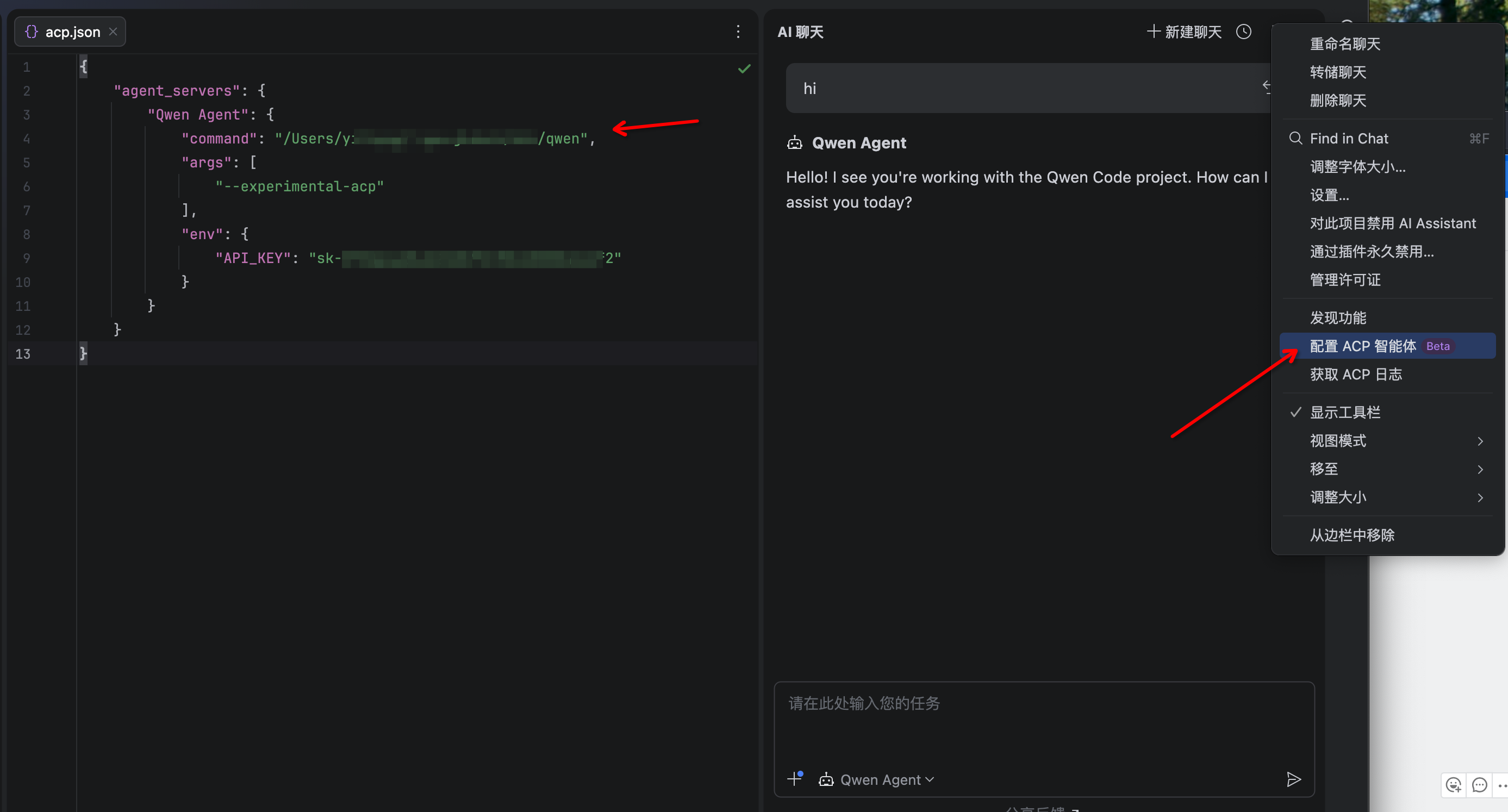
> JetBrains IDEs provide native support for AI coding assistants through the Agent Control Protocol (ACP). This integration allows you to use Qwen Code directly within your JetBrains IDE with real-time code suggestions.
|
||||
> JetBrains IDEs provide native support for AI coding assistants through the Agent Client Protocol (ACP). This integration allows you to use Qwen Code directly within your JetBrains IDE with real-time code suggestions.
|
||||
|
||||
### Features
|
||||
|
||||
- **Native agent experience**: Integrated AI assistant panel within your JetBrains IDE
|
||||
- **Agent Control Protocol**: Full support for ACP enabling advanced IDE interactions
|
||||
- **Agent Client Protocol**: Full support for ACP enabling advanced IDE interactions
|
||||
- **Symbol management**: #-mention files to add them to the conversation context
|
||||
- **Conversation history**: Access to past conversations within the IDE
|
||||
|
||||
@@ -40,7 +40,7 @@
|
||||
|
||||
4. The Qwen Code agent should now be available in the AI Assistant panel
|
||||
|
||||

|
||||
|
||||
|
||||
## Troubleshooting
|
||||
|
||||
|
||||
@@ -22,13 +22,7 @@
|
||||
|
||||
### Installation
|
||||
|
||||
1. Install Qwen Code CLI:
|
||||
|
||||
```bash
|
||||
npm install -g qwen-code
|
||||
```
|
||||
|
||||
2. Download and install the extension from the [Visual Studio Code Extension Marketplace](https://marketplace.visualstudio.com/items?itemName=qwenlm.qwen-code-vscode-ide-companion).
|
||||
Download and install the extension from the [Visual Studio Code Extension Marketplace](https://marketplace.visualstudio.com/items?itemName=qwenlm.qwen-code-vscode-ide-companion).
|
||||
|
||||
## Troubleshooting
|
||||
|
||||
|
||||
@@ -1,6 +1,6 @@
|
||||
# Zed Editor
|
||||
|
||||
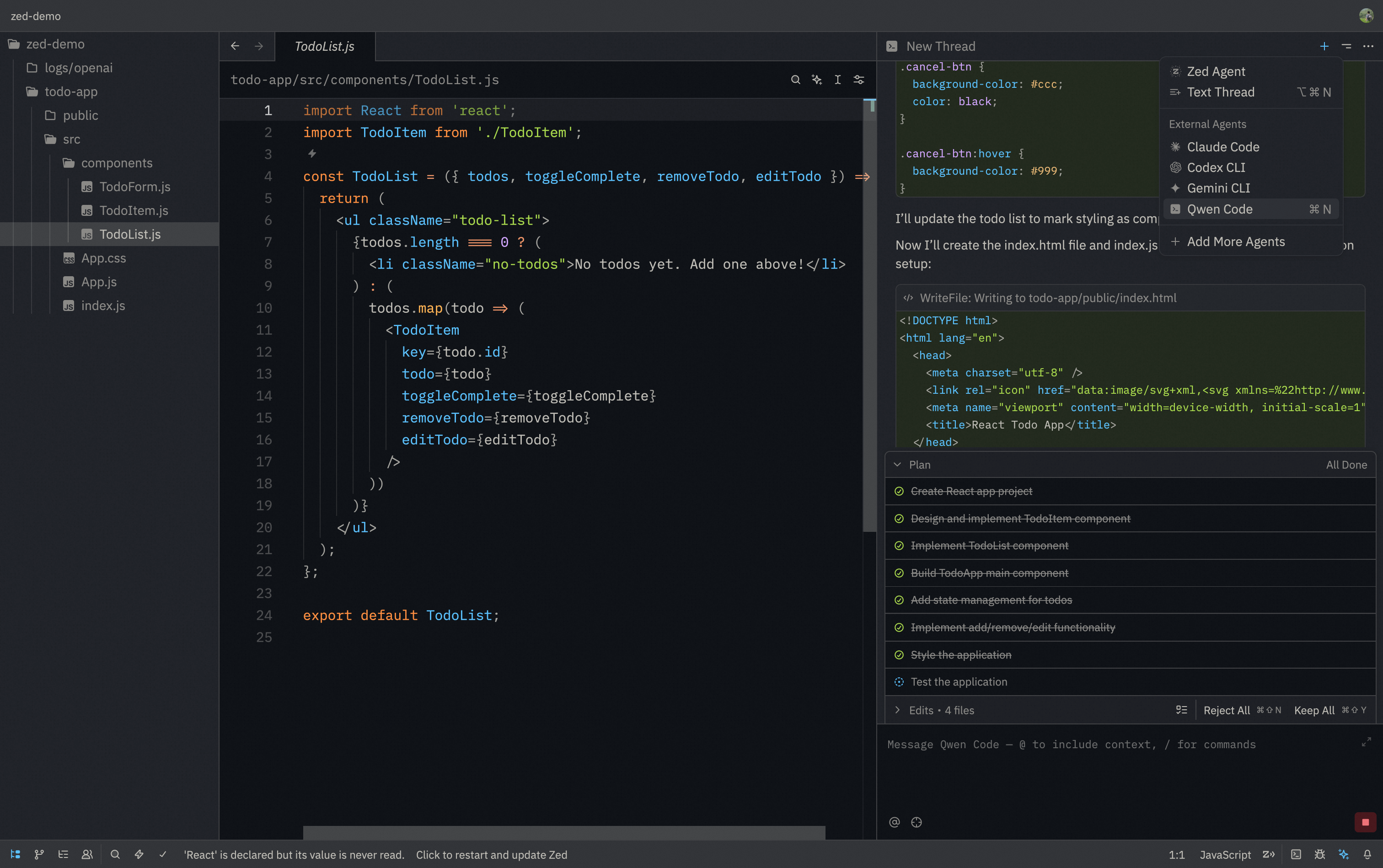
> Zed Editor provides native support for AI coding assistants through the Agent Control Protocol (ACP). This integration allows you to use Qwen Code directly within Zed's interface with real-time code suggestions.
|
||||
> Zed Editor provides native support for AI coding assistants through the Agent Client Protocol (ACP). This integration allows you to use Qwen Code directly within Zed's interface with real-time code suggestions.
|
||||
|
||||
|
||||
|
||||
@@ -20,9 +20,9 @@
|
||||
|
||||
1. Install Qwen Code CLI:
|
||||
|
||||
```bash
|
||||
npm install -g qwen-code
|
||||
```
|
||||
```bash
|
||||
npm install -g @qwen-code/qwen-code
|
||||
```
|
||||
|
||||
2. Download and install [Zed Editor](https://zed.dev/)
|
||||
|
||||
|
||||
Reference in New Issue
Block a user